What is ML.PREDICT in BigQuery ML?
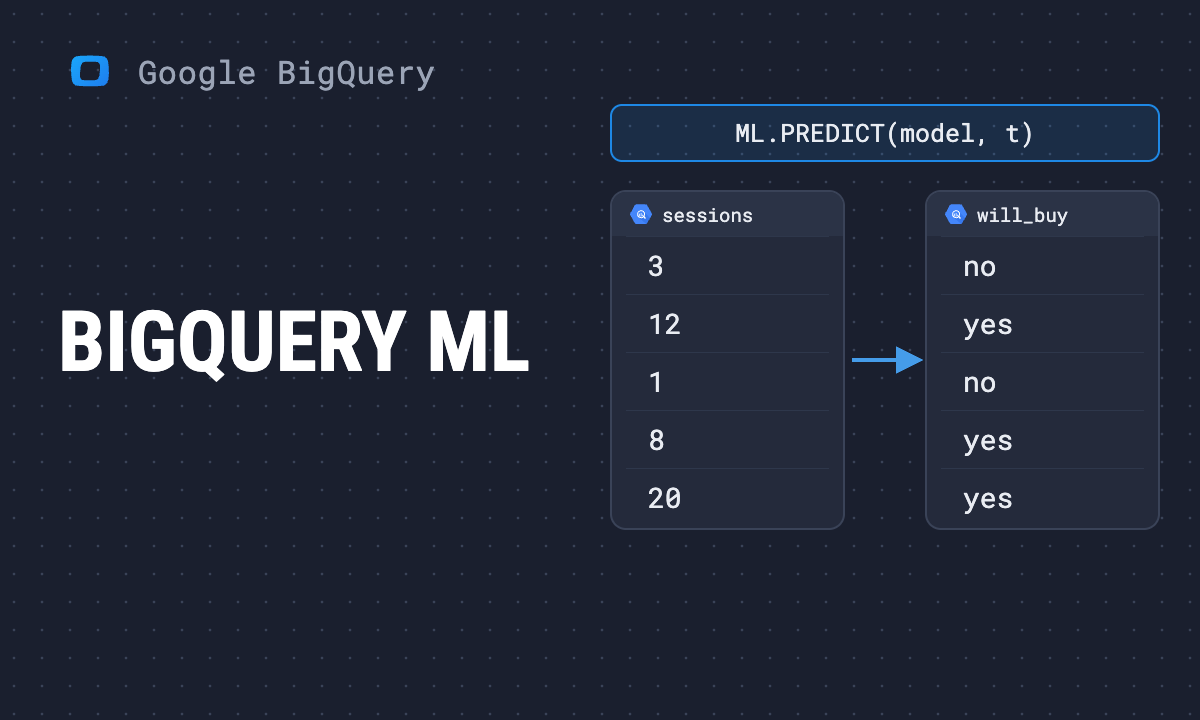
ML.PREDICT in BigQuery ML is the function used to generate predictions from a trained machine learning model.
ML.PREDICT in BigQuery ML applies a model’s learned patterns to new data, returning predicted values, classifications, or probabilities. It lets teams run predictive analytics directly in BigQuery using simple SQL, without relying on external tools or complex code.
Why ML.PREDICT is important in BigQuery ML
Why ML.PREDICT is important in BigQuery ML
ML.PREDICT is important because it transforms trained models into actionable insights that directly support business decision-making in BigQuery.
Key points include:
- Operational use: It applies models to new data, enabling predictions such as customer churn, sales forecasts, or risk scoring directly within BigQuery.
- Efficiency: Eliminates the need for external ML platforms or complex infrastructure, reducing delays and simplifying workflows for analysts and marketers.
- Versatility: Works with multiple model types, including regression, classification, neural networks, and imported frameworks like TensorFlow or XGBoost.
- Business impact: Predictions help teams act proactively, whether in optimizing campaigns, managing inventory, or improving customer engagement strategies.
- Scalability: Handles large datasets natively in BigQuery, ensuring predictions remain reliable and consistent as data volumes grow,
How to use ML.PREDICT in BigQuery ML
How to use ML.PREDICT in BigQuery ML
ML.PREDICT is used after training a model to apply predictions to new data through straightforward SQL queries.
Key points include:
- Train the model: Build a machine learning model in BigQuery ML using historical data, ensuring the schema matches prediction needs.
- Write the query: Run an SQL statement with ML.PREDICT, specifying the model and the dataset containing the input values.
- Generate predictions: The function outputs predicted values, classifications, or probabilities depending on the type of model trained.
- Integrate predictions into workflows: Use them in dashboards, reports, or data pipelines to inform decisions across marketing, finance, or operations.
- Validate results: Compare predictions with real outcomes to assess performance and refine the model for improved accuracy over time.
OWOX Data Marts
See your first report built in real time. 15 minutes.
- Connect your data warehouse
- Pick your metrics
- Get a live Google Sheets report
In the time it takes to write a ticket. Then imagine never writing that ticket again.
Book a DemoWe'll use your actual use case
Limitations of ML.PREDICT in BigQuery ML
Limitations of ML.PREDICT in BigQuery ML
ML.PREDICT is powerful, but it has limitations that impact accuracy, performance, and the application of predictions.
Key limitations include:
- Data dependency: Predictions are only as reliable as the training data, and poor-quality or biased datasets reduce accuracy significantly.
- Extrapolation limits: Forecast accuracy drops when predicting far beyond the range of training data, especially in time-sensitive applications.
- Model drift: Over time, models may become less effective as business conditions or customer behaviors change, requiring retraining.
- Resource usage: Large-scale prediction jobs may consume high compute and storage resources, increasing costs within BigQuery environments.
- Complex models: Advanced models like deep neural networks may be harder to interpret, making it difficult for non-technical teams to trust predictions.
Best practices of ML.PREDICT in BigQuery ML
Best practices of ML.PREDICT in BigQuery ML
ML.PREDICT delivers the best results when applied with clean data, the right methods, and continuous validation over time.
Key best practices include:
- Use quality data: Train models on accurate, representative, and complete datasets to avoid biased or misleading predictions.
- Match schemas: Ensure the input data for predictions matches the training schema exactly; otherwise, errors or mismatches can occur.
- Batch predictions: For large-scale inference, use batch prediction jobs to manage costs and improve processing efficiency in BigQuery.
- Validate predictions: Regularly compare predictions with real-world outcomes to refine models and maintain trust in their results.
- Retrain frequently: Update models with fresh data as business conditions change to reduce model drift and keep predictions relevant.
- Monitor performance: Track accuracy, latency, and cost metrics for prediction queries to balance efficiency with reliability.
Real-world use cases for ML.PREDICT in BigQuery ML
Real-world use cases for ML.PREDICT in BigQuery ML
ML.PREDICT is widely used across industries to turn trained models into practical predictions that drive better decisions and outcomes.
Key use cases include:
- Customer churn prediction: Marketing teams identify at-risk customers and design targeted retention campaigns to reduce churn and improve loyalty.
- Product recommendations: Retailers predict which products individual customers are most likely to purchase, powering personalized shopping experiences.
- Fraud detection: Financial institutions use ML.PREDICT to flag unusual transactions in real time, minimizing fraud risk and protecting revenue.
- Sales forecasting: Businesses apply predictions to anticipate revenue trends and align budgets, staffing, and supply chain planning with demand.
- Lead scoring: Sales and marketing teams prioritize leads based on predicted conversion likelihood, focusing resources where results are most probable.
Send recurring numbers as Insights
Send recurring numbers as Insights
Insights with AI Assistance turn saved SQL queries over a Data Mart into a scheduled write-up. Write the text once, add the queries (your own, or drafted by the AI Assistant and applied by you), and OWOX sends the result to Email, Slack, Microsoft Teams or Google Chat on the schedule you set. Every figure comes from a saved query, so you can check it.
Learn how teams ship analytics faster
Organizations that scaled analytics without scaling headcount
 "For 10 years I was blind." The day Pürblack® founder stopped guessingSecondsto get reports across six channelsRead the story
  How OWOX Reports Helped Reformation Make Data-Backed DecisionsMinutesfrom data request to business decisionRead the story
  How OWOX Reports Streamlined Operations for WorkSimpli, Saving Over 10 Hours Weekly10hrs+saved per week on manual reportingRead the story
 Not testimonials. Comment threads.
Real things real customers said — each quote pinned to a specific claim, straight from the quotes database.
 Nodari RizunFounder & CEO, Pürblack®
“AI, by the nature of the models, will hallucinate. And because of that, you need something which will create guardrails to ensure that there are no hallucinations, that you can trust your data.”
Nodari RizunFounder & CEO, Pürblack®“I was blind, now I can see. OWOX opened our eyes.”
“We are extremely satisfied with the results achieved through our partnership with OWOX. I'm also impressed by quick and effective support we get from OWOX”
Turn your data into decisions.
Governed data marts give you the clean foundation ML needs to actually work.
- No AI hallucinations
- Analyst-governed definitions
- Every number traces to SQL