RFM analysis: how to segment customers by recency, frequency and value
RFM analysis ranks your customers on three things: Recency (how long since their last purchase), Frequency (how many purchases) and Monetary value (how much they spent). Each customer gets a score from 1 to 3 (or 1 to 5) on each, and the three digits together, such as 333 or 121, place them in a segment: your best customers, the ones about to leave, the ones who bought once and never came back.
It needs only one table, every order with a customer ID, a date and an amount, which is why it is usually the first segmentation a marketing team builds. This guide shows how to calculate RFM scores in Google Sheets and in SQL, how to turn scores into named segments, and what to do with each.
Originally published in 2023. Updated in October 2026 with a complete, runnable SQL version and a fix for the scoring mistake most RFM tutorials make.
What R, F and M measure
| Letter | Question | Calculated as | A high score means |
|---|---|---|---|
| Recency | when did they last buy? | days since the last order | bought recently |
| Frequency | how often do they buy? | number of orders in the period | buys often |
| Monetary | how much do they spend? | total order value in the period | spends a lot |
Recency is usually the strongest predictor of whether someone buys again: a customer who bought last week is far more likely to buy next month than one who bought last year, whatever they spent. Frequency shows habit. Monetary value shows what the habit is worth.
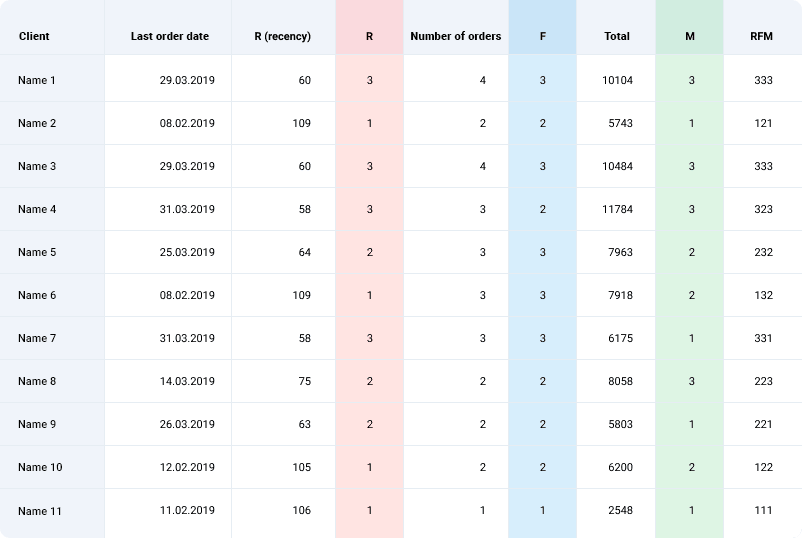
Scores are relative: a 3 means “in the top third of your customers”, not a fixed number of days or dollars. That keeps the method working for a store selling coffee and one selling sofas.
Before you start: three choices
Before you start: three choices
Decide these first, because they change who lands in which segment:
- The period. Frequency and monetary value are counted over a window, typically the last 12 months. Too short and seasonal buyers look lapsed; too long and old habits mask recent change.
- The scale. Three groups (1–3) give 27 combinations and are easy to act on. Five groups (1–5) give 125 and suit large customer bases.
- Which orders count. Completed orders only, net of refunds. A customer whose last “order” was a cancellation is not recent.
OWOX Data Marts
See your first report built in real time. 15 minutes.
- Connect your data warehouse
- Pick your metrics
- Get a live Google Sheets report
In the time it takes to write a ticket. Then imagine never writing that ticket again.
Book a DemoWe'll use your actual use case
How to do RFM analysis in Google Sheets
How to do RFM analysis in Google Sheets
For a few thousand customers, a spreadsheet is enough.
Step 1: prepare one row per order
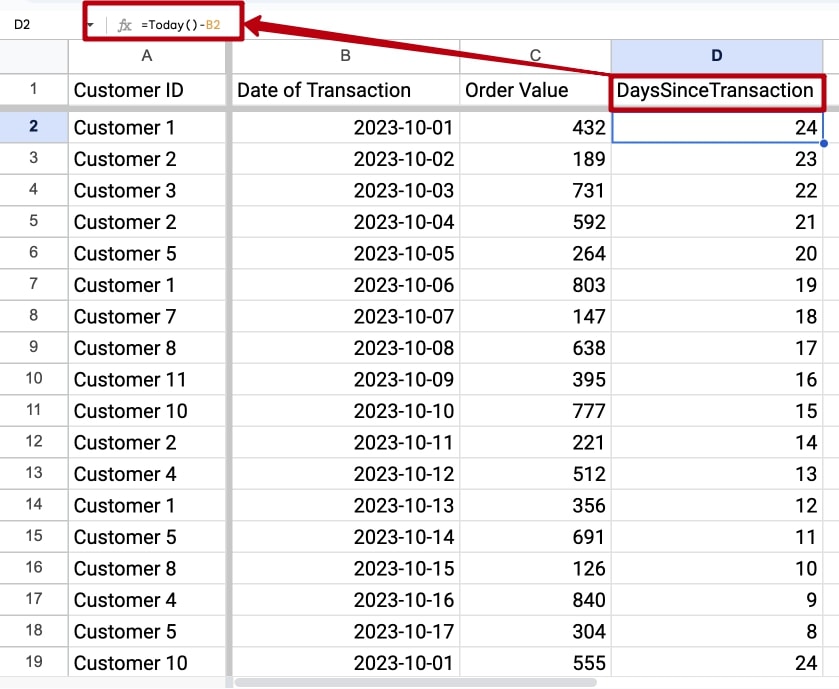
Start with three columns: Customer ID, Order date and Order value.
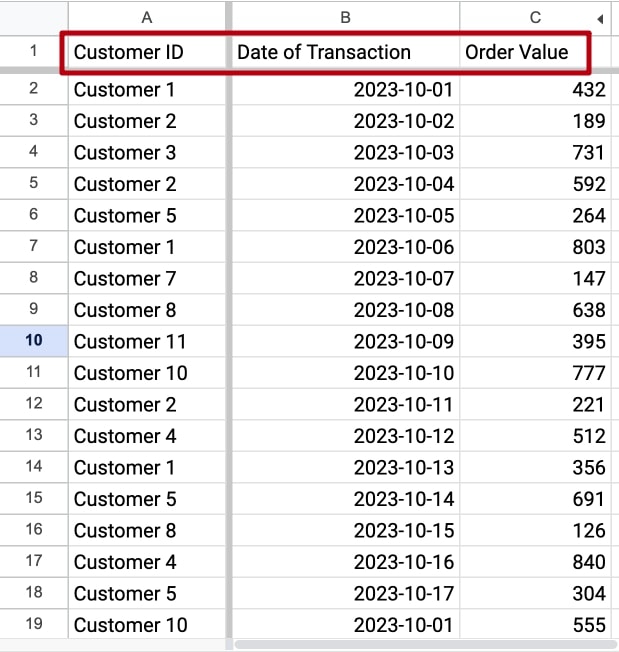
Add a column DaysSinceOrder with =TODAY()-B2, filled down. If you want results that do not change every day, replace TODAY() with a fixed date in a cell.
Step 2: summarise per customer
Select the data and choose Insert → Pivot table. Put Customer ID in Rows, then add three Values:
- DaysSinceOrder, summarised by MIN: recency
- Customer ID, summarised by COUNTA: frequency
- Order value, summarised by SUM: monetary value
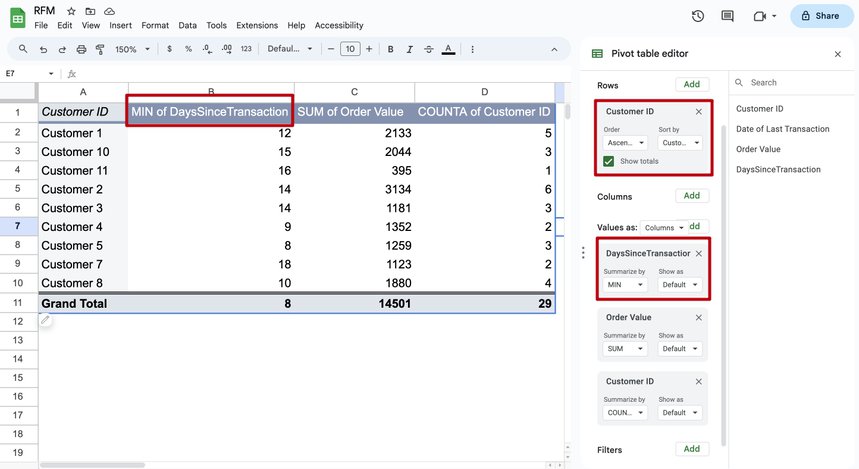
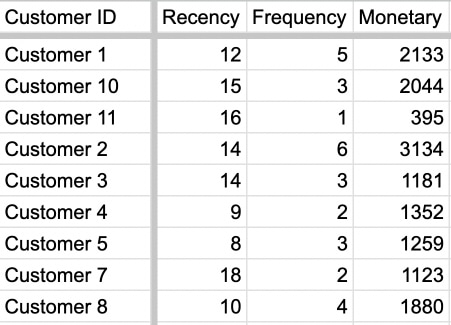
Copy the result to a new sheet and name the columns Recency, Frequency and Monetary.
Step 3: score recency
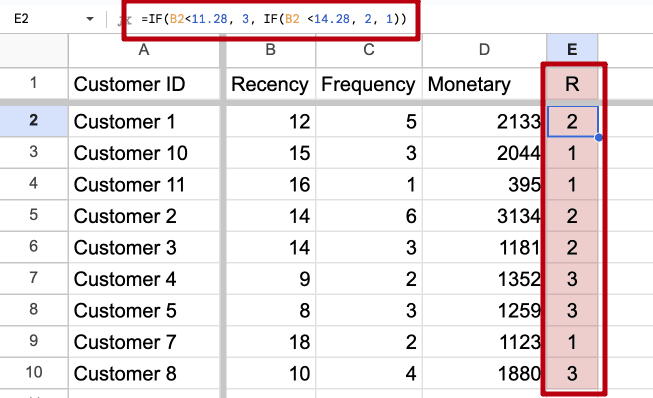
Find the thresholds that split customers into thirds:
=PERCENTILE.INC(B:B, 0.33)=PERCENTILE.INC(B:B, 0.66)
If a third of customers bought within 11 days and two thirds within 14, score recency with =IF(B2<=11, 3, IF(B2<=14, 2, 1)). Recency is the one score where smaller is better, so the lowest number of days gets the 3.
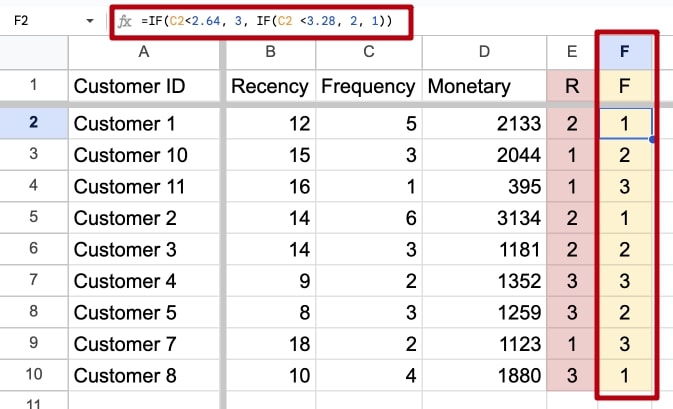
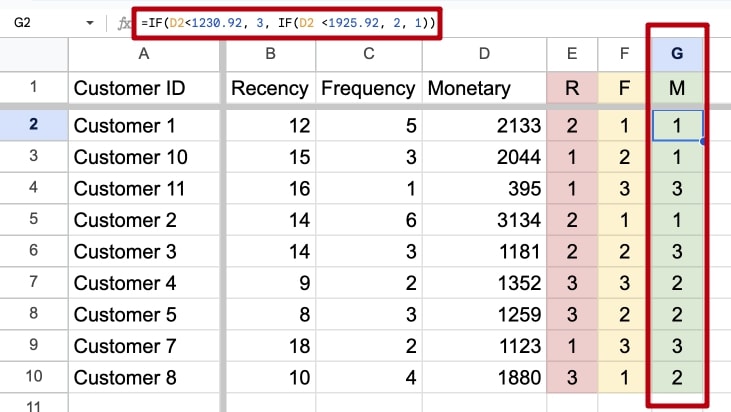
Step 4: score frequency and monetary value
Repeat with the same percentiles on the Frequency and Monetary columns, this time giving the highest values a 3.
Step 5: combine the scores
Join the three digits into one code with =E2*100+F2*10+G2, which turns R=3, F=2, M=1 into 321.
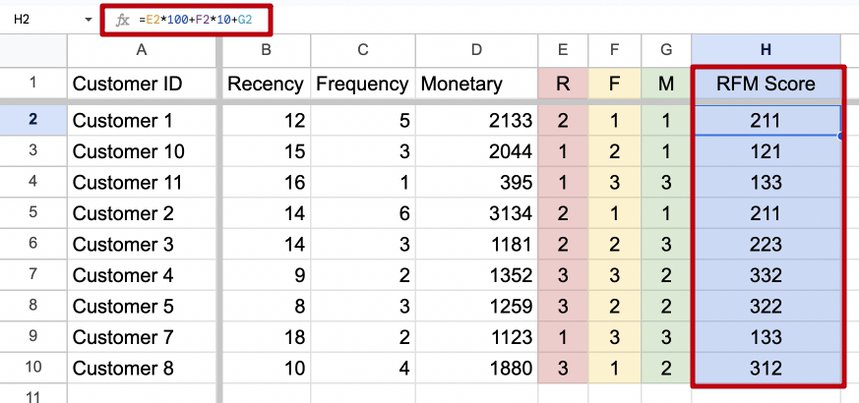
Sorting by the code gives you the segments. The spreadsheet’s limit is the refresh: next month you start again from a new export.
How to do RFM analysis in SQL
Once orders are in your warehouse, the whole calculation is one query that reruns on fresh data. The version below runs as written in Google BigQuery; the orders CTE stands in for your orders table, and the as-of date is fixed so the result is reproducible.
WITH orders AS (
  SELECT 'c1' AS customer_id,
         DATE '2026-09-28' AS order_date,
         120.0 AS order_value
  UNION ALL SELECT 'c1', '2026-08-15', 80.0
  UNION ALL SELECT 'c1', '2026-06-02', 95.0
  UNION ALL SELECT 'c2', '2026-09-30', 40.0
  UNION ALL SELECT 'c3', '2026-03-11', 310.0
  UNION ALL SELECT 'c3', '2026-01-20', 150.0
  UNION ALL SELECT 'c4', '2025-11-05', 35.0
  UNION ALL SELECT 'c5', '2026-09-02', 60.0
  UNION ALL SELECT 'c5', '2026-07-19', 75.0
  UNION ALL SELECT 'c6', '2026-05-24', 220.0
),
per_customer AS (
  SELECT customer_id,
         DATE_DIFF(DATE '2026-10-01',
                   MAX(order_date), DAY)
           AS recency_days,
         COUNT(*) AS frequency,
         SUM(order_value) AS monetary
  FROM orders
  GROUP BY customer_id
),
scored AS (
  -- ties get the same score
  SELECT *,
         LEAST(3, 1 + CAST(FLOOR(3 *
           PERCENT_RANK() OVER (
             ORDER BY recency_days DESC))
           AS INT64)) AS r,
         LEAST(3, 1 + CAST(FLOOR(3 *
           PERCENT_RANK() OVER (
             ORDER BY frequency))
           AS INT64)) AS f,
         LEAST(3, 1 + CAST(FLOOR(3 *
           PERCENT_RANK() OVER (
             ORDER BY monetary))
           AS INT64)) AS m
  FROM per_customer
)
SELECT customer_id,
       recency_days, frequency, monetary,
       CONCAT(r, f, m) AS rfm,
       CASE
         WHEN r = 3 AND f = 3 THEN 'Champions'
         WHEN r >= 2 AND f >= 2 THEN 'Loyal'
         WHEN r = 3 AND f = 1 THEN 'New'
         WHEN r = 1 AND m = 3 THEN 'Cannot lose'
         WHEN r = 1 THEN 'Lapsed'
         ELSE 'Needs attention'
       END AS segment
FROM scored
ORDER BY rfm DESC| customer_id | recency_days | frequency | monetary | rfm | segment |
|---|---|---|---|---|---|
| c1 | 3 | 3 | 295.0 | 333 | Champions |
| c2 | 1 | 1 | 40.0 | 311 | New |
| c5 | 29 | 2 | 135.0 | 222 | Loyal |
| c6 | 130 | 1 | 220.0 | 212 | Needs attention |
| c3 | 204 | 2 | 460.0 | 123 | Cannot lose |
| c4 | 330 | 1 | 35.0 | 111 | Lapsed |
The scoring mistake to avoid
Most SQL tutorials score RFM with NTILE(3). It splits customers into three equal-sized groups by row count, so customers with the same value can land in different groups. Run on the six customers above, NTILE gave c2, who has placed one order, a frequency score of 2, the same as c5 with two orders, while c4 and c6, also with one order each, got 1. c2 was labelled Loyal after a single purchase.
The query above uses PERCENT_RANK, which gives tied values the same rank, so every one-order customer gets the same frequency score and c2 is correctly labelled New. In a real orders table, where most customers have exactly one order, the difference is not six rows but a quarter of the customer base.
We ran both versions on the demo shop behind the public [Demo] E-commerce project in OWOX Data Marts (synthetic data: 3,647 customers with a completed order between October 2025 and September 2026), with the same segment rules:
Segment with NTILE |
Segment with PERCENT_RANK |
Customers |
|---|---|---|
| Champions | Loyal | 437 |
| Loyal | New | 382 |
| Loyal | Needs attention | 183 |
| other moves | 4 | |
| Changed segment | 1,006 (28%) |
All 565 customers in the second and third rows had placed one order. NTILE called them Loyal because they fell into the middle third of a frequency column where one-order customers fill more than a third of the rows. Send them a loyalty offer and you are rewarding people who have not come back yet. NTILE also breaks ties in no guaranteed order, so the same query can put a different customer in a different group on the next run.
From scores to segments
A three-digit code is precise but hard to act on. Group codes into a handful of named segments and give each one an action:
| Segment | Typical codes | What it means | What to do |
|---|---|---|---|
| Champions | 333, 332 | bought recently, often, a lot | early access, referral asks, no discounts needed |
| Loyal | 2–3 on R and F | regular buyers | loyalty rewards, cross-sell |
| New | 3 on R, 1 on F | first purchase was recent | onboarding, a reason for the second order |
| Needs attention | middle scores | slipping | a reminder with something relevant to past purchases |
| Cannot lose | 1 on R, 3 on M | used to spend a lot, gone quiet | a personal win-back, not a mass email |
| Lapsed | 111, 112 | bought once, long ago, little | a low-cost reactivation test, then stop |
The rule names in the query are a starting point. Adjust the boundaries to your business: a furniture store’s “recent” is months, a grocery’s is days.
Two cautions. Seasonality moves customers between segments without a change in behaviour: a gift buyer who only shops in December is not lapsed in October. And RFM describes the past. To estimate what each segment will be worth, combine it with customer lifetime value; to see when customers typically stop buying, use cohort analysis.
Keep the segments the same for everyone
Keep the segments the same for everyone
RFM breaks quietly when it is recalculated in several places. Email marketing scores customers in its platform, the analyst in SQL, someone else in a spreadsheet, each with a different period and different refund rules, and “Champions” means three different lists.
The fix is to define the query once and publish it. In OWOX Data Marts that is a Data Mart: the analyst’s SQL with its period, order status and scoring rules, which every report and every question reads from. With customers and orders in a model such as the E-commerce model, a marketer can ask
“Count customers by how many completed orders they have placed (1, 2, 3 or more) and whether their last completed order was in the last 90 days. One row per order-count group, with the two counts side by side.”
| Asked of raw tables | Asked of the Data Model | |
|---|---|---|
| What the assistant sees | every orders table | the published Orders Data Mart |
| What counts as an order | any row, cancelled and returned included | the completed status the analyst’s Data Mart carries |
| What you get | a segment count | the count, and the SQL behind it |
![The prompt above asked in the AI Assistant of an Insight on the Orders Data Mart, in the [Demo] E-commerce project of OWOX Data Marts: 1,888 customers with three or more completed orders and none in the last 90 days, next to 1,065 frequent buyers still active – the Cannot lose and Needs attention groups found with recency and frequency alone.](https://cdn.owox.ai/www/content-marketing-article/rfm-analysis/screens/1.png/public)
The answer is only as right as the Data Marts behind it, but the segment means the same thing in the email platform, the dashboard and the answer. The segment lists can also be delivered on a schedule to a for the team that sends the campaigns.
For a ready-made layout, see the RFM analysis template, and for the segmentation concept in one paragraph, the RFM segmentation glossary entry.
Turn your data into decisions.
Governed data marts give you the clean foundation ML needs to actually work.
- No AI hallucinations
- Analyst-governed definitions
- Every number traces to SQL
Frequently Asked Questions
What is RFM analysis?
RFM analysis is a technique used in customer segmentation to identify and target the most valuable customers based on their purchase behavior. It uses three measures: recency, frequency, and monetary value.
How do you calculate RFM scores?
Summarise orders per customer into recency, frequency and monetary value, split each measure into groups by percentile, and combine the three scores into one code such as 321. Recency is the score where a smaller number of days gets the highest score.
Should I use NTILE to calculate RFM scores in SQL?
Not for frequency. NTILE splits customers into equal-sized groups by row count, so customers with the same number of orders can get different scores. PERCENT_RANK gives tied customers the same score; in our demo shop the difference moved 28% of customers to another segment.
What should I do with each RFM segment?
Reward Champions without discounts, give new customers a reason for a second order, send a relevant reminder to customers who need attention, win back high spenders who have gone quiet personally, and test a low-cost reactivation for lapsed customers before stopping.