Joinable Data Marts
Declare the join once. Every report inherits it.
A hand-written join onto a one-to-many table can double revenue without an error. Declare the relationship between two Data Marts once, with join keys and a Dedup per field, and every report on the source picks the joined fields. Adding a column never multiplies rows.
Get started freeRead the docs →
Does this fit your stack?
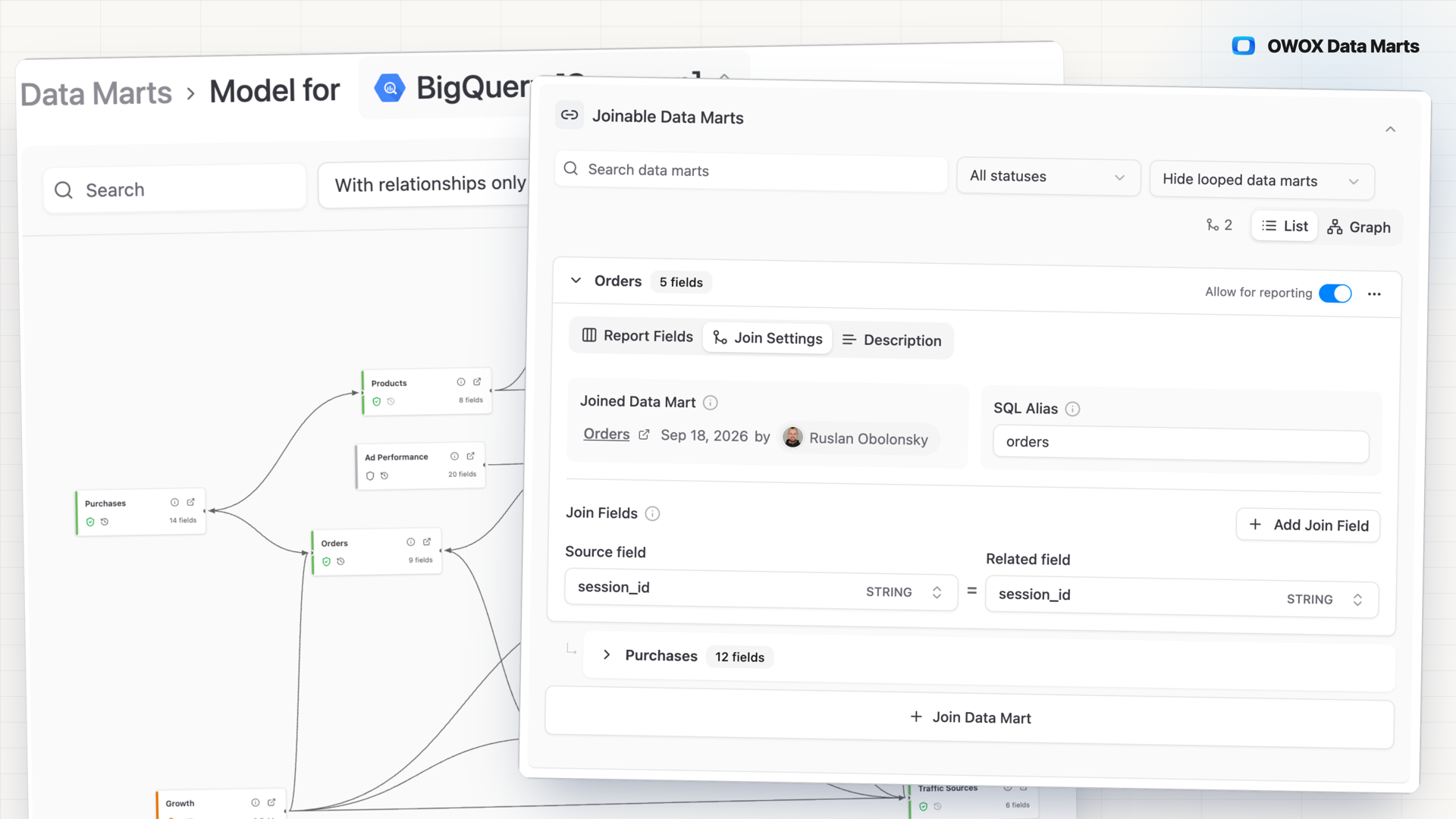
Why OWOX
When a question needs a column from another Data Mart, the usual fix is one more SQL Data Mart, or a hand-written join that silently doubles revenue on a one-to-many table. Declare the relationship once, and every report on the Data Mart picks the joined fields.
- The SQL pre-aggregates each joined Data Mart by its join key before the LEFT JOIN, so adding a column never multiplies your rows, and the query is one click away.
- The Data Owner sets the join keys and how each field collapses; business users and AI assistants pick only through joins the Data Owner declared.
- Chains count: if Campaigns joins Orders and Orders joins Products, Products fields are one tick away in every Campaigns report.
Every hand-written join is one more copy to keep right
Revenue sits in one Data Mart, the product category two hops away. Without a declared join, you write another SQL Data Mart for that one question and the copies drift. Or a one-to-many join doubles revenue, and nothing flags it.
THE DATA OWNER
Declare the relationship, not another query
In the source Data Mart's Data Setup, click Join Data Mart, pick a target on the same storage and pair the join keys. Then set each joined field's alias, its Dedup and the aggregations reports may use.
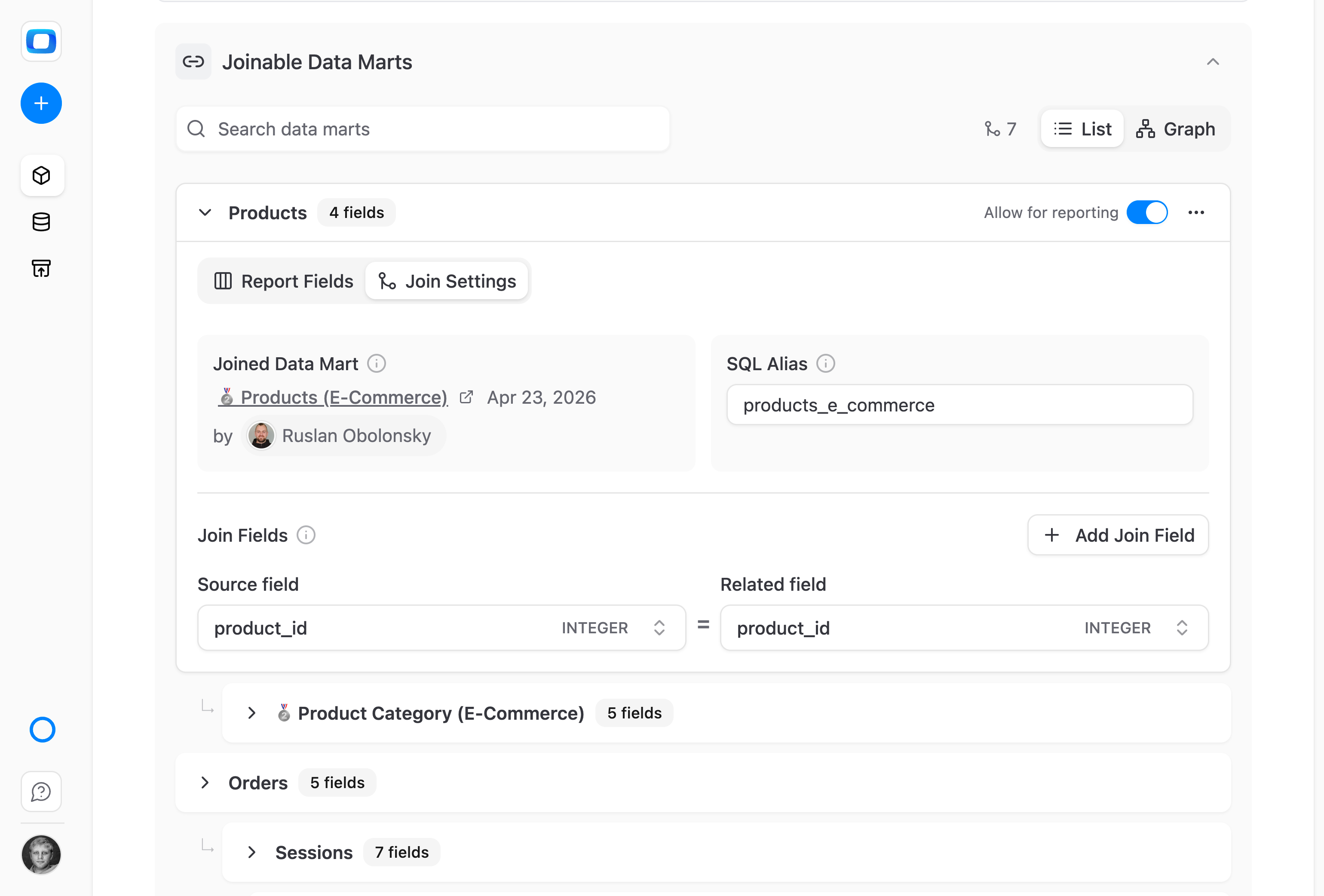
Written once on the Data Mart, inherited by every report.
THE BUSINESS USER
The next column is already in the picker
In the OWOX Extension for Google Sheets, joined fields sit in their own group under the Data Mart's native fields. Tick Customer Segment or Region and run: the report never holds more rows than the source Data Mart.
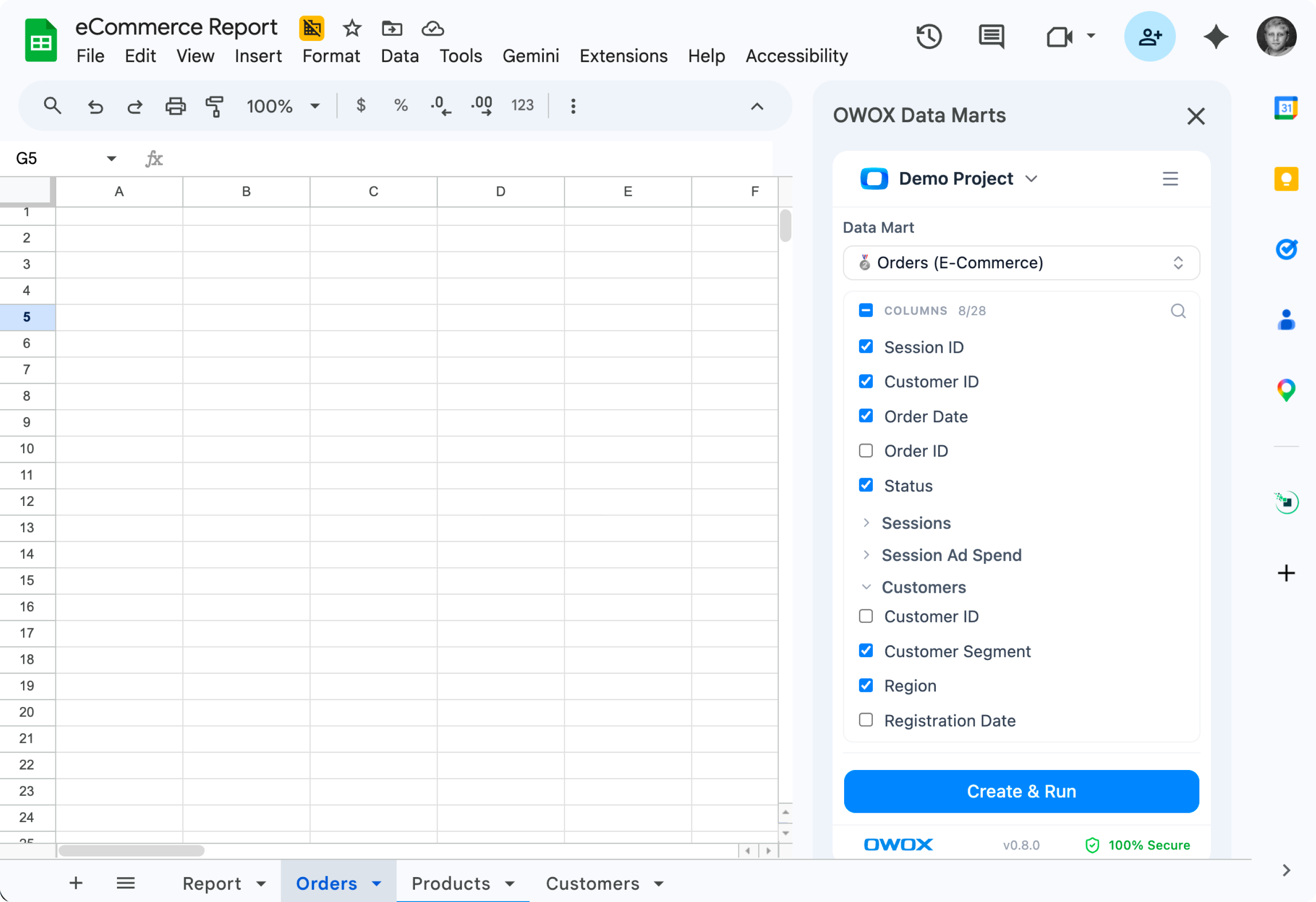
A column from another Data Mart is one more tick.
No second model to keep in sync — A semantic layer such as LookML, dbt MetricFlow or Cube models joins in a separate layer you author and maintain. Here the relationship lives on the Data Mart the Data Owner already owns, next to its aliases and descriptions.
For Data Owners
One declaration instead of a join per report
The join lives on the Data Mart, not in a copy of a query. Every report, destination and AI assistant reuses it, so there is no second copy to drift from the first.
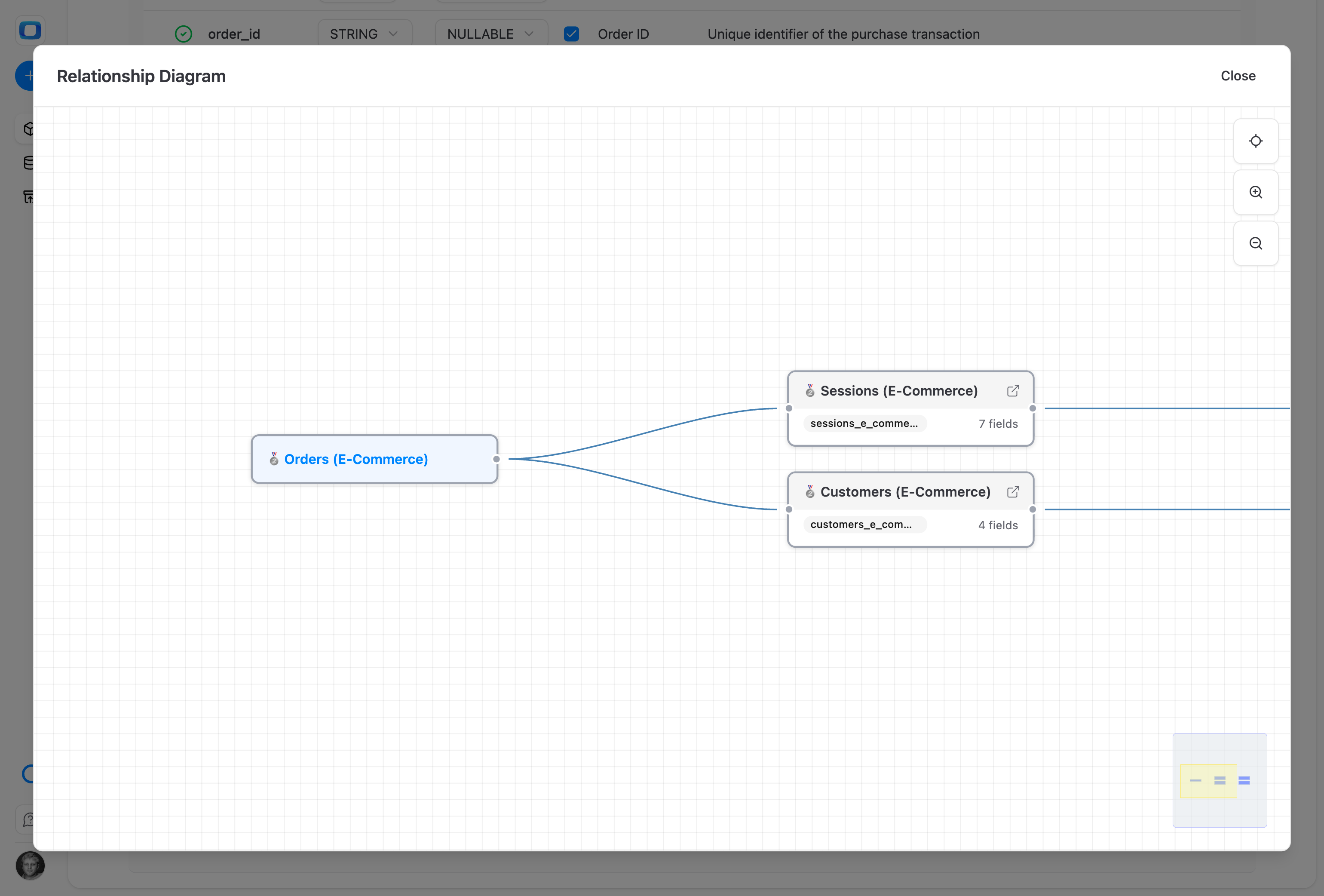
Chains, not just pairs
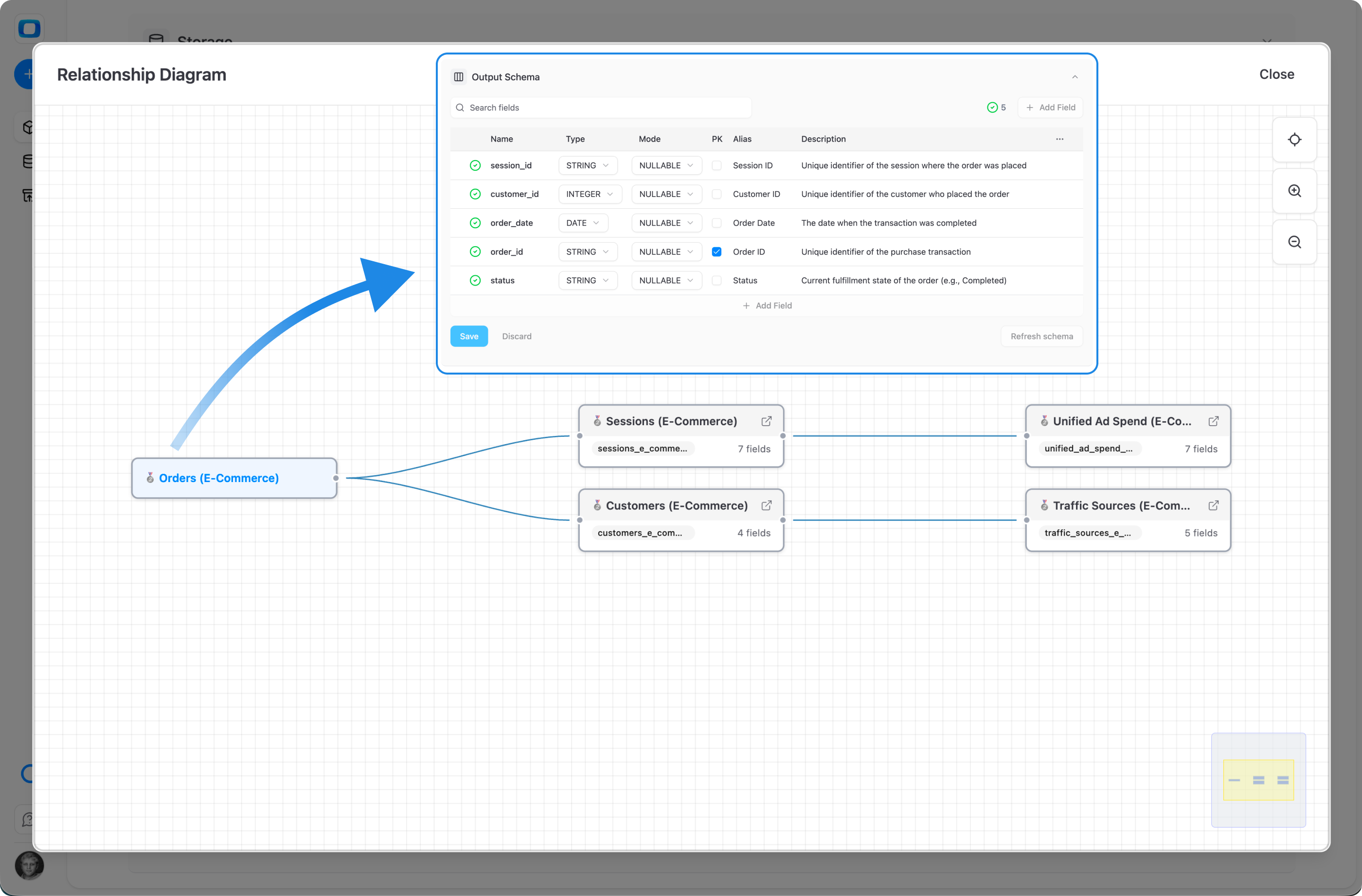
If Orders joins Customers and Customers joins Traffic Sources, Traffic Sources fields are available in every Orders report. The Graph view shows each Data Mart reachable from the source. A chain that loops back gets a Loop badge and adds no fields.
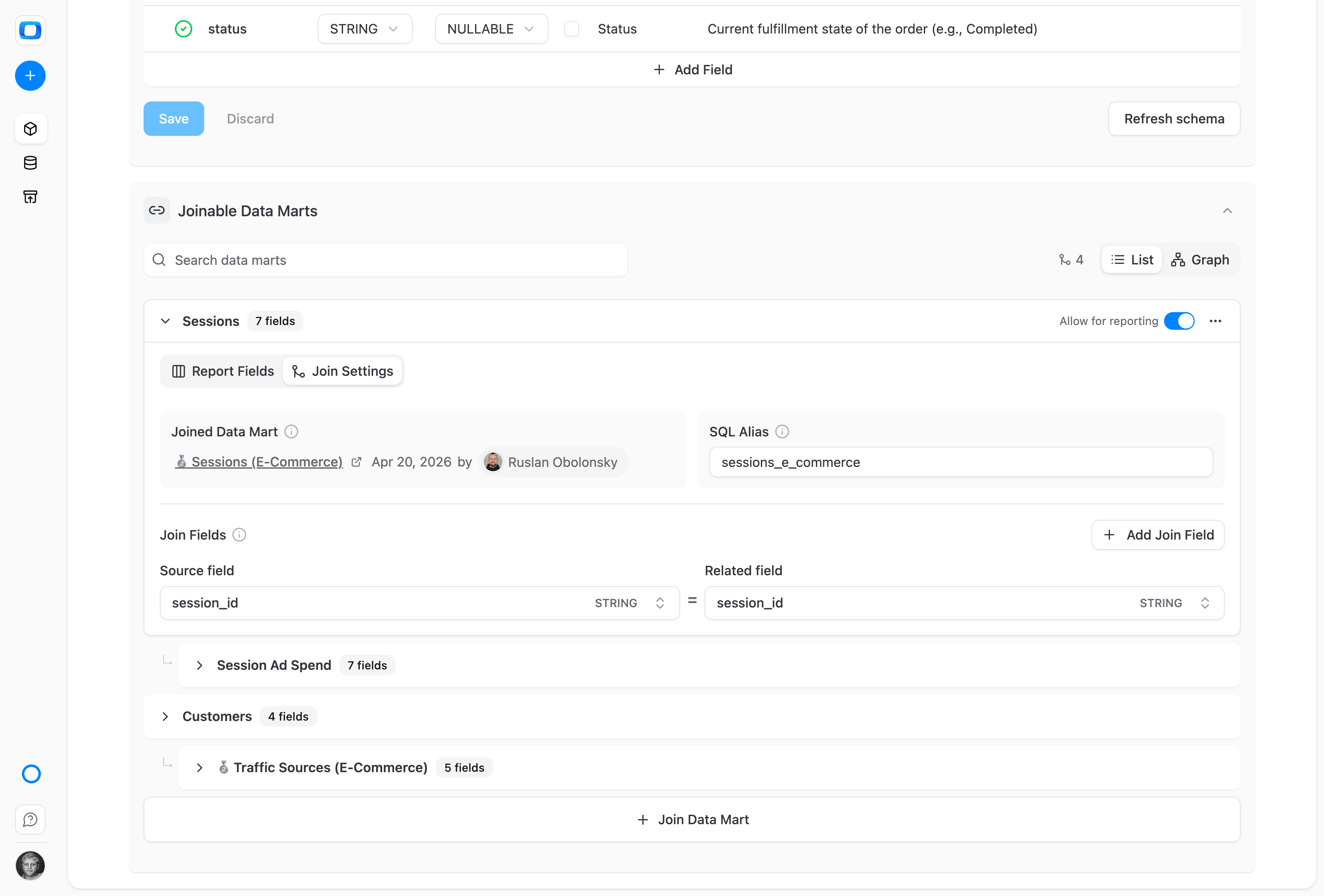
Worked example: Orders to Sessions on session_id
On Orders (E-Commerce), click Join Data Mart and pick Sessions. Join Settings fills the SQL alias sessions_e_commerce. Pair session_id with session_id, both STRING. Add Join Field builds a composite key, combined with AND; a type mismatch is blocked at save.
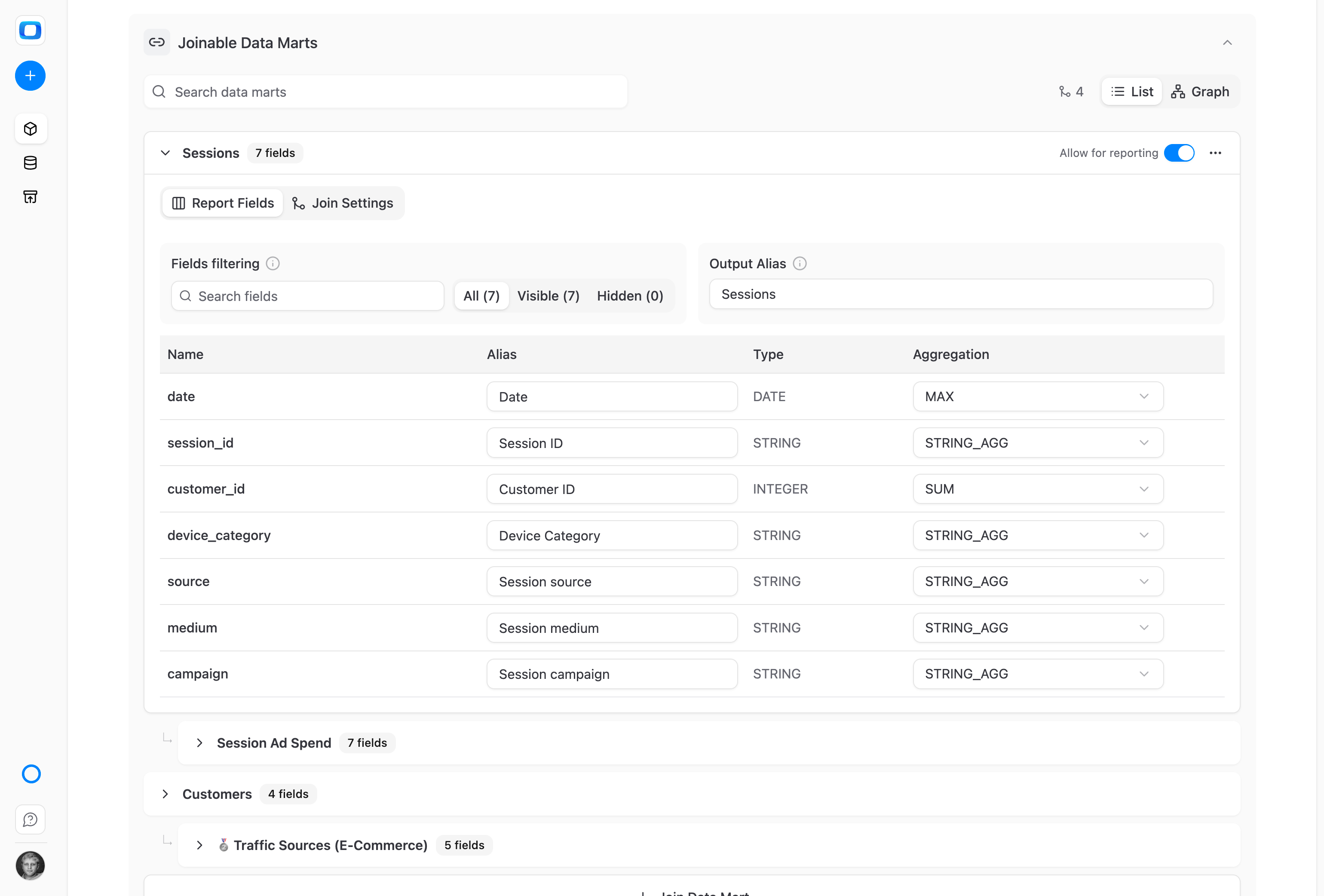
Decide how each joined field collapses
A joined Data Mart can hold several rows per join key. Each field's Dedup collapses them to one value before the join: by default SUM for numbers, MAX for dates, STRING_AGG for text. ANY_VALUE, AVG, MIN, COUNT and COUNT_DISTINCT cover other questions.
For Business Users
Take the column, not the query
Joined fields arrive in the report editor you already use, under names the Data Owner chose. You pick columns; the joins and their definitions stay the Data Owner's.
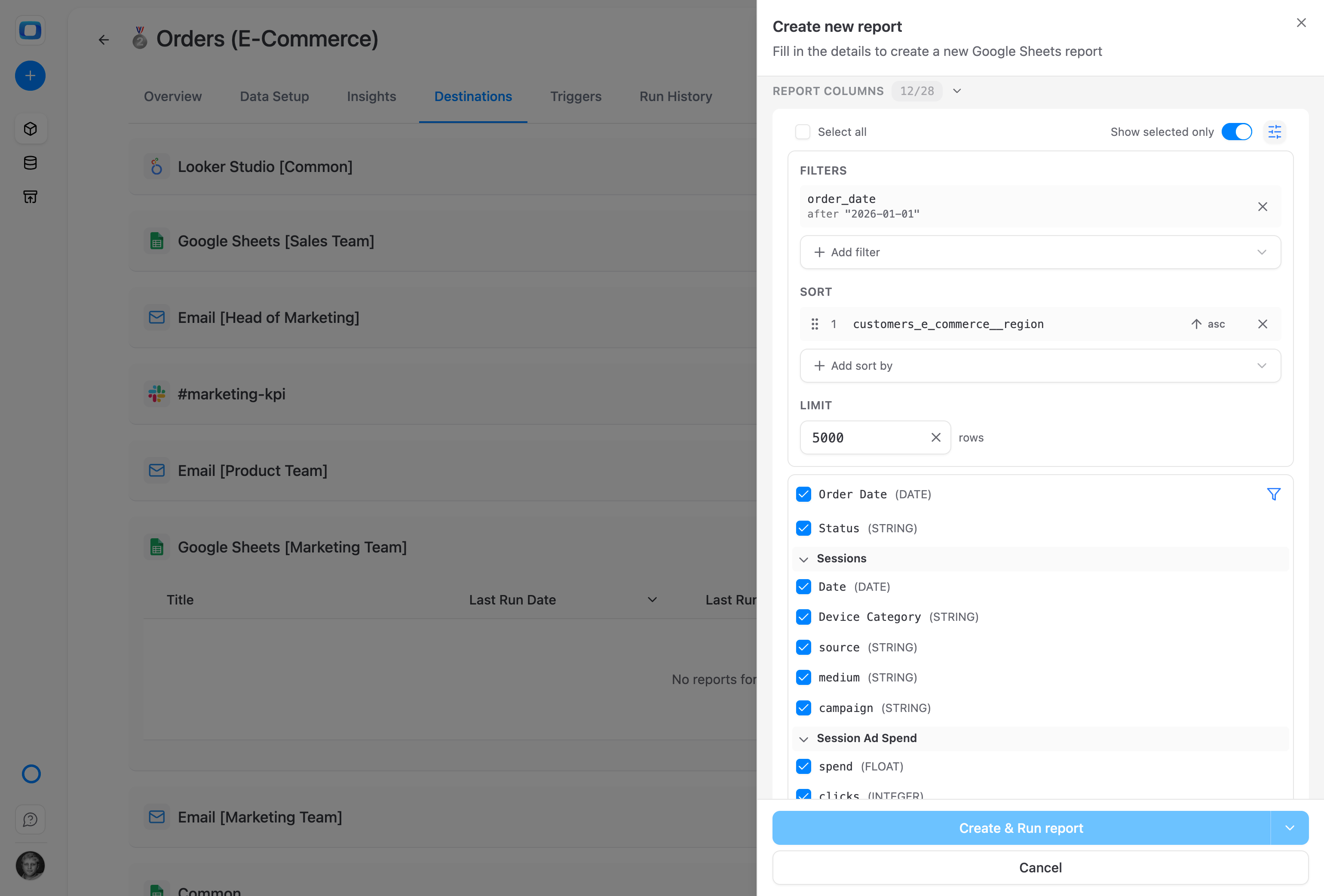
Native and joined fields in one list
In the report editor, the Data Mart's own fields sit on top, and each relationship adds a group under its Output Alias: Sessions, and Session Ad Spend reached through it. Sort by a joined field like any other.
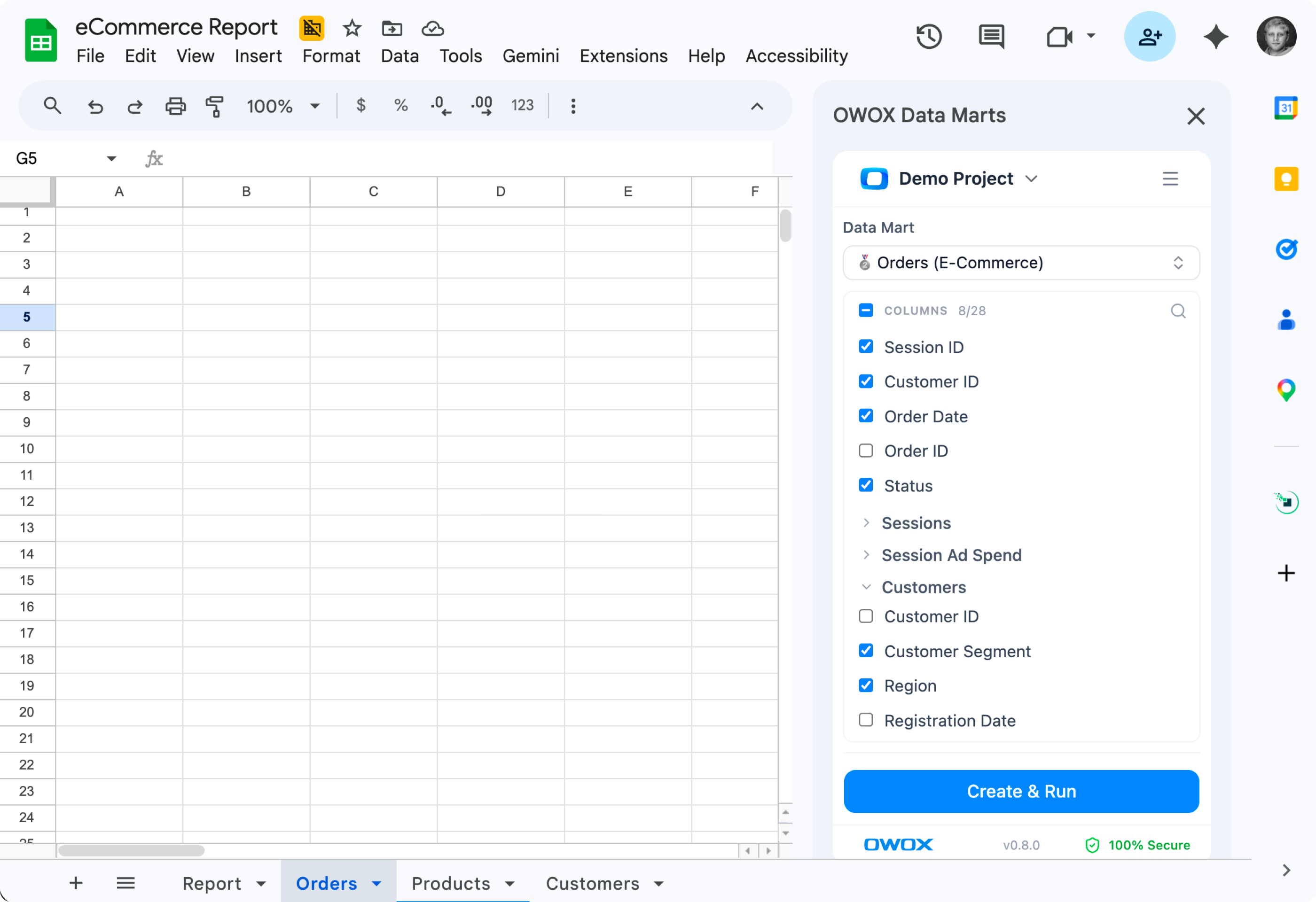
Right inside Google Sheets
In the OWOX Extension for Google Sheets, open the Customers group on the Orders Data Mart, tick Customer Segment and Region, then Create & Run. The same joined fields reach Microsoft Excel, Data Studio, email, Slack and Teams reports.
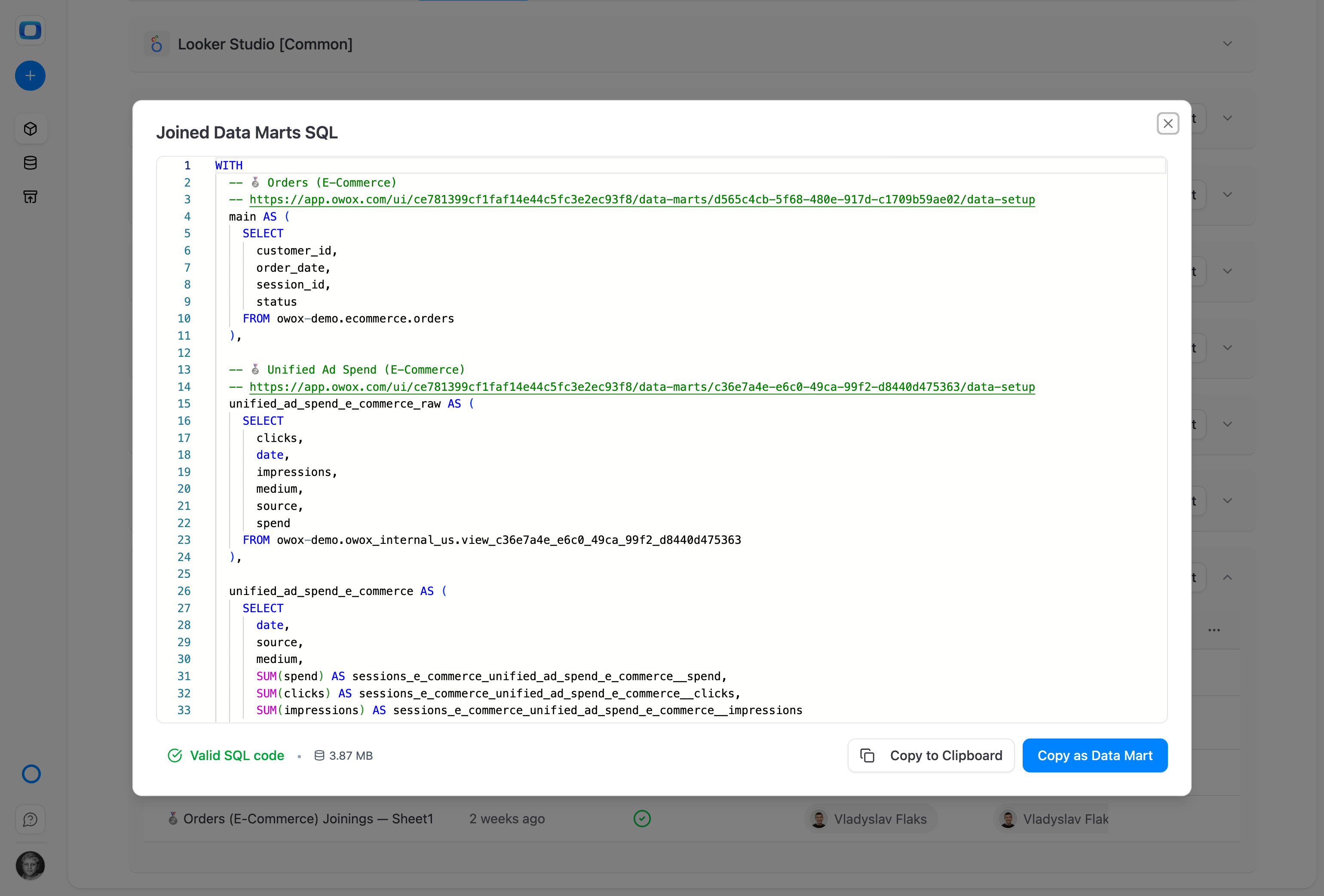
The SQL behind the number, one click away
Preview SQL on the report shows the generated query: each joined Data Mart pre-aggregated in its own CTE, commented with a link back to its definition, then LEFT JOIN-ed. Copy as Data Mart turns it into a standalone SQL Data Mart.
Compare plans
Everything business needs

Adding a column can't multiply rows
Each joined Data Mart is pre-aggregated by its join key before the LEFT JOIN, so the result never holds more rows than the source Data Mart.

Only joins the Data Owner declared
Business users and AI assistants connected through OWOX MCP pick joined fields; they cannot create a join of their own.

SQL you can read and keep
Preview the generated SQL from the report, the Destinations tab or Run History, and keep it as a standalone SQL Data Mart with Copy as Data Mart.

Runs in your warehouse
The join is SQL executed in your own storage: Google BigQuery, Snowflake, AWS Redshift, AWS Athena or Databricks. Both Data Marts sit on the same one.
Frequently asked questions
How is this different from a semantic layer?
A semantic layer such as LookML, dbt MetricFlow or Cube models joins in a separate layer you author, then keep in sync. Here the Data Owner declares the relationship on the Data Mart they already own. It extends a report by columns; report logic beyond that stays in SQL Data Marts.
What does the Data Owner set up?
Joinable is a relationship between two Data Marts, not a Data Mart type. On the source Data Mart, the Data Owner picks a target, pairs the join keys and sets each joined field's alias, Dedup and allowed aggregations. Allow for reporting shows or hides the joined fields in every report. Learn Dedup first: it decides what a joined number means.
Do I need a primary key?
It is recommended, not required. A join onto a Data Mart with no declared primary key is allowed and highlighted. With a key, OWOX can tell you which way a joined COUNT may be off instead of saying it cannot tell, and the joined Data Mart publishes a Unique Count.
What can't be joined?
Both Data Marts must sit on the same storage; cross-storage joins are not supported. A Data Mart cannot join itself, and join keys must have compatible types. To add a relationship you need maintenance access to both Data Marts. A target still in Draft blocks the chain until it is published.
How do I check a joined number?
Open Preview SQL from the report or from the Data Mart's Destinations tab, or open a run in Run History to see the SQL sent to your storage. It shows the pre-aggregation CTEs, the LEFT JOINs and the output aliases, ready to paste into your warehouse console.
Can an AI assistant use joined fields?
Yes, through OWOX MCP. The assistant selects joined fields from relationships the Data Owner declared and cannot create a join of its own. When the Data Owner writes a relationship description in the Description tab, the assistant reads it with the join keys, so it knows what the join means, not only how rows match.
Every claim has a receipt.
Real things real customers said — each quote pinned to a specific claim, straight from the quotes database.
 Nodari RizunFounder & CEO, Pürblack®
“AI, by the nature of the models, will hallucinate. And because of that, you need something which will create guardrails to ensure that there are no hallucinations, that you can trust your data.”
 Mark SimmonsCMO, Pürblack®
“We had six or seven different channels and no single source of truth — it was almost impossible, a lot of guesswork.”
Nodari RizunFounder & CEO, Pürblack®“We regained time. And time is the one resource that never comes back.”
- 0.37.0Pick any Lucide icon for a Data Mart, with search
- 0.36.0Hiding a calculated metric no longer fails the save on a Data Mart with a joined formula
- 0.36.0Warn when a join changes how a calculated field’s number reads
- 0.36.0Pick the right Dedup for a joined field, with the guide one click away
- 0.36.0Find unconnected Data Marts and read field aliases and descriptions on the Models canvas
Declare your first relationship
Open a Data Mart's Data Setup, click Join Data Mart, pair the keys, then tick a joined field in your next report.
- Internal OWOX data as of 2026-10-02
- G2 reviews of OWOX
- npm installs stat
You are booked. The invitation is on its way to , with the calendar invite and the meeting link.