NewAI Insights — your data, analyzed on a schedule

Analytics is stuck in service-desk mode. It doesn't have to!

Your data team isn't slow – they're trapped rebuilding the same reports for every stakeholder. OWOX lets them build a shared data library once – and hand it off to business forever. No tickets. No exports. No hallucinated numbers.
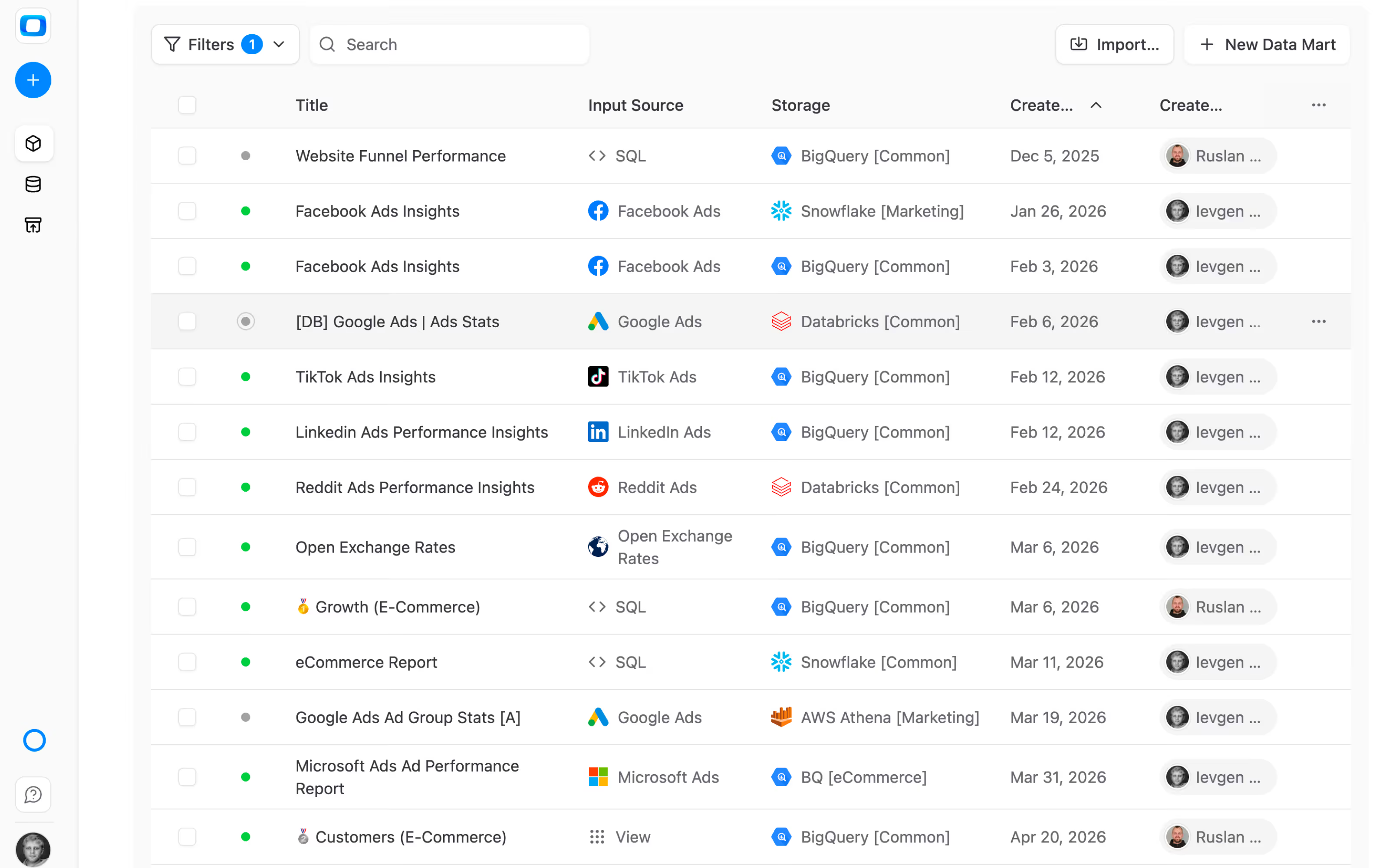
app.owox.com / data-marts / marketing context
Analytics is stuck in service-desk mode. It doesn't have to!
Trusted, proven, recognized

Trusted by 170,000 spreadsheet users

170K+
Users trust OWOX[1]
Analysts, marketers, and data teams across 20+ industries
4.9★
Rating on G2[2]
“A trusted data analytics partner” — verified review
365K+
Data marts delivered
Created and served by OWOX to business users
79K
npm installs[3]
Self-hosted OWOX Community Edition on GitHub
Works with your infrastructure

Data Warehouses

OWOX connects to the warehouse you already run — your data never leaves your infrastructure.

The problem

Self-service analytics fails the same way every time

Every team does “self-service” already — in ChatGPT, ad-hoc exports, or forwarded Sheets. Here’s what changes when analysts own the system.

Without a system

Everyone builds their own truth

Queries live inside dashboards and one-off exports — impossible to govern or reuse
Business users self-serve anyway — in ChatGPT, Gemini, or Claude, without guardrails
AI sits on top of raw data, hallucinating context it doesn’t have
Analysts become the reconciliation layer — answering tickets instead of scaling analytics
Nobody trusts the numbers — because nobody owns them
With OWOX

Analysts own the system. Business users get answers.

Every metric is defined once in a Data Mart — reused across every report, channel, and team
Self-service is governed — stakeholders pull only what the data team approved
AI amplifies trusted data — grounded in analyst-defined SQL, not LLM guesses
Analysts scale the library — not the ticket queue
Every number has an owner. Every cell traces back to SQL.

The reporting backlog disappears because the hand-off is the product.

Get started free →
One warehouse, two audiences

The system analysts build. The answers business uses.

OWOX turns your data warehouse into a self-service analytics system — defined once by analysts, consumed safely by everyone else in the tools they already use.

The producer

Analysts define the logic

Create data marts library using SQL, existing tables, views or custom connectors. Set ownership, definition, context, access, and output schema once. Publish, share, re-use.
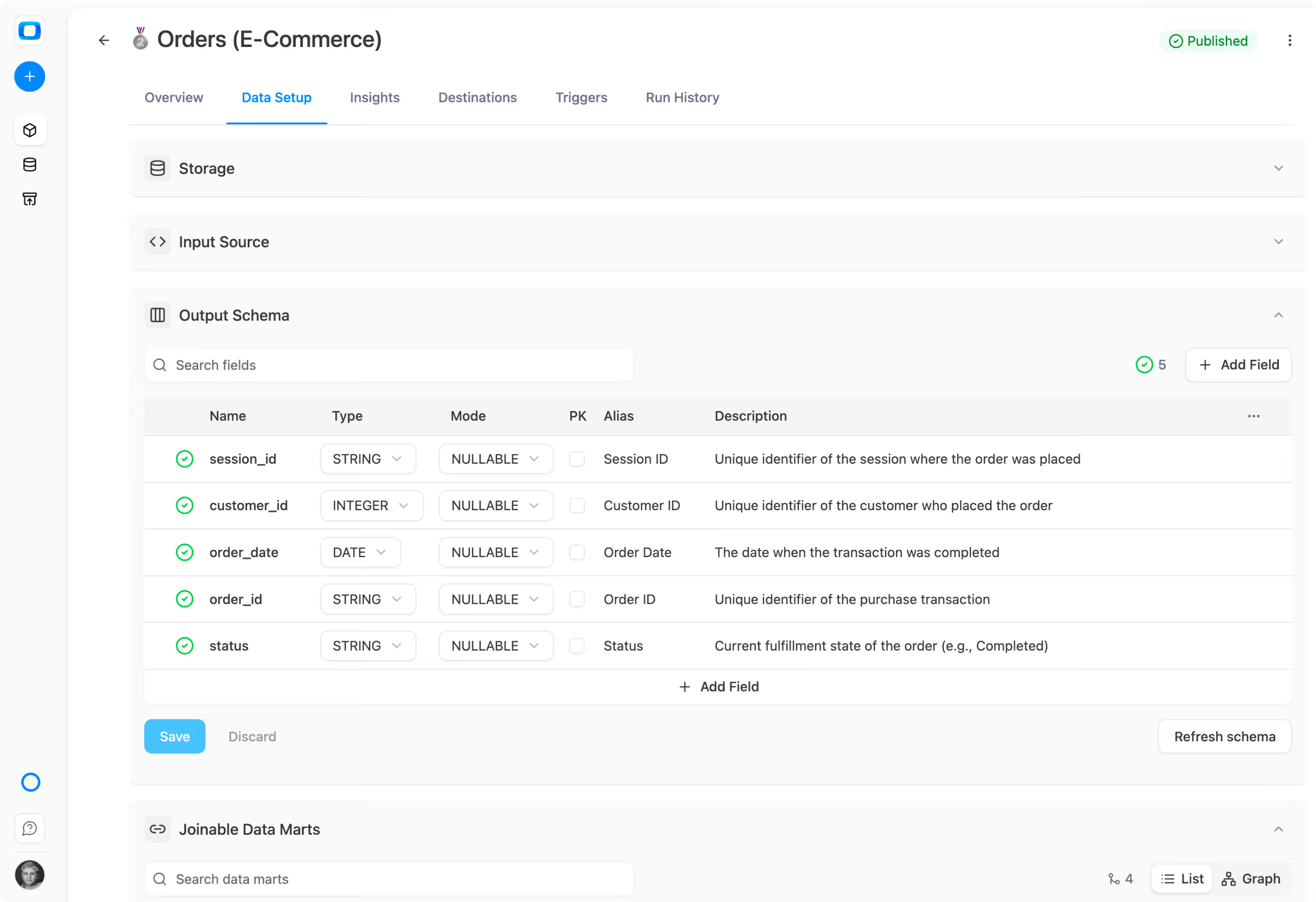
Analysts define the logic
01Define once. Version-controlled. Governed. Reusable across every downstream tool.
The Consumer

Business users get trusted answers

Marketing, sales, finance — pull from the same Data Marts in Google Sheets, Looker Studio, Slack, or email. No tickets. No waiting. No stale exports. & finally, a clean reporting backlog.
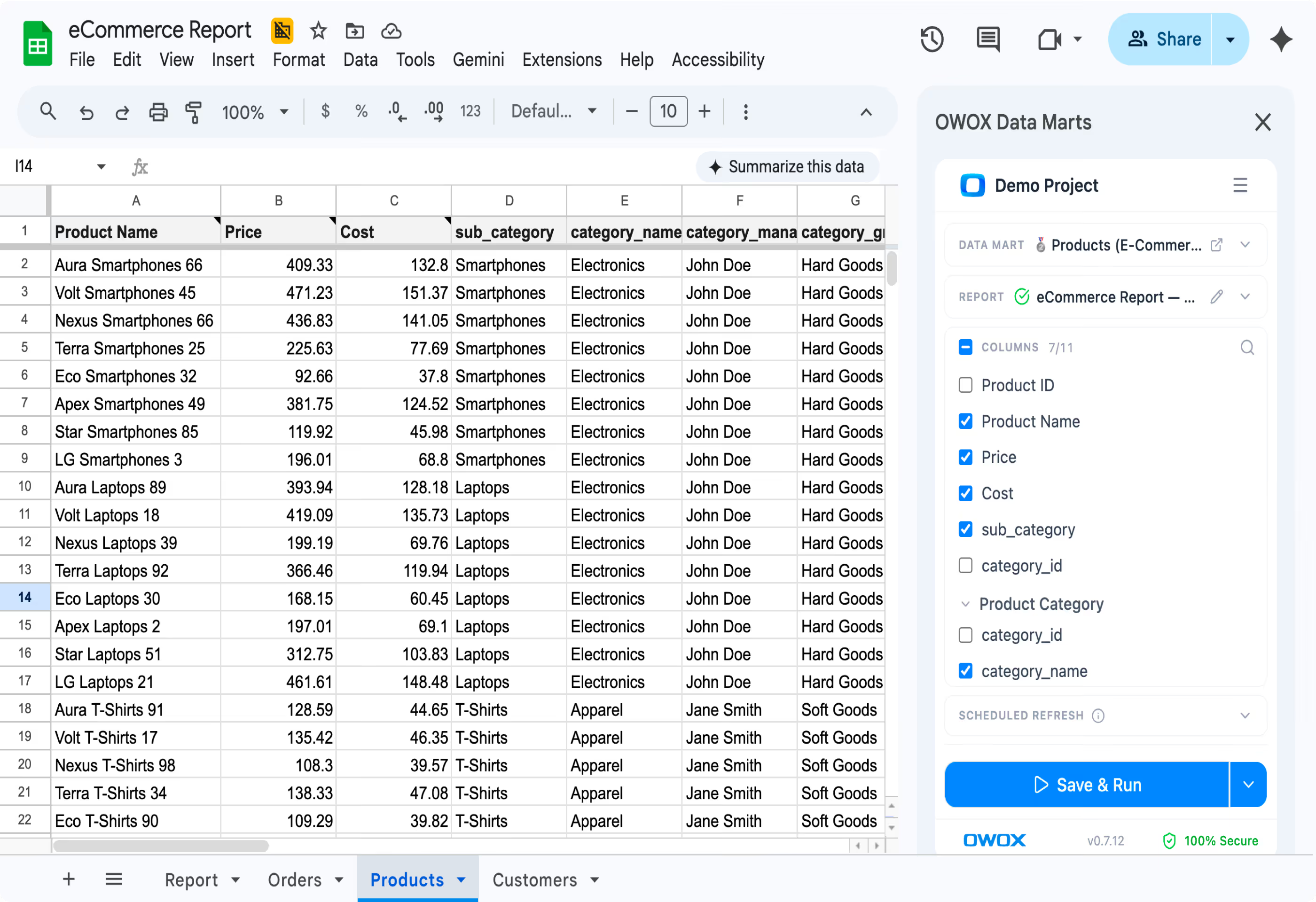
Business users get trusted answers
02Same definition, same numbers — right inside the tool they already use every day.
One data warehouse.
One source of truth. Two audiences. Zero reporting tickets.
Data Mart Library

Build your Data Mart library in one click

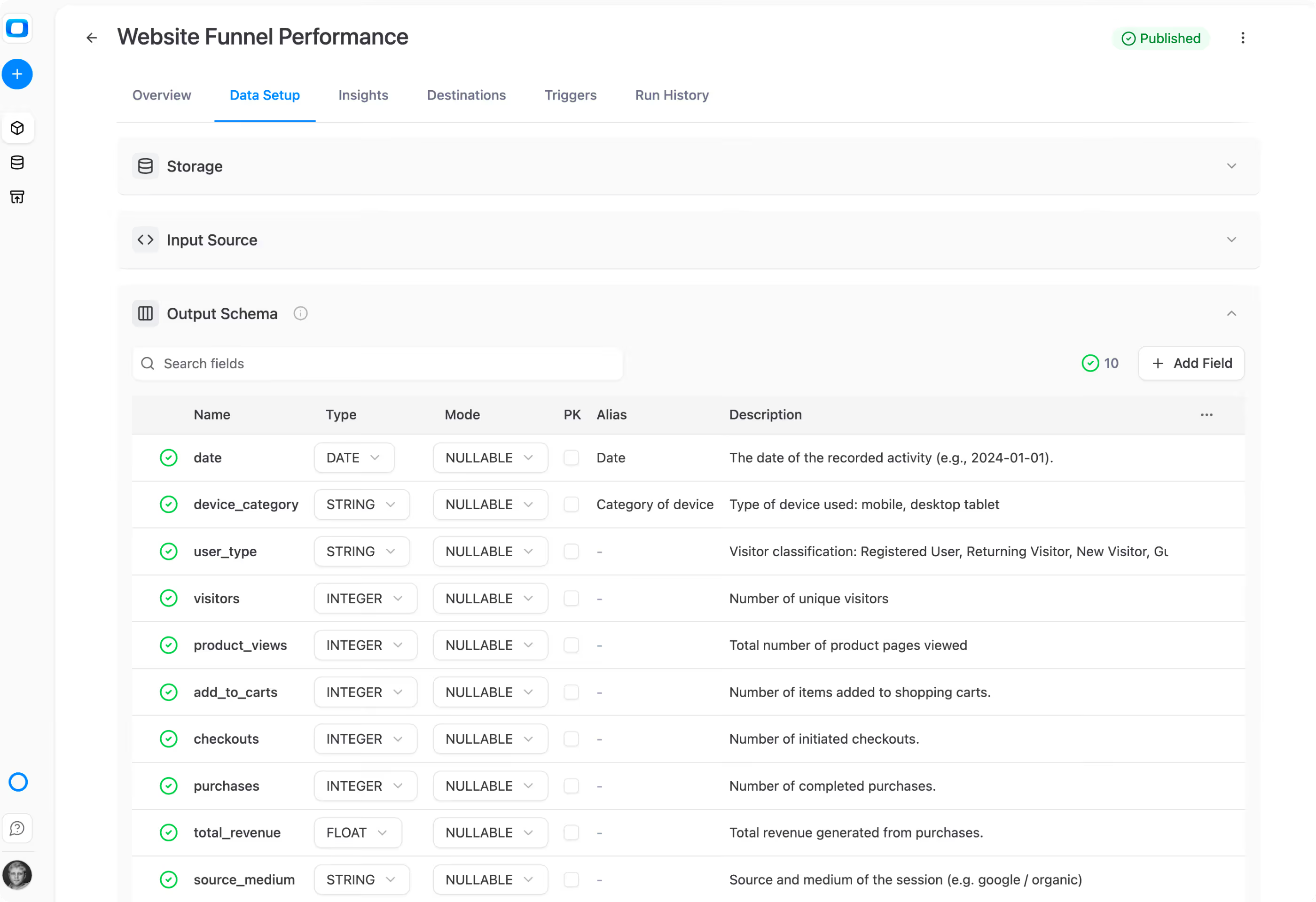
Pick tables and views from your warehouse — get a fully populated Data Mart library with descriptions, aliases, join keys, and ownership. All auto-generated.
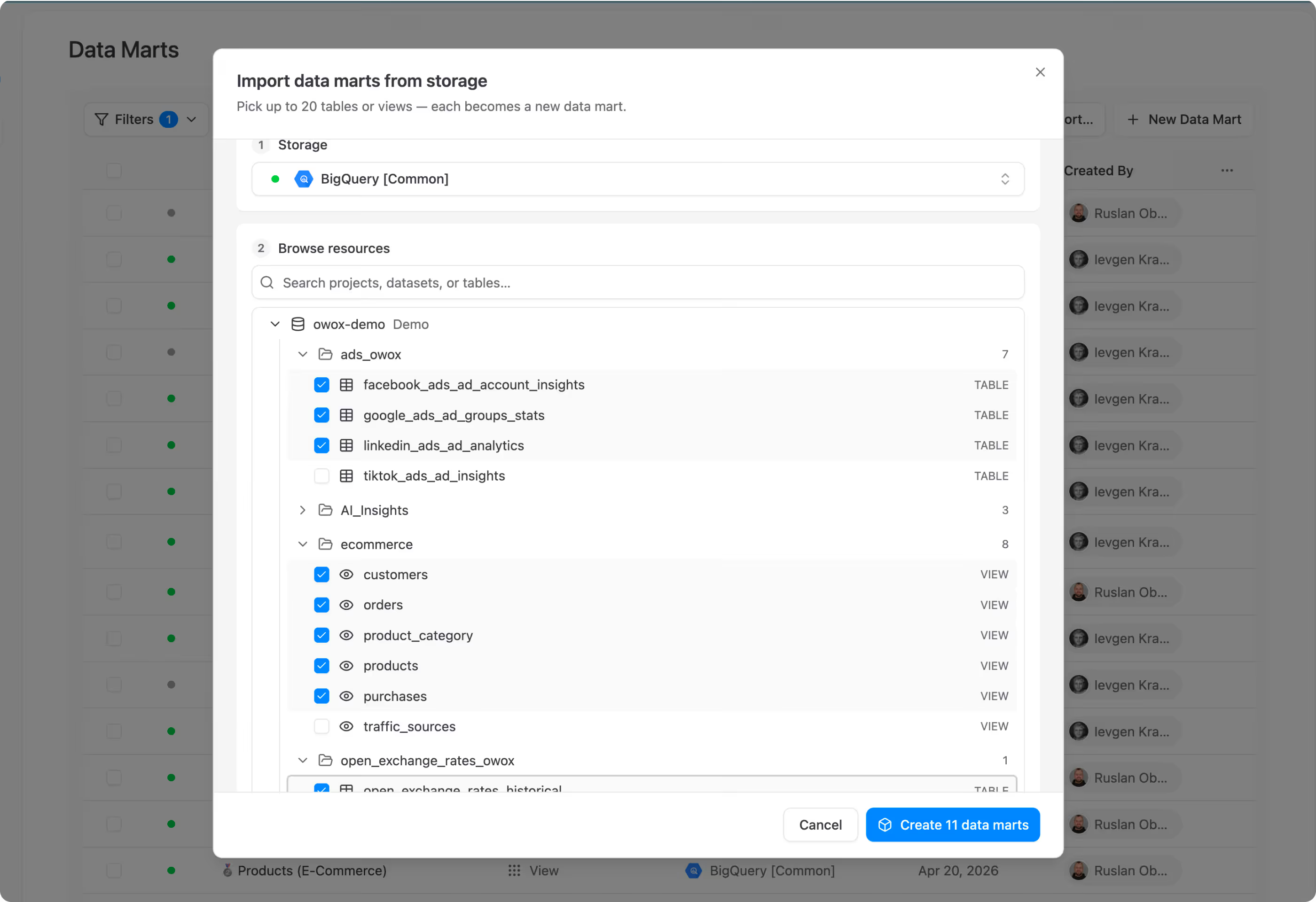
Auto-generated schema with business-friendly aliases and descriptions
Join keys defined for cross-mart self-service in Sheets
Technical and Business Owner assigned to every Data Mart
Build your Data Mart library in one click
One Data Mart. Every report. Every channel.
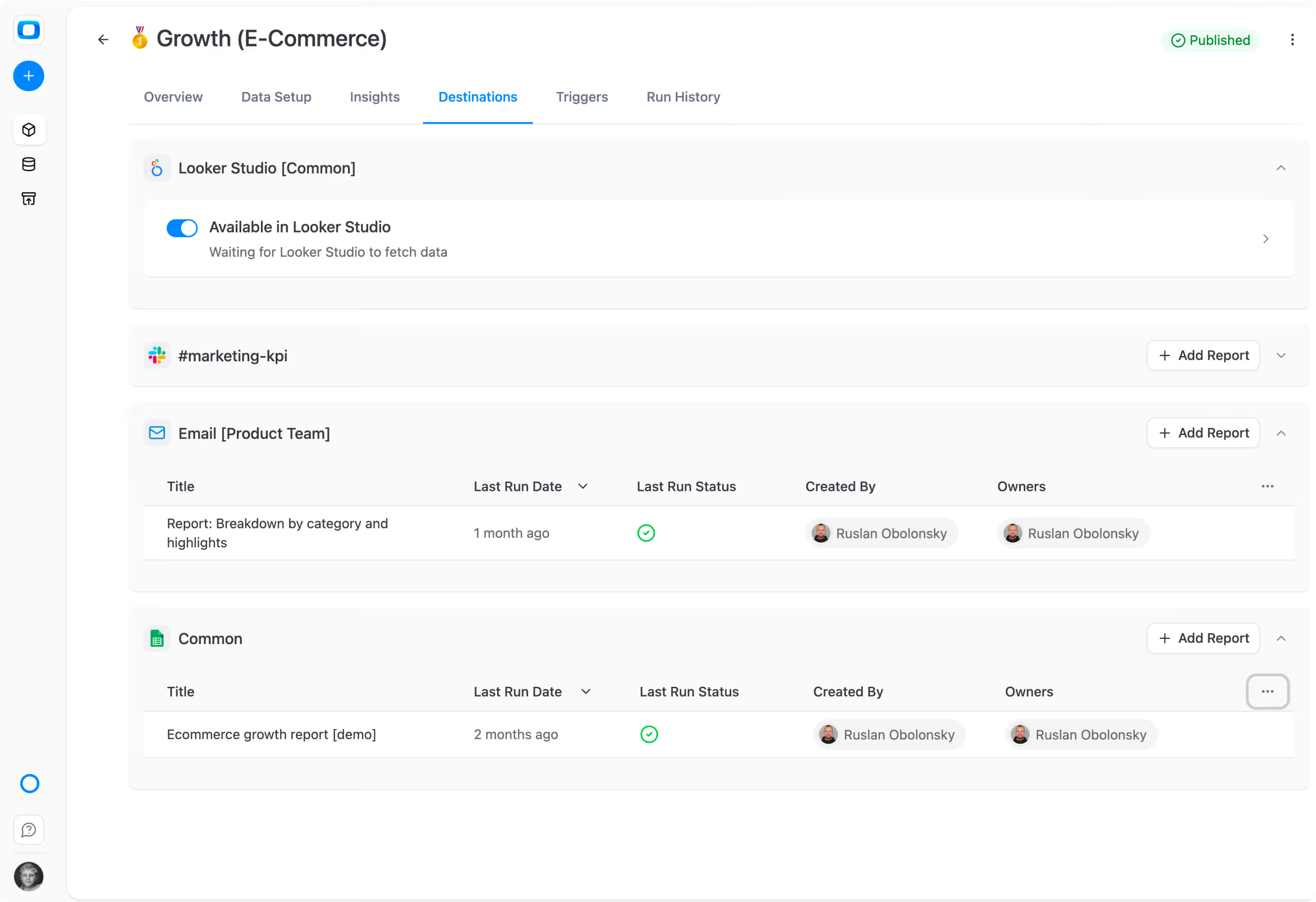
Re-usable across every tool

One Data Mart. Every report. Every channel.

A single published Data Mart feeds multiple Google Sheets, Looker Studio dashboards, Slack channels, and email digests — simultaneously. Same SQL, same numbers everywhere.

Multiple reports with different filters from one Data Mart
Fan out to Sheets, Looker Studio, Slack, Teams, and Email
New stakeholder? Add a report — not a query
One Data Mart. Every report. Every channel.
no semantic layer needed

The semantic layer you don’t have to build

Business users browse the Data Mart library in Google Sheets, join Data Marts by analyst-defined keys, and pick the columns they need — no SQL, no tickets, no hallucinations.

See joined entities by pre-set keys — right inside Sheets
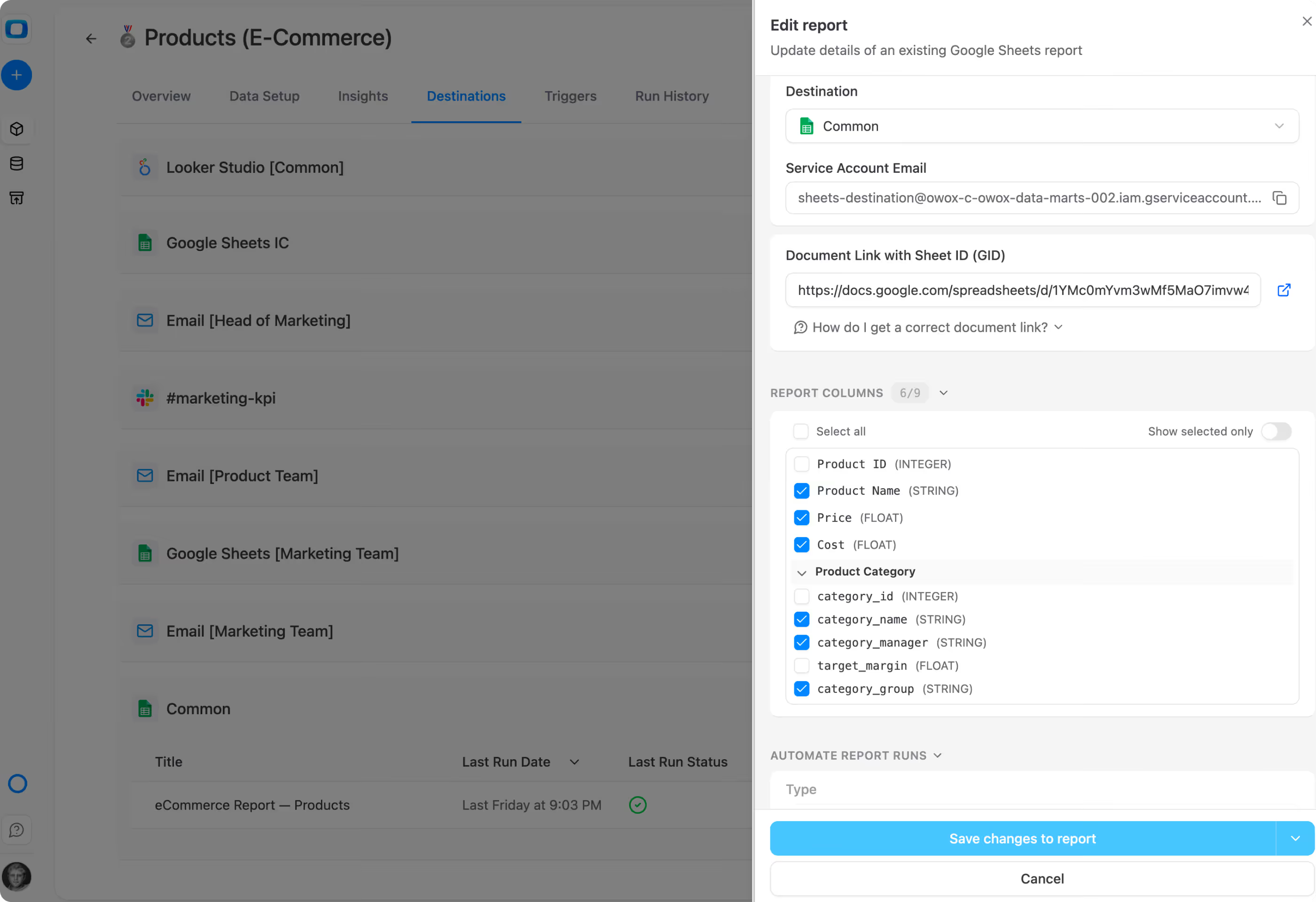
Pick columns from the joined result with a visual column picker
Every cell is traceable, deterministic, verifiable — no AI used
The semantic layer you don’t have to build

Self-service analytics fails the same way every time

Every team does “self-service” already – in ChatGPT, Claude, Gemini ad-hoc exports, or forwarded Sheets. Look how ot could be hallucination-free.

For data analysts

Scale self-service analytics without losing control

Build the library once. Publish it. Business users self-serve. You stay in control of definitions, ownership, and access.

Library in one click

Pick tables from your warehouse. Get a populated, governed Data Mart library — descriptions, aliases, keys, owners included.
Pick tables from your warehouse. Get a populated, governed Data Mart library — descriptions, aliases, keys, owners included.

Full transparency

Never get blamed for a number you didn’t write. Every cell traces back to the SQL you approved.

Never get blamed for a number you didn’t write. Every cell traces back to the SQL you approved.
Keep control clear

Data stays in your warehouse. Context-based access makes ownership obvious. Technical and Business Owners on every Data Mart.
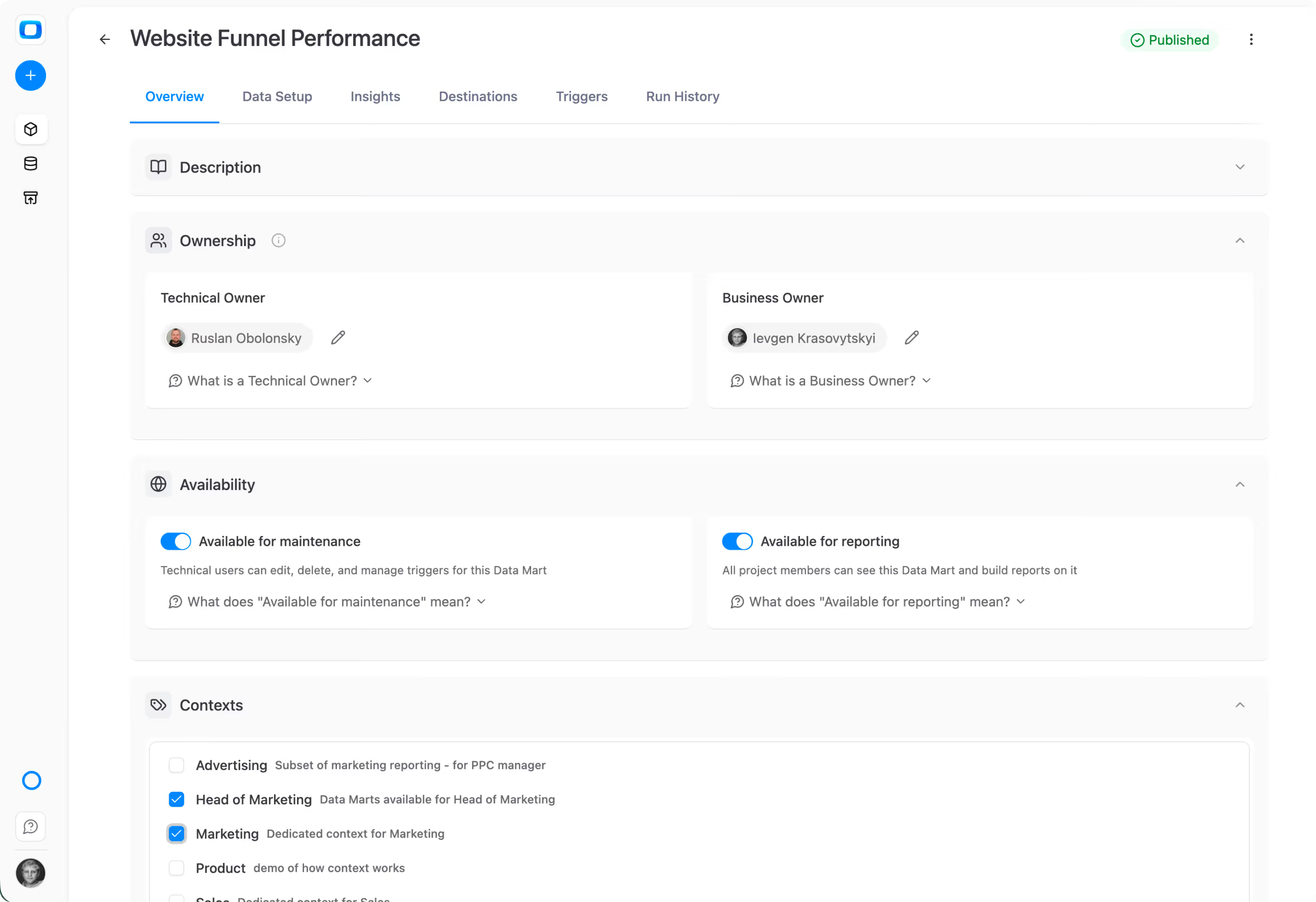
Data stays in your warehouse. Context-based access makes ownership obvious. Technical and Business Owners on every Data Mart.
Pick tables from your warehouse. Get a populated, governed Data Mart library — descriptions, aliases, keys, owners included.
Never get blamed for a number you didn’t write. Every cell traces back to the SQL you approved.
Data stays in your warehouse. Context-based access makes ownership obvious. Technical and Business Owners on every Data Mart.
For spreadsheet users

Get trusted data when you need it — without waiting in a queue

Self-serve from a Data Mart library inside Google Sheets. Add columns on the fly. Keep it fresh. No tickets, no exports, no hallucinations.

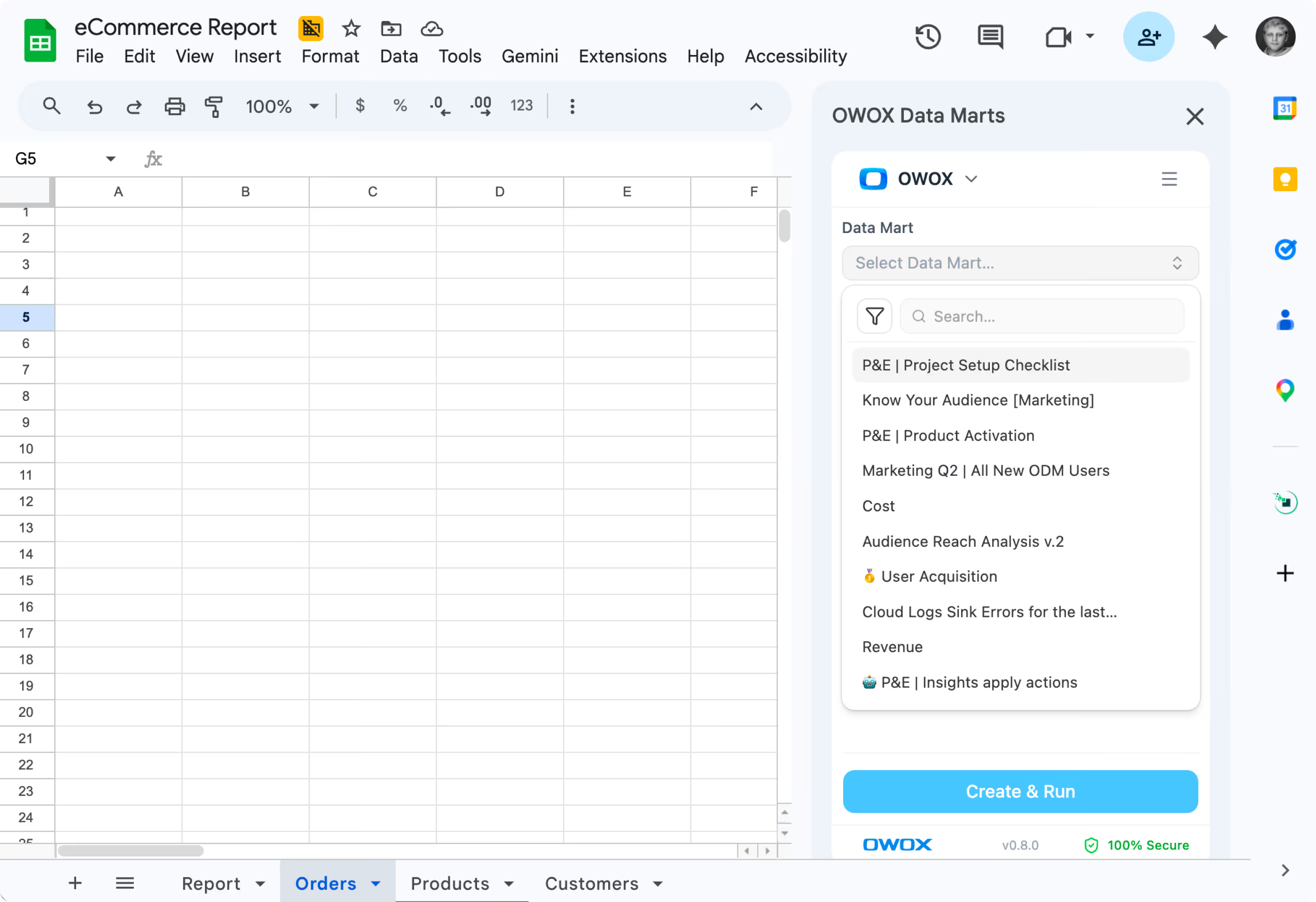
Don’t waste your time

Browse the Data Mart library right from Sheets. Pick what you need from what you have access to.

Browse the Data Mart library right from Sheets. Pick what you need from what you have access to.

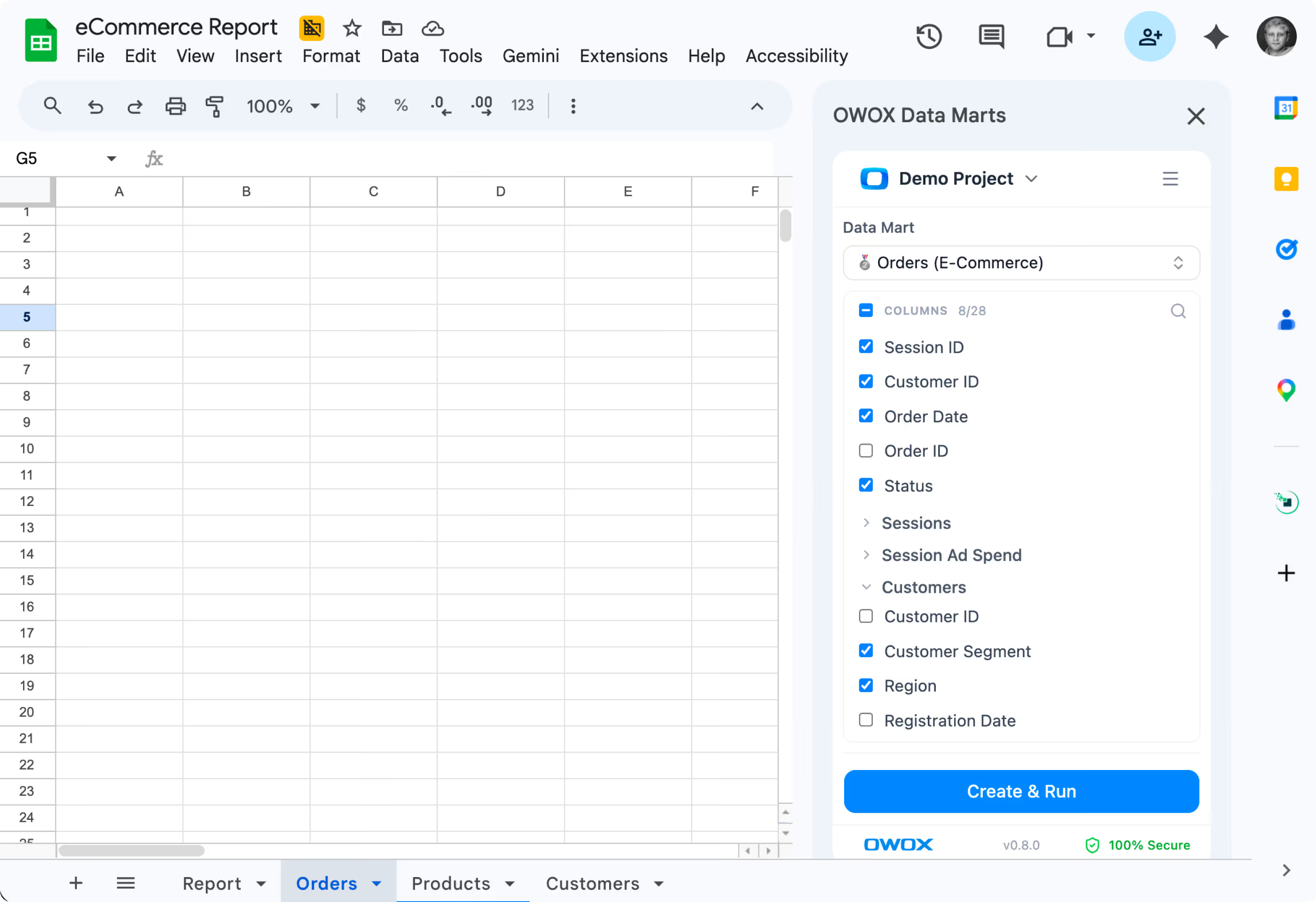
Pick columns you need

This is the first ever window to trusted corporate data right from Google Sheets UI with column-picker. Yeah, you can swap columns if needed as well.

This is the first ever window to trusted corporate data right from Google Sheets UI with column-picker. Yeah, you can swap columns if needed as well.

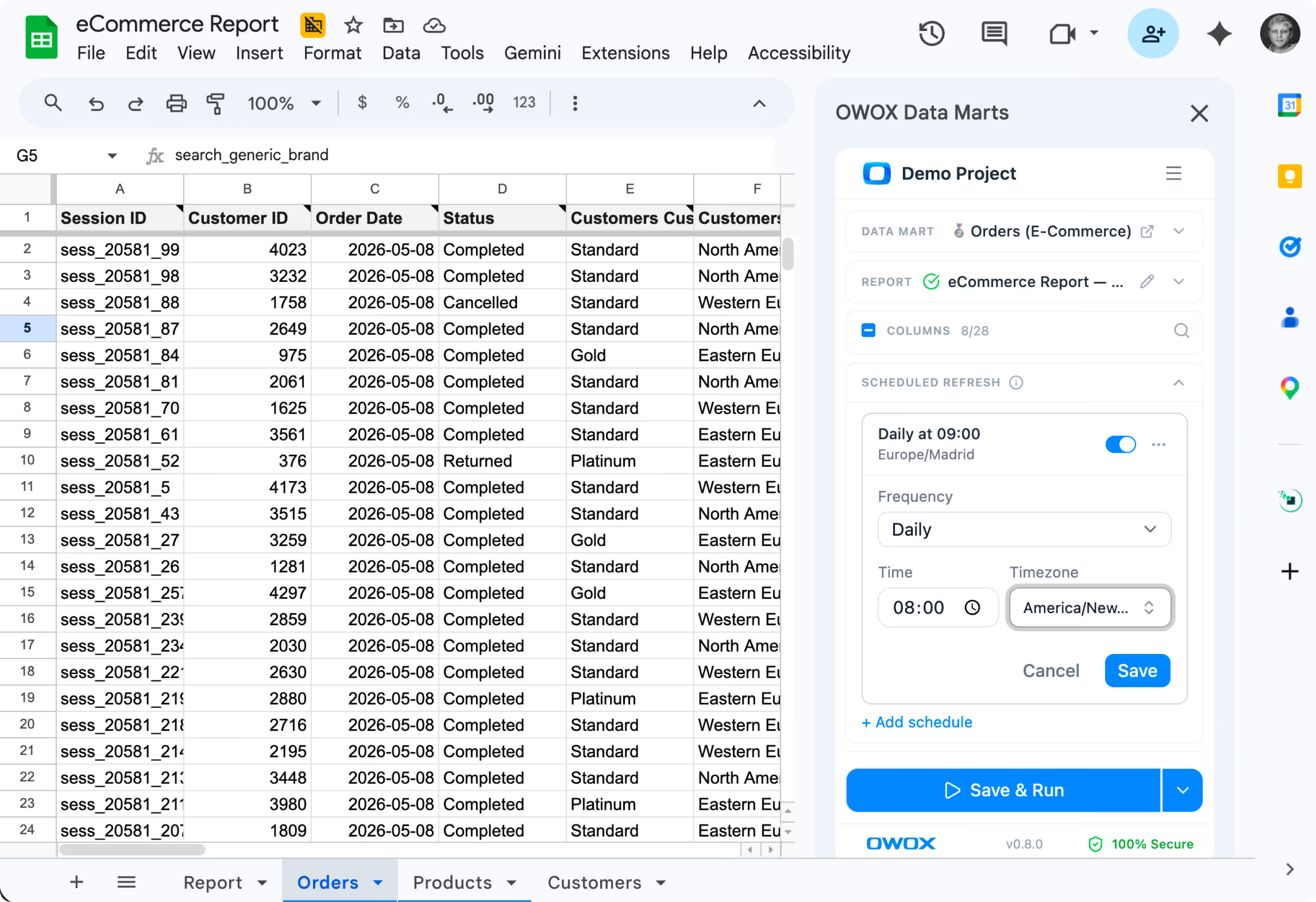
Keep data fresh

Schedule refreshes, apply filters, and stay live with your warehouse — all from inside Google Sheets.

Schedule refreshes, apply filters, and stay live with your warehouse — all from inside Google Sheets.
Browse the Data Mart library right from Sheets. Pick what you need from what you have access to.
This is the first ever window to trusted corporate data right from Google Sheets UI with column-picker. Yeah, you can swap columns if needed as well.
Schedule refreshes, apply filters, and stay live with your warehouse — all from inside Google Sheets.
AI-narrated executive briefings. Zero hallucinations.
AI Insights

AI-narrated executive briefings. Zero hallucinations.

Insights turn Data Mart output into recurring narrative reports — delivered to Slack, Teams, or email. AI drafts the prose. Your analyst approves the SQL. Every number is traceable.

Markdown templates with data placeholders filled by deterministic SQL
Delivered on schedule to Slack, Teams, Email, or Google Chat
Patented technology — AI narrates, never invents the numbers
AI-narrated executive briefings. Zero hallucinations.
Social proof

Every claim has a receipt.

Stats with comment threads attached — like a colleague verifying your numbers in a shared sheet.

170,000
Users on OWOX Platform — and growing 40% year-over-year.
B2
cell "users on platform"
SM
Sarah M.
Head of Analytics, Retail
3d ago

We migrated 200+ reports from Looker to OWOX Data Marts. Our team now self-serves without filing a single Jira ticket. Easily the best infrastructure decision we made this year.

✓ Verified
12 min
Median time-to-first-report for new OWOX users. No onboarding calls required.
C4
cell "time to first report"
DL
David L.
Data Lead, SaaS
Sarah M.

Connected BigQuery, set up 37 data marts, built a data model and had live reports in Sheets in under 15 minutes. My team thought I was joking when I showed them how they can now get live reports right in their sheets.

✓ Verified
Customer stories

Teams that applied self-service analytics

Three outcomes you get the moment your data marts go live

All case studies →
Attention

OWOX isn't the right fit if…

We’d rather save you a sales call. OWOX works best for teams with a data warehouse and a data team — or at least the intention to build one.

01

You don’t have a data warehouse and don’t plan to set one up

02

You’re not ready for analyst-defined governance — and prefer each team to build metrics independently

03

You want dashboards, not tables — we deliver data to spreadsheets and channels, not BI visualizations

Still curious? OWOX Data Marts is open source.  Self-host on your own infra for free – forever.

Explore on GitHub →
FAQ

Frequently asked questions

How is OWOX different from a BI tool?
+
Do I need a data warehouse to use OWOX?
+
What about AI hallucinations?
+
How long does setup take?
+
What does OWOX cost?
+
Can I self-host OWOX?
+
CLOUD

Start free in minutes

Connect your data warehouse, build your first Data Mart, and hand it off to your team in Google Sheets – then forget about reporting backlog forever.

No credit card required
AI Insights & next gen Extension
Built-in scheduling & monitoring
Demo

Talk to a data expert

See how OWOX gets your team rid of reporting backlog with a self-service system your analysts control and your business actually uses.

30-min live walkthrough of your use case
Best practices of the  famous data teams
Beta access to future releases