

AWS Athena 101: Serverless Data Warehouse on S3 Explained
Explore AWS Athena’s architecture, features, and use cases for serverless analytics on S3 with guidance on cost, performance, and integration.

Amazon AWS Athena looks deceptively simple: point it at files in S3, write SQL, and get results. No clusters, no servers, no capacity planning. For many data teams, that sounds like the perfect shortcut to “having a data warehouse” without actually building one.
In practice, Athena is powerful – but it’s not a drop‑in replacement for a full data warehouse, and it behaves very differently from engines that work on columnar tables inside a managed database. If you treat it like “just another warehouse”, you’ll quickly run into cost surprises, performance issues, and modeling challenges.
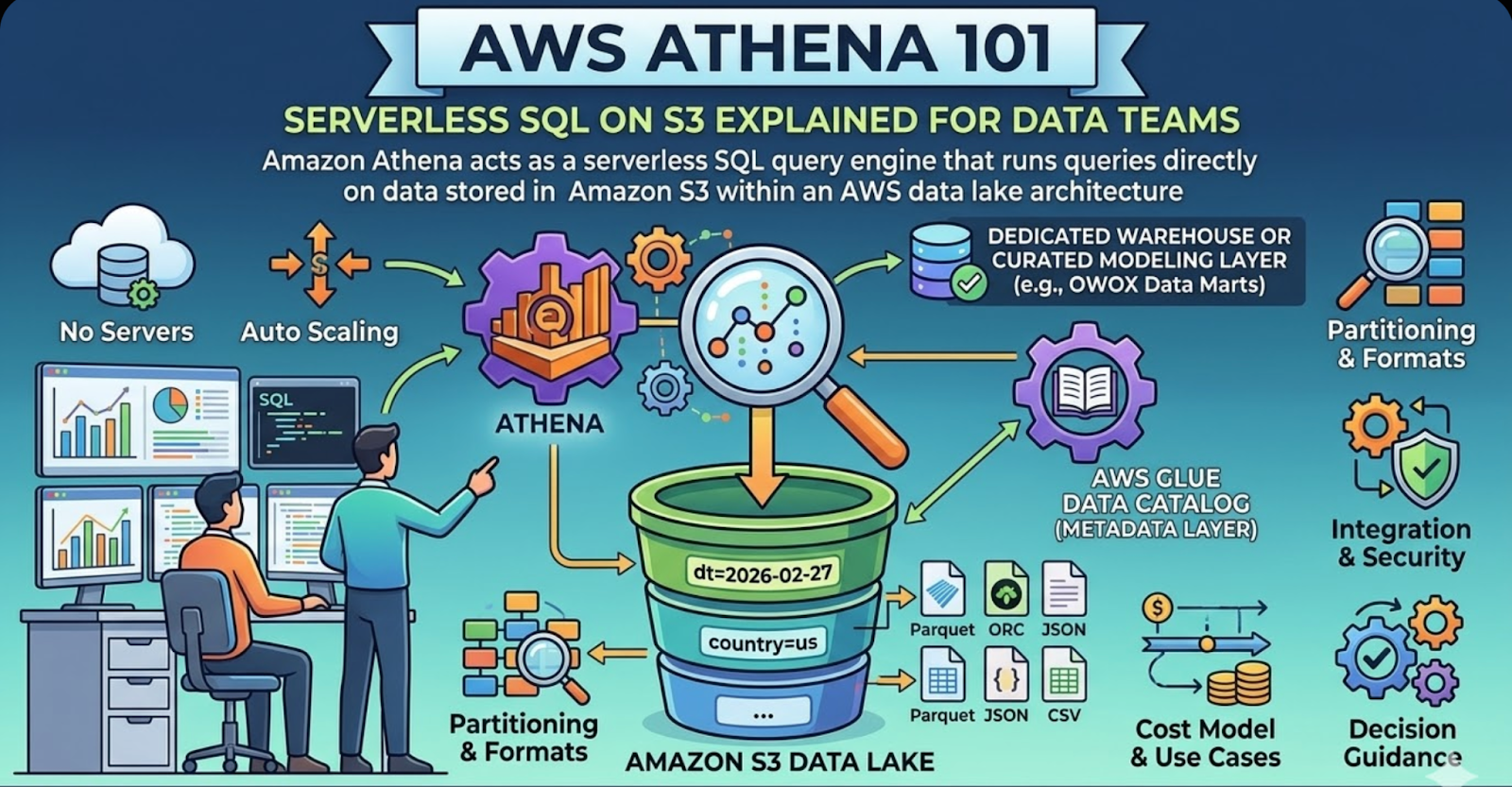
This guide walks through Athena the way technical teams actually evaluate and use it: as a serverless, pay‑per‑query SQL layer on top of S3, sitting inside a broader analytics ecosystem.
What you’ll learn in this guide
By the end of this article, you’ll have a clear, practical understanding of:
- What Athena is (and isn’t): A serverless, distributed query engine that reads data directly from S3, not a traditional MPP warehouse with local storage.
- How Athena works under the hood: The core architecture components – S3, the AWS Glue Data Catalog, the query engine, and how they interact.
- Key features that matter to data teams: Partitioning, formats (Parquet/ORC/JSON/CSV), integration with AWS services, security, and cost model.
- Where Athena fits in a modern stack: Common patterns with S3 data lakes, event streams, and analytics tools – and where a warehouse still makes sense.
- Typical use cases and anti‑patterns: When Athena shines (ad‑hoc exploration, log analysis, lakehouse patterns) and when it becomes painful (heavy BI dashboards, complex transformations at scale).
- Practical decision guidance: How to decide whether Athena should be your primary analytics engine, a complementary tool, or just part of your data lake plumbing.
If you’re a data analyst, analytics engineer, or product/marketing leader working with S3‑centric data, this guide is written for you. We’ll stay concrete and opinionated, with enough technical depth to inform real architecture decisions – without drowning you in internal AWS implementation details.
Why Athena matters in an S3‑centric analytics ecosystem
Most modern data teams already treat S3 as the “source of truth” for raw and semi‑processed data:
- Application and product logs
- Event streams (e.g., from Kinesis, Kafka, or tracking SDKs)
- Third‑party exports from tools like advertising platforms or CRMs
- Periodic database snapshots and CDC streams
Athena’s core promise is straightforward: run SQL directly on that S3 data without loading it into a separate database.
That changes the calculus in several ways:
- Lower operational overhead: No clusters to size, patch, or scale. You don’t need a dedicated infra engineer just to keep an analytics database alive.
- Shorter time‑to‑first‑query: As soon as data lands in S3 and you define a table in the Glue Data Catalog, analysts can start querying.
- Closer to “schema‑on‑read”: You can evolve schemas more flexibly, especially with columnar formats and partitioned data.
- Fine‑grained, per‑query cost visibility: You pay based on scanned data, not on provisioned capacity.
For teams consolidating behavioral, marketing, and product data into S3, Athena often becomes the first serious analytics engine they adopt. Over time, it can either evolve into a key part of a lakehouse architecture or serve as a bridge to a more warehouse‑centric model.
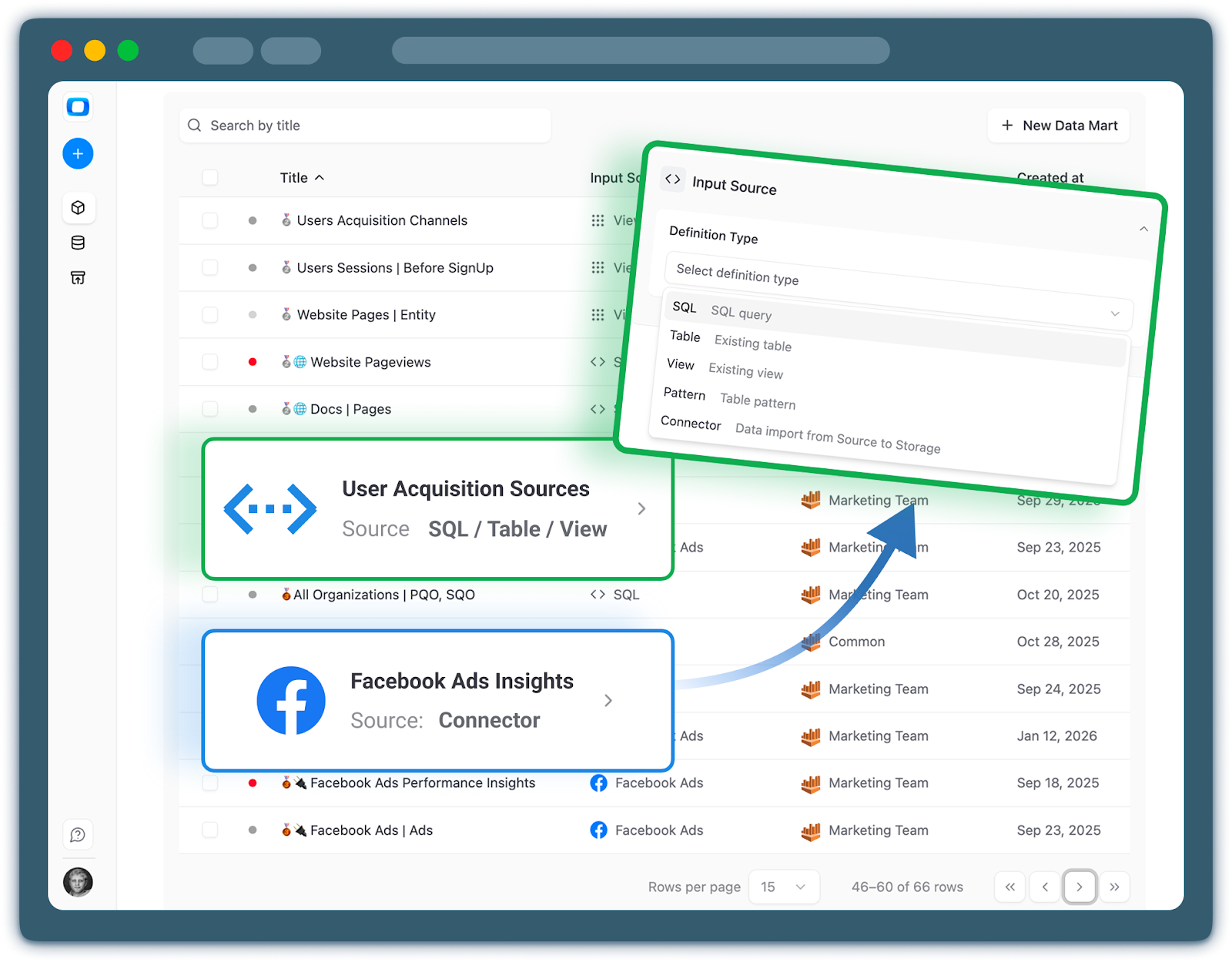
If you’re already centralizing data into curated, analytics‑ready models, a managed layer like OWOX Data Marts can sit on top of your storage layer to streamline modeling, governance, and access control. You can learn more about that approach here: OWOX Data Mart.
What Is AWS Athena in the AWS Analytics Ecosystem
In the AWS ecosystem, Amazon Athena is the missing piece that turns an S3 data lake into something analysts can actually query with SQL. It’s not a database, and it doesn’t store your data. Instead, Athena is a serverless, interactive query service that reads data directly from S3 using schemas defined in the AWS Glue Data Catalog.
At a high level:
- S3 is the storage layer (files and objects).
- Glue Data Catalog is the metadata layer (tables, columns, partitions).
- Athena is the compute layer (distributed SQL engine).
This separation is what makes Athena’s architecture different from a traditional warehouse. There’s no cluster to manage, and no local storage to maintain; Athena spins up resources behind the scenes when you run a query, scans the relevant S3 objects, and then tears those resources down.
Conceptually, you can think of it as:
- “Bring your own storage” (S3)
- “Bring your own schema” (Glue)
- “Pay‑per‑query compute” (Athena)
From a data‑team perspective, Athena becomes one of several engines reading from the same S3 lake – alongside Spark, EMR, and potentially a dedicated warehouse. A curated modeling layer like OWOX Data Marts can then sit on top, exposing analytics‑ready tables regardless of which engine is executing the queries.
Athena as a Serverless Interactive SQL Query Service
Athena is a fully managed, serverless SQL engine. You don’t provision instances, configure nodes, or think about capacity in advance. When you submit a query – via the console, JDBC/ODBC, or an API – Athena allocates compute resources under the hood, executes the query in a distributed fashion, and returns a result set.
Key properties:
- Interactive: Designed for on‑demand queries, exploratory analysis, and development workflows.
- Standard SQL: Uses a Presto/Trino‑compatible dialect, so most analysts can get productive quickly.
- Pay per TB scanned: Costs are driven by how much data each query reads, not by uptime or reserved capacity.
- Tight AWS integration: Hooks into IAM, CloudTrail, CloudWatch, and other services for security and observability.
This makes Athena ideal as a low‑friction entry point to analytics on S3 – especially for teams that want to avoid managing infrastructure but still need powerful, distributed query capabilities.
How Athena Relates to Amazon S3 as the Storage Layer
Athena doesn’t own or manage your data; it operates directly on files stored in S3. You point tables at one or more S3 prefixes, and Athena reads those objects at query time.
Important implications of this S3‑first model:
- No loading step: You don’t “ingest” data into Athena. As soon as files land in S3 and a table is defined, you can query them.
- Shared storage: The same S3 data can be consumed by Athena, Spark, EMR, machine‑learning workloads, and even another warehouse.
- Format‑aware: Athena supports CSV, JSON, Parquet, ORC, Avro, and more – with columnar formats (Parquet/ORC) being critical for performance and cost.
- Layout matters: How you partition data in S3 (e.g., s3://bucket/events/dt=2026-02-27/) directly affects query latency and how much data gets scanned.
You can think of S3 as the “disk” for Athena, but it’s a shared, multi‑tenant disk that other systems can also read and write.
Where AWS Glue Data Catalog Fits as the Metadata Layer
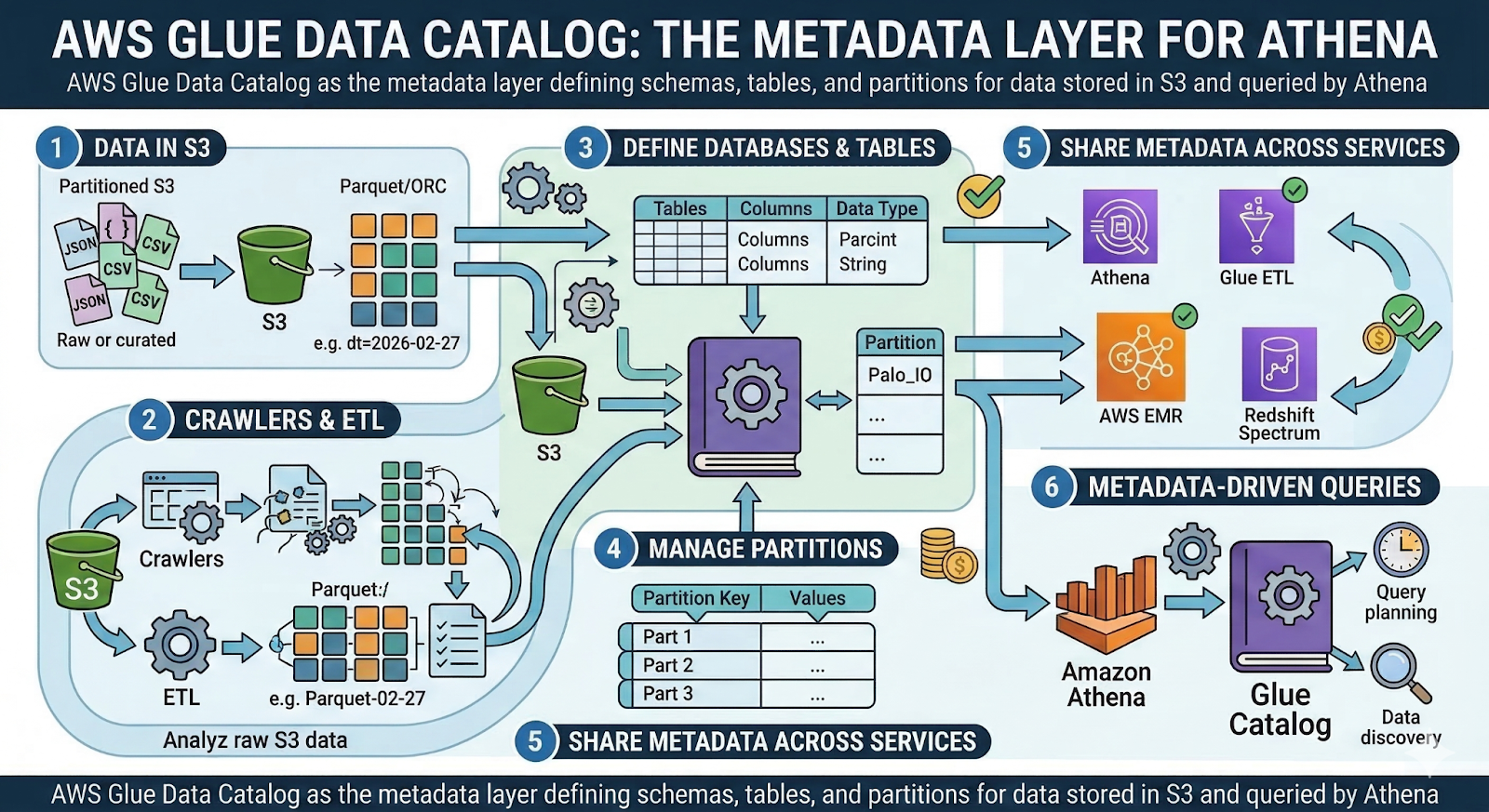
To run SQL, Athena needs to know what your data “looks like”: table names, columns, data types, partitions, and locations. That information lives in the AWS Glue Data Catalog, which acts as a centralized metadata repository for S3‑backed datasets.
With Glue Data Catalog, you can:
- Define databases and tables that map to S3 prefixes.
- Specify schemas (column names and types) and SerDes (how to interpret file formats).
- Manage partitions, either manually or via crawlers and ETL jobs.
- Share metadata across Athena, Glue ETL, EMR, and other AWS analytics services.
Athena queries are effectively “metadata‑driven”: the engine consults the Glue catalog to understand where to read from and how to parse the files. If the schema is wrong or partitions are missing, your queries will either fail or silently scan more data than necessary.
For multi‑team environments, treating Glue as a governed, versioned catalog – rather than an ad‑hoc collection of tables – is essential for keeping Athena usable at scale.
How Athena Differs From a Classic Data Warehouse Conceptually
Athena often gets described as a “serverless data warehouse”, but conceptually it’s quite different from classic warehouses like Redshift, BigQuery, or Snowflake.
A simplified comparison:
- Storage:
- Warehouse: Manages its own tightly coupled storage layer.
- Athena: Reads from external storage (S3) only.
- Compute model:
- Warehouse: Persistent clusters/virtual warehouses, often reserved or autoscaled.
- Athena: Ephemeral, on‑demand compute per query.
- Data lifecycle:
- Warehouse: Data is loaded, transformed, and stored as internal tables.
- Athena: Data remains in S3; tables are just metadata pointing to files.
- Cost model:
- Warehouse: Pay for provisioned compute (plus storage), regardless of usage.
- Athena: Pay per TB scanned, tightly coupled to query patterns and data layout.
In practice, this means Athena excels at reading and analyzing existing lake data, but it’s not optimized as a heavy‑duty transformation engine or long‑running storage system. Many teams use Athena alongside a curated warehouse or data mart layer, such as OWOX Data Marts, which provides stable, modeled tables while still leveraging S3 and Athena where they make sense.
How AWS Athena Works Step by Step from S3 Objects to SQL Results
To understand how Athena fits into your stack, it helps to see what actually happens between “data lands in S3” and “analyst gets a result set”. Under the hood, Athena is orchestrating S3, the Glue Data Catalog, and a distributed SQL engine – on demand, for each query.
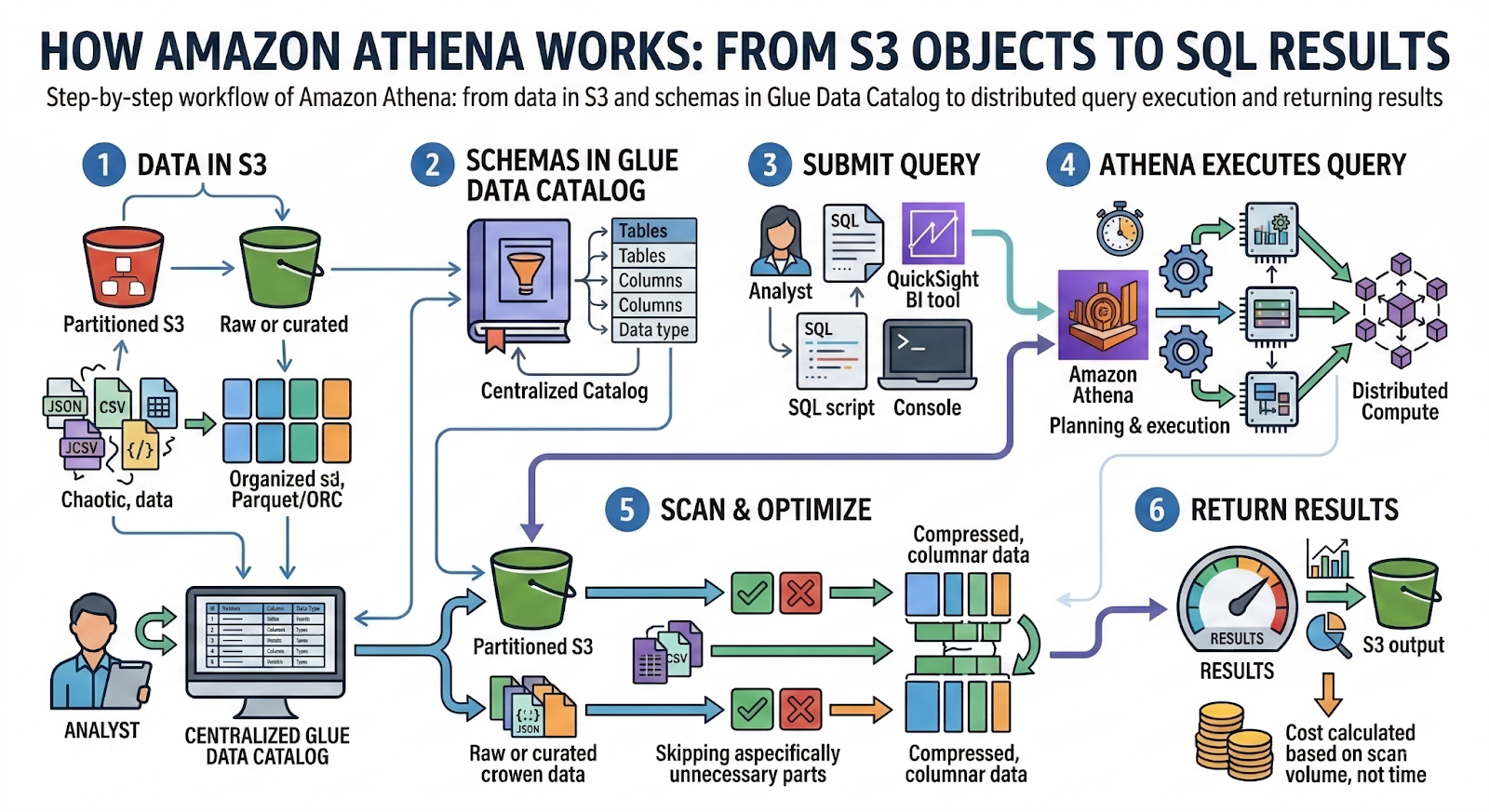
At a high level, the flow looks like this:
- Data is written to S3 in raw or curated form, usually partitioned by time and/or business keys.
- Tables and schemas are defined in the Glue Data Catalog (or via Athena DDL) to describe how to interpret those files.
- A query is submitted through the console, API, or a BI tool using standard SQL.
- Athena plans and executes the query, scanning relevant S3 objects and pushing down filters and projections where possible.
- Results are materialized in an S3 output location and streamed back to the client.
- Cost is calculated based on the volume of data scanned, not on query time or CPU used.
This step‑by‑step model is simple conceptually, but choices around S3 layout, partitions, and file formats heavily impact performance and cost.
Storing Raw and Curated Data in Amazon S3
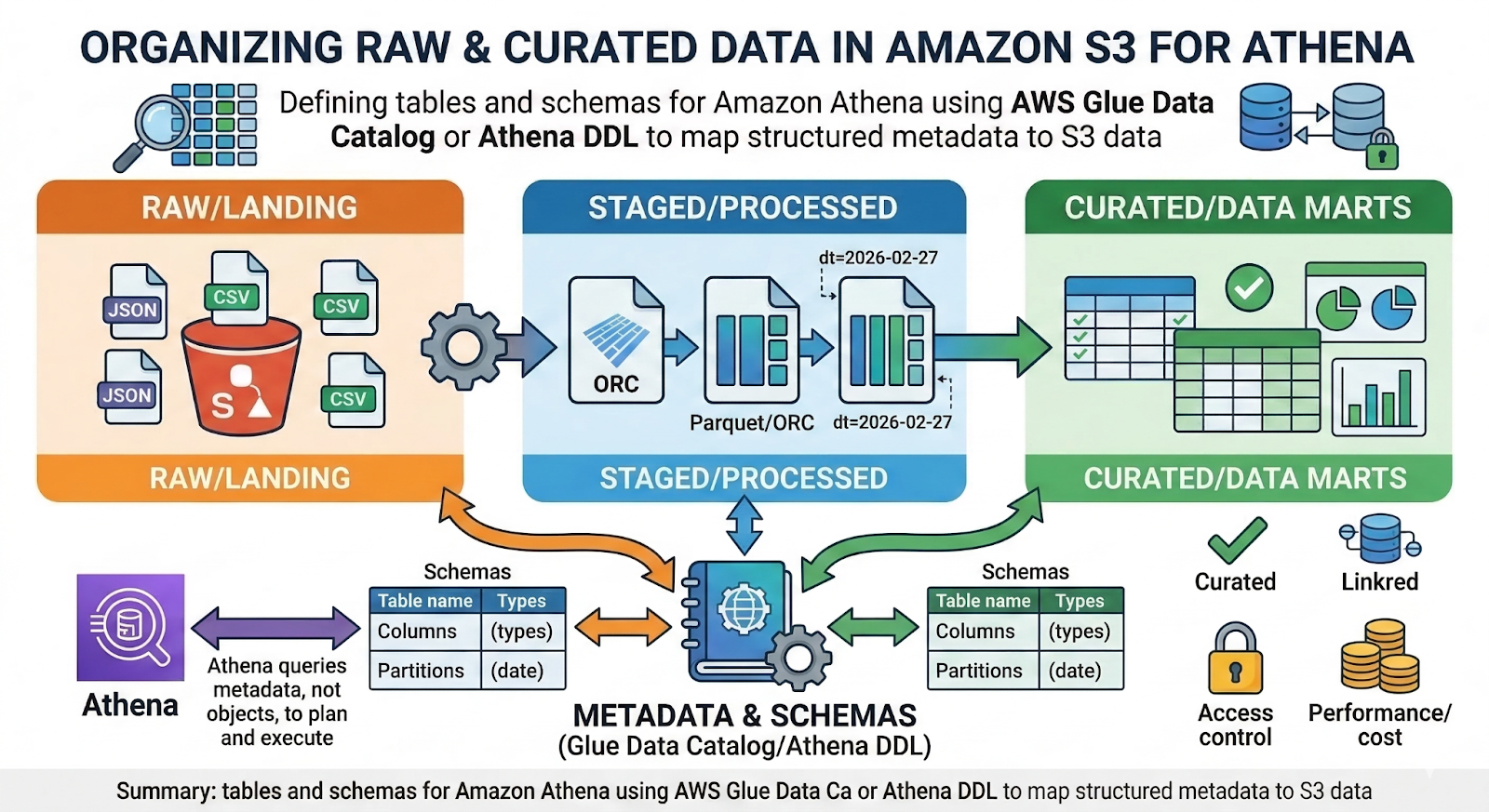
Most teams using Athena organize S3 into zones that reflect data maturity:
- Raw/landing: Direct dumps from apps, events, and third‑party tools (often JSON, CSV, or newline‑delimited logs).
- Staged/processed: Cleaned and standardized data, frequently converted to columnar formats (Parquet/ORC).
- Curated/data marts: Aggregated or business‑friendly tables ready for analytics and BI.
Within each zone, data is typically partitioned by date and sometimes by other high‑cardinality keys (e.g., country, source, event_type):
s3://analytics-bucket/events/dt=2026-02-27/source=web/part-0001.parquet
This layout allows Athena to skip entire folders when you filter on partition columns ( WHERE dt = '2026-02-27' ), reducing both scan volume and latency. Curated layers can be generated by your own ETL or by a managed modeling layer such as OWOX Data Marts.
Defining Tables and Schemas With Glue Data Catalog or Athena DDL
Once data is in S3, Athena needs to know how to read it. That is expressed as tables and schemas, stored in the AWS Glue Data Catalog and/or created via DDL in Athena.
You can define tables using:
- Athena DDL (via console, JDBC, or API):
1CREATE EXTERNAL TABLE events (
2    user_id     STRING,
3    event_name  STRING,
4    event_time  TIMESTAMP
5)
6PARTITIONED BY (dt STRING)
7STORED AS PARQUET
8LOCATION 's3://analytics-bucket/events/';
- Glue crawlers, which scan S3 paths and infer schemas automatically (useful for discovery, but you’ll often refine schemas manually).
- Glue ETL jobs, which can transform data and register/update tables in the catalog.
The Glue Data Catalog centralizes this metadata:
- Which S3 path a table points to.
- Column names, types, and SerDes.
- Available partitions and their locations.
Athena simply reads from this catalog at query time. Maintaining accurate schemas and partitions is crucial – otherwise, queries can become slow, expensive, or incorrect.
How the Athena Query Engine Scans, Filters, and Returns Results
When you run a query, Athena’s distributed query engine goes through a series of internal steps:
- Parse and plan
It parses your SQL, resolves table and column references via the Glue catalog, and generates an execution plan (joins, filters, aggregations). - Identify files to scan
Based on the plan and any partition filters (WHERE dt >= '2026-02-01'), Athena determines which S3 prefixes and objects are needed. Partitions not matching the filter are skipped entirely. - Parallel scan and filter
Athena spins up workers that read the relevant S3 objects in parallel. With columnar formats (Parquet/ORC), it reads only the columns referenced in the query, not full rows. - Apply predicates and joins
Filters, aggregations, and joins are pushed down as much as possible. Intermediate results are shuffled between workers as needed. - Materialize results
The final result set is written to an S3 query‑results location (usually as CSV or Parquet) and then streamed back to the client. You can reuse that output for downstream processing or as a data source for other tools.
This flow is invisible to the user, but your S3 layout, partition design, and file format choices directly determine how many objects and bytes the engine must touch.
Cost Model and Why You Pay Per Terabyte Scanned
Athena’s pricing is per terabyte of data scanned, rounded up to the nearest megabyte. You are not billed for:
- Query execution time.
- Number of result rows.
- Idle compute or storage inside Athena (there is none).
This has important consequences:
- Wide, row‑based formats are expensive: CSV/JSON forces Athena to read entire files, even if you select a few columns.
- Columnar formats are cheaper and faster: Parquet/ORC allow column pruning and compression, dramatically reducing bytes read.
- Good partitioning saves money: Filtering on partition keys lets Athena skip whole folders, reducing scanned data by orders of magnitude.
- Bad filters cost you: Forgetting a partition filter (e.g., missing WHERE dt >= ...) can trigger a full‑table scan over months or years of data.
In practice, controlling cost means engineering your S3 layout and schemas for efficient access – and continuously monitoring which Athena queries are scanning the most data. A curated layer, whether built in‑house or via something like OWOX Data Marts, can help enforce these best practices systematically.
Core Features of Amazon Athena That Matter for Data Teams
From a distance, Athena looks like “just run SQL on S3”. For data teams, the real value comes from a set of core features that make it practical to plug into an analytics stack without adding operational burden.
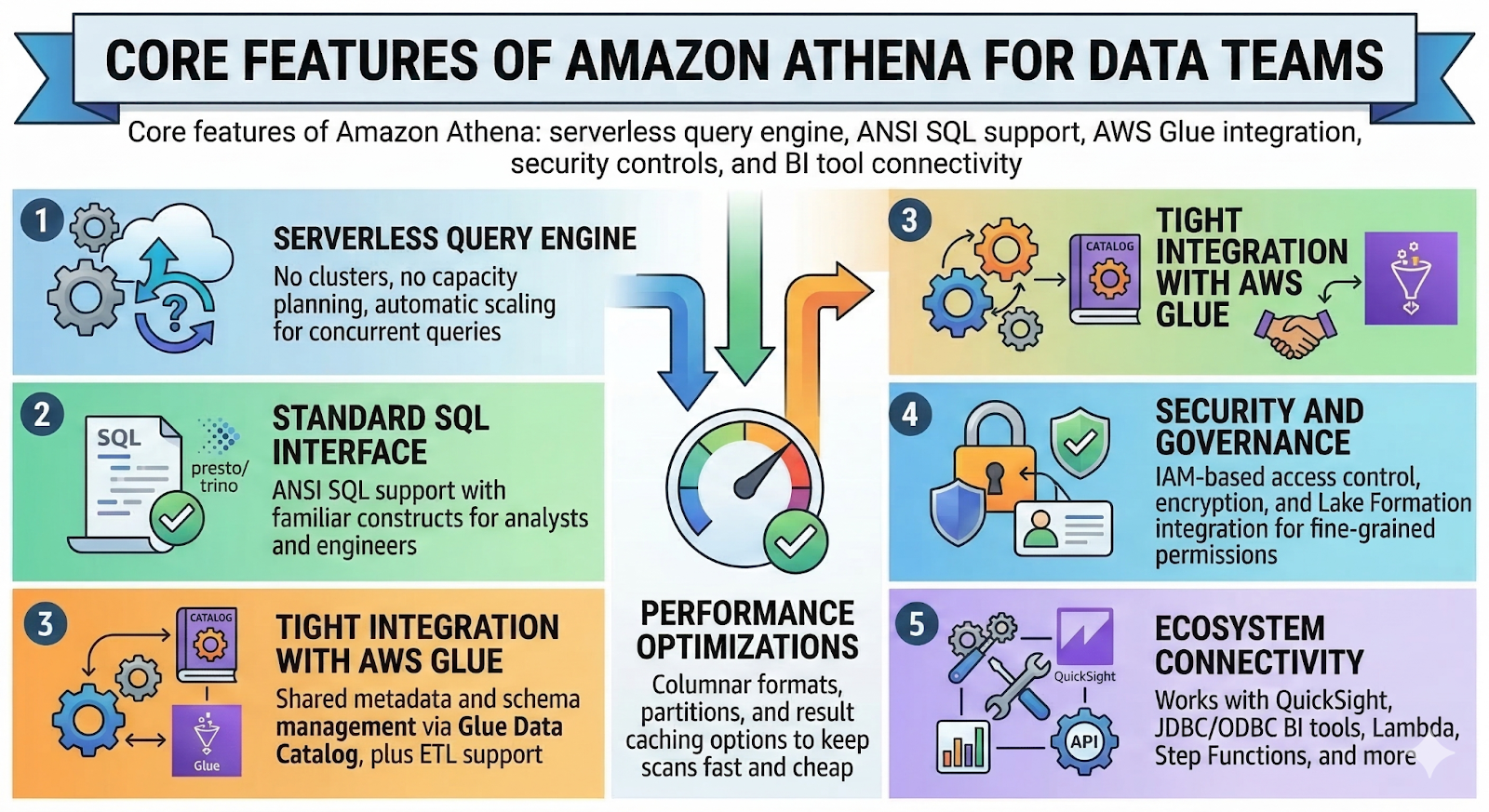
Key Athena core features that matter day to day:
- Serverless query engine
No clusters, no capacity planning, and automatic scaling for concurrent queries. - Standard SQL interface
Presto/Trino‑style ANSI SQL support with familiar constructs for analysts and engineers. - Tight integration with AWS Glue
Shared metadata and schema management via Glue Data Catalog, plus ETL support. - Security and governance
IAM‑based access control, encryption, and integration with Lake Formation for fine‑grained permissions. - Ecosystem connectivity
Works with QuickSight, JDBC/ODBC BI tools, Lambda, Step Functions, and more. - Performance optimizations
Columnar formats, partitions, and result caching options to keep scans fast and cheap.
The combination of these features is why many teams adopt Athena as their default serverless query engine on top of an S3 data lake – even when they also use a dedicated warehouse or a curated modeling layer like OWOX Data Marts.
Serverless Operations and Scaling Without Clusters
Athena’s most visible feature is that it is fully serverless: you don’t create clusters, choose instance types, or manage autoscaling policies. AWS handles the underlying fleet of resources and parallelizes your queries automatically.
Practical implications:
- Zero provisioning: Start querying as soon as S3 data and Glue tables exist.
- Elastic concurrency: Multiple users and tools can run queries in parallel without manual scaling.
- No maintenance windows: Patching, upgrading, and hardware failures are abstracted away.
- Predictable ops footprint: Data teams don’t need a dedicated platform engineer to “own the database”.
This lets smaller teams punch above their weight, and larger teams standardize on Athena as a low‑friction access layer to S3 – reserving cluster‑based engines for specialized workloads.
ANSI SQL Support and Compatibility With Common BI Tools
Athena uses a Presto/Trino‑derived SQL dialect, closely aligned with ANSI SQL. That means most analysts can:
- Use familiar constructs ( SELECT, JOIN, GROUP BY, WINDOW FUNCTIONS ).
- Work with arrays, maps, and JSON using built‑in functions.
- Write CTAS ( CREATE TABLE AS SELECT ) and INSERT queries for derived tables.
Because Athena exposes JDBC and ODBC drivers, it integrates cleanly with:
- BI platforms (Tableau, Power BI, Looker, Metabase).
- Notebook environments (Jupyter, Zeppelin, local tools).
- Custom applications and internal tools.
This compatibility reduces onboarding friction: you can plug Athena into existing visualization and analytics workflows without teaching a new query language or building custom connectors.
Integrations With AWS Services Like Glue, Lake Formation, and QuickSight
Athena is designed to sit in the middle of the AWS analytics ecosystem, not operate in isolation:
- AWS Glue Data Catalog
Central metadata store for schemas, partitions, and table definitions, shared with Glue ETL and EMR. - AWS Glue ETL
Transform raw data into Parquet/ORC, manage partitioning, and register curated tables that Athena can query immediately. - AWS Lake Formation
Adds row‑ and column‑level security, centralized governance, and permission management over Glue catalog resources. - Amazon QuickSight
Native BI and dashboarding tool that connects directly to Athena for serverless visualization on S3 data. - Lambda, Step Functions, EventBridge
Enable event‑driven analytics workflows: trigger Athena queries after new data lands, or orchestrate batch reporting flows.
These integrations make Athena a natural backbone for S3‑centric pipelines, with Glue and Lake Formation handling structure and governance while Athena handles interactive SQL.
Partitions, File Formats, and Performance Considerations
To get good performance and predictable costs from Athena, data layout matters as much as the query engine itself.
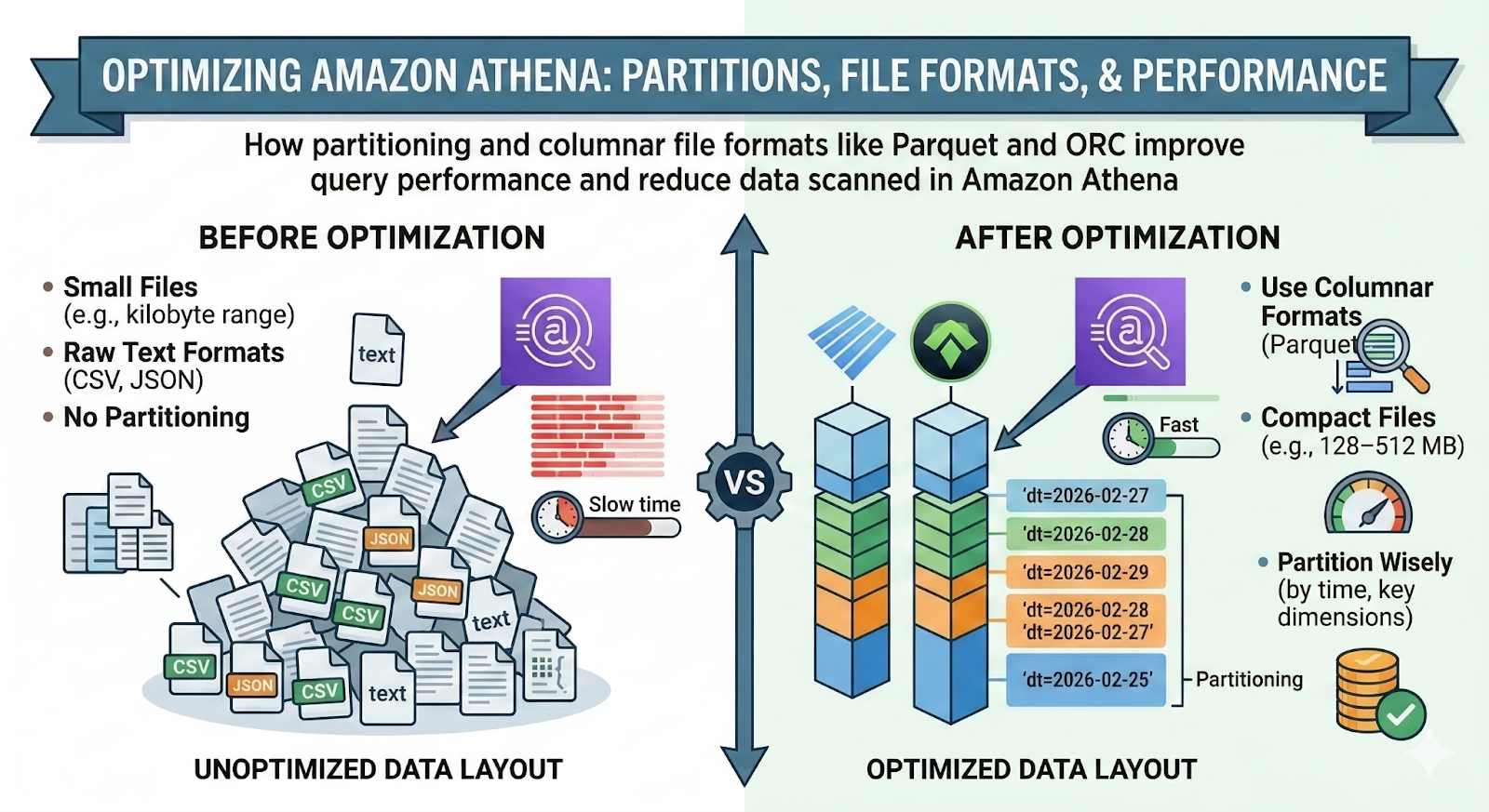
Best practices include:
- Use columnar formats
Prefer Parquet or ORC over CSV/JSON. Athena can read only the needed columns, apply compression, and skip unnecessary blocks. - Partition wisely
Partition primarily on time (e.g., dt, event_date), and only add additional partition keys that significantly reduce the typical query scope. - Avoid tiny files
Compact small files into larger ones (e.g., 128–512 MB) to reduce overhead and improve scan throughput. - Align schemas across tools
Keep Glue schemas, ETL jobs, and consumer expectations in sync to avoid costly full‑table rescans.
Curated layers – either built in‑house or using something like OWOX Data Marts – can standardize these patterns so every new dataset is Athena‑friendly by design.
Common AWS Athena Use Cases on Top of S3 Data Lakes
Once you understand how Athena works, the next question is simple: what is it actually good at? In practice, the most valuable Athena use cases are those where you already have large volumes of data in S3 and need serverless analytics on S3 without building more infrastructure.
Typical patterns include:
- Log analytics at scale for S3 access logs, application logs, and clickstream data.
- Marketing and advertising analytics on CSV/Parquet exports from ad platforms.
- IoT and event data exploration for product and operations teams.
- Business intelligence and ad hoc querying without spinning up clusters or loading everything into a warehouse.
In all of these, Athena’s role is the same: querying S3 with Athena using familiar SQL, with performance and cost controlled by how you partition and format the data.
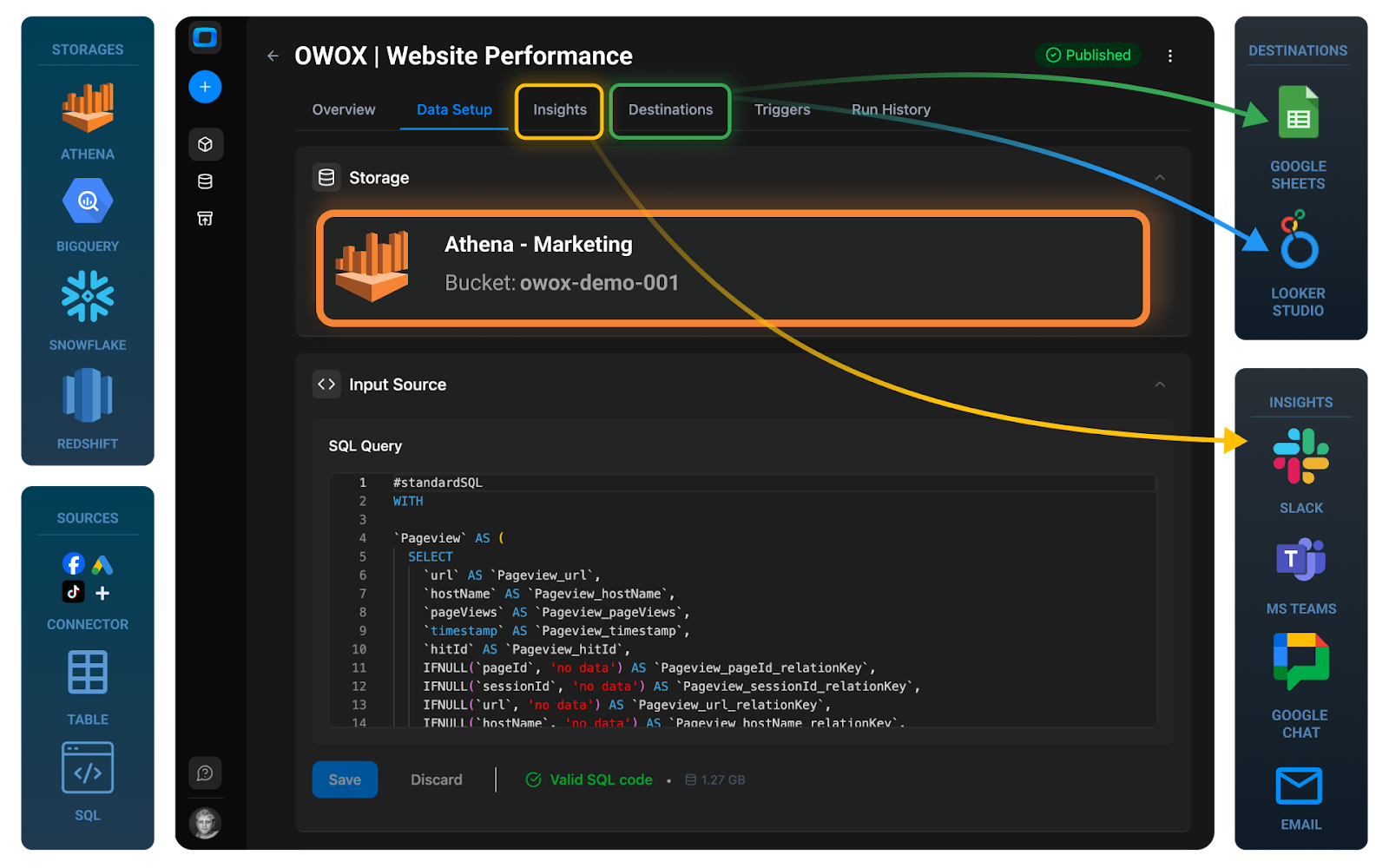
Analyzing S3 Access Logs, Application Logs, and Clickstream Data
Athena is a natural fit for log and clickstream analytics because those datasets are:
- High volume
- Append‑only
- Naturally partitioned by time
Common scenarios:
- S3 and CloudFront access logs: Investigate suspicious access patterns, cost anomalies, or content delivery performance by querying logs directly where they land.
- Application and API logs: Debug production issues, analyze latency, or detect error spikes by slicing logs by endpoint, status code, or user segment.
- Clickstream events: Understand user journeys, funnels, and feature adoption using SQL over event streams exported from tracking SDKs.
By storing logs in columnar formats and partitioning by date (and possibly service), you can run complex queries over months of history with serverless analytics instead of maintaining a separate log database.
Querying Marketing and Ad Platform Exports Landed in S3
Most marketing and growth teams are drowning in CSVs and exports from:
- Google Ads, Facebook Ads, LinkedIn Ads, and other ad networks
- Analytics platforms and CDPs
- Affiliate and partner platforms
Landing these files in S3 and exposing them via Athena lets you:
- Join across platforms: Combine ad spend, impressions, and conversions from multiple sources at the SQL layer.
- Build custom attribution views: Stitch campaign data with web/app behavior and CRM events.
- Automate reporting: Schedule Athena queries to materialize daily/weekly metrics as tables that BI tools can consume.
For teams that want more governed, cross‑channel marketing models, a curated layer like OWOX Data Marts can sit on top, with Athena executing the queries transparently while marketers work with stable, business‑friendly schemas.
Working With IoT and Event Data for Exploratory Analysis
IoT and operational event data are classic S3 data‑lake workloads:
- Device telemetry (temperatures, voltages, GPS)
- Fleet and logistics events
- Sensor readings from manufacturing or facilities
These streams produce massive, time‑series datasets that are expensive to store and query in traditional databases. With Athena, you can:
- Land events directly in S3 (often via Kinesis/Data Firehose).
- Partition by time and device/region.
- Run exploratory queries to detect anomalies, trends, and outliers.
Data scientists and analysts can iterate on hypotheses quickly, without waiting for data to be copied into a specialized time‑series store.
Running Business Intelligence and Ad Hoc Queries Without Spinning Up Clusters
Athena is also used as a lightweight backbone for BI and ad hoc analysis, where teams want dashboards and self‑service querying but don’t want to operate a warehouse cluster.
Typical patterns:
- Connect BI tools (Tableau, Power BI, QuickSight, Looker, Metabase) to Athena via JDBC/ODBC.
- Expose a curated set of S3‑backed tables as the “semantic layer” for analysts and business users.
- Use Athena for low‑frequency dashboards, internal tools, and one‑off investigations.
The big advantage is zero cluster management: you pay only when queries run, and you can scale from a few analysts to multiple teams without revisiting capacity decisions. For more demanding, dashboard‑heavy BI, teams often pair Athena with a modeled data mart layer such as OWOX Data Marts to keep queries predictable and performant.
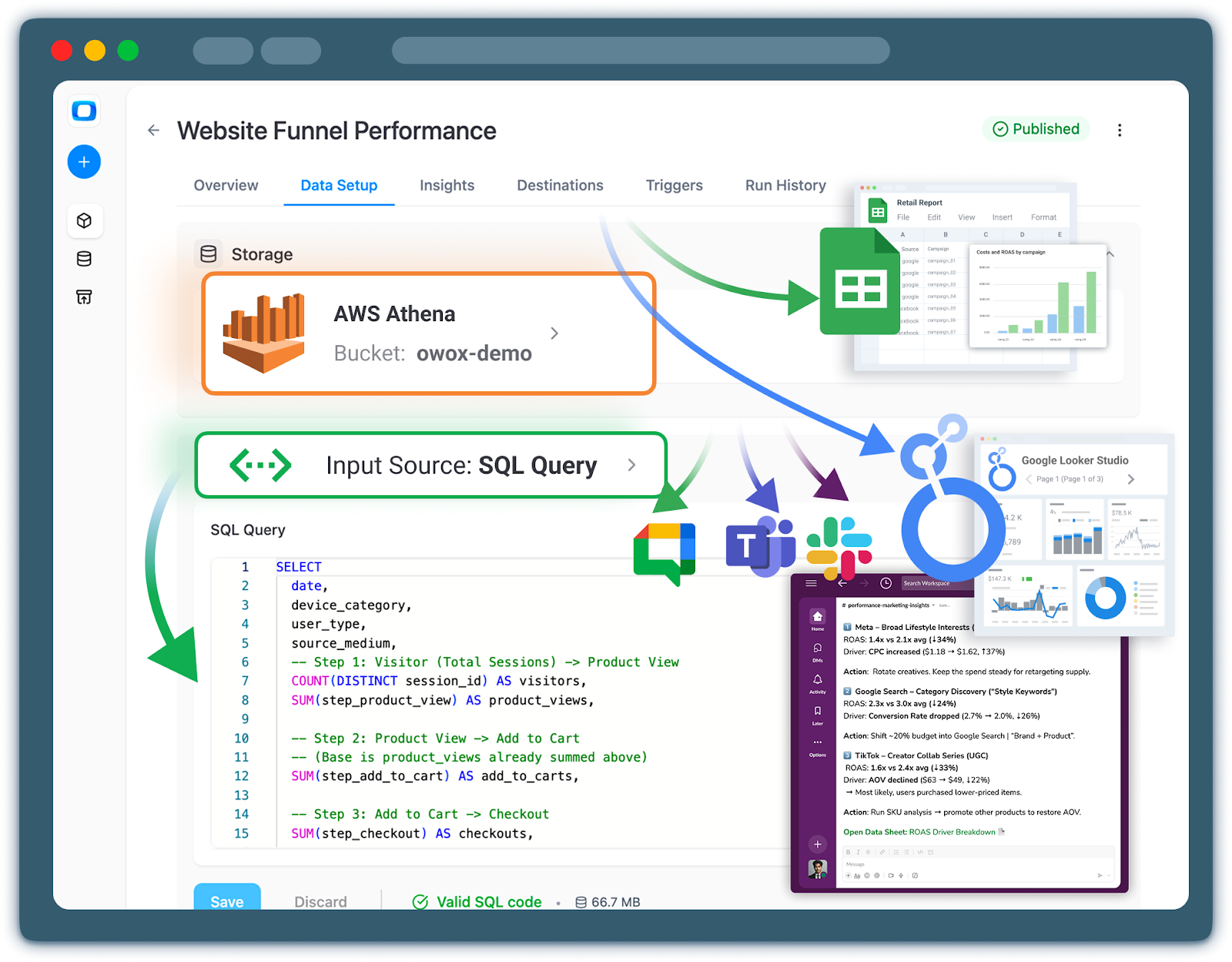
Advantages and Limitations of Using Athena as Your Query Engine
Athena’s combination of low operational overhead and pay‑per‑query pricing makes it attractive as a primary query engine on S3 – but it’s not a silver bullet. Understanding both Athena advantages and AWS Athena limitations is essential before you bet your analytics strategy on it. In short:
Pros:
- Serverless: no cluster provisioning or capacity planning.
- Tight AWS integration (Glue, Lake Formation, S3, QuickSight).
- Standard SQL with broad tool compatibility.
- Great fit for exploratory, bursty, or log‑heavy workloads.
- Simple cost model (pay per TB scanned).
Cons:
- Performance and cost are highly sensitive to data layout and partitions.
- No built‑in semantic layer (metrics, business definitions, relationships).
- Limited workload management compared to dedicated warehouses.
- Concurrency and heavy dashboard workloads can expose performance ceilings.
- Governance, lineage, and documentation must be built with other tools.
Athena is a powerful serverless query engine, not an end‑to‑end analytics platform. You’ll still need modeling, governance, and reporting layers – whether custom‑built or managed, like OWOX Data Marts.
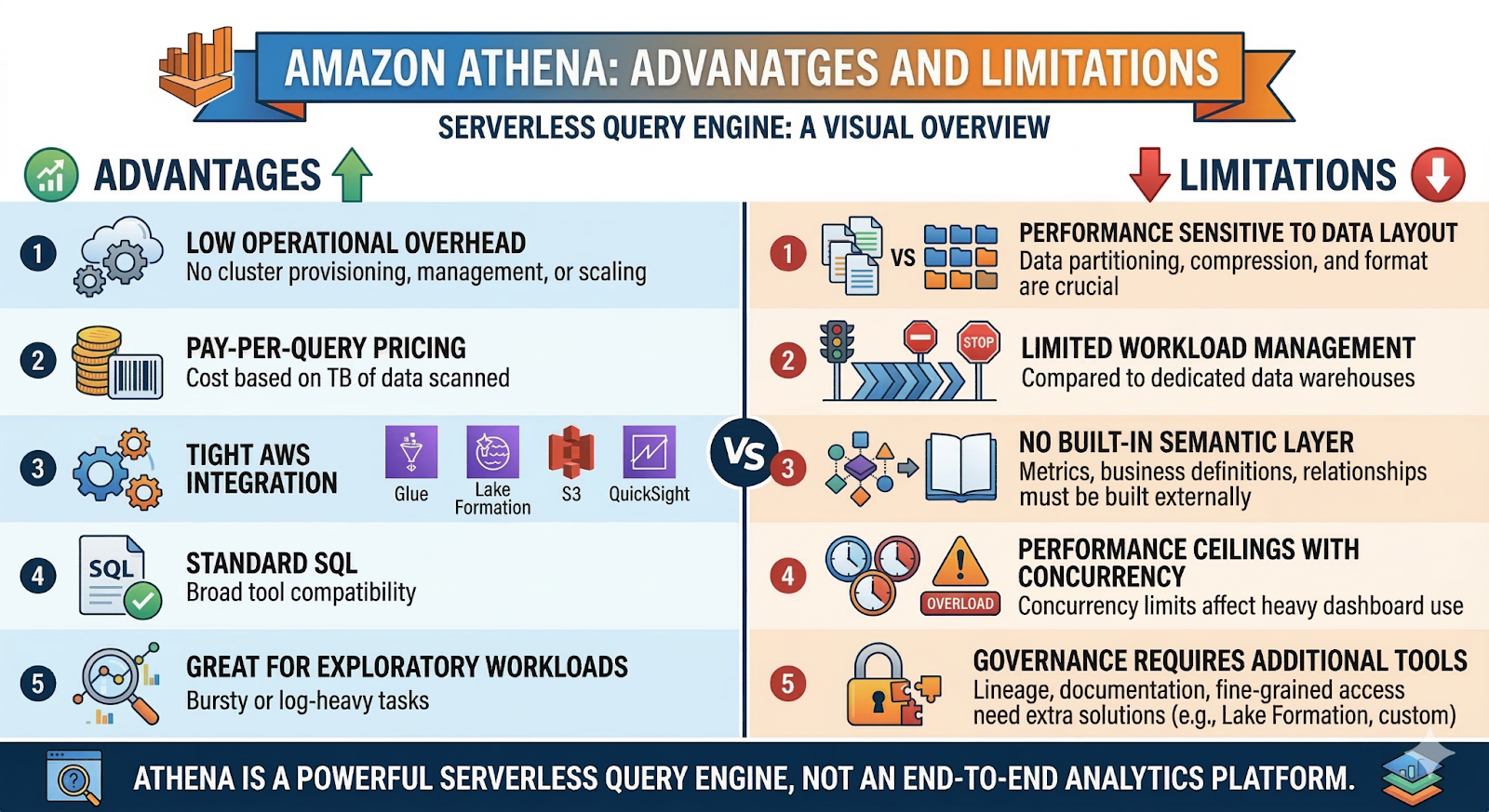
Operational Benefits: No Cluster Management and Automatic Scale
The clearest advantage of Athena is operational simplicity. As a data team, you don’t:
- Size or resize clusters.
- Pick instance types or worry about reserved/spot capacity.
- Patch, upgrade, or monitor database servers.
Instead, Athena:
- Scales automatically – to handle concurrent queries from analysts, BI tools, and batch workloads.
- Starts instantly – new teams can be productive within hours of landing data in S3.
- Centralizes access – multiple teams can query the same S3 lake without setting up separate infrastructure.
This elasticity and “zero admin” posture free up engineering time to focus on data modeling and data quality instead of infrastructure babysitting.
Performance and Cost Trade-Offs Based on Data Structure and Partitions
The biggest Athena performance trade‑offs come from how your data is stored:
- Good layout (Parquet/ORC, well‑chosen partitions, reasonably sized files):
- Queries scan less data, so they’re faster and cheaper.
- Partition pruning (WHERE dt >= '2026-02-01') avoids scanning irrelevant S3 prefixes.
- Column pruning reads only the columns your query uses.
- Bad layout (CSV/JSON, no partitioning, millions of tiny files):
- Athena must scan the entire file, even if you select one column.
- Queries often devolve into full‑table scans across months/years of data.
- Per‑query costs balloon, and latency becomes unpredictable.
Example: Two tables each hold 10 TB of clickstream data. One is partitioned by day and stored in Parquet; the other is a flat directory of CSVs. A query for the last 7 days and 3 columns might scan:
- Parquet/partitioned: ~100 GB
- CSV/unpartitioned: multiple TB
Both run “the same SQL”, but cost and latency differ by an order of magnitude.
Why Athena Is Not a Semantic Layer or Governed Reporting System
Athena executes SQL; it doesn’t define what your data means. It lacks:
- Centralized metrics definitions (“revenue”, “active user”, “conversion”) with versioning.
- Business‑friendly views that abstract away raw schemas and joins.
- Row‑level and object‑level governance beyond what IAM/Lake Formation provides at the table/column level.
- Change management (e.g., how field renames or schema changes roll out to downstream users).
If every analyst writes their own SQL directly on raw S3 tables, you’ll quickly accumulate conflicting definitions, duplicated logic, and fragile dashboards – even if Athena’s core engine works perfectly.
Gaps You Must Solve With Data Modeling, Governance, and Reporting Layers
To use Athena effectively at scale, you must add complementary layers around it:
- Data modeling/transformation
Build curated, analytics‑ready tables and views (e.g., user events, marketing performance, revenue facts). This can be DIY with SQL/ETL or via managed solutions like OWOX Data Marts. - Semantic and metrics layer
Standardize KPIs, dimensions, and joins so “revenue” or “LTV” means the same thing across reports and tools. - Governance and security
Use Lake Formation, IAM, catalogs, and policies to control who can access which datasets and at what granularity. - Reporting and BI
Connect Athena to BI tools (QuickSight, Tableau, Power BI, Looker, etc.) using curated tables as the interface for non‑technical users.
Athena gives you a flexible, serverless compute layer on S3. The rest of a modern analytics stack – modeling, semantics, governance, and UX – still needs to be designed and implemented around it.
When to Use AWS Athena vs Redshift, BigQuery, and EMR
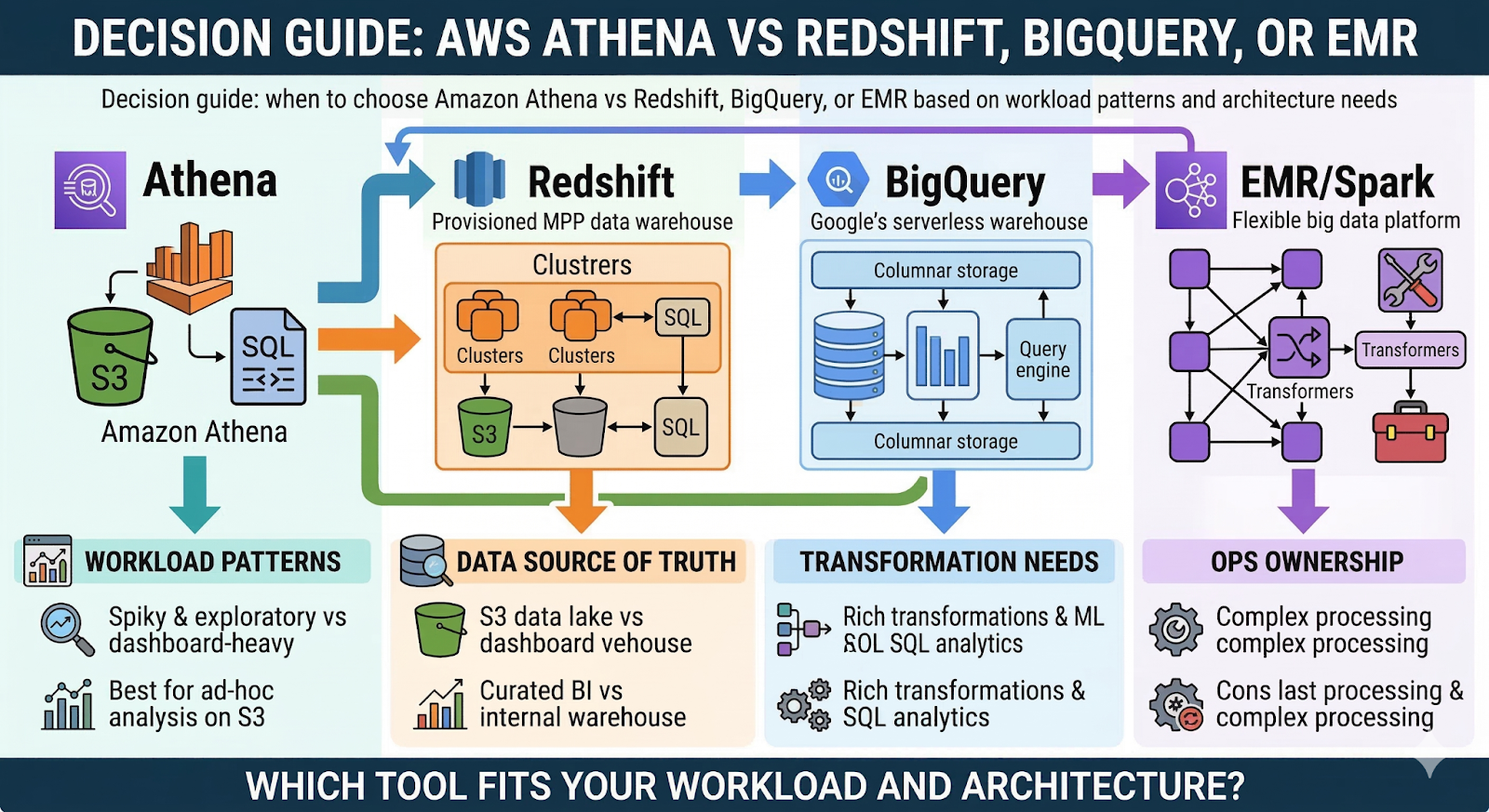
Athena doesn’t exist in a vacuum. When you design an analytics stack, you’ll inevitably compare Athena vs Redshift, Athena vs BigQuery, and Athena vs EMR/Spark. Each tool targets different workload patterns, with distinct trade‑offs in performance, flexibility, and operational overhead.
At a high level:
- Athena – Serverless, pay‑per‑TB query engine on top of S3. Great for ad‑hoc analysis, logs, and lake‑first architectures.
- Redshift – Provisioned MPP data warehouse with local storage, strong for high‑performance BI on curated schemas.
- BigQuery – Google’s serverless/managed warehouse with deep integration into GCP and columnar storage under the hood.
- EMR/Spark – Flexible big data platform for complex transformations, ML, and custom processing at large scale.
Key questions to ask:
- Are workloads spiky and exploratory, or steady and dashboard‑heavy?
- Is your “source of truth” S3 data lake or internal warehouse tables?
- Do you need rich transformations and ML, or mainly SQL analytics?
- How much ops ownership is your team willing to take on?
Comparing Athena With Amazon Redshift for Warehouse-Style Workloads
For warehouse‑style workloads in AWS, the core trade‑off is Athena vs Redshift.
Athena:
- Serverless: No clusters, pay per TB scanned.
- External storage: Reads directly from S3; no data loading step.
- Best for: Ad‑hoc queries, exploratory analysis, log analytics, and lakehouse patterns.
Redshift:
- Provisioned (or serverless-with-reservation): You configure RA3 nodes or use Redshift Serverless with capacity settings.
- Managed storage: Data is loaded into Redshift tables, optimized for MPP execution.
- Best for: High‑concurrency BI, complex joins, and performance‑sensitive dashboards on curated schemas.
In practice, many teams use Athena as the lake query engine and Redshift as the curated warehouse. Raw and semi‑structured data stay on S3; high‑value, modeled data is loaded into Redshift for predictable BI workloads. A modeling layer like OWOX Data Marts can sit in front of either engine.
How Athena’s Serverless Model Contrasts With BigQuery’s Managed Warehouse
Comparing Athena vs BigQuery is really comparing two different philosophies:
Athena:
- Storage: External (S3), fully under your control.
- Compute: Serverless query engine; you pay per TB scanned.
- Metadata: Glue Data Catalog and AWS ecosystem.
- Sweet spot: Teams already committed to AWS and S3 data lakes.
BigQuery:
- Storage: Managed, columnar storage integrated with BigQuery.
- Compute: Serverless but with more warehouse‑like features (slots, reservations).
- Metadata & ecosystem: Native to GCP with strong ML and streaming integrations.
- Sweet spot: GCP‑centric stacks and teams favoring a warehouse‑first design.
Both are “serverless SQL on cloud storage”, but BigQuery is closer to a full‑fledged warehouse, whereas Athena is explicitly a query engine on your own S3 lake. Your choice usually follows your cloud provider and how strongly you want to control storage and formats.
Where EMR and Spark Make More Sense Than Athena
Athena is not a replacement for EMR/Spark. If you need:
- Heavy batch transformations over petabyte‑scale datasets.
- Complex ML pipelines, feature engineering, and iterative model training.
- Custom stream processing or non‑SQL processing (Scala, Python, R).
- Fine‑grained control over runtime, libraries, and execution environment.
Then EMR or managed Spark platforms are the better fit. Use EMR/Spark when:
- You’re building ETL pipelines that reshape data at scale (e.g., aggregations, joins, feature generation).
- You need reproducible computation graphs and long‑running jobs.
- You want to integrate closely with ML frameworks, notebooks, or data science workflows.
In many stacks, EMR/Spark prepares data into Parquet/ORC on S3, and Athena then serves it for interactive SQL and BI.
Decision Guidelines for Choosing Athena in Your Architecture
Use Athena as a primary query engine when:
- S3 is already your main data lake and system of record.
- Workloads are exploratory, bursty, or log‑heavy, not constant dashboard refreshes.
- You want minimal ops and are comfortable pushing modeling and governance to other layers.
- You’re an early‑stage and don’t want to commit to a heavy warehouse yet.
Favor Redshift or BigQuery when:
- You run many concurrent dashboards and scheduled reports.
- You need strong performance guarantees on curated schemas.
- Your analysts prefer stable, warehouse‑style semantics and features.
Bring in EMR/Spark when transformations and ML are too complex or too large for SQL alone.
Across all scenarios, think of Athena as the serverless SQL face of your S3 lake. Pair it with a robust modeling and data mart layer – whether homegrown or managed like OWOX Data Marts – to turn that raw flexibility into reliable, governed analytics.
From Athena Queries to Reusable Analytics: What Comes Next
Athena gives you the ability to query S3 with SQL. That’s powerful – but on its own, it doesn’t give you trusted KPIs, governed data marts, or a shared understanding of metrics across teams. To move from clever queries to reliable analytics, you need to layer additional capabilities on top of Athena and your S3 data lake.
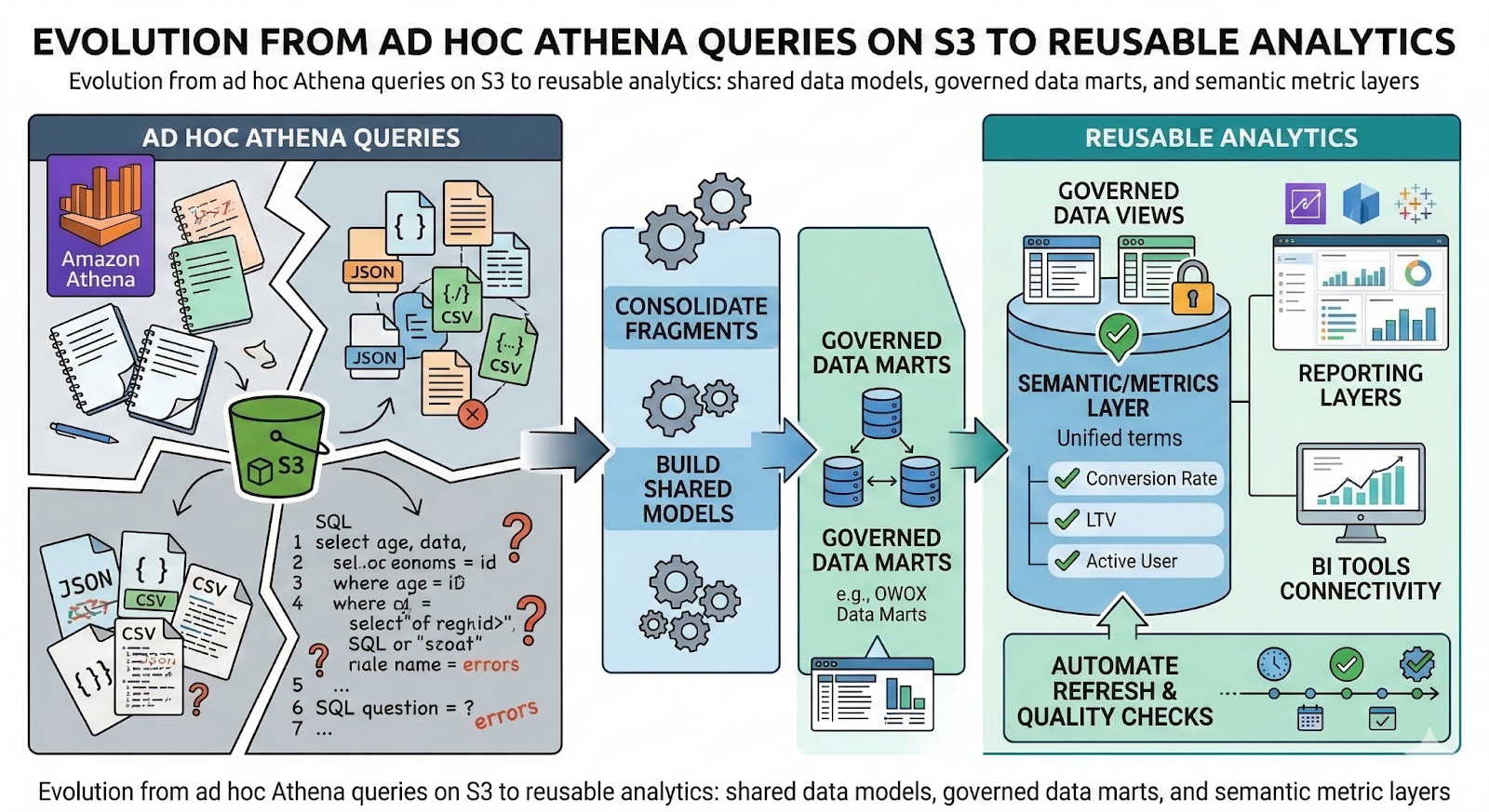
A typical evolution looks like this:
- Start with ad hoc Athena queries for discovery and debugging.
- Identify recurring questions and brittle SQL fragments scattered across notebooks and BI tools.
- Consolidate logic into shared models and data marts that Athena (and other engines) can query.
- Define a semantic/metrics layer so “conversion rate”, “LTV”, or “active user” mean the same thing everywhere.
- Expose these governed views through reporting layers and BI tools, with access control and documentation.
- Automate refresh, quality checks, and lineage, so stakeholders trust the data over time.
That’s where solutions like OWOX Data Marts come in: providing an opinionated, governed analytics layer on top of objects and tables, while Athena continues to play the role of serverless compute. You can explore that approach here: OWOX Data Mart.
Why Querying S3 Data Is Only the First Step Toward Reliable Reporting
Raw Athena queries are great for exploration, but problematic as a long‑term reporting strategy. If every analyst:
- Writes their own joins from events, marketing, and CRM tables.
- Implements their own filters (e.g., “exclude test traffic”, “only paying users”).
- Rebuilds the same aggregations in dashboards and notebooks.
You end up with inconsistent numbers and fragile dashboards. Two teams may both use Athena and S3, yet report different “revenue” or “active users” for the same date range.
Other challenges:
- Maintainability: Nobody wants to debug a 400‑line SQL query embedded in a BI tool.
- Change management: A schema change in S3 can silently break dozens of reports.
- Onboarding: New analysts spend weeks reverse‑engineering existing queries instead of delivering insights.
Athena solves the access problem (“Can I query the data?”), but not the consistency problem, “Are we all using the same definitions?”.
The Need for Reusable Metrics, Governed Data Marts, and Shared Definitions
To move beyond one‑off results, you need reusable metrics with Athena and other engines:
- Reusable metrics
Central definitions for KPIs like revenue, LTV, churn, and MAU/DAU, ideally versioned and documented. - Governed data marts
Stable, business‑friendly tables and views (e.g., fact_events, fact_revenue, dim_campaigns) that abstract away raw S3 complexity and Glue schemas. - Shared semantic layer
Relationships between tables, standard dimensions (time, geography, product), and metric logic are expressed once and reused everywhere. - Access and governance
Clear rules around who can query raw vs curated data, and what level of detail (e.g., user‑level vs aggregated).
Implementing this manually is possible, but often painful. A governed data mart layer like OWOX Data Marts gives you an opinionated structure on top of S3 and Athena, so every report and tool builds on the same metrics and dimensions instead of inventing its own.
How a Dedicated Reporting Layer Turns Athena Into a Foundation for BI and AI
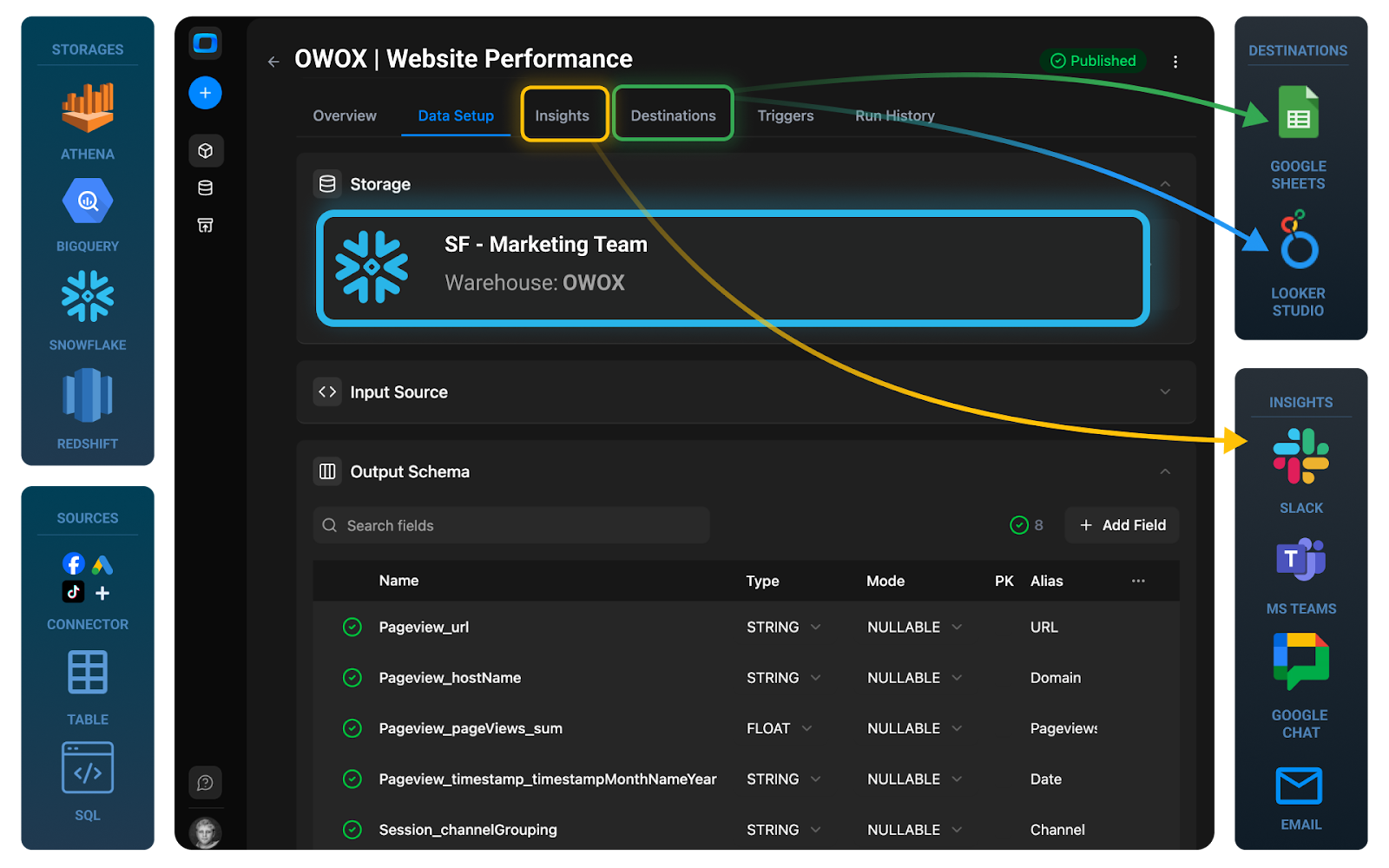
Once you have governed data marts and metrics, you need a reporting layer that:
- Exposes curated tables to BI tools and notebooks as the default entry point.
- Automates refresh schedules, dependencies, and quality checks.
- Tracks lineage from S3 objects to Athena queries to dashboards.
- Provides documented datasets so analysts understand how to use them.
With that in place, Athena becomes a foundation for BI and AI:
- BI tools (QuickSight, Tableau, Power BI, Looker, Metabase) query curated views instead of raw S3 tables.
- Data scientists can trust that feature tables and training sets derived from data marts use the same business logic as reporting.
- Engineering can evolve the underlying S3 layout, partitions, and ETL with less impact on end users.
A solution like OWOX Data Marts helps automate this bridge: turning Athena‑accessible data into stable, governed entities that downstream tools can safely rely on.
Frequently asked questions




"AI by its nature will hallucinate. You need guardrails so you can trust your data."
"We had six or seven different channels and no single source of truth. It was almost impossible"
"We regained time. And time is the one resource that never comes back."