What is Snowflake? A beginner's guide to the cloud data warehouse
Snowflake is a cloud data warehouse that stores data once and lets any number of independent compute clusters, called virtual warehouses, query it. You pay for storage by the terabyte and for compute by the second. This guide covers how it is built, the objects you work with, how data gets in, and what you still need on top of it to report.

Snowflake is a data warehouse that runs entirely in the cloud. You do not install it or size a server for it. You create an account on AWS, Azure or Google Cloud, load data, and query it with SQL.
What made it different, and what still explains most of how it behaves, is one design decision: storage and compute are separate. Data is stored once. Compute is rented by the second, in as many independent clusters as you need, and switched off when nobody is asking a question. This guide explains what that means in practice, with the SQL to try it.
What Snowflake is, in plain terms
What Snowflake is, in plain terms
A data warehouse is a database built for analysis: large tables, many rows read at once, questions like “revenue by channel by month” instead of “fetch order 1042”. Snowflake is one of those, delivered as a service.
Three things describe it to someone who has never used it:
- It speaks SQL. Tables, views, joins, window functions. If you can write a query, you can use it.
- It is fully managed. There are no servers to patch, no indexes to rebuild, no storage to provision.
- It bills by use. Storage per terabyte per month, compute per second while a cluster runs. Snowflake pricing has the rates and a worked bill.
How Snowflake is built: three layers
How Snowflake is built: three layers
Snowflake’s architecture is usually drawn as three layers, and each one maps to something you will see on a bill or in the interface.
Storage. Your tables are stored in a compressed, columnar format in the cloud provider’s object storage, organised into small units Snowflake calls micro-partitions. You never manage files. You pay for the compressed volume.
Compute. Queries run on virtual warehouses: clusters you create, name and size from X-Small upward. A warehouse reads from storage, does the work and returns the result. Several warehouses can read the same table at the same moment without slowing each other down, which is how one team’s heavy job stops being another team’s slow dashboard.
Cloud services. The coordinating layer: logins, access control, query planning, metadata. It is what lets a suspended warehouse wake up on the next query without anyone starting it.
Because the layers are independent, they scale independently. Ten times the data does not need ten times the compute, and a second team does not need a second copy of the data.
OWOX Data Marts
See your first report built in real time. 15 minutes.
- Connect your data warehouse
- Pick your metrics
- Get a live Google Sheets report
In the time it takes to write a ticket. Then imagine never writing that ticket again.
Book a DemoWe'll use your actual use case
The objects you will meet
Everything in Snowflake lives in a simple hierarchy, and most confusion in the first week comes from mixing up two of its words: a database holds data, a warehouse runs queries.
- Account: your Snowflake environment in one cloud region.
- Database: a container for schemas, for example
analytics. - Schema: a container for tables and views inside a database, for example
analytics.marts. - Table and view: where data is, and saved queries over it.
- Virtual warehouse: compute. Not a place where data lives.
- Role: what a user is allowed to see and do. Privileges are granted to roles, and roles to users.
Creating the basics takes a few statements:
CREATE WAREHOUSE reporting_wh
  WAREHOUSE_SIZE = 'XSMALL'
  AUTO_SUSPEND = 60
  AUTO_RESUME = TRUE;

CREATE DATABASE analytics;
CREATE SCHEMA analytics.marts;
AUTO_SUSPEND = 60 stops the warehouse after a minute with no queries, and AUTO_RESUME restarts it on the next one. Those two settings are the difference between paying for the work and paying for the day.
Getting data in
Snowflake does not collect data for you. Something has to put it there, and there are three common routes.
Bulk loading from files. Files are placed in a stage (a location in cloud storage that Snowflake can read) and loaded with COPY INTO:
COPY INTO analytics.raw.orders
FROM @my_stage/orders/
FILE_FORMAT = (TYPE = 'CSV' SKIP_HEADER = 1);
Continuous loading. Snowpipe loads files as they arrive, without a warehouse you manage, and is billed per gigabyte loaded.
Connectors. For data that lives in other platforms, a connector calls the platform’s API on a schedule and writes the result into Snowflake tables. These are the guides for the sources marketing and e-commerce teams ask about most: Facebook Ads, Google Ads, Microsoft Ads, LinkedIn Ads, TikTok Ads, Reddit Ads and Shopify.
Snowflake also stores semi-structured data. JSON can be loaded into a VARIANT column and queried with path notation, so an API response does not have to be flattened before it is useful.
Querying: SQL you can start with
Querying: SQL you can start with
The examples below run on a small e-commerce dataset: sessions, orders, customers and products in ecommerce.public. Each was validated on Snowflake before publication.
Revenue by month
SELECT
  DATE_TRUNC('month', o.order_date) AS month,
  COUNT(DISTINCT o.order_id) AS orders,
  SUM(p.price * o.quantity) AS revenue
FROM ecommerce.public.orders o
JOIN ecommerce.public.products p
  ON o.product_id = p.product_id
GROUP BY month
ORDER BY month;
Snowflake lets you group by a column alias, which keeps queries like this short.
Sessions, orders and revenue by channel
SELECT
  s.source_medium,
  COUNT(DISTINCT s.session_id) AS sessions,
  COUNT(DISTINCT o.order_id) AS orders,
  SUM(p.price * o.quantity) AS revenue
FROM ecommerce.public.sessions s
LEFT JOIN ecommerce.public.orders o
  ON s.session_id = o.session_id
LEFT JOIN ecommerce.public.products p
  ON o.product_id = p.product_id
WHERE s.date >=
  DATEADD(day, -30, CURRENT_DATE())
GROUP BY s.source_medium
ORDER BY revenue DESC;
Top three products per category with QUALIFY
SELECT
  p.category,
  p.product_name,
  SUM(p.price * o.quantity) AS revenue
FROM ecommerce.public.orders o
JOIN ecommerce.public.products p
  ON o.product_id = p.product_id
GROUP BY p.category, p.product_name
QUALIFY ROW_NUMBER() OVER (
  PARTITION BY p.category
  ORDER BY SUM(p.price * o.quantity) DESC
) <= 3;
QUALIFY filters on a window function directly. In most other SQL dialects this needs a subquery.
Features that set Snowflake apart
Features that set Snowflake apart
A few capabilities come from the architecture and are worth knowing early, because they change how you work.
Time Travel. Snowflake keeps earlier versions of a table for a retention period, one day by default and up to 90 on Enterprise edition and above. You can query the past, or bring back something dropped by mistake:
SELECT COUNT(*) AS orders_an_hour_ago
FROM ecommerce.public.orders
  AT(OFFSET => -3600);

UNDROP TABLE orders;
Zero-copy cloning. CREATE TABLE orders_dev CLONE orders; makes a full, writable copy of a table, schema or database in seconds without duplicating the storage. Only later changes take space. It is the cheapest test environment you will ever build.
Data sharing. One account can give another read access to live tables with no files exported and nothing copied.
Many warehouses, one copy of the data. Loading, transformation, reporting and ad hoc analysis each get their own warehouse, sized and suspended for what it does.
What Snowflake costs
The bill has three parts: compute in credits, storage per terabyte and data transfer. Compute is almost always the largest and the only one that surprises anyone, because a warehouse bills for every second it is running, whether or not a query is executing.
The full breakdown, with the price of a credit by edition, credits per hour for each warehouse size and the SQL to see your own spend, is in Snowflake pricing explained.
Why teams choose Snowflake, and where it stops
Why teams choose Snowflake, and where it stops
Snowflake became a common first choice for analytics teams for reasons that follow from the design, not from marketing.
- Concurrency without contention. Separate warehouses mean finance’s month-end and marketing’s dashboards do not compete.
- Little to operate. No vacuuming, no index tuning, no capacity planning beyond a warehouse size.
- It starts small. One X-Small warehouse and a few tables is a working setup. The same account scales to a whole company.
- It runs on three clouds. The same product on AWS, Azure and Google Cloud.
It is equally useful to be clear about what Snowflake is not:
- Not a data collection tool. It stores what you load. Getting data out of ad platforms, a CRM or a shop is a separate job.
- Not a reporting tool. It returns rows. Dashboards, spreadsheets and scheduled reports live elsewhere.
- Not a definition of your metrics. Two analysts can compute “revenue” two ways from the same tables, and Snowflake will run both.
If you are still deciding between platforms, Snowflake vs BigQuery compares the two in detail, and what Databricks is covers the lakehouse alternative.
From warehouse to reports people read
From warehouse to reports people read
The gap between “the data is in Snowflake” and “the marketing lead has her numbers on Monday” is where most of the work is. OWOX Data Marts is built for that gap. It does not transform your data. It connects Snowflake as a storage, and everything it does happens on your tables, in your account.
It covers both ends. On the way in, connectors load data from ad platforms and Shopify into Snowflake tables on a schedule.
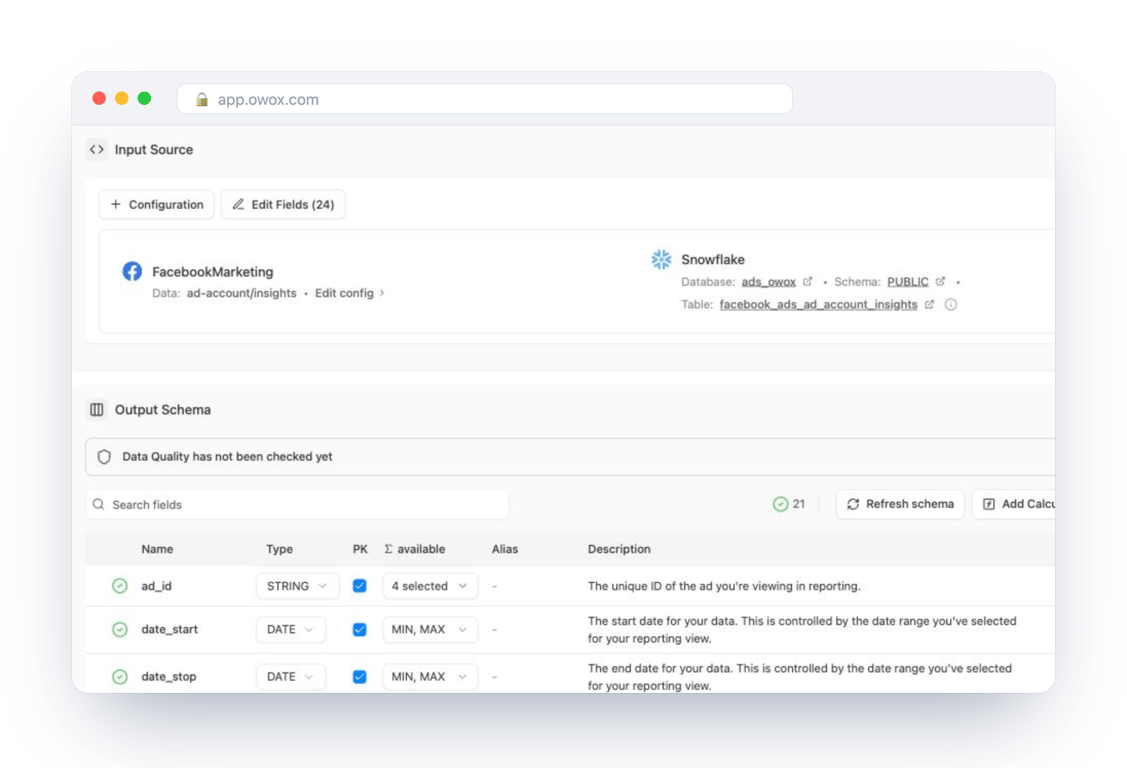
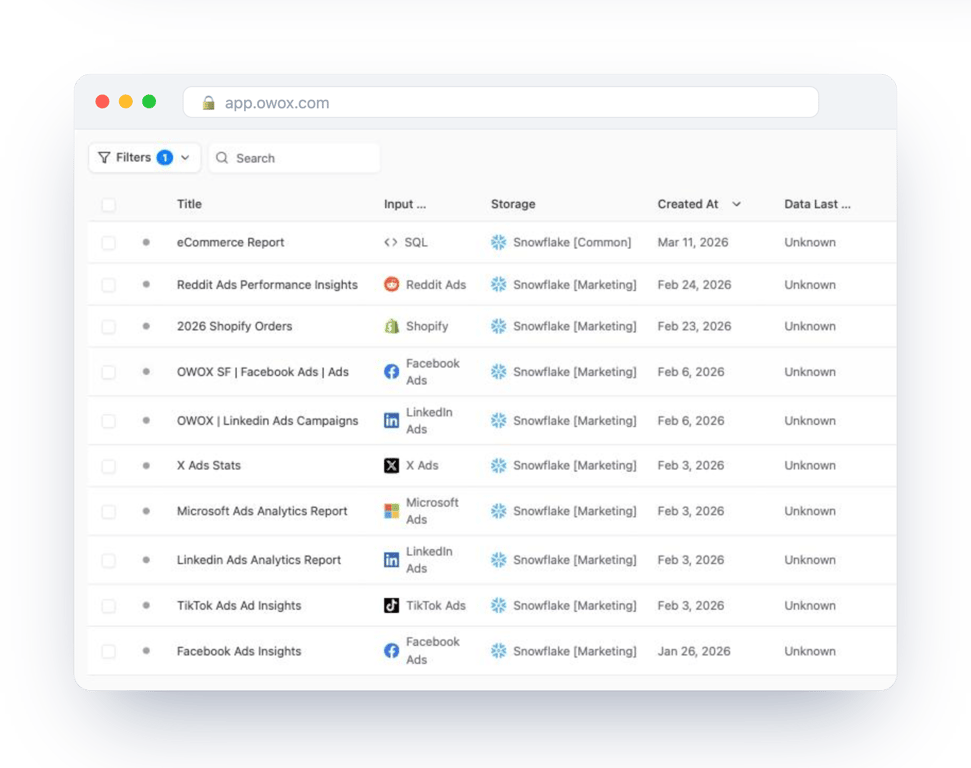
On the way out, an analyst publishes a table, a view or a SQL query as a Data Mart: one named, documented definition that reports are built on.
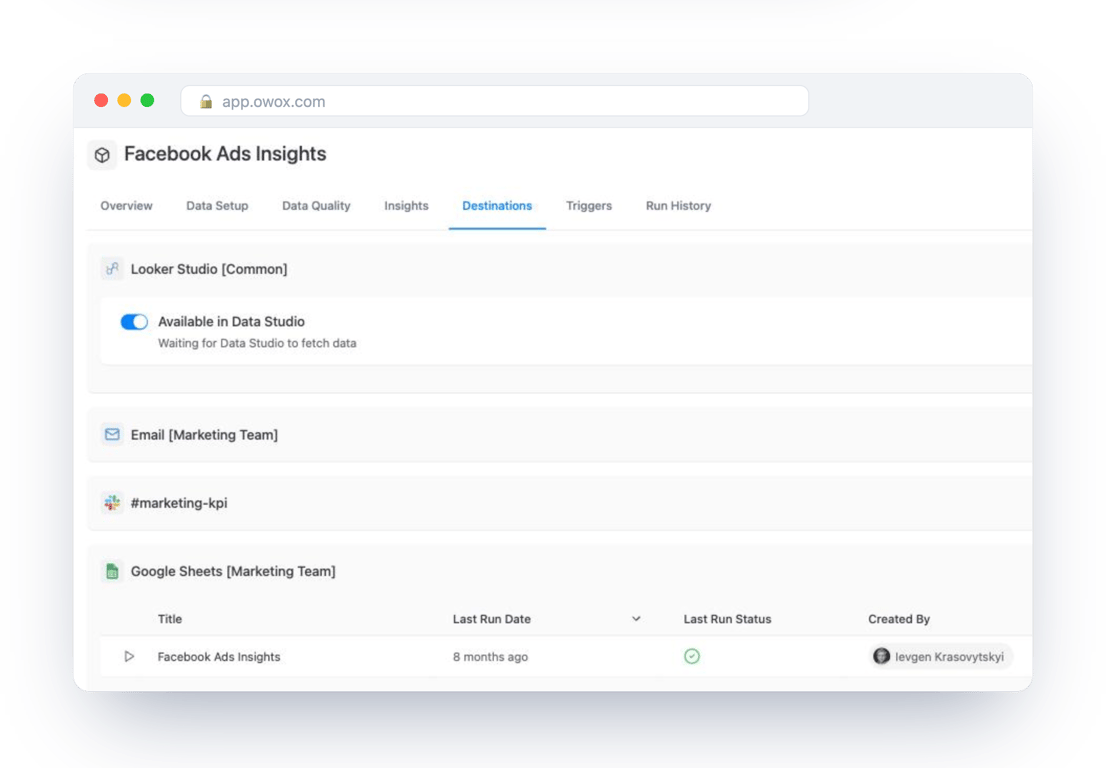
Each Data Mart can be delivered to Google Sheets, Data Studio, Slack or email, on a schedule, without the reader needing a Snowflake login.
Three guides go deeper on this layer: Snowflake as a reusable reporting layer for analysts, self-service marketing analytics on Snowflake for marketing teams, and Snowflake reports in Google Sheets for the spreadsheet side.
Turn your data into decisions.
Governed data marts give you the clean foundation ML needs to actually work.
- No AI hallucinations
- Analyst-governed definitions
- Every number traces to SQL
Frequently Asked Questions
How does OWOX Data Marts work with Snowflake?
OWOX Data Marts connects Snowflake as a storage and works on your own tables. Connectors load data from ad platforms and Shopify into Snowflake on a schedule. An analyst publishes a table, a view or a SQL query as a Data Mart, and reports built on it are delivered to Google Sheets, Data Studio, Slack or email. It does not transform data; the SQL stays the analyst's.
How does Snowflake handle concurrency and performance for multiple teams running queries simultaneously?
Snowflake runs queries on virtual warehouses, which are independent compute clusters. Each team or workload can have its own, so a heavy transformation job does not slow down dashboards, and all of them read the same single copy of the data. A warehouse can also add clusters of the same size when queries start to queue.
Can Snowflake replace ETL tools or BI dashboards on its own?
No, Snowflake is not an ETL or reporting tool. It provides a centralized platform to store and process data, but you still need separate ETL/ELT pipelines to ingest data and BI tools to create dashboards and visualizations. Snowflake works as the foundational data layer that integrates with these other tools.
What role do Data Marts and data modeling play in getting value from Snowflake?
A Data Mart is a table, a view or a query organised around a business question rather than a source system, with agreed definitions. On Snowflake it gives every report one place to read from, so the same metric is not calculated differently in each dashboard, and heavy logic runs once instead of in every tool.
Is Snowflake suitable for small companies or only large technical enterprises?
Snowflake is suitable for both large enterprises and smaller teams. It benefits any organization combining multiple data sources and needing a trusted, scalable analytics foundation. Smaller companies can start with focused use cases like marketing ROI or product funnels and scale their Snowflake environment without requiring large data engineering teams.
How does Snowflake's architecture separate storage and compute, and why is this important?
Snowflake separates where data is stored (storage) from how data is processed (compute). This allows storing vast amounts of data cheaply while independently scaling compute resources to run queries efficiently. It provides flexibility, cost control, concurrent usage by multiple teams, and better performance without data duplication.
Why do businesses and analytics teams use Snowflake for their data needs?
Businesses use Snowflake to centralize data into a single governed source of truth, reducing conflicting reports and speeding up decision-making. Snowflake scales with business growth, supports multiple teams running queries concurrently, and improves reliability and consistency in analytics without manual data merges or spreadsheet errors.
What is Snowflake, and how does it work as a cloud data warehouse?
Snowflake is a cloud-native data warehouse that securely stores, organizes, and analyzes large volumes of data in a single cloud environment. It separates storage and compute, allowing scalable, pay-as-you-go processing without managing hardware or infrastructure, enabling teams to query and analyze data reliably using SQL and BI tools.