Get Facebook Ads Insights Delivered to Slack

Use OWOX Data Marts to turn Facebook Ads data into AI-powered insights delivered directly to Slack. Monitor performance, spot anomalies, and get answers – without opening dashboards.
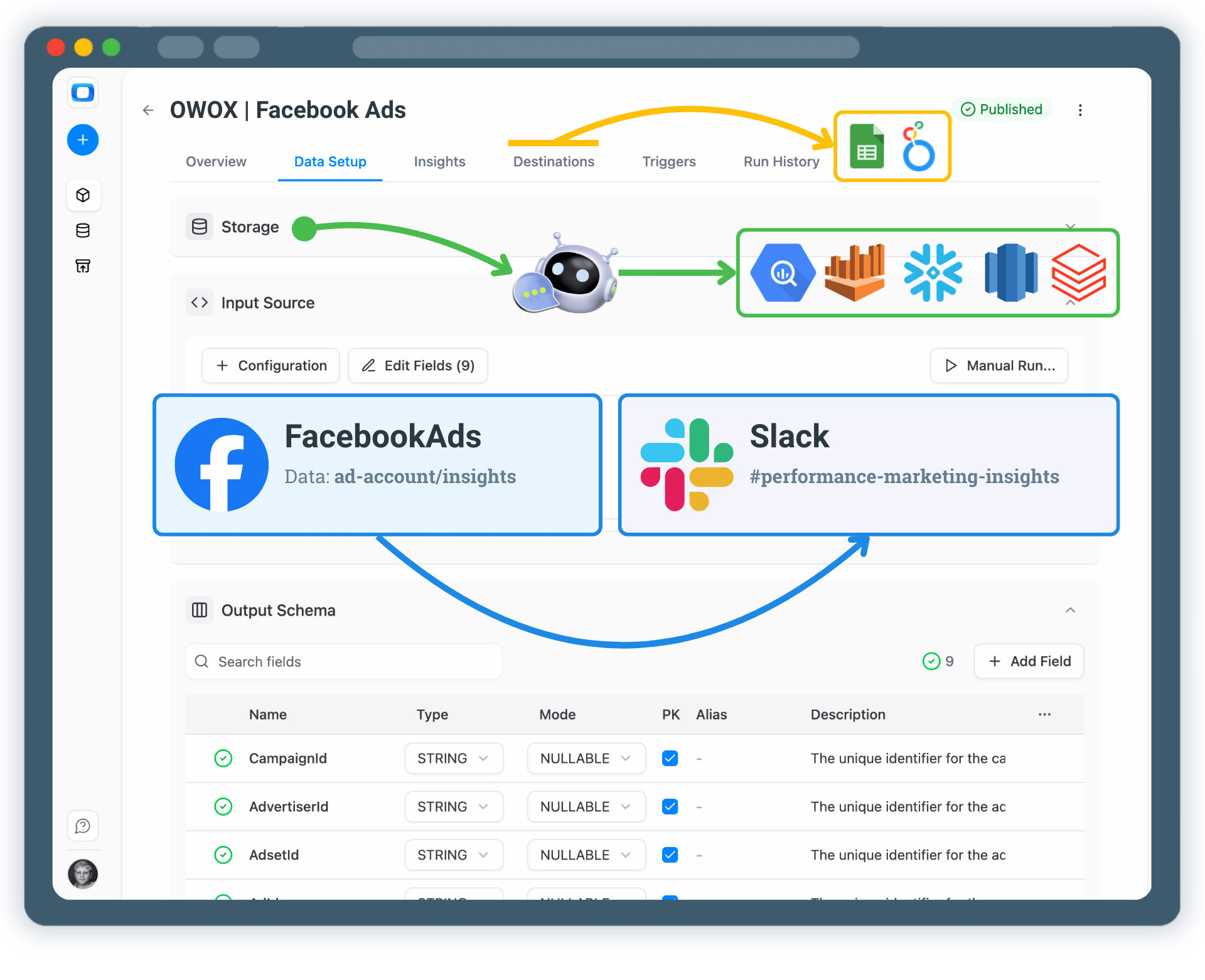
Get Facebook Ads Insights Delivered to Slack

From Facebook Ads Data to Actionable Insights – Automatically

You define what data you collect, how metrics are calculated, and which insights matter – AI delivers them to Slack on your schedule.

Step 1: Collect Facebook Ads Data

Start by collecting raw Facebook Ads data into a data storage using OWOX Data Marts.

  • Choose a data warehouse such as BigQuery, Snowflake or AWS Redshift
  • Collect spend, impressions, clicks, conversions, and campaign structure
  • Keep full ownership and transparency over your ads data

This data becomes the foundation for all future insights (both AI and SQL-based).

Step 1: Collect Facebook Ads Data
Collect Facebook Ads Data
Step 1: Collect Facebook Ads Data
Step 2: Define Metrics & Business Logic

Step 2: Define Metrics & Business Logic

Define how Facebook Ads performance should be calculated and interpreted.

  • Create or reuse a Facebook Ads Data Mart
  • Define metrics like CPA, ROAS, CTR, or custom KPIs
  • Ensure consistent logic across teams and reports

AI Insights rely on trusted, modeled data – not raw tables.

Step 2: Define Metrics & Business Logic
Define Metrics
Request a demo

Step 3: Configure AI Insights

Choose which Facebook Ads insights you want to receive.

  • Daily or weekly performance summaries
  • Spend spikes, drops, or anomalies
  • Campaigns that overperform or underperform expectations
  • Natural-language answers to marketing questions

You control what AI analyzes and how insights are generated.

Step 3: Configure AI Insights
Configure AI Insights
Step 3: Configure AI Insights
Step 4: Deliver Insights to Slack

Step 4: Deliver Insights to Slack

Send Facebook Ads insights directly to your corporate Slack.

  • Choose Slack channels or direct message emails
  • Schedule automated delivery or receive alerts in real time
  • Keep teams aligned without opening dashboards

Insights arrive into where decisions are made.

Step 4: Deliver Insights to Slack
Connect Slack
Request a demo

Step 5: Go Beyond Alerts & Summaries

Your Facebook Ads insights don’t have to live only in Slack.

  • Reuse the same data mart in Google Sheets or Looker Studio
  • Blend Facebook Ads data with GA4, CRM, or revenue data
  • Extend AI Insights delivery to Email for broader stakeholder access

One trusted data mart – multiple insight destinations.

Step 5: Go Beyond Alerts & Summaries
Explore More Use Cases
Step 5: Go Beyond Alerts & Summaries

Turn Facebook Ads Data into Daily Decisions

Schedule a quick walkthrough to see how OWOX Data Marts helps you:

  • Get Facebook Ads Insights Delivered to Slack
  • Deliver trusted insights to business teams
  • Reduce reporting chaos & manual work
  • Scale analytics without adding complexity
Also, on this call, you’ll learn how data teams utilize AI Insights to always deliver what matters the most
Turn Facebook Ads Data into Daily Decisions