How to load Google Ads data into Snowflake with OWOX Data Marts
To get Google Ads data into Snowflake, create a connector Data Mart, enter the customer ID of the ad account, sign in with Google, choose a stats endpoint and publish. The connector writes one table per endpoint into your Snowflake account and refreshes it on a schedule. Cost arrives in micros, and the date arrives as text.

Google Ads reports are good at Google Ads. They stop being enough when the question crosses a boundary: paid search next to paid social, cost next to orders from your own database, this year’s keywords next to last year’s. Those questions are joins, and joins happen in the warehouse.
This guide loads Google Ads data into Snowflake with the Google Ads connector in OWOX Data Marts. It covers the setup, the manager-account rule that breaks most first runs, what the tables look like, and the SQL to start with.
What you end up with
One table per endpoint in your own Snowflake account. For performance reporting that is usually google_ads_campaigns_stats: one row per campaign per day, with impressions, clicks, cost and conversions.
The connector calls the Google Ads API, writes the result into the table and repeats on a schedule. It does not model or reshape the data. The reporting logic on top is SQL you write and own.
Before you start
In Google Ads. The customer ID of the ad account you want data from. It is shown in the top right corner of the Google Ads interface when that account is open. If you reach the account through a manager account, you also need the manager account’s ID.
In Snowflake. A storage of type Snowflake connected to your project, as described in the storage guide: account identifier, warehouse, and a key pair or a username with a programmatic access token. The role must be able to create a database, a schema and tables, because the connector creates them on the first run if they do not exist.
A small dedicated warehouse with auto-suspend is enough for a daily load. Snowflake pricing explained shows what that costs.
OWOX Data Marts
See your first report built in real time. 15 minutes.
- Connect your data warehouse
- Pick your metrics
- Get a live Google Sheets report
In the time it takes to write a ticket. Then imagine never writing that ticket again.
Book a DemoWe'll use your actual use case
Step 1: create the Data Mart
Click New Data Mart, enter a title such as “Google Ads Campaign Stats”, select the Snowflake storage and click Create Data Mart. On the Data Setup tab, set Definition Type to Connector and choose Google Ads.
Step 2: enter the account and sign in
Step 2: enter the account and sign in
The form has two ID fields, and they are where most first runs go wrong.
- Customer ID is the account the data comes from. For any stats endpoint it must be an ad account, not a manager account. Performance data cannot be read from a manager account itself.
- Login Customer ID is the manager account you sign in through. Fill it in only if you access the ad account through a manager account, and leave it empty if you sign in directly. It must not be the same as the customer ID.
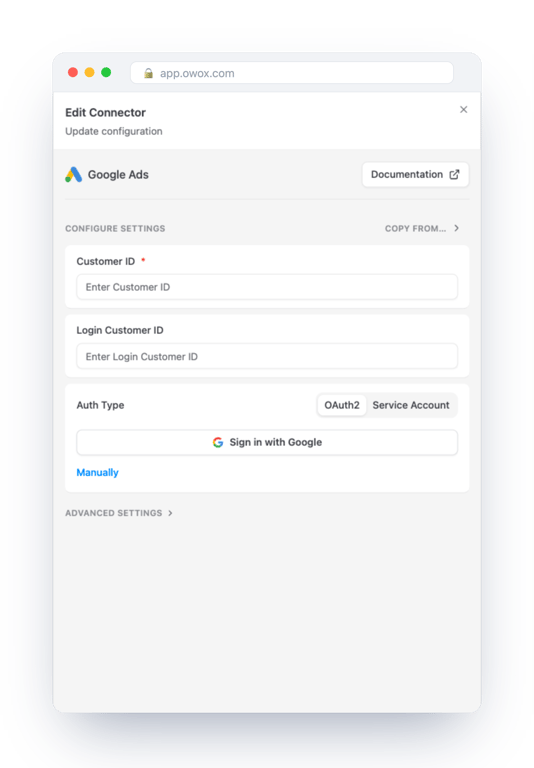
Then choose how to authenticate.
Sign in with Google is the short way. Pick the Google account that has access to the ad account and grant access. The form then shows which account is connected.
Manually is for your own credentials: a refresh token, a client ID and a client secret from a Google Cloud OAuth client, plus a developer token from the API Center of a manager account. Service Account takes a service account key and a developer token. A new developer token only works with test accounts until Google grants it Basic Access, which the credentials guide explains. With the sign-in button, none of that is needed.
Step 3: choose the endpoint and the fields
Step 3: choose the endpoint and the fields
Each Data Mart loads one endpoint. They come in two kinds.
Stats endpoints hold daily performance, one row per object per day:
- Campaigns Stats, keyed by campaign and date.
- Ad Groups Stats, keyed by ad group and date.
- Ad Group Ads Stats, keyed by ad and date.
- Keywords Stats, keyed by keyword and date, with quality score.
- Geo Stats, by campaign, country and date.
Settings endpoints hold the current state of objects, without dates:
- Campaigns and Ad Groups: names, statuses, channel type, bidding strategy, budget.
- Criterion: keywords, placements and negative exclusions with their bids.
- Geo Target Constants: the reference table that turns the country ID in Geo Stats into a name.
Start with Campaigns Stats. Add a second Data Mart for Campaigns when you want to report by channel type or bidding strategy, and join the two on campaign_id.
Then select fields. The keys are always included. For the rest, take what you will report on. Fields can be added later, and the connector adds the columns.
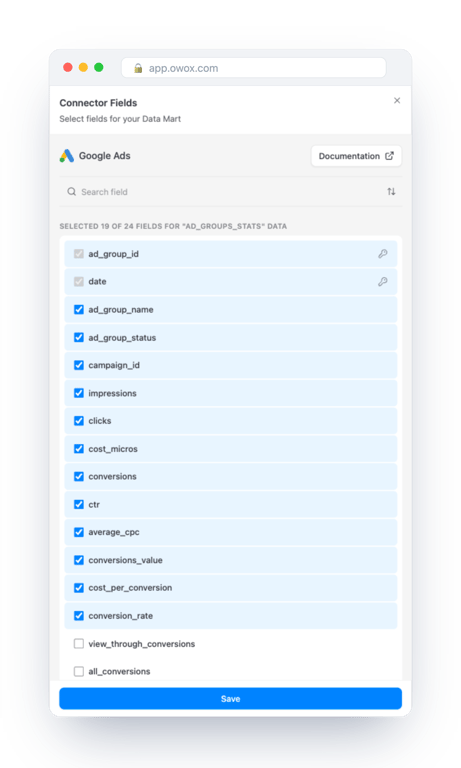
The last screen asks for the database, schema and table. The setup proposes a database named after the source, the schema PUBLIC and a table named after the endpoint.
Step 4: publish and run
Click Publish & Run Data Mart. Publishing starts the first import. When it finishes, the Data Setup tab shows the Google Ads source, the Snowflake table it writes to and the columns with their types.
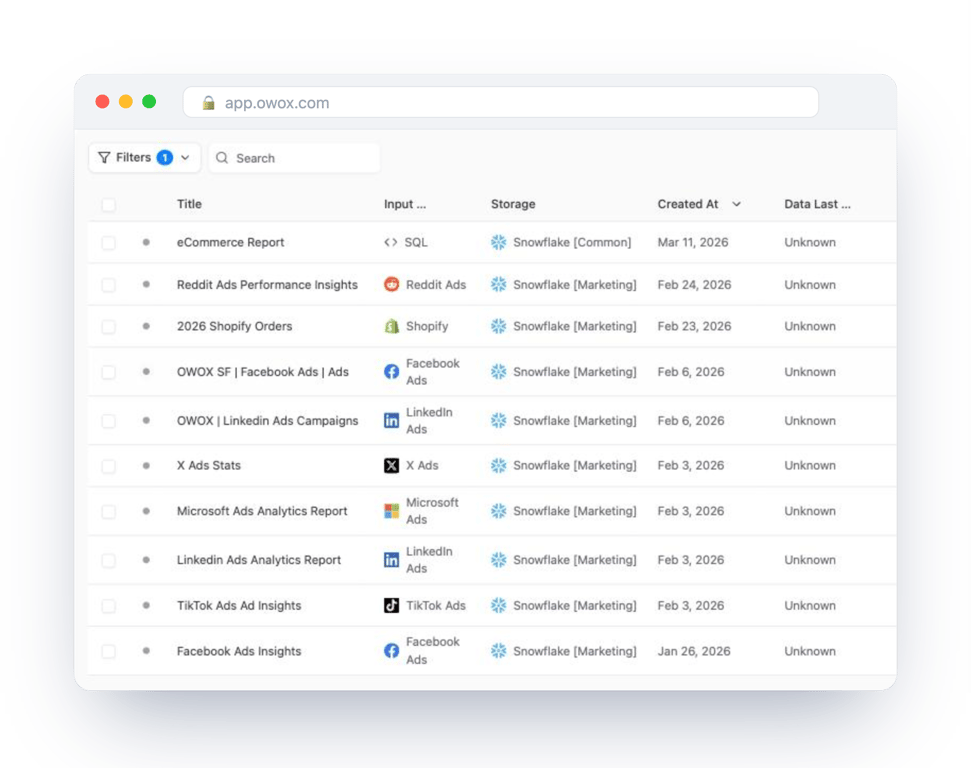
In the Data Mart list, a connector Data Mart sits next to every other source loaded into the same storage.
Step 5: load history and set the schedule
Step 5: load history and set the schedule
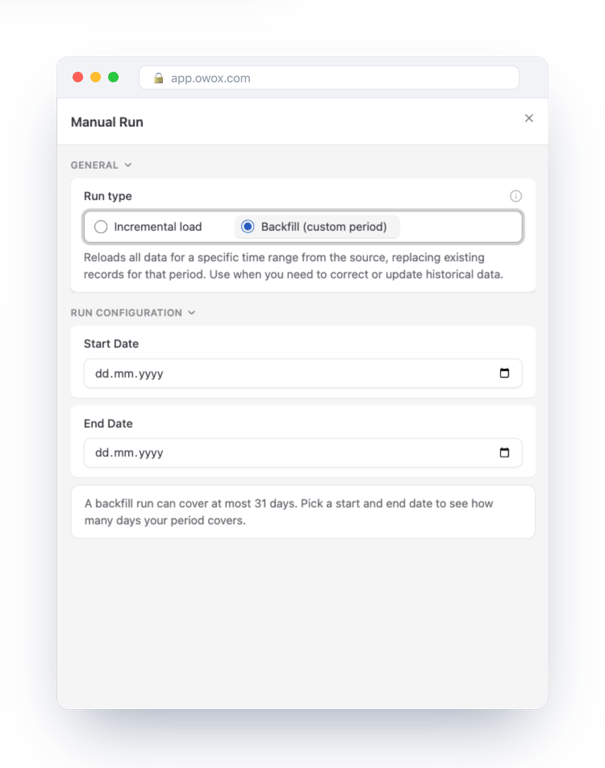
History. Click Manual Run and choose Backfill (custom period). One backfill run covers at most 31 days. For a longer history, run consecutive periods, each after the previous one has finished.
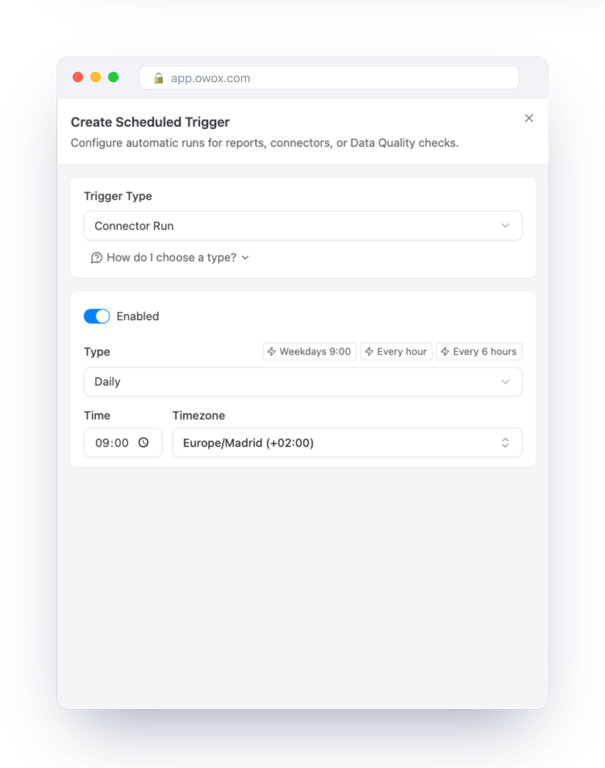
Schedule. A Data Mart without a trigger does not run again. On the Triggers tab, add a trigger of type Connector Run: daily, weekly, monthly or at an interval, in the time zone you choose.
Scheduled runs are incremental. Each one starts from the last loaded date minus the Reimport Lookback Window, two days by default, and rewrites those days. Google Ads keeps adjusting recent conversions, so if your conversion window is long, raise the lookback in the advanced settings. Rows are merged on the keys, so a re-imported day replaces the old one.
What the tables look like in Snowflake
What the tables look like in Snowflake
Three details decide whether your first query works.
Names are case-sensitive. The connector creates the schema, table and column names quoted. In Snowflake that makes them case-sensitive, and an unquoted name is read as upper case. google_ads_owox.public.google_ads_campaigns_stats fails with “does not exist or not authorized”. google_ads_owox."PUBLIC"."google_ads_campaigns_stats" works. The database name is not quoted; everything below it is, including each column.
Cost is in micros. cost_micros is the cost multiplied by one million, in the account’s currency. Divide by 1,000,000. The same applies to budget and bid fields ending in _micros.
The date is text. The date column holds the day as a string in YYYY-MM-DD form. Wrap it in TO_DATE when you filter or group by it.
Query the data
Both queries use the column names and types the connector creates on Snowflake. Their syntax was checked on Snowflake.
Cost, clicks and conversions by campaign and day, for the last 30 days:
SELECT
  TO_DATE("date") AS date,
  "campaign_name" AS campaign,
  SUM("impressions") AS impressions,
  SUM("clicks") AS clicks,
  SUM("cost_micros") / 1000000 AS cost,
  SUM("conversions") AS conversions
FROM google_ads_owox."PUBLIC"."google_ads_campaigns_stats"
WHERE TO_DATE("date") >=
  DATEADD(day, -30, CURRENT_DATE())
GROUP BY TO_DATE("date"), "campaign_name"
ORDER BY date, cost DESC;
The same numbers by channel type, joining the stats table to the campaign settings:
SELECT
  TO_DATE(s."date") AS date,
  c."campaign_advertising_channel_type"
    AS channel_type,
  SUM(s."clicks") AS clicks,
  SUM(s."cost_micros") / 1000000 AS cost,
  SUM(s."conversions") AS conversions,
  SUM(s."cost_micros") / 1000000
    / NULLIF(SUM(s."conversions"), 0)
    AS cost_per_conversion
FROM google_ads_owox."PUBLIC"."google_ads_campaigns_stats" s
LEFT JOIN google_ads_owox."PUBLIC"."google_ads_campaigns" c
  ON s."campaign_id" = c."campaign_id"
GROUP BY
  TO_DATE(s."date"),
  c."campaign_advertising_channel_type"
ORDER BY date, cost DESC;
Compute ratios from sums. Averaging the ctr or average_cpc column across rows gives a small campaign the same weight as a large one.
A view over these tables is the right place to do the renaming and the division once, so that nobody downstream meets micros or quoted names. Snowflake as a reusable reporting layer shows how to structure that.
From table to report
A connector Data Mart can be reported from as it is. On its Destinations tab you attach reports to Google Sheets, Data Studio, Slack or email, each with its own columns and schedule. Snowflake reports in Google Sheets walks through that.
For a report with cost in currency and campaigns grouped your way, publish your own query as a second Data Mart and report from that one. To put Google Ads next to the other channels in one table, see self-service marketing analytics on Snowflake.
When the first run fails
Run History shows the error the API returned. With Google Ads it is nearly always one of these.
- A stats endpoint on a manager account. The customer ID is the manager account. Replace it with the ad account’s ID and put the manager ID in Login Customer ID.
- The same ID in both fields. Login Customer ID must differ from Customer ID. If you sign in directly to the ad account, leave it empty.
- No access. The Google account you signed in with cannot open that ad account.
- Developer token without Basic Access. Only with manual or service account credentials. The token works on test accounts until Google approves it.
Where to go next
The same setup loads the other sources into the same Snowflake account: Facebook Ads, Microsoft Ads, LinkedIn Ads, TikTok Ads, Reddit Ads and Shopify.
On Databricks the steps are the same and the table names have three parts: see Google Ads to Databricks. For the platform itself, start with what Snowflake is and how it works.
Turn your data into decisions.
Governed data marts give you the clean foundation ML needs to actually work.
- No AI hallucinations
- Analyst-governed definitions
- Every number traces to SQL
Frequently Asked Questions
How do I deliver Google Ads data from Snowflake to business users?
On the Data Mart's Destinations tab, create reports to Google Sheets, Data Studio, Slack or email, each with its own columns and schedule. Business users can also pull a published Data Mart themselves with the OWOX Data Marts extension for Google Sheets, choosing columns and filters without SQL or a Snowflake login.
How can I combine Google Ads with other ad platforms in Snowflake?
Load each platform with its own connector Data Mart so every table is in the same Snowflake account. Then write one query that selects date, channel, impressions, clicks and cost from each table and combines them with UNION ALL, converting Google Ads cost from micros. Publish that query as a Data Mart so every report reads the same definition.
Why is Google Ads cost so large in the Snowflake table?
The cost_micros column holds cost multiplied by one million, in the account's currency, as the Google Ads API returns it. Divide it by 1,000,000 in your query. The date column is stored as text, so wrap it in to_date when filtering or grouping. A view or a SQL Data Mart over the table is a good place to do both once.
How do I keep Google Ads data fresh in Snowflake?
Add a Connector Run trigger on the Data Mart's Triggers tab: daily, weekly, monthly or at an interval. Each scheduled run is incremental and re-imports the last days set by the Reimport Lookback Window, two days by default, so conversions that Google Ads adjusts after the fact are updated. Rows are merged on the keys, so a re-imported day replaces the earlier version.
What do I need before connecting Google Ads to Snowflake?
Your store address, permission to create and install an app in the store, and an Admin API access token issued for that app with read scopes. In Snowflake you need a connected storage with an account identifier, a warehouse and a key pair or a username with a programmatic access token, on a role that can create a database, schema and tables.
Why does my Google Ads stats endpoint return an error for a manager account?
Performance data cannot be read from a manager account itself. For any stats endpoint the Customer ID must be an ad account. Put the manager account's ID in Login Customer ID, and only when you access the ad account through it. The two IDs must be different, and Login Customer ID stays empty if you sign in directly to the ad account.
How do I load Google Ads data into Snowflake?
Create a Data Mart in OWOX Data Marts on your Snowflake storage, set its definition type to Connector and choose Google Ads. Enter the customer ID of the ad account, sign in with Google, pick an endpoint such as Campaigns Stats and the fields you need, then publish. The connector creates the table in your Snowflake account and loads it, and a Connector Run trigger repeats the load on a schedule.