AI Dashboards
Ask Claude or ChatGPT what's going wrong. Get the answer as a dashboard
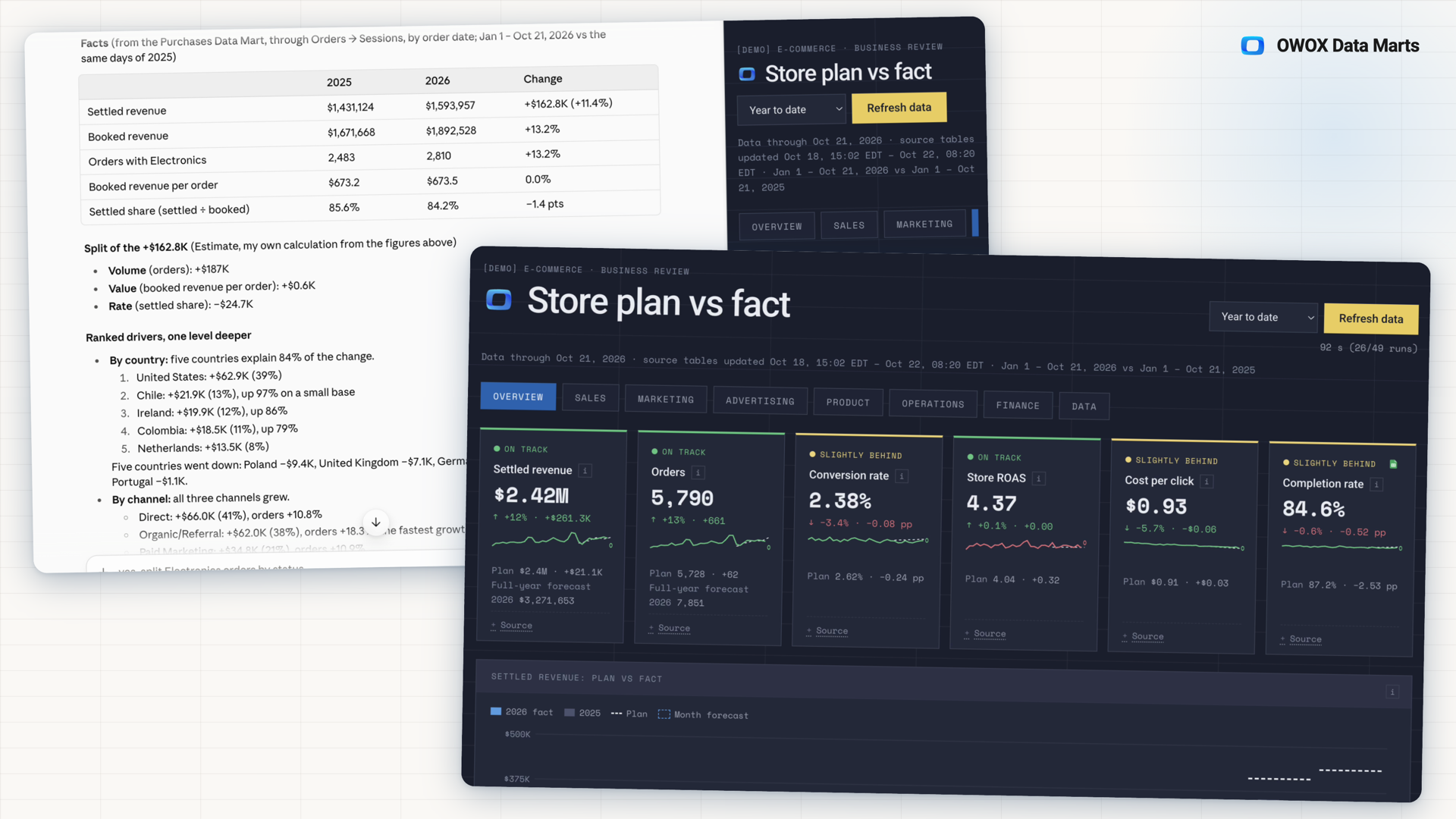
Connect your AI assistant to OWOX, and it answers from your Data Marts, with your business context and metric logic, not guessed numbers. Ask "Am I behind plan this year, and why?" and request the answer as a dashboard that shows what is going wrong. The OWOX dashboard skill for Claude does the prompting for you and highlights what is dropping or growing, and why. Documentation
Why OWOX
When you ask Claude or ChatGPT why you are behind plan, an assistant reading raw tables guesses which numbers to use, and every new dashboard guesses again. With AI Dashboards, Claude or ChatGPT answers from the Data Marts your team already set up, as a dashboard that shows what is going wrong.
- Numbers are read through OWOX, calculated the way your team defined each metric, with your business context, not guessed.
- The free OWOX dashboard skill for Claude asks a few questions instead of a long prompt, then shows plan vs. actual, what is dropping or growing, and why. The skill for ChatGPT is coming.
- A skill-built dashboard refreshes with one button, shows the Data Marts behind every block, and each colleague you share it with sees only what their role allows.
Why not connect Claude or ChatGPT straight to your warehouse?
Connected straight to your warehouse with no written business context, the assistant has to guess which table holds revenue and how orders connect to sessions, and every new dashboard guesses again. Through the OWOX connector it reads Data Marts: datasets your Data Owner defined and published, with field descriptions and the links between tables, next to the goals and plans written down in your project. The assistant chooses what to show. OWOX builds every query from that data model and runs it on your warehouse.
THE BUSINESS LEAD
Ask about the problem, not the chart
Tell Claude or ChatGPT what worries you, such as "Are we behind plan, and why?", and ask for the answer as a dashboard. Through the OWOX connector, the assistant reads your Data Marts and the business context written in your project.
You ask. The assistant builds. OWOX answers every query.
THE DATA OWNER
Goals and plans, defined once for every dashboard
The Data Owner publishes Data Marts and declares how they join, and each team's goal and plan sit in the project's business contexts. The OWOX dashboard skill reuses them: contexts become tabs, plans become plan vs. actual, joins become breakdowns.
Defined once. Reused by every dashboard.
Numbers read, not guessed — The assistant reads your data through OWOX, from the Data Marts and the links between them that your team defined. On a dashboard the OWOX skill builds, each number comes from your Data Marts or is a labelled formula over them, such as variance or a forecast.
For Business Teams
The faster way: the OWOX dashboard skill
A free skill for Claude, coming to ChatGPT: a set of OWOX instructions that Claude follows, installed with the OWOX plugin. It builds the dashboard with OWOX's method, and you answer a few questions instead of writing the prompt.
What's dropping and what's growing
Scorecards show each key number against plan, with the variance and an on-track or behind status. Charts add plan vs. actual by month and to date, with a full-year forecast.
Why it moved, and where to dig next
Each dashboard tab ranks what moved its key number most and explains each driver in four parts: what happened, why it matters, what to do and what to check. The Dig deeper button copies a ready prompt for a Claude chat that queries the same Data Marts further.
Refresh it next week, don't ask again
The skill follows one method, and OWOX builds every query from your data model, so you get one dashboard to refresh next week instead of asking again. Share it with your team, or send any chart to Google Sheets as an OWOX Report.
For Data Teams
One data model behind every answer
The goals, plans and joins you set up once are what every answer reads, and what the OWOX dashboard skill builds on.
Works on any project
On a project with no plan or joins yet, the OWOX dashboard skill builds from what exists and ends with "Get more from this dashboard": the plan, join, calculated field or description to add next, with links into OWOX.
Access follows the role
Every query runs as the signed-in OWOX member, so the assistant reads only the Data Marts their role opens. On a skill-built dashboard, a block a colleague cannot read says so, and the rest still renders.
Every block names its source
On a skill-built dashboard, a Source note under each block lists the Data Marts, the fields and the join path behind it, so any number can be checked in OWOX.
How a dashboard comes together
Step 1: Connect your assistant to OWOX
Add the OWOX connector in Claude or ChatGPT, the link that lets the assistant read your OWOX project, and sign in.
Step 2: Describe the business problem
Ask in plain words, such as "Are we behind plan, and why?", and ask for the answer as a dashboard.
Step 3: Or let the OWOX skill ask the questions
Instead of writing the prompt, the free OWOX dashboard skill in Claude asks a few questions with options from your project and builds the dashboard with OWOX's method.
Step 4: Refresh, share and dig deeper
Refresh a skill-built dashboard for new numbers, share it in your organization, and ask the assistant why a number moved.
Compare plans
Everything business needs
Numbers from your data model
Through the OWOX connector, the assistant reads your published Data Marts with the joins, goals and plans your team defined, instead of guessing at tables.
A dashboard you reuse
The OWOX dashboard skill builds it with one method, so you get a dashboard to refresh and share, not a new one on every prompt.
Every number can be checked
A Source note under each block of a skill-built dashboard shows the Data Marts, fields and joins behind it.
Looks like your company
The OWOX dashboard skill uses the brand your project description names, or takes the colors, fonts and logo from your website.
Frequently asked questions
What do I need to build a dashboard?
An OWOX project with published Data Marts, and Claude or ChatGPT with the OWOX connector signed in to that project. For the OWOX dashboard skill, a paid Claude plan and the free OWOX plugin for Claude.
Do I need the OWOX dashboard skill?
No. With the OWOX connector, you can ask for a dashboard in your own words. The skill makes it faster: it asks a few questions instead of a long prompt, applies OWOX's method, highlights what is dropping or growing and why, and builds a dashboard you can reuse.
How do I install the OWOX dashboard skill?
Add OWOX/owox-ai-skills to Claude as a plugin marketplace and install the OWOX plugin from it, then add the OWOX connector in Claude's Settings → Connectors and sign in to your OWOX project. The plugin brings the dashboard skill with it.
Do I need to write code?
No. You ask in plain words and answer a few questions in the chat.
Where does the dashboard run?
In Claude or ChatGPT, through the OWOX connector. The OWOX dashboard skill runs in Claude today, in the Claude desktop app and Claude Code, and publishes the dashboard as a page you open, refresh and share. The skill for ChatGPT is coming.
Can my team use the dashboard?
Yes, a dashboard the OWOX skill built can be shared with people in your organization, on a Claude Team or Enterprise plan. Each colleague needs the OWOX connector with the same name, signed in to the same project, and sees only what their role allows. People outside your organization see no live data.
Will the numbers be the same every time?
Yes, on a dashboard the OWOX skill built. It holds no numbers of its own: it reads the same Data Marts with the same queries each time, so a number changes only when your data does.
How is the dashboard kept up to date?
On a dashboard the OWOX skill built, press Refresh data. The dashboard reads the Data Marts behind the tabs you opened again, through your own OWOX access, and a counter under the button shows the queries as they run.
Does the AI write the numbers?
On a dashboard the OWOX skill built, no: every number comes from your Data Marts or is a labelled formula over them, such as variance or a full-year forecast. The only text the AI writes from the live numbers is the recommendations and checks next to each driver, and they are labelled. Without the skill, the assistant reads your data through OWOX, and OWOX builds each query from your data model.
Can the dashboard follow our brand?
Yes. The OWOX dashboard skill uses the colors, fonts and logo your project description names. If it names none, the skill asks for your company website and takes them from there, or uses the default OWOX look.
Why not let Claude or ChatGPT query the warehouse directly?
Because without written business context, each query is a guess. Claude and ChatGPT can both connect straight to a warehouse, and Claude Dashboards writes a new SQL query for each chart. In Anthropic's tests of its own analytics agent, Claude answered analytics questions correctly at most 21% of the time without written guidance on which sources to consult, and consistently above 95% with it. OpenAI's Data plugin guide strongly recommends authoritative definitions "to keep the model on track". In OWOX, those definitions are your Data Marts and business contexts, and every dashboard reads them.
Isn't it enough to tell the assistant who may see what?
No. Google Cloud's own guidance on AI agents with database access says that instructing the agent to enforce access rules "is typically not sufficient to protect the data". With OWOX, access is not an instruction: every query runs as the signed-in OWOX member, so the dashboard shows only the Data Marts that member's role opens.
Every claim has a receipt.
Real things real customers said — each quote pinned to a specific claim, straight from the quotes database.
 Nodari RizunFounder & CEO, Pürblack®
“AI, by the nature of the models, will hallucinate. And because of that, you need something which will create guardrails to ensure that there are no hallucinations, that you can trust your data.”
 Mark SimmonsCMO, Pürblack®
“We had six or seven different channels and no single source of truth — it was almost impossible, a lot of guesswork.”
Nodari RizunFounder & CEO, Pürblack®“We regained time. And time is the one resource that never comes back.”
Ask for your dashboard on your own data
Connect Claude or ChatGPT to your OWOX project and ask what is going wrong. The answer comes from the Data Marts your team already set up.
You are booked. The invitation is on its way to , with the calendar invite and the meeting link.
Schedule in person meeting at Tip Top Toronto
You are booked. The invitation is on its way to , with the calendar invite and the meeting link.