Insights with AI assistance
Scheduled write-ups where every number comes from SQL
A weekly report typed by hand gets skipped, and one written by an LLM carries figures nobody checked. An Insight is a scheduled write-up with numbers you can check: you write the text once, and every figure is filled from a saved SQL query over your Data Mart each time it goes out to Email, Slack, Microsoft Teams or Google Chat. Documentation
Why OWOX
A stakeholder wants the numbers every Monday as a short write-up, and it is either typed by hand again or written by an LLM with figures nobody checked. Insights sends a write-up you wrote once, with every figure filled from your saved SQL, on a schedule.
- Every figure comes from a saved SQL query over your Data Mart, not from the model, so you can check each one.
- The AI Assistant drafts the template and the SQL as suggested actions; nothing is saved until you press Apply.
- One template feeds every report built on it: Email, Slack, Microsoft Teams or Google Chat, each on its own schedule.
The weekly write-up is either late or unchecked
A stakeholder wants the same numbers every Monday as a short write-up. Typed by hand, it is skipped under load. Written by an LLM, it puts an unchecked number in front of leadership, under the Data Owner's name.
THE DATA OWNER
Write it once, then schedule it
Write the text once and add up to 5 SQL queries, your own or drafted by the AI Assistant. Mark where each table or single figure goes. Send & Schedule sets the channel and the time: daily, weekly, monthly or on an interval.
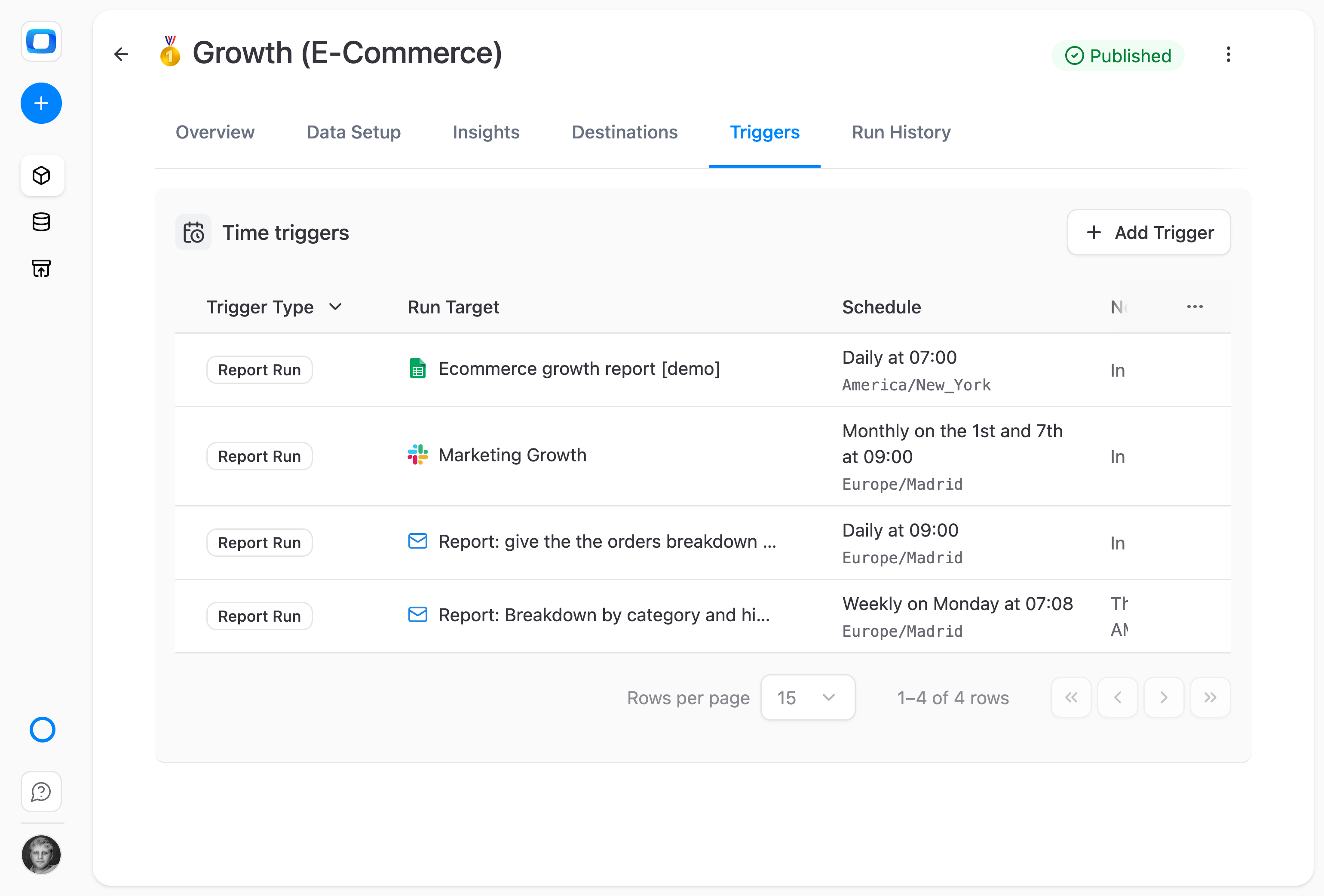
Every send runs the same saved queries.
THE BUSINESS USER
The numbers arrive with the words around them
The rendered Insight lands in the inbox or channel you already read, on the schedule you asked for: headings, a short write-up and current figures. There is no dashboard to open and nothing to learn.
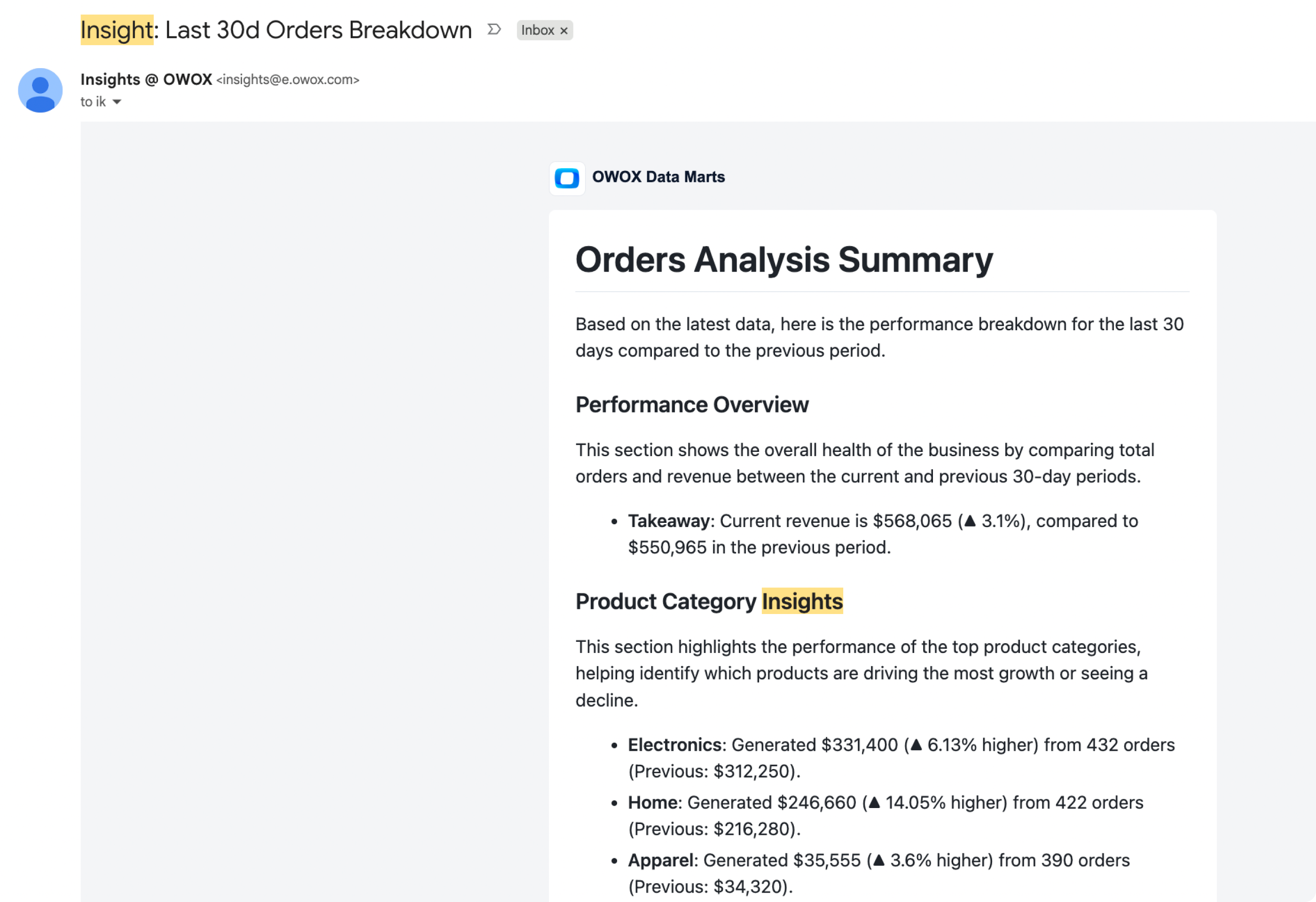
Same shape every send, with fresh numbers.
Not an AI summary of your data — An LLM asked to summarise data writes the figures too, so you check each one before it goes out. Here every figure is a saved query result, and the text is the template you applied.
For Data Owners
The report is text and SQL you can read
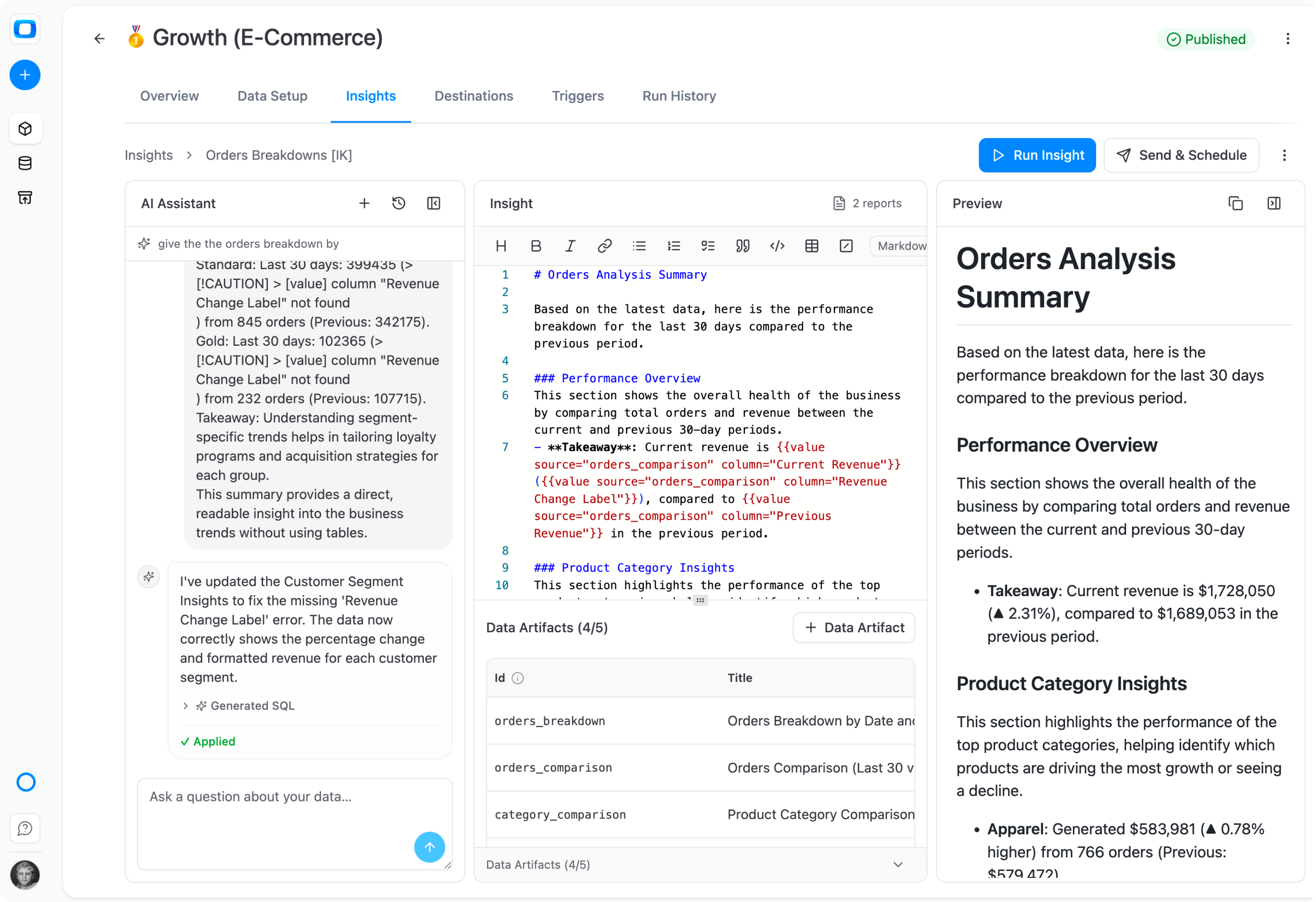
Every part of an Insight is open in the editor: the template, each query behind it and a preview of what will be sent.
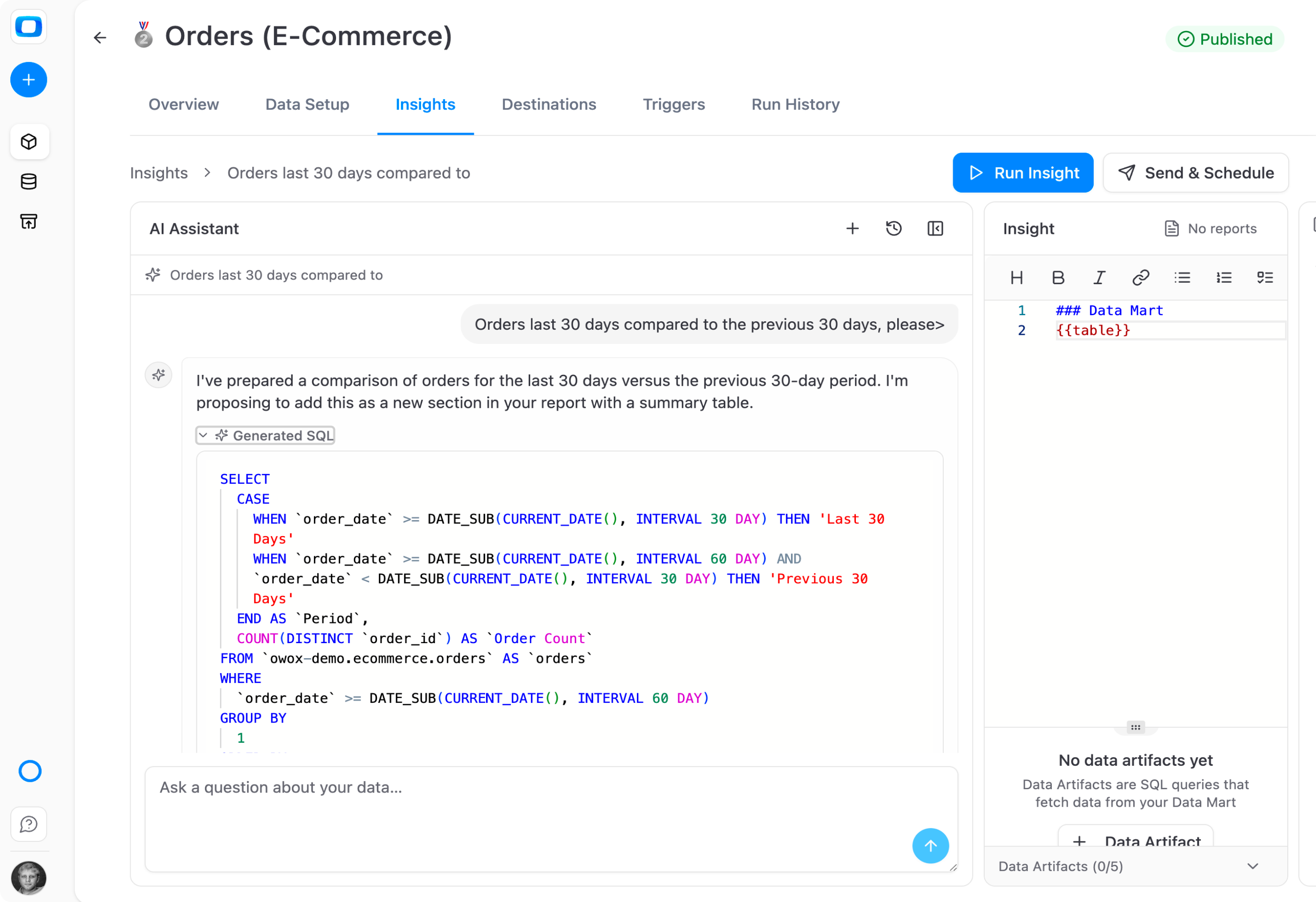
The AI Assistant drafts, you apply
Ask in the chat panel, for example for orders in the last 30 days against the previous 30. The assistant proposes the SQL and the template change as suggested actions. Nothing is saved until you press Apply.
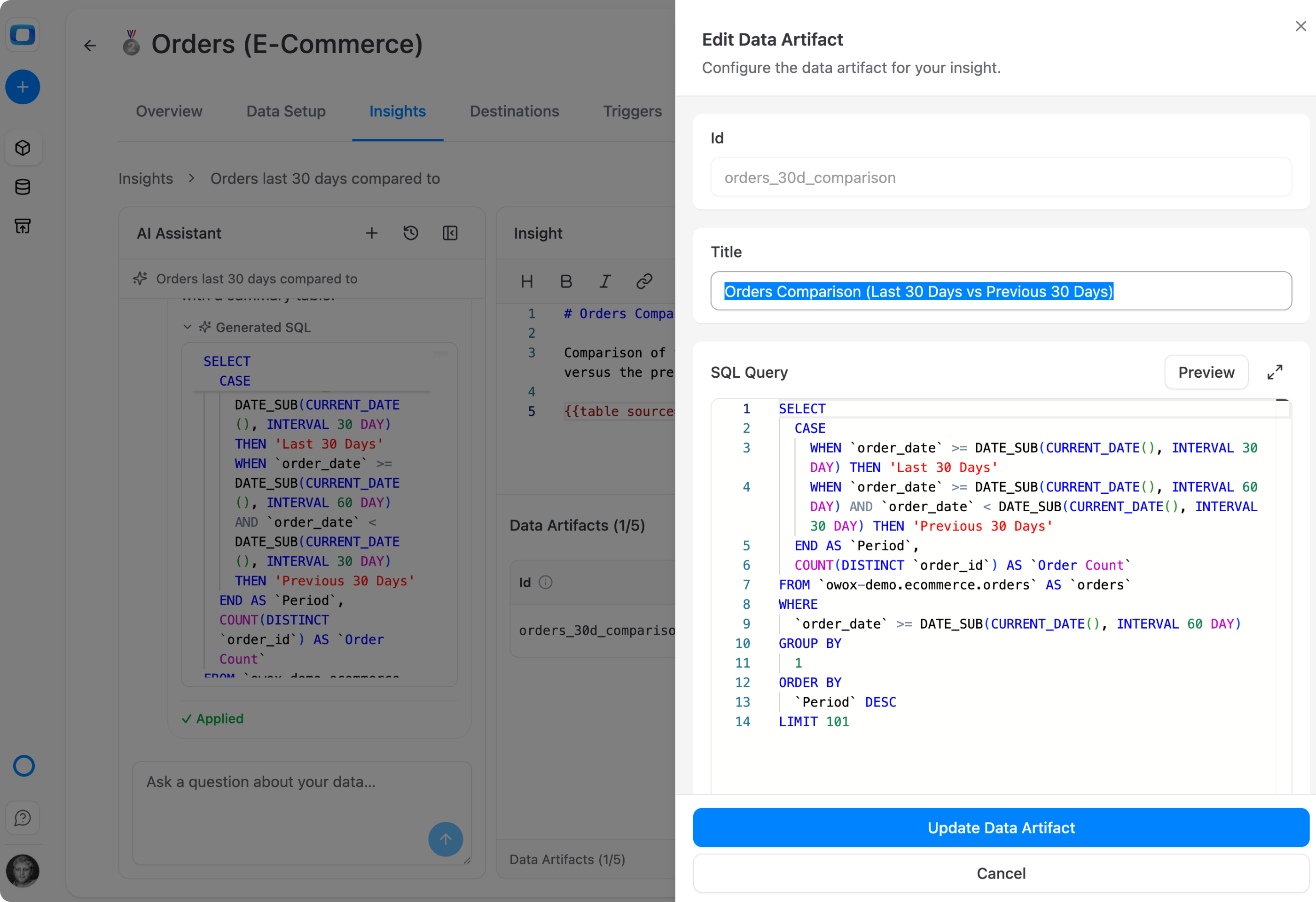
Every figure is a named query
Each figure comes from a saved SQL query: the Data Mart's own, or one you save in the Insight under a name you choose. Preview its result, save it, then place it in the text as a whole table or as a single number.
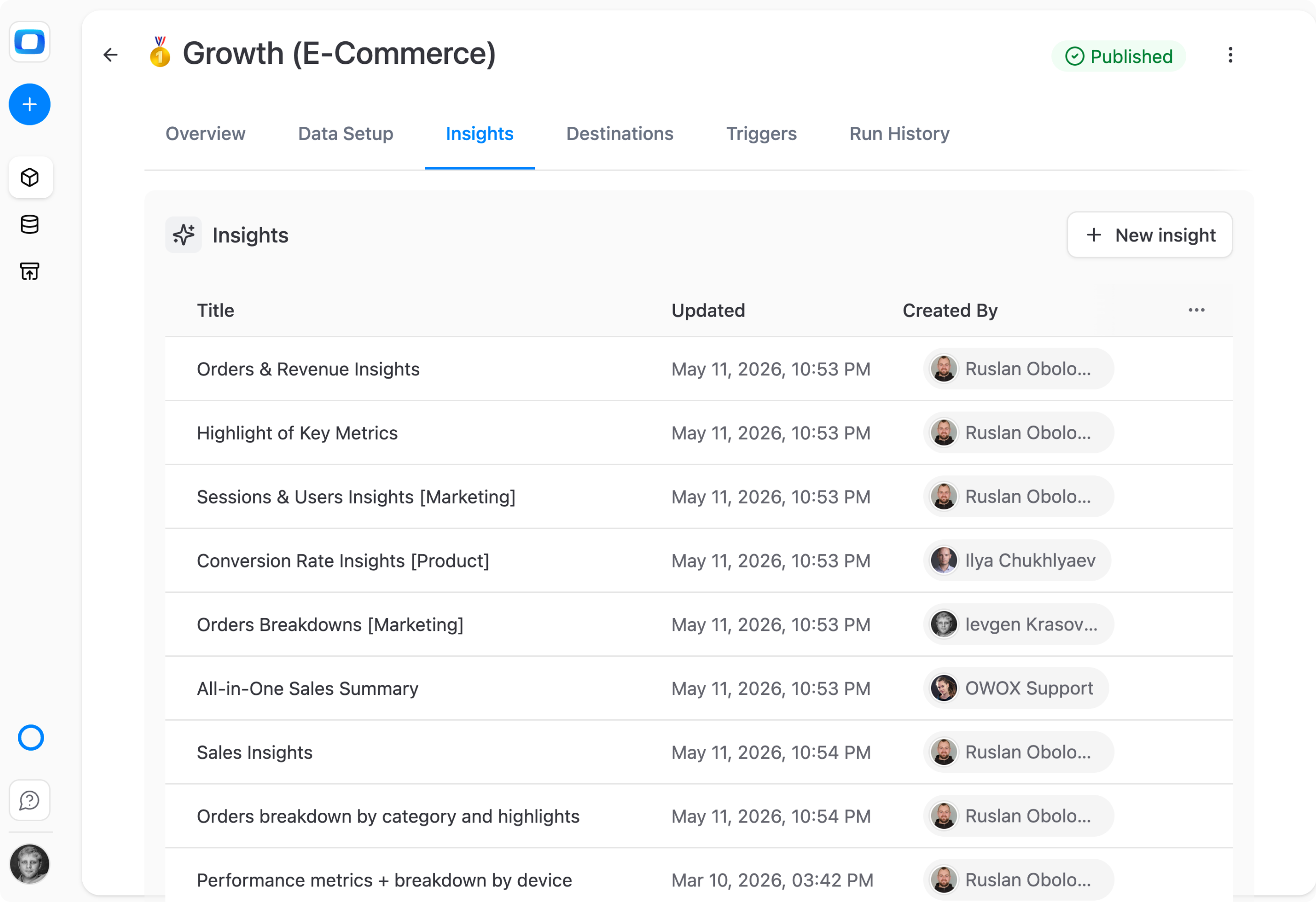
One Data Mart, an Insight per audience
Write separate Insights on the same Data Mart: an orders breakdown for marketing, a sales summary, a set of key metrics. Each has its own template and reports, and all read the same Data Mart.
For Business Users
Read the numbers where you already work
You ask for a regular update; the Data Owner sends it to your inbox or team channel.
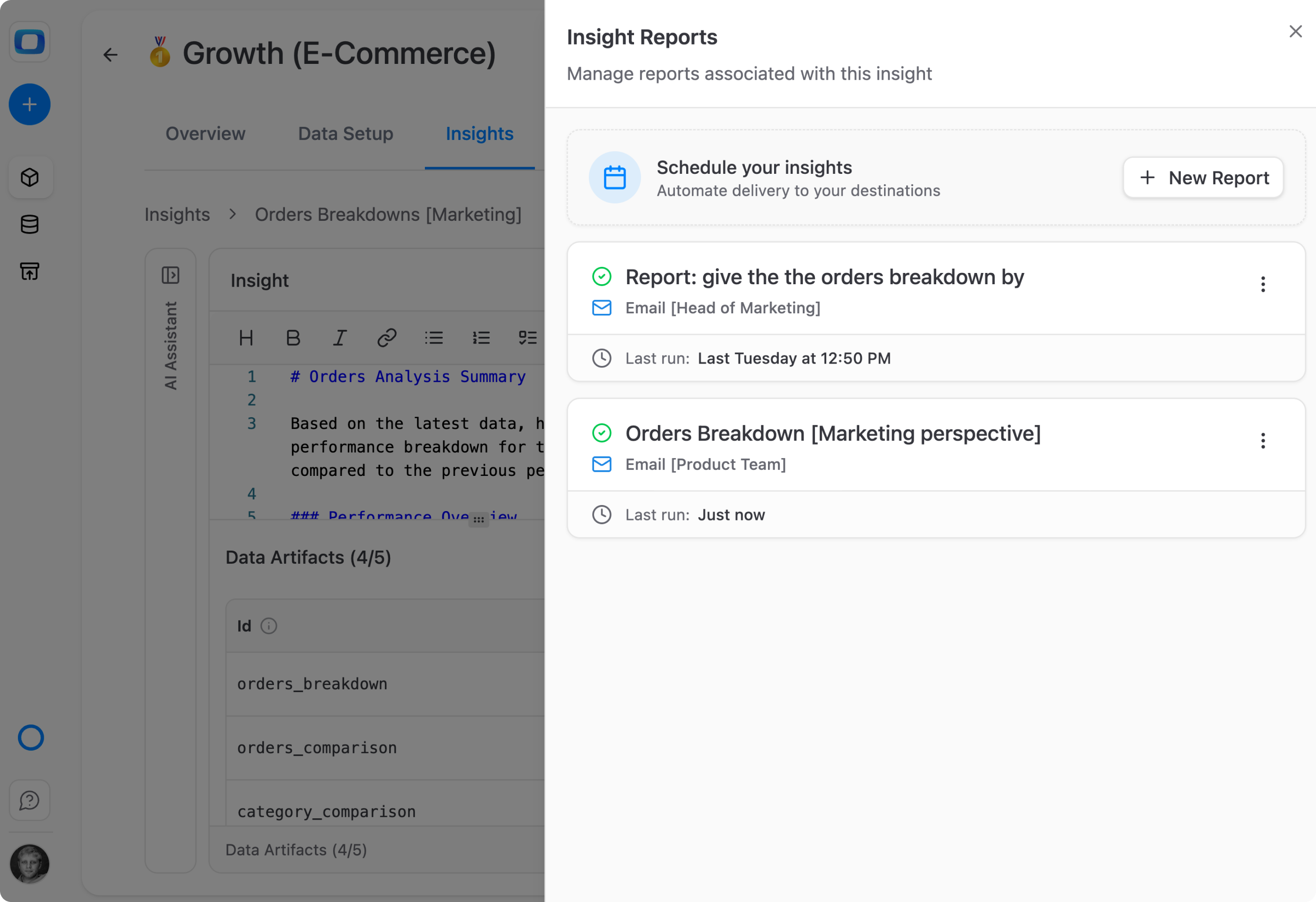
A report per team, on its own schedule
One Insight can feed several reports, such as one to the Head of Marketing and one to the product team. Each has its own destination and schedule, and all of them use the same template.
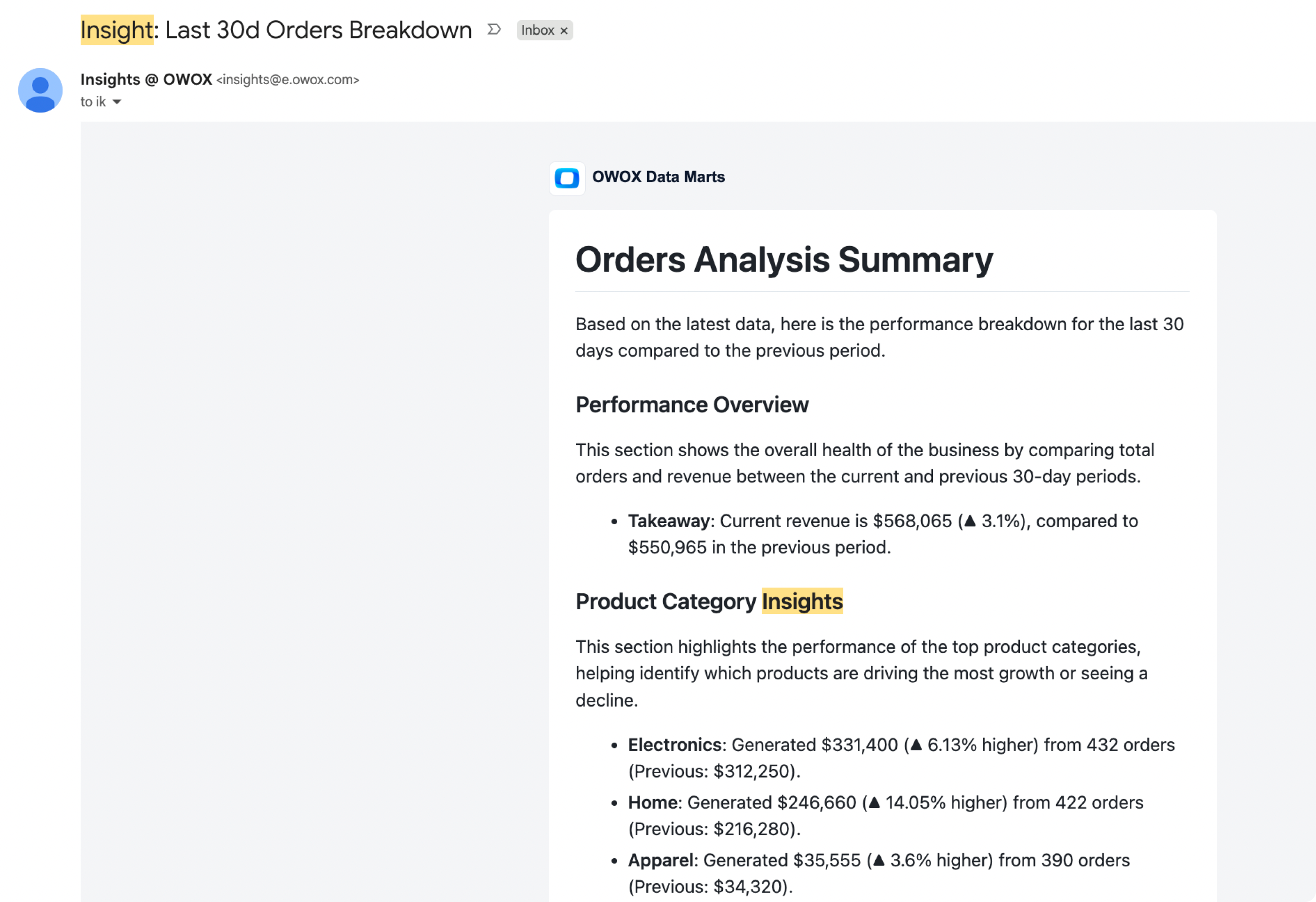
A write-up, not a link to a dashboard
The Insight arrives as a message from insights@e.owox.com, or in Slack, Microsoft Teams or Google Chat: headings, text and figures in one place, readable without opening OWOX.
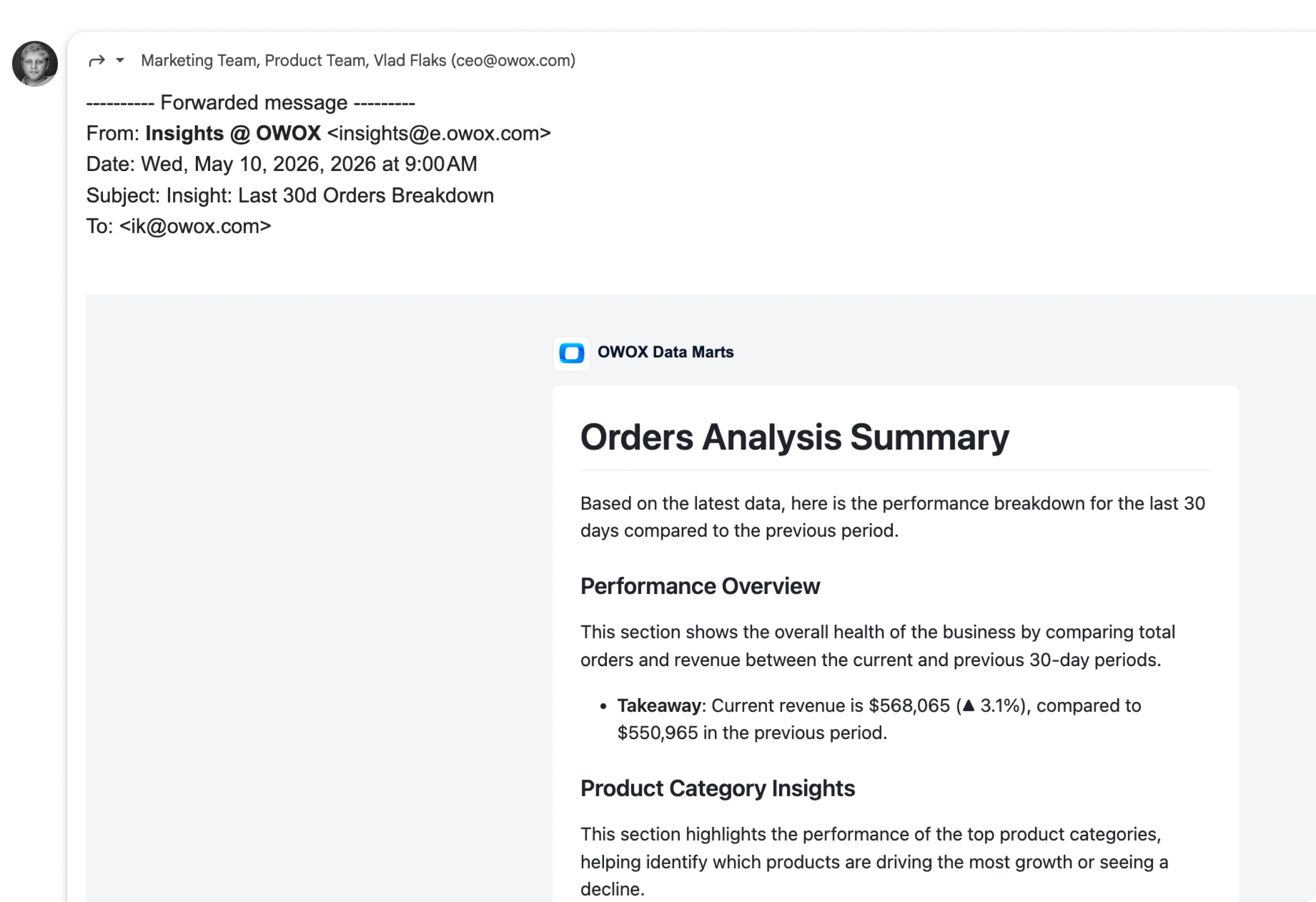
Forward it as it is
An emailed Insight is an ordinary message. Forward it to your manager or your team, and the figures travel with the text that explains them.
Supported Insights Destinations
Supported Insights Destinations
We deliver scheduled results of AI-powered analysis into corporate messengers or by email


Compare plans
Pay as you go
Top up only when you have a decision to make. No subscription loop.
$0.30 / run
Start freeEverything business needs

Every figure from a query
Each number in the message is filled from a saved SQL query, run in your own warehouse, where the Data Mart's data lives.

The text is the template
What is sent is the text you applied. Every send has the same shape, with the figures refreshed from SQL.

AI drafts, you apply
The AI Assistant proposes template and SQL changes as suggested actions. Nothing is saved until you press Apply.

One template, four channels
Email, Slack, Microsoft Teams and Google Chat. Edit the template once and every report built on the Insight sends the new version.

Sent only when it matters
Choose per report: send always, only when the result is empty, or only when it is not. With the last, an empty result sends nothing.

Runs only on published Data Marts
A draft Data Mart cannot run an Insight, so stakeholders get figures only from a Data Mart the Data Owner published.

Every Insight in one list
The project-wide Insights page lists the Insights of every Data Mart in the project, so you find one without opening each Data Mart.

Limits stated, not hidden
Up to 5 SQL queries per Insight and 100 rows each on a run. A table in the message says so when rows were cut.
Frequently asked questions
Does the AI write the numbers in an Insight?
No. Each figure is filled from a saved SQL query you can open and read, and no AI runs when the Insight is sent. The AI Assistant helps you write the text and the SQL while you build the Insight, and nothing changes until you press Apply. The same queries run on every send.
How is this different from asking an AI chat to summarise the data?
An LLM asked for a summary writes the text and the figures itself, so you check every figure before it reaches leadership. An Insight is a fixed template plus saved queries: every send has the same shape with refreshed data, and every number traces to SQL.
What happens to scheduled reports when I edit the template?
Every report built on the Insight sends the new version from its next run. One Insight feeds all the reports that reference it, so you edit one template, not a copy per channel.
What do I need before I create an Insight?
A published Data Mart and the Data Owner or Project Admin role; a draft Data Mart cannot run an Insight. Open the Data Mart's Insights tab and press + New Insight, or start from the AI Assistant chat.
Do I write the SQL myself?
You can, or you can ask the AI Assistant to draft it. Describe what you need in the chat, for example orders in the last 30 days against the previous 30, and it proposes the SQL and where its result goes in the text. Read the query, press Apply, then preview the result before you schedule it. A wrong query gives a wrong number on every send, so the check is yours.
Can an Insight be sent only when there is something to report?
Yes. Each report has a sending condition: send always, only when the result is empty, or only when it is not empty. With the last option, an empty result sends no message.
Every claim has a receipt.
Real things real customers said — each quote pinned to a specific claim, straight from the quotes database.
 Nodari RizunFounder & CEO, Pürblack®
“AI, by the nature of the models, will hallucinate. And because of that, you need something which will create guardrails to ensure that there are no hallucinations, that you can trust your data.”
 Mark SimmonsCMO, Pürblack®
“We had six or seven different channels and no single source of truth — it was almost impossible, a lot of guesswork.”
Nodari RizunFounder & CEO, Pürblack®“We regained time. And time is the one resource that never comes back.”
Schedule your first Insight
Open a published Data Mart, go to Insights, press + New Insight and add a SQL query. Then press Send & Schedule.
You are booked. The invitation is on its way to , with the calendar invite and the meeting link.