Data API
Build Data Marts From Code. Read Them Over HTTP.
Dozens of Data Marts mean days of forms, and an app running its own SQL on the warehouse disagrees with your reports. The Data API builds, describes, joins and publishes Data Marts from code, then apps and AI agents read the same published Data Marts your reports do.
Get started freeRead the docs →
Does this fit your stack?
Why OWOX
The CMO asks why the dashboard app and the Google Sheets report disagree on revenue: the app reads the warehouse with its own copy of your SQL. The Data API builds, describes, joins and publishes Data Marts from code, and apps and AI agents read those published Data Marts, with a key that acts as you.
- Every pull, an AI agent's included, is a run in Run History with the request that made it, so a number from a script can be reproduced.
- Apps and agents read only published Data Marts with the joins you declared, the same definition your reports use; a key carries your access, nothing wider.
- One script creates the drafts, writes every alias and description, declares the joins and publishes; run it again after an upstream rename.
The fiftieth Data Mart takes as many clicks as the first
A new source brings dozens of Data Marts to describe, or an upstream rename breaks them all. By hand, that is days of forms, or descriptions skipped. An app on the warehouse runs its own copy of your SQL and drifts from your reports.
THE DATA OWNER
Write the model once, as a script
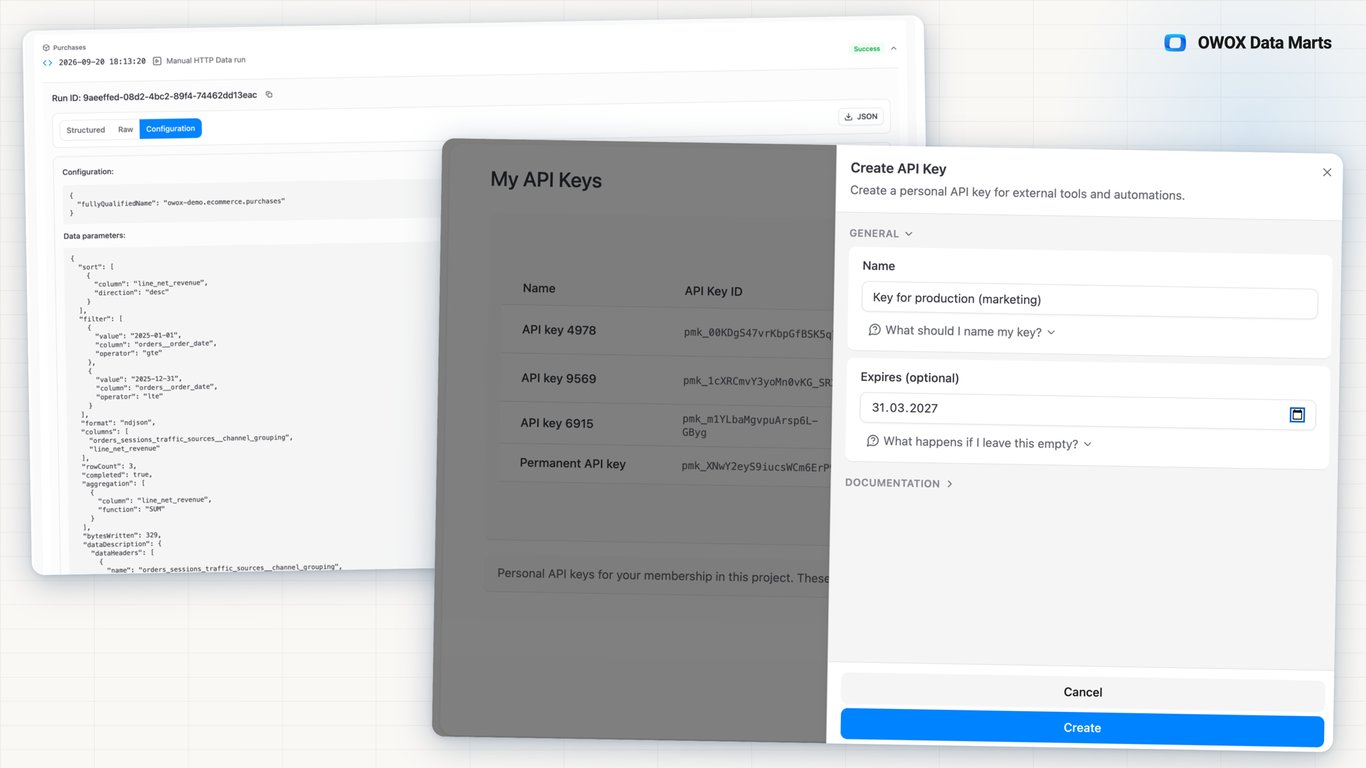
Create a key in Project settings → My API Keys. Your script or AI agent then creates Data Marts as drafts, writes each output schema with aliases and descriptions, declares relationships and publishes. After an upstream rename, edit the script and run it again.
The key acts as you and cannot grant new access.
THE BUSINESS USER
Built from code, delivered like any Data Mart
A Data Mart the Data Owner built over the API reaches your Google Sheets report, your AI assistant and your team's internal dashboard like one built by hand, with the same aliases and descriptions. You have no API key to manage.
One Data Mart behind the app, the sheet and the chat.
Not a borrowed session, not a warehouse login — An AI agent driving the browser acts on a borrowed session and breaks with each redesign. A script with warehouse access writes its own SQL. Here the agent holds a key that acts as you, nothing wider, and apps read only published Data Marts.
For Data Owners
Build and read the model from code
The HTTP API authors Data Marts and streams their rows, from the script, CI job or AI agent you already run.
Every column described by the script that made it
Create a Data Mart as a draft, set its definition, write an alias and a description on every column, set owners and contexts, then publish. The same calls edit existing Data Marts, so a rename across dozens of them is one loop.
Worked example: from draft to rows
POST /api/data-marts creates the draft. PUT /api/data-marts/{id}/schema writes aliases and descriptions. POST …/relationships declares a join and what it means. PUT …/publish publishes. GET /api/external/http-data/data-marts/{id}.ndjson streams the rows, joins resolved on the server.
Every pull is a run you can audit
Each pull, an AI agent's included, creates an HTTP Data run in Run History and returns its id in the x-owox-run-id header. The run keeps the request: columns, filters, sort, row count and, when controls or joins shape the query, the executed SQL.
For Business Users
Numbers in your team's own tools
Data Marts built or read through the API are the Data Owner's published Data Marts, so the numbers in your team's tools come from the same definitions as your reports.
An internal dashboard on a Data Mart
A dashboard app built on the API pulls its rows from a published Data Mart, with a key the Data Owner issued for it. The Data Mart stays the source of truth whatever tool draws the chart.
A saved report, streamed as it is
The Data API can also stream a saved report's data, applying its stored filters, aggregations, date buckets and sorting. The app receives the same view the report shows.
No key in your hands
You keep reporting in Google Sheets, Microsoft Excel, Data Studio or your AI assistant through OWOX MCP. API keys stay with the Data Owner's scripts and apps, so nothing you use runs around the Data Mart.
Compare plans
Everything business needs
Same Data Marts as the UI
A Data Mart built over the API shows in the Models canvas like one built by hand. The API is the same project, not a side door.
No warehouse credentials in apps
Apps authenticate with an API key and read only published Data Marts; a draft returns 404. Storage credentials are granted in the OWOX interface only.
A key that acts as you
Each key carries its member's role and access, nothing wider, with an optional expiry and a Last authenticated time. Revoke it from My API Keys.
Joins resolved on the server
One column selector returns every field available to reports, joined Data Marts included, through relationships the Data Owner declared. The caller writes no JOIN.
Frequently asked questions
How is this different from giving the app warehouse access?
A warehouse login lets the app write its own SQL against raw tables, so its metric logic can drift from yours, and its numbers from your reports. The Data API returns a published Data Mart's output, joined through the relationships the Data Owner declared. Its key cannot grant credentials to a new storage, destination or source.
Who can call the Data API?
Anything holding an API key. @owox/api-client covers TypeScript and JavaScript and reaches any API-key endpoint through its low-level methods; plain HTTP works from the OpenAPI spec and Swagger UI. owox-ctl lists and streams from a terminal, CI job or AI agent. A key acts as the project member who created it.
What can the API build?
Data Marts from draft to published: definition, title, description, output schema, owners, contexts, relationships and how joined fields collapse. It also manages storages, destinations, reports and the project description. The one exception is granting a storage, destination or source its credentials: that stays in the OWOX interface, so a key never widens what the project can reach.
Do business users need an API key?
No. Business users get the same Data Marts in Google Sheets and Microsoft Excel, in Data Studio, or in Claude or ChatGPT through OWOX MCP, which signs in with its own OAuth. The API is for the Data Owner's scripts, apps and agents.
How large a pull can one request return?
The endpoint streams NDJSON, one row per line, without pagination: offset and page tokens are rejected. Cap a pull with limit, or split a large one with filters. Each encoded filter, sort or aggregation parameter is limited to 8,192 characters.
Does the Data API cost credits?
Each successful pull is an HTTP Data Report Run at 0.1 credit. Creating, editing, joining and publishing Data Marts over the API is configuration and uses no credits.
Every claim has a receipt.
Real things real customers said — each quote pinned to a specific claim, straight from the quotes database.
 Nodari RizunFounder & CEO, Pürblack®
“AI, by the nature of the models, will hallucinate. And because of that, you need something which will create guardrails to ensure that there are no hallucinations, that you can trust your data.”
 Mark SimmonsCMO, Pürblack®
“We had six or seven different channels and no single source of truth — it was almost impossible, a lot of guesswork.”
Nodari RizunFounder & CEO, Pürblack®“We regained time. And time is the one resource that never comes back.”
Script your next Data Mart
Create an API key in My API Keys, create a draft Data Mart over the API, publish it and read its rows back.
- Internal OWOX data as of 2026-10-02
- G2 reviews of OWOX
- npm installs stat
You are booked. The invitation is on its way to , with the calendar invite and the meeting link.