Data Freshness Tracking
Know When The Data Last Changed Before Anyone Asks
An AI assistant's answer built on stale data looks as convincing as a current one. Data Freshness Tracking shows when the source tables behind each Data Mart were last written to: in OWOX MCP results, on the Data Mart page, the Data Marts list and the Models canvas.
Get started freeRead the docs →
Does this fit your stack?
Why OWOX
A founder asks whether the AI assistant's figure for yesterday's sales is current, and the Data Owner is the one who has to answer: a stale figure looks as convincing as a fresh one. OWOX shows when the source tables behind each Data Mart were last written to, with nothing to configure.
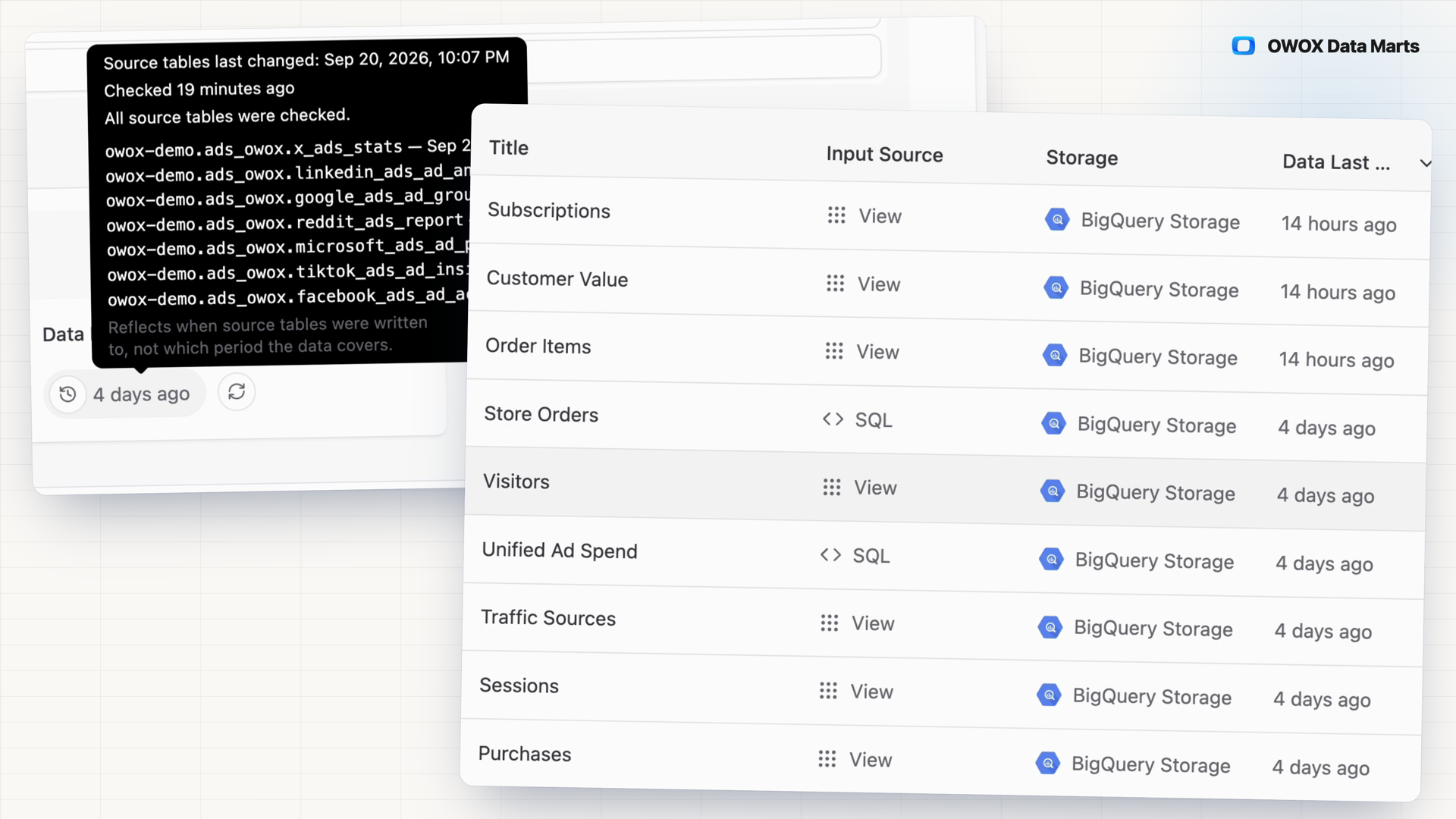
- Hover the value for the exact timestamp and each source table's own time; SQL and views are traced to their base tables.
- It reports when tables were written, not what period they cover, and shows Unknown or ≥ rather than guess when a source can't be read.
- Each query an AI assistant runs through OWOX MCP returns the date with the rows; the same value sits on the Data Mart page, in the list and on every canvas node.
Stale data looks exactly like current data
A founder asks an AI assistant for yesterday's sales and gets a confident answer from a table that stopped loading. Nothing flags it. The Data Owner is asked why the number is wrong, then hunts for the load that failed.
THE DATA OWNER
Check the source tables, not the report
Open a Data Mart's Overview: the Data Last Updated tile shows when its source tables were last written to. Press Check now to measure it live. On the Models canvas, Actions → Check Data Last Updated measures every visible Data Mart in one pass.
Nothing to configure. It reads storage metadata only.
THE BUSINESS USER
See the date next to the answer
Ask Claude or ChatGPT through OWOX MCP, and every query result carries when its source tables last changed. The assistant is asked to show it as a readable date. When OWOX cannot tell, the value comes back as unknown, not a guess.
Measured live, in the same call that reads the data.
No metadata query to write and maintain — Checking by hand means tracing a Data Mart's SQL and views to their base tables, then reading each warehouse's own metadata. OWOX does both on five storages and shows the newest write.
For Data Owners
Find a stale source before anyone else does
The value comes from your storage's own metadata for the tables the Data Mart reads, so a load that quietly stopped shows up as an old date.
Worked example: one tile, one button
On the Data Mart page, open Overview → Details. The Data Last Updated tile shows the newest write among the source tables. Press Check now (⟳) to measure it live, then hover for the exact timestamp, coverage and per-table breakdown.
Traced to the base tables
SQL Data Marts and views resolve to the base tables underneath, nested views included. A sharded set such as events_YYYYMMDD collapses into one entry showing its newest shard; a neighbour like events_backup does not count.
Honest about what it cannot see
Unknown means OWOX could not determine the time, not that the data is stale. A value marked ≥ means some sources could not be checked, so the real time is more recent. A failed check never erases the last-known value.
For Business Users
Know how current a number is before you act on it
The date reaches you where you already ask for the data, so "is this current?" has an answer before the number goes into a decision.
In every AI assistant query
Each query Claude or ChatGPT runs on a Data Mart through OWOX MCP measures the date live and returns it with the rows. The assistant is asked to show it in your time zone when the conversation sets one, otherwise in UTC.
In the Data Marts list
Sort the Data Marts you can see by Data Last Updated to spot the one that stopped changing. Any project member who can see a Data Mart can run the check.
Written to, not "covers today"
A backfill can rewrite a table today with figures from 2021. The value is a storage timestamp: it says when the table was last written to, not what period the data covers.
Compare plans
Everything business needs
Nothing to configure
No threshold, no timestamp column, no schedule. The value comes from storage metadata for the tables the Data Mart already reads.
One value, every surface
The Data Mart page, the sortable list, a clock on each canvas node and OWOX MCP query results show the same timestamp.
Checkable down to the table
Hover any value for the exact timestamp, when the check ran, how complete the coverage is and each source table's own time.
Runs on your warehouse
Measured on Google BigQuery, Snowflake, AWS Redshift, AWS Athena and Databricks from each storage's own metadata. No data rows are read.
Frequently asked questions
How is this different from the Data freshness check?
Data Last Updated reads storage metadata: when the source tables were last written to, with nothing to configure. The Data freshness check in Data Quality Checks reads a timestamp field in the data and fails when its newest value is older than a threshold you set. A backfill can pass the first and fail the second.
Why not query the warehouse metadata myself?
You can, table by table. First trace the Data Mart's SQL and views to their base tables. Then read each storage's own record of writes: commit history for Delta tables on Databricks and Iceberg tables on Athena, account DML history on Snowflake. OWOX does both and shows the result where reports and AI answers come from.
Which warehouses are supported?
Five data storages: Google BigQuery, Snowflake, AWS Redshift, AWS Athena and Databricks. Precision varies. BigQuery is exact and immediate; Redshift can lag by up to about 5 minutes; Snowflake reports the hour and can trail by several hours. Classic Hive tables on Athena, external tables and Databricks history older than 30 days by default show Unknown.
When does the value update?
When someone presses Check now or runs the canvas check, and on every run that delivers data: a manual or scheduled report run, an HTTP Data request or an OWOX MCP query. OWOX never measures in the background on its own. A run that reads joined Data Marts records the value in its run history only.
Does checking cost credits?
No. A check reads storage metadata only, consumes no credits and records no run. When an AI assistant queries a Data Mart through OWOX MCP, the measurement is part of that query and is not billed separately.
What do Unknown and ≥ mean?
Unknown means OWOX could not determine the time; it says nothing about whether the data is stale or fresh. A value marked ≥ means some source tables could not be checked, so the real time can only be more recent. Hover the value to see which tables were not read.
Every claim has a receipt.
Real things real customers said — each quote pinned to a specific claim, straight from the quotes database.
 Nodari RizunFounder & CEO, Pürblack®
“AI, by the nature of the models, will hallucinate. And because of that, you need something which will create guardrails to ensure that there are no hallucinations, that you can trust your data.”
 Mark SimmonsCMO, Pürblack®
“We had six or seven different channels and no single source of truth — it was almost impossible, a lot of guesswork.”
Nodari RizunFounder & CEO, Pürblack®“We regained time. And time is the one resource that never comes back.”
See when your Data Marts last changed
Open a Data Mart's Overview and press Check now, or check every Data Mart on the Models canvas at once.
- Internal OWOX data as of 2026-10-02
- G2 reviews of OWOX
- npm installs stat
You are booked. The invitation is on its way to , with the calendar invite and the meeting link.