Data Quality Checks
Fix The Broken Join Before A Report Quotes It.
When a dashboard and a finance spreadsheet disagree on order count, the cause can be duplicate orders or orders with no matching customer, and both look like correct data. Data Quality Checks test a Data Mart, its fields and joins, and show each finding's violation count, example values and SQL.
Get started freeRead the docs →
Does this fit your stack?
Why OWOX
Finance asks the Data Owner why the dashboard's order count differs from theirs, and the cause can be duplicate orders or orders whose customer is missing from the joined Data Mart, which look exactly like correct data. Data Quality Checks test the Data Mart, its fields and its joins, on demand or on a schedule.
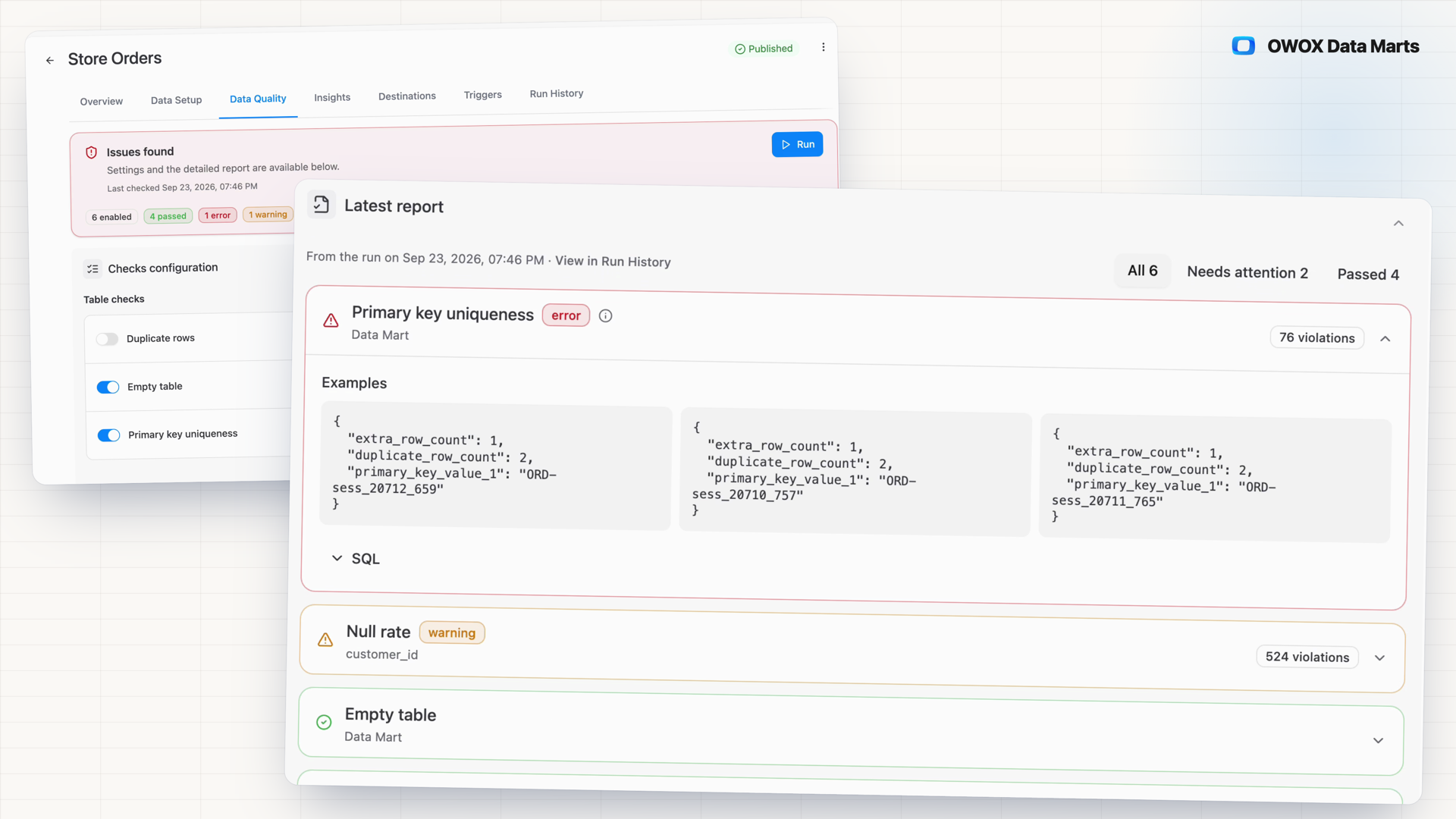
- Duplicate rows and join values with no match in the target show up as failed checks, each with its violation count, up to three example values and the SQL that found it.
- You choose the checks and each one's severity, Error, Warning or Notice, and Run History keeps the configuration every run used.
- A preset of basic checks is on from the start, and a Data Quality Run trigger reruns them on your schedule.
Duplicates and broken joins don't raise an error
A broken composite key, duplicate rows or a join value with no match all still return numbers. When the dashboard and finance disagree on order count, a Data Owner without Data Mart checks tests each suspicion with ad-hoc SQL, one column at a time.
THE DATA OWNER
Declare the checks on the Data Mart
On the Data Quality tab, open Checks configuration, turn on Data Mart checks, add field checks per column and enable relationship checks on declared joins. Give each one a severity, Error, Warning or Notice, then Save & Run.
You decide what counts as an error and what is a note.
THE BUSINESS USER
Report on a Data Mart someone checked
Nothing changes in the report you already use. The checks run on the Data Mart behind it, and when a number looks off, the Data Owner opens the latest result: which check failed, example values and the SQL that found them.
Question a number, and the Data Owner has the latest check results.
On the Data Mart, not in a dbt project — dbt tests and hand-written assertions live in the transformation layer, inside a project you have to own. These checks sit on the Data Mart the business reports on, even one built on someone else's view, and the Data Mart's check status shows in Data Setup and on the Models canvas.
For Data Owners
Checks you declare, findings you can rerun
Choose the properties that matter for this Data Mart, run them when you need to, and read every finding down to the query that produced it.
Data Mart, field and relationship checks
Empty table, primary key uniqueness and duplicate rows check the whole Data Mart. Null rate, column uniqueness, constant column, type mismatch, data freshness and negative values go on single fields. Relationship integrity checks that join values exist in the target.
Worked example: checks on an Orders Data Mart
On Orders, turn on Primary key uniqueness and Duplicate rows, add Data freshness on the order timestamp with a threshold in hours, and enable Relationship integrity against Customers and Sessions. Set each severity, then Save & Run.
Every finding brings its SQL
Expand a failed check to see the violation count, up to three example values and the formatted SQL that produced the finding. Copy it into your warehouse console and get the same count and examples back.
For Business Users
The checking happens behind your report
You never open the Data Quality tab. What reaches you is a Data Mart the Data Owner tests for duplicates, missing values and broken joins.
Nothing new to learn
The checks run on the Data Mart, not in your spreadsheet. Your report, filters and columns in Google Sheets, Microsoft Excel or Data Studio stay as they are.
A questioned number has a record
When a figure in your report looks off, ask the Data Owner. Their Run History holds every check run on the Data Mart: what passed, what failed, with example values and the SQL behind each.
Found on the Data Owner's side
Duplicate rows that would inflate a revenue sum, or orders whose customer is missing from the joined Data Mart, are what these checks are built to find.
Compare plans
Everything business needs
The SQL behind every finding
Each failed check shows its violation count, up to three example values and the query that found them, ready to rerun in your own warehouse.
Severity you set per check
Mark each check Error, Warning or Notice. Findings are grouped by severity, so errors are not buried among notes.
Runs on your schedule
Run checks from the Data Quality tab, in bulk from the Data Marts list or the Models canvas, or on a Data Quality Run trigger with its own schedule.
A record of every run
Run History keeps each run's results and the configuration it ran under, so you can show what a Data Mart was checked against, and when.
Frequently asked questions
How is this different from dbt tests or a data observability tool?
dbt tests run in the transformation layer, inside a project you have to own. These data quality checks sit on the Data Mart the business reports on, even one built on someone else's view. An observability platform watches the whole warehouse for anomalies; these check only what you declared, on the Data Marts you chose.
What do I need before the first run?
A published Data Mart with a saved Output Schema. A preset is on from the start: Empty table, primary key checks where a key is set, null-rate checks on key fields and relationship integrity on declared joins. Run it as is, or add checks and set thresholds: null rate as a percentage, data freshness in hours.
Which warehouses are supported?
Google BigQuery, Snowflake, AWS Redshift, AWS Athena and Databricks. The checks are SQL that runs in your warehouse, so query processing stays there. Data freshness needs a timestamp field and is not available on Snowflake.
Does a failed check block the Data Mart?
No. A finding informs the Data Owner; it does not stop the Data Mart from being used in reports. Results show where the Data Owner works: the Data Quality tab, Data Setup above the Output Schema and the Models canvas, where Actions, then Check Quality, runs several Data Marts at once.
How do I check a finding myself?
Expand the failed check on the Data Quality tab and copy its SQL: the formatted query that produced the finding. Run it in your warehouse console and you get the same violation count and example rows. Run History keeps every past run with its results and the configuration it ran under.
Do Data Quality runs cost credits?
Each successful run is 0.1 credit, however many checks it executes and whether or not it finds problems. Manual, bulk and scheduled runs count the same way.
Every claim has a receipt.
Real things real customers said — each quote pinned to a specific claim, straight from the quotes database.
 Nodari RizunFounder & CEO, Pürblack®
“AI, by the nature of the models, will hallucinate. And because of that, you need something which will create guardrails to ensure that there are no hallucinations, that you can trust your data.”
 Mark SimmonsCMO, Pürblack®
“We had six or seven different channels and no single source of truth — it was almost impossible, a lot of guesswork.”
Nodari RizunFounder & CEO, Pürblack®“We regained time. And time is the one resource that never comes back.”
Run your first checks on a Data Mart
Open the Data Mart's Data Quality tab, keep the preset or add checks, and press Run.
- Internal OWOX data as of 2026-10-02
- G2 reviews of OWOX
- npm installs stat
You are booked. The invitation is on its way to , with the calendar invite and the meeting link.