owox-ctl CLI
Hand Your AI Agent A Key, Not Your Browser
An AI agent that queries raw tables or clicks through the app can count monthly active customers two ways, with no record of what it asked. owox-ctl gives agents, scripts and CI jobs JSON commands that act as you: check the key, list Data Marts, stream published rows, publish plugins.
Get started freeRead the docs →
Does this fit your stack?
Why OWOX
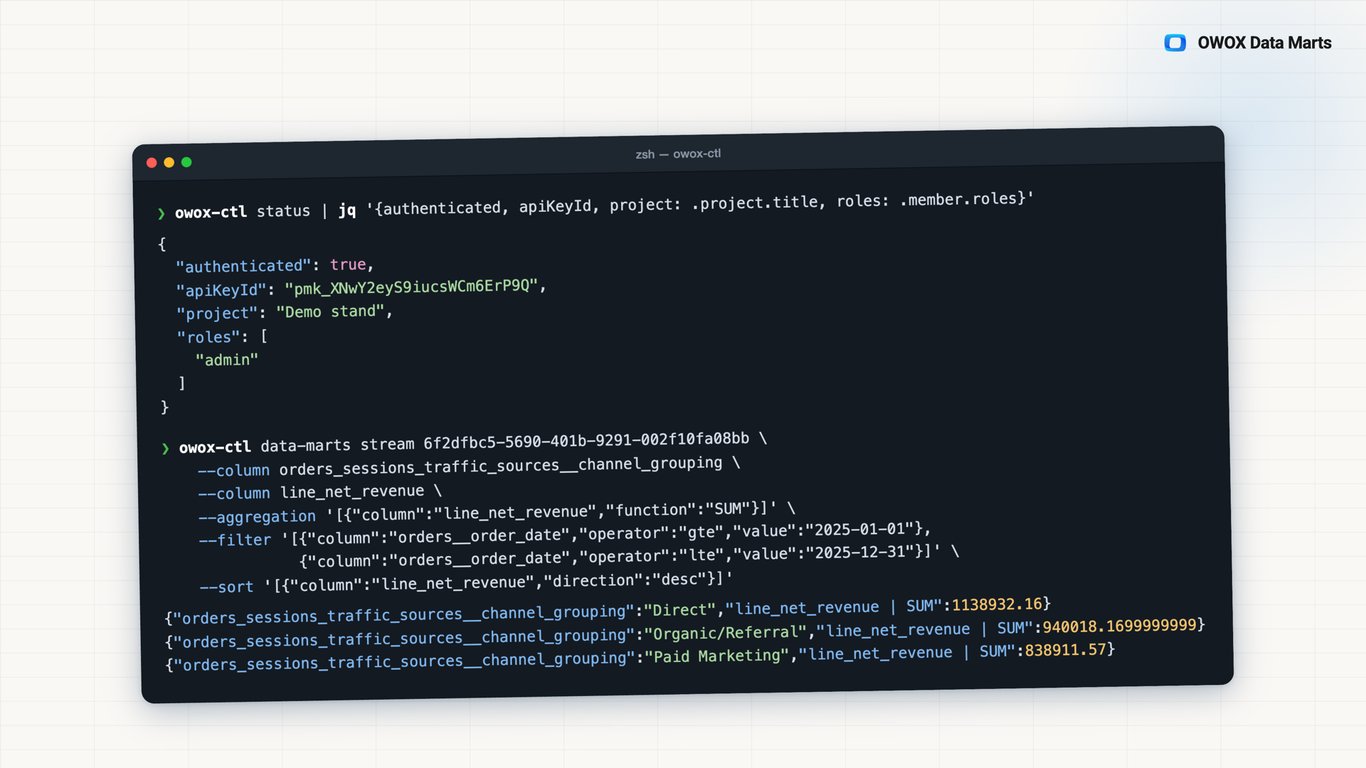
The founder asks why your AI agent gave two different active-customer counts for the same month, and nothing shows what it queried. owox-ctl gives the agent JSON commands that read your published Data Marts as you, and every row pull lands in Run History.
- Each data-marts stream reads a published Data Mart with the joins you declared; Run History records the columns, filters and row count the agent asked for.
- The key carries your role and access and nothing wider; owox-ctl status shows which member it acts as, and you revoke it when done.
- One command per job, for agents, scripts and CI: list your Data Marts, stream rows as NDJSON with filters and aggregations, publish or update a plugin.
One active-customer question, two answers, no record of either
Your AI agent, a revenue script or a CI check needs your data. On raw tables each one decides what counts as an active customer, so one question can get two answers; a browser-driven agent breaks on every redesign. Either way the number carries your name and no record.
THE DATA OWNER
One key, plain JSON commands
Create a key in My API Keys and set OWOX_API_KEY. owox-ctl status prints the project and the member the key acts as, with roles. data-marts list returns your Data Marts as JSON; data-marts stream pulls a published one's rows as NDJSON.
The key carries your access and nothing wider.
THE BUSINESS USER
Nothing changes where you report
You never need a key or a terminal. You keep reporting in Google Sheets, Microsoft Excel, Data Studio or your AI assistant through OWOX MCP, on the same published Data Marts the Data Owner's scripts check.
Scripts check the Data Marts your reports already use.
A key, not a borrowed session — An agent clicking through the app breaks on every redesign and acts on someone's session. With owox-ctl it holds a key that is you: bounded by your access, recorded in Run History when it pulls rows, revoked from My API Keys.
For Data Owners
Your scripts and agents work through the model
Every command goes through your OWOX project, not around it, so a script or an agent reads the Data Marts you published, with your joins and your column names.
Know who the key acts as
owox-ctl status validates the key and returns the project and the member it resolves to, with that member's roles. Run it before you hand a key to an agent: the agent acts as you, bounded by your access.
Worked example: monthly revenue in one command
Run owox-ctl data-marts stream dm_123 with --column date, --column revenue, a MONTH --date-bucket on date and a SUM --aggregation on revenue. You get one NDJSON row per month, the total under "revenue | SUM", ready to pipe into a check.
Joined fields and filters, like a report
--columns '**' adds every joined field available to reports. --filter and --sort take JSON rules, --limit caps the rows, and a pre-join filter with aliasPath narrows a joined source before it is joined.
For Business Users
Keep working where you already report
owox-ctl is the Data Owner's tool. What reaches you is its result: Data Marts checked by a script, and plugins shipped by a command.
No key, no terminal
You read data in your own tools: Google Sheets, Microsoft Excel, Data Studio, or Claude and ChatGPT through OWOX MCP. An API key is for the Data Owner's scripts and agents.
The same Data Marts the scripts check
A stream reads a published Data Mart with the joins the Data Owner declared, the same definition your report is built on. A Data Mart still in draft answers nothing until it is published.
New plugins show up in the Gallery
When a plugin is published for your project, it appears in the project's Gallery and you decide whether to install it. A newer release reaches every installation without reinstalling.
Compare plans
Everything business needs
JSON from every command
Every command prints JSON, and data-marts stream writes NDJSON rows as they arrive, so pipes, files and CI steps take the output as it is.
A key that acts as you
The key carries your role and your per-resource access. owox-ctl status shows which member it resolves to; revoke it when the agent no longer needs it.
Every row pull leaves a record
Each data-marts stream is a run in Run History with its columns, filters, sort and row count, attributed to the member who owns the key.
Plugins shipped by command
owox-ctl plugins publish lists a plugin for you or your project; plugins update asks the project to check for a newer release now.
Frequently asked questions
What is owox-ctl?
The OWOX Data Marts Control CLI, on npm as @owox/ctl. It controls a running OWOX project through the same HTTP API the Data API uses. Commands: status, data-marts list, data-marts stream, storages list, destinations list, and the plugin commands. The separate owox CLI runs OWOX Data Marts itself.
How do I set it up?
Run npm install -g @owox/ctl. Create a key in My API Keys, under Project settings. Set OWOX_API_KEY in the environment, in a .env file in the working directory, or in a file passed with --env-file. Then run owox-ctl status: "authenticated": true and your member mean it works.
Can owox-ctl create or edit a Data Mart?
Not with a command today; the commands that change something are the plugin ones. Creating a Data Mart, writing its schema, declaring relationships in your data model and publishing are HTTP API calls that accept the same key. The docs' Support Matrix lists them; call them from @owox/api-client or plain HTTP.
What can an agent holding my key do?
What you can do in the project, nothing wider: the key carries your role and your per-resource access. No key can give a storage, destination or source its credentials. Keep keys out of agent instruction files; use an environment variable, --env-file or a secret manager, and revoke the key when the agent no longer needs it.
How is this different from letting an agent use the app in a browser?
A browser agent breaks when the interface changes and acts on a borrowed session. owox-ctl gives the agent terminal commands with JSON output, which the docs name for AI agents. The agent holds a key that is you, and every row pull is recorded in Run History against you.
Can I see what my AI agent asked for?
Yes, for every pull it made through owox-ctl. Each data-marts stream is a Report Run in Run History, with the columns, filters, sort, aggregation and row count it requested, attributed to the member the key acts as. Each successful stream is 0.1 credit; status and the list commands cost nothing. What the agent does with the rows afterwards is outside that record.
Every claim has a receipt.
Real things real customers said — each quote pinned to a specific claim, straight from the quotes database.
 Nodari RizunFounder & CEO, Pürblack®
“AI, by the nature of the models, will hallucinate. And because of that, you need something which will create guardrails to ensure that there are no hallucinations, that you can trust your data.”
 Mark SimmonsCMO, Pürblack®
“We had six or seven different channels and no single source of truth — it was almost impossible, a lot of guesswork.”
Nodari RizunFounder & CEO, Pürblack®“We regained time. And time is the one resource that never comes back.”
Hand your agent its first command
Install @owox/ctl, create a key in My API Keys, set OWOX_API_KEY and run owox-ctl status.
- Internal OWOX data as of 2026-10-02
- G2 reviews of OWOX
- npm installs stat
You are booked. The invitation is on its way to , with the calendar invite and the meeting link.