AI dashboard · Google Ads
Google Ads dashboard, built by AI on your Data Model
Google Ads spend against the orders and net sales the store recorded, campaign by campaign, and the CTR mistake most reports make. Claude built it through OWOX MCP on a governed Data Model; the same Data Marts can run as a Report in Google Sheets.
Three questions, one Data Model
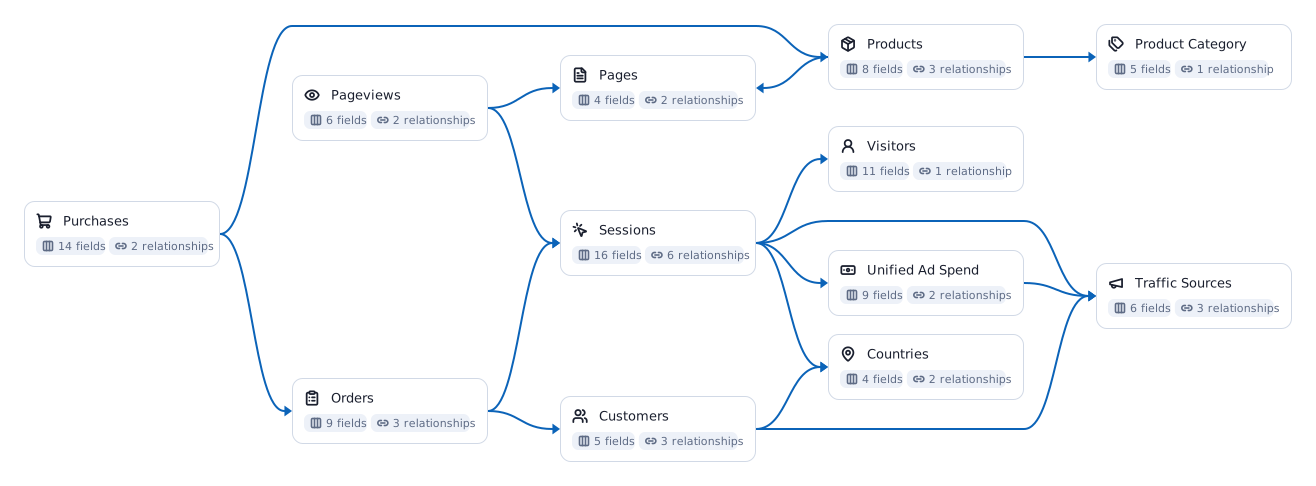
Every view answers one question a marketing or sales lead asks. Between them they read four of the twelve Data Marts in the e-commerce Data Model below, and each view names the ones it uses, so you can open the definition behind any number.
Summary
Is Google Ads paying for itself?
Opens with what the numbers mean: what Google Ads leaves after its spend, which campaign returns the most per $1 and which the least. Then spend, clicks and the conversions Google claims against the orders the store recorded.
Campaigns
Which campaigns earn their budget?
Every campaign's spend, store orders, net sales and profit after ad spend, with net sales per $1 next to what Google claims per $1.
CTR trap
Is our click-through rate real?
Click-through rate two ways, month by month: all clicks over all impressions, and the average of each day's rate. The average runs two points high once a low-volume campaign joins.
The metrics on this dashboard
Each one is defined once in the Data Model and read the same way in every view. Follow a chip for what the metric means and how to calculate it.
An AI dashboard is only as true as what it reads
Most AI dashboards start from an exported file. That works until the second export.
On a CSV
The AI guesses what revenue means, every time
Each export is its own version of the truth, so two dashboards give two numbers. The file goes to whoever has it, and it is out of date the moment it is saved.
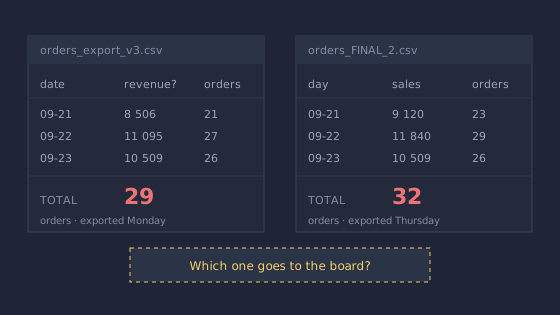
Which one goes to the board?
On your Data Model
CTR is defined once, not averaged
A Data Model computes click-through rate from summed clicks and impressions at whatever grain a report asks for, so a sheet, a dashboard and an AI answer cannot disagree on it.
One definition, every view.
Connecting the AI straight to the warehouse is not enough either. A warehouse rarely holds the business context, so the AI still guesses what the numbers mean. The Data Model is where that context lives.
From your warehouse to a dashboard in five steps
Your analyst does step two once. After that, anyone with access asks their AI for the dashboard they need.
- 01Your warehouseBigQuerySnowflakeDatabricksRedshiftAthenaYour data stays where it is. OWOX runs on it and keeps no copy.
- 02Data ModelData MartsjoinsmetricsYour analyst defines once what net sales, an order and a channel mean.
- 03OWOX MCP and APIgovernedpermissionsThe only door the AI gets: the Data Marts it may read, nothing raw.
- 04Claude or ChatGPTyour own AIAsk for the dashboard in plain words. It builds it on the Data Model.
- 05AI dashboardReportevery runKept as a Report, refreshed every time it runs, like Sheets or Excel.
Build this on your own data
Connect your warehouse, describe your business once, and let your AI build the dashboards your team asks for.