BigQuery aggregate functions: COUNT, SUM, STRING_AGG, ARRAY_AGG and more
An aggregate function turns many rows into one value per group. This guide runs every common BigQuery aggregate on the same six-row table and shows the result: COUNT against COUNTIF, why AVG skips NULLs, STRING_AGG and ARRAY_AGG with ORDER BY and LIMIT, ANY_VALUE, LOGICAL_OR and LOGICAL_AND, MAX_BY, and the traps in each.
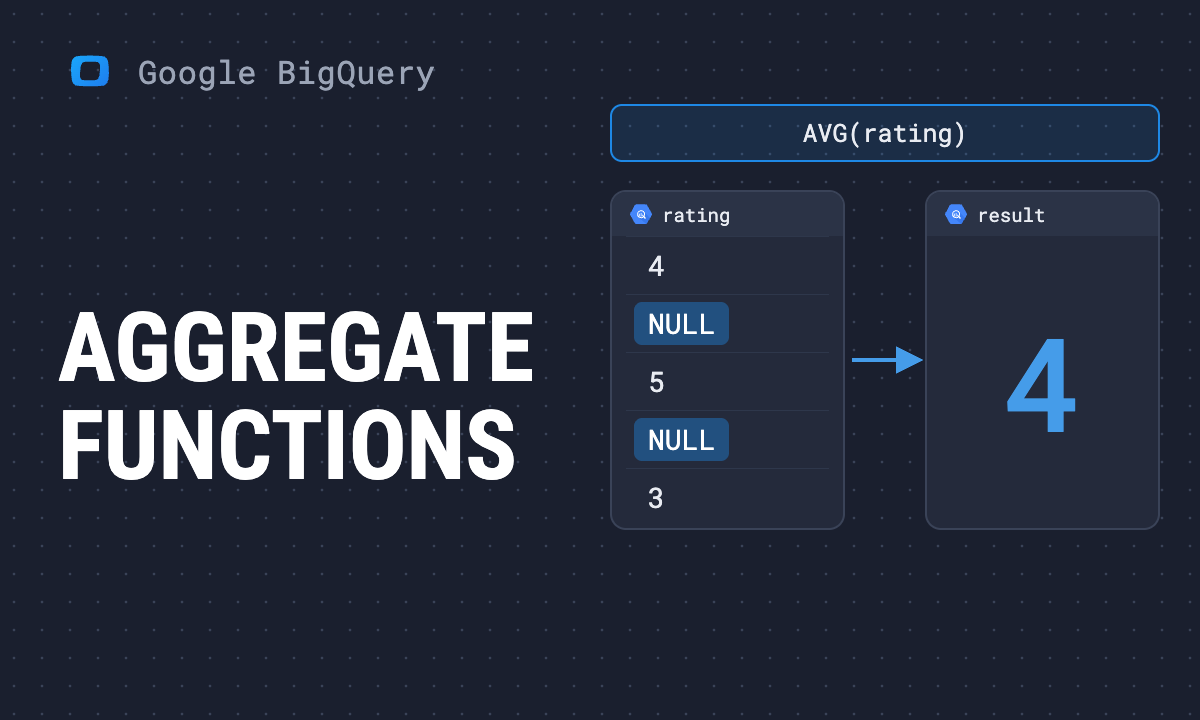
An aggregate function turns many rows into one value: one per table, or one per group with GROUP BY. BigQuery has dozens. Nine of them do almost all everyday work, and each has one behaviour that produces a wrong number without an error.
| Function | Returns | Watch out for |
|---|---|---|
COUNT(*) |
rows | counts rows with NULLs too |
COUNT(col) |
non-NULL values | not the same as COUNT(*) |
COUNTIF(cond) |
rows where the condition is true | NULL conditions are not counted |
SUM, AVG |
total, mean | skip NULLs; FLOAT64 rounding |
MIN, MAX |
smallest, largest | skip NULLs |
STRING_AGG(col, sep) |
values joined into one string | order is random unless you give ORDER BY |
ARRAY_AGG(col) |
values as an array | keeps NULLs unless IGNORE NULLS |
ANY_VALUE(col) |
one value from the group | which one is not defined |
LOGICAL_OR, LOGICAL_AND |
true if any / all rows are true | |
MAX_BY(x, y), MIN_BY(x, y) |
x from the row with the largest / smallest y |
Note: Originally published in January 2024. Fully rewritten in October 2026: every result below was produced by running the query in BigQuery on 16 October 2026.
The table used in every example
The table used in every example
Paste this before any query below and it runs as is:
WITH orders AS (
  SELECT 1 AS order_id, 'anna' AS customer,
         'paid' AS status, 120.0 AS amount, 'web' AS channel
  UNION ALL SELECT 2, 'anna', 'paid', 80.0, 'email'
  UNION ALL SELECT 3, 'ben', 'refunded', 200.0, 'web'
  UNION ALL SELECT 4, 'ben', 'paid', 50.0, 'ads'
  UNION ALL SELECT 5, 'cara', 'paid', NULL, 'web'
  UNION ALL SELECT 6, 'cara', 'paid', 30.0, NULL
)
Six orders, three customers, one order with no amount and one with no channel.
COUNT, COUNTIF and COUNT(DISTINCT)
COUNT, COUNTIF and COUNT(DISTINCT)
SELECT
  COUNT(*) AS rows_,
  COUNT(amount) AS with_amount,
  COUNTIF(status = 'refunded') AS refunds,
  COUNT(DISTINCT customer) AS customers
FROM orders;| rows_ | with_amount | refunds | customers |
|---|---|---|---|
| 6 | 5 | 1 | 3 |
COUNT(*) counts rows. COUNT(amount) counts rows where amount is not NULL. COUNTIF counts rows where the condition is true, and a condition that evaluates to NULL is not counted. COUNT(DISTINCT ...) is exact in BigQuery; for very large tables APPROX_COUNT_DISTINCT is cheaper and close.
OWOX Data Marts
See your first report built in real time. 15 minutes.
- Connect your data warehouse
- Pick your metrics
- Get a live Google Sheets report
In the time it takes to write a ticket. Then imagine never writing that ticket again.
Book a DemoWe'll use your actual use case
SUM, AVG, MIN and MAX skip NULLs
SUM, AVG, MIN and MAX skip NULLs
SELECT
  SUM(amount) AS total,
  AVG(amount) AS avg_amount,
  AVG(COALESCE(amount, 0)) AS avg_with_zero,
  MIN(amount) AS smallest,
  MAX(amount) AS largest
FROM orders;| total | avg_amount | avg_with_zero | smallest | largest |
|---|---|---|---|---|
| 480 | 95.999999999999986 | 79.999999999999986 | 30 | 200 |
Two things in that row.
AVG divides by the rows that have a value. 480 over 5 is 96; the order with no amount is left out. Replace NULL with zero and the average drops to 80, because that order now counts as a sale of nothing. Which one is right depends on what the NULL means, and the query has to say so. More in the COALESCE guide.
The amounts are FLOAT64, because 120.0 in SQL is a float. Floats cannot hold every decimal exactly, so the average comes back as 95.999999999999986. For money, store and sum NUMERIC, or round at the end with ROUND(AVG(amount), 2).
STRING_AGG: values joined into one string
STRING_AGG: values joined into one string
SELECT
  customer,
  STRING_AGG(channel, ', ' ORDER BY order_id) AS channels
FROM orders
GROUP BY customer
ORDER BY customer;| customer | channels |
|---|---|
| anna | web, email |
| ben | web, ads |
| cara | web |
- Without
ORDER BYinside the function, the order is not guaranteed. Two runs can join the same values differently, and a report that compares strings will show a change that is not one. - NULLs are skipped. Cara’s second order has no channel and does not appear.
STRING_AGG(DISTINCT channel, ' | ' ORDER BY channel)across the whole table returnsads | email | web.
ARRAY_AGG: values as an array
SELECT
  customer,
  ARRAY_AGG(amount IGNORE NULLS
            ORDER BY amount DESC LIMIT 1) AS largest_order
FROM orders
GROUP BY customer;| customer | largest_order |
|---|---|
| anna | [120] |
| ben | [200] |
| cara | [30] |
The full form is ARRAY_AGG(expr [IGNORE NULLS] [ORDER BY ...] [LIMIT n]), in that order. ORDER BY ... LIMIT 1 is a common way to take the top value per group; MAX_BY below does the same in one call.
Without IGNORE NULLS, NULLs are kept. ARRAY_AGG(channel) over the whole table returned ["web","email","web","ads","web",null] in our test. Add IGNORE NULLS whenever the array goes on to another step, such as UNNEST or a join. The array functions guide covers what to do with the array next.
ANY_VALUE: one value, no promise which
ANY_VALUE: one value, no promise which
SELECT customer, ANY_VALUE(status) AS any_status
FROM orders
GROUP BY customer;| customer | any_status |
|---|---|
| anna | paid |
| ben | refunded |
| cara | paid |
ANY_VALUE returns a value from some row of the group. Ben has one paid and one refunded order, and the query returned “refunded”; another run may return “paid”. Use it only for a column that is the same on every row of the group, such as a customer’s name when you group by customer ID. It saves adding the column to GROUP BY. For anything else, say which row you want, with MAX_BY or ARRAY_AGG ... LIMIT 1.
LOGICAL_OR and LOGICAL_AND
SELECT
  customer,
  LOGICAL_OR(status = 'refunded') AS any_refund,
  LOGICAL_AND(status = 'paid') AS all_paid
FROM orders
GROUP BY customer;| customer | any_refund | all_paid |
|---|---|---|
| anna | false | true |
| ben | true | false |
| cara | false | true |
These answer “did any” and “did all” per group without a subquery. A common use is flagging customers who ever refunded, or sessions where every hit was from a bot.
MAX_BY and MIN_BY
SELECT
  MAX_BY(order_id, amount) AS biggest_order,
  MIN_BY(customer, amount) AS smallest_customer
FROM orders;| biggest_order | smallest_customer |
|---|---|
| 3 | cara |
MAX_BY(x, y) returns x from the row where y is largest: order 3, the 200 order. Before these existed, the same answer took a window function or a self-join.
GREATEST and LEAST are not aggregates
GREATEST and LEAST are not aggregates
They compare values across columns in one row, not down a column. And unlike MAX, they do not skip NULLs:
| Expression | Result |
|---|---|
GREATEST(1, 2, 3) |
3 |
GREATEST(1, NULL, 3) |
NULL |
LEAST(1, NULL) |
NULL |
One NULL argument makes the whole result NULL. Wrap the arguments in COALESCE if a missing value should not win.
GROUP BY, HAVING and aliases
- Every column in
SELECTis either inGROUP BYor inside an aggregate.ANY_VALUEis the escape hatch for a column you know is constant. GROUP BYaccepts the alias fromSELECT:SELECT customer AS c, COUNT(*) FROM ... GROUP BY cruns.- To filter on an aggregate, use
HAVING, notWHERE:HAVING SUM(amount) > 100. The order the clauses run in is in WHERE, HAVING and QUALIFY. - An aggregate with
OVER (...)becomes a window function and keeps every row; see window functions.
For statistics such as STDDEV, VARIANCE and CORR, see statistical aggregate functions. All function families are mapped in the BigQuery functions overview.
Where aggregates go wrong in reports
Where aggregates go wrong in reports
Most wrong totals are not a function used wrongly. They are a join that multiplied rows before the SUM ran: one order joined to three items is summed three times. The fix is to aggregate each table to the grain you need first, and join after; the JOIN and UNION guide shows the effect with numbers.
The second source of disagreement is the NULL decision above: one analyst averages with NULLs left out, another with zeros, and two reports differ. In OWOX Data Marts the query that makes that choice is published once as a Data Mart, with the choice written in the column’s description, and every report reads that one model. OWOX Data Marts runs your SQL as written, in your own BigQuery project, and does not transform the data.
Turn your data into decisions.
Governed data marts give you the clean foundation ML needs to actually work.
- No AI hallucinations
- Analyst-governed definitions
- Every number traces to SQL
Frequently Asked Questions
How do BigQuery aggregate functions handle NULL values?
SUM, AVG, MIN, MAX and COUNT(column) skip NULLs. COUNT(*) counts every row. AVG therefore divides by the rows that have a value: 480 over five orders is 96 even when a sixth order has no amount. Replace NULLs with COALESCE only if a missing value really means zero.
How does GROUP BY work with aggregate functions in BigQuery?
GROUP BY splits the rows into groups and each aggregate returns one value per group. Every column in SELECT must be in GROUP BY or inside an aggregate. BigQuery accepts the SELECT alias in GROUP BY, and HAVING filters on the aggregated values.
How do I use ARRAY_AGG in BigQuery?
ARRAY_AGG collects values into an array: ARRAY_AGG(expr [IGNORE NULLS] [ORDER BY ...] [LIMIT n]). ORDER BY with LIMIT 1 takes the top value per group. Without IGNORE NULLS the NULLs stay in the array.
What is the difference between COUNT, COUNTIF and COUNT DISTINCT in BigQuery?
COUNT(*) counts rows, COUNT(column) counts rows where the column is not NULL, COUNTIF(condition) counts rows where the condition is true, and COUNT(DISTINCT column) counts different non-NULL values. It is exact in BigQuery; APPROX_COUNT_DISTINCT is cheaper on very large tables.
What is an aggregate function in BigQuery?
A function that turns many rows into one value, for the whole table or for each group in GROUP BY: COUNT, SUM, AVG, MIN, MAX, STRING_AGG, ARRAY_AGG and others. With an OVER clause the same function becomes a window function and keeps every row.