BigQuery IF, CASE, IFNULL, NULLIF and COALESCE, with tested examples
BigQuery's conditional expressions decide a value row by row: IF for one condition, CASE for several, IFNULL and COALESCE to fill NULLs, NULLIF to avoid division by zero, IS DISTINCT FROM to compare values that may be NULL. This guide runs each on the same four-row table, shows the result, and points out where a NULL quietly changes the answer.
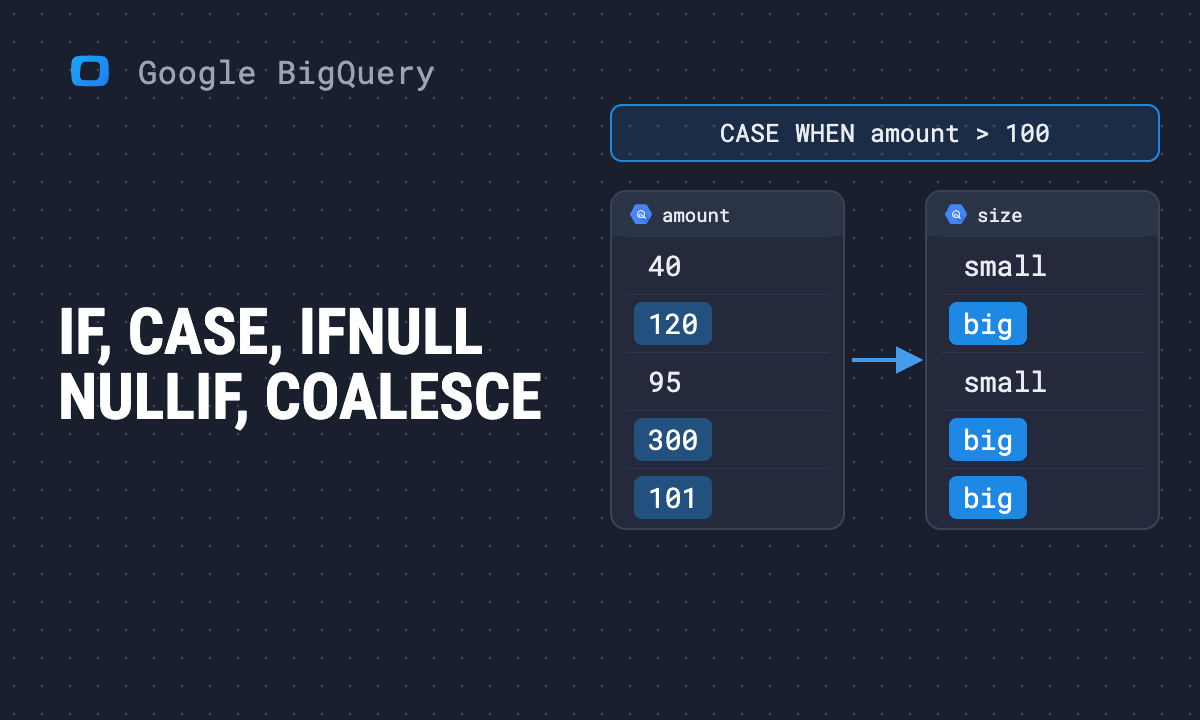
BigQuery has no IIF and no IF ... ELSE inside a query. The “if statement” of a SELECT is the IF function, IF(condition, value_if_true, value_if_false), and for more than one branch, CASE. Around them sit four helpers for NULLs: IFNULL, COALESCE, NULLIF and IS DISTINCT FROM.
| Expression | Use it for |
|---|---|
IF(cond, a, b) |
one condition, two outcomes |
CASE WHEN ... THEN ... ELSE ... END |
several conditions, checked in order |
IFNULL(x, fallback) |
replace a NULL with one value |
COALESCE(x, y, z) |
the first non-NULL of several |
NULLIF(x, y) |
turn a value into NULL, usually zero before dividing |
x IS DISTINCT FROM y |
compare when either side may be NULL |
Note: Originally published in January 2024. Fully rewritten in October 2026: every result below was produced by running the query in BigQuery on 16 October 2026.
The table used in every example
The table used in every example
WITH orders AS (
  SELECT 1 AS order_id, 'paid' AS status,
         120.0 AS amount, 3 AS items, 'web' AS channel
  UNION ALL SELECT 2, 'paid', 80.0, 0, 'email'
  UNION ALL SELECT 3, 'refunded', 200.0, 2, NULL
  UNION ALL SELECT 4, NULL, 50.0, 1, 'ads'
)
Order 3 has no channel and order 4 has no status. Real tables have rows like these, and they are where conditional logic goes wrong.
IF
SELECT
  order_id,
  IF(status = 'paid', amount, 0) AS paid_amount
FROM orders;| order_id | paid_amount |
|---|---|
| 1 | 120 |
| 2 | 80 |
| 3 | 0 |
| 4 | 0 |
IF evaluates the condition and returns the second argument when it is true, otherwise the third. A condition that is NULL counts as not true, so order 4, with no status, falls to the third argument.
Inside an aggregate, IF builds a conditional total: SUM(IF(status = 'paid', amount, 0)) returned 200. COUNTIF(condition) is the shorter form for counting.
The IF ... THEN ... ELSE ... END IF statement also exists, but only in BigQuery scripting, between statements, not inside a SELECT.
OWOX Data Marts
See your first report built in real time. 15 minutes.
- Connect your data warehouse
- Pick your metrics
- Get a live Google Sheets report
In the time it takes to write a ticket. Then imagine never writing that ticket again.
Book a DemoWe'll use your actual use case
The NULL trap in every condition
The NULL trap in every condition
This is the mistake behind most wrong counts:
SELECT COUNTIF(status != 'refunded') AS not_refunded
FROM orders;
It returned 2, not 3. Order 4 has no status, and NULL != 'refunded' is not true but NULL, so the row is not counted. The same happens in WHERE, IF and CASE.
If a missing status should count as “not refunded”, say so:
| Expression | Order 4 (status NULL) |
|---|---|
status != 'refunded' |
NULL, so excluded |
status IS DISTINCT FROM 'refunded' |
true |
IFNULL(status, '') != 'refunded' |
true |
IS DISTINCT FROM treats two NULLs as equal and a NULL and a value as different, which is what most people expect != to do.
CASE
The searched form checks conditions in order and stops at the first that is true:
SELECT
  order_id,
  CASE
    WHEN amount >= 100 THEN 'large'
    WHEN amount >= 60 THEN 'medium'
    ELSE 'small'
  END AS size
FROM orders;| order_id | amount | size |
|---|---|---|
| 1 | 120 | large |
| 2 | 80 | medium |
| 3 | 200 | large |
| 4 | 50 | small |
Order matters: put >= 60 first and every large order becomes “medium”. Without ELSE, a row that matches nothing gets NULL.
The simple form cannot find NULL
CASE status WHEN 'paid' THEN ... END compares status with each value using =. Since nothing equals NULL, WHEN NULL never matches:
| Expression | Order 4 |
|---|---|
CASE status WHEN 'paid' THEN 'keep' WHEN NULL THEN 'missing' ELSE 'other' END |
other |
CASE WHEN status IS NULL THEN 'missing' WHEN status = 'paid' THEN 'keep' ELSE 'other' END |
missing |
To handle NULL, use the searched form with IS NULL as the first branch.
Every branch must return the same type
SELECT CASE WHEN TRUE THEN 1 ELSE 'none' END;fails with “No matching signature for operator CASE; all THEN/ELSE arguments must be coercible to a common type but found: INT64, STRING”. Return the same type from every branch, or CAST one of them. Numbers do mix: an INT64 branch and a FLOAT64 branch both come back as FLOAT64. The same rule applies to IF and COALESCE.
IFNULL and COALESCE
| Expression | Order 3 (channel NULL) | Order 4 |
|---|---|---|
IFNULL(channel, 'unknown') |
unknown | ads |
COALESCE(channel, status, 'none') |
refunded | ads |
IFNULL(x, y) is COALESCE(x, y) with two arguments. COALESCE takes as many as you like and returns the first that is not NULL. Filling a NULL changes what an average or a count means, so decide it once and write it down; the COALESCE guide shows the effect on an average.
NULLIF and division by zero
SELECT 10 / 0 fails the whole query with “division by zero”. In a table with one empty row out of millions, that is one failed scheduled report.
SELECT
  order_id,
  amount / NULLIF(items, 0) AS per_item
FROM orders;| order_id | items | per_item |
|---|---|---|
| 1 | 3 | 40 |
| 2 | 0 | NULL |
| 3 | 2 | 100 |
| 4 | 1 | 50 |
NULLIF(items, 0) returns NULL when items is 0, and dividing by NULL gives NULL instead of an error. SAFE_DIVIDE(amount, items) does the same in one call. Either way, an AVG over the result skips that row. That is right when you want the typical order, but not for a total: an average of per-row ratios ignores the rows that became NULL and weights small rows like large ones, so for a figure such as cost per order divide the sums instead. The mathematical functions guide has the other SAFE_ functions.
Which one to use
- One condition:
IF. - Several, in order: searched
CASE, withIS NULLfirst if NULLs are possible. - A default for a missing value:
IFNULL, orCOALESCEfor a chain of fallbacks. - A ratio:
SAFE_DIVIDE, orNULLIFon the divisor. - A comparison where either side can be NULL:
IS DISTINCT FROM.
All the function families are mapped in the BigQuery functions overview, and the clauses these expressions sit in are in WHERE, HAVING and QUALIFY.
Write the rule once
A CASE that groups channels, or an IF that decides what counts as a sale, is a business rule. Copied into five queries, it becomes five slightly different rules, and the reports stop agreeing. In OWOX Data Marts that query is published once as a Data Mart with a description on each column, so the rule lives in one place and every report, or dashboard reads the same result. OWOX Data Marts runs your SQL as written, in your own BigQuery project, and does not transform the data.
Turn your data into decisions.
Governed data marts give you the clean foundation ML needs to actually work.
- No AI hallucinations
- Analyst-governed definitions
- Every number traces to SQL
Frequently Asked Questions
Why does COALESCE return a 'No matching signature' error in BigQuery?
All arguments of COALESCE must be coercible to one type. COALESCE(1, 'none') mixes INT64 and STRING and fails. Cast one side, for example COALESCE(CAST(x AS STRING), 'none'). Numbers mix: INT64 and FLOAT64 come back as FLOAT64.
What happens when CASE branches return different types?
The query fails: 'all THEN/ELSE arguments must be coercible to a common type'. Return the same type from every branch, or CAST one of them. The same rule applies to IF and COALESCE.
How do I compare values that may be NULL in BigQuery?
Use IS DISTINCT FROM or IS NOT DISTINCT FROM. A plain comparison with NULL returns NULL, which counts as not true, so COUNTIF(status != 'refunded') skips rows with no status. status IS DISTINCT FROM 'refunded' counts them.
What is the difference between IFNULL and NULLIF in BigQuery?
IFNULL(x, y) replaces a NULL x with y. NULLIF(x, y) does the opposite: it returns NULL when x equals y. The usual use of NULLIF is amount / NULLIF(items, 0), which returns NULL instead of a division-by-zero error.
How do I write an IF statement in BigQuery?
Inside a query, use the IF function: IF(condition, value_if_true, value_if_false). A NULL condition counts as false. For several conditions use CASE. The IF ... THEN ... END IF statement exists only in BigQuery scripting, between statements.
When should I use COALESCE in BigQuery?
When a value may be missing and you want the first one that is present: COALESCE(channel, source, 'none'). It takes any number of arguments; IFNULL is the two-argument form. Filling NULLs changes averages and counts, so decide the default deliberately.
How do CASE expressions work in BigQuery?
The searched form, CASE WHEN condition THEN value ... ELSE value END, checks conditions in order and stops at the first true one. The simple form, CASE column WHEN value THEN ..., compares with =, so WHEN NULL never matches; use WHEN column IS NULL in the searched form instead.
What are conditional expressions in BigQuery?
Expressions that choose a value row by row: IF, CASE, IFNULL, COALESCE, NULLIF, and the comparison IS DISTINCT FROM. BigQuery has no IIF function.