

OWOX Data Marts vs Airbyte for Snowflake
Discover how OWOX Data Marts provides a governed, reusable analytics layer in Snowflake, complementing or replacing Airbyte’s raw data ingestion for scalable, trusted reporting

Snowflake has made it straightforward to centralize data, scale compute on demand, and plug in almost any BI or AI tool. Yet most teams still hit the same bottleneck: they have plenty of data loaded, but not enough data that is truly analytics-ready.
.png)
Tools like Airbyte have lowered the barrier to getting data into Snowflake.
What they don’t solve by design is turning that raw, heterogeneous data into governed, documented, and reusable data marts that reliably power dashboards, spreadsheets, and insights.
That’s where a data-mart-first approach comes in. Instead of starting from “What connectors do we have?” and hoping your analytics layer will sort itself out later, a data-mart-first workflow starts from “What business questions need consistent answers?” and works backwards to the models and pipelines required.
In this article, we explore why data analysts and analytics engineers working with Snowflake should prioritize analytics-ready data over raw ingestion, and how that shifts your tool choices and architecture decisions.
We’ll look at:
- How connector-first tools like Airbyte fit into a modern Snowflake stack
- What changes when you adopt a data-mart-first mindset
- The trade-offs between building everything yourself vs. using opinionated, domain-specific data marts
- How solutions like OWOX Data Marts can sit on top of your existing ingestion layer to deliver governed, AI-ready models faster
By the end, you’ll have a clearer picture of when Airbyte alone is enough, when it becomes a hidden cost center, and when pairing it with a data-mart-first layer is the more scalable choice for Snowflake-based analytics.
Snowflake Analytics Needs More Than Just Connectors
Most Snowflake teams don’t struggle to collect data anymore. They struggle to turn that data into consistent, explainable numbers that stakeholders can confidently act on.
Connector-first tools like Airbyte make it easy to stream data from dozens of sources into Snowflake. You get raw tables quickly: ad platform exports, CRM objects, product events, and billing data. On paper, you’ve “modernized” your stack.
In practice, analysts still spend most of their time:
- Reconciling conflicting metrics between tools
- Untangling schema changes and broken joins
- Rebuilding similar logic across dashboards and use cases
Connectors solve the “how do we get data in?” question. They don’t answer “what does revenue mean here?” or “which definition of active user should we use?” or “how do we guarantee that everyone sees the same number for ROAS?”
This is the gap a data-mart-first architecture is designed to fill.
Instead of treating Snowflake as just a landing zone for raw connectors, you establish a curated, governed layer of analytics-ready data marts that encode your business logic: unified customer tables, marketing attribution models, funnel views, LTV cohorts, and so on.
In this context:
- Airbyte and similar tools are essential for ingesting Snowflake analytics-ready data sources.
- A data mart layer is essential for organizing, governing, and reusing that data for decisions, reporting, and AI.
Solutions like OWOX Data Marts sit above your data ingestion layer, giving you pre-built, Snowflake-native data marts for key marketing and product use cases, while still letting you extend and customize them as your business evolves.
Connector-First vs Analytics-Ready Approaches for Snowflake
When building analytics pipelines into Snowflake, tools tend to fall into two categories: connector-first ingestion platforms and analytics-ready data platforms.
The difference becomes clearer when comparing how Airbyte and OWOX Data Marts approach the problem:
In practice, this means the two tools solve different parts of the analytics stack. Airbyte focuses on moving raw data into Snowflake, while OWOX Data Marts focuses on turning that data into governed, reusable structures that analysts can immediately use for reporting, spreadsheets, and AI insights.
From Landing Raw Data to Delivering Decisions: What Analysts Actually Need
Once raw data lands in Snowflake, analysts don’t want more tables – they want stable answers.
At a minimum, analysts need:
- Coherent metrics: One definition of revenue, conversion, active user, CAC, LTV, not one per dashboard.
- Trusted joins and keys: A reliable way to connect ad clicks, web sessions, orders, and accounts across tools.
- Governed models: Versioned, documented transformations where changes are controlled, reviewed, and communicated.
- Reusable logic: Attribution, cohorts, funnels, and segmentation are expressed once and reused by BI, notebooks, and AI workloads.
- Fast delivery to stakeholders: The ability to expose this curated layer to Looker Studio, Power BI, Hex, or custom apps without rebuilding business logic each time.
Raw connector tables are necessary but insufficient. Without an intermediate layer of analytics-ready data, every analyst ends up implementing their own version of the truth, and every new question becomes a small data modeling project.
Why Connector-First Thinking Breaks at the Reporting Layer
Connector-first architectures start with “how many sources can we plug in?” rather than “how will people use this data?” That works fine until the reporting layer grows beyond a few exploratory dashboards.
Problems typically emerge when:
- Different teams build their own models directly on raw connector tables.
- Metric definitions drift across dashboards, decks, and SQL snippets.
- Schema or API changes in a source break dozens of downstream queries.
- Stakeholders lose trust because numbers differ between tools or time periods.
Airbyte, for example, excels at moving data into Snowflake. It does not try to:
- Harmonize business concepts across sources (e.g., customer, order, session).
- Enforce canonical metric definitions.
- Manage documentation, ownership, and change control for data models.
By the time these gaps show up, teams often have a sprawling web of ad-hoc transformations and BI dashboards that are expensive to refactor. Connector-first thinking optimizes for ingestion speed, not for the long-term reliability and usability of Snowflake analytics-ready data.
How Data-Mart-First Thinking Changes the Architecture
A data-mart-first approach inverts the usual sequence.
You start by defining the core analytical structures you need – such as:
- A unified marketing performance data mart (spend, impressions, clicks, conversions, revenue).
- A customer 360 data mart with behavior, transactions, and lifecycle states.
- A product analytics data mart with events, funnels, and retention cohorts.
These data marts become a stable, reusable layer that sits between raw connector data and business-facing tools. All transformations, joins, and metric definitions live here, not scattered across dashboards or ad-hoc scripts.
Architecturally, this means:
- Raw data from connectors is treated as a staging layer, not a direct analytics source.
- Data marts are modeled explicitly (schemas, ownership, SLAs) and optimized for analyst workflows.
- BI, experimentation, and AI tools all connect to the same curated data marts, ensuring consistency.
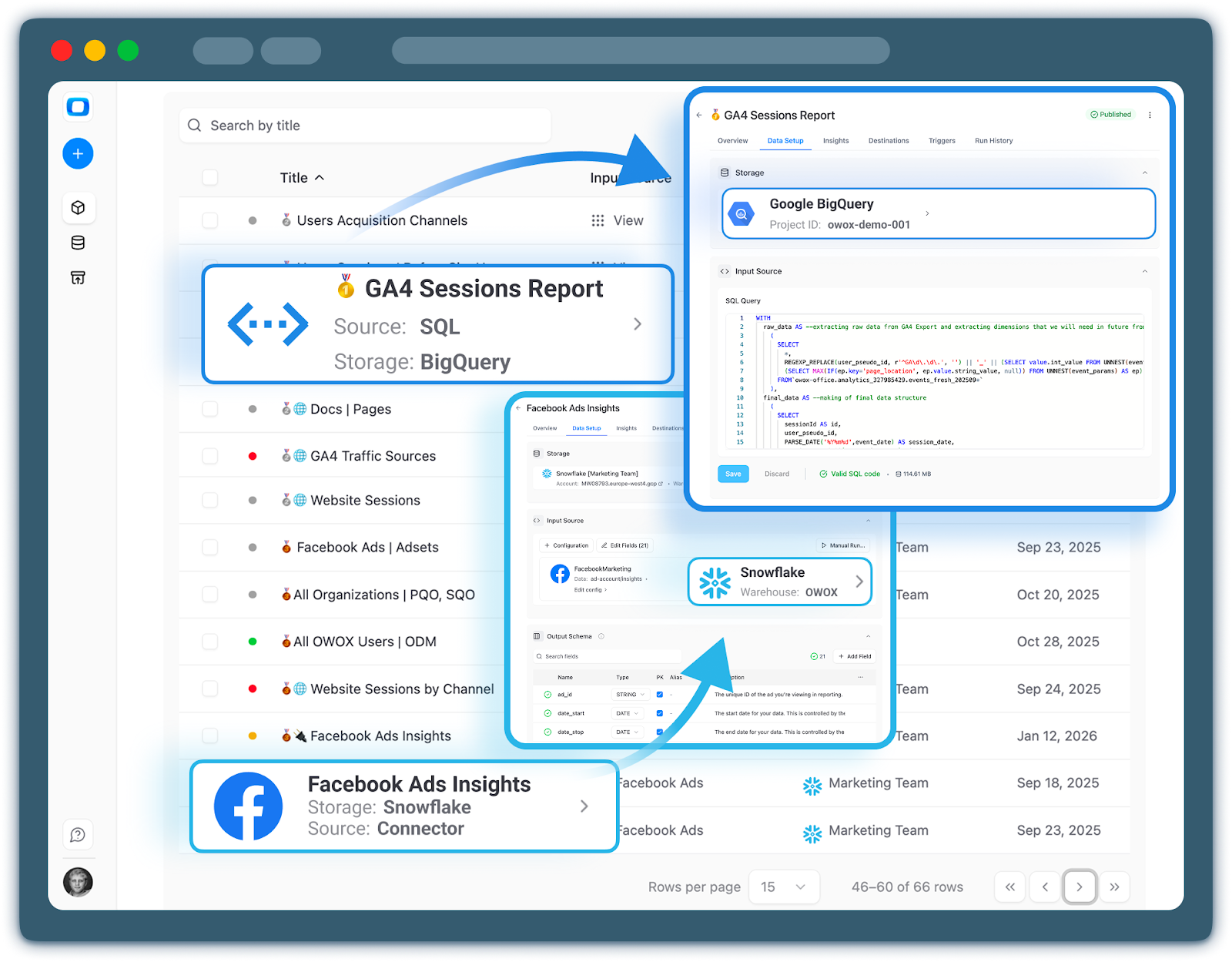
This approach reduces duplication of effort, isolates upstream changes, and makes it much easier to onboard new analysts – because they can rely on documented, analytics-ready objects instead of deciphering raw tables.
How OWOX and Airbyte Works together
In a mature Snowflake stack, Airbyte and OWOX occupy complementary layers:
- Airbyte: Connects to SaaS tools, ad platforms, databases, and event streams; lands raw and lightly structured data into Snowflake reliably and cost-effectively.
- OWOX Data Marts: Builds and orchestrates governed, subject-specific data marts (e.g., marketing, product) on top of that raw data, with ready-to-use models, metrics, and lineage.
The result is an architecture where connectors handle ingestion, while the data mart layer ensures your Snowflake environment delivers scalable, governed, and AI-ready analytics – without turning every new report into a custom modeling exercise.
What Airbyte Does Well in a Snowflake-Centric Stack
Airbyte has become a go-to choice for teams that want a programmable, open-source way to move data into Snowflake. It’s particularly attractive when you have many heterogeneous sources, need marketing data connectors for Snowflake, and want to keep full control of your ELT logic and infrastructure.
From a technical perspective, Airbyte is a strong fit as the ingestion and extraction layer in a modern stack. It’s designed to solve the “connect everything to Snowflake” problem with:
- A large connector ecosystem
- Configurable sync schedules and incremental loading
- Support for custom connectors and transformations in code
For data engineers, this is a big win: you can standardize ingestion across the company and avoid building dozens of ad-hoc scripts. But for analysts and marketers, Airbyte on its own is just the first step. Without a well-defined modeling and data mart layer on top, the responsibility for turning raw data into analytics-ready models still falls heavily on them.
Airbyte’s Core Value Proposition: Open Source Connectivity
Airbyte’s main value proposition is simple: open source connectors plus ELT pipelines.
Key characteristics:
- Open source: You can self-host, inspect the code, and modify or extend it to meet internal standards or niche use cases.
- Broad connector coverage: Popular SaaS tools (Salesforce, HubSpot), ad platforms (Google Ads, Meta Ads, TikTok), databases, and file-based sources are available out of the box.
- ELT-focused: Data is extracted from sources and loaded with minimal transformation into Snowflake, leaving the heavy modeling for later stages.
- Configurable syncs: Full and incremental loads, change data capture for some sources, and flexible scheduling.
- Extensibility: If a connector doesn’t exist or doesn’t meet your needs, you can build or fork one and manage it with your usual engineering workflows.
For teams evaluating an Airbyte Snowflake alternative, this is the baseline: any contender must either match this connector's breadth and flexibility or integrate cleanly on top of it. Airbyte is not trying to be an end-to-end analytics solution – it’s deliberately specialized in getting your raw data into Snowflake efficiently.
Typical Airbyte to Snowflake to dbt Architecture for Analytics
In most Snowflake-centric organizations, Airbyte is just one piece of a longer chain. A common architecture looks like this:
- Airbyte → Snowflake (raw layer):
- Airbyte pulls data from marketing platforms, product tools, CRM, billing, etc.
- It loads that data into Snowflake “raw” schemas, often closely mirroring source APIs.
- dbt → Snowflake (modeled layer):
- dbt models reference those raw tables to build normalized and transformed schemas.
- Business logic – joins, filters, KPI definitions – is expressed as SQL models and macros.
- dbt handles tests, documentation, and dependency graphs.
- BI or notebooks → Snowflake (semantic & visualization layer):
- Tools like Looker Studio, Tableau, Power BI, or Hex sit on top of the modeled layer.
- Teams define semantic layers or explore models to build dashboards and analyses.
This Airbyte–Snowflake–dbt–BI pattern is powerful and flexible. It’s also where most complexity shifts away from ingestion and into the modeling and semantic layers.
From a data analyst’s perspective, the success of this architecture depends less on Airbyte itself and more on how well the modeled layer is designed, governed, and standardized.
Without a clear data mart strategy, the pipeline may technically work but still deliver inconsistent metrics and duplicated logic.
Strengths for Data Engineers (not Analysts)
Data engineers often prefer Airbyte because it fits naturally into established engineering practices:
- Infrastructure control: You can self-host, tune performance, and align with internal security and compliance requirements.
- Code-driven customization: Custom connectors and transformations can live in version control, with code review and CI.
- Fine-grained monitoring and observability: Logs, metrics, and failure alerts integrate with existing DevOps tooling.
- Composable with other tools: It plays well with dbt, Airflow, Dagster, and orchestration frameworks you already use.
For teams that want to design every aspect of their pipeline and are comfortable owning that complexity, Airbyte is a strong foundation.
Limitations for Data Analysts
Where Airbyte starts to look less attractive is when it’s treated as the primary analytics solution rather than just the ingestion layer.
From an analyst perspective, relying only on Airbyte + raw tables in Snowflake leads to recurring pain points:
Metrics drift
Each analyst implements “revenue”, “active user”, or “ROAS” slightly differently in their own SQL or BI tool. Over time, numbers don’t match across dashboards, and trust erodes.
Duplicated SQLs
Without a stable data mart layer, common logic – attribution, cohorts, funnels, deduplication – gets copy-pasted into multiple queries and dashboards.
Any upstream schema change means hunting through dozens of queries to fix breakages.
Limited governance and documentation
Airbyte documents how data is ingested, not how it should be interpreted. Ownership of business logic, change management, and semantic definitions is scattered across individuals and teams.
Slow onboarding and experimentation
New analysts must learn each source’s raw schema and business quirks before they can do meaningful work. Experimentation slows because every new question feels like starting from scratch.
This is exactly the gap that a data mart layer – or a solution like OWOX Data Marts – is designed to close: keep using Airbyte for what it does best (ingestion and ELT), while giving analysts curated, governed, and reusable Snowflake analytics-ready data instead of a forest of raw connector tables.
OWOX Data Marts Explained: A Data-Mart-First Layer on Snowflake
OWOX Data Marts are built for teams that want governed, analytics-ready data on Snowflake without turning every new question into a modeling project.
Instead of exposing raw connector tables to analysts, OWOX provides data marts that encode your core business logic: how you define sessions, conversions, revenue, attribution, cohorts, and more.
These data marts are documented and managed as first-class products, not ad-hoc SQL.
On top of that, OWOX handles data collection & delivery into tools like Google Sheets and Looker Studio, and an AI analytics layer that runs only on governed data marts – so you get insight automation without sacrificing data quality.
The result is a data-mart-first layer that:
- Sits directly on your Snowflake
- Reduces engineering effort for ingestion and modeling
- Gives analysts spreadsheet-ready data from Snowflake and consistent metrics everywhere
- Enables AI analytics in Snowflake while keeping hallucinations in check
All of this is available as a self-service, open-source–driven platform you can start using quickly via OWOX Data Marts.
Ingestion Connectivity Into Snowflake Without Managing ETL Scripts
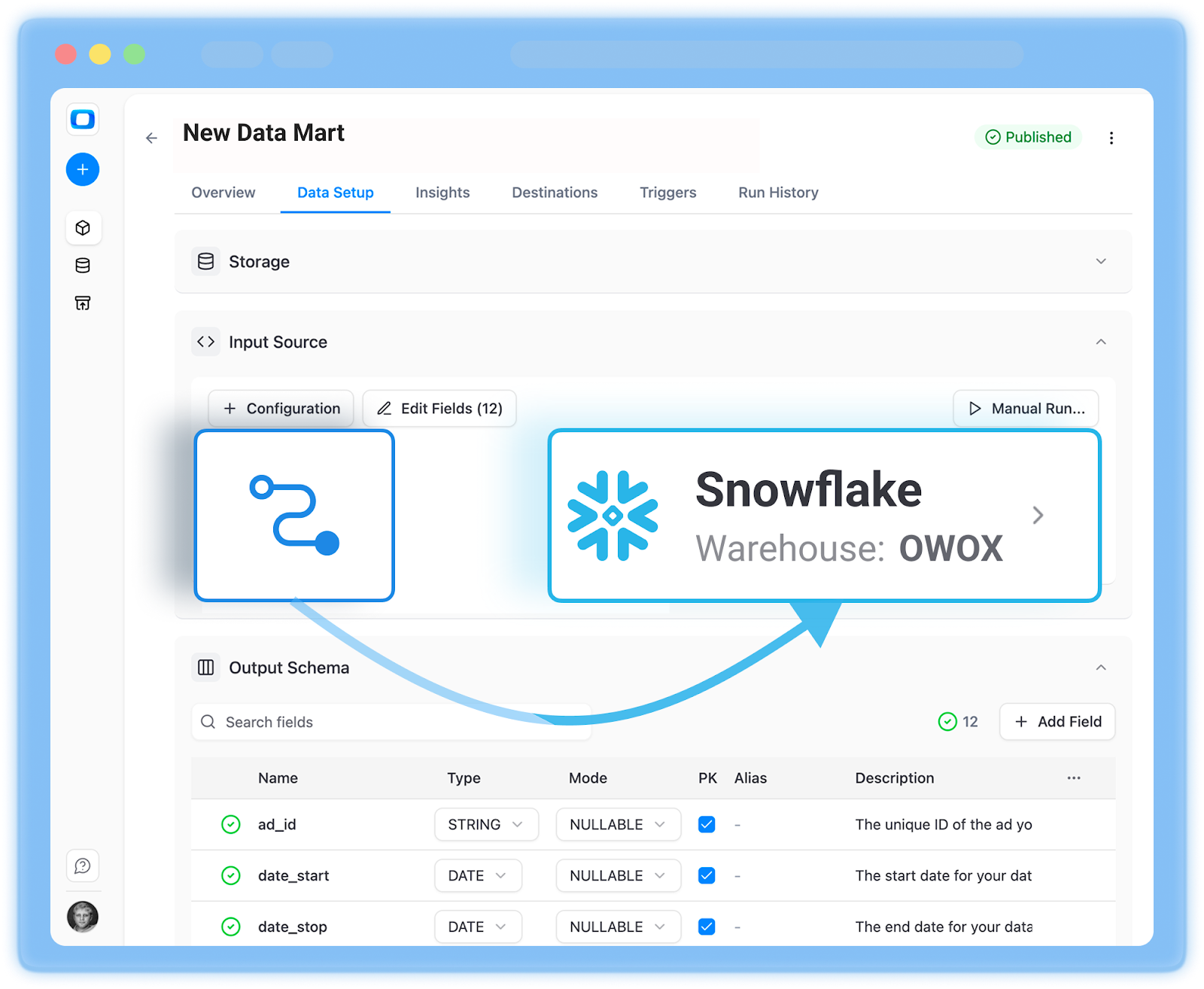
OWOX includes managed ingestion pipelines, so you don’t need to maintain a zoo of custom ELT scripts or hand-rolled connectors just to get data into Snowflake.
Instead of:
- Writing and deploying Python scripts for each marketing API
- Babysitting schema changes and pagination quirks
- Rebuilding connectors every time a vendor updates their endpoint
You configure sources once in OWOX and let the platform handle extraction, normalization, and loading into Snowflake. It’s designed specifically around governed data marts, so ingested data lands into Snowlake in a structure that feeds those data marts reliably.
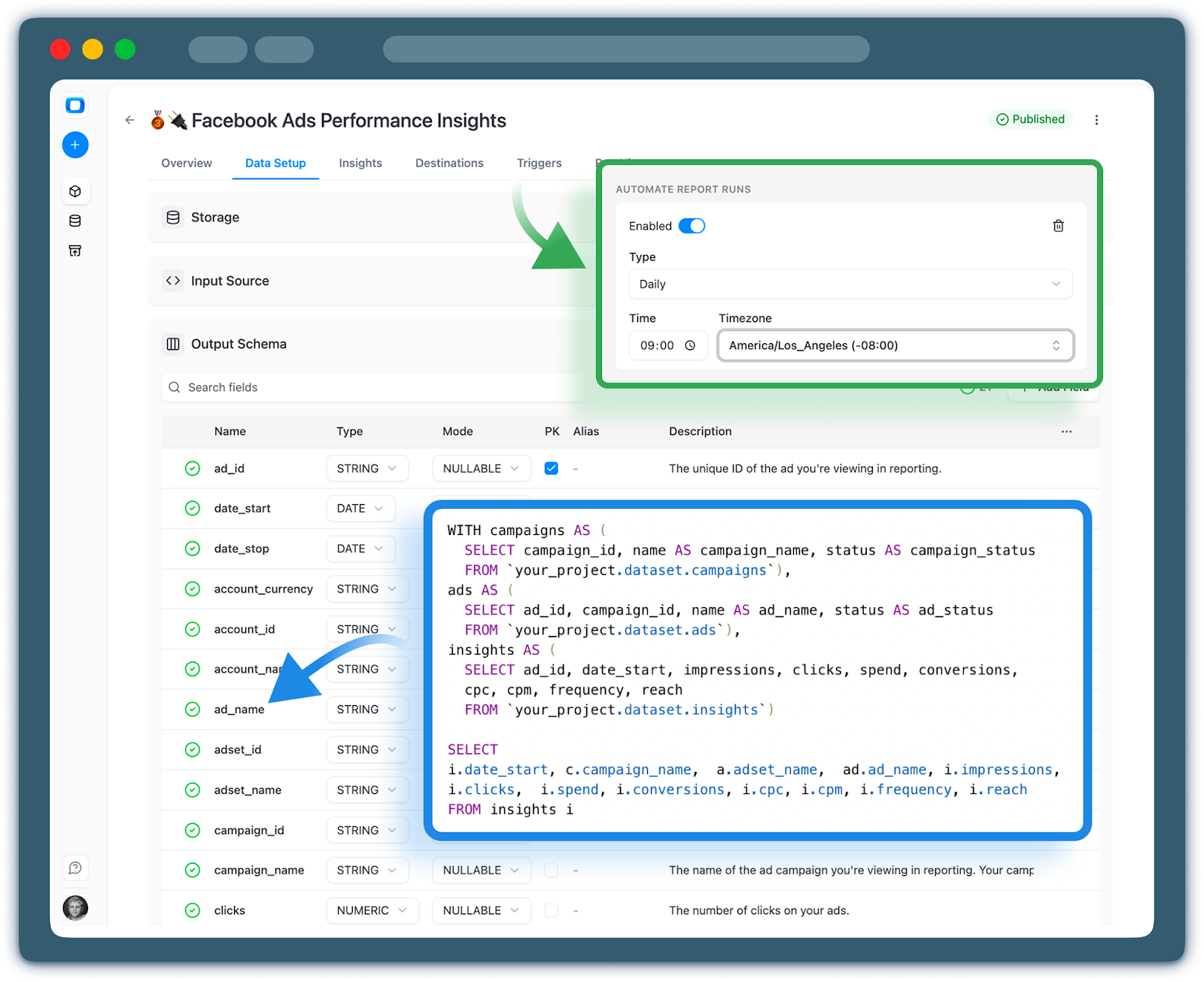
Engineering overhead drops dramatically: fewer cron jobs to maintain, fewer broken jobs after an API change, and a clear path from source to data mart without glue code.
Reusable Data Marts as the Contract Between Analysts and Business Teams
The core of OWOX is its library of reusable data marts – especially for marketing and product analytics. These data marts act as the contract between analysts and business stakeholders:
- Metrics are defined once (e.g., revenue, ROAS, CAC, LTV, sessions, conversions).
- Dimensions like channels, campaigns, geo, device, and product categories are standardized.
- Attribution and funnel logic are centralized rather than living in scattered queries.
Analysts work against these governed data marts on Snowflake instead of stitching raw tables together every time. Business teams know that when they see “Revenue” or “Paid Search” in a dashboard, it’s coming from exactly the same logic everywhere.
That contract has two effects:
- Trust: Fewer metric disputes in meetings because everyone is literally reading from the same table.
- Speed: New dashboards, experiments, and models are built by reusing existing data marts, not redefining logic from scratch.
For teams tired of metric drift and duplicated SQL, OWOX’s governed data marts on Snowflake become the authoritative source of truth.
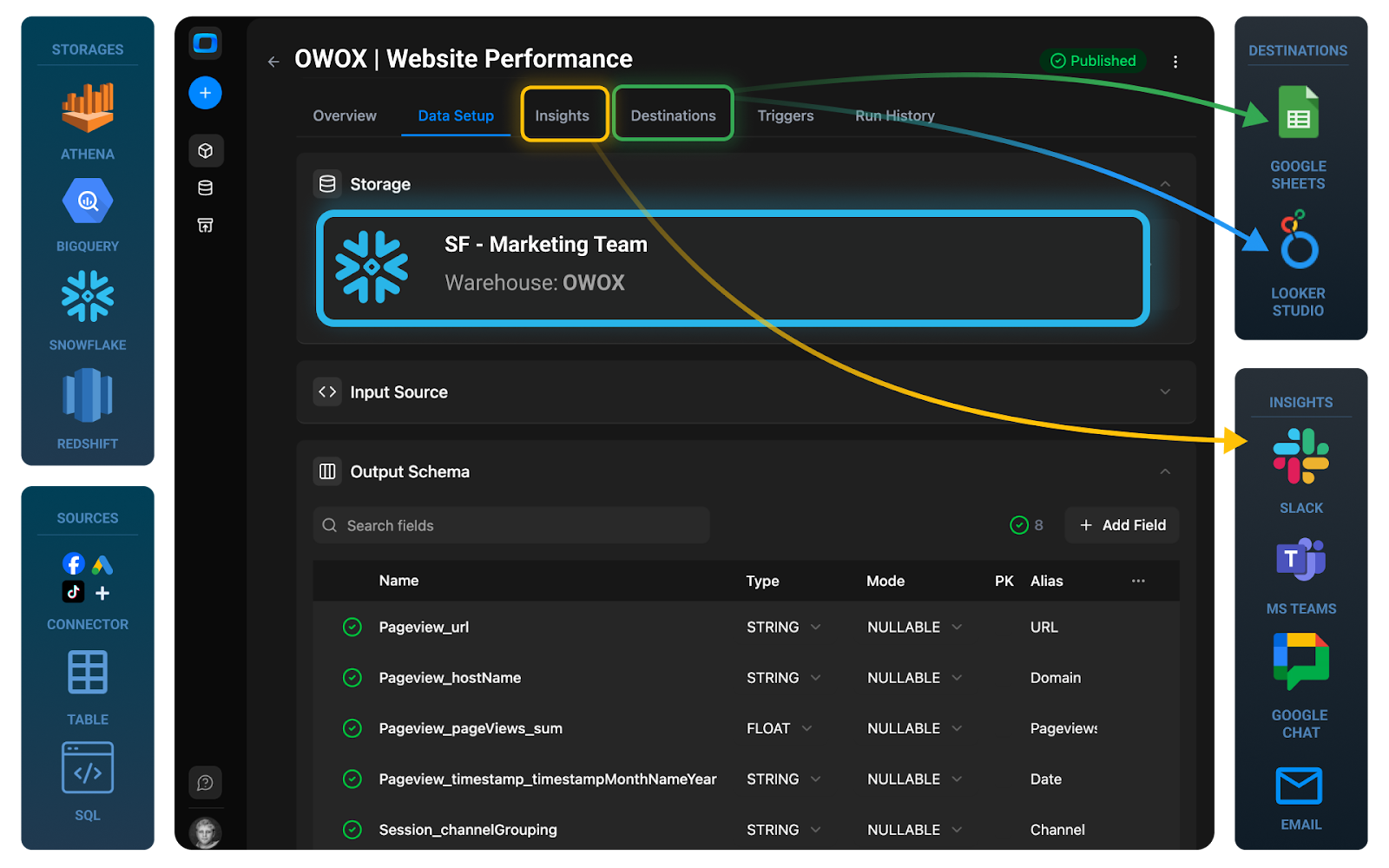
Flexible Delivery Into Google Sheets, Looker Studio, and Other Tools From One Logic
Most organizations don’t live purely inside a BI tool. Stakeholders still demand spreadsheet-ready data from Snowflake for ad-hoc analysis, budgeting, and what-if scenarios.
OWOX is designed so that a single governed data mart can power many destinations:
- Google Sheets: Pull curated tables or views directly into Google Sheets for finance, performance marketing, or ops teams.
- Looker Studio and BI tools: Use the same data marts to back dashboards and self-service exploration.
- APIs and exports: Expose data to downstream apps or data products without rewriting transformations.
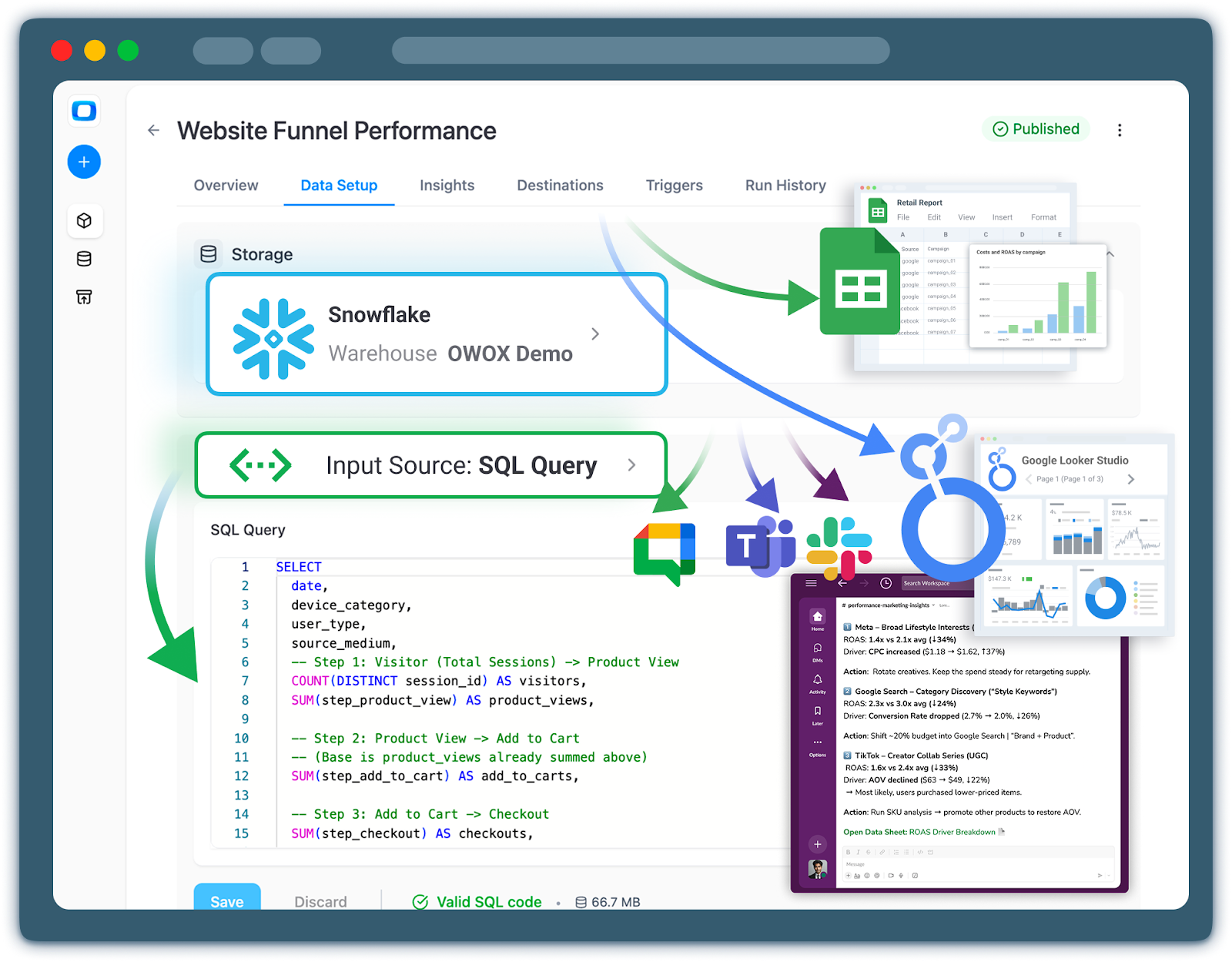
The important part: the business logic doesn’t change per destination. You don’t create one version of ROAS for Sheets and another for Looker Studio. All tools consume the same Snowflake marketing data marts, so numbers align across decks, spreadsheets, and dashboards.
Analysts are empowered to serve different workflows – self-service BI, spreadsheet modeling, or embedded analytics – while maintaining one analytical backbone.
AI Insights as an Always-On Analyst Powered Only By Governed Data Marts
OWOX goes beyond static data marts by adding an AI insights layer that acts like an always-on junior analyst, but with strict guardrails.
Instead of letting an LLM roam freely across raw tables (and hallucinate structure or semantics), OWOX limits AI access to governed data marts in Snowflake. This means:
- The AI only sees curated, well-defined tables and fields.
- Metric definitions and dimensions are already encoded, so the model doesn’t need to guess.
- Generated insights, anomaly alerts, and summaries are based on trusted data rather than ambiguous raw exports.
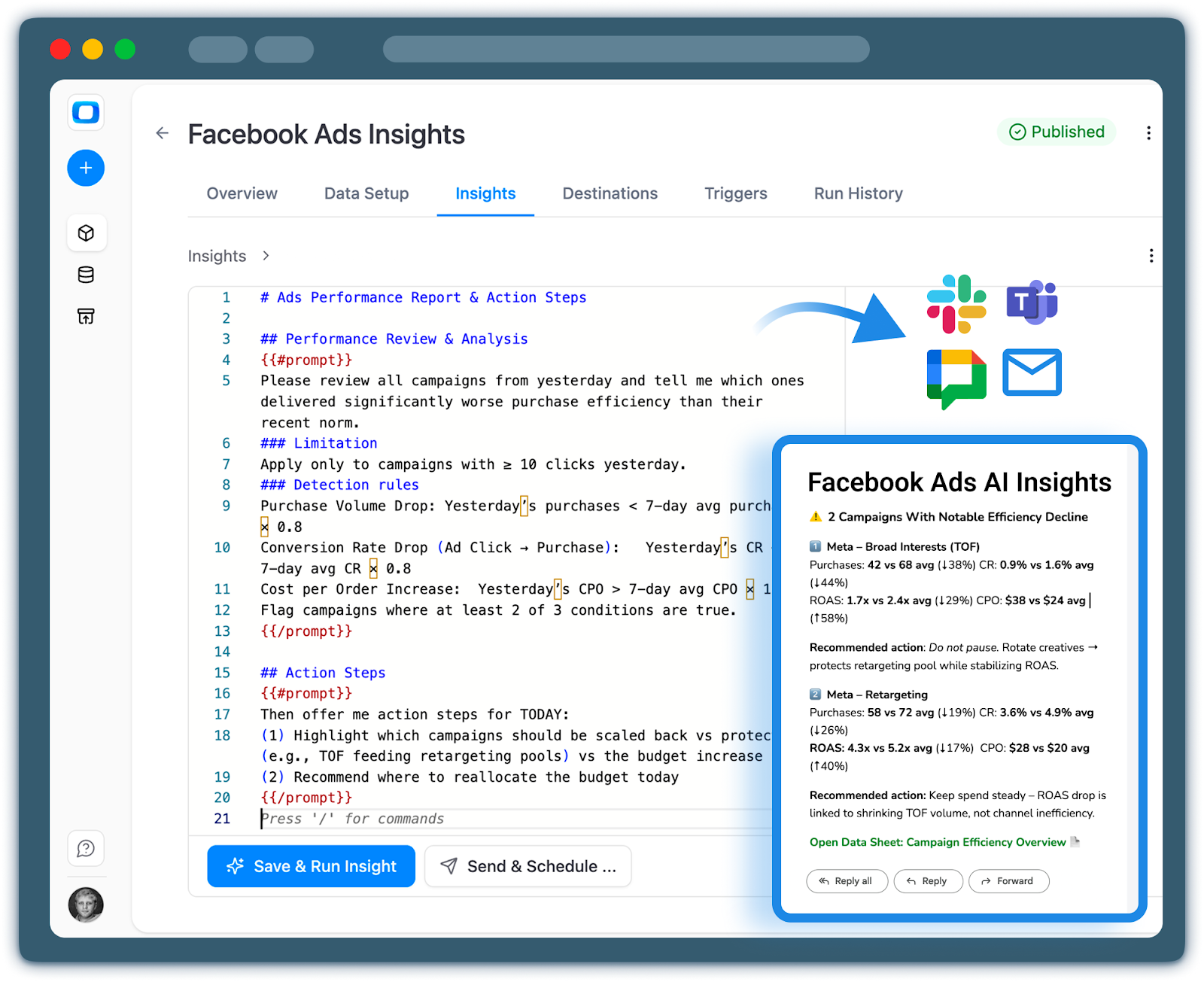
OWOX can surface those AI-driven insights where your teams already work:
- Slack: Alerts about performance shifts, budget anomalies, or conversion drops.
- Email: Regular digests summarizing key trends across channels or products.
- Dashboards: Narrative explanations alongside charts to contextualize movements.
Because the AI analytics for Snowflake is bound to governed data marts, you reduce the risk of misleading or inconsistent AI output. The system amplifies the impact of your existing models instead of undermining them with guesswork.
Taken together, ingestion, governed data marts, multi-destination delivery, and AI-driven insights make OWOX Data Marts a data-mart-first layer that turns Snowflake into a consistent, scalable analytics and decision engine – not just a storage backend.
How OWOX Data Marts Changes the Daily Workflow for Analysts
For many teams using Snowflake as a data warehouse, the current reality is: engineers own connectors, analysts own fragile SQL, and business users wait for someone to unblock them. OWOX Data Marts is designed to flip that dynamic.
By providing governed, reusable data marts on top of Snowflake – plus managed ingestion and automated delivery – OWOX shifts more control into analysts’ hands while still keeping a strong governance framework. The result is self-service analytics on Snowflake that is faster, more consistent, and easier to trust.
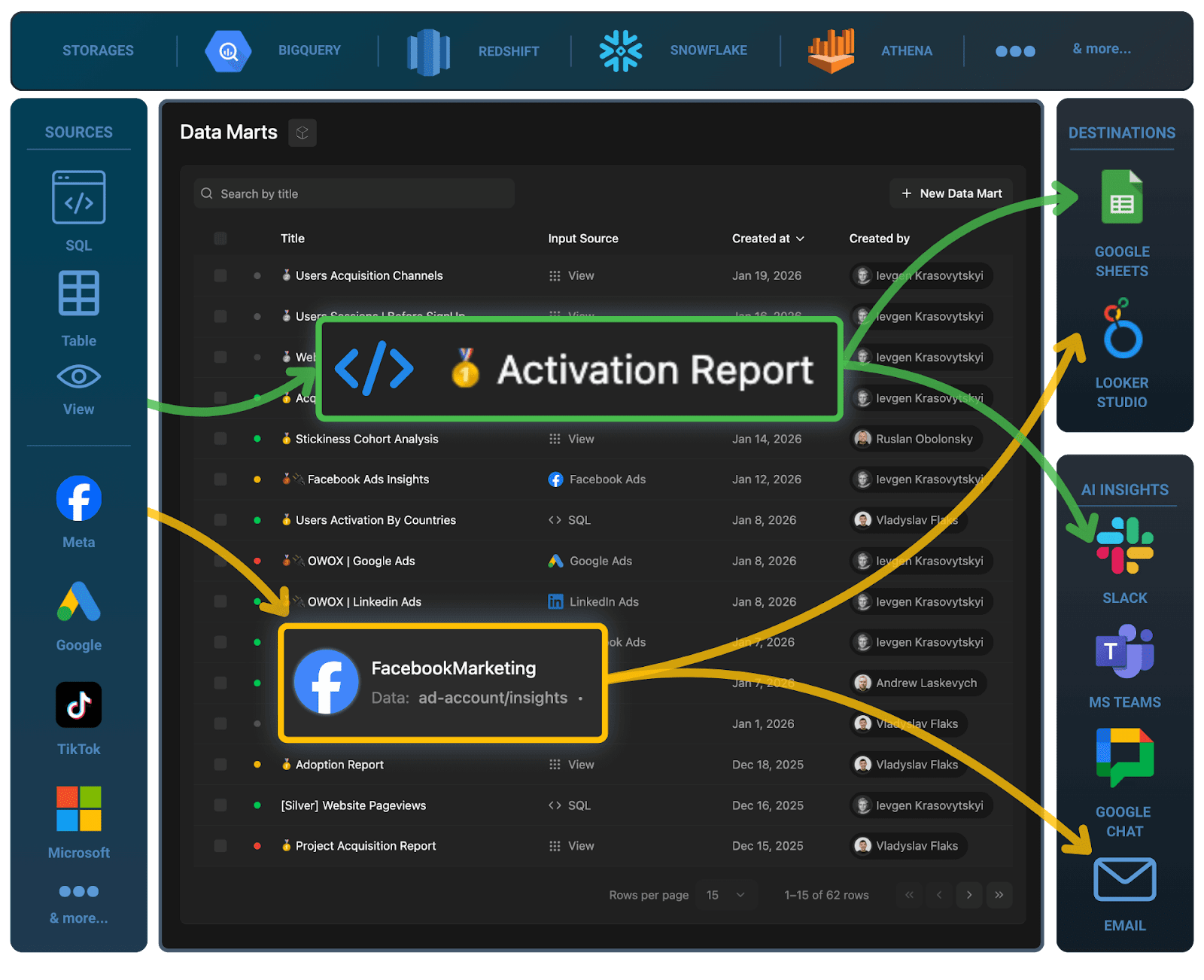
Instead of stitching together raw tables and firefighting metric disputes, analysts can focus on:
- Defining shared metrics and dimensions once
- Operating a clean set of marketing and product data marts
- Automating reports and AI-driven insights for stakeholders’ tools
Owning the Full Pipeline From Connectors to Data Marts as an Analyst
With OWOX, analysts can configure and monitor much of the pipeline themselves:
- Connectors and ingestion are set up through the OWOX interface, not custom scripts.
- Data lands directly into Snowflake in a structure optimized for OWOX’s marketing and product data marts.
- Analysts can see how each source feeds into each data mart and adjust configurations without opening a Jira ticket.
This doesn’t eliminate engineering, but it reduces dependency on them for day-to-day changes:
- Need to add a new ad platform? Configure it in OWOX and attach it to existing marketing data marts.
- Need to tweak attribution windows or channel groupings? Update the data mart logic, not a half-dozen dashboards.
Analysts move from “consumer of pipelines” to operator of governed data flows, with clear visibility into how data moves through Snowflake.
Defining Once, Reusing Everywhere: Metrics and Dimensions Across Teams
OWOX Data Marts encourages analysts to treat metrics and dimensions as products:
- Define key metrics – ROAS, CAC, LTV, retention, active users – once in Snowflake marketing data marts and other domain data marts.
- Standardize dimensions like channel, campaign, geo, device, customer segment, and product category.
- Document these in the data mart layer so anyone querying Snowflake understands the business meaning.
Once defined, these metrics and dimensions are:
- Reused in BI dashboards and notebooks
- Exposed to finance via spreadsheet-ready exports
- Available to AI insights, so automated narratives use the same definitions
Collaboration improves because:
- Marketing, product, and finance teams reference the same objects when they talk about performance.
- Disagreements shift from “your number vs my number” to “do we need to evolve the shared definition in the data mart?”
- Analysts spend less time reconciling reports and more time exploring drivers and hypotheses.
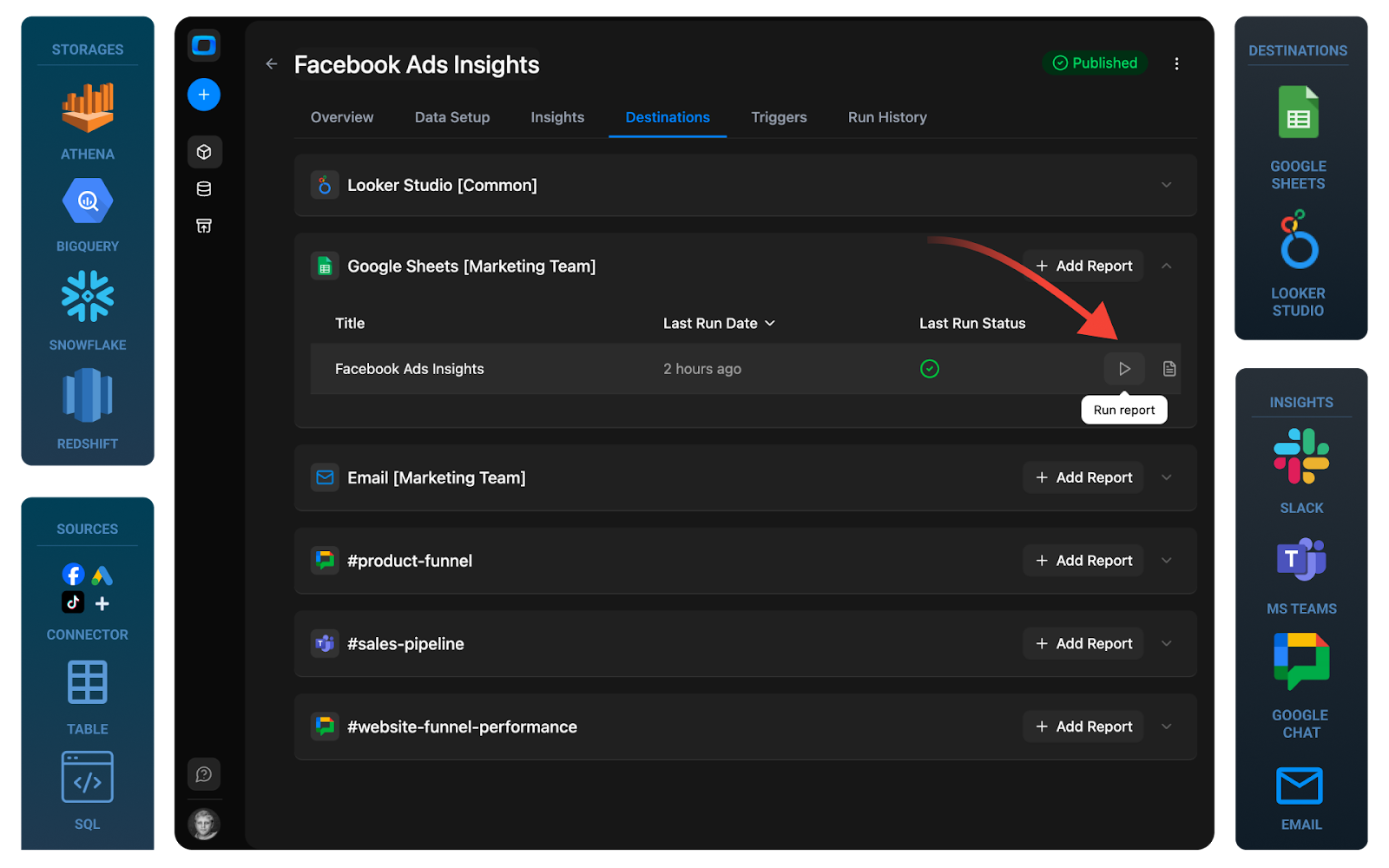
Delivering Scheduled Reports and AI Insights to Slack, Teams, and Email
Once governed data marts are in place, OWOX makes it straightforward to deliver value where stakeholders already work:
- Schedule recurring reports to Google Sheets, Looker Studio, or other BI tools – powered by the same data marts.
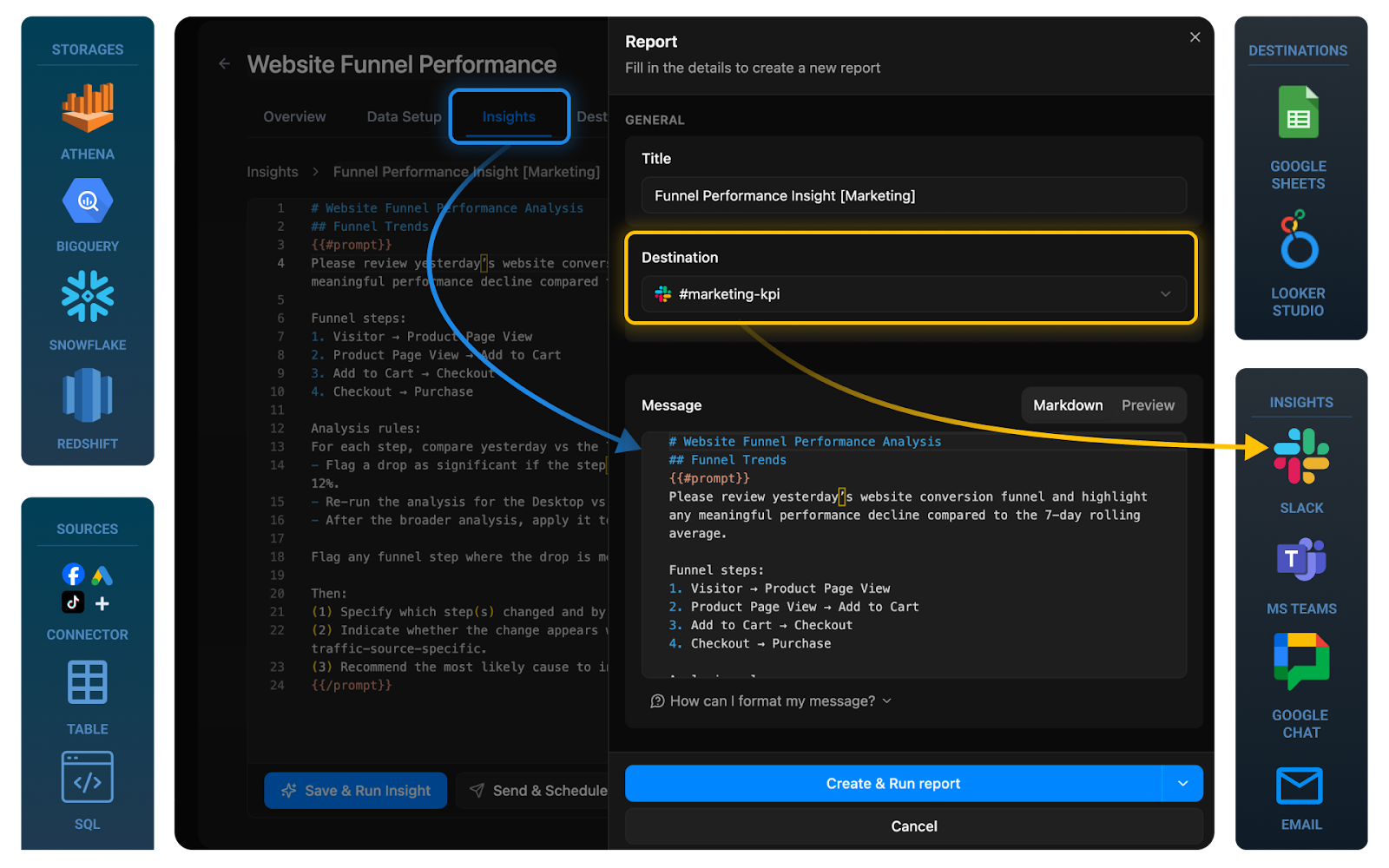
- Push AI insights for marketing data directly into Slack or Teams, highlighting anomalies, trends, or underperforming segments.
- Send email summaries to executives that combine charts with narrative explanations generated from governed Snowflake data.
Because all of this runs on top of OWOX Data Marts:
- Stakeholders see consistent numbers across channels: chat, email, dashboards, and spreadsheets.
- Analysts can adjust thresholds, segments, or KPIs in the data mart layer and have updates propagate automatically to all delivery channels.
Instead of manually exporting CSVs and writing commentary every week, analysts configure the flows once and let OWOX handle the routine work.
Reducing Dependency on Engineering While Improving Governance and Trust
The net effect of adopting OWOX Data Marts is a shift in data ownership in Snowflake:
- Analysts become primary owners of metric definitions, data marts, and report logic.
- Engineering focuses on platform reliability and security, not constant ETL changes.
- Governance improves because logic is centralized, versioned, and visible – rather than embedded in scattered SQL.
For analysts, this means fewer blockers, faster iteration, and more confidence that when a number leaves Snowflake – whether in a dashboard, a Sheet, or an AI-generated insight – it can be trusted.
Using OWOX Together With or Instead of Airbyte in Your Data Stack
Choosing between Airbyte and OWOX isn’t always a binary decision. In many Snowflake setups, the most pragmatic approach is to keep what already works for ingestion and add a governed data mart and insights layer where you’re currently missing one.
Think about the split like this:
- Airbyte = broad, flexible ingestion into Snowflake
- OWOX Data Marts = reporting and Snowflake semantic layer alternative for marketing/product, plus governed AI insights
Depending on your existing connectors, team skills, and governance requirements, you can either:
- Keep Airbyte as your primary ingestion layer and layer OWOX on top, or
- Use OWOX for supported sources and simplify your pipelines, especially around marketing and digital analytics
Below are the main scenarios and how to evaluate which path fits your team.
Scenario 1: Keep Airbyte for Broad Ingestion, Add OWOX as the Data Mart and Insights Layer
In this hybrid setup:
- Airbyte continues to ingest data from a wide variety of SaaS tools and databases into Snowflake.
- OWOX connects to that Snowflake data and builds governed marketing and product data marts on top.
- OWOX’s AI insights, Sheets exports, and BI integrations consume these data marts, not raw tables.
This works best when:
- You already have a significant investment in Airbyte and custom connectors.
- Your main gap is how to build a robust reporting layer on Snowflake that analysts and AI can trust.
- You want a low-friction way to add a Snowflake semantic layer alternative without rewriting your ingestion.
You keep Airbyte’s strengths (source coverage) and add OWOX where you’re currently spending the most analyst time: modeling, standardizing metrics, and delivering insights.
Scenario 2: Use OWOX Connectors for Supported Sources, Simplify Your Snowflake Pipelines
In some environments, especially marketing- and product-heavy stacks, OWOX’s built-in connectors cover a large share of your critical sources. In that case, you can:
- Use OWOX-managed data ingestion directly into Snowflake for supported sources (mostly ads platforms, but we’re growing the library every month).
- Let OWOX automatically feed its governed data marts from these ingested datasets.
- Retain Airbyte or other tools only for truly niche or internal sources, or phase them out over time.
Benefits of this consolidation:
- Fewer moving parts: Less custom ETL/ELT code, fewer pipelines to monitor.
- Aligned schemas: Data is ingested in a way that is purpose-built for OWOX data marts, reducing transformation overhead.
- Single pane of glass for setup, monitoring, data marts, and AI insights.
For teams evaluating an Airbyte Snowflake alternative specifically for marketing and product analytics, starting ingestion directly in OWOX Data Marts can meaningfully simplify both engineering and analytics workflows.
Evaluation Checklist to Choose the Right Approach for Your Team
To decide whether to use OWOX alongside or instead of Airbyte, work through the following checklist:
- Team skills and ownership:
- Do you have a strong data engineering team that wants to fully own ingestion and modeling in code?
- Or are analysts and analytics engineers expected to drive most of the reporting and semantic layer work?
- Who should own metric definitions and govern data marts in Snowflake?
- Governance and reporting needs:
- How often do you encounter metric drift or conflicting numbers across dashboards and Sheets?
- Do you need a more robust Snowflake semantic layer alternative for marketing/product data?
- Are you required to demonstrate clear data lineage and ownership for audits or compliance?
- AI readiness and automation:
- Are you planning to deploy AI assistants or automated insights on top of Snowflake in the next 6–12 months?
- Do you have a curated, trusted subset of data that AI tools should be restricted to?
- How important is it to automate alerts and reports to Slack, Teams, or email using governed metrics?
If your answers highlight gaps in governance, reporting layer complexity, or AI readiness, it’s a strong signal that pairing your existing Airbyte setup with OWOX Data Marts – or using OWOX as your primary ingestion for supported sources – will materially improve how your Snowflake analytics stack operates.
Next Steps: Try OWOX Data Marts on Your Own Snowflake Data
The fastest way to evaluate a Snowflake reporting layer is to see it working on your own data, with your own questions.
You don’t need to redesign your whole stack to start. You can connect Snowflake, define a first marketing or product data mart, and compare the experience directly with your current Airbyte- (or connector-) first approach.
Use a short pilot to answer: Does OWOX reduce the time from “new question” to “trusted answer”? If the answer is yes, you’ll have a clear case to expand.
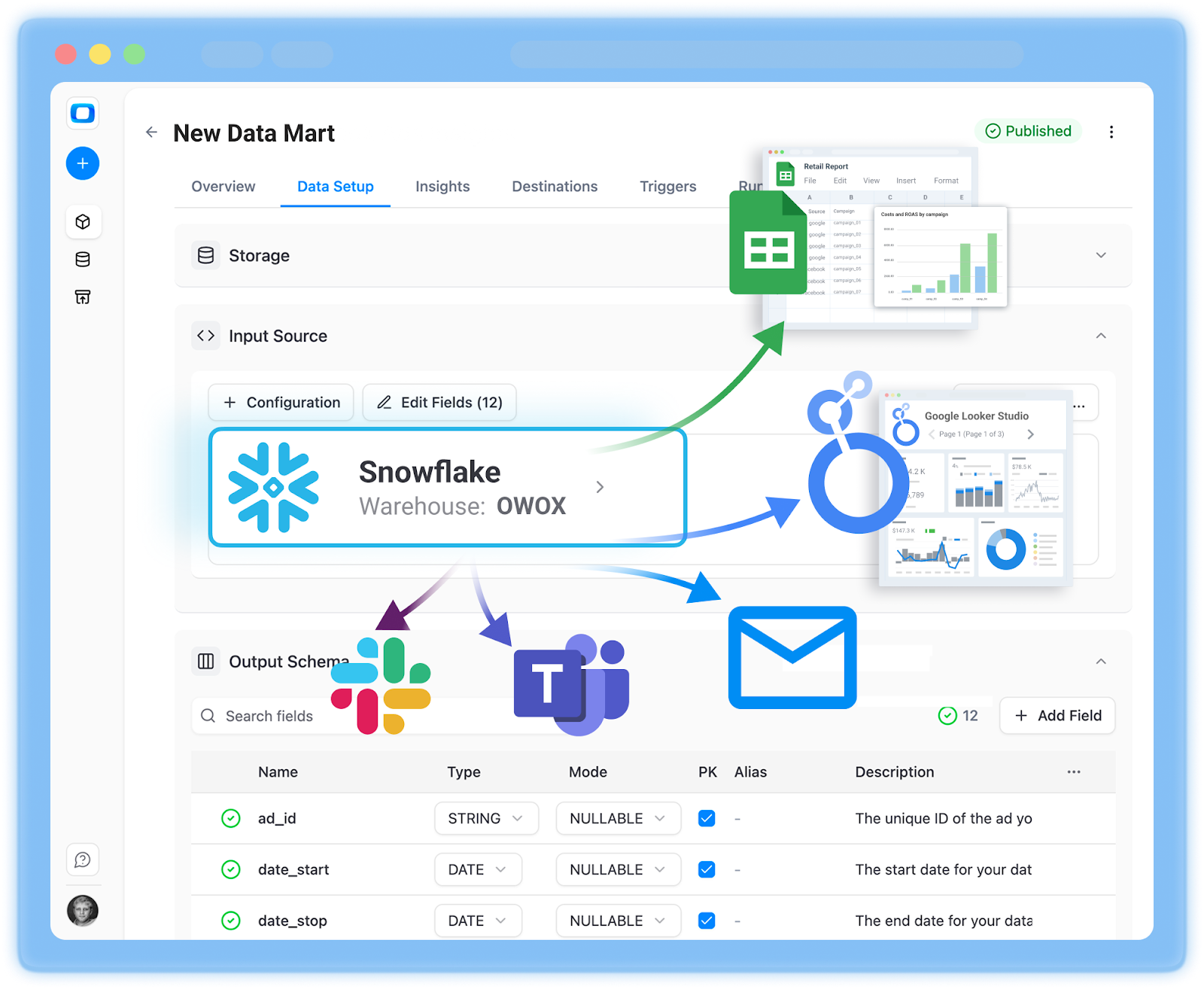
You can start a free project with OWOX Data Marts and validate it as your Snowflake reporting layer in days, not months.
What You Can Set Up in the First Week With OWOX
In the first 5 minutes, most teams can:
- Connect Snowflake (and optionally a few key sources) via the OWOX UI.
- Spin up an initial data mart focused on a single domain, such as:
- Paid acquisition performance (spend, clicks, conversions, ROAS).
- Product usage (events, funnels, retention).
- Validate core metrics by comparing data mart outputs with existing dashboards or exports.
- Schedule at least one automated report (e.g., weekly performance summary) to Google Sheets or Looker Studio.
- Enable AI insights on the new data mart and route a small set of alerts to Slack or email.
Frequently asked questions







"AI by its nature will hallucinate. You need guardrails so you can trust your data."
"We had six or seven different channels and no single source of truth. It was almost impossible"
"We regained time. And time is the one resource that never comes back."