How to Read an Apache Ossie Model: From YAML File to Diagram
Someone sent you a 600-line Ossie YAML file, or you found one in the apache/ossie examples, and your lead asked whether it looks right. Scrolling it will not tell you. This is a worked run on the two official example files: how each part of the file shows up as a picture, what the tools reported, and where the file and the picture disagree.
Everything below was run on 20 October 2026, against the files on the default branch of the apache/ossie repository, which is an incubating project. If you want the background first, what Apache Ossie is covers it.
The 30-second version: paste a link, see the model
The 30-second version: paste a link, see the model
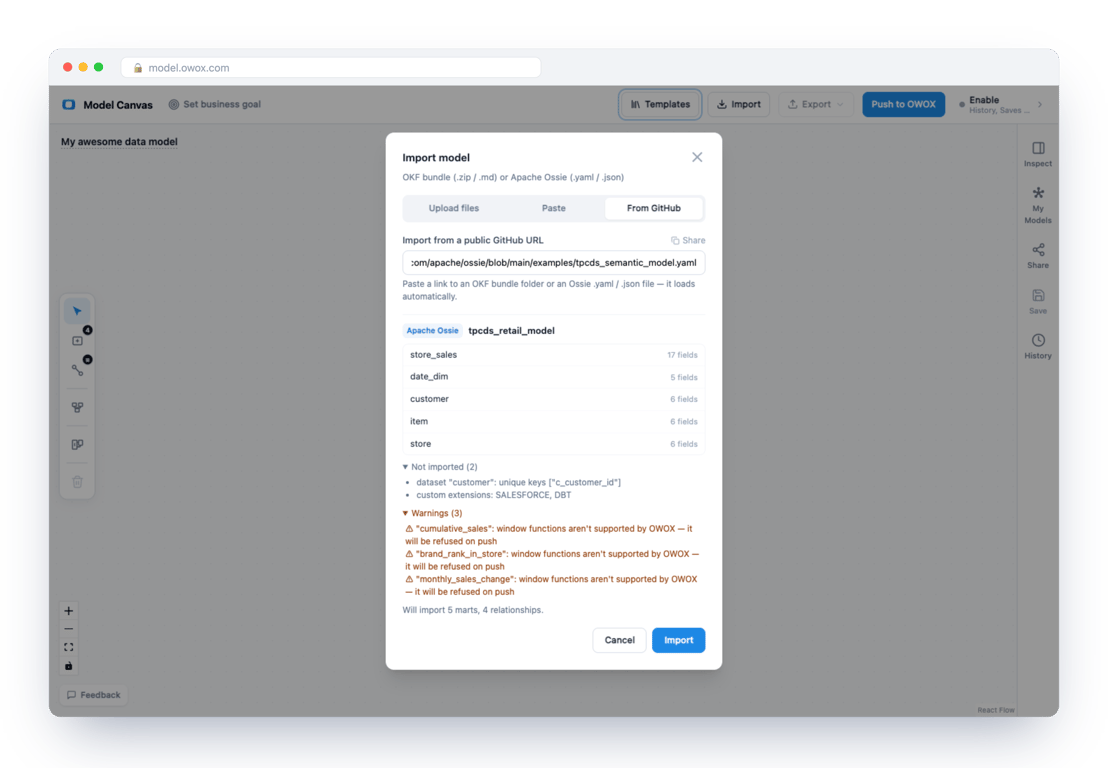
The OWOX Model Canvas at model.owox.com is free and needs no login. It opens an Ossie file straight from GitHub if you put the file’s address after ?ossie=:
https://model.owox.com/?ossie=https://github.com/apache/ossie/blob/main/examples/tpcds_semantic_model.yamlOpen that link and an import dialog appears with the model already read. Before you click anything it lists the datasets and their field counts, anything it will not import, any warnings, and a closing line: “Will import 5 marts, 4 relationships.” Clicking Import puts the model on the canvas. If the canvas already holds a model, the dialog first asks whether to replace it or merge the new file into it, so open a file on a blank canvas when you only want to look at it.
Anatomy of an Ossie file
The 0.2.0.dev0 specification says each document describes exactly one semantic model, and requires three things at the root: version, name and a non-empty datasets list. Everything else is optional. The TPC-DS example uses all of it:
| Key | What it holds | In TPC-DS |
|---|---|---|
datasets |
logical tables | 5 |
relationships |
joins between datasets | 4 |
metrics |
aggregates defined on the model | 8 |
ai_context |
text for AI agents | at the model, dataset, field and relationship level |
custom_extensions |
vendor-specific blocks | SALESFORCE, DBT |
Files written before this draft look different. Earlier versions wrap the model in a semantic_model list, and the current schema does not accept that wrapper. The canvas read a small file in the old shape without complaint, but the repository’s own validator refused it with four errors, among them “‘version’: ‘0.2.0.dev0’ was expected” and “Additional properties are not allowed (‘semantic_model’ was unexpected)”. The canvas is forgiving where the schema is not.
The last key deserves a note. custom_extensions is how a vendor stores its own data in a shared file: each entry has a vendor_name and a data string, and the TPC-DS example carries one for SALESFORCE and one for DBT. The spec calls them vendor-specific attributes, and its migration notes say to preserve custom extensions when a file moves between shapes. The canvas does not carry the SALESFORCE and DBT entries over, which is why both show up under “Not imported”, and it writes its own OWOX entry in their place.
OWOX Data Marts
See your first report built in real time. 15 minutes.
- Connect your data warehouse
- Pick your metrics
- Get a live Google Sheets report
In the time it takes to write a ticket. Then imagine never writing that ticket again.
Book a DemoWe'll use your actual use case
Read the TPC-DS example, dataset by dataset
Read the TPC-DS example, dataset by dataset
The model has a fact table, store_sales, and four dimensions: date_dim, customer, item and store. The canvas reports 17 fields on store_sales and 5 to 6 on each dimension, so it is clear at once where the weight is.
The 17 needs explaining, because the file does not declare 17 fields on store_sales. It declares nine. The other eight are the model’s metrics, which the canvas places on store_sales as calculated fields, and an export to OKF lists them under “Calculated fields” on that page. A metric always has to live on some dataset, and the canvas picks the one the formulas read from.
Switch to the view that shows fields and you can read the keys too. store_sales declares a composite key:
- name: store_sales
  source: tpcds.public.store_sales
  primary_key: [ss_item_sk, ss_ticket_number]
and the canvas draws a key icon next to both columns.
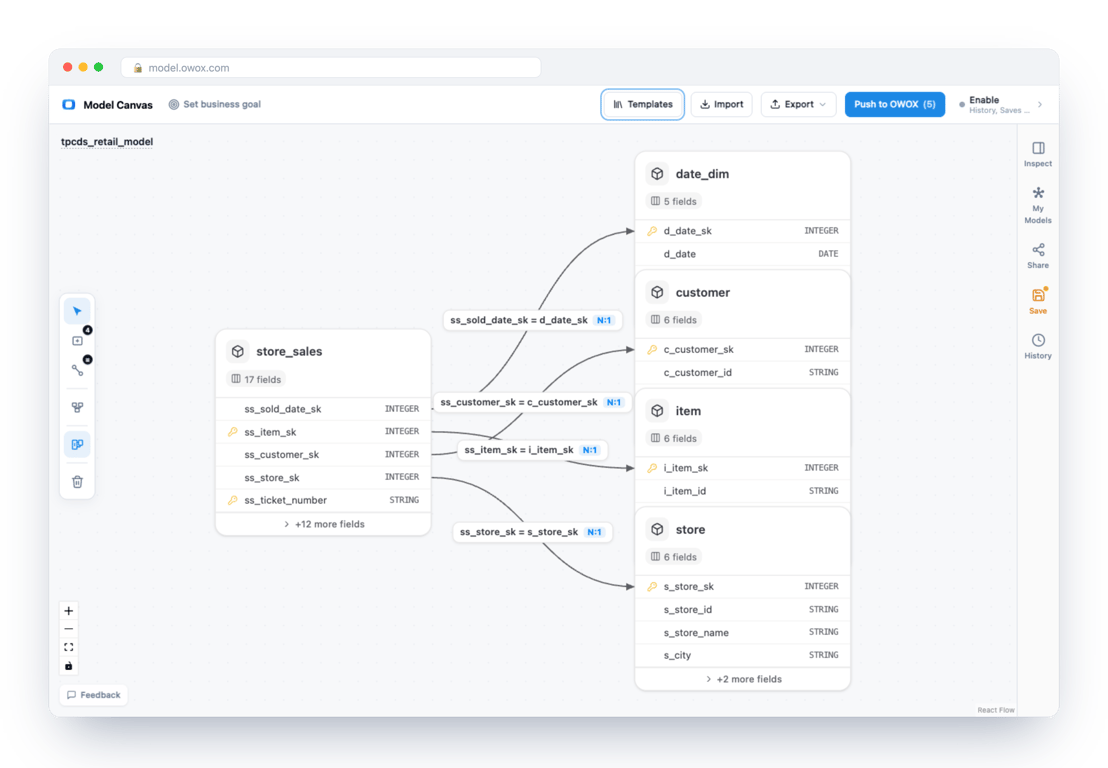
That is the fields view; the dimension cards below it carry the same icons. On each dimension the key is a single surrogate column such as d_date_sk or i_item_sk. One thing the canvas did not carry over: the customer dataset also declares unique_keys: [c_customer_id], and the import dialog lists it under “Not imported”.
Relationships: reading the join
Relationships: reading the join
A relationship is a from dataset, a to dataset and the key columns on each side:
- name: store_sales_to_item
  from: store_sales
  to: item
  from_columns: [ss_item_sk]
  to_columns: [i_item_sk]
On the canvas it is a line from store_sales to item, labelled ss_item_sk = i_item_sk and marked N:1. Select the line and the Inspect panel shows the same key pair, a description taken from the file’s synonyms, and a cardinality field that reads “Optional – for modeling/visualization only.”
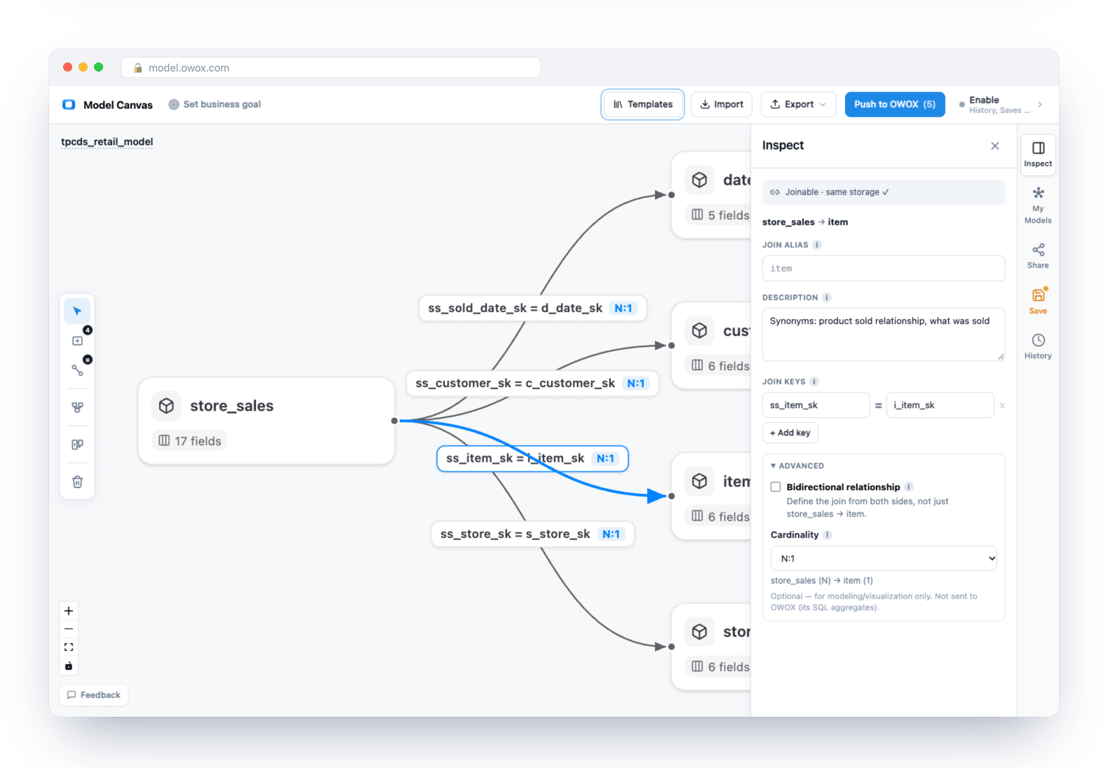
The TPC-DS file states no cardinality. The N:1 on the line is what the canvas shows, and on export it keeps that value in an OWOX extension. Worth knowing before you quote a cardinality from a diagram as if the file said it.
Metrics and calculated fields
In the file a metric is an expression written against dataset names, not table names:
- name: total_sales
  expression:
    dialects:
      - dialect: ANSI_SQL
        expression: SUM(store_sales.ss_ext_sales_price)
On the canvas, the same definition is a calculated field on store_sales, and its formula drops the dataset prefix: SUM(ss_ext_sales_price). A formula that reads from another dataset keeps the prefix. customer_lifetime_value, for example, divides by COUNT(DISTINCT customer.c_customer_sk).
Three of the eight metrics are window functions: cumulative_sales, brand_rank_in_store and monthly_sales_change. The canvas imported all three and warned that OWOX does not support window functions and would refuse them on push. That is a limit of the target, not a fault in the file, and the warning is how you find out before you push.
Dialects and AI context
Every field and metric carries a list of dialects. In TPC-DS each has one, ANSI_SQL. A file can list several, such as ANSI_SQL and SNOWFLAKE, and each tool decides which entry it reads. The Snowflake documentation says its converter uses the SNOWFLAKE or ANSI_SQL entry and skips a field that has neither, without an error. Check which dialects your file actually carries before you trust a count of what loaded.
ai_context is where the file talks to an AI agent: instructions on the model, and synonyms on datasets, fields, metrics and relationships. total_sales lists “total revenue”, “gross sales” and “sales amount”. On the canvas that text arrives appended to the description as a line starting “Synonyms:”, and the diagram does not treat it as structure. On export the structured ai_context does not come back: 25 field-level blocks in the original are gone from the exported file, folded into description text.
When a file will not open
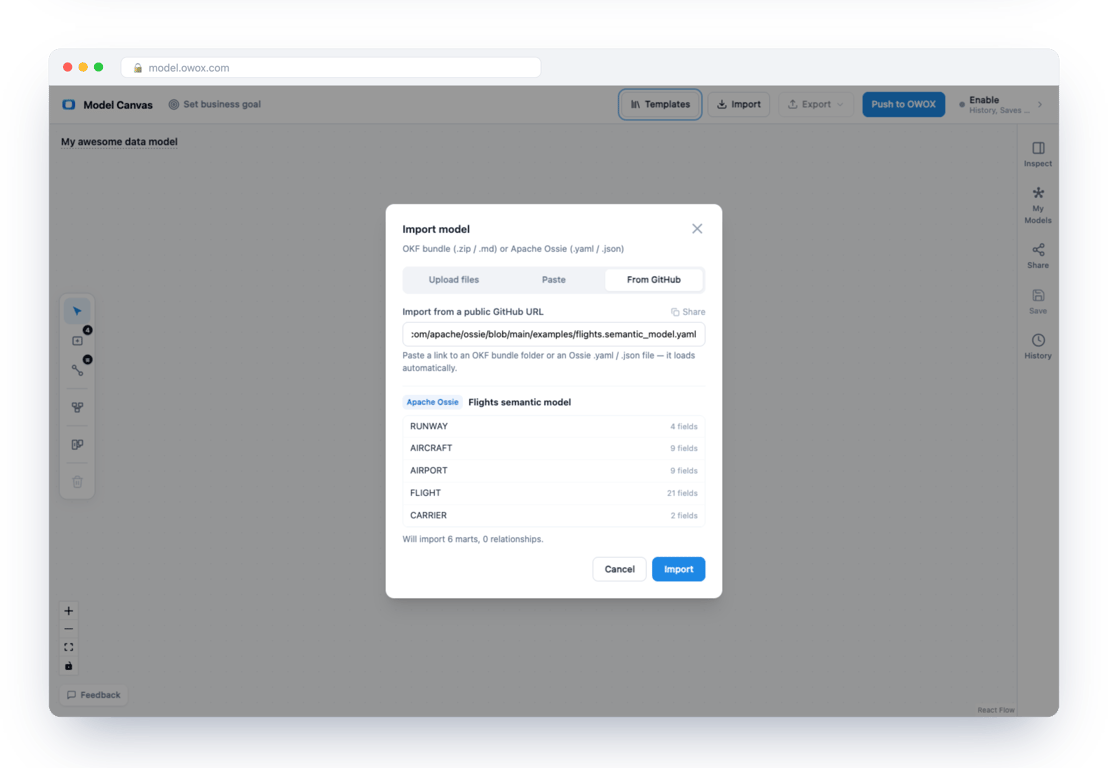
Flights is the better lesson, because it is three documents. The repository’s examples/ folder has flights.semantic_model.yaml, flights.ontology.yaml and flights.mapping.yaml, and the canvas opens only the first:
- The semantic model opened as six datasets –
RUNWAYwith 4 fields,AIRCRAFT9,AIRPORT9,FLIGHT21,CARRIER2 andROUTE6 – and “0 relationships”. The file declares none. The joins are in the other documents.
- The ontology was refused with: “This is an Apache Ossie ontology (business concepts), not a semantic model. The canvas imports semantic models: import the file with a top-level “datasets” list instead.”
- The mapping was refused with: “This is an Apache Ossie mapping document, not a semantic model. Import the semantic model it points to instead: ./flights.semantic_model.yaml”
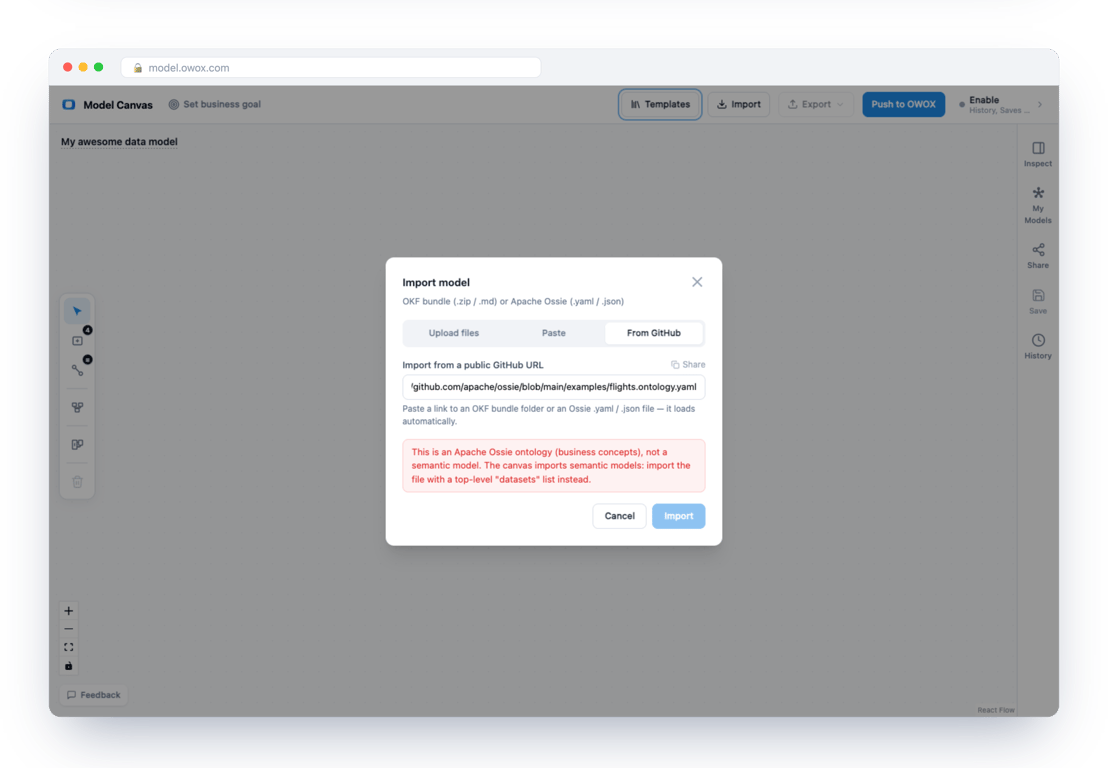
Two more cases we tried by pasting a file in. A broken line got a plain parse error with the line and column (“Flow sequence in block collection must be sufficiently indented and end with a ] at line 5, column 30”). A relationship that names a dataset the file does not declare was dropped: “Will import 1 marts, 0 relationships”, with one item under “Not imported”. Read that second line before you click, because the import is otherwise silent about it. The rule we took from these runs is simple: look at “Not imported” and the warnings before you press Import, not after.
Validate and share
Opening a file is not validating it. The repository ships validation/validate.py, which checks the JSON Schema, unique names, relationship references, key counts and SQL syntax. We ran it on four files and all four passed: the TPC-DS original, the Flights semantic model, the TPC-DS file after a round trip through the canvas, and the canvas’s export of its E-commerce template. The last one passed with a warning: a relationship whose target columns do not cover the target dataset’s primary or unique key.
The round trip changed more than the check shows. Exporting TPC-DS back to Apache Ossie gave a file that validates, with the same five datasets, four relationships and eight metrics, and the same version string, 0.2.0.dev0. It also gave a file of 519 lines against 672 and these differences:
- the 26 field-level
dimensionblocks are gone; - the
unique_keysare gone: all five datasets declare them, and each declaration repeats the dataset’s primary key, apart fromcustomer’s second key,c_customer_id, which is the one the import dialog lists under “Not imported”; - structured
ai_contextis flattened into description text; - the
SALESFORCEandDBTextensions are replaced by a singleOWOXextension; - relationships were renamed,
store_sales_to_datebecomingstore_sales_to_date_dim.
A second model showed one more change. We wrote a small revenue model (two datasets, one relationship, three metrics) and left datatype off the fields. After the round trip every field was typed String, including order_date, line_revenue and line_net_revenue, and each of the three metrics gained Decimal. The OKF export showed the same: the schema table lists line_revenue as STRING. If your file leaves types out, the canvas fills them in, and the filled-in values are guesses. The specification says to omit datatype when the type is unknown, so the guess goes against its own guidance. The one dimension block in that model, is_time: true on order_date, was dropped as well.
None of this breaks the file, and all of it matters if the exported copy is the one another tool will read. Export from the canvas to look at a model, not to replace the original.
A checklist for reviewing an Ossie file
A checklist for reviewing an Ossie file
From these runs, in the order we would do them:
- Read the version first.
0.2.0.dev0and0.1.1are different shapes, and the tools that read the file name the version they accept. - Open it, then read “Not imported” and the warnings before you import. They are the cheapest list of what a tool cannot act on.
- Count. Datasets, relationships and metrics in the dialog should match what you expect from the file. A relationship that names a dataset the file does not declare disappears from the count without an error.
- Find where each metric lives. A metric sits on one dataset, and its formula may read from others through relationships. Check that the relationships it needs exist.
- Check the dialects. Make sure every field and metric carries an entry the tool you care about reads.
- Run
validate.pyon the file, and on the ontology with--schema ontology/ontology.jsonif you have one. The Flights ontology passes under its own schema, and the Flights semantic model passes under the default one. - After any export, diff it against the original. Types,
dimensionblocks,unique_keysand structuredai_contextare the places it will differ.
The export menu also offers PNG and SVG, so the diagram itself can go into a review thread. The OKF vs Ossie comparison shows what the same model looks like in Google’s format, and the Model Canvas is where to try your own file.
Turn your data into decisions.
Governed data marts give you the clean foundation ML needs to actually work.
- No AI hallucinations
- Analyst-governed definitions
- Every number traces to SQL
Frequently Asked Questions
How do I open an Ossie YAML file?
In the OWOX Model Canvas at model.owox.com, choose Import and upload the file, paste its text, or paste a GitHub link. A link in the form model.owox.com/?ossie= followed by the GitHub address of the file opens it directly.
Can I view an Ossie model as a diagram?
Yes. Each dataset becomes a card, each relationship a line labelled with its join keys, and the view that shows fields marks primary keys with a key icon. The official TPC-DS example shows as a fact table with four dimensions.
What does primary_key do in Ossie?
It lists the columns that identify a row of a dataset. In the TPC-DS example `store_sales` has a composite key of `ss_item_sk` and `ss_ticket_number`, and the canvas marks both columns with a key icon. The repository's validation script also warns when a relationship's target columns do not cover a key.
What is the difference between a field and a metric in Ossie?
A field is a column or a computed expression on one dataset. A metric is an aggregate defined on the model, written against dataset names, for example `SUM(store_sales.ss_ext_sales_price)`. The canvas places each metric on a dataset as a calculated field.
Why does my Ossie file say it is an ontology?
Because it holds business concepts and not datasets. The canvas imports semantic models only, and it tells you so, and for a mapping file it names the semantic model to import instead. In the official Flights example the ontology, the mapping and the semantic model are three separate files.
Can I export a model back to Ossie?
Yes, from the Export menu. We exported the TPC-DS model and the file passed the Apache Ossie repository's own validation script, but it was not identical: the structured ai_context, the unique_keys and the vendor extensions did not come back as they were.