Changelog
Every OWOX Data Marts release, newest first: what changed, the pull request behind each change, and a short video where there is one
Release 0.44.0
New features are easier to discover: each release shows what's new right in the app
#1835 · The app now shows each new release in a bottom-left card with its what's-new video, chapters that play from each scene, and a link to the changelog. It reappears on each visit until you close it, and if there is no video three days after release it lists the release's changes instead. A self-hosted instance announces only releases up to its own version, returned by
/api/flagsasAPP_OWOX_VERSION, and browsers that cannot reach docs.owox.com show no card.Microsoft Ads imports work for advertisers who sign in with Google
#1851 · Teams that sign in to Microsoft Advertising with Google can now import data: the Microsoft Ads Credential offers Sign in with Google next to Sign in with Microsoft, where before every run failed with error
126 IdentityTypeMismatch. Signing in with the wrong type now fails right away and says which button to use, the Credential shows the connected user's email, and other Microsoft Ads errors in Run History show Microsoft's own message. Self-hosted instances needOAUTH_MICROSOFT_ADS_GOOGLE_CLIENT_IDandOAUTH_MICROSOFT_ADS_GOOGLE_CLIENT_SECRET, withOAUTH_GOOGLE_REDIRECT_URIpointing to the Google callback page.Connector Data Marts set up through MCP no longer fail their first run because of the table path
#1853 · A saved connector Data Mart with a three-part table path now stops its run with a format error; change the table path to two parts through MCP or the API to run it again, because the web app cannot change a saved connector's table path. OWOX now rejects a path such as
project.dataset.tablewhen you save or publish, with an error stating the expected format, instead of failing the first run withInvalid dataset ID. Google BigQuery expectsdataset.tableand AWS Athena expectsdatabase.table.claude.ai now gets every rule for querying a Data Mart
#1855 · The description of the
query_data_martMCP tool is now shorter than the 4,096 characters claude.ai keeps, with the rules for reading results first, so the assistant no longer misses them and reports wrong totals after filtering a joined Data Mart. The operator and aggregation table moved out of the description, becauseget_data_mart_details_by_idalready returns it inoperators_by_categoryandallowedAggregations.claude.ai and ChatGPT now get the OWOX rules for safe setup and delivery
#1856 · ChatGPT users must disconnect and reconnect the OWOX app to get these changes, because ChatGPT keeps the tool list from when the app was added. The OWOX rules for AI assistants (ask before a deletion, never take provider secrets in chat, do not send a report message twice) now reach the assistant in claude.ai, ChatGPT and Claude Code, because the shared instructions are short and each safety rule is also in the description of its tool. The new
get_owox_guidetool returns the full workflow for one task.Invited teammates get their email right away, and you know if it was not sent
#1858 · OWOX Data Marts now sends the invitation email as soon as a Project Admin clicks Send invitation, and tells the admin when it could not be sent. The email names who invited the person, the project and the role; if sending fails the invitation still stands and the
POST /api/members/inviteresponse hasemailSent: false. Only OWOX-managed projects send this email, while self-hosted installations keep the one-time invitation link.Access request emails name the project and take Project Admins straight to the request
#1859 · Both access request emails now name the project and show roles as Project Admin, Data Owner or Business User instead of
ADMIN,EDITORorVIEWER. The admin's button opens Project Settings → Members of that project, where the request is approved or declined, and the teammate's button opens the project after approval. Self-hosted installations are not affected, because only OWOX-managed projects have access requests.Backfill a catalog for any period in one run, and follow a long backfill as parts of one operation
#1860 · A backfill already running when this version is deployed finishes with the 31-day parts it was planned with, and operators of a self-hosted deployment with several replicas must finish the rollout before anyone starts a backfill longer than a month, or a replica on the previous version leaves days unloaded. For catalog nodes with no date filter, the Manual Run form now says the whole catalog loads in one run and Run History shows one plain run. For nodes fetched by date, a period longer than 31 days loads in parts cut at calendar months, and the connector fields API gains an
isFetchedByDateflag per node.Safer custom connector tests in your AI assistant: API keys stay out of the chat
#1861 ·
test_custom_connectorno longer acceptsmanifestor keys inconfiguration: the assistant saves the draft withsave_custom_connector_draft, then tests it withconnector_idand, when the API needs keys, acredential_id, and ChatGPT users must disconnect and reconnect the OWOX app to get the new tools. API keys now go only through saved Credentials instead of the chat, and the test runs the saved draft, so it checks the connector you publish.Plugins get one typed answer from a fixed list, with no chat reply to parse
#1879 · Existing OpenAI, Gemini and Anthropic AI Credentials now provide
decision, so a plugin that declares it sends its data to that provider with the Credential's key; a maintainer can turn it off by setting Decision model to Not configured. A plugin declares{ "id": "ai", "models": ["decision"] }inplugin.jsonand passesctx.credentials.ai.decisiontoexperimental_decideto get one typed answer (choice,scoreorboolean) from a fixed list instead of parsing a chat reply. OWOX AI servesdecisiononly when the operator setsAI_PLUGIN_DECISION_PROVIDER,AI_PLUGIN_DECISION_BASE_URL,AI_PLUGIN_DECISION_API_KEYandAI_PLUGIN_DECISION_MODEL.Plugins that use AI work at once: choose OWOX AI instead of your own AI key
#1862 · The plugin install dialog now offers OWOX AI as the first option and selects it, so a plugin that uses AI works at once without your own AI key. Members can still pick their own AI Credential and switch between it and OWOX AI on the plugin's Credentials tab, and plugin code and
plugin.jsondo not change. On OWOX Data Marts Cloud each successful OWOX AI call is billed as an AI Process Run, and a project that cannot run them gets403withPROJECT_OPERATION_BLOCKED.
Release 0.43.0
Compare LinkedIn Ads results across markets: spend by country, region, and county
#1809 · The LinkedIn Ads connector can now split spend by location with three new endpoints, Ad Analytics by Country, Ad Analytics by Region and Ad Analytics by County, which import each campaign's daily impressions, clicks, spend and conversions per location with its English name next to the LinkedIn URN. They make more API requests than Ad Analytics, LinkedIn drops locations with fewer than 3 events so totals can be lower, and location data arrives 12-24 hours late, which the default Reimport Lookback Window of 2 days picks up on the next run.
The Sheet link of a Google Sheets source opens the imported tab, not the first one
#1836 · The Sheet link in a Google Sheets Data Mart's Input Source now opens the tab the Data Mart imports, including in existing Data Marts, instead of the spreadsheet's first tab. For a project Viewer, or when the tab list cannot be loaded, it still opens the first tab.
See which Credentials a plugin uses, and change them on the plugin's Credentials tab
#1837 · An installed plugin that needs Credentials now has a Credentials tab next to Overview that shows the Credential granted to each requirement, already selected. Members change it there and press Save, or Discard, and Configure Credentials no longer sits in the page header. When a plugin's AI request fails at the provider, the server log now records which Credential and model failed and the provider's HTTP status, without writing the prompt or the secret.

Parallel reads of a SQL Data Mart on Google BigQuery no longer fail with a rate limit error
#1845 · Many parallel reads of one SQL Data Mart on Google BigQuery, from a plugin page with many cards, HTTP Data clients or the MCP
query_data_marttool, no longer fail withExceeded rate limits: too many table update operations for this tableor return without totals. A read now rewrites the Data Mart's view only after its SQL changes, which avoids Google BigQuery's limit of 5 table updates in 10 seconds. Only SQL Data Marts on Google BigQuery and Legacy Google BigQuery change.Plugin AI calls no longer fail with a timeout after 30 seconds
#1846 · Plugin AI calls now get the full 120 seconds, so a plugin like Gyroscope no longer fails on a slow reasoning model with
HTTP_ERROR 408 Request timeout after 30 secondson a large project. A general 30-second request limit used to stop the call first. A Credentialfetchstill times out after 30 seconds.Set up and maintain Data Marts from your AI assistant
#1839 · Data Owners can now manage Data Marts through MCP from their connected AI assistant, from draft setup and connector selection to publication, relationships and recurring runs. The tools use your existing project and resource permissions, and connectors use saved Credentials. Authorization and secret entry stay in the OWOX browser flow.
Connect a Google Sheets plan with one Google sign-in
#1828 · Adding a Google Sheets Source account on the Credentials page now takes one Google sign-in and the spreadsheet picker opens right away, instead of failing with Failed to open popup window or asking for access a second time. The Data Mart form gets a + Add spreadsheet item, suggests table names such as
budget_2026_planfrom the document and sheet name, and warns in Target Setup when another Data Mart writes to the same table. If a Credential shows no Google account, reconnect it to add spreadsheets.
Release 0.41.0
Rotating a warehouse key is one change: Storages share reusable Credentials
#1796 · API clients must switch:
PUT /data-storages/:idnow takesreusableCredentialIdand rejects the oldcredentialId,credentialsandsourceStorageIdfields, and Storage responses no longer includecredentialsorcredentialId. A Storage now selects a reusable Credential in a new Credential field instead of keeping its own key, so rotating a key is one change that applies to every Storage using it, and switching it off stops them all. Existing Storages are converted once on the first start and keep running with no action needed, and Copy credentials from another storage is removed.
Finding the right Data Mart is quicker: the list keeps your search when you come back
#1789 · The Data Marts list now keeps your search when you come back in the same browser tab, through the back arrow, the browser's Back button or the sidebar, so you no longer retype it after a wrong guess. The search is kept per project and only in the current tab, and a clear button in the search field also appears in the Connectors, Destinations, Storages, Contexts and Members lists.
See on one screen who has access to a Data Mart, who doesn't, and why
#1795 · The Data Mart's Overview tab now lists every project member, whether they have access, what it comes through, and what to change to give them more, so a Project Admin can see why a member has no access and fix it on the same page. The Sharing and Contexts sections show who each option and context lets in and warn how many members a setting keeps out. The list is visible to Project Admins only.

Deleting a context no longer gets stuck on attachments you cannot see
#1799 · A Project Admin can now delete a Context without being blocked by attachments they cannot see. The delete dialog and
memberCountinGET /api/contexts/{id}/impactcount only non-admin members with Selected contexts only scope and exclude deleted Data Marts, Storages and Destinations. Hidden assignments are removed together with the context, and Project Settings → Contexts now lists Project Admins and Entire project members on every context.Clearer warning when a report counts a field from a joined Data Mart
#1798 · When you tick Count on a field from a joined Data Mart, the report editor's warning now opens with what the number counts, such as Counts Customers rows, not Orders rows, and names the real Data Marts, whether the count can be higher or lower, and what to pick instead. If a missing primary key is the cause, it names that Data Mart and links to its Output Schema in a new tab. The warning still blocks nothing and appears under the same conditions.
Dates from Google Sheets arrive as dates, not text
#1797 · Existing Data Marts keep their columns as they are; to store a Google Sheets column as a date, set its type in the Output Schema to
DATE, and the next run or Upload writes dates. New Data Marts store a column of dates asDATEfrom the first run, so date filters and date grouping work. In aDATEcolumn, any cell that is not a date is imported as an empty value and Run History lists the rows to fix.Shared SQL logic stays in one place: build a Data Mart on top of another
#1802 · A SQL Data Mart can now reference another Data Mart of the same Storage in its
FROMclause, so shared logic lives in one place and dependent Data Marts follow its changes instead of drifting as copies. Type@in the SQL editor to pick a published Data Mart; OWOX substitutes its SQL when the query runs, and readers need no access to the referenced one. It works on Google BigQuery, AWS Athena, Snowflake, AWS Redshift and Databricks, not on Legacy Google BigQuery storages.
Safer sign-in and request validation: Better Auth and zod security fixes
#1815 · Magic links sent before the upgrade and not yet used stop working, so send those users a new one. This release moves to versions that fix a critical Better Auth flaw (GHSA-965c-763c-88jm) that let an OAuth state value work as a magic link, and a zod flaw (GHSA-mrhx-c7xc-m3w5) that could exhaust memory. On MySQL the application widens
verification.idtoVARCHAR(255)at start and needs theALTERprivilege, and 400 validation messages are worded differently under zod 4, so update any script that matches on that text.Rotating a connector key is one change: Sources share reusable Credentials
#1811 · Before you upgrade, check your custom connector templates: a template path no longer steps into text, so
{{ parameters.Key.0 }}or{{ record.name.length }}is now unresolved and fails the run wherever an unresolved path does. A connector configuration now selects a reusable Credential in a new Credential field instead of keeping its own key, so replacing the secret once updates every Data Mart that uses it, and switching it off stops them all. Existing configurations are converted once on first start, so upgrade all instances together, and API clients now send_credential_id.
Reuse one Google Sheets or Google Chat key across Destinations
#1803 · API clients must switch:
POST /data-destinationsandPUT /data-destinations/:idnow takereusableCredentialIdfor Google Sheets and Google Chat webhook delivery and reject the oldcredentialId,sourceDestinationIdand keycredentialsfields, and the Destination Google OAuth routes are removed, so connect a Google account from the Credential instead. Existing Destinations are converted once on the first start of this version and keep running, but a Google account Destination whose sign-in lacks a permission the Sheets Google account Credential requires stops until you reconnect its Credential. Destinations now select a reusable Credential in a new Credential field, so rotating a key is one change that updates every Destination using it, and Copy credentials from another destination is removed.
Set up Contexts without leaving your AI assistant
#1790 · Project admins can now set up Contexts and the project description from their AI assistant through MCP. The assistant can create Contexts, update their names, descriptions and icons, inspect their usage, assign members, and delete detached Contexts. It can also list project members, read project settings, and update or clear the project description.
Build and maintain custom connectors from your AI assistant
#1807 · Data Owners can now create drafts, test and publish custom connectors for HTTP APIs from their connected AI assistant through MCP, instead of using only the Connector Builder or HTTP API. The tools also update metadata, inspect versions and roll back to an earlier published version, and are currently available through the custom MCP connection flow.

Correct client address behind a load balancer that adds two forwarding entries
#1813 · Behind a load balancer that appends two
X-Forwarded-Forentries, such as a Google Cloud external Application Load Balancer, set the newTRUST_PROXY_HOPSvariable to2so the real client address is used instead of the load balancer's. The default stays1, so deployments that do not set it behave as before. The value is a number from0to10, and anything else stops the application at startup.

Release 0.40.0
Plugins do their work on schedule, also when nobody has them open
#1769 · A plugin can now create schedules with
ctx.schedules, so its backend action runs on a cron expression and time zone even when nobody has the plugin open. Members pause, resume and delete schedules, and see and cancel their runs, under Plugins → Schedules. SDK authors should update test doubles and exhaustive switches, becauseBackendActionContext.schedules,PluginActionExecution.scheduleId,PluginActionExecutionContext.scheduleIdandPluginContext.schedulesare new members.
Tell contexts apart at a glance: pick an icon for each context
#1772 · A Project Admin can now pick an icon for each context, from the same set as Data Mart icons, so contexts are recognizable at a glance in the contexts list, on badges and in every Contexts picker. A context without an icon shows the default tag icon. Through the API,
PUT /api/contexts/{id}/iconsets or resets it withnull, andPOST /api/contextsandPUT /api/contexts/{id}accept an optionalicon.
Organizing a project is faster: find Data Marts missing a context or a relationship
#1774 · Project admins can now find joined Data Marts that sit outside every context with two filters on the Data Marts list: Relationships (With relationships or Without relationships) and a new No context option under Contexts. Relationships are counted across all storages, whichever Data Mart defines them.
GET /api/data-martsnow returnsrelationshipsCounton every list item, the same number as on the Models canvas card.Connecting a plan from Google Sheets takes fewer guesses
#1777 · Connecting Google Sheets as a source needs fewer guesses: the Connector definition type shows the logos of the most used sources, and the Input Source card shows the connector name and the selected sheet with a link. After Sign in with Google a confirmation names the connected account, and Copy from is now Reuse from another Data Mart with a hint about what it reuses. The suggested table name now comes from the selected sheet, for example
product_engineering, so check it before saving, since nothing stops two Data Marts from writing to one table.Warnings when a Count reads a joined Data Mart
#1778 · While Count is ticked on a joined field, the aggregation popover in the report editor and the Google Sheets extension now warns that it counts rows of the report's Data Mart that found a match, not the joined Data Mart's rows. It says whether the number can come out higher or lower, or cannot be checked because a primary key is missing, and points to Count Unique. The formula editor gives the same advice for calculated fields and now reads the primary key as set in the Output Schema before you press Save.

Bring in the colleague who sets up your project right after sign-up
#1761 · A new project's admin can invite the teammate who will connect the data warehouse and create Data Marts on a step right after the sign-up questionnaire. Add emails, pick a role (Data Owner is preselected) and send all invitations at once, or skip; the step shows once, and later invitations go through Project Settings, Members.
Large relationship diagrams open readable, on the Data Mart you are working on
#1781 · In the Graph view of the Joinable Data Marts block, a diagram too large to read when fitted now opens on the current Data Mart at a readable size, with the Data Marts it joins next to it. Diagrams that fit at a readable size still open whole, and Fit to view still shows the full diagram.
Open the Google Sheet a scheduled report fills, right from Triggers
#1786 · On the Triggers page and in each Data Mart's Triggers tab, hovering a report-run row now shows an Open document button that opens the report's Google Sheet in a new tab, so you no longer need to dig through the info card. The info button now opens its card on click, clicking these buttons no longer opens the trigger's edit panel, and Open document shows only for reports whose destination is Google Sheets.
Plugin backend actions can use AI Credentials
#1788 · A plugin's backend action now receives the AI Credential through
ctx.credentials.ai, so a scheduled action that needs AI no longer has to call a provider's API with an exact Credential. The backend needs@owox/plugin-sdk0.40.0, since older SDK versions keep getting only exact Credentials, and an AI Credential that is not usable is left out without stopping the action.
Release 0.39.0
See who published a plugin in Plugin history
#1748 · Installation history is now Plugin history, one list, newest first, of installs, removals, restores, publications with the member who made them, Verified listing changes, version updates and suspensions for the plugins you can reach in a project. All, Installations and Publications filter the list, and Restore stays available for every plugin you removed. Open it from Plugins → ⋮ → Plugin history, or use
GET /api/plugins/history.
Install a plugin as you publish it
#1750 · Publish & Install in the Publish a plugin sheet lists the plugin, asks you to confirm the installation and opens the plugin, so it is in your menu right away instead of needing a trip through the Gallery. Publish only, in the button's menu, lists the plugin without installing it, and Publish & Install on a plugin you already have opens it.

Tell your AI assistant which Data Mart field to use
#1741 · Project, Context and Data Mart descriptions can now link to a specific output-schema field, including calculated fields: type
@, pick a published Data Mart, and search its fields by alias or technical name. The link gives your AI assistant an exact field reference to verify against the schema. Opening a field link expands Output Schema, scrolls to the field and highlights it, and if the field was renamed or removed the link still opens the Data Mart.
Developing plugins is easier: find release problems before you publish
#1739 · Plugin authors can check a branch, tag or commit for release problems before publishing with
owox-ctl plugins check OWNER/PLUGIN_NAME --ref <branch, tag, or commit SHA>, which lists every failed rule it can evaluate with release sync's rejection codes and exits with code 1 when there are issues. Nothing is recorded, and only deployment publishers and members who manage a publication of the plugin can run it; the API isPOST /api/plugins/check.Clear errors when a plugin's parentId does not match the collection's entityBinding
#1744 · A plugin's collection
putwhoseparentIddoes not match the collection'sentityBindingnow fails with status 400 and a message naming the collection and the plugin's current version, instead of a misleading 403 about permissions. The API codes arePLUGIN_COLLECTION_NOT_ENTITY_BOUNDwhenparentIdis sent to a collection withoutentityBinding, andPLUGIN_COLLECTION_PARENT_ID_REQUIREDwhen it is missing on a collection with one.Enable the Save button when the Create destination form opens pre-filled
#1746 · A valid pre-filled Create destination form can now be saved right away instead of needing an edit first. In edit mode, Save stays disabled until you change something.
Plugins can run actions on their own backend
#1756 · A plugin can declare actions in a
backendblock ofplugin.jsonand run them on its own backend, such as a Cloudflare Worker or a Cloud Run service. The page callsctx.actions.invoke(name, input)and waits, orctx.actions.startto let the action finish after the plugin closes. Credential secrets stay in OWOX Data Marts, and the install dialog names the origin the plugin runs code on.
Plugins can call Google APIs with a service account
#1757 · A new built-in Google Service Account Credential stores a service account JSON key, and a plugin that declares
google-service-accountwith OAuth scopes inplugin.jsoncan call Google APIs such as Google Docs and Google Sheets. OWOX Data Marts adds the access token to each request, so neither the plugin page nor its backend sees the key or the token. Once a project saves such a Credential, an earlier version cannot list that project's Credentials, so roll back only after deleting them.
Reload a year of history in one backfill, not twelve
#1755 · In Manual Run you can now pick any past start and end date, and OWOX runs the period as a chain of runs of up to 31 days each, instead of rejecting periods over 31 days. Each segment counts as one run and is its own entry in Run History, and the form shows how many runs the period costs and asks you to confirm from two segments up. A failed segment does not stop the rest, cancelling the active run stops the whole backfill, and the start date cannot be earlier than 2000-01-01.

Long Facebook Ads imports no longer fail on a corrupted response
#1752 · Long Facebook Ads imports no longer fail when Facebook returns one damaged page, which used to end the import with a JSON parsing error such as
SyntaxError: Unexpected non-whitespace character after JSON at position 88743. A damaged body is now retried using your Max Fetch Retries and Initial Retry Delay (ms) settings, and the run fails only if every attempt comes back damaged. Nothing to change in your connector setup, and any Facebook Ads import that failed with a JSON parsing error can be re-run.
Release 0.38.0
Import from Google BigQuery blocks tables stored in another location
#1722 · Import data marts from storage no longer lets you pick a table or view from a dataset in a different location than the Google BigQuery storage, which used to create a data mart that could not read its data. The picker now shows each dataset's location and greys out tables and views outside the storage's location. The Select... picker for Table, View and Pattern Data Marts follows the same rule.

Uninstall plugins from the sidebar, even after they leave the Gallery
#1735 · Every installed plugin in the sidebar now has a … menu with Settings and Uninstall, so you can uninstall a plugin even after it is unpublished from the Gallery. Uninstalling asks for confirmation, stops the plugin only for you, and ends any Credential access you granted. The Plugins page also keeps unlisted installed plugins, marked as not listed, so the Installed filter matches the sidebar.

Publishing a plugin you already have now says it is installed
#1736 · When you publish a repository whose plugin you have already installed, the confirmation now names the plugin and says you already have it installed, instead of only showing Plugin published. Publishing still only changes who can find a plugin; it installs it for nobody and leaves existing installations as they are.
Edit a relationship from its arrow on the Models canvas
#1720 · Clicking an arrow on the Models canvas, or its join fields label, now opens that relationship in a right-hand panel where you can edit Report Fields, Join Settings and Description, with changes saved as you type. Click another arrow to switch the panel to it, and after a join fields change the canvas redraws the arrow and keeps your zoom and position.

Preview SQL from an open report
#1721 · The report side panel now has a Preview SQL button in its header, so you can read the query a report runs when you open it from a teammate's shared link. If Report Columns has unsaved edits, the Report SQL dialog says they are not included. In Data Studio reports the button moved from under Report Columns to the header.

Storage and Destination settings point to the field you need to fix
#1723 · When a Storage or Destination cannot be saved because of one value, Save now marks that field in red, opens its section, moves the cursor to it and shows the reason under it, instead of only a toast. A Destination panel no longer closes and discards your input. Google BigQuery Project ID format and Service Account keys are checked before saving, and a failed save for another reason, such as a lost connection, now says so.

Plugin page drops Reinstall and renames Check now to Check and Update
#1732 · An installed plugin's page no longer offers Reinstall, because installing again rebuilt or reset nothing. Install, Restore from Installation history and Configure Credentials work as before. The Check now button is renamed Check and Update and does the same thing: it asks for a newer release right away, and a valid newer release becomes current for everyone using the plugin.

Google Sheets errors in Run History explain the cause and the fix
#1713 · When Google Sheets fails to apply a report's changes, Run History now shows one plain message instead of Google's varying text, with advice: run the report again after a single failure, and if it fails on every run, limit formulas that read whole columns of the report's sheet or send the report to a separate spreadsheet, and fix circular references. Google's text stays at the end as details. Other Google Sheets errors now name the step that failed and Google's reason.
Plugin SDK: links to a plugin's own pages
#1724 ·
@owox/plugin-sdkaddsctx.route,ctx.ui.setRoute(path)andctx.ui.copyLink(path?), so a plugin's pages can be shared by link. Existing plugins keep working without changes, and to use the new members you update@owox/plugin-sdk. On an older OWOX Data Marts deploymentctx.routeisundefined,setRoutedoes nothing andcopyLinkrejects.Share links to plugins
#1724 · Copy a link to any plugin page from its menu, and open pages inside plugins through
/ui/<project>/plugins/<pluginId>/open<route>; members who have not installed the plugin are offered the install first. Earlier/plugins/run/<installationId>links redirect to the new address. For people outside a project, usenonein place of the project id and OWOX opens the link in the reader's current project after sign-in.
Shopify connector: more orders fields, including line-item discounts
#1726 · The orders
lineItemsJSON now includesdiscountedUnitPriceAfterAllDiscountsSet,totalDiscountSet,currentQuantityanddiscountAllocations, anddiscountApplicationsalso exportsindexand__typename. Data marts selectinglineItemsordiscountApplicationsget the new keys on their next run, while previously imported rows keep the old shape until a backfill. The orders field list also gains 47 opt-in fields in the Fields picker.Explore business contexts with your AI assistant
#1716 · Connected AI assistants can now read complete context descriptions and discover Data Marts within selected contexts, with context names and IDs shown in search, catalog and Data Mart details while each user's existing access is preserved. In Project, Context and Data Mart descriptions you can use Markdown and type
@to insert a link to a published Data Mart, with a preview before saving.SQL validation no longer fails for large queries
#1711 · SQL validation (dry run) no longer fails with a server error for queries over 64 KB on MySQL-backed deployments. Large queries now validate normally.
Athena query results are cleaned up when the Output Bucket names a folder
#1712 · When an AWS Athena storage's Output Bucket includes a folder, such as
my-athena-results/owox/, OWOX Data Marts now deletes the query results once they are read, as it does for a plain bucket. Before, those results stayed in your bucket. The bucket link on the Data Mart page now opens that folder.Inspect executed SQL for HTTP Data streaming runs
#1725 · Run History now shows the SQL of Data Mart and report HTTP Data streaming runs that use output controls or joined fields in the Executed SQL block, with parameter values inlined and a copy button. You can locate the run using the
x-owox-run-idresponse header.
Enable the Create trigger button on a freshly opened form
#1738 · The Create trigger button is now enabled as soon as the form opens, and submitting an incomplete form shows a validation error such as a missing report. Editing an existing trigger still requires a change before Save changes enables.
Release 0.37.0
Short links resolve only on known short link services and domains you allow
#1671 · Administrators must add any branded short link domain to the allowlist before upgrading, because short links now resolve only on known services and domains you allow, where 0.36.0 requested any one-part
httpslink. Until a domain is added, parsed fields such asad_final_urls_parsedhold the original link andlink_url_assetgets noparsed_url. Add your own domains through theCONNECTOR_SHORT_LINK_DOMAINSenvironment variable, or contact support in OWOX Cloud.Google and Microsoft sign-in works after a page is left open
#1620 · You can choose Google or Microsoft on a sign-in or sign-up page left open for a while without an expired session interrupting the sign-in. If a sign-in session does expire, the page now shows "Your sign-in session expired. Please try again." so you know to retry.
Clearer connector errors, and custom connectors that handle more APIs
Run History now shows the provider's own error message instead of the raw response body, and a run that loaded nothing shows Loaded 0 rows. The Connector Builder checks node and parameter names as you type, and a custom connector waits for a
Retry-Afterheader up to 5 minutes instead of failing the run. Publish and Test now refuse a node that uses{{ dateWindow.start }}or{{ dateWindow.end }}without fetching by date window, and a node can end its date window days before today withincremental.endLagDays.Unchecking a column in the OWOX Extension no longer fails Save & Run
#1669 · Unchecking a column in the Google Sheets Extension or the Excel add-in no longer makes Save & Run fail with
Output controls validation failed, because the Extension now removes the aggregation, date bucket, metric filter and sort that hang on that column. Reset returns columns and their rules to the last saved state, and unchecking every column shows Select at least one column instead of saving. Editing a metric filter now keeps it a metric filter.Technical Owner and Technical User are now called Data Owner
#1695 · The Data Mart owner field formerly called Technical Owner and the project role formerly called Technical User are now both called Data Owner. Access and permissions do not change, and the API keeps its field names such as
technicalOwnerIdsandtechnicalOwnerUsers, with the role value stilleditor, so existing integrations keep working. The new name appears on the Data Mart page, the Data Marts list, role pickers, sharing hints, error messages and MCP guidance.
Preview data no longer fails on out-of-range dates
#1683 · On Databricks and Snowflake Data Marts, Preview data no longer fails with a server error when a DATE or TIMESTAMP value is outside the range the app can display. The preview loads, shows that cell as
[Invalid Date], and keeps the other rows and columns as usual.Filters with “contains” and “does not contain” can be applied
#1701 · In Filters on the Data Marts, Storages, Destinations, Reports, Insights and Triggers lists, Apply filters now turns on as soon as a row has a value after you switch its condition from is to contains or does not contain. The conditions that take several values are renamed from is and is not to is any of and is none of, and they work as before.
Pick any Lucide icon for a Data Mart, with search
#1688 · The Data Mart icon picker now offers the whole Lucide library, over 1,500 icons, below the recommended set under All icons, with a search box that filters by English name. The picked icon shows wherever Data Mart icons appear. In the API,
icononPOST /api/data-martsandPUT /api/data-marts/{id}/iconalso acceptslucide:<icon-name>, for examplelucide:rocket, and existing recommended keys keep working.
Clearer MCP labels for external systems
OWOX Data Marts MCP now labels when queries, report schema checks and report schedules can interact with a connected data warehouse or report destination outside OWOX.
Clearer MCP report actions and confirmations
#1699 · OWOX Data Marts MCP now describes its report export options without steering assistants away from other integrations. Report creation, delivery and updates declare their possible irreversible effects, and report schema lookup says when it may refresh a warehouse view.
Release 0.36.0
Preview Data Mart rows from Data Setup
#1642 · The Data Setup tab has a new Preview data button that runs a query in your data warehouse and shows the first 10 rows of every visible field, including for draft Data Marts. You can change the Limit (1–1000), sort by a column and filter from a column header, and each of these runs in the warehouse. A preview is not a Data Mart run, so it does not appear in Run History and does not consume credits.

Upload a Google Sheet to your storage from the OWOX Extension
#1656 · Someone working in a Google Sheet can now refresh the storage table right from the OWOX Extension by clicking Upload on the tab that a Google Sheets connector Data Mart imports. Upload starts an ordinary manual run that fully replaces the storage table with the current sheet data, appears in Run History and counts toward consumption. It needs the project Editor role and edit access to the Data Mart.

Hiding a calculated metric no longer fails the save on a Data Mart with a joined formula
#1665 · Using Hide from reports on a calculated metric no longer makes the Output Schema save fail with a Disconnected columns error on a Data Mart whose calculated field reads a joined Data Mart. A metric that was already hidden also no longer blocks adding such a formula. Every formula is still checked against your warehouse, and hidden metrics leave the report column picker as usual.
Warn when a join changes how a calculated field’s number reads
#1643 · Calculated fields that read a joined Data Mart now warn you, while you write the formula and when you save it, about how the join shapes the number. A joined
COUNTwithoutDISTINCTcan come out higher (FORMULA_JOINED_MEASURE_MULTIPLIED) or lower (FORMULA_JOINED_MEASURE_COLLAPSED), and any joined measure leaves out non-matching rows (FORMULA_JOINED_ROWS_EXCLUDED). Nothing is blocked and every field still saves as written.
Pick the right Dedup for a joined field, with the guide one click away
#1650 · The joined Data Marts guide now explains what a joined field's Dedup does and which aggregations it allows, with a table of common cases showing which Dedup to pick. The tooltip on the Dedup column header in a joined Data Mart's Report Fields tab now links straight to that section.
MCP clients can recover from expired OAuth grants
#1630 · MCP clients that send an expired or invalid refresh token or authorization code now get the standard
invalid_grantOAuth error and can restart authorization automatically, instead of failing with an unexpected server error. C2C authentication failures and Identity Provider outages remain server errors.Support MCP protocol 2026-07-28 and alert on compatibility failures
#1633 · The MCP endpoint now understands the
2026-07-28protocol revision, including theserver/discovermethod, so Claude clients that probe for it before connecting are no longer rejected. Clients on 2024-2025 revisions remain supported, and rejections of the modern revision are now logged at error level for production alerting. Duringowox serveshutdown, ordinary MCP calls drain before long-lived subscription streams close, so an opensubscriptions/listenresponse cannot stall a rolling update.Connect Codex to project-specific MCP URLs
#1631 · OAuth clients that verify issuer-bound authorization responses (RFC 9207), including Codex, can now sign in against project-specific MCP URLs such as
https://<project>.mcp.owox.com, because successful and error callbacks carryiss. Authorization failures are now sent back to every MCP client through its redirect URI with the standarderror,error_descriptionandstateparameters, and unexpected internal failures useserver_error.Output Schema rows are separated again in the dark theme
#1635 · In the dark theme, rows of a Data Mart's Output Schema are separated by a visible line again, for every storage type, instead of looking like one solid block. The divider between the Add Field and Add Calculated Field buttons is visible again too. The light theme and your fields, aliases and descriptions are unchanged.
Long field descriptions wrap in the Output Schema
#1636 · Field descriptions in a Data Mart's Output Schema now wrap inside the Description column instead of stretching the table sideways, and line breaks you wrote are kept. A description longer than eight lines ends in an ellipsis that you can click to read and edit the full text. Applies to every storage, including nested BigQuery
RECORDfields.Find unconnected Data Marts and read field aliases and descriptions on the Models canvas
#1637 · The relationships filter on Data Marts, Models has a new Without relationships only option that leaves only the Data Marts no other visible Data Mart joins to, and it is kept in the page URL as
rel=unconnected. In the ERD view, each field row now shows its Output Schema description, and canvas settings let you switch descriptions off and choose between field aliases and technical field names.Editing a relationship description no longer collapses the joined Data Mart
#1638 · Typing a relationship description on Data Setup, Joinable Data Marts no longer collapses the expanded card, closes the Description tab or moves the cursor, because the saved text is applied in place. The 'Relationship updated' notification no longer appears after every pause; only a failed save is reported.
Custom no-code connectors
#1577 · Connector authors can build a connector to any REST API without code, using a manifest and a web builder with live testing, then publish, roll back and bind versions to Data Marts. Publishing a version or making another one active changes what runs in every Data Mart that follows the active version, so it needs edit access to each of those Data Marts or a project admin; the manifest is readable by editors only because it can hold a typed credential.

Automatic aggregations you can change
#1647 · Removing an automatic aggregation from a report column now sticks, because OWOX remembers every column you removed one from. If you remove all of them, the report returns every row as stored, with no aggregation and no
DISTINCT, on every run and reopen. This covers every destination that collapses on delivery, including the Microsoft Excel add-in.
Resolve short links in every ads connector, with nested paths and a per-Data-Mart cache
#1651 · Unchecking Create Empty Tables or Process Short Links now takes effect, where a saved unchecked value used to be treated as checked. Every ads connector with landing URL fields now resolves short links and writes the landing page into a parsed field such as
link_url_asset.parsed_url,ad_final_urls_parsedorclick_url_parsed; in an existing Data Mart, select the parsed field, and daily reports need a backfill for older rows. Links with several path parts resolve on the domains in theCONNECTOR_SHORT_LINK_DOMAINSenvironment variable, and each resolved link is remembered per Data Mart for 30 days.Start a connector run without expanding the Input Source card
#1652 · The Manual Run button of a connector Data Mart now sits in the header of the Input Source card on the Data Setup tab, so a collapsed card no longer hides it. You can open a Data Mart from a failed-run email and start a new run straight away. The button appears once the connector is configured and stays disabled, with a tooltip, while the Data Mart is a draft or a run is in progress.

Clearer Data Mart cards and canvas settings on the Models canvas
#1656 · Data Mart cards on the Models canvas now match the cards on the OWOX website, with an icon, the title, short badges, and sharing indicators, and only unpublished Data Marts show a Draft badge. The redesigned canvas settings let you choose the view, pick which parts of a card to show, and show field aliases and descriptions in the ERD view. Clicking the relationships or fields count lists the related Data Marts or the Output Schema fields.

Pick an icon for each Data Mart
#1656 · You can now click the icon next to a Data Mart's title and choose one that matches its subject, from everyday and data-stack icon sets. The icon shows on the Data Mart page, on its Models card and in canvas PNG and SVG exports, and Reset to default brings back the plain box. Changing it needs edit access, and the API returns it as
icon, set withPUT /api/data-marts/{id}/iconor on creation, where an unknown key is rejected with400.
Release 0.35.0
Deleted reports are retained
#1623 · This update includes a database migration, and older backend versions do not hide deleted reports; reverting the migration makes those reports visible again. Deleting a report now removes it from lists while its settings and run history remain stored.
Handle array fields safely in reports
#1606 · Reports with stored array controls on repeated or
ARRAYfields must have those controls removed or be recreated before saving or running. These fields can be shown as columns, but filters, slices, sorting, aggregations and date buckets are unavailable for them, and joined arrays are returned as JSON arrays that replace existing deduplication overrides. Whole records selected as columns are exported to Google Sheets as JSON text.Destinations tab now promotes connecting an AI assistant alongside your existing destinations
#1612 · A published Data Mart's Destinations tab now shows a card inviting you to connect Claude or ChatGPT even when other destinations already exist, where before it appeared only with none. The card links to the MCP setup guide and can be collapsed.
Resume an interrupted manual backfill from the last fully loaded date
#1632 · When a deploy or restart interrupts a manual backfill, the automatic retry now continues from the day after the last fully loaded one instead of starting the whole period again, and Run History names the day it starts from. A backfill you start yourself always loads the whole period you choose, and scheduled and incremental runs are unaffected. Shopify and TikTok Ads backfills still reload the whole period.
Select conversions and conversion values by default in Facebook Marketing insights
#1611 · The
conversionsandconversion_valuesfields are now selected by default in the Facebook Marketing insights endpoints, so new Data Marts built on them include conversion data without manual field selection. Ad Account Insights by Link URL Asset keeps its previous defaults, because Meta supports only a limited set of fields there. Both fields now have real descriptions, and the connector documentation and troubleshooting guide cover Meta's limits on conversion metrics.Find reports from search
#1610 · Self-hosted upgrades must stop the previous application and its background workers before starting this version, because running both versions together can leave report search results outdated. API client users must update the OWOX API client or explicitly filter by supported
entityTypes, since unfiltered search results now includeREPORT. Search now finds reports alongside Data Marts, storages and destinations, ranks report names highest, and respects access to both the Data Mart and destination.
A hidden column no longer reads as a broken schema
#1629 · A report that selects a column you later hid from reporting now lists it under Hidden columns, separate from Disconnected columns that are really gone from the schema. The message tells you to uncheck the hidden columns or ask your analyst to show them in reports again, instead of telling you to restore a schema that is not broken. This applies to every way of hiding a column, including Hide from reports on a joined field, and hiding itself works as before.
Reports no longer deliver duplicate rows when no aggregation was chosen
#1614 · Before upgrading, check two things: an automatically aggregated column is relabelled like a manually chosen one (
sessionsbecomessessions | SUM), so a Google Sheets formula or Looker Studio binding that reads the plainsessionsheader stops resolving, and a SQL-defined Data Mart now materialises a view (CREATE OR REPLACE VIEW) on every run, so a read-only storage credential that worked before will now fail. A report with a column selection and no aggregation used to deliver every underlying row, and OWOX now collapses it on delivery: dimensions only are returned distinct, and a metric gets the first aggregation its governance allows. The report editor shows the applied aggregation, and ad-hoc reads such as HTTP Data and the MCPquery_data_marttool are unchanged.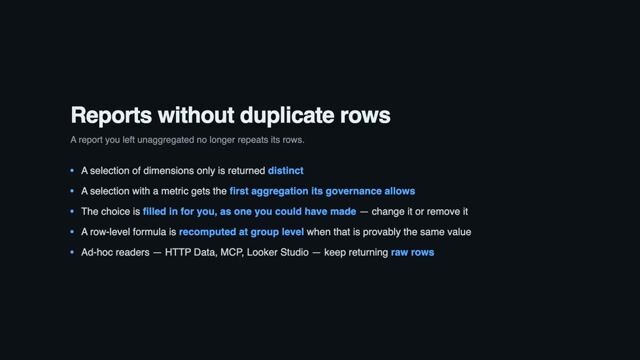
Google Sheets source: pick the sheet tab from a list and a leaner setup form
#1605 · The Google Sheets source setup now lists the tabs of the selected spreadsheet so the Sheet Name can be picked instead of typed, for both Google OAuth and Service Account authentication. With Google OAuth the spreadsheet is chosen with Google Picker only, so the manual "Spreadsheet ID or URL" input no longer appears in that mode. Header Row and Range moved to Advanced Settings because most sheets keep their headers in the first row and import the whole tab.
Limit manual backfill to 31 days per run
#1628 · A manual backfill now covers at most 31 days, so reload a longer history by starting several backfills with consecutive periods. A backfill longer than 31 days that was running at deploy time stops at the limit when resumed, so start it again as several shorter backfills. The Manual Run form shows how many days the period covers and rejects longer ones, and the manual-run API rejects them with a clear error.
Google Sheets: the first sheet of an auto-created document is named after the report
#1615 · Every report added to the same auto-created document now needs a distinct name, including the first report's, because sheet names are unique within a spreadsheet. When a Google Sheet is created through
add_reportwithout aspreadsheet_id, or with the Create document button, its first sheet is now named after the document title instead of Sheet1. Documents created before this change are not renamed.AI assistants now use the metrics your Data Mart already defines
#1621 · An AI assistant connected through the MCP server now picks a Calculated Field whose formula aggregates, such as a ROAS or a CTR, instead of pulling the underlying columns and dividing in its reply. OWOX computes the field in your warehouse over every matching row, so the answer stays correct when the row limit truncates what the assistant sees, and guards like
NULLIFstay applied.get_data_mart_details_by_idnow marks such a field with ausagenote, and nothing in your Data Marts needs to change.Current vendor API versions for the Criteo, LinkedIn, and Facebook connectors
#1617 · Existing data marts keep working and no settings need to change. The Criteo Ads, LinkedIn Ads, LinkedIn Pages and Facebook Ads connectors now use current vendor API versions, Criteo
2026-07, LinkedIn202609and Facebook Graphv26.0, because the previous ones were approaching end of support, Criteo's in February 2027.Create Microsoft Excel destinations from the web app
#1622 · Microsoft Excel is back in the destination type list, so you can add an Excel destination from the Destinations page with just a title and no credentials, instead of waiting for the OWOX add-in for Excel to create one on your first report run. The add-in still creates one automatically if your project has none you can use. Also fixed: picking Copy credentials from and then switching the destination type no longer sends that source with the new destination.
Snapshot builds are now distributed as container images only
#1627 · If you run pre-release builds,
owox@nextis no longer published to npm: pullghcr.io/owox/owox-data-marts:next, or an exact0.x.0-next-<timestamp>tag to pin one. This applies to every package the repository releases, including@owox/plugin-sdk,@owox/api-clientand@owox/ctl, whose changes now reach consumers only in a release. Releases are unchanged, and existing snapshot versions stay installable.
Release 0.34.0
MCP report tools: update the report you have instead of creating another
#1585 · When a follow-up request changes a report the assistant created, it now updates that report instead of creating a second one.
add_reportreturnserror_code: similar_report_existsfor a duplicate unless you passallow_similar: true, andupdate_reportreturns the full updated definition and re-runs Google Sheets reports. Email, Slack, Microsoft Teams and Google Chat reports are not re-sent unlessrun_immediately: trueis passed, andadd_reportacceptsspreadsheet_idto add a sheet to an existing spreadsheet.Configure joins before publishing Data Marts
#1599 · Draft Data Mart joins can now be configured before publication, including their output fields, output aliases, and join-specific descriptions.
Connect Claude or ChatGPT to your Data Marts
#1589 · Users can ask questions about their data in Claude or ChatGPT and get answers drawn from published Data Marts and their analyst-approved definitions. The onboarding checklist has a new step for connecting an AI assistant, which completes for you the first time a question in Claude or ChatGPT successfully queries one of the project's Data Marts.
Destinations tab now promotes Google Sheets, Excel, and MCP together
#1608 · A published Data Mart with no destinations now offers Google Sheets, Microsoft Excel and connecting an AI assistant (Claude or ChatGPT) via MCP as switchable tabs. The active tab cycles every few seconds until you hover, focus or pick one yourself.
MCP: guidance for projects without Data Marts
#1587 · When a project has no published Data Mart visible to the connected user, the MCP tools
list_data_marts,get_relevant_data_marts_by_promptandsummarize_data_catalognow returngetting_startedinstead of an empty list. It includes a link to create the first Data Mart, setup guides, the user's unpublished drafts and role-based next steps, so a new user hears where to start rather than that no data was found.Configure disconnected joined fields
#1609 · The Report Fields tab now keeps disconnected Output Schema fields available for alias, visibility, and aggregation configuration. Reports continue to exclude these fields while they are disconnected.
Keep report output controls consistent with the column selection and the Data Mart schema
#1597 · Unchecking a column in the report editor now also removes the aggregation, date bucket, bound metric filter and unresolvable sort rule set on it, while row filters and slices stay. A report that does not aggregate can sort by any Data Mart column, and a column missing from the schema is reported as a disconnected column by name. Scheduled runs and Looker Studio pulls now skip a sort rule on a missing column with a log warning instead of failing, and the "Output controls validation failed" message names the failing rules and columns.
Keep output schema field connection statuses server-controlled
#1601 · Output schema updates no longer accept a client-provided connection status as the field's actual state. API users and plugin developers could previously encounter misleading connected fields when saving a schema before the storage had verified them; the backend now derives the status, and the web app omits it from update requests.
Model Canvas and Data Mart navigation polish
#1565 · The Model Canvas page now opens straight into your model, with a single storage selected automatically and the storage picker moved into the page header. With no filters applied it now shows all Data Marts, published or draft, connected or not, where before it showed only published and connected ones. Cards get a color stripe for Data Quality status, canvas download is a toolbar button, bulk actions state how many Data Marts they affect, and a Data Marts breadcrumb now appears on Reports, Triggers, Run History and Insights too.
Fix the Model Canvas failing with a full-page error on larger data models
#1594 · Opening the Model Canvas or the Joinable Data Marts diagram on a storage with many Data Marts and relationships no longer replaces the page with an error screen. If automatic layout fails, the canvas retries with a simplified view of the relationships, then falls back to a plain grid you can rearrange by dragging. Node positions you set are still saved per storage.
Open the OWOX add-in for Excel straight from the Destinations tab
#1598 · A Data Mart that has no Microsoft Excel reports yet now links to the OWOX add-in for Excel, so a business user reaches the place an Excel report is actually created in a single step instead of being told where to look. The Excel destination's description also links to the installation guide, for organizations that install the add-in manually.
Data Studio: complete responses for large reports, and real query errors
#1595 · Data Studio reports now return as many complete rows as fit within Apps Script response limits instead of ending with malformed JSON. When loading a Data Mart schema or its data fails, it shows troubleshooting guidance and the underlying query error instead of suggesting the deployment URL is incorrect.
Fix LinkedIn Ads adAnalytics silently dropping data when the response exceeds 15,000 elements
#1569 · LinkedIn Ads adAnalytics exports over a large date range no longer silently lose data when the response exceeds 15,000 elements, because the connector now fetches, saves and checkpoints one day at a time and resumes an interrupted run from the last completed day. If a daily response still reaches 15,000 elements, the import finishes with a Warning status listing the affected days. LinkedIn API errors now fail the run instead of returning no rows, with rate-limit (429) and server (5xx) errors retried first.
Temporary BigQuery faults no longer fail the whole import
#1593 · A batch that BigQuery fails with a temporary fault no longer ends the whole import, even after hundreds of thousands of rows were stored. The storage now waits and saves that batch again using the existing Max Fetch Retries and Initial Retry Delay settings. Errors another attempt cannot fix, such as an invalid query or a denied permission, still stop the run immediately.
Keep automatic project redirects scoped to the signed-in user
#1591 · OWOX Data Marts no longer carries an automatically remembered project into a session for a different user. After switching accounts during sign-in, users continue with a project available to the newly authenticated account instead of being sent to request access for the previous account's project.
Projects in the switcher are sorted alphabetically
#1603 · The Switch project menu now lists your projects in alphabetical order instead of the order the server happened to return them in, so a project always sits where you expect it. Sorting ignores letter case, so
alphaandAlphaare ordered together, and it reads numbers as numbers: _Project 2_ comes before _Project 10_.
Release 0.33.0
Calculated Fields in the Output Schema
#1566 · Analysts can define a Calculated Field in a Data Mart's Output Schema as a formula in the warehouse's own SQL, such as
SUM(clicks) * 1.0 / NULLIF(SUM(impressions), 0). It recomputes at whatever grain a request asks for, so reports, Google Sheets, Looker Studio, MCP agents and Totals rows get the true ratio of the sums, and formulas are test-run against the warehouse on save. It is available on Google BigQuery, AWS Athena, Snowflake, AWS Redshift and Databricks.Send Reports to Microsoft Excel Destination
#1549 · Open the OWOX add-in in a workbook and pick a published Data Mart, and the report's rows land in the worksheet you opened it from. The report is created in the add-in, then appears in OWOX Data Marts with its title, run history and last-run status, and its columns, filters and sorting can be edited there. It cannot be run or scheduled from the web app, so refresh it from the add-in, and runs from Excel are billed as Excel Report Run.
Reuse project Credentials across plugins
#1580 · Projects can now store reusable Credentials with owners, sharing, Contexts and dependency visibility. Plugins declare the Credentials they require and members select eligible ones during installation, while raw secrets stay in the host. External Credential definitions can be added from public GitHub repositories or from private ones available through the deployment's GitHub access, and plugin authors use the same typed
exactCredentialhelper for built-in and external definitions.Report output column schema
#1572 ·
GET /reports/:id/output-schemareturns the columns a report's rows will carry, with name, title, description and type, including aggregated columns, Unique Count and calculated fields that are not on the Data Mart schema. Joined fields in Excel reports now use the same header form as Google Sheets,Field name (Data Mart name).Plugin release rejections are now visible, and collection compatibility follows SemVer
#1568 · When a plugin's GitHub release is rejected during sync, the reason is now shown in application logs, in the
UPDATE_CHECKaudit record and in a Release issues card on the plugin page, instead of the plugin silently staying on an old version. The collection-compatibility check is back and follows SemVer: within a compatibility line a release may add collections but cannot remove one or change its name, scope or entity binding. A breaking collection change must be shipped as a major version bump, or a minor bump while the plugin is below 1.0.0.Report filters: one “is blank” pair instead of four null/empty operators
#1560 · Nothing saved breaks: reports and API calls that use
is_empty,is_not_empty,is_nulloris_not_nullkeep working with their previous semantics, and only the menus stop offering them. The filter picker now offers a single pair, is blank and is not blank, defined by what the spreadsheet cell shows, which avoids guessing between empty and null and getting 0 rows. The Data API acceptsis_blankandis_not_blankin filter rules, and the MCPquery_data_martand report tools advertise the same pair.Join descriptions: shown in the column pickers, and editable per join path
#1559 · Report column pickers in the web app and the Google Sheets extension now show each joined Data Mart's description and full join path on hover. The Description tab of an inherited join is now editable per join path, so the text applies only to that path while the relationship and other data marts keep their own wording. Clearing the field or using the new Reset to inherited button falls back to the inherited description, and the path-specific text also appears in
joins[]in the MCP data mart details.Report links point at the report, not at the Data Mart
#1582 · The note on a Google Sheets imported column now ends with a Report page link that opens the report itself, with its panel expanded, instead of the Data Mart setup tab. The Open report in OWOX Data Marts button on Google Chat report cards and the Edit report link in report email footers open the same deep link. This takes you straight to the report's schedule and run history when a sheet has stopped refreshing.
Schedule Data Mart triggers in UTC
#1576 · Scheduled triggers now offer UTC as an explicit fixed-offset timezone with no daylight saving time changes. Existing UTC aliases remain compatible, and legacy Europe/Kiev identifiers are shown as Europe/Kyiv without rewriting saved schedules.
Cheaper incremental imports into Google BigQuery
#1579 · Incremental connector runs into Google BigQuery now touch only the partitions for the imported dates instead of scanning the whole destination table, so daily import cost stays flat as the table grows. This applies to date-partitioned time-series tables such as ad performance reports, and means lower BigQuery query costs and fewer daily quota errors; entity tables like campaign lists keep their current behavior.
Resumable incremental imports for Microsoft Ads, Google Ads, Reddit Ads, Criteo, and X Ads
#1556 · An interrupted incremental run of Microsoft Ads, Google Ads, Reddit Ads, Criteo and X Ads now resumes from the last completed date instead of restarting the whole date range, so long imports no longer retry endlessly without finishing. Microsoft Ads also stops early with a clear message when the Account IDs field holds no usable ID, or when Fields references a report the source no longer provides.
Connector runs interrupted by a restart are reported as a warning
#1558 · When a server restart stops a connector run, the run resumes by itself and continues from the last day it finished. Run history now shows this as a warning instead of an error, so a restart no longer looks like a failed import. Runs that stop for any other reason are still reported as errors.
Checkout and cart tokens for Shopify orders
#1583 · The Shopify connector can now import
checkoutTokenandcartTokenfrom theordersnode, selected in the connector's field picker.checkoutTokenmatchescheckout.tokenin Shopify Web Pixel events, so orders can be joined withcheckout_completedevents. Orders imported before you enable the fields stay NULL until you re-import them with a backfill run.Connect Google Sheets sources with Google OAuth
#1563 · Users can authorize a Google account and choose a spreadsheet with Google Picker when configuring a Google Sheets source. Service account authentication remains available.
Labeled retry settings in connector Advanced settings
#1588 · Connector Advanced settings now show Max Fetch Retries and Initial Retry Delay (ms) with hints that the delay is in milliseconds and that retries count total attempts including the first request. This stops a delay of
5from being read as five seconds. The Facebook Ads troubleshooting guide now covers Meta's rate-limit errors (code 4, subcode 1504022 and code 17, subcode 2446079) and how to adjust these settings.Joinable Data Marts diagram opens fitted to the whole graph, and its zoom controls keep working
#1574 · The Graph view of the Joinable Data Marts diagram now always opens showing the entire diagram, instead of sometimes landing zoomed in on the root card until you pressed Fit to view. The +/- zoom buttons no longer stop responding, because the zoom range is now derived from the live graph and pane size.
Help videos now stream from Cloudflare instead of GitHub attachments
#1552 · All six in-product help videos now play from the same Cloudflare Stream player, so the three that loaded from GitHub attachments no longer break on networks that block github.com. The documentation site shows the Cloudflare player as well, and the Google Sheets destination page gains the setup walkthrough video.
The OWOX BI link opens the current project
#1581 · When you are in a Data Marts project and choose OWOX BI from the project menu, you land in that same project on bi.owox.com instead of the BI home page.
Remove obsolete Slack Community links
#1571 · The Help menu no longer shows the obsolete Slack Community invitation, and project documentation now directs contributors to GitHub Discussions and Issues instead.
Release 0.32.0
Count unique records from any joined Data Mart
#1522 · Some existing reports will show different numbers:
Unique Counton a composite key goes down,SumandAverageon a joined Data Mart go up, and a key unique only within its join is now counted per join key, so the number rises sharply. Every joined Data Mart now offers aUnique Countfield in the report column picker that counts distinct records by its primary key, so you can see orders per customer without adding an order column. It can be selected and sorted by but not filtered, and cached report data is cleared on upgrade.Require an OWOX Data Marts Cloud license for Report Runs
#1529 · Legacy offline Enterprise license keys are no longer supported and fall back to Community. Every Report Run is now authorized with OWOX Data Marts Cloud before it executes and billed to the project signed into the license key; without a valid key the deployment runs as Community and Report Runs finish as Restricted with a message. Project administrators manage keys in Project Settings → License keys, where a key is bound to one deployment origin, shown once and expires after 365 days.
Plugin collections: host-stored JSON documents for installed plugins
#1517 · Plugins can now declare project- or member-scoped collections in
plugin.jsonand use them throughctx.collections(name). The host stores the JSON documents, applies entity authorization rules and keeps credentials out of the plugin frame. The SDK supports paginatedlist, nullableget,putanddelete, with writes bound to an immutableparentId.Data Last Updated Date for AWS Redshift, AWS Athena, Snowflake, and Databricks
#1524 · For Snowflake, the connection role needs access to the
SNOWFLAKEdatabase (account usage), otherwise Data Marts show Unknown. Data Last Updated now works for AWS Redshift, AWS Athena, Snowflake and Databricks on the Data Mart page, the list, the model canvas and MCPquery_data_martresponses. On Athena, Iceberg tables answer exactly while classic Hive tables show Unknown.The “Row Count” column is removed from aggregated reports
#1536 · Reports that relied on the automatic
Row Countcolumn must be repointed to an explicit Count aggregation on an always-filled column such as an ID, because aggregated reports, and the MCP and HTTP data endpoints, now return only the columns you selected. In Google Sheets the next run removes theRow Countcolumn and shifts everything to its right one column left, and a Data Studio chart built only onRow Countstarts failing until you use Refresh fields and rebuild it on a Count field.Optional description for Data Mart relationships
#1540 · Each join between Data Marts can now carry an optional free-text description of its business meaning, edited in a new Description tab on the joined Data Mart's card. The API accepts an optional
descriptiononPOST/PATCH /data-marts/:id/relationshipsand returns it, and sendingnullor an empty string clears it. In MCP,get_data_mart_details_by_idwithdetail_level=with_joined_fieldsnow returns ajoinsarray so assistants understand how and why Data Marts relate.Joinable Data Marts diagram: filters on the toolbar and the same view settings as the Models canvas
#1507 · In the Joinable Data Marts diagram, the Status and looped data marts filters moved from the gear popover to the toolbar next to search and now apply to both the Graph and the List, so the two views no longer show different relationships. The gear now holds the same view settings as the Models canvas: Compact or Detailed cards, layout direction, join field labels and object labels. All settings are remembered per browser.
Include field descriptions in the Models canvas exports
#1503 · Models canvas exports now include each Output Schema field's description as stored in the Data Mart. In the OKF Markdown bundle the Description cell shows the description after the primary key note and the
FK to [Target]notes are removed, and in the JSON export every field with a description gains adescriptionproperty.Give MCP assistants the complete project context
#1532 · MCP clients now receive the full project description, up to 10,000 characters without truncation, through
get_project_context, together with the current project metadata. Assistants are told to call it before their first project-specific operation. After an admin updates the description, the new value is available on the next call without reconnecting the MCP client.Run newly created push-destination reports immediately through MCP
#1531 · Newly created push-destination reports now run immediately by default when created through MCP
add_report, and the response returns the initialrun_idfor status polling. Userun_immediately: falsefor configuration-only creation; Looker Studio remains pull-based. If queueing fails after creation, the response preserves the report id and directs the assistant to retry withrun_reportinstead of creating a duplicate report or Google Sheet.Google Chat: direct webhook delivery, clearer setup, and delivery logs
#1455 · Google Chat Destinations now offer Incoming Webhook and Channel Email delivery methods; existing destinations keep their method, and new ones default to direct delivery through a space-specific webhook that posts formatted cards. Destination settings explain how to choose a method and where to get the webhook URL or space email. Report run logs show the delivery method and destination without exposing webhook credentials.
Copy a link to a Report
#1550 · Reports now have a permanent direct link. Opening a report on the Data Mart Destinations tab puts it into the page URL, and a Copy link button in the report panel header lets you share that link with a teammate — opening it shows the page with the same report already open.
Creating a report no longer stops you at “publish the Data Mart first”
#1528 · Clicking New Report on a draft Data Mart no longer hits a greyed-out button. If the Data Mart is ready, Publish and create report publishes it and opens the new report form in one click; if something such as a Storage or an Input Source is missing, you see what is missing and a Review Data Setup button.
Reliable bulk publishing for Data Mart drafts
#1515 · Previously, publishing Data Mart drafts in bulk from a Storage's menu could fail for every draft with a generic "please check them independently" message, even when some drafts were ready to publish. This is now fixed, so drafts you have access to publish succeed as expected. When a draft still cannot be published, the notification names the reason — that it has no definition yet, for example, or that its table name is not in the expected format — so you know what to correct before trying again.
AI metadata generation for SQL data marts: no dataset-creation permission, and visible failures
#1523 · Users with data-only BigQuery access can now use the AI helper on SQL data marts, because sample rows are fetched from the data mart's own SQL and
bigquery.datasets.createis no longer needed in most cases. Legacy Google BigQuery data marts and non-SQL definitions still use the technical-view path. Generation errors now show as persistent, dismissible notifications, and BigQuery permission errors name the project and the missing permission.Fix: “Copy from…” no longer shares or deletes another Data Mart’s credentials
#1480 · Credentials already wiped by this bug are not restored, so those Data Marts need their credentials entered again, while Data Marts that still share a record are separated automatically the next time each is saved. 'Copy from...' now creates its own credentials record for manually entered credentials, so it no longer shares or deletes another Data Mart's credentials, and it requires edit access to the source Data Mart. Without that access, the error now explains how to get it.
Google Ads, LinkedIn Ads, LinkedIn Pages, and Shopify connectors use supported API versions
#1504 · Google Ads imports no longer fail with
UNSUPPORTED_VERSIONafter Google sunset API v21 on 2026-08-05, because the connector now uses v25. LinkedIn Ads, LinkedIn Pages and Shopify connectors move to the 2026-07 version so their imports keep running when the old versions are sunset.Google Ads campaign and video metrics import
#1514 · Google Ads
campaignsandcampaigns_statsimports that selectvideo_views,video_view_rate,campaign_start_date, orcampaign_end_datefailed after Google renamed these fields in its v25 API, and they run again now that the connector requests the current names. No action is needed: field names in OWOX, existing data mart configurations and destination tables are unchanged.Facebook imports survive an inaccessible ad account
#1519 · The Facebook Marketing connector now skips an ad account that returns a permission error and continues with the remaining accounts, instead of aborting the whole import and leaving data frozen on every later run. Each skip is raised as a warning on the run, other failures still fail the run, and if every account fails the run stops with an error naming each one.
Memory-safe Keywords import for Microsoft Ads
#1545 · Previously, importing Keywords from a large Microsoft Ads account crashed the run with an out-of-memory error. The connector now streams records to storage in small chunks instead of loading the whole download at once. Imports of any account size now complete within normal memory limits.
OpenHolidays connector no longer fails when saving fetched data
#1543 · Every OpenHolidays run failed with
TypeError: storage.saveData is not a functionright after the API returned holiday rows, so no data ever reached the storage table. The connector requested its storage instance without waiting for the async initialization to finish, then tried to save data into the still-pending result instead of the ready storage. It now waits for the storage to initialize before saving, and imports complete successfully.Editing the table name no longer clears the other storage fields
#1542 · On the connector setup step 'Choose where to store your data', clearing the table name no longer wipes the dataset or database name, so you can type a dataset name while the table field is empty. The fix applies to Google BigQuery, AWS Athena, Snowflake, AWS Redshift and Databricks.
Google Sheets reports recover from deleted sheets with one click
#1538 · When someone deletes a report's destination sheet, the report now shows an error that explains what happened instead of a cryptic Failed to find sheet 0 message. The failed report's row menu offers Reconnect & run, which rebinds the report to a sheet named after it, reusing the sheet if it exists and creating it otherwise, then reruns the report. Renaming the sheet afterwards is safe because the report tracks it by ID.
Values starting with ”+” no longer break in Google Sheets reports
#1535 · Google Sheets reports no longer show
#ERROR! Formula parse errorfor exported values that start with+, such as session identifiers like+Dri7…. The destination now prefixes such values with an apostrophe ('), so the cell displays the original value as stored, and only+values are escaped.Typing in the SQL editor now works reliably on saved Data Marts
#1509 · The SQL Query editor on saved Data Marts now accepts every key you type, including spaces, which the Joinable Data Marts diagram used to capture when it was set to the diagram view. A query you are still writing no longer disappears when the page refreshes in the background, and the Save button no longer stays greyed out after you pick a different input source type.
Connecting a Google account no longer fails intermittently
#1520 · Connecting Google BigQuery storage or a Google Sheets destination no longer fails at random and now succeeds on the first attempt. The OAuth popup now only hands the authorization result back to the tab where you clicked Connect with Google, and that tab completes the connection with its own session.
api-client: expose in/not_in filters and the new relative-date presets in the traversal types
#1510 · The public
@owox/api-clienttypes now include theinandnot_inoperators and thethis_week,last_week,this_quarter,last_quarterandnext_n_daysrelative-date presets, so TypeScript callers no longer get a compile error for requests the API already accepted. Forinandnot_in,valueis an array of 1 to 500 values of the same type. The client guide now documents thevalueshape of every filter operator.API surface maintenance
#1513 ·
@owox/api-clientcan now call/api/...endpoints without typed abstractions throughpatchJson()anddeleteJson(), and manage Data Mart runs withruns.forDataMart(id)and itsstart(),list(),get()andcancel()methods. Starting and cancelling runs need Technical User access, listing and inspecting need Business User access, and requests larger than 1 MiB are rejected. Existing typed integrations need no migration.Plugin publishing no longer fails during a safe synchronization cooldown
#1525 · Publishing a plugin repeatedly no longer fails while a GitHub synchronization is cooling down, because the plugin's last validated version is reused. Authenticated GitHub App and server-token reads use a 30-second cooldown and anonymous reads keep 300 seconds. A separate in-progress error is returned while another synchronization is still running.
Release 0.31.0
Add Data Quality checks
#1474 · Configurable manual and scheduled Data Quality runs for BigQuery, Legacy BigQuery, Athena, Snowflake, Redshift, and Databricks Data Marts. The new Data Quality workspace supports 11 table, field, and relationship checks, stores reproducible SQL and examples, and surfaces compact results in Output Schema, Models, and Run History.
Data Last Updated Date
#1472 · You can see when the source tables behind a Data Mart last changed in the warehouse, on the Data Mart page, the Data Marts list and the model canvas, and through MCP, where
query_data_martreturns adata_last_updatedblock. Every run that delivers data also records the value in Run History; BigQuery is supported first, and other storages reportunavailableuntil their support lands.Google Sheets source connector
#1466 · A new Google Sheets source connector imports one sheet into a table in the user's Storage and makes it available as a Data Mart. It supports Service Account authentication, dynamic header-based field inference, and full refreshes across supported storages, so the materialized table reflects the current sheet contents, including schema changes.
Models canvas redesigned as an ERD, Joinable Data Marts diagram to match
#1476 · The Models canvas now draws ERD-style cards with a definition-type badge, a published/draft dot and, in the new Detailed view, typed field rows with primary keys first. Cards can be dragged with positions saved per storage in your browser, relationship lines are curves that highlight on click, and the Object labels setting controls what each card shows. The Joinable Data Marts diagram uses the same cards and gains the Show looped Data Marts and Status filters.
Export the Models canvas as SVG, PNG, JSON, or an OKF bundle
#1496 · The Models canvas can now be exported through Actions, Export as SVG, PNG, JSON or an OKF Markdown bundle that works well as context for AI assistants. The export covers exactly what the canvas shows regardless of pan and zoom, and the Actions menu moved into the toolbar so it no longer covers content.
Change the Input Source of an existing Data Mart
#1495 · The Input Source type of an existing Data Mart can now be changed within the same storage, for example from a table to a SQL query, while relationships, reports and field metadata stay in place. Fields missing from the new source are marked disconnected, a confirmation dialog shows what may break, and the new source is checked against the storage before saving. Data Marts based on a connector are not affected.
HTTP Data on report level
#1450 · A new
GET /api/external/http-data/reports/{reportId}.ndjsonendpoint streams an existing report's data as NDJSON with its saved filters, aggregations, date buckets, unique count and sort applied, and an optionallimitoverrides the saved limit. The response carries anx-owox-run-idheader pointing to anHTTP_DATArun, which records the executed SQL inadditionalParams.httpData.executionSqlQuerywhen the report applies such controls. Both HTTP Data endpoints record aFAILEDrun for any failure during query execution.Guide AI queries with a field type → operators/aggregations matrix
#1435 · MCP tools now tell AI assistants which operators and aggregations each field supports:
get_data_mart_details_by_idreturns each field's typecategoryandallowedAggregations, plus anoperators_by_categorymatrix, andquery_data_martembeds a field-type matrix in its description. Mismatches now return targeted errors such asinvalid_operator_for_type,invalid_date_bucketandinvalid_filter_value, and boolean fields are filterable. Newinandnot_infilter operators and relative-date presets (this and last week, this and last quarter, next N days) work across storages, in the report UI and inquery_data_mart.List draft Data Marts through MCP
#1465 · MCP clients can now explicitly list draft Data Marts with
list_data_marts, while published Data Marts remain the default catalog state.Combined and Sample are now on by default for text fields
#1500 · Text columns now offer
Combined(STRING_AGG) andSample(ANY_VALUE) by default, alongsideCountandCount Unique, so you no longer enable them field by field before a report can use them. Existing Data Marts pick this up automatically unless a field has an explicitly chosen narrower list.Sort by Unique Count
#1473 · Reports can now sort by the Unique Count metric. Previously, enabling Unique Count added the column to a report but the Sort section had no way to reference it. Once Unique Count is enabled, it now shows up as a sort option like any other column, ascending or descending.
Joined field names read better in Google Sheets
#1491 · Google Sheets reports that would write two columns under the same header now fail with a clear message naming the header, so rename one of the two columns or the Output Alias of the joined Data Mart it comes from. Columns from a joined Data Mart now read
Recency Score (RFM_SEGMENT)instead of leading with the Data Mart name, and existing sheets pick up the new headers on their next refresh without shifting any columns. Data Studio, email destinations, the HTTP data endpoint and MCP keep the prefixed form, so match columns on the technical field name, and leading or trailing spaces in aliases are no longer kept.New Data Marts are shared for maintenance by default
#1492 · A new Data Mart now starts with both Shared for reporting and Shared for maintenance on, so other Technical Users can join it to their own Data Marts right away. Existing Data Marts are not changed, and the owner can turn Shared for maintenance off in one click, after which non-owners keep reporting access but cannot edit or join it. Storages and Destinations keep their current defaults.
Cleaner connector run logs: warnings for issues you can fix yourself
#1470 · Connector run failures now split into warnings, for issues you can fix yourself such as expired credentials or a canceled run, and errors, which our support team can help resolve. Each crash now appears as a single log entry and duplicate entries are gone.
Clearer Data Warehouse selection during onboarding
#1471 · The Data Warehouse step in onboarding now shows an interactive preview for the selected supported warehouse, illustrating how OWOX takes data from input sources, processes it in the chosen warehouse, and delivers it to destinations such as Google Sheets, Excel, email, Slack, and Looker Studio. The step also gains a responsive two-column layout, updated selection states, and a short animation. The preview is hidden when you select Other or I don't know.
Copy a link to a Destination or Storage
#1487 · Destinations and Storages now have a Copy link button in their configuration panel, so you can grab a direct link and share it with a teammate instead of explaining which item to click through the list to find.
Easier access to service account details
#1477 · When viewing Google service account credentials, you can now copy the service account email with one click or open its details in Google Cloud Console. The email remains visible and can still be selected manually when you only need part of it.
Correct COUNT DISTINCT, SUM, AVG, percentiles, and Combined across joined Data Marts (fan-out fix)
#1488 · Numbers will change for any saved report that uses
COUNT DISTINCT,SUM,AVG, a percentile orCombinedon a joined Data Mart whose join fans out, and a saved report with a metric filter on those joined metrics will be rejected on its next run. These metrics are now computed correctly at the report grain, including across multi-hop bridges, on BigQuery, Athena, Redshift, Snowflake and Databricks. A report selecting bothCOUNTandCOUNT DISTINCTon a joined field now shows onlyCOUNT DISTINCT, and Totals now honour metric filters.Keep NULL rows for “is not” / “is none of” / “does not contain” report filters
#1442 · Reports with negative filters can now return more rows:
is not,is none of,does not containanddoes not match regexno longer drop rows where the column is NULL, so addis not nulloris not emptyto exclude them. In blended reports, a post-join filter likecrm.status is not Churnedon aLEFT JOINed column now keeps source rows with no join match, and negative metric (HAVING) filters keep groups whose aggregate is NULL. Applies to BigQuery, Athena, Redshift, Snowflake and Databricks.More reliable connector runs during cancellation and long backfills
#1439 · Cancelled connector runs now stay cancelled and keep their logs, instead of reappearing as running minutes later. Long BigQuery backfills on OAuth no longer stop after about an hour with an "Invalid Credentials" error, because the access token is now refreshed mid-run. A run can still fail that way if its saved token expired before it started, so reconnect the BigQuery destination or use a service account for now.
Fix dropped characters and lost focus in connector settings
#1449 · Fields on the Configure Settings step of connector setup now keep focus and accept every character, whether typed quickly or pasted, where before characters were dropped and credential fields lost focus after the first character. Nested credential fields now show readable labels such as 'Service Account Key (JSON)' instead of raw field names.
Preview SQL no longer requires edit access
#1489 · Anyone who can see a Data Mart can now open Preview SQL on its reports and copy the generated SQL, instead of failing with "edit access to the source data mart is required". This fixes the error for Business Users and for Technical Users who are not owners. The SQL validator and Copy as Data Mart are now hidden for users without maintenance access instead of failing on click.
No more leftover columns when switching Data Marts in Google Sheets
When creating a report in the Google Sheets extension, switching to another Data Mart now resets the column selection. Previously, columns picked for the first Data Mart stuck around and showed up as "Disconnected columns" under the new one — and could even reach the created report and make it fail.
API surface maintenance
#1456 · Consumers using the previously released
runs.getHistory(...)in@owox/api-clientmust rename those calls toruns.list(...). The client also addssearch.query(query, options)for finding visible Data Marts, storages and destinations, anddataMarts.list({ offset, ownerFilter })can start from an offset and filter byhas_ownersorno_owners. OpenAPI contracts forGET /api/data-marts/runs,GET /api/data-martsand the NDJSON endpointGET /api/external/http-data/data-marts/{dataMartId}.ndjsonare now complete.
Release 0.30.1
More reliable MCP reporting answers
#1458 · MCP reporting tools now expose only published Data Marts and use business-friendly field labels, and each result names its source Data Mart and links to related Data Marts, reports, destinations and schedules. When a result is cut off by the row limit or response-size cap, the assistant gets an explicit truncation reason and must tell you. It is also guided to use OWOX aggregations for count questions.
Release 0.30.0
Model canvas
#1413 · New project-level, read-only visualization of the data marts visible to the user in a storage and their relationships, available from the new "Models" sidebar item under Data Marts. Includes filters by storage, status, and relationships; search with highlighting; join-field labels on edges; node-avoiding edge routing; selectable layout directions; and directional (including bidirectional) join edges. Both this canvas and the existing Joinable Data Marts graph are now rendered with React Flow (replacing Rete.js), preserving their established styling and interactions.
Add project-based MCP server URLs
#1407 · OWOX MCP now accepts project-specific server URLs,
https://{projectId}.mcp.owox.com/mcp, next to the sharedhttps://mcp.owox.com/mcp. A project-specific connection takes the project from the host and skips project selection, while still checking that the user has access to the project. Project settings show the project-specific URL with a copy option.Add project-aware MCP instructions
#1412 · OWOX MCP servers now provide clients with built-in instructions for discovering and querying Data Marts with the current tool workflow. Project admins can add project-specific business context in Project settings; the project description is stored per project and appended to the MCP instructions when a client connects.
Create and update reports for every destination type through MCP
#1430 · The
add_reporttool now supports every destination type, not just Google Sheets, and Email, Slack, Microsoft Teams and Google Chat reports take a newmessageparameter with the subject and a body template that supports the{{table}}placeholder. Data Studio reports are created with a 5-minute data cache lifetime, and the response includes a setup-guide link.update_reportaccepts the samemessageparameter to change an existing email-family report, and everyadd_reportresponse now reports thedestination_typeit created.Create and update reports with query-parity output controls through MCP
#1445 · The
add_reporttool accepts new optionalfilters,slices,aggregations,date_buckets,sort, andlimitparameters — the same shape and vocabulary asquery_data_mart— applied to the report on every run, so a filtered or aggregated query can be exported to a report that matches exactly the numbers the user saw.update_reportaccepts the same parameters as replacements ([]removes a control,nullremoves the row limit, omitting a parameter keeps the current value;filtersandsliceseach replace only their own kind of rule). All controls work for every destination type and are validated against the data mart schema before any side effect — for Google Sheets, before the sheet document is created.Sort rows from the query_data_mart MCP tool
#1422 · The
query_data_martMCP tool now accepts asortparameter, an ordered list of{ field, direction }rules withascordesc, so an assistant can order results without post-processing. Each sorted field must also be listed infields, as withaggregationsanddate_buckets.Improve Output Schema AI actions
#1415 · The Refresh schema and global Generate field aliases & descriptions actions moved to the table toolbar, keeping all primary actions in one place. The global AI action dropdown was removed — a single click now generates both field aliases and descriptions. AI action buttons were added to the Alias and Description column headers, so users can generate values for an entire column where the action applies.
Data Level selection for TikTok Ads performance reports
#1411 · TikTok Ads
ad_insightsandad_insights_by_countrynow honor the selected Data Level (advertiser, campaign, ad group, or ad), a dropdown in the main connector settings. The field selector pins only the unique-key fields that level requires — advertiser-level reports no longer forcead_idand can group by date alone. Choose Data Level before selecting fields; when changing it on a connector that already has data, use a new Data Mart so rows merge correctly.Reports table UX — discoverable actions
#1390 · In the reports table, Open document and Preview SQL now sit next to the report title, and the More actions menu stays in the actions column. Truncated report titles now show a tooltip.
Improve Document Link field UX
#1402 · The Document Link section of the Google Sheets Report form is simplified: Open document appears only when a valid Google Sheets URL is entered, and New Sheet is offered as an alternative to pasting a URL. The input placeholder now reads Paste a Google Sheets URL.
Shared Login Customer ID field for Google Ads
#1403 · The Login Customer ID for Google Ads is now one top-level field shared by all authentication types, so the value is no longer lost when you switch methods and is reachable from the OAuth button flow. Existing connectors keep working because the old stored value is still read as a fallback. The field is optional for Service Account authentication and sits directly under Customer ID.
Selective refresh and clearer failed-report errors in Google Sheets
On Refresh all reports in Google Sheets, each report shows its title, sheet and last-run status, with a clear error message when the last run failed. You can choose which reports to refresh with checkboxes, or target only failed, successful or never-run ones. The single-report refresh screen shows the actual error details and an Open report action, and the same details are in the All reports list.
HTTP Data streaming supports aggregations and date buckets
#1420 · The HTTP Data streaming API, the
@owox/api-clienttraverseData()method and theowox-ctl data-marts streamcommand now acceptaggregationanddateTruncparameters (--aggregationand--date-bucketon the CLI). Any selected column without an aggregation rule becomes a grouping key, so you can stream pre-aggregated rows such as monthly revenue totals straight from a published Data Mart without building a Report. Grand totals and the applied aggregation are recorded in the HTTP_DATA run history.Clearer permission errors when managing Storages, Destinations, and Data Marts
#1425 · Permission errors now name the exact role required — such as owner with the Technical User role, or Project Admin — and the "access forbidden" toast stays on screen until dismissed. Previously these actions failed with a vague message that did not explain who could perform them, and the error toast disappeared after a few seconds.
Google Sheets A1 note shows import finish time
#1438 · The A1 cell note for a Google Sheets export now records when the import finished (written in the finalize step after all data is on the sheet), not when the first data batch started writing. While rows are still streaming, only the short ODM marker is present; the full provenance block (
Imported at …, data mart title, and link) is written at the end.Clearer report details, errors, and recovery in Google Sheets
The Data Mart section on a report card in the Google Sheets extension now shows a loading indicator, a clear message if details fail to load, or No details available. A report that cannot run because of missing columns shows the same actionable error as OWOX Data Marts, and if a report's first run fails the editor still opens so you can fix the setup and retry.
Fix BigQuery report runs when the table name matches a filter column
#1410 · BigQuery report runs failed when a Table Data Mart's unaliased table short name matched a filtered column — BigQuery treats the short name as a row
STRUCTalias, so the generated SQL compared aSTRUCTto a string (for example on Google Sheets export for a table such as…countryfiltered on acountrycolumn). Output-controls and explicit-projection queries now alias the source assrcand qualify filter/sort references (`src.country) inWHERE,ORDER BY, andHAVING, whileSELECTandGROUP BY` stay unqualified so nested RECORD paths keep their shape. Existing reports need no reconfiguration.Output schema edits no longer get silently reverted
#1418 · Unchecking a column (Alias or Description) no longer becomes visible again after a few seconds or resets on tab switch, and toggling "Hidden from reports" on a field while an AI-generated alias or description was still loading is no longer undone once generation finishes. Column visibility now persists per data mart across tab switches and reloads, and edits made while AI generation is running are preserved. Generating metadata that fills in nothing new no longer marks the schema as unsaved.
Correct joined data mart aggregations and flag missing primary keys
#1416 · When a joinable field is deduplicated with a count (COUNT / Count Unique), its value in the blended result is now a whole number, so reports can sum, average, or take min/max of it (arithmetic aggregations appear automatically, Sum active by default) instead of collapsing the joined events into a concatenated string and under-counting them — fixing funnel-style reports (sessions, add-to-carts, purchases across shared dimensions). Slices (pre-join filters) on such a field now offer the operators for its original type, since a slice runs on raw values before the join. Separately, a joined data mart with no primary key now shows a "No primary key" warning in both the relationship list and the graph, because without a key the join cannot deduplicate rows reliably and metrics can be double-counted (fan-out).
Report totals cover every selected metric, not just numeric fields
#1432 · Report totals — returned by the
query_data_martMCP tool and retrievable for a Data Mart run via itsx-owox-run-id— now cover every aggregated metric, includingCountandCount Uniqueon text, date, or boolean columns across both native and joined Data Mart fields. Previously totals covered numeric fields only, so a scorecard aggregating a text column (for example the number of distinct countries) came back empty even though the run succeeded.Sample(ANY_VALUE) andCombined(STRING_AGG) are no longer included in totals, since neither reduces to a meaningful grand total.Report column picker fixes
#1419 · Adding a column in the Aggregations panel now opens the aggregation editor immediately, and Apply stays disabled until you pick a function or bucket, so a new column can no longer be discarded by an empty Apply. The relative-date "Last N days/months" filter input can be cleared with Backspace, and a trash button in the editor header deletes a single filter or slice. The auto-generated "Unique count" row now uses the same font as the other fields.
Cross-platform Windows support for dev scripts and git hooks
#1368 · Dev scripts and the husky pre-commit hook now work on Windows: inline environment-variable assignments such as in
npm run dev -w owoxare wrapped withcross-env, and the husky setup writes a POSIX shell hook instead of a batch-style one that failed with@echo: command not foundand blocked commits. It repairs only the stale hook formats it generated before and leaves hand-edited hooks untouched.API surface maintenance
#1434 · OAuth routes such as
/api/data-destinations/oauthandPOST /api/data-destinations/connect/google-sheetsnow reject API-key authentication and require an interactive user session, while other resource operations are unchanged.@owox/api-clientaddsproject.getSettings(),project.getSetupProgress(),runs.getHistory({ limit, offset }),insights.getTemplates({ limit, offset }),models.getDataMarts(),markdown.parseToHtml({ markdown })andauth.getContext(). Protected operations now declare theX-OWOX-Authorizationheader in OpenAPI.Fix nested blended field name collisions in joinable data marts
#1414 · Saved reports that use legacy nested blended names, such as
customers__campaign_idforcampaign.id, are not migrated and will not resolve after deploy, while flat joined columns need no changes. Nested (struct) fields in joined sources now get distinct report column names with a stable hash, such asads__campaign_idfor flatcampaign_idversusads__campaign_id__a8702665for nestedcampaign.id. During a rolling deploy, nested-field reports saved or run mid-rollout can briefly orphan until every pod serves the new names.
Release 0.29.0
Data Mart report aggregations
#1373 · Deploy the backend before shipping a Google Sheets Extension build that exposes new aggregation options, because the extension's function list has no compile-time guard against drift from the API. Reports can now aggregate Data Mart data on the server across BigQuery, Athena, Snowflake, Redshift and Databricks, with group-by, metric functions such as
SUMandCOUNT_DISTINCT, date bucketing throughdateTruncConfig, and filters on aggregated columns.Auto-create Google Sheets documents for reports
#1369 · Existing OAuth Google Sheets destinations must reconnect to grant the new
drive.filescope before folder placement and sharing work. The Google Sheets report form gets a Create document action that makes a new spreadsheet for the selected destination, and destinations can target a Drive folder. Picking a folder through the Google Drive Picker requires the newGOOGLE_PICKER_API_KEYenvironment variable.Smart search for Data Marts, storages, and destinations
#1370 · Added semantic search functionality for finding project Data Marts, Storages, and Destinations from the project search index.
MCP tools
The MCP server gains tools to explore, query and manage Data Marts and reports from an AI assistant. Discovery tools are
summarize_data_catalog,get_data_mart_details_by_idandget_data_mart_reports, andquery_data_martqueries a Data Mart directly with filters, aggregations and date buckets, recorded in Run History and costing credits per call. Report tools areadd_report,update_report,run_report,get_report_run_statusanddelete_report, plus schedule management and the destination toolslist_destinationsandadd_destination.Protect unsaved Output Schema changes from being lost
#1374 · When a Data Mart's Output Schema has unsaved changes, a prompt now appears before any action that would replace it, with three choices: Save & continue, Discard & continue, or Cancel. Triggered by generating field aliases or descriptions with AI, refreshing the schema, publishing the Data Mart, updating the input source, or leaving the page.
API-key exchange and auth context
#1364 · Project member API keys can now be exchanged for IDP access tokens in Better Auth and the development Null IDP, and the tokens expire after 15 minutes, so clients re-exchange the API key.
client.auth.getContext()in@owox/api-clientandowox-ctl statusnow show the project and member context without exposing key secrets. Magic links also keep the invite role through the callback, so the role is no longer dropped when the user is added to the project.Automatic retry and clearer error messages for Criteo Ads imports
#1379 · Criteo Ads imports now automatically retry on server errors, rate limits, and network issues, so brief outages on Criteo's side no longer stop an import. When an import still fails, logs now include the HTTP status, the provider's own error message, and a note when the failure looks temporary. Previously a temporary server error failed the whole import immediately with only a raw stack trace in the logs.
Report Column Picker search and layout improvements
#1372 · The Report Column Picker has a search bar that works across native and blended Data Mart columns, with a clear empty state when nothing matches. Search works together with Show selected only and Select all, and the toolbar is reorganized for easier access.
Published OWOX Data Marts MCP in ChatGPT Apps
#1366 · OWOX Data Marts MCP is now published in the ChatGPT Apps catalog.
Release 0.28.0
Google Sheets Extension menu and sidebar updates
The Google Sheets extension gets an All Reports menu item that lists every report in the document with its sheet name, last run status and last run time, and a Create new report item that adds a new sheet and opens the report form. Hovering the last run status icon in the sidebar shows why a run failed, and the sidebar now follows the active sheet reliably when you switch quickly.
Executed SQL in Run History
#1338 · Report runs now record the exact SQL that ran, with output controls applied and filter parameter values inlined, in an Executed SQL block in Run History, where before only the raw Data Mart query was stored. It covers Google Sheets, Email, Slack, Google Chat, Microsoft Teams and Looker Studio, and appears only when output controls or blended SQL were applied.
Output controls for Databricks and Snowflake
#1311 · Filters, slices, sort, and limit are now supported on Databricks and Snowflake Data Marts, matching support already available for BigQuery, Athena, Redshift, and Legacy BigQuery. Filter values are correctly escaped per storage type; substring matchers avoid
LIKEso user%and_stay literal. Available in the web app and the Google Sheets Extension.Quick run button for reports
Reports table now has a direct run button. A brief undo window appears before the run begins.
Form validation and UI improvements
#1323 · Submitting a form now opens any collapsed sections containing invalid fields and focuses the first error. Table filters now default to the
isoperator for fields that support bothcontainsandis, and reset when switching filter fields. Project switcher menu received search, scroll-into-view, keyboard navigation, state reset on close, and accessibility improvements.Fail fast on disconnected report columns and output controls
#1309 · Reports now reject orphaned column references upfront — after a joined Data Mart alias is renamed, a relationship is removed, or a field disappears from the schema or is hidden — instead of letting them leak into generated SQL and fail with a cryptic "Unrecognized name" error. The column picker shows a "Disconnected columns" block for stale selections; stale filter/slice rules are highlighted in red in Output Controls; the Output Controls button badge turns red when any control references a disconnected field.
Readable field names and search in Output Controls
#1334 · Filters, Slices, and Sort pickers now show the field's alias (or leaf column name), with the joined Data Mart name as a muted second line for blended fields, instead of raw nested identifiers. Each picker is now searchable by alias, Data Mart name, or technical field name.
Criteo placement, category, and transaction reporting
#1322 · Three new Criteo endpoints: placements, placement categories, and transactions. Added extra statistics dimensions (device, OS, channel) and reporting currency selection. Previously only campaign-level statistics were available.
Reliable incremental sync after partial connector run
#1342 · The incremental date checkpoint is now written only after all accounts complete successfully. Previously, a mid-run failure could advance the checkpoint past data that was never fully fetched, silently skipping those dates on the next run. Affects MicrosoftAds, CriteoAds, GoogleAds, RedditAds, and XAds.
Criteo access token proactive refresh
#1356 · The Criteo connector now refreshes the access token 60 seconds before it expires and retries any request that still returns an expired-token error. Previously the cached token was reused for the entire run without expiry checks, causing mid-run failures on long-running syncs.
Reconnect notice when Google Storage authorization expires
#1344 · Expired authorization is now detected before a connector run starts and surfaced as a "Reconnect Storage" prompt, instead of starting the run and failing with an opaque authentication error. The storage health indicator updates automatically when access is lost.
Drag-and-drop for service account JSON
#1319 · Service account credential textareas now accept dropped JSON files, with JSON validation, file size limits, and error feedback.
Shopify totalOutstanding field
Added
totalOutstandingto Shopify orders — the total amount not yet transacted for the order.Session invalidation on password change and reset
#1297 · After a successful password change or reset, all other active sessions are revoked. The session that performed the change is preserved.
Unified column identifiers for output control slice filters
#1329 · Slice (pre-join) filters now reference columns by the same fully qualified identifier as regular output filters (e.g.
category_details__item_event_count) instead of a raw column name plus a separatealiasPath. Existing saved reports are migrated automatically.Bug fixes and improvements
#1349 · OAuth sign-in for the Microsoft Ads, TikTok, LinkedIn and Google Ads connectors no longer fails with Not Found after provider authorization, on both self-hosted and cloud deployments. Rotated Microsoft Ads refresh tokens are now saved, and AI Helper no longer fails on Output Schemas with disconnected fields or on table names containing dashes.
Release 0.27.1
Fix release build broken by duplicate google-auth-library
#1312 · A transitive dependency drift left two copies of
google-auth-library(v10) in the tree — one hoisted at the root and a second pinned exactly bygoogleapis-common— which produced incompatibleOAuth2Clienttypes and broke the TypeScript build of the Google Sheets and BigQuery integrations. A scoped npm override now makesgoogleapis-commonreuse the root copy, so the packages build and publish reliably again.
Release 0.27.0
OWOX Data Marts API access
#1251 · OWOX Data Marts now has an API client and a CLI for custom integrations:
@owox/api-clientfor TypeScript and JavaScript, andowox-ctl, which reads credentials from environment variables or.env/--env-fileand defaults tohttps://app.owox.com. Available commands areowox-ctl status,owox-ctl data-marts list,owox-ctl data-marts stream,owox-ctl storages listandowox-ctl destinations list.HTTP Data API — stream Data Mart rows over HTTP
#1248 · A new
GET /api/external/http-data/data-marts/{id}.ndjsonendpoint streams a published Data Mart's rows as newline-delimited JSON for project members authenticated with their ODM member token (x-owox-authorization). Columns are chosen withcolumns=*,columns=**or repeatedcolumn=<name>, with optional base64url-encodedfilterandsortand alimit; hidden fields are rejected. Every pull is recorded as anHTTP_DATArun in run history.User provisioning and project access requests
#1238 · Added project-level user provisioning settings and context-scoped defaults for newly provisioned users. Users who receive a project token without assigned roles now stay inside a restricted ODM app shell, where they can request access to the current project or create a new one.
SQL preview icon on all reports
#1278 · The SQL preview icon is now visible on all reports (Google Sheets, Email, Looker Studio). For reports with output controls or joined fields, clicking it opens the generated SQL dialog. For reports without, it shows a tooltip explaining that the report queries the Data Mart source directly, with a link to Data Setup.
Project-wide Data Mart activity pages
#1287 · Added project-wide pages for Data Mart triggers, reports, insights, and run history. The lists support project-level search and filters and preserve row-level permissions for actions.
Output controls expanded to Athena, Legacy BigQuery, and Redshift
#1272 · Filters, slices, sort and limit now work on AWS Athena, Legacy BigQuery and AWS Redshift Data Marts, as they already did on standard BigQuery, in the web app and the Google Sheets Extension. Relative-date presets are also tightened on all storages:
last_n_daysandlast_n_monthsnow stop at today so future-dated rows no longer leak in, andthis_monthandthis_yearare clamped to the current period.Automatic schema evolution for Snowflake and Redshift
#1236 · Adding new fields to an existing Snowflake or Redshift Data Mart no longer causes MERGE or INSERT failures. Both storages now query the live table schema on every run and issue
ALTER TABLEto add any missing columns before writing data.Cancel Data Mart runs from Run History
In-progress connector and report runs can now be cancelled from Run History. Cancellation stops associated run triggers, marks the run as cancelled in history, and asks for confirmation that stopping a run can leave data incomplete.
Facebook Ads reach reporting at ad set and campaign level
#1265 · Two new Facebook Ads endpoints report daily performance aggregated at the ad set and campaign level, with reach deduplicated to match the numbers shown in Meta Ads Manager. Previously, reach was only available per ad, so totals summed across ads overcounted the same people.
Google Sheets destination access email visible for both auth methods
#1281 · The email address that needs document access was previously only shown for Service Account connections. It is now displayed and copyable in one click — in both the destination form and the report form — for Service Account and Google OAuth alike.
Default row limit for Google Sheets reports
New Google Sheets reports now apply a default limit of 10,000 rows instead of returning all rows, to avoid hitting Google Sheets cell limits. The output controls icon reflects the applied limit, and a tooltip is shown before the first run.
Availability labels renamed to “Shared for…”
#1257 · "Available for use", "Available for reporting", and "Available for maintenance" are now "Shared for use", "Shared for reporting", and "Shared for maintenance". The "Not available" filter option is now "Not shared".
Clearer API error messages for resource access
#1306 · Error messages returned when access is denied or a resource is not found now use product names — "Data Mart", "Data Storage", "Data Destination", "Technical User", "Project Admin" — instead of the former internal identifiers
DataMart,DataStorage,DataDestination,editor,admin.Anonymous CLI usage telemetry
#1294 ·
owox servenow sends one anonymous event on successful startup, with a random identifier, CLI and Node versions, OS platform and architecture, and Docker, IDP and web flags. No hostnames, file paths, emails or IP-derived identity are collected. Opt out withOWOX_TELEMETRY_DISABLED=1orDO_NOT_TRACK=1; telemetry is off automatically in CI.Faster Google Sheets import from BigQuery views
#1304 · Data Marts based on a BigQuery VIEW now import into Google Sheets faster and more reliably for large datasets. Previously, large views could stop responding mid-import and deliver no data at all.
Improved SQLite runtime stability
#1289 · Improved runtime stability for SQLite-backed deployments, focusing on scheduled run processing and transaction coordination during concurrent background activity.
Bug fixes and improvements
Connector-based Data Marts keep their definition type and connector settings when you switch tabs without a configured Storage, and can now be saved without one. Graph zoom controls now work for deep relationship graphs.
Release 0.26.0
New OWOX Extension for Google Sheets — public release 🎉
#1227 · The new OWOX Extension for Google Sheets is published on the Google Workspace Marketplace and replaces the legacy add-on. It lets you pick Data Mart fields with descriptions without SQL, apply slices and filters to report output, use Refresh Current and Refresh All, and see every scheduled report on one page. It honors the full permissions model including Contexts, and includes Intercom chat support in the sidebar.
Default fields for connector endpoints
#1231 · Each connector endpoint now ships with a curated set of pre-selected default fields, so users no longer have to choose fields from scratch on first use. Endpoint overviews and descriptions were also rewritten for clarity.
Data Mart run indicator
#1213 · An "Updating data" badge with an animated spinner now appears in the Data Mart header during active runs. The badge includes a "View runs" button for one-click access to run history. The manual run button is disabled while another run is in progress, with a tooltip explaining why.
Membership requests on the Members page
#1212 · Project Admins can now review pending project join requests from Project Settings, Members. Opening a request lets the admin assign role, role scope and contexts before approving, or decline it with a confirmation. The pending requests card is admin-only and hidden when there are none.
“Enable Google Sheets” checklist group for onboarding
#1223 · Users whose
onboarding.use_casecontainssync_dwh_sheetsorimport_external_sheetsnow see a dedicated "Enable Google Sheets" group in the Setup Checklist instead of the generic "Get data to your report" group. Three steps: create a Google Sheets Destination, install the Extension, and create and run a report from it. The group is non-blocking and auto-updates as users complete each step.Stricter OAuth credential checks when creating Destinations
#1214 · Creating a Google Sheets destination with an existing
credentialIdnow enforces two checks already applied on updates. A credential from another project is rejected with403 Forbidden — Credential does not belong to this project, and one linked to another destination needs copy-credentials access on it, otherwise403 Forbidden — You do not have permission to copy credentials from this destination. A freshcredentialIdfrom the OAuth callback passes both checks.Clarified Microsoft Ads account and customer ID fields
#1244 · Docs and in-product field tips now explicitly state that Account ID and Customer ID must be the numeric API identifiers from the
aidandcidURL parameters, not the alphanumeric numbers shown elsewhere in the Microsoft Ads UI.Bug fixes and improvements
#1242 · Technical Users tagged as Business Owner of a Data Mart that is available for maintenance no longer lose Edit, Delete and Manage Triggers. Blended report filters and sorting no longer fail with ambiguous column errors, and the project notification settings endpoints no longer accept a caller-controlled project ID, which let an authenticated user read or change another project's notification configuration.
Release 0.25.0
AI helper for Data Mart metadata
#1202 · A Sparkles button next to title, description, field alias and field description inputs creates an AI draft based on the Data Mart's schema and up to 30 sample rows, and nothing is saved until you apply it. Generate field descriptions and Generate field aliases fill the whole Output Schema at once for review. Self-hosted deployments must set
AI_BASE_URL,AI_API_KEYandAI_MODELto enable the buttons.Bulk import of Data Marts from BigQuery
#1175 · The Import… button on the Data Marts page lists every table and view in the selected BigQuery storage, and up to 20 selected resources become Data Marts in one click, each named after its resource. Sharded tables such as
events_20240101appear as a singleevents_*entry that creates a Table Pattern Data Mart.Google Sheets export preserves column layout and side-by-side formulas
#1191 · Refreshing an OWOX to Google Sheets report no longer wipes the whole tab, so extra columns, formulas, pivot tables, charts and named ranges stay intact. Your column order is kept, new SQL columns are appended on the right, and formulas in the first data row are filled down across new rows. A failed refresh leaves existing data in place and sets the Data Mart status to failed.
Output controls per report — filters, sort, and row limit
#1189 · A new Output controls panel in the Report Columns picker lets you shape what a report writes to its destination without changing the Data Mart. You can add filters, including on columns not selected for output, sort by several columns with
asc/desc, and cap the number of rows. Currently supported on BigQuery only, while Athena, Redshift, Snowflake and Databricks return a clear capability error.Report runs and trigger management for all Data Mart viewers
Manual report runs and Report Trigger CRUD are now available to any project member who can see the Data Mart and use the Destination — not just the Report owner. Report config editing (columns, filters, owners, destination) remains restricted to owners with an effective Destination.
New Data Marts, Storages, and Destinations are available by default
#1201 · Newly created entities now default to
Available for reporting / use = ON, so other project members can see them immediately. TheAvailable for maintenancetoggle still defaults to OFF. Existing entities are not migrated.Improved BigQuery location search and grouping
#1195 · Country names are now part of every BigQuery location label, so searching for Saudi Arabia finds
me-central2 Dammam. The catch-all Other group is replaced with Middle East, South America and Africa groups. Three missing regions were added:northamerica-south1,us-south1andeurope-west10.Looker Studio destination renamed to Data Studio
#1204 · Renamed consistently across the destination type dropdown, availability toggle, report cards, run history, sidebar help menu, setup checklist, and notification labels. Existing configurations and dashboards are unaffected.
Storage picker button integrated into input field
#1185 · The table/view picker button now appears inside the Fully Qualified Name input rather than next to it. Shows "Select…" with a database icon when empty; collapses to an icon-only button with "Change selection" tooltip when a value is set.
Contextual promo and health UX for bulk Data Mart creation
#1196 · When exactly one BigQuery Data Mart is configured, users now see a prompt to bulk-create Data Marts from existing tables and views. Resource browsers in storage pickers now show a health-state block instead of raw loading errors when the selected storage is not fully configured.
Google Sheets promo and Email Reports owners column
#1183 · Published Data Marts without a Google Sheets destination now show a contextual promo with a direct CTA to create one. Email Reports table now displays report owners as an avatar group.
“New Report” and “New Trigger” labels and empty states
#1194 · Button labels standardized to "New Report" and "New Trigger" across the app. Empty states for destinations now show a prominent "New Report" button directly in place. Google Sheets destination empty state includes suggestions to invite teammates.
Report creation button enabled as soon as all fields are valid
#1184 · The "Create & Run report" button no longer requires manually editing the default title to become active. It enables as soon as all required fields are filled.
Data Mart table navigation and dialog improvements
#1190 · Cmd/Ctrl+Click on a Data Mart row now opens it in a new tab. Long titles in delete dialogs wrap correctly, and sticky action cells no longer turn transparent during scroll.
Accessibility and dark mode improvements
#1186 · Tables now share one selection checkbox, Switch components have proper label associations, and the Contexts column can be sorted in the Data Mart, Storage and Destination tables. Dark mode styles for the health status ring indicators were also fixed.
Bug fixes and improvements
#1188 · The Data Marts list no longer shows a wrong Input Source when a Data Mart has multiple owners or contexts. Blended fields from joined Data Marts now get correct types and aggregations in Looker Studio, for example
COUNTandCOUNT_DISTINCTas numeric metrics andSTRING_AGGandANY_VALUEas dimensions.
Release 0.24.0
Joinable Data Marts and joined reports
#1152 · Data Marts can be joined to each other, and a report can combine fields from several joined Data Marts in one output. Set up joins, join conditions, exposed fields, aliases and aggregations in the Joinable Data Marts block on the Data Setup tab, then pick joined fields in the Report Columns picker of Google Sheets, Looker Studio and Email reports. Works on BigQuery, Snowflake, Redshift, Athena and Databricks, and any joined report can be saved as a standalone Data Mart.
Project contexts and role scope
#1166 · Admins can now define Contexts in Project Settings, attach them to Data Marts, Storages and Destinations, and set each member to
Entire projectorSelected contextsto narrow what shared resources a non-owner can see. Owners and admins are never gated by Contexts. A unified Project Settings page replaces the separate Members page.Setup checklist for guided onboarding
#1127 · Added a Setup Checklist that guides new users through the key steps required to start working with the product. Each step includes a direct call to action, the checklist tracks progress in real time, and steps are grouped into logical stages.
OAuth for LinkedIn Ads and LinkedIn Pages
#1150 · Added OAuth authorization flow for both LinkedIn connectors, including UI login, callback handling, credential exchange, and token-backed execution. Existing LinkedIn configurations are migrated to the OAuth2 structure with compatibility for previously saved settings.
Table and view browser for BigQuery Data Marts
#1167 · A new Fill from Storage button lets you browse available tables and views through a
project → dataset → tablehierarchy. Selecting a table or view automatically fills the Fully Qualified Name field. Manual entry remains available as an alternative.Improved Data Mart publishing experience
#1139 · Data now starts loading automatically after you publish a connector-based Data Mart, and guidance focuses on scheduling automatic updates instead of manual runs. Promo messages appear only once, and button labels and tooltips are clearer.
Data Mart page layout and table usability improvements
#1154 · Data Mart tables keep row actions visible during horizontal scroll, and long values wrap correctly in tables and titles. Scrollable tabs now show a fade at the edge when content is hidden.
Project Settings documentation
#1156 · New documentation section covering members, roles, and resource access. Includes three pages: Members Management, Roles and Permissions, and Ownership and Availability (with per-entity access tables for Storage, Data Mart, Destination, Report, and their Triggers).
Enhanced security headers
#1167 · Improved HTTP security headers now apply automatically to all application pages and authentication screens: Content Security Policy against clickjacking, Strict Transport Security for HTTPS enforcement, XSS and content-type protection, and referrer policy controls.
Improved BigQuery configuration validation
#1167 · Invalid project ID values are now caught immediately when saving OAuth-authenticated BigQuery storages, with clear error messages to correct typos or formatting issues before they cause runtime errors.
Bug fixes and improvements
#1147 · Unconfigured storages now show a grey health indicator saying Complete setup to activate Storage instead of a red one, which is now reserved for configured storages that fail validation.
campaign_idandadgroup_idintiktok_ads_ad_insightsare now populated instead of always beingnull.
Release 0.23.0
Ownership foundations
#1105 · Ownership is now explicit across the main entities, as a first step of the Permissions Model Evolution, and it does not affect access control yet. A Data Mart has separate Technical Owner and Business Owner, while Storages, Destinations and Reports have an Owners list, and the creator is assigned automatically. Lists show an Owners column and Data Marts, Storages and Destinations can be filtered by owner.
Availability model and owner-based access control
#1143 · Data Marts, Storages and Destinations now have explicit availability settings, such as Available for reporting and Available for maintenance. Owners always have access to their own entities, while non-owners see only available ones, and this is enforced on every endpoint including direct URLs. Existing entities stay fully available, and new entities default to not available.
Extended role definitions and report ownership
#1143 · Viewer is now Business User and Editor is Technical User, without changing stored identifiers. Business Users can create, edit, delete and run their own Reports, manage Report Triggers and manage Destinations, while Technical Users keep project-wide Report management. A Report owner who loses access to the DataMart or Destination becomes read-only until access is restored.
Invite teammates from setup screens
#1119 · Added contextual "Invite teammates" helper blocks to setup and empty state screens. Includes a reusable component with responsive layout and optional documentation link.
Auto-select the only storage when creating a Data Mart
#1112 · When creating a Data Mart, if the project has only one storage, that storage is now selected automatically.
Geographic performance reports for Google Ads connector
#1110 · Added
Geo StatsandGeo Target Constantsnodes to the Google Ads connector. The two tables are designed to be joined in BigQuery oncountry_criterion_id.X Ads: country breakdown for ad stats
#1066 · Added
stats_by_countrynode for daily ad stats broken down by country. A companiontargeting_locationsreference table maps X Ads location IDs to country names and ISO codes — join on thecountryfield.Progressive save for Facebook Ads data
#1130 · Data is now saved to BigQuery page by page. A failure only affects the remaining pages, not the entire dataset.
Bug fixes and improvements
#1124 · An invalid storage status now shows Access validation failed instead of blank text, and storages with custom names sort correctly by their visible name on the Data Marts page. Unexpected application crashes now show a friendly fallback screen, and the sidebar stays visible for in-layout errors so you can navigate away without a full reload.
Release 0.22.0
Business Owner & Technical Owner for Data Marts
Each Data Mart can now have Business Owners and Technical Owners, assigned from an Owners section on its edit page, and the creator is automatically set as Technical Owner of a new Data Mart. The Data Marts list gains Business Owner and Technical Owner columns, hidden by default, and a filter by owner.
Created By visibility across major entities
#1083 · A Created By column now appears in the Data Storages, Data Destinations, Reports, Scheduled Triggers and Insights tables, so you can see who created each entity. The Data Destinations and Data Storages lists can also be filtered by creator.
Trigger-based execution for connector and report runs
#1044 · Connector and report runs are now processed through a task queue instead of running immediately in the background. This improves reliability by ensuring runs are not lost on server restart, adds per-project concurrency limits, and automatically retries runs that cannot start due to concurrency limits. Includes a safety mechanism to detect and fail runs stuck in the queue for too long.
Onboarding video for Email-based Reports
#1092 · A new onboarding video helps new users get started with Email-based Reports. It is shown once on the Destinations tab of a Data Mart, and is also available under Help menu, Video tutorials and in the Email Reports documentation.
Sign In page redesign with product-focused brand panel
#1065 · The sign-in screen has a redesigned brand panel with a carousel of product use cases (Google Sheets, Looker Studio, Email delivery). It carries the headline "Build once. Share anywhere." with short supporting text per slide, and the carousel rotates automatically with lazy-loaded images.
Externalized connector secrets from Data Mart definitions
#1077 · Non-OAuth connector secrets move out of Data Mart definitions into a separate
connector_source_credentialstable, which centralizes credential storage and reduces secret exposure in definition JSONs. Secrets are extracted on save and injected during connector execution, and a data migration covers existing Data Marts.Improved UX for setting triggers
#1089 · Reduced friction in the trigger setup flow: smart default type based on Data Mart configuration, improved empty state with a CTA button, and one-click schedule presets (Daily 9:00, Every hour, Every 6h, Weekdays 9:00).
Searchable Storage Selector in Data Mart form
#986 · The storage picker in the Create Data Mart form is now a searchable combobox. Storages are listed alphabetically by title, typing filters the list, and the Create new storage option stays at the bottom.
Auto-subscribe new project members to notification settings
#1047 · New members with the Admin or Editor role are now subscribed automatically to existing notification settings when they join a project, and members who leave and rejoin are subscribed again. Manual unsubscribes are respected, and members downgraded to Viewer are removed from the receivers list.
Bug fixes and improvements
Publishing connector definitions for Athena, BigQuery, Databricks, Redshift and Snowflake no longer fails on credential validation. The delete confirmation dialog now shows the Data Mart's name, and editing a secret in a oneOf config no longer resets sibling fields or switches the auth type.
Release 0.21.1
Fixed build failure issue
#1061 · Fixed build error caused by ESLint configuration issue
Release 0.21.0
Introducing reusable Insights with AI assistance
Insights is now available in OWOX. You can use it to analyze data mart results directly, create reports, explore your data and share findings with your team.
Add OAuth for Google Ads connector
#1027 · The Google Ads connector now offers a Sign in with Google button, so you no longer enter
RefreshToken,ClientIdandClientSecretby hand. The release also fixes a COOP SecurityError in the OAuth popup polling that affected all OAuth connectors.Add “Copy Credentials” button to Storage and Destination
#995 · Added a "Copy Credentials" button to Storage and Destination edit forms, allowing users to copy credential configuration from other storages or destinations of the same type. Includes new backend endpoints for listing storages and destinations by type with credential identity information.
Improve Data Mart publish status message
#1002 · The publish status message for data marts now says what you still need to do before publishing, such as completing storage configuration or configuring an input source. It also shows when the data mart is ready to publish.
Add video tutorials about completing storage setup and insights
#1016 · The Help menu now has two video tutorials. One shows how to complete the Google BigQuery storage setup so you can publish Data Marts from OWOX Reports in Google Sheets, and the other covers getting started with Insights.
AWS Athena storage descriptions
#997 · Added support for column descriptions (comments) in AWS Athena storage and Output Schema.
Implement destination name validation for all data storage types
#1031 · Implements comprehensive destination name validation for
CONNECTORandTABLEdefinition types across BigQuery, Snowflake, Athena, Redshift, and Databricks. This update strengthens security by preventing malformed table names and ensuring all storage configurations are properly validated before processing.Improve form UI with collapsible sections
#1007 · Forms can now hide less important or advanced settings in collapsible sections, so you see the most important fields first. This helps, for example, with storages created automatically during integration with the OWOX Reports extension for Google Sheets. Existing forms stay expanded by default.
Show storage health status in the configuration form
#1008 · The General section of the Data Storage configuration form now shows whether the storage access is valid. You see at once if the connection works or has configuration issues, and the indicator matches the one in the Data Storage list.
Bug fixes and improvements
Storage validation for the Google Legacy BigQuery connector is fixed, and Google BigQuery storage now saves OAuth credentials so OAuth-authenticated users can save storage settings. Duplicate trigger runs caused by MySQL deadlocks are fixed, and field descriptions and primary key flags are no longer lost after schema sync in Redshift and Snowflake data marts.
Release 0.20.0
New Sign Up options: Email/Password and Microsoft Authentication in the Cloud edition on app.owox.com
Users can now sign up using their email and password, or through Microsoft account integration for seamless access.
Table Filters for Data Marts and Data Storages
#945 · Tables of Data Marts and Data Storages now filter with logical conditions (Is, Is not, Contains, Does not contain). Filter states persist, views can be shared through deep links, and the filter status is visible at a glance.
Data table support in email-based report templates
#904 · You can now embed data mart results as a Markdown table in your email-based reports using the
{{table}}tag with optional parameters.Add Microsoft Ads OAuth Integration
#967 · The Microsoft Ads connector now supports OAuth2 sign-in with a Client ID, Client Secret and Refresh Token. Access tokens refresh automatically using the
offline_accessscope, so background data fetching keeps working long-term.Google OAuth authentication for BigQuery and Google Sheets
#958 · BigQuery storages (including Legacy BigQuery) and Google Sheets destinations now support Google OAuth as an alternative to service account JSON. Users can connect their Google account directly via an OAuth button in the settings form and switch between authentication methods at any time.
Upgrade API Version in Facebook Marketing Connector to v25.0
#979 · Updated all Facebook Graph API / Marketing API endpoints from
v23.0tov25.0across the Facebook Marketing connector.Facebook Marketing API Page Limit
#977 · Added a user-configurable
Limitparameter to the Facebook Marketing source to control API page size, helping resolve 'reduce the amount of data' errors for specific ad accounts.Adaptive input for SQL Query
The SQL Query block has been made more convenient for use on small screens. The ability to control the size of the block has been added.
TikTok Ads Country Dimension
#984 · Added
country_codedimension to TikTok Ads connector with a newad_insights_by_countrynode to support geographic breakdown in reporting.Add data mart link to Google Sheets metadata notes
#968 · Google Sheets exports now include a link to your data mart in the cell note (A1). The link takes you directly to the data mart page for quick access.
AWS Redshift Storage UI improvements
Moved the "Database Name" field after connection type selection to match the natural AWS Console lookup order.
Sort runs in notification emails by time (newest first)
#961 · Previously, runs in notification emails appeared in the order they were added to the queue, which could result in non-chronological ordering (e.g., 2:48, 3:02, 3:03). Now runs are sorted by finished time in descending order, so the most recent runs appear first.
Fix string timestamp handling in Snowflake storage
#966 · ISO 8601 string values in TIMESTAMP and DATETIME columns are now parsed and written to Snowflake as
YYYY-MM-DD HH:MM:SS. Invalid timestamp strings fall back to the existing special-character obfuscation path.
Release 0.19.0
Add email and webhook notifications for Data Mart runs
#910 · Add notification settings per project with support for email and webhook channels. Notifications are grouped by a configurable delay window and sent automatically when Data Mart runs fail or succeed. Settings are created automatically on the first run of a project.
Add batch publish action for draft data marts
#893 · Add the ability to publish multiple draft data marts at once from the list page.
Add health status indicator for data storages
#900 · Display a live access-validation indicator (colored dot with details on hover) for each configured data storage — both in the storages list and in the storage selector when creating a new data mart.
Show data mart counts by status on the data storages list
#920 · Show separate counts for published and draft data marts in the data storages list.
Publish data storage drafts
#920 · Add a publish drafts action for data storages with confirmation and result toasts.
Show actual error details when Google Sheets access check fails
When the Google Sheets access check fails, the error now shows the actual message from the Google Sheets API instead of a generic Access check failed text, which makes the problem easier to understand and fix.
Add direct table link for AWS Redshift storages
For AWS Redshift storages, clicking the table name in a Data Mart's input source now opens the Redshift Query Editor v2 SQL Workbench for the configured AWS region. This works like the existing console links for BigQuery, Athena and Snowflake.
Fix Athena MaxResults exceeding API limit of 1000
#934 · Cap
MaxResultsparameter to 1000 in AthenagetQueryResultsto comply with the AWS Athena API limit. Previously, callers could pass values greater than 1000 (e.g., streaming batch size of 5000), causingInvalidRequestExceptionerrors.Fix LinkedIn Ads field type definitions
The LinkedIn Ads field definitions now use correct types. The
runSchedulefield isOBJECTinstead ofNUMBER, theidfields in account, campaign and campaign group schemas areSTRING, anddateRangeStartanddateRangeEndareDATEfor proper date handling and BigQuery partitioning.Fix Looker Studio connector requests with forFilterOnly fields
#902 · Remove incorrect
forFilterOnlyexclusion ingetRequestedFieldNamesto ensure all requested fields are returned in the connector data response.Update Snowflake storage configuration form
Snowflake storage setup now calls the authentication method "Username & PAT" instead of "Username & Password". Help text and security tips refer to Programmatic Access Tokens, and the warehouse navigation instructions match the current Snowflake UI.
Release 0.18.0
Add Databricks storage type with Personal Access Token authentication
#867 · Databricks is now available as a storage type, so you can connect to Databricks SQL warehouses. Authentication uses a Personal Access Token, and the storage is configured with a Host and an HTTP Path.
Add OAuth flow for TikTok Ads connector
#863 · The TikTok Ads connector now supports OAuth2, with a TikTok login button and a callback page for the authorization redirect. Manual credential entry is still available as a fallback.
Improved Looker Studio destination stability
#874 · Enhanced Looker Studio destination stability and performance by implementing data streaming. This update ensures a smoother user experience and more reliable delivery of large datasets from Data Marts.
Descriptions for fields in AWS Redshift tables
#874 · After launching the connector, field descriptions will be synchronized with tables in Redshift
Enrich Facebook Marketing ad-account/ads endpoint
#879 · The Facebook Marketing connector's
ad-account/adsendpoint now returns real ad data instead of null values, with 19 fields such as ad name, status, campaign and adset relationships, creative details and timestamps, and 8 essential fields pre-selected by default. Performance metrics still come from thead-account/insightsendpoint.Fix Snowflake data mart schema derivation to properly handle queries with LIMIT clauses by wrapping them in subqueries instead of naive concatenation
#887 · Enhanced Snowflake data mart schema derivation to properly handle queries with LIMIT clauses by wrapping them in subqueries instead of naive concatenation. This ensures that the schema is derived correctly even when the query contains a LIMIT clause.
Update Snowflake storage UI to use PAT terminology
#883 · The Snowflake storage settings now say "PAT (Programmatic Access Token)" instead of "Password", matching Snowflake's current terminology. This is a visual change only: existing configurations stay as they are and no action is required.
Release 0.17.0
Insights feature is now available for all projects in the cloud version
#845 · Users can now try out the new Insights functionality and share their feedback.
Insights: Improved permission handling and read-only mode
#843 · Insights can now be viewed in a read-only mode when you lack edit permissions, and actions such as editing or deleting are disabled according to your access level. New tooltips and messages explain why an action is restricted.
Added instant health status indicators to the Data Marts list
#841 · The Data Marts list now shows a color-coded health indicator for each Data Mart: success, failure, mixed results, in progress, or no recent runs. Run statuses for visible rows load automatically, hovering shows recent run details with a path to Run History, and draft Data Marts say they must be published before runs are available.
Fix bugs in Data Mart “Run History” tab
#857 · Fixed two Run History tab bugs: clicking Load More no longer causes unexpected visual effects, and runs loaded that way are no longer deleted, so more than the last 20 runs stay visible.
Refactor: Standardize Data Types Across Connectors
#839 · All storage connectors (AWS Athena, AWS Redshift, Google BigQuery, Snowflake) and source connectors now use one centralized set of standard data types: STRING, BOOLEAN, INTEGER, NUMBER, DATE, DATETIME, TIME, TIMESTAMP, ARRAY and OBJECT. Storage-specific type constants are removed from the API reference files.
AbstractStorage.getColumnType()now throws an error if a child class does not implement it.Add new fields to Facebook Ads source connector
#848 · Added
cost_per_result,resultsandresult_ratefields to the Facebook Ad Account Insights report schema, allowing for better cost efficiency analysis.Feat: Add default fields for Microsoft Ads
#815 · The Microsoft Ads connector now pre-selects common fields such as Impressions, Clicks and Spend when you choose the User Location Performance Report or Campaigns. You can still uncheck any of them.
Add new fields to Shopify orders
#851 · Shopify orders now include
discountCodes, the discount code strings applied to the order, anddiscountApplications, with each application's code, amount or percentage, target type and allocation method.Fix: TikTok Connector Type Handling
#858 · Fixed "Unknown type STRING" errors in the TikTok Ads connector by updating type handling to use standardized DATA_TYPES constants.
Release 0.16.0
Floating Popovers and Help Menu for Tutorials and Support
#794 · New users get video tutorial popovers for Google Sheets and Looker integration, plus a popover tutorial in the empty Data Marts state. A new Help menu in the sidebar gives quick access to help resources, and the Intercom launcher visibility is now controlled.
AI-Powered Insight Creation
#812 · You can now create your first insight with AI, which generates an insight template with pre-configured AI prompts tailored to your Data Mart's structure. This removes the manual setup needed to start with insights.
AWS Redshift Storage Support
AWS Redshift is now supported as a storage type, for both Serverless (workgroup-based) and Provisioned (cluster-based) deployments. You connect with username and password authentication, and setup documentation is included.
Streamlined Data Mart Onboarding
#831 · Introduced interactive "next-step" suggestions to help you set up and use your Data Marts faster. Now, after publishing or loading data, you'll get clear guidance on the best next action—like running a connector, scheduling triggers, or creating reports—ensuring a smoother transition from configuration to results.
Add direct linking for Data Storages and Destinations
#833 · Specific Data Storages and Destinations can now be opened through direct links with URL parameters, which makes it easy to share them with others. The URL also stays in sync with the entity you have open.
Improve pagination
#828 · Lists of Data Marts, Storages and Destinations now have a page-size selector and information about selected items and pages, and your preferred page size is remembered. The Select all checkbox now selects only the current page.
Improve UX in Reports
#830 · Report table rows now have buttons to run the report and to open the Google Sheets document directly. The default action for a new report is now Create and Run instead of Create, for Google Sheets and Email destinations.
Add Shopify Connector
#780 · Added new Shopify connector with support for multiple data nodes including orders, products, customers, metafields, and more
Improved Facebook Marketing Connector Stability and Data Depth
#802 · Facebook Marketing imports are more resilient: missing or invalid dates no longer interrupt data transfers.
Microsoft Ads: AccountID changes to AccountIDs
#835 · The Microsoft Ads connector field
AccountIDis renamed toAccountIDsand now accepts several comma-separated Account IDs, so one connector can load data for multiple accounts. Existing connectors are migrated automatically with no action needed.
Release 0.15.0
Improve Storage Creation UX and Interaction Safety
#792 · Creating a Storage is safer: selecting a Storage type is protected against accidental double-clicks, so duplicate creation requests are no longer sent. Buttons switch to a disabled state while a new Storage is being created.
Enhance Report Creation Workflow and Scheduling
Fix Report Reader for View-Defined Data Marts in BigQuery Storage
#795 · Reports on data marts defined by views in BigQuery Storage now read correctly. The reader validates the
definitionTypeparameter so view-based definitions are handled differently from other definition types.
Release 0.14.0
Fix migration error on application start with SQLite database
#763 · Fixed an issue where users running OWOX with SQLite database could encounter errors like "SQLITE_ERROR: no such column: runType" during database migrations.
Added additional information about users in UI
#757 · The Data Marts list now shows who created each Data Mart, and the Run History tab shows who started each run.
Add Snowflake support for Data Marts and Connectors
#748 · Snowflake can now be the storage for Data Marts and Connectors, using username and password or key-pair authentication. Data Marts can read Snowflake tables or run custom SQL, and connectors can load data into Snowflake with automatic table creation and merge or upsert on unique keys. Data Studio and AI Insights features are supported too.
Release 0.13.0
New: Email-based destinations
#736 · You can now add Email as a destination and deliver reports straight to inboxes, with a dedicated editor that supports Markdown messages, sending conditions and a preview. Slack, Microsoft Teams and Google Chat are added through the same email channel. Features show or hide by app edition, and existing flows are unchanged.
The creative field in the Facebook Marketing connector is no longer supported; use creative_id instead
Implement OAuth2 flow for Facebook Marketing connector
#744 · The Facebook Marketing connector can now authenticate through OAuth2, with token exchange and refresh handled for you and credentials stored securely in the database. A Set up manually option remains for configuring a token by hand.
Release 0.12.0
Enhanced Run History: Google Sheets Reports and Looker Studio Data Fetching
#658 · The Run History tab now shows all Data Mart runs in one place, including Google Sheets Export and Looker Studio report runs alongside Connector runs. Each run shows its title, icon, start time and whether it was manual or scheduled, queued operations get a Pending status, and all runs from before the update count as manual.
Improve ConnectorEditForm with Auto-Save and Smarter DataMartDefinition Handling
#687 · Connector settings in the connector edit form are now saved automatically, and safeguards for unsaved changes help prevent data loss. The data mart definition is also updated automatically when the form is submitted, with clearer validation and a smoother configuration flow.
Safer and Smoother Connector Editing Experience
#720 · If you change connector settings and try to close the form before saving, a confirmation dialog now prevents losing your work. Configuration details are simpler to manage and tooltips are clearer.
Facebook Connector: Added support for nested creative fields in ad-group endpoint
#702 · The Facebook connector's ad-group endpoint now offers flat creative fields:
creative_id,creative_name,creative_url_tags,creative_object_story_specandcreative_effective_object_story_id.Fixed false error notification about actualizing schema
#730 · When configuring the Connector-based Data Mart, attempts to update the table schema would cause users to receive an error message in the UI that was not actually an error. For the Connector-based Data Mart, the table and schema are created on first run, so attempting to update the schema before the first run would result in an error in the UI. Now updating schema trigger checks the Data Mart type and doesn't try for these cases
Refactor connector execution architecture by removing the standalone @owox/connector-runner package and integrating its functionality directly into @owox/connectors package
#697 · Breaking change: the
@owox/connector-runnerpackage is removed, so anything that depends on it must use@owox/connectorsinstead. Connector execution logic now lives in@owox/connectors/src/connector-runner.jsand the DTOs in@owox/connectors/src/Core/Dto/. This consolidates the connector packages and removes the redundant connector-runner workflows.Remove @kaciras/deasync and sync-request dependencies and migrate to async/await
#708 · Connectors package users should note that Google Apps Script support is removed, so only the Node.js environment is supported. The
@kaciras/deasyncandsync-requestdependencies are removed and synchronous blocking code now uses async/await, and theENVIRONMENTenum and environment detection logic are gone.Show Connector State in Manual Run menu
#707 · In Manual Run, State Info for incremental runs now shows the Connector State as read-only JSON with a copy option. Connectors with several configurations show the state for each one, and "No state available" appears when there is none. This shows where incremental loading will continue and helps troubleshooting.
Add new Facebook Marketing insights endpoints and improve Facebook field schema filtering
#666 · If a Data Mart used
ad-account/insightswith breakdown fields such asage,gender,country,device_platform,product_id,publisher_platform,platform_positionorregion, recreate it on the matching new endpoint, becausead-account/insightsno longer supports breakdowns. New endpoints includead-account/insights-by-age-and-gender,ad-account/insights-by-device-platform,ad-account/insights-by-product-id,ad-account/insights-by-publisher-platform-and-positionandad-account/insights-by-region.Hidden optional connector config knobs
#728 · Marked shared connector config fields as either hidden manual backfill dates or “Advanced” tuning options so the UI only surfaces essential settings by default.
Release 0.11.0
Enhanced Data Mart run history monitoring with automatic updates
#681 · Run history and Google Sheets reports now refresh automatically in the background, and you can switch auto-refresh off in run history, with the choice saved for future sessions. Manually running a connector shows a loading indicator with a cancel option, and running one that is already in progress gives a friendly message instead of a technical error.
Add ability to copy connector configuration from existing Data Marts
#682 · When you create or edit a connector-based Data Mart, a Copy configuration dropdown lists existing Data Marts with the same connector type and copies their settings. Data Marts with several configurations let you pick a specific one, a tooltip previews the required fields, and secrets stay masked and are merged from the source on the backend.
Improve Data Mart Creation Flow and Connector Editor Experience
#661 · Creating a Data Mart is smoother: the empty Data Marts page offers several creation modes and has smoother animations, new icons were added for Facebook Ads, X Ads and LinkedIn Ads, and the Connector Setup Sheet opens automatically when you pick a definition type. The code editor theme is also more consistent.
Fix BigQuery data duplication with NULL in unique keys
#680 · Fixed MERGE query in BigQueryStorage to correctly handle NULL values in unique key columns using
IS NOT DISTINCT FROMinstead of=. This prevents duplicate records when fields likeAssetGroupIdare NULL.Fix Boolean type in Connector Data Mart configuration
Fixed an issue with boolean field types in connector configurations when setting up data marts. This fix ensures that boolean fields in connector configurations are properly handled, making them interactive and displaying appropriate UI indicators regardless of their default values.
Fixed connector configuration fields editing
#692 · Fixed an issue where connector configuration fields with default values were difficult to edit when setting up a data mart. Fields now properly handle user input and allow modification of default values.
Improved SQL validation flow in Data Marts to prevent timeout issues
#681 · You can now save SQL queries in Data Marts even when validation takes longer than 30 seconds, which used to cause timeout errors. SQL validation in Input Sources is now asynchronous and no longer blocks saving, and it is no longer required to publish a Data Mart.
Fix messages for Data Mart publish button
#681 · Improved the clarity of status messages displayed on the Data Mart publish button. You'll now see more accurate and informative feedback when publishing your Data Marts.
Add Google Ads connector
#602 · A new Google Ads connector authenticates with a Service Account. It loads campaigns, ad groups, ad performance, keyword performance and criteria data, for example through the
campaigns,ad_groups_stats,keywords_statsandcriterionnodes.Added support for oneOf fields with recursive secret masking
#664 · Connector configuration fields with
oneOfvariants now mask and merge nested secrets such as API keys and tokens, so sensitive values in nested authentication settings stay protected. Editing an existing configuration now pre-selects the correct variant, and the connector form gains an Advanced Fields section.Remove MaxFetchingDays parameter and improve incremental fetching logic
#674 · The
MaxFetchingDaysparameter is removed from all data source connectors. On the first run, data is fetched from the 1st of the previous month, and on later runs fromLastRequestedDate(withReimportLookbackWindowapplied) up to today. Manual backfill works as before.
Release 0.10.0
Fix incremental state management for multiple connector configurations
#633 · Incremental updates now save state for every connector configuration of a Data Mart, instead of only the last one when there were two or more. State is tracked separately per configuration using its
_id, a database migration converts existing state data, and logging gained structured metadata.Improved Connector Setup and Usability Enhancements
#657 · The connector setup flow has a cleaner layout and clearer steps, with refined default titles and interface texts. The Connector Editor adds keyboard shortcuts for faster field selection: Command + Shift + A on macOS and Control + Shift + A on Windows.
Improved environment variable logging
#655 · Environment setup now shows only essential information instead of verbose technical details such as variable counts and processing steps.
Added migration to rename Bing Ads connector to Microsoft Ads
#654 · The Run History tab now shows history for Data Marts that previously used the Bing Ads connector, which is now named Microsoft Ads. A migration performs the rename.
Fixed Looker Studio Connector error with deleted Data Marts.
Release 0.9.0
Add System Theme Option to User Menu
#598 · The theme switcher now has a System option that follows your device's theme automatically. Theme selection is available in the user menu.
Convert boolean parameters to proper boolean type
#577 · Boolean configuration parameters now use the proper
booleantype instead ofstringorbool: ProcessShortLinks for Facebook Marketing, and SandboxMode and IncludeDeleted for TikTok Ads.Add new CLI commands for database migrations
#565 · The CLI can now manage database migrations directly.
migrations upruns all pending migrations,migrations downreverts the last one, andmigrations statuschecks migration status.Mask connector secrets in UI
#609 · Secret fields in a connector's configuration are now masked on the configuration page and in the Run History tab.
Enhanced Connector Setup Flow
#589 · The connector setup flow has a more consistent layout and better usability across all steps. Accessibility and visual design were also refined in the connector editing interface.
Enhanced connectors to support CreateEmptyTables configuration option
#529 · Connectors now create tables even when no data is fetched if the
CreateEmptyTablesparameter is set to true.Enhanced Google BigQuery Location Options
BigQuery location labels now include region codes alongside city names, such as
us-central1 (Iowa)instead of justIowa. The location combobox also searches by keywords and is wider so long names fit.Split Facebook Marketing insights endpoint into three separate endpoints
#620 · If a Data Mart used
ad-account/insightswith breakdown fields such as country orlink_url_asset, recreate it onad-account/insights-by-countryorad-account/insights-by-link-url-asset, becausead-account/insightsno longer supports breakdowns. The Facebook Marketing insights endpoint is now split into base insights, insights by country and insights by link URL asset.Fix data mart run history time logs
#632 · Run History log times now display in the correct timezone.
Added magic link confirmation page to idb-better-auth
#576 · Generated magic links now open a confirmation page before the password setup page.
Improvements & Bug Fixes
#628 · This update includes general interface improvements, performance enhancements, and minor fixes to ensure a smoother and more reliable user experience.
Intercom chat integration
#581 · 💬 Intercom chat integration is now available in the Web app for faster support and onboarding.
Release 0.8.0
Better Auth: Primary Admin Setup & Password Reset
#563 · Set
IDP_BETTER_AUTH_PRIMARY_ADMIN_EMAILand the primary admin is created or managed automatically on server startup, with a magic link written to the logs. Admins can also reset user passwords from the Admin Dashboard at/auth/dashboard, which generates a magic link automatically.refactor: rename Bing Ads to Microsoft Ads and update documentation, images, and references
Enhance DataMartCreateForm with New Storage Creation
#523 · You can now create a new storage directly from the Data Mart create form when choosing a storage. The page styling was also refined for visual consistency.
fix: allow deleting a datamart within a project if it was created by another user
fix: a user with the viewer role is not allowed to modify objects in the application with idp = better-auth
Google Tag Manager integration
Breaking Change: LinkedIn Authentication Update
#487 · If you use a LinkedIn connector, replace the old Access Token with three credentials: Client ID, Client Secret and Refresh Token. Copy the Client ID and Client Secret from your app's Auth tab in the LinkedIn Developer Portal, generate the Refresh Token via the OAuth 2.0 tools, and enter all three in the connector configuration in OWOX Data Marts.
Logging System Architecture Refactor
#543 · If you set the
LOG_LEVELSenvironment variable, rename it toLOG_LEVELand replace values likeLOG_LEVELS=log,warn,errorwith a threshold such asLOG_LEVEL=info, which is also the default. Theenvironmentfield is removed fromLoggerConfig, so drop that parameter from LoggerFactory calls. Logging now works from a single level threshold, and TypeORM logging has clearer context formatting.Secure MySQL connections (TLS/SSL)
MySQL connections can now be encrypted with TLS/SSL by setting environment variables:
DB_SSLfor the backend andIDP_BETTER_AUTH_MYSQL_SSLfor the identity provider. See the MySQL SSL section of the deployment guide for details.Revamp NotFound Page and Improve Mobile Layout
#530 · The 404 page is redesigned with a foreground card, an animated background and a navigation button that guides users back. The mobile layout is improved and the sidebar trigger icon is updated for consistency.
Refactor OpenHolidays connector according to common architecture and fix bugs
Simplified MySQL configuration in the idp-better-auth
#562 ·
idp-better-authnow uses theDB_*environment variables for MySQL unlessIDP_BETTER_AUTH_MYSQL_*is specified.Enhance Error Handling and Notifications
#553 · API errors and notifications are now handled more consistently across the app, and the notification toaster styles are clearer.
Updated Google BigQuery & Google Sheets authentication
#571 · Google BigQuery and Google Sheets now authenticate with a JWT-based auth client (
google-auth-library), which improves the reliability of loads and queries and removes deprecated credential paths and warnings. No action is required, because existing service account JSON keys continue to work.Updated Looker Studio data destination
#551 · For a Looker Studio data destination,
deploymentUrlis now generated fromLOOKER_STUDIO_DESTINATION_ORIGIN, falling back toPUBLIC_ORIGIN, so a value you set manually at creation is replaced by the environment variable values. In production, setPUBLIC_ORIGINto your actual deployment URL, which defaults tohttp://localhost:${PORT}.
Release 0.7.0
Add configurable timeout middleware for long-running operations
#485 · Long-running operations such as SQL editing, schema operations and publishing a data mart now get a 3-minute timeout instead of failing at 2 minutes. All other data mart operations keep a 30-second default.
Switch between projects in the Cloud edition on app.owox.com ✨
#515 · You can switch between your projects in the Cloud edition on app.owox.com from the sidebar menu, without signing out. This keeps your context while you move between workspaces and reach project-specific data and settings faster.
0.7.0 fixes
Clarifies LinkedIn Pages import steps, adds new images, and improves error handling and API logging
#495 · The LinkedIn Pages guide now has clearer import options, detailed Organization URN instructions and new images. The LinkedIn Pages source also has more robust error handling and logs API responses to help with debugging.
Refactor BankOfCanada connector according to common architecture and fix bugs
Refactor GitHub connector according to common architecture and fix bugs
Refactor: enhance Reddit Ads connector reporting logic with new field definitions
Release 0.6.0
Initial release of Better Auth IDP provider with comprehensive authentication features
#449 · The Better Auth identity provider adds a web admin dashboard for user management and role-based access control with admin, editor and viewer roles and invitation permissions. It also supports magic link sign-in and configuration through environment variables with SQLite and MySQL databases.
Add project ID in URL routing
Fix undefined values in BigQuery Storage and cleanup Facebook fields
#454 · Undefined values are now stored as NULL in BigQuery Storage instead of the string undefined. Non-working fields were also removed from the Facebook Marketing
adAccountInsightsFieldsschema.Fix Facebook referral_id field causing whitelist error
#447 · The
referral_idfield was removed from the Facebook Marketing schema because it caused whitelist validation errors.Optimize logging and fix security issues
#445 · Log noise in BigQuery storage is reduced, and credentials are no longer exposed in Sources logs. The Facebook connector also gains progress tracking and explicit time series flags.
Split LinkedIn dateRange fields and hardcode field limits
#458 · The single LinkedIn
dateRangefield is replaced by separatedateRangeStartanddateRangeEndfields for finer data granularity. TheMaxFieldsPerRequestparameter is removed and its value is now fixed.Standardize Facebook Marketing table names with facebookads prefix
#462 · All Facebook Marketing
destinationNamevalues inFacebookMarketingFieldsSchemanow include the facebook ads prefix.
Release 0.5.0
Triggers and reports columns available in the Data Marts list
#405 · The Data Marts list now has columns showing the number of triggers and reports for each Data Mart.
Fixed BingAds report data export and added proper field mapping
#427 · BingAds reports now export correctly, split into two report types with proper field schemas. Values are also no longer saved with quotes in the database.
Add manual backfill functionality for data mart connectors
#384 · Connector runs can now be started manually with custom payload parameters, so you can backfill data on demand.
Connector Target step: editable dataset/database and table
#409 · The connector Target step now has editable dataset or database and table fields, with defaults derived from the sanitized destination name. Inline validation checks required and allowed characters, and helper text shows the full path as
{dataset}.{table}.Show Individual Destination Cards in Destination Tab
#417 · The Destination tab now displays a separate card for each specific destination in the project. Each card shows only the reports belonging to that destination, making it easier to find and manage reports at a glance.
Enhanced Output Schema Formatting
#414 · The Output Schema gives more control over how data reads in Destinations: column header descriptions appear as cell notes in Google Sheets, BigQuery and Athena timestamp fields are formatted automatically, and you can reorder delivered fields by drag and drop.
Update API version and refactor insights data fetching logic
#431 · Facebook Marketing now uses Graph API version 23.0 directly, and the configurable
ApiBaseUrlparameter is removed. The unsupportedactivity_recencyfield is removed from the ad account insights fields.TypeORM Entity Migration Mechanism
#385 · Database schema changes for TypeORM entities now run automatically on application startup, so no manual migration steps are needed. This keeps the schema in step with entity definitions and supports schema evolution without data loss.
Improving credentials management security for Data Storage and Data Destination
#334 · The API and the UI no longer return or display credential secrets for Data Storage and Data Destination, and credentials are updated only when you explicitly change them. A link to manage Google Cloud Platform service accounts was added.
Added Looker Studio Connector support
#383 · Looker Studio is now a data destination, so you can connect Data Marts directly to Looker Studio dashboards. You can switch a Data Mart's availability for Looker Studio on or off in one click on its Destinations tab. Your OWOX Data Marts installation must be reachable from the internet for the connector to work.
Remove unsupported fields
#429 · Eight unsupported or deprecated fields are removed from
adAccountInsightsFieldsin the Facebook Marketing API reference, includingage_targeting,gender_targeting,labelsandlocation. This avoids API errors from invalid fields on Facebook API v19.0 and above.Hover Cards in Triggers List — Now Smarter and More Visual
#388 · Hovering over a Report Run or Connector Run in the Triggers list now shows key details without extra clicks. Reports show name, last edit, run history and a one-click link to Google Sheets, and connectors show source name, field count, run history and a direct Google BigQuery or AWS Athena link.
Implement column visibility and sorting persistence
#420 · Selected table columns and accordion states are now remembered in the browser across page refreshes instead of resetting. This applies to the Data Marts list, the Storages list, and the Destinations, Triggers and Reports lists on Data Mart details.
Connector-Based Data Mart UX improvements
#390 · Setting up a connector-based Data Mart is easier: the Target Setup step validates the target dataset or database name inline, and a double-click on a connector card selects it and moves to the next step. The Fields Selection step can sort fields A-Z, Z-A or in original order, with unique key fields always at the top.
Updated connector configuration step
#382 · The connector configuration step now gives date fields a type, shows field descriptions as tooltips, and uses field labels as titles instead of field names.
Release 0.4.0
Add Data Mart Connector Icons
#322 · Connector-based Data Marts now show connector icons and link to the connector documentation. You can also cancel a running connector run.
Fixed unexpected behaviour
#336 · Fixes a 404 error after reloading the page, a crash of the React app, and an error when publishing a connector-based data mart.
Add data mart run history feature that allows users to view and track execution history of their data marts
#297 · A new Run History tab in the Data Mart details shows the execution status and results of past runs, with a Load more option for long histories. The release also lets you edit source fields in already published connector-based Data Marts and improves AWS Athena query execution and DDL handling.
Add data mart schema management feature that allows users to view, edit, and manage the structure of their data marts
#294 · BigQuery and Athena Data Marts get a visual schema editor where you can add, remove and reorder fields and set field types and modes. The schema is validated against the underlying storage, and you can actualize it from the data source to keep it in sync.
Add SQL validation for Data Marts
#315 · SQL in Data Marts is now validated automatically as you type, with clear error messages when a query is invalid. For valid queries it also shows the estimated data volume.
UX/UI Improvements
Forms for Triggers, Reports, Storage and Destinations now share one layout with tooltips and inline hints, and Storage and Destination tables enter edit mode with one click on a row. A confirmation dialog warns before you leave a Storage or Destination with unsaved changes. The release also lists Snowflake, Databricks, AWS Redshift and Azure Synapse as planned storages with "Coming Soon" status and redesigns the Create Data Mart page.
Release 0.3.0
Time Triggers: Schedule Your Reports and Connectors
#278 · Reports and connectors can now run automatically on a schedule with Time Triggers. You can schedule daily, weekly on chosen days, monthly on chosen days, or at regular intervals, in your local or any other timezone.
You are booked. The invitation is on its way to , with the calendar invite and the meeting link.