GA4 default channel group: the rules, and how to build your own
The default channel group in Google Analytics 4 is a fixed set of rules that sorts traffic into channels by source, medium and campaign. This guide lists the rules for manually tagged traffic from Google's documentation, explains the three channel group dimensions, shows how to create a custom channel group, and how to define channels in SQL on the BigQuery export, where the default channel is not stored.
The default channel group in Google Analytics 4 is a fixed set of rules that sorts every session into a channel, such as Organic Search, Paid Social or Email, by its source, medium and campaign. You cannot edit the rules. You can read them, tag your links so that they match, and build a custom channel group next to the default one.
This guide lists the rules that apply to links you tag yourself, explains why sessions end up in Unassigned, walks through a custom channel group, and shows what to do in BigQuery, where the default channel is not part of the export.
What a channel group is in GA4
What a channel group is in GA4
A channel is a named bucket for traffic sources. A channel group is the set of rules that fills the buckets. GA4 ships with one, the default channel group, and Google maintains it: “It’s not possible to edit the Google Analytics default channel group because Google maintains a universal default for all users” (Google Analytics Help, checked October 2026).
The same channels appear in three dimensions, and they answer different questions:
| Dimension | Scope | What it tells you |
|---|---|---|
| Session default channel group | Session | The channel that started this session |
| First user default channel group | User | The channel that first brought this user |
| Default channel group | Event | The channel credited for a key event, by the property’s attribution model |
Session and first user dimensions use paid and organic last click. The event-scoped one uses the attribution model set for the property, which is data-driven by default. Three reports can show three different numbers for “Email” and all be correct, because they are not the same dimension.
GA4 also has a primary channel group. It starts as a copy of the default and, unlike the default, can be edited. It is the one to change if you want your own definitions to appear in standard reports.
The default channel rules for tagged traffic
The default channel rules for tagged traffic
For traffic from Google Ads, Display & Video 360 and the other linked Google products, GA4 reads the channel from the integration. For everything else, the channel follows from the source, medium and campaign name, which means from your UTM tags. These are the rules from Google’s table:
| Channel | Rule |
|---|---|
| Direct | Source exactly matches (direct) and medium is (not set) or (none) |
| Cross-network | Campaign name contains cross-network |
| Paid Shopping | Source is a shopping site, or campaign name matches the shopping pattern, and medium matches the paid pattern |
| Paid Search | Source is a search site and medium matches the paid pattern |
| Paid Social | Source is a social site and medium matches the paid pattern |
| Paid Video | Source is a video site and medium matches the paid pattern |
| Display | Medium is display, banner, expandable, interstitial or cpm |
| Paid Other | Medium matches the paid pattern |
| Organic Shopping | Source is a shopping site, or campaign name matches the shopping pattern |
| Organic Social | Source is a social site, or medium is social, social-network, social-media, sm, social network or social media |
| Organic Video | Source is a video site, or medium contains video |
| Organic Search | Source is a search site, or medium exactly matches organic |
| AI Assistant | Medium exactly matches ai-assistant |
| Referral | Medium is referral, app or link |
Source or medium is email, e-mail, e_mail or e mail |
|
| Affiliates | Medium is affiliate |
| Audio | Medium exactly matches audio |
| SMS | Source or medium exactly matches sms |
| Mobile Push Notifications | Medium ends with push, or contains mobile or notification, or source is firebase |
The paid pattern is the regular expression ^(.*cp.*|ppc|retargeting|paid.*)$. A medium of cpc, cpm, ppc, paid or paid_social matches. A medium of ads or sponsored does not.
The lists of search, social, video and shopping sites are Google’s own; the Help page links a spreadsheet with them.
Two rules are newer than most guides. AI Assistant is its own channel: GA4 sets the medium to ai-assistant when the referrer matches Google’s list of AI assistants. And Cross-network covers Performance Max, Demand Gen and Smart Shopping campaigns.
OWOX Data Marts
See your first report built in real time. 15 minutes.
- Connect your data warehouse
- Pick your metrics
- Get a live Google Sheets report
In the time it takes to write a ticket. Then imagine never writing that ticket again.
Book a DemoWe'll use your actual use case
Why traffic lands in Unassigned
Why traffic lands in Unassigned
Google’s definition: “Unassigned is the value Analytics uses when there are no other channel rules that match the event data.” In practice there are three reasons.
- The medium is one GA4 does not know.
utm_medium=newsletteris not email by the rules above.utm_medium=fb_adsis not paid. Both go to Unassigned. - A paid medium with an unknown source falls to Paid Other, not Paid Social.
utm_source=meta&utm_medium=cpcworks only ifmetais on Google’s list of social sites. - The source is missing. A session with (not set) as source and medium matches nothing. The causes are covered in what (not set) means in GA4.
The fix for the first two is in your links, not in GA4: use the medium values from the table. A tagging scheme and a builder are covered in the guide to UTM tags.
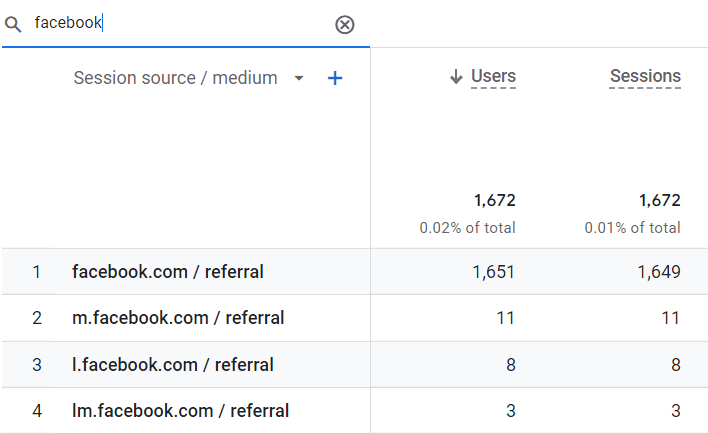
The same source can also be split in ways the channel group hides. One social network arrives as several referrers:
How to see channels in GA4 reports
How to see channels in GA4 reports
Open Reports, Acquisition, Traffic acquisition. The table is grouped by Session default channel group, or by Session primary channel group once you have set a custom group as primary. Use the drop-down above the first column to switch to Session source / medium or Session campaign, and the plus sign to add a second dimension.
For first-touch channels, open User acquisition, which uses First user default channel group.
How to create a custom channel group
How to create a custom channel group
A custom channel group is your own rule set. It works next to the default and applies to historical data in reports, so you can compare old and new definitions on the same date range.
- Open Admin, then Data display, then Channel groups.
- Click Create new channel group. To start from Google’s rules instead of an empty list, use Copy to create new on the default group.
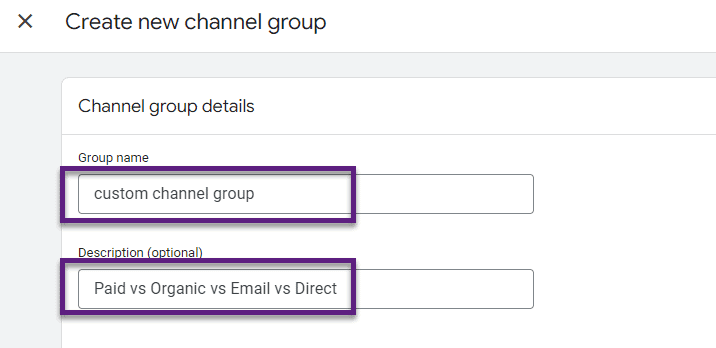
- Give the group a name and a description.
- Click Add new channel, name it, and add conditions on source, medium, campaign or the other traffic dimensions.
- Use Reorder to set the order. Rules are evaluated from top to bottom and the first match wins, so put narrow channels above broad ones.
- Click Save group.
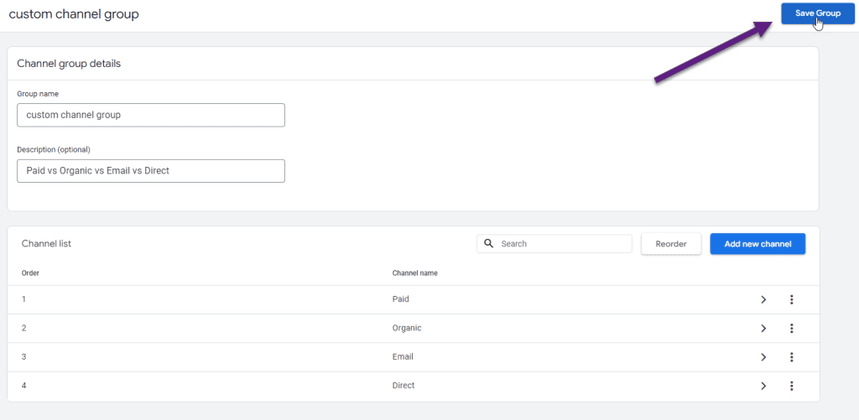
The group then appears as a dimension in the acquisition reports and in explorations.
Where GA4 channel groups stop
Custom channel groups solve naming. They leave four things open:
- The default cannot be changed, and many shared reports and integrations use it.
- Rules can only use the dimensions GA4 offers. A channel that depends on your own data, such as a partner list, a campaign plan or a CRM field, cannot be expressed.
- Costs are not there. GA4 has spend for linked Google Ads accounts. For other platforms it has only what you import by hand.
- The definition lives in one property’s Admin. The dashboard, the finance sheet and the warehouse each need their own copy, and copies drift.
There is a fifth, and it surprises people when they link BigQuery: the default channel group is not a field in the export. The export gives you source, medium and campaign. The channel is yours to define.
Define channels in BigQuery
In the warehouse a channel group is a CASE expression. This one follows Google’s rules for a few channels and runs as written on the public GA4 sample:
SELECT
  CASE
    WHEN traffic_source.source = '(direct)'
      AND traffic_source.medium
        IN ('(none)', '(not set)')
      THEN 'Direct'
    WHEN REGEXP_CONTAINS(
      traffic_source.medium,
      r'^(.*cp.*|ppc|retargeting|paid.*)$')
      THEN 'Paid'
    WHEN traffic_source.medium = 'organic'
      THEN 'Organic Search'
    WHEN traffic_source.medium
        IN ('referral', 'app', 'link')
      THEN 'Referral'
    WHEN REGEXP_CONTAINS(
      traffic_source.medium, r'^(e[-_ ]?mail)$')
      THEN 'Email'
    WHEN traffic_source.medium = 'affiliate'
      THEN 'Affiliates'
    ELSE 'Unassigned'
  END AS first_user_channel,
  COUNT(DISTINCT user_pseudo_id) AS users
FROM
  `bigquery-public-data.ga4_obfuscated_sample_ecommerce.events_*`
WHERE _TABLE_SUFFIX BETWEEN '20210101' AND '20210131'
GROUP BY first_user_channel
ORDER BY users DESC| first_user_channel | users |
|---|---|
| Organic Search | 38,489 |
| Direct | 25,814 |
| Unassigned | 21,907 |
| Referral | 18,397 |
| Paid | 5,223 |
traffic_source is the user’s first source, so this is the equivalent of First user default channel group. Unassigned is large here because Google replaced part of the sample’s sources with placeholder values. On your own export, a large Unassigned row is the list of mediums your tagging scheme has to cover.
The point of doing it in SQL is that the rules are now yours. You can add a line for your affiliate network, read a mapping table maintained by the marketing team, or join spend from the ad platforms by campaign. Linking a property is covered in connecting GA4 to BigQuery.
One channel definition for every report
One channel definition for every report
A CASE expression pasted into five queries is five definitions. The marketer’s version of the problem is familiar: the weekly report says Paid Social brought 400 sessions, the dashboard says 520, and both were built by careful people.
OWOX Data Marts keeps the definition in one place. An analyst writes the channel logic once, saves it as a Data Mart on the warehouse that holds the export, and publishes it with a description of each channel. Reports for Google Sheets and Data Studio (the former Looker Studio) are built on that Data Mart, so a change to the rule reaches all of them.
OWOX Data Marts does not decide what a channel is and does not collect GA4 data. The rules are the analyst’s SQL, on tables already in your warehouse. What the product adds is that marketers work with the published result in a spreadsheet, without editing the logic. Because ad platforms such as Facebook Ads, TikTok Ads and Microsoft Ads are available as sources, spend can sit in the same warehouse and be joined by campaign, as shown in blending GA4 conversions with ad spend.
Turn your data into decisions.
Governed data marts give you the clean foundation ML needs to actually work.
- No AI hallucinations
- Analyst-governed definitions
- Every number traces to SQL
Frequently Asked Questions
Which UTM medium values does GA4 recognise as paid?
A medium that matches the regular expression ^(.*cp.*|ppc|retargeting|paid.*)$, for example cpc, cpm, ppc, paid or paid_social. Combined with a source on Google's list of search, social, video or shopping sites, it gives Paid Search, Paid Social, Paid Video or Paid Shopping. Otherwise it gives Paid Other.
Is the default channel group available in the GA4 BigQuery export?
No. The export contains source, medium and campaign, not the channel. You define channels in SQL, usually with a CASE expression that follows Google's published rules and adds your own.
Can I change the default channel group in GA4?
No. You can create custom channel groups, which work next to the default and apply to historical data in reports, and you can edit the primary channel group, which starts as a copy of the default.
How can I view the default channel group report in GA4?
Open Reports, then Acquisition, then Traffic acquisition. The table is grouped by Session default channel group. The User acquisition report shows First user default channel group.
Why is my traffic in the Unassigned channel?
Unassigned means no channel rule matched. The usual causes are a UTM medium GA4 does not recognise, such as newsletter or fb_ads, or a session with no source and medium at all.
What is the difference between session, first user and event-scoped channel groups?
Session default channel group is the channel that started a session. First user default channel group is the channel that first brought the user. Default channel group is event-scoped and credits key events by the property's attribution model. The first two use paid and organic last click.
What is the default channel group in Google Analytics 4?
It is a fixed set of rules that assigns traffic to channels such as Direct, Organic Search, Paid Social and Email, based on source, medium and campaign. Google maintains the rules and they cannot be edited.