Data-driven attribution: how Google's model works in GA4, Google Ads and Search Ads 360
Data-driven attribution replaces fixed rules with a model learned from your own converting and non-converting paths. This guide explains how the method works, exactly what Google's implementation does in Google Analytics 4, Google Ads and Search Ads 360 as of October 2026, where it stops seeing your business, and how to build a data-driven model whose arithmetic you can check.
Rule-based attribution models decide the split before they see the data: last click gets everything, or every touch gets an equal share. Data-driven attribution turns that around. It looks at the paths of people who converted and people who did not, works out how much each touchpoint changed the odds, and splits the credit accordingly. It is the model Google now defaults to in Google Ads and recommends in Google Analytics 4, so most marketers meet it there first.
This guide explains what data-driven attribution is, how Google’s version works and what it does in each product as of October 2026, where it stops seeing your business, and what to do when you need a data-driven number you can take apart and defend.
Note: Originally published in 2020. Fully rewritten in October 2026: the Universal Analytics 360 material and a retired OWOX product section were removed, every Google claim was re-checked against Google’s current documentation, and a section on building an inspectable model was added.
What data-driven attribution is
What data-driven attribution is
Data-driven attribution (DDA) is an algorithmic attribution model: instead of applying a fixed rule to every conversion path, it estimates from your own data how much each touchpoint contributed to the conversion, and assigns credit in proportion.
The idea underneath is counterfactual. For each touchpoint the model asks: how likely was this person to convert given that they saw this ad, compared with a similar person who did not? The difference is the touchpoint’s contribution. Add the contributions up along a path and you have the split. Game theory gives the formal version, the Shapley value, and the Markov chain’s removal effect asks the same question from the other side; both are worked through in the attribution models guide.
Two things follow that matter in practice. The model is specific to you: it is trained on your paths, so it cannot be copied from another account. And it needs non-converting paths as well as converting ones, because the whole method is a comparison between the two. A tool that only logs successes cannot run it.
How Google’s model works
Google publishes more about its method than most vendors, and the description on its attribution help page is worth reading in full. The short version, in Google’s own terms:
- The model “uses machine learning algorithms to evaluate both converting and non-converting paths”.
- It “incorporates factors such as time from key event, device type, number of ad interactions, the order of ad exposure, and the type of creative assets”.
- It uses “a counterfactual approach”, contrasting “what happened with what could have occurred to determine which touchpoints are most likely to drive key events”, and assigns credit “based on this likelihood”.
- “Each data-driven model is specific to each advertiser and each key event.”
- “Conversions can be reattributed for up to 7 days after the conversion”, so a path that is still open can change its credit for a week.
The method is sound, and it is the same one you would use yourself with enough data. The questions to keep in mind as you read the product sections are not about the method but about what the model can see (only Google-measured touches) and what you can see of the model (the output, not the weights).
OWOX Data Marts
See your first report built in real time. 15 minutes.
- Connect your data warehouse
- Pick your metrics
- Get a live Google Sheets report
In the time it takes to write a ticket. Then imagine never writing that ticket again.
Book a DemoWe'll use your actual use case
DDA in Google Analytics 4
Google Analytics 4 made data-driven attribution free to every property, which in Universal Analytics was a 360-only feature with a volume gate. Today it is the recommended reporting model, and the one most teams should compare their platform reports against.
The three models GA4 offers
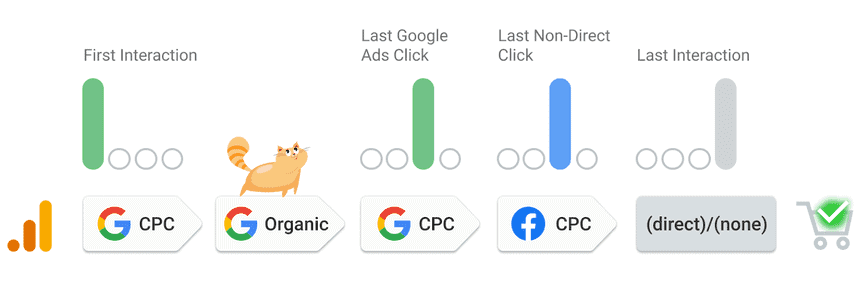
The Attribution reports offer exactly three models: data-driven, paid and organic last click, and Google paid channels last click. The rule-based models that Universal Analytics users remember, first click, linear, time decay and position-based, were removed in November 2023. If you want them, you build them yourself, which the last section covers.
Where the settings live
The reporting attribution model is set in Admin → Data display → Events → Attribution settings, and you need the Marketer role or above on the property. Changing it applies to historical and future data in every report that uses event-scoped traffic dimensions, so conversion and revenue figures move when you switch. Any viewer can still pick a model inside the Model comparison and Conversion paths reports without changing the property default.
Two more settings sit on the same page:
- Key event lookback window. For acquisition key events (
first_open,first_visit) the default is 30 days, switchable to 7. For every other key event the default is 90 days, with 30 and 60 as options. The window applies to all models and all key event types, and changes apply going forward. - Channels that can receive credit. Google paid channels only, or paid and organic channels. The second gives a cross-channel view in Analytics and affects the conversions shared with linked Google Ads accounts; it applies to web conversions only, since app conversions always use Google paid channels.
GA4 renamed conversions to “key events” in 2024, which is why the settings and reports use that word.
What it does well
- Free, and already attached to the data you collect.
- The model is trained on your property, not on a generic benchmark, and the comparison reports make it easy to see how credit shifts against last click.
- The lookback and channel settings are explicit, which is more control than most ad platforms give.
Where it falls short
- It is a black box. Google states no minimum data for DDA in GA4, but it also publishes no weights; you see the output and must take the method on trust.
- It sees what Google sees. Touches on Meta, LinkedIn, TikTok or email are only in the model if they reach GA4 as tagged sessions, and anything after the website, such as a CRM-qualified lead or a refund, is invisible.
- Only three models remain. A team that needs a position-based or time-decay baseline has to build it elsewhere.

DDA in Google Ads
In Google Ads, data-driven attribution is “the default attribution model for most conversion actions”. The only other model still supported is last click; conversion actions that used the deprecated rule-based models were upgraded to data-driven.
The model “looks at website, store visit, and Google Analytics conversions from Search (including Shopping), YouTube, Display, and Demand Gen ads”, compares the paths of customers who convert with those who do not, and credits the ad interactions that raise the probability of conversion. Because the same model feeds Smart Bidding, its practical job is less reporting than optimisation: it tells automated bidding which keywords, ads and campaigns to lean on.
Data requirements
The old gate is gone. Google’s page now says that “all conversion actions are eligible for data-driven attribution, regardless of conversion or interaction volume”, with a recommendation of “at least 200 conversions and 2,000 ad interactions in supported networks within a 30-day period” for the model to perform well. Below that it still runs; it just has less to learn from.
What it does well
- Default, free and tied directly to bidding, so the attribution output changes spend without anyone building a report.
- Covers YouTube and Display engagements as well as clicks, which last click ignores.
Where it falls short
- It is a Google Ads model. Every other channel, and every conversion Google Ads cannot see, is outside it.
- The credit split optimises Google’s spend; it is not a view of your marketing mix.

DDA in Search Ads 360
Search Ads 360 is the Google Marketing Platform’s search management tool, built for advertisers running paid search across several engines. Its data-driven attribution works on Floodlight conversions, the platform’s own conversion tracking, and feeds its bid strategies.
The requirements are the strictest of the three products: “your sample must include at least 15,000 clicks and 600 Floodlight conversions during the last 30 days” to create a model. In return you get up to five DDA models, each covering as many as 50 Floodlight conversion actions, a model that “learns and updates each week”, and reporting applied “multiple times throughout the day” so the numbers are near real time. A separate option lets a Google Analytics 4 key event use data-driven attribution inside Search Ads 360, under the same thresholds.
What it does well
- Several models side by side, so channel groupings can be compared rather than argued about.
- Near-real-time reporting and direct connection to bid strategies.
- Offline conversions can be uploaded into Floodlight, so the model can see more than the website.
Where it falls short
- The volume gate rules out most mid-sized advertisers.
- It is paid-search attribution. Organic, email, social and impressions outside the Floodlight scope are not in the path.
- It is an enterprise product with its own setup: Campaign Manager 360, Floodlight configuration, channel-grouping labels.
What Google’s DDA cannot see
All three products run the same honest method on a partial view. Three gaps recur, and they are the reason a data-driven number from Google and a data-driven number from your warehouse can disagree by a wide margin.
- Other platforms’ touches. Each product models the interactions it measured. A journey that ran Meta → email → Google search → direct looks, to Google Ads, like a one-touch search conversion.
- Everything after the click. Qualified leads, closed revenue, refunds and returns live in your CRM and order system. A model trained on “key events” is trained on form fills and checkouts, not on money.
- The weights. You can see that search got 38% of a conversion; you cannot see why, reproduce it, or run it on last year’s data under a changed assumption. For a dashboard that is acceptable. For a budget decision someone has to defend, it is the weak link.
Build a model you can inspect
The method behind data-driven attribution is not Google’s. Shapley values and Markov removal effects are published mathematics, and the inputs they need, every session with its channel and every conversion with its value, are in the GA4 BigQuery Export and your ad and CRM data. Put those in one warehouse table and the model is yours: you choose the lookback window, you include the CRM revenue and the refunds, and you can print the weights.
The practical path has three steps. Marketing attribution models walks through the first, with a runnable BigQuery query that computes four rule-based models from the GA4 export in one pass, and explains where the Markov and Shapley computations live. Build a marketing attribution model in BigQuery covers the step before that: sessionising GA4 events and attaching ad cost to sessions, so the output is return on spend rather than a share of conversions.
The third step is the one that makes the model useful to anyone but its author. Published as a governed Data Mart in OWOX Data Marts, the attribution query has a name, an owner and a definition of what counts as a conversion; reports in Google Sheets and Looker Studio read from it, and a business user can ask for the channel breakdown in plain language and get the number with the query behind it. The analyst still owns the SQL; the product publishes and schedules it. That is the difference between a data-driven number you can show the board and one you have to take on faith.
Free guide: The Ultimate Guide to Marketing Attribution Modeling: Everything You Need to Know →
Which to use
- GA4’s data-driven model for the cross-channel view of what Google can measure, and as the baseline every platform report is compared against. Turn on paid and organic channels unless you have a reason not to.
- Google Ads’ model for what it was built for: feeding Smart Bidding. Read its credit split as a bidding signal, not as a marketing-mix report.
- Search Ads 360 only if you clear the volume gate and run paid search across engines at a scale that justifies the platform.
- Your own model in the warehouse when the number has to include non-Google channels, CRM revenue or refunds, or has to be explained to someone who will ask how it was calculated.
Key takeaways
- Data-driven attribution learns the credit split from converting and non-converting paths instead of applying a rule. The method is sound and the mathematics is public.
- Google runs it in three products with three scopes: GA4 sees tagged sessions, Google Ads sees its own ad interactions, Search Ads 360 sees Floodlight conversions at enterprise volume.
- GA4 offers three models, data-driven and two last-click variants, with settings under Admin → Data display → Events → Attribution settings, a 30- or 90-day default lookback, and a choice of which channels may receive credit.
- Google Ads has no minimum volume for DDA any more and recommends 200 conversions and 2,000 interactions a month; Search Ads 360 still requires 15,000 clicks and 600 Floodlight conversions.
- None of them can see other platforms, CRM revenue or refunds, and none shows its weights. When the number has to be defended, build the model in your warehouse and publish it as a governed Data Mart.
Turn your data into decisions.
Governed data marts give you the clean foundation ML needs to actually work.
- No AI hallucinations
- Analyst-governed definitions
- Every number traces to SQL
Frequently Asked Questions
Can I still use traditional attribution models in GA4 alongside data-driven attribution?
GA4's Attribution reports offer three models: data-driven, paid and organic last click, and Google paid channels last click. First click, linear, time decay and position-based were removed in November 2023, so a team that wants those has to build them from the GA4 BigQuery Export.
How can businesses benefit from implementing data-driven attribution in their GA4 setup?
By adopting data-driven attribution in GA4, businesses can gain a clearer understanding of which marketing channels and touchpoints are most effective in driving conversions. This allows for better allocation of marketing budgets, optimization of campaigns, and improved ROI. The insights derived from this model can significantly enhance marketing strategies and decision-making processes.
Is there a minimum amount of data required for data-driven attribution to be effective in GA4?
Google states no minimum data volume for data-driven attribution in Google Analytics 4; the model runs on whatever the property has, and improves with more converting and non-converting paths. Google Ads likewise makes every conversion action eligible but recommends at least 200 conversions and 2,000 ad interactions in a 30-day period. Search Ads 360 still requires 15,000 clicks and 600 Floodlight conversions in the last 30 days.
How does data-driven attribution in GA4 differ from Universal Analytics?
Universal Analytics applied rule-based models by default and offered data-driven attribution only to Analytics 360 customers above a volume threshold. Google Analytics 4 offers data-driven attribution to every property, trains it on the property's own converting and non-converting paths, and has removed the rule-based models except two last-click variants.
What is the primary advantage of using data-driven attribution in GA4 over traditional models?
Data-driven attribution in GA4 offers a more accurate representation of the conversion journey by distributing the value of a conversion across all touchpoints. Unlike traditional models that might give full credit to the last interaction, data-driven attribution considers the significance of each touchpoint, providing a holistic view of the user's path to conversion.
What is the attribution model?
An attribution model is the set of rules that decides how much credit each touchpoint in a customer's journey gets for a conversion. The same journey can give a channel all of the credit, a share of it, or none, depending on the model, so the model is a choice about what question you want answered.
What does attribution mean in advertising?
The goal of attribution in advertising is to define how the value of a conversion is distributed across channels that move the user through the funnel.
What is the attribution problem?
The following difficulties may occur when working with attribution:
1. You need to collect data manually from various advertising platforms
2. You have to consistently update existing models: outdated models won’t fit the new business requirements
3. It’s difficult to change strategies fast if you have fixed budgets and partner contracts with advertising agencies