How to Build a Marketing Attribution Model in BigQuery
Want to know which of your marketing efforts actually lead to conversions – without relying on black-box tools or paying for costly software? If you’re already using GA4 BigQuery Export, you’re closer than you think.
By using OWOX Data Marts connectors to ad platforms and simple SQL templates, you can build your own marketing attribution model that’s fully transparent and tailored to your business.
In this guide, we’ll show you how to do it using OWOX Data Marts, combining data connectors and SQL-based Data Marts – giving you full control, without the cost or lock-in.
What Is Attribution Modeling, and Why Does It Matter?
What Is Attribution Modeling, and Why Does It Matter?
Attribution modeling is a method used to assign credit to different marketing channels and touchpoints that influence a customer’s decision to convert. Rather than focusing only on the final click, it considers the entire customer journey, from the first ad view to the final purchase, so you can see which efforts truly contribute to success.
This helps marketers make informed decisions and improve campaign effectiveness across every stage of the funnel.
Here are the key benefits of using attribution modeling:
- Helps you find and fix weak points in the buyer’s journey to improve your overall conversion rates.
- Reveals how much return on investment (ROI) each channel or campaign brings to your business.
- Allows you to invest more in the touchpoints that are actually driving results across different marketing platforms.
- Helps personalize future campaigns based on how your unique audience interacts with your content and ads.
- Gives clear insight into which marketing actions are most effective for converting visitors into loyal customers.
Keep in mind that GA4’s built-in model comparison tool doesn’t support rule-based options like first-click or linear. By moving attribution logic into BigQuery with OWOX Data Marts, you gain full flexibility and documented rules that can be reused across dashboards and teams.
When implemented inside a governed environment like OWOX Data Marts, attribution logic becomes reusable, documented, and consistent, helping eliminate conflicting reports across tools.
Why Choose OWOX Data Marts for Attribution Modeling in BigQuery
Why Choose OWOX Data Marts for Attribution Modeling in BigQuery
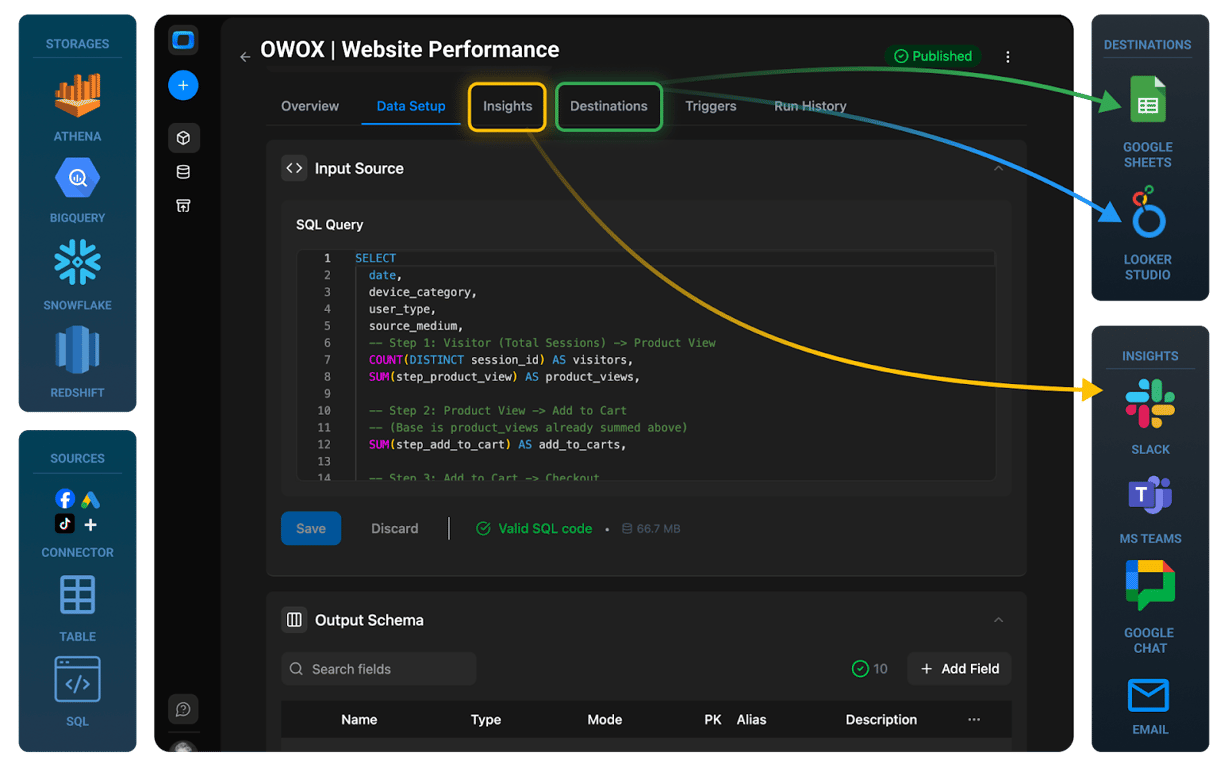
To build effective attribution models, you need to bring marketing data from different platforms into one place. While data from Google Ads & Google Analytics (GA4) can be easily synced with Google BigQuery, importing ad data from other non-Google ad platforms is often challenging.
Paid tools and custom scripts often add delays, costs, and complexity. Instead, OWOX Data Marts offers lightweight and as cheap as possible, open-source connectors that streamline this process, without vendor lock-in or per-source fees.
These connectors let you send ad data from platforms like Facebook, LinkedIn, and TikTok straight into BigQuery. You don’t need to code or rely on expensive third-party tools.
Once the data is in BigQuery, you can start modeling right away using SQL templates that help assign credit across multiple touchpoints. Everything is faster, customizable, and easier to audit.
Here’s why OWOX connectors are ideal for attribution modeling in BigQuery:
- Skip manual coding by using prebuilt, open-source connectors that send data directly to BigQuery on your schedule.
- Reduce platform fees since there’s no per-source or per-user pricing to worry about. Just pay for what you use.
- Speed up modeling with ready-made SQL templates that save time on query development.
- Maintain flexibility with transparent workflows that are easy to customize for different attribution rules.
- Own your stack by running everything in your own BigQuery environment without depending on third-party tools.
OWOX Data Marts
See your first report built in real time. 15 minutes.
- Connect your data warehouse
- Pick your metrics
- Get a live Google Sheets report
In the time it takes to write a ticket. Then imagine never writing that ticket again.
Book a DemoWe'll use your actual use case
How Free Connectors Bring GA4 and Ad Data into BigQuery for Attribution Modeling
How Free Connectors Bring GA4 and Ad Data into BigQuery for Attribution Modeling
OWOX Connectors make it easy to move ad spend data into BigQuery. In this section, we’ll cover how to set up the connection, combine them using SQL, and automate updates.
Ensure that your GA4 Data is in BigQuery
Check if your GA4 property is already exporting data into BigQuery. If it isn’t connected, you’ll need to set up the export first.
For a detailed walkthrough on how to import GA4 data into BigQuery, please refer to our step-by-step guide.
Note: We don’t want to charge you for what is already available under the native Google infrastructure.
Import Ad Data to BigQuery Using OWOX Data Marts
With OWOX, you can set up Data Marts that pull ad data from multiple platforms like Facebook, TikTok, Reddit, Criteo, LinkedIn, and Microsoft directly into BigQuery on your schedule. The process is simple:
- Sign in to OWOX Data Marts
Just get started free here. You’ll have 30 credits, so you’re pretty much covered for a few months. - Add a data storage:
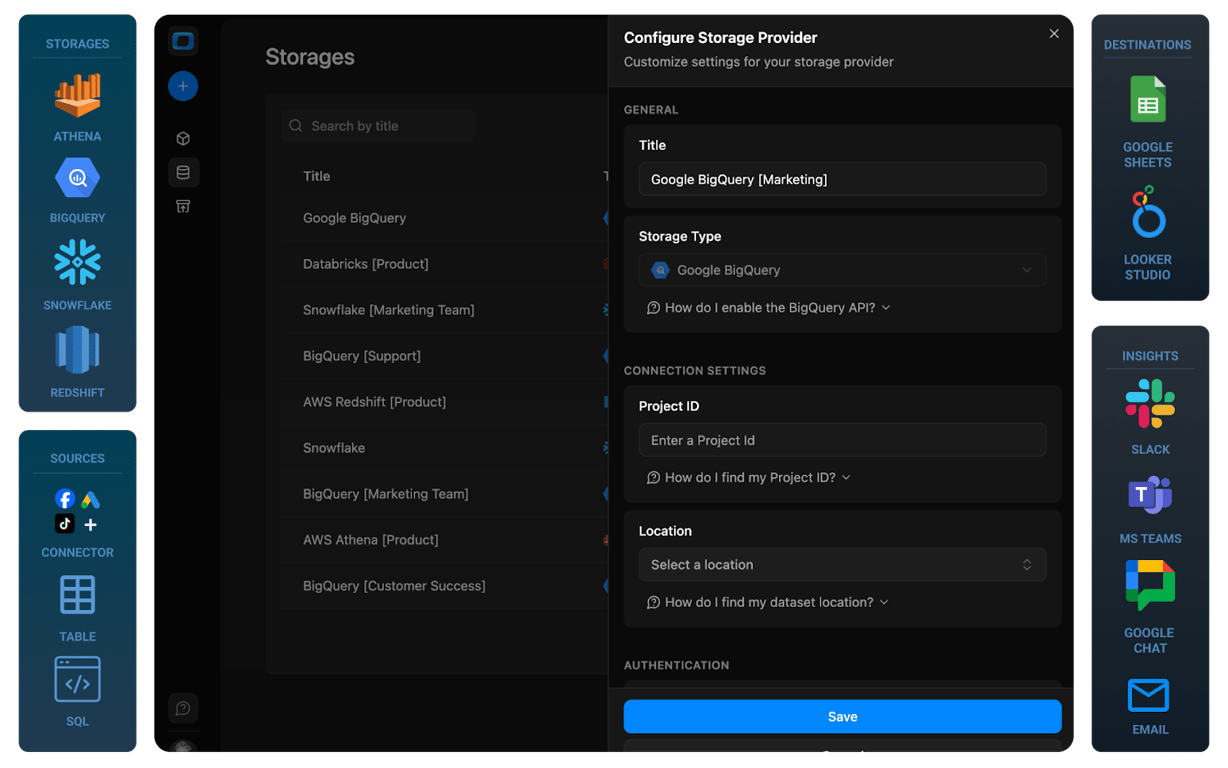
In the OWOX interface on your localhost, add a new storage and select Google BigQuery. Enter your project ID, region, and service account JSON key to connect.
- Create a Data Mart:
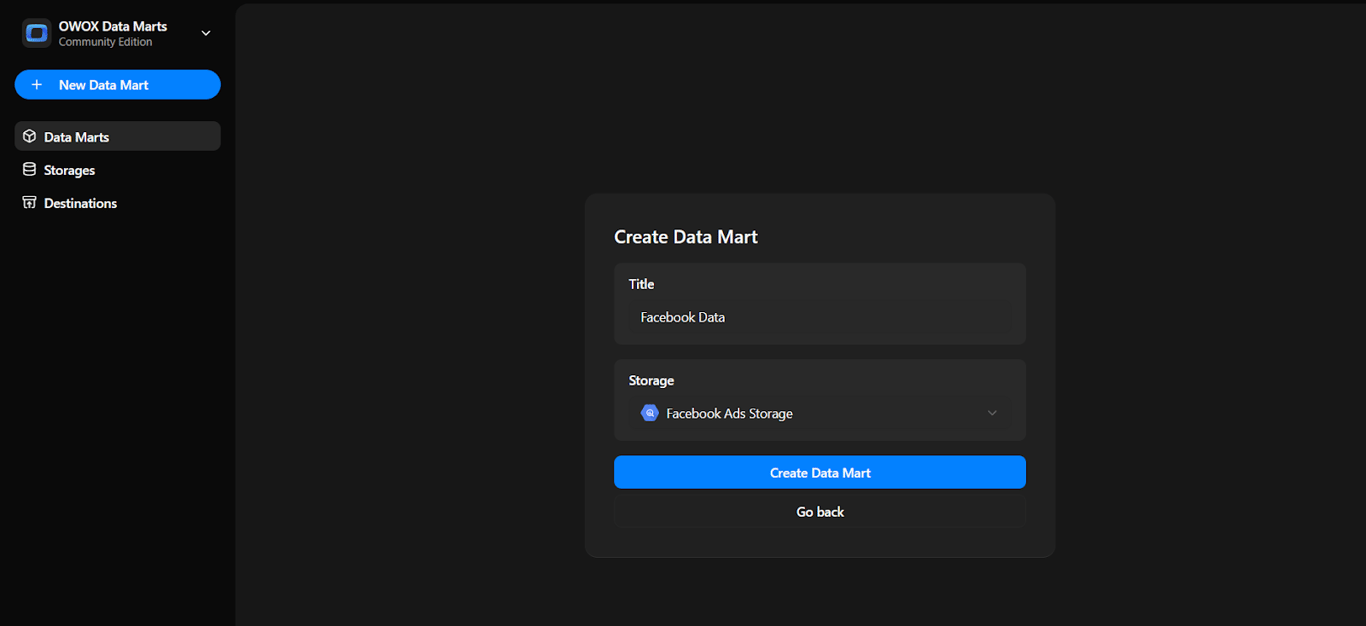
Click ‘New Data Mart’, give it a name, and link it to your BigQuery storage. Specify the dataset and table where your ad data will be stored.
- Set Up Your Data Mart:
In the Data Setup tab, choose ‘Connector’ as the definition type.- Choose the ad account from one of the options given.
- Enter your ad account details and authorize the connector.
- Pick the data points from the platform API.
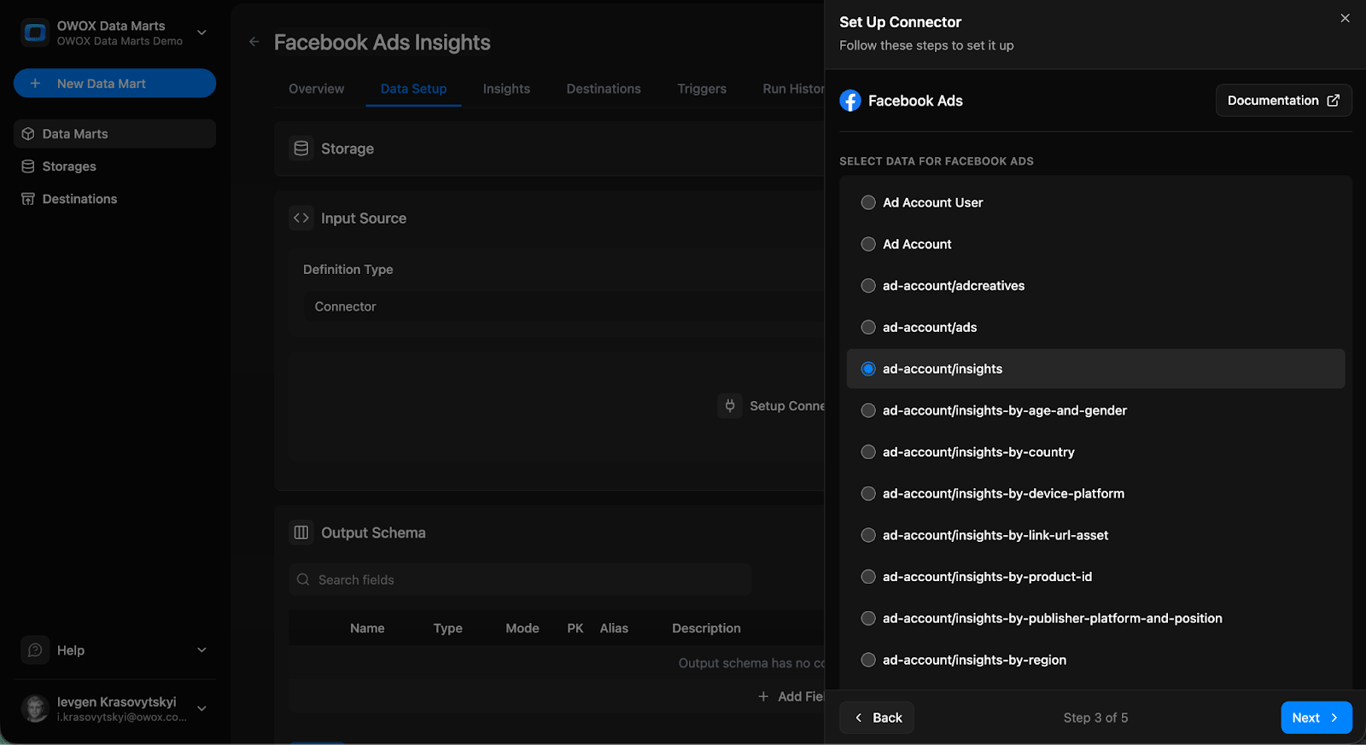
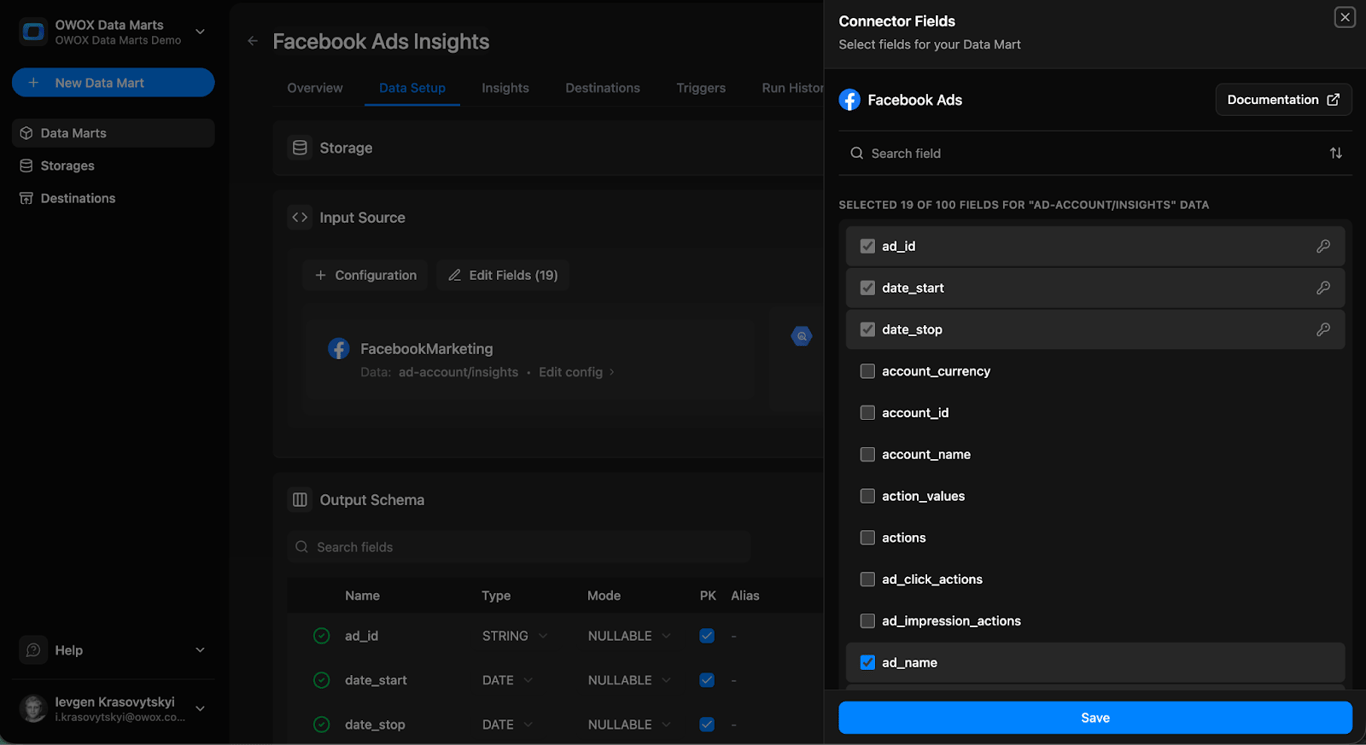
- Then, select any fields you need.
- Specify the BigQuery dataset and table.
- Save it.
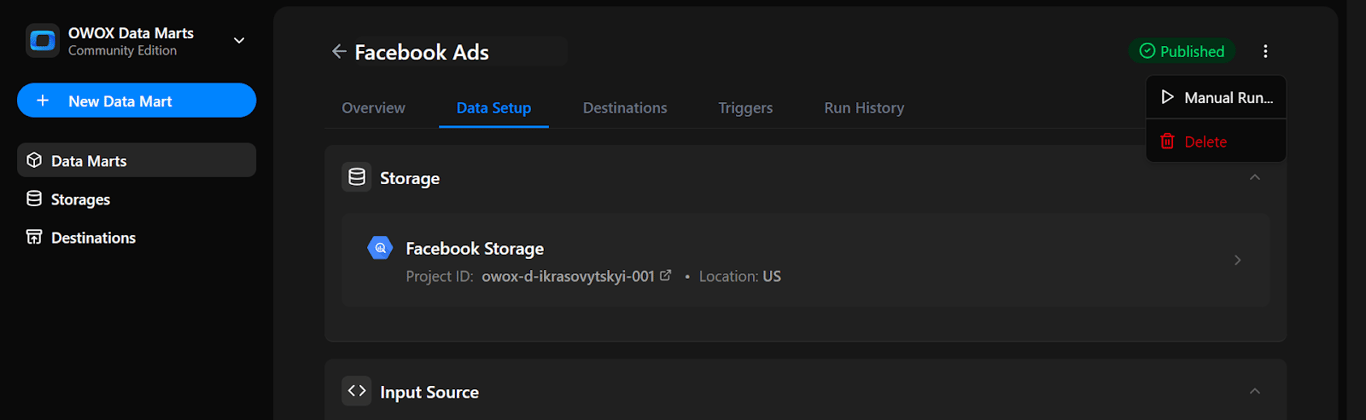
- Publish the Data Mart:
Once you have saved your configuration, publish the Data Mart, and run it manually once to validate that data is flowing correctly into the BigQuery dataset and table.
- Set Up Triggers:
Automate updates by adding a trigger. Choose Connector Run to refresh ingestion to update reports, and set the schedule (daily, weekly, monthly, or intervals).
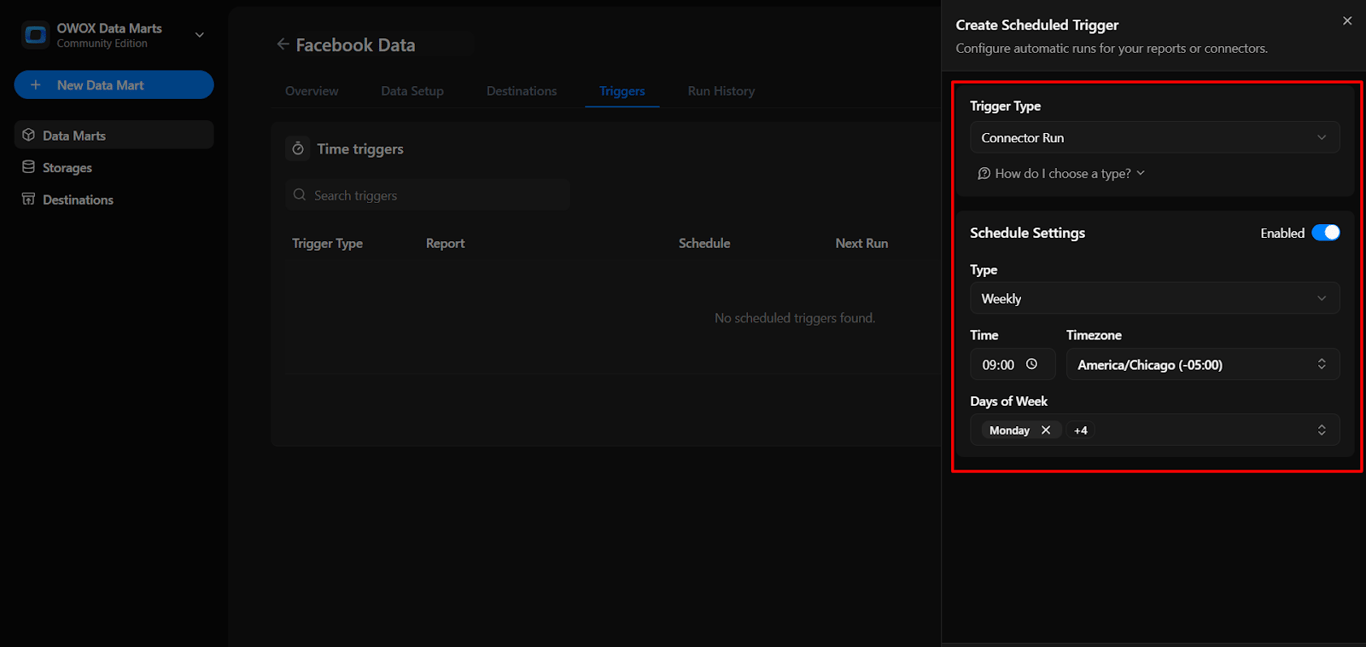
This workflow gives you automated, cost-free ingestion of ad platform data into BigQuery, ready for analysis and reporting.
TikTok Ads Connector to Google BigQuery
Building Attribution Models with Combined Data in BigQuery
After bringing both GA4 event data and ad spend data into BigQuery, you can start building attribution models that reflect the full customer journey. This combined data allows you to see which channels and touchpoints influenced user actions, rather than just the last interaction before a conversion.
These attribution models are typically created using an SQL-based Data Mart in OWOX, where the query logic is versioned, traceable, and reusable across multiple destinations.
Using SQL, you can create rule-based models like first-click, last-click, linear, data-driven, or even custom logic tailored to your marketing goals. These models help you understand which channels drive real results and provide the insights needed to optimize your campaign strategy.
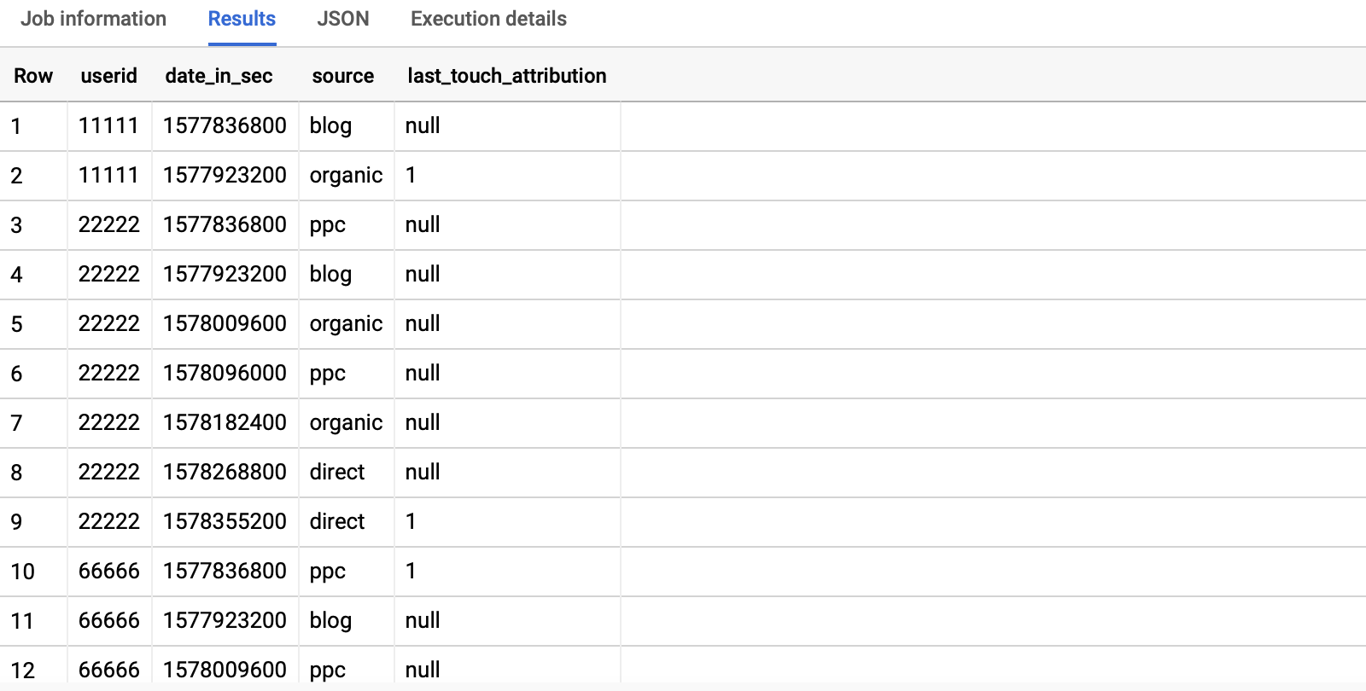
Using BigQuery to Analyze Cross-Channel Marketing Performance
Using BigQuery to Analyze Cross-Channel Marketing Performance
When you combine data from Google Ads, Meta Ads, and GA4 in BigQuery, you get a complete view of how users interact with your brand across multiple platforms. Instead of looking at each channel in isolation, you can analyze the full customer journey, from the first impression to the final conversion.
SQL allows you to build attribution models that measure the impact of every touchpoint along the way. You can identify which platforms perform best, compare campaign effectiveness, and understand how different channels work together to drive results. This insight helps you make smarter marketing decisions backed by real data.
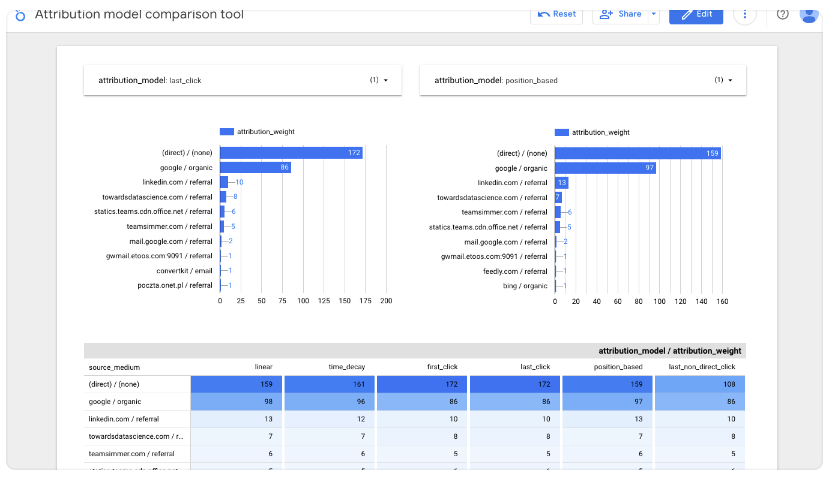
You can also export your model outputs to Google Sheets or Looker Studio via OWOX Destinations, no need to duplicate logic or rewrite queries.
Understanding the Core Logic of Attribution Modeling
Understanding the Core Logic of Attribution Modeling
To build effective attribution models, it’s important to understand how user interactions are tracked and credited. This section explains key concepts like touchpoint tracking, lookback windows, and defining conversion events that drive meaningful marketing insights.
Touchpoint Tracking in Attribution Models

Touchpoint tracking is about recording every interaction a user has with your marketing before they convert. These could include clicking on an ad, opening an email, or visiting your website from a referral. It helps you understand the path a customer takes before completing an action.
By tracking touchpoints like first-click, last-click, or multi-click, marketers can see which channels actually influence decisions. This insight allows better evaluation of campaign performance and smarter budget allocation across touchpoints.
Lookback Windows in Attribution Modeling
A lookback window sets the time frame in which a user’s interactions can be considered for attribution. For example, if the window is 30 days, only touchpoints within those 30 days before a conversion will be eligible for credit.
This helps marketers understand how long it takes for marketing actions to influence users. It also ensures older interactions aren’t unfairly credited, giving a more accurate view of what really impacts user behavior within a meaningful time range.
Defining Conversion Events in Attribution Models

Conversion events are the actions you want users to take – like making a purchase, signing up, or requesting a demo. These are the key outcomes that attribution models focus on when assigning credit to marketing touchpoints.
Attribution models then evaluate which touchpoints deserve credit for driving that conversion. If only one touchpoint occurred in the lookback window, it gets full credit. If multiple exist, the model decides how to split the credit, depending on the logic used (e.g., last-click, time-decay, etc.).
Step-by-Step Guide to Writing SQL for Attribution Models Using Templates
Step-by-Step Guide to Writing SQL for Attribution Models Using Templates
Creating attribution models in BigQuery becomes easier with ready-made SQL templates. In this section, we’ll walk you through how to use, customize, and run these templates to analyze marketing touchpoints effectively.
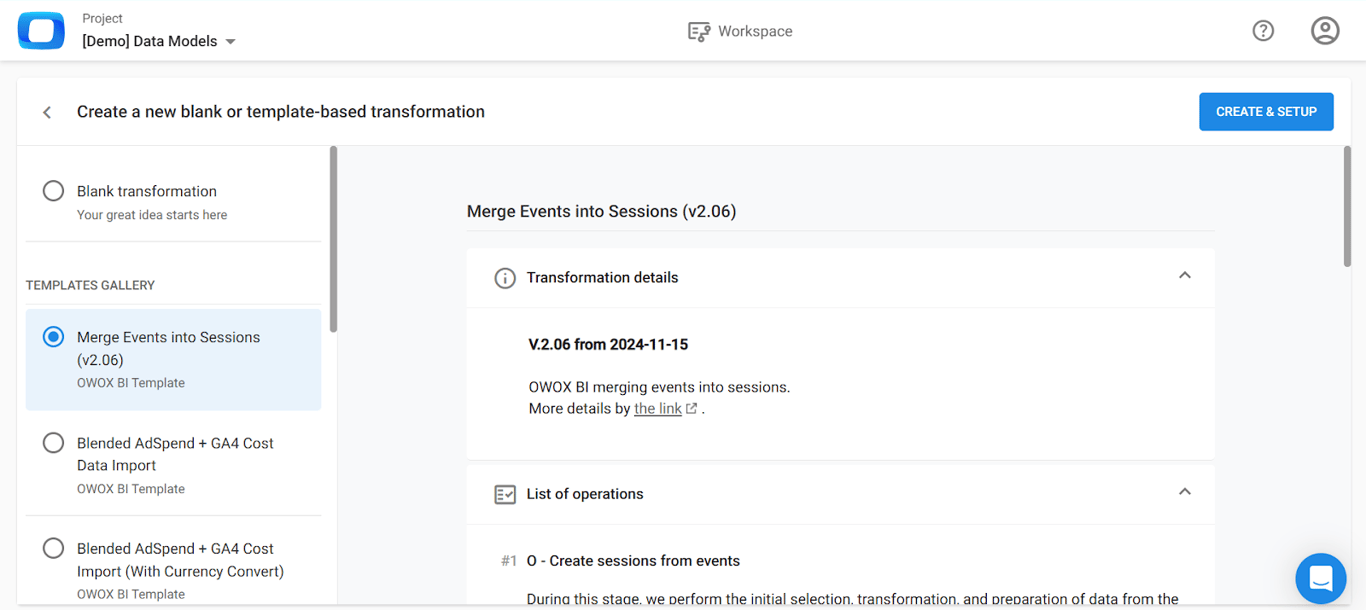
Step 1: Convert GA4 Events into Sessions with OWOX Templates
Before you can assign attribution credit, your GA4 event-level data needs to be grouped into sessions. Use the OWOX “Merge Events into Sessions” template to generate sessionized data in BigQuery.
This transformation extracts traffic source details, calculates session_start timestamps, and clusters events by user_pseudo_id. The result is a clean session-level table ready for attribution modeling.
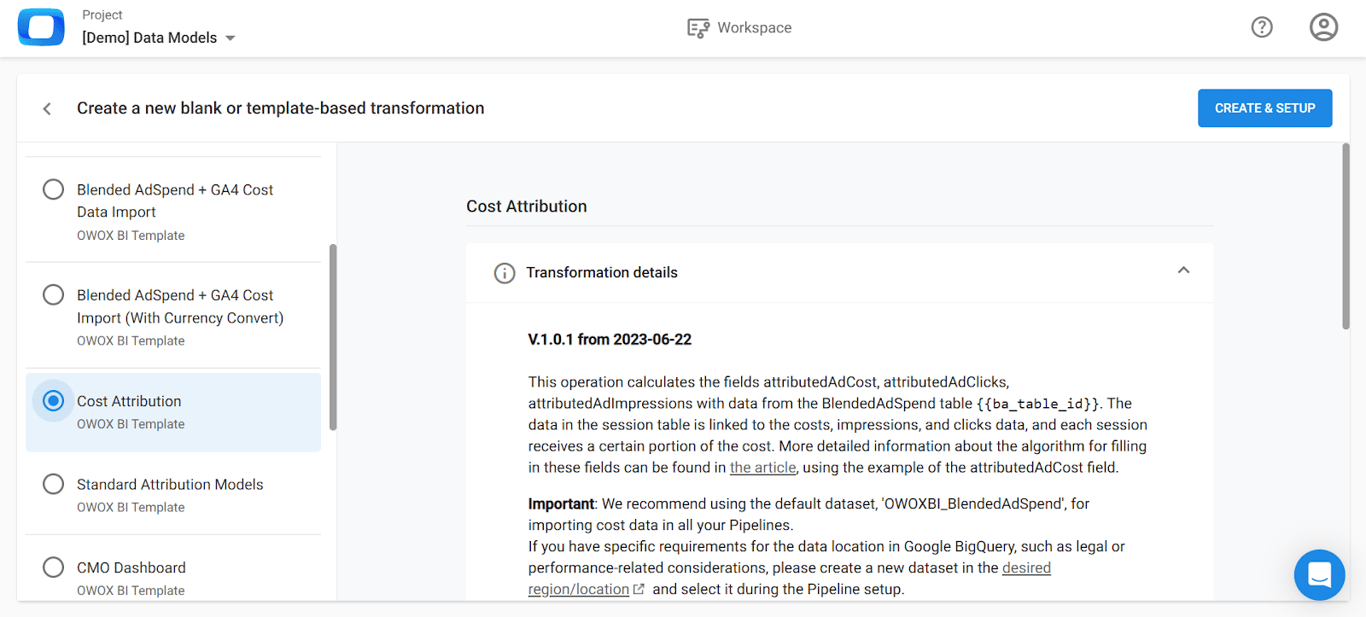
Step 2: Attribute Cost to Sessions with OWOX Cost Template
Importing ad spend alone isn’t enough; you also need to connect it to user sessions. Use the OWOX “Costs Attribution on Sessions” template to distribute ad costs across sessions that actually drove clicks or impressions.
The template matches ad data using gclid, click_timestamp, or UTM parameters and calculates key fields like attributedAdCost, adClick, and adCampaignName for each session.
Step 3: Building Attribution Models with SQL (With Examples)
Once your data is unified, you can apply rule-based attribution using SQL-based Data Marts.
Popular attribution models you can write in SQL:
- First-Touch Attribution (SQL Example)
FIRST_VALUE(sess.traffic_source) OVER (
  PARTITION BY user_pseudo_id
  ORDER BY session_start
) AS first_touch- Last-Touch Attribution (SQL Example)
LAST_VALUE(sess.traffic_source) OVER (
  PARTITION BY user_pseudo_id
  ORDER BY session_start
) AS last_touch- Linear Attribution (SQL Example)
Split conversion credit equally across touchpoints:
revenue / COUNT(*) OVER (
  PARTITION BY user_pseudo_id, conversion_id
)
Each query becomes a Data Mart that you can reuse in Sheets or Looker Studio.
Step 4: Validate Attribution Output with the Attribution Check Table
Before using your attribution data in reports, it’s important to verify its accuracy. The OWOX attribution template automatically generates an “Attribution Check” table that highlights potential issues in your data.
It flags sessions missing conversions, unmatched costs, or gaps in attribution logic, helping you fix errors before results reach dashboards or stakeholders.
To run this check, set the required variables like gcp_project_id, ba_dataset_id, and ba_table_id, then click RUN to execute the query. After it runs, you can preview the costAttributionCheck table in BigQuery to identify any rows with missing or zero values in AdCost, Impressions, or Clicks.
Step 5: Automate Data Updates
You can automate refreshes with:
This ensures your attribution model stays up-to-date without manual exports.
Access the OWOX Data Marts for Attribution Modeling Created for Analysts
Access the OWOX Data Marts for Attribution Modeling Created for Analysts
With OWOX Data Marts, you can manage your marketing data pipelines using fully open-source connectors and SQL templates, without hidden fees or rigid SaaS plans.
- Set up no-code connectors for platforms like Facebook, LinkedIn, TikTok, and others, with no need for advanced technical skills.
- Send ad data straight into BigQuery, giving you complete control without being locked into a vendor’s pricing model or subscription tier.
Customize schemas, metrics, and refresh schedules based on your unique reporting needs, whether you’re just starting out or scaling your analytics.
Turn your data into decisions.
Governed data marts give you the clean foundation ML needs to actually work.
- No AI hallucinations
- Analyst-governed definitions
- Every number traces to SQL
Frequently Asked Questions
Where can I access the OWOX Data Marts Community Edition?
You can find the open-source OWOX Data Marts (Community Edition) on GitHub. It includes connectors, SQL templates, and setup guides for importing ad data into BigQuery and running attribution analysis.
How do I write SQL to build attribution models in BigQuery?
You can start with pre-built SQL templates for models like first-touch, last-touch, or linear. Customize these queries to match your dataset and logic, for example, adding time decay or multi-touch rules. Then run them in BigQuery to analyze channel performance.
Can I use GA4 event data and ad spend data in BigQuery for attribution modeling?
Yes. You can join GA4 event data with ad spend data in BigQuery using common fields like campaign or date. This combined dataset allows you to apply attribution models in the Data Marts and analyze the impact of each marketing channel on conversions.
How do free connectors help in building attribution models in BigQuery?
Free connectors like those in OWOX Data Marts (Community Edition) let you import cross-channel ad data into BigQuery without manual exports or costly SaaS tools. This enables you to unify data sources for accurate attribution modeling using SQL.
What is an attribution model, and why is it important?
An attribution model is a rule or set of rules that assigns credit to marketing touchpoints for driving conversions. It’s important because it helps marketers understand which channels and campaigns contribute most to customer actions, improving budget allocation and strategy.