Data quality checks on every Data Mart: prove the number before anyone asks
Being asked whether a number is right has two halves: what the number means, and whether the data under it is sound. This guide covers the second: six checks for the usual ways a total breaks, what three of them found on a demo shop's data, how OWOX Data Marts runs them on every Data Mart, how to get told when one fails, what a passing check does not prove, and a short note for the person who asked.
“Is this number right?” If someone asked you that this week, the honest answer has two halves. One is whether the number means what they think it means: which orders, which dates, which definition. The other is whether the data under it is sound: no doubled rows, no missing days, no joins that quietly drop records. This article is about the second half, and about answering it before anyone has to ask.
If you are the person who asked, the last section is written for you, in plain words. The rest is for the analyst who was handed the question: six checks for the usual ways a total breaks, what they found on one demo shop’s data, how OWOX Data Marts runs them on every Data Mart (a dataset an analyst defines with SQL, a table or a view, with an owner and a description, that reports are built on), how to get told when one fails, and what a passing check does not prove.
Why nobody notices until someone asks
Why nobody notices until someone asks
A wrong number looks exactly like a right one. A key that stops being unique, a feed that stopped three days ago, a join that drops the customers who are missing from a lookup table: none of these throws an error. The query runs, the dashboard renders, and the total is off by just enough to change a decision.
So the usual quality signal is that nobody has complained, until the complaint arrives as a screenshot from someone senior.
The way out is to write down, in advance, what must be true of the data behind each report, check it on a schedule, and have someone told when it breaks. Then “is this number right?” has an answer you can show.
Six checks for the usual ways a total breaks
Six checks for the usual ways a total breaks
Six questions cover the breaks that come up again and again. Each is a short query you can write today on any warehouse.
- Is each row counted once? Pick the column, or set of columns, that should identify a row, and count the groups that appear more than once. A doubled order line doubles its revenue in every sum above it.
- Is anything missing that should be there? Count NULLs in the fields a report groups or joins by. A NULL country does not drop out of a total; it lands in a bucket nobody looks at.
- Is it up to date? Compare the latest date in the data with the date you expected. “Last 7 days” on a feed that stopped on Friday is a smaller number, not an error.
- Does every join find its match? For each relationship, count the rows whose key has no partner on the other side. An inner join silently drops them; a left join keeps them with empty fields.
- Are the values possible? Negative quantities, a column with one value in every row, dates in the future. Each is either a bug or a rule you have not written down yet. Set the sign rule per field: a refund or a return can legitimately be negative.
- Is the latest day complete? Compare yesterday’s row count, or its total, with the same weekday in recent weeks. This is the check that catches a half-loaded day. A freshness check only asks whether yesterday arrived; a partial load passes it.
Write each check so that a row coming back means a problem and no rows means it passed. The NULL check, with a threshold:
SELECT
  SAFE_DIVIDE(
    COUNTIF(traffic_source_id IS NULL),
    COUNT(*)) AS null_share
FROM `owox-demo.ecommerce.sessions`
WHERE date >= DATE_SUB(CURRENT_DATE(),
  INTERVAL 7 DAY)
HAVING null_share > 0.01
The impossible-values check:
SELECT COUNT(*) AS bad_lines
FROM `owox-demo.ecommerce.purchases`
WHERE quantity <= 0
  OR sale_price < 0
HAVING COUNT(*) > 0
The volume check, yesterday’s orders against the average of the same weekday over the last four weeks:
WITH daily AS (
  SELECT order_date AS day,
    COUNT(*) AS orders
  FROM `owox-demo.ecommerce.orders`
  GROUP BY day
),
target AS (
  SELECT DATE_SUB(CURRENT_DATE(),
    INTERVAL 1 DAY) AS day
)
SELECT
  t.day,
  IFNULL(SUM(IF(d.day = t.day,
    d.orders, 0)), 0) AS orders,
  AVG(IF(DATE_DIFF(t.day, d.day, DAY)
    IN (7, 14, 21, 28), d.orders, NULL))
    AS baseline
FROM target AS t
LEFT JOIN daily AS d
  ON d.day BETWEEN
    DATE_SUB(t.day, INTERVAL 28 DAY)
    AND t.day
GROUP BY t.day
HAVING orders < 0.7 * COALESCE(baseline, 1)
All three return no rows on the demo. The volume check is the honest one to look at: on 11 October it compared 10 October’s 11 orders with a baseline of 15.5, which is 71%, just above the 70% line. A shop this small swings that much on an ordinary day; a low-volume table needs a sum over several days or a wider margin. The thresholds are starting points, not rules: zero NULLs for a field you join on, around 1% for one a report only groups by, 70% of the usual volume, then adjust to what your data normally looks like.
CURRENT_DATE() in BigQuery is UTC unless you pass a time zone, such as CURRENT_DATE('America/New_York') (date functions). Use the zone your business day is counted in.
None of this is new (the data quality checklist and data testing cover the practice). What matters is where the checks run: on the dataset people actually read, not only upstream.
OWOX Data Marts
See your first report built in real time. 15 minutes.
- Connect your data warehouse
- Pick your metrics
- Get a live Google Sheets report
In the time it takes to write a ticket. Then imagine never writing that ticket again.
Book a DemoWe'll use your actual use case
What three checks found on one shop’s data
What three checks found on one shop’s data
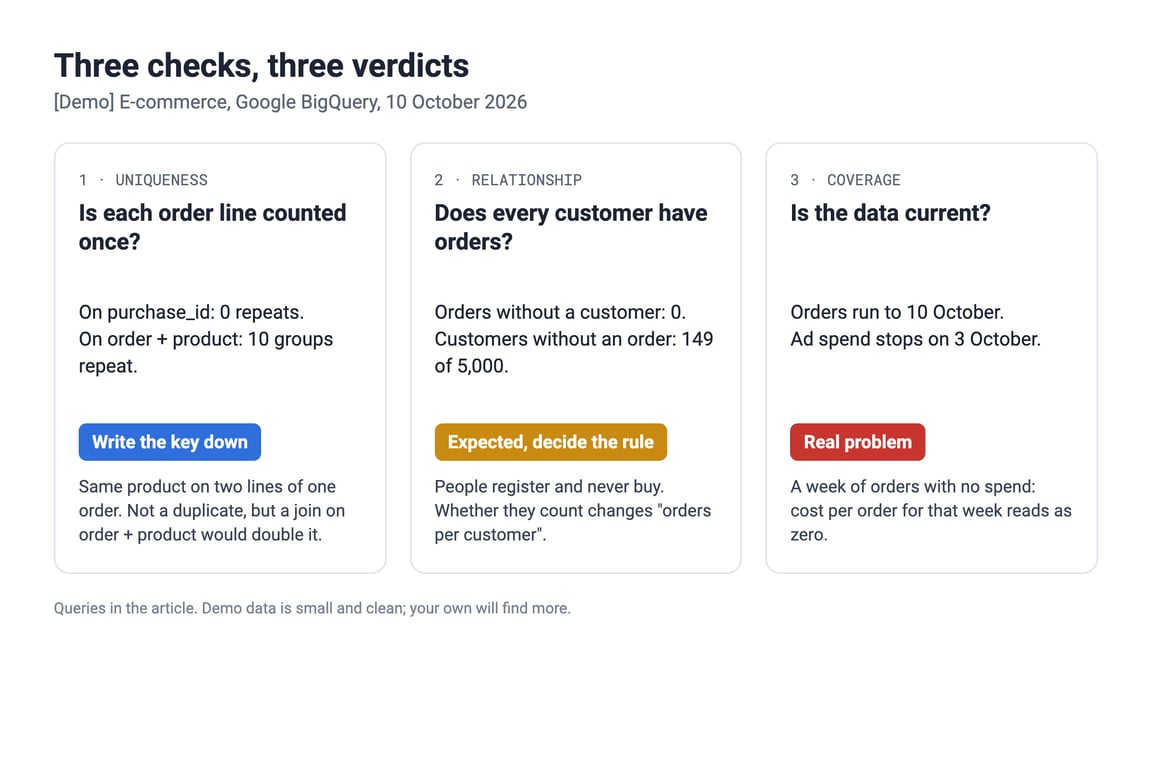
We ran three of these in BigQuery on the [Demo] E-commerce project, an online shop with orders, customers, sessions and ad spend, on 10 October 2026. The demo is small and clean: one currency, a session behind every order, no duplicated rows. That is the point of the example: even clean data produces findings, and each one needs a different verdict.
Uniqueness depends on the key you declare
The Purchases Data Mart holds one row per order line, 31,789 lines across 17,965 orders, and declares purchase_id as its primary key. Counted on that key, no row appears twice. Counted on the key many people would assume, an order and a product, ten groups do:
SELECT
  order_id,
  product_id,
  COUNT(*) AS lines
FROM `owox-demo.ecommerce.purchases`
GROUP BY order_id, product_id
HAVING COUNT(*) > 1
Ten rows come back: the same product on two lines of one order, each with its own purchase_id. That is not a duplicate. It is how this shop records a basket. But a report that joins on order and product would be off on exactly those ten orders. The check passes or fails depending on what you said a row is, which is why the key belongs in writing next to the data.
A relationship can be complete and still not cover everyone
Every order points at a customer who exists: the count of orders without a matching customer is zero. Run the relationship the other way, from customers to orders:
SELECT
  COUNT(*) AS customers_without_orders
FROM `owox-demo.ecommerce.customers` AS c
LEFT JOIN `owox-demo.ecommerce.orders` AS o
  USING (customer_id)
WHERE o.customer_id IS NULL
It returns 149 of 5,000 customers. Expected: people register and never buy. It is not a fault, but it decides an answer. “Average orders per customer” is a different number depending on whether those 149 are in the denominator, and the person asking will not know to ask.
Fresh is not the same as covering today
The order data runs to 10 October. The ad spend data stops on 3 October. A check with a threshold returns a row when the newest date is too old:
SELECT
  MAX(date) AS latest,
  COUNT(*) AS row_count
FROM `owox-demo.ecommerce.ad_performance`
HAVING COUNT(*) = 0
  OR DATE_DIFF(CURRENT_DATE(),
    MAX(date), DAY) > 1
Run on 11 October, it returned one row: 3 October, eight days behind. The COUNT(*) = 0 condition matters: on an empty table MAX(date) is NULL, and a check on the date alone would quietly pass. For a daily load, one day is a sensible starting threshold; a feed that lands weekly needs a wider one.
This is the one that would change a decision. Any ratio over the last week now depends on which side is partial. Spend is missing and orders are not, so cost per order (spend over orders) falls towards zero and ROAS (revenue over spend) jumps, or cannot be computed at all. If revenue were partial instead, the ratio would move the other way; if both are partial, you cannot tell which way it moved. Nothing errors in any of these cases.
The product’s built-in freshness check would not have caught this one: the demo’s dates are DATE columns, and that check needs a timestamp (more on that below).
The sorting into verdicts is the analyst’s job; checks make sure it happens before the number is quoted.
Running the checks on every Data Mart
Running the checks on every Data Mart
In OWOX Data Marts, quality checks are attached to the Data Mart itself, the dataset your reports read from. The details below are from the product documentation.
What you can check. A fixed set on the whole Data Mart, on its fields and on its relationships, covering checks 1 to 5 above but not the volume check. The documentation does not describe a check written in your own SQL. It needs a published Data Mart with a saved Output Schema.
What you get back. For every enabled check: its status, the number of violations, up to three example values, and the SQL that ran, so you or anyone else can rerun it in the warehouse and see the same rows. That SQL is what turns “the tool flagged it” into something the person asking can check without taking your word for it.
When it runs. On demand from the Data Quality tab, for many Data Marts at once from the list or the Models canvas, or on a schedule with a Data Quality Run trigger.
Where you see it. On the Data Quality tab, on the Models canvas, and in Run History with the configuration each run used: a dated record, not your memory.
The freshness check needs a timestamp
The freshness check works only on a field that marks an instant: TIMESTAMP in Google BigQuery and Databricks, TIMESTAMP WITH TIME ZONE in AWS Athena, TIMESTAMPTZ in AWS Redshift, and it is not available for Snowflake fields. For a date-only table, expose a load timestamp as a field in the Data Mart, or schedule the threshold query above, as the next section shows.
The separate Data Last Updated indicator tells you when the source tables were last written to. The documentation is explicit that “updated today” does not mean “covers today”: a load can run this morning and still end on 3 October. Read it as “the pipe ran”, and use a check on the dates in the data for “the data is current”.
Getting told when a check finds a problem
Getting told when a check finds a problem
For every check that matters, decide who is told, how, and by when.
In OWOX Data Marts, as documented today, nobody is told. Notifications by email or webhook cover Data Mart runs that fail or succeed (notification settings), and a data quality run that completes and finds issues is not a failed run. For an alert, use the warehouse.
In BigQuery: a scheduled query that fails on purpose. The ERROR function stops a query with your own message (Google’s reference). Wrap the freshness check in it:
SELECT IF(
  COUNT(*) = 0
    OR DATE_DIFF(CURRENT_DATE(),
      MAX(date), DAY) > 1,
  ERROR('ad spend is stale or empty'),
  'ok') AS status
FROM `owox-demo.ecommerce.ad_performance`
On the demo it fails with “ad spend is stale or empty”, and it also fails on an empty table, which the date condition alone would let through. Schedule it to run daily, early enough to fix the load before the report is read, and turn on Send email notifications in the scheduled query’s settings (scheduling queries). BigQuery then emails the account that set up the schedule when a run fails; you cannot change that recipient. To reach a shared inbox or a chat channel, add a Pub/Sub topic, which receives a message for every succeeded, failed or cancelled run (run notifications). Any check above that returns rows on a problem can be wrapped the same way.
In Snowflake: an alert. An alert runs a condition on a schedule and acts when it returns rows, for example by sending an email through a notification integration (alerts). Notification integrations can also call a webhook, and Snowflake documents Slack, Microsoft Teams and PagerDuty among the targets (notifications). The “a row means a problem” shape is exactly what an alert condition wants.
In an orchestrator. If Airflow already runs your loads, put the check in a task that fails when it returns rows; Airflow’s on_failure_callback and notifiers send the alert (callbacks).
Whichever route you pick, send it to a second person or a shared channel, not only to yourself, so a check that fires on your day off still reaches someone.
What a passing check does not prove
What a passing check does not prove
- A passing check proves the property you declared, nothing more. This key is unique, this field is under its null threshold, this join finds its matches. It does not prove that revenue is defined the way finance defines it. That is the other half of the question, covered in one source of truth for your numbers.
- It does not stop anyone using the data. An Error finding informs you; it does not freeze the Data Mart or block a report.
- It does not watch for the unexpected. There is no anomaly detection; a problem nobody wrote a rule for goes unseen.
- It does not ping you about findings, as documented today. Use the warehouse route in the section above.
If you already test in dbt or the warehouse
If you already test in dbt or the warehouse
dbt ships four generic tests out of the box, unique, not_null, accepted_values and relationships (data tests). If your models carry them, keep them.
Freshness in dbt. dbt source freshness compares a source’s newest load time with warn_after and error_after thresholds, read from a loaded_at_field you name (freshness). That measures the pipe: a load that ran this morning with half a day of rows passes. It is the same point as “updated today” against “covers today”, so pair it with a check on the dates and volume in the data. The dbt_utils package adds tests such as recency and equal_rowcount (dbt_utils).
If you do not own the dbt project, you can still attach a check to the Data Mart you publish from its tables.
Where to start this week
- Pick the Data Mart behind the report your most senior reader opens.
- Write down what a row is. One sentence, plus the column or columns that identify it. That is your primary key check.
- List the joins the report depends on and check both directions. Decide, for each gap, whether it is a fault or a rule.
- Check the latest date and yesterday’s volume of every source against a threshold, especially ad spend and anything loaded from a file.
- Set a severity for each check and run them once by hand. Open every finding and rerun its SQL yourself.
- Schedule the checks before the report is read, and set up who is told when one fails, plus a second person.
Steps 1 to 4 work in a SQL editor today.
The next section is written to be forwarded. Fill in the brackets before you send it.
For the person who asked: the short version
For the person who asked: the short version
You asked whether [the number] is right. That is two questions.
Does it mean what you think? Which orders, which dates, before or after refunds. That is a definition, and finance or the team that owns the number sets it.
Is the data under it sound? No doubled rows, no missing or half-loaded days, nothing lost in a join. That part is mine. [Last week, a half-loaded day made cost per order look terrible] or [a stalled spend load made ROAS look too good]; this check now catches that. Each finding comes with the query that produced it, so anyone can rerun it.
Two limits, in plain words. Our tool’s own freshness check cannot read our date-only tables, so I run my own. And the tool does not message anyone when a check finds a problem, so I have set up [an email from the warehouse to me and to the analytics channel], so [a colleague] sees it when I am off.
What you will receive. If a check fails, a note from me by [9:00] naming the number affected and whether to hold it, before the [9:30 Monday] meeting. If nothing fails, a one-line all-clear at the same time. No message at all means the checks did not run, and the numbers should wait. A pass means the checks I set up passed that morning; it does not mean the definition is right, and it does not catch a problem nobody wrote a rule for.
What I need from you. Tell me which report you rely on most, so I start there, and who decides the definition of [the number] if two teams disagree.
If in doubt, ask: “When did the checks on this last run, and did anything fail?”
Turn your data into decisions.
Governed data marts give you the clean foundation ML needs to actually work.
- No AI hallucinations
- Analyst-governed definitions
- Every number traces to SQL
Frequently Asked Questions
Why is the data freshness check not available on my date field?
In OWOX Data Marts the freshness check needs a field that marks an instant: TIMESTAMP in Google BigQuery and Databricks, TIMESTAMP WITH TIME ZONE in AWS Athena, TIMESTAMPTZ in AWS Redshift. It is not available for Snowflake fields or for DATE columns (documentation). Expose a load timestamp as a field, or check the latest date in the data with a short query.
Can I run data quality checks without owning the dbt project?
Yes. dbt tests live in the dbt project, so you can only add one where you can change the models (dbt documentation). In OWOX Data Marts the checks attach to the published Data Mart, so an analyst can check a Data Mart built on tables or views someone else maintains. The Data Mart needs a saved Output Schema (OWOX documentation).
Does a failed data quality check block the Data Mart?
No. Severity (Error, Warning or Notice) is set per check and groups the findings; it does not stop reports or anyone else from reading the Data Mart. A completed run can report issues without being a failed run (documentation). You decide what to do with each finding.
Does a passing data quality check mean the number is right?
No. A passing check proves the property you declared: this key is unique, this field is under its null threshold, this join finds its matches. It does not prove that the number uses the definition the business agreed, and it does not catch a problem nobody wrote a rule for. The definition is a separate question, owned by finance or the team that owns the number.
Can I see the SQL behind a data quality finding?
Yes. For each enabled check, the OWOX Data Marts report shows its status, the number of violations, up to three example values and the SQL used to execute and reproduce the check, so you can rerun it in your warehouse (documentation).
Which data quality checks should I run before a report goes out?
Start with five: each row counted once (a uniqueness check on the column or columns that identify a row), no NULLs in the fields the report groups or joins by, the latest date in the data matches the date you expect, every join finds its match in both directions, and no impossible values such as negative quantities. Run them on the dataset the report reads, not only upstream. In OWOX Data Marts these exist as Data Mart, field and relationship checks; the full list is in the Data Quality Checks documentation.