Data sampling in Google Analytics 4: limits and how to avoid it
Google Analytics 4 samples when a query needs more events than the property's quota: 10 million for standard properties. This guide covers how to recognise sampled data, how sampling differs from thresholding and the (other) row, what reduces it inside GA4, and a tested BigQuery query that returns exact counts.
Google Analytics 4 samples data when a report, exploration or API request needs more events than the property’s quota allows: 10 million events for a standard property. Above that limit GA4 reads a portion of the events and scales the result up. The numbers are estimates, and the interface tells you so with the data quality icon.
This guide covers the documented limits, how to tell sampling from the two other things that change GA4 numbers (thresholding and the (other) row), what reduces sampling inside GA4, and how to get exact counts from the BigQuery export when the interface cannot give them.
What data sampling is in GA4
Google’s definition: sampling “may occur when the number of events used to create a report, exploration, or request exceeds the quota limit for your property. When this happens, Analytics uses a portion of the data and then scales up to provide directionally accurate results” (Google Analytics Help, checked October 2026).
“Directionally accurate” is the phrase to remember. A sampled result is good for seeing which way a trend goes. It is not a number to reconcile against orders in your shop system or to put into a budget.
The sampling limits
| Property type | Events per query before sampling |
|---|---|
| Standard GA4 | 10 million |
| Analytics 360 | up to 1 billion (100 million by default, raised on request in Explore) |
The limit counts the events the query has to read, not the events in the property. That is why the same exploration is unsampled for one week and sampled for one year, and why adding a segment or a longer date range can switch sampling on.
Google also notes a specific case: filtering a large dataset by country can cause sampling in standard reports and in Explore.
OWOX Data Marts
See your first report built in real time. 15 minutes.
- Connect your data warehouse
- Pick your metrics
- Get a live Google Sheets report
In the time it takes to write a ticket. Then imagine never writing that ticket again.
Book a DemoWe'll use your actual use case
How to tell that a report is sampled
How to tell that a report is sampled
Look at the data quality icon at the top of the report or exploration. When results are sampled, it shows the percentage of data used. A green check mark means the result is based on all available data.
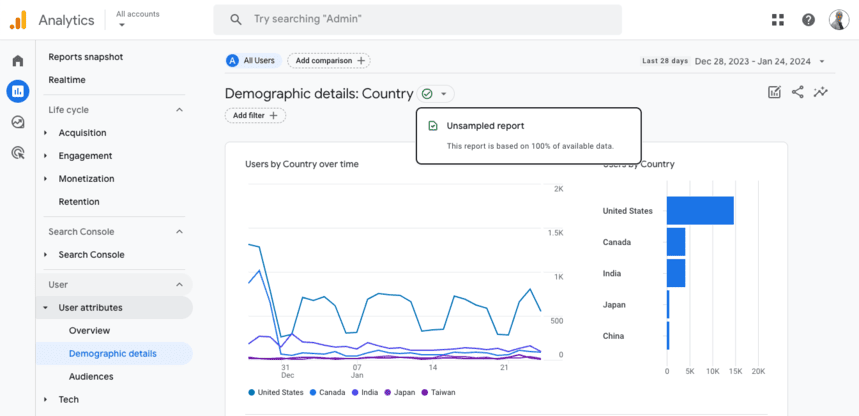
The lower the percentage, the wider the error. A result built on 70% of the events is usually close. A result built on 5% of the events should not be used for a decision about money.
Sampling, thresholding and the (other) row
Sampling, thresholding and the (other) row
Three different mechanisms change what a GA4 report shows. They have different causes and different fixes, and they are often confused.
| Mechanism | What happens | Cause | Can you remove it in GA4 |
|---|---|---|---|
| Sampling | Numbers are estimated from part of the events | The query exceeds the event quota | Sometimes: shorter date range, simpler query |
| Thresholding | Rows are withheld | Too few users, in reports with demographic or search query data | No. Thresholds are system defined |
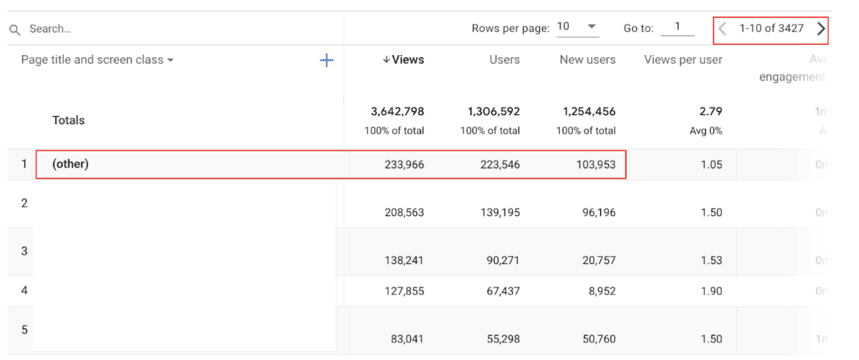
| (other) row | Less common values are merged into one row | The table exceeds its row limit | Sometimes: fewer high-cardinality dimensions |
Thresholding protects user identity. Google’s page says thresholds “are system defined. You can’t adjust them.” A wider date range can bring withheld rows back.
The (other) row appears when a dimension has too many distinct values. Google treats any dimension with more than 500 values as high-cardinality. Page paths with query parameters and custom dimensions holding an ID are the usual sources.
How to reduce sampling inside GA4
How to reduce sampling inside GA4
These follow from how the limit works:
- Shorten the date range. Fewer days means fewer events to read. Run the same exploration month by month and add the results up where the metric is additive, such as events or revenue. Do not add up users across months: one person is counted in each.
- Use standard reports where they answer the question. They read pre-aggregated tables, so they reach the limit later than explorations do.
- Remove what the question does not need. Each segment, filter and extra dimension makes the query heavier.
- Analytics 360 raises the limit to up to 1 billion events per query. It is a paid edition; whether it pays off depends on how often the standard limit is hit.
None of these removes the limit. A property that collects several million events a month will meet sampling whenever someone asks about a year.
Where GA4 stops
Three things cannot be changed in the interface:
- The 10 million event quota of a standard property.
- Data retention for explorations. Event-level data is kept for 2 months by default and for 14 months at most on a standard property (Google Analytics Help). A year-on-year exploration by a custom dimension is not possible after that.
- Distinct counts are approximated. Google states that GA4 uses HyperLogLog++ to estimate users and sessions, with discrepancy rates that are in most cases below 1% and can be higher when several such metrics are combined.
For a marketing team reading trends, this is fine. For an analyst who has to explain why GA4 shows 4,930 purchases and the shop system shows 5,012, it is not: the difference could be sampling, estimation, or a real tracking gap, and the interface cannot say which.
Get exact counts from the BigQuery export
Get exact counts from the BigQuery export
GA4 has a native export to BigQuery, available to standard properties. Google’s export page describes the daily export as “all the raw, unsampled event data” for the previous day (Google Analytics Help). Setup is covered step by step in the guide to connecting GA4 to BigQuery.
Once the events are in BigQuery, a count is a count. This query runs as written on Google’s public GA4 sample and reads three months of events:
SELECT
  device.category AS device,
  COUNT(DISTINCT user_pseudo_id) AS users,
  COUNT(DISTINCT CONCAT(
    user_pseudo_id, '-',
    CAST((SELECT value.int_value
          FROM UNNEST(event_params)
          WHERE key = 'ga_session_id') AS STRING)
  )) AS sessions,
  COUNT(*) AS events,
  COUNTIF(event_name = 'purchase') AS purchases
FROM
  `bigquery-public-data.ga4_obfuscated_sample_ecommerce.events_*`
WHERE _TABLE_SUFFIX BETWEEN '20201101' AND '20210131'
GROUP BY device
ORDER BY users DESC
Result on the sample:
| device | users | sessions | events | purchases |
|---|---|---|---|---|
| desktop | 158,917 | 208,942 | 2,498,330 | 3,226 |
| mobile | 109,195 | 143,185 | 1,704,069 | 2,355 |
| tablet | 6,250 | 8,002 | 93,185 | 111 |
Every row is computed from all 4.3 million events. There is no quota that turns it into an estimate, and COUNT(DISTINCT ...) is exact.
What the export does not give you, so that the numbers are not a surprise:
- A standard property exports up to 1 million events per day in the daily export. Above that, the export has to be filtered or moved to streaming.
- The export starts on the day you link it. It does not backfill history.
- Numbers will differ from the interface. The export contains raw events without the modeling and Google signals data GA4 adds to its own reports. Google documents this difference; it is expected.
From a query to a number the team trusts
From a query to a number the team trusts
Running a query once solves today’s question. The recurring problem is different: the marketer still opens GA4, sees a sampled number, and asks the analyst which one is right. The analyst runs the query again.
OWOX Data Marts is where that query becomes something others can use. The analyst saves the SQL as a Data Mart on the warehouse that holds the export, with a description of what “session” and “purchase” mean in it, and publishes it. Reports on that Data Mart are delivered to Google Sheets or Data Studio (the former Looker Studio) on a schedule, so the marketer reads exact counts in the tool they already use.
OWOX Data Marts does not collect GA4 data and does not change it. It reads the tables the export wrote and runs the SQL the analyst approved. The step from raw export tables to tables a team can report on is described in GA4 export to BigQuery and data modeling, and the query patterns for the export are in how to query GA4 event data in BigQuery.
Turn your data into decisions.
Governed data marts give you the clean foundation ML needs to actually work.
- No AI hallucinations
- Analyst-governed definitions
- Every number traces to SQL
Frequently Asked Questions
Why does GA4 sample data?
GA4 samples to return a result quickly when a query would have to read more events than the quota allows. The quota is 10 million events per query for a standard property and up to 1 billion for an Analytics 360 property.
How do I know if a GA4 report is sampled?
Open the data quality icon at the top of the report or exploration. When the result is sampled, it shows the percentage of data used. A green check mark means the result is based on all available data.
How do I get unsampled data from GA4?
Inside GA4, shorten the date range, use standard reports and remove segments and dimensions the question does not need. For results that are never sampled, link the property to BigQuery: the daily export contains the raw, unsampled events, and a query on it returns exact counts.
What is thresholding in GA4, and is it the same as sampling?
No. Thresholding withholds rows so that nobody can infer the identity of individual users, mostly in reports with demographic or search query data. Sampling estimates numbers from part of the events. Thresholds are system defined and cannot be adjusted; sampling can sometimes be reduced with a shorter date range.
What is data sampling in Google Analytics 4?
Data sampling in Google Analytics 4 means the result of a report, exploration or API request is calculated from a portion of the events and scaled up. It happens when the query needs more events than the property's quota. Google describes the results as directionally accurate.
Does the GA4 BigQuery export have limits?
Yes. A standard property can export up to 1 million events per day in the daily export, the export starts on the day you link it and does not backfill history, and the numbers differ from the GA4 interface because the export holds raw events without modeling or Google signals data.