Why Home-Grown Marketing Data Loaders Break on Schema Drift, and How to Make Them Survive It
For the analyst who maintains hand-written loaders from ad platforms into BigQuery and rebuilds them every time a source changes shape. The three changes that cause it (an added field, a renamed or retyped field, a reordered export), what each one breaks, the fix for each in the load job, the views and the sheet, a drift check you can paste, and how to decide when a maintained connector costs less than the code.
“A source adds a field and unless the load job has schema update options set to allow it, the whole job just fails outright.” That is one analyst describing six Python scripts that load Meta Ads, Google Ads and a CRM into BigQuery. Schema drift is not one problem. It is three different changes, and each breaks a different part of the pipeline:
- A field is added. The load job fails, or the views over the table do.
- A field is renamed or retyped. The request to the source fails, or the column fills with nulls.
- The columns come out in a different order. Nothing fails. Anything that reads a column by position reads the wrong one.
Each has a fix that holds, and none of them is “rewrite the loader”. The rest of this guide takes them one at a time, then gives a check that tells you which of the three happened before a report does.
What each kind of drift breaks
What each kind of drift breaks
The three are worth keeping apart, because the fix for one does nothing for the others.
| The source | What breaks | How loud |
|---|---|---|
| adds a field | the load job, if the table schema cannot grow; a view that pairs a fixed column list with SELECT * |
loud: an error |
| renames or retypes a field | an API request that names the old field; a typed column that rejects the new values | loud, or silent nulls if the loader skips missing keys |
| reorders its columns | a lookup formula, a parser that reads by index | silent: a wrong number |
The quiet row is the expensive one. One analyst in r/analytics: “My lookup formulas then point at the wrong column, and I only notice when a total looks odd.”
An added field: decide whether the table grows
An added field: decide whether the table grows
When a JSON or CSV load brings a field the table does not have, BigQuery has to do one of three things with it, and the default is to treat the row as bad. Google’s job reference says it plainly: with ignoreUnknownValues false, “records with extra columns are treated as bad records, and if there are too many bad records, an invalid error is returned”. That is the outright failure in the thread.
You choose the behaviour per load job:
- Let the table grow.
schemaUpdateOptions: ALLOW_FIELD_ADDITIONadds the new field as a nullable column. It works withWRITE_APPEND,WRITE_TRUNCATE_DATA, orWRITE_TRUNCATEon a single partition. On a whole table,WRITE_TRUNCATEalways overwrites the schema, so a truncate-and-reload script takes the new shape every run, whether you wanted it or not. - Ignore it on purpose.
ignoreUnknownValues: trueloads the fields the table knows and drops the rest. The load never fails on an addition, and you learn about the new field only if something else tells you. - Fail, and mean it. Keep the default where a new field is a change someone must review first.
In the Python client the first choice is two lines on the job config:
from google.cloud import bigquery

job_config = bigquery.LoadJobConfig(
    source_format=bigquery.SourceFormat.NEWLINE_DELIMITED_JSON,
    write_disposition=bigquery.WriteDisposition.WRITE_APPEND,
    schema_update_options=[
        bigquery.SchemaUpdateOption.ALLOW_FIELD_ADDITION,
    ],
    schema=table_schema,  # pass it; do not autodetect
)
Pass the schema rather than autodetecting it. Autodetect infers types from “up to the first 500 rows”, in Google’s words. A field that is whole numbers for 500 rows and has a decimal on row 501 is inferred as an integer and fails the load later, which is the second complaint in the same thread. For changing a column you already have, see how to modify a BigQuery table schema.
OWOX Data Marts
See your first report built in real time. 15 minutes.
- Connect your data warehouse
- Pick your metrics
- Get a live Google Sheets report
In the time it takes to write a ticket. Then imagine never writing that ticket again.
Book a DemoWe'll use your actual use case
The view that breaks when the table grows
The view that breaks when the table grows
A loader that copes with new fields can still leave every report broken, because the view on top cannot. The error from one r/bigquery thread is worth reading closely:
Invalid view definition for project.business_vault.table_view
with 17 columns vs. 18 columns from view query
The view had worked for months while new source fields simply did not show up in it. Then someone asked for field descriptions, so the view was rebuilt with a column list, and its body was still SELECT *:
CREATE OR REPLACE VIEW `project.business_vault.table_view` (
  id OPTIONS (description = 'primary key'),
  updated_at OPTIONS (description = 'last update in the source')
  -- ... 15 more
) AS
SELECT *
FROM `project.dataset.table`
QUALIFY ROW_NUMBER() OVER (PARTITION BY id ORDER BY SAFE_CAST(_dlt_load_id AS FLOAT64) DESC) = 1;
view_column_name_list fixes the number of columns at 17. SELECT * expands to whatever the table has at query time. The day the source adds a field, the two disagree, and BigQuery refuses to run the view until it is recreated.
The fix is to name the columns in the body as well, so both lists come from the same place:
CREATE OR REPLACE VIEW `project.business_vault.table_view` (
  id OPTIONS (description = 'primary key'),
  updated_at OPTIONS (description = 'last update in the source')
) AS
SELECT id, updated_at
FROM `project.dataset.table`
QUALIFY ROW_NUMBER() OVER (PARTITION BY id ORDER BY SAFE_CAST(_dlt_load_id AS FLOAT64) DESC) = 1;
Now a new field in the table is invisible to the view until you add it, and nothing breaks in between. If the descriptions live in a spreadsheet and a script writes the CREATE, have the script write the SELECT list from the same rows. One list, two places, never out of step. This DDL was not run for this article; the error is quoted from the thread. More on view definitions in BigQuery CREATE VIEW: syntax, cost and limits.
A renamed or retyped field: one place where names are yours
A renamed or retyped field: one place where names are yours
A rename is the hardest of the three, because an API does not tell you it renamed a field. It tells you the old name is invalid, or it stops sending it.
Google Ads is the clearest case on record. Its v25 API renamed video_views, video_view_rate, campaign_start_date and campaign_end_date. Google Ads rejects a query entirely when it contains even one unrecognized field, so any load that still asked for one old name got nothing at all, not three good fields and one null. That is from the OWOX Data Marts changelog (release 0.32.0), where the Google Ads connector hit exactly this and was fixed by requesting the new names.
Two habits keep a rename from reaching your reports:
- Map the vendor’s names to your own in one place. The loader requests
video_viewstoday and something else next year; the table column staysvideo_views. When the vendor renames, you change one line of the mapping, and every view and report below it carries on. - Load into a staging table, then check it against a contract before anything is merged into the table people read. The contract is just the list of columns and types the downstream SQL expects.
The check is one query against INFORMATION_SCHEMA.COLUMNS. Write your expected columns as literal rows, compare them with what the table actually has, and keep only the differences:
WITH expected AS (
  SELECT * FROM UNNEST([
    STRUCT('date' AS column_name, 'DATE' AS data_type),
    ('source', 'STRING'),
    ('medium', 'STRING'),
    ('campaign', 'STRING'),
    ('impressions', 'INT64'),
    ('clicks', 'INT64'),
    ('spend', 'NUMERIC'),
    ('conversions', 'FLOAT64')
  ])
),
actual AS (
  SELECT column_name, data_type
  FROM `owox-demo.ecommerce.INFORMATION_SCHEMA.COLUMNS`
  WHERE table_name = 'ad_performance'
)
SELECT
  column_name,
  e.data_type AS expected_type,
  a.data_type AS actual_type,
  CASE
    WHEN a.data_type IS NULL THEN 'missing'
    WHEN e.data_type IS NULL THEN 'new'
    WHEN e.data_type != a.data_type THEN 'type changed'
    ELSE 'ok'
  END AS drift
FROM expected AS e
FULL OUTER JOIN actual AS a USING (column_name)
WHERE e.data_type IS DISTINCT FROM a.data_type
ORDER BY drift, column_name;
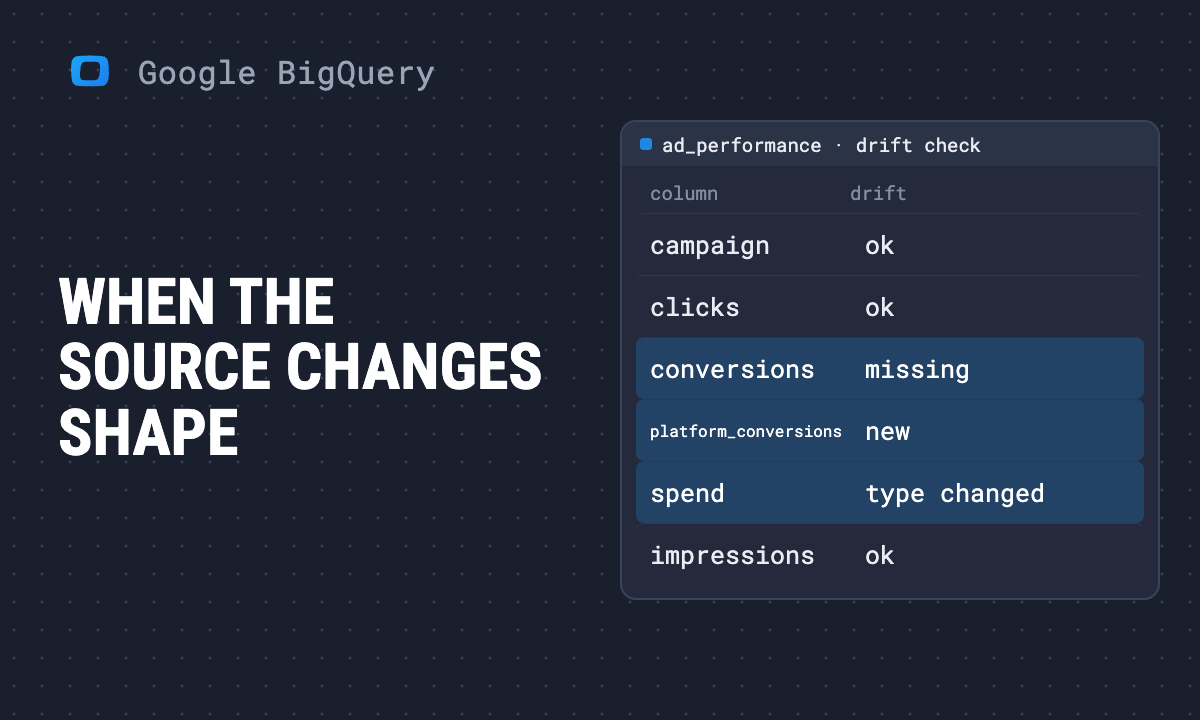
Run against the demo ad table, with a contract written the way a loader might have expected it, it returns all three kinds of finding:
| column_name | expected_type | actual_type | drift |
|---|---|---|---|
| conversions | FLOAT64 | missing | |
| ad_spend_id | INT64 | new | |
| campaign_status | STRING | new | |
| ctr_stored | FLOAT64 | new | |
| platform_conversions | FLOAT64 | new | |
| spend | NUMERIC | FLOAT64 | type changed |
Demo data: the synthetic shop behind the OWOX demo project (owox-demo.ecommerce.ad_performance), run on 2026-11-09; the expected list is written for this example, not taken from a real loader. The query reads table metadata only.
Read the rows in pairs. A missing column and a new column of the same type, here conversions and platform_conversions, is what a rename looks like from the warehouse: the old name stopped arriving and a new one started. A new column alone is an addition. A type changed row is the one that fails a load into a typed column. Schedule the query after each load and fail the merge when it returns a missing or type changed row.
A reordered export: match by name, never by position
A reordered export: match by name, never by position
The third change breaks nothing that runs. “Every time someone adds a breakdown to the export, the columns come out in a different order,” as the r/analytics thread puts it, “and nothing in the file says the layout has moved either.”
Anything that addresses a column by where it sits is exposed: a VLOOKUP with a column index, a range like D:D in a formula, a parser that splits a line and takes field 4. The fix is the same everywhere: find the column by its header each time.
In a sheet, look the header up instead of counting columns:
=INDEX(A:Z, ROW(), MATCH("Spend", $1:$1, 0))MATCH finds the column named Spend wherever it is today, so a new breakdown that pushes it two columns right changes nothing. In a loader, read the header row, build a name-to-index map, and look fields up by name. A field that is not in the map is a missing finding for the contract above, not a value read from its neighbour.
When a maintained connector is cheaper than the code
When a maintained connector is cheaper than the code
Every fix above is code someone keeps. The question in the original thread, whether to consolidate six scripts or “stop fighting it”, comes down to who notices a vendor change and how many loaders need the same fix. Ad APIs change on the vendor’s schedule: the OWOX Data Marts changelog records the Google Ads connector moving from v21, which Google sunset on 2026-08-05 and which then failed every import, to v25, and the Facebook Ads connector moving to Graph v26.0 later.
This is what Data Marts connectors do with the three changes, as the product’s own documentation states it:
- You choose the fields. A connector “fetches the fields you select, and loads them into your Storage”, your own warehouse. A new field the platform adds is not part of the request until it is in the connector and you select it.
- The table grows instead of failing. The connector’s storage step creates the destination table “or add[s] the columns it lacks”, and merges rows “by the node’s unique keys”, which is also why the required unique-key fields stay selected.
- A vendor rename is fixed in the connector, and your names stay. On the Google Ads rename above, the changelog says the fields kept their names in OWOX, and existing Data Mart configurations and destination tables were unaffected. That is the one-place mapping from the previous section, kept by the people who ship the connector.
- A field that disappears is flagged, not guessed. A report that still selects a field that has left the schema is rejected up front, with the stale field shown in a “Disconnected columns” block, instead of failing later with a cryptic
Unrecognized name. - The sheet matches by name. A report into the Google Sheets destination “matches columns by their SQL name, not by position”. A new column is appended at the right edge, and a removed or renamed one turns the formulas that used it into
#REF!, which the documentation calls “an honest signal”.
What it does not do is make drift impossible. The same changelog entry records that until the fix shipped, Google Ads imports selecting a renamed field “failed outright”. The difference is where the fix happens: once, in a connector everyone who uses it shares, instead of once per script on your side. The connectors are MIT-licensed and their source is on GitHub, so you can read which fields each one requests. See the free open-source connectors for analysts for the list, and the Google Ads to BigQuery connector for the one in this story.
A rough rule for the decision: count the sources, then count the API versions each one ships in a year. One CRM with a stable export is cheap to own. Six ad and analytics sources, each moving on its own release schedule, is six times the watching and six copies of every fix. Keep the code where the source is yours or rarely moves; hand the rest to something whose job is to follow the vendor.
Turn your data into decisions.
Governed data marts give you the clean foundation ML needs to actually work.
- No AI hallucinations
- Analyst-governed definitions
- Every number traces to SQL