Is the Medallion Architecture Worth Its Complexity? Count Decisions, Not Layers
“Bronze -> Silver -> Gold seems to have become the default architecture for almost every data pipeline. When do you think Medallion is genuinely useful, and when does it just add unnecessary complexity?” That is a data engineer on r/databricks, in August 2026, and it is the right question. Most of the answers it got were opinions. This article tries a different test: take a real defect, see which layer ends up owning the fix, and let that decide whether the layer earns its place.
The short answer: a layer is worth it when it holds a decision. If you cannot name the decision a layer makes, it is a copy of the layer before it, with a cost.
What the three guides actually say
What the three guides actually say
The pattern is not a standard. Databricks describes it as a “data design pattern”, Microsoft calls it a design pattern that is the recommended approach for Fabric, and dbt’s own guide says it is “just a starting point”. We read all three pages in October 2026. They agree on the shape, and they disagree on where the quality work happens.
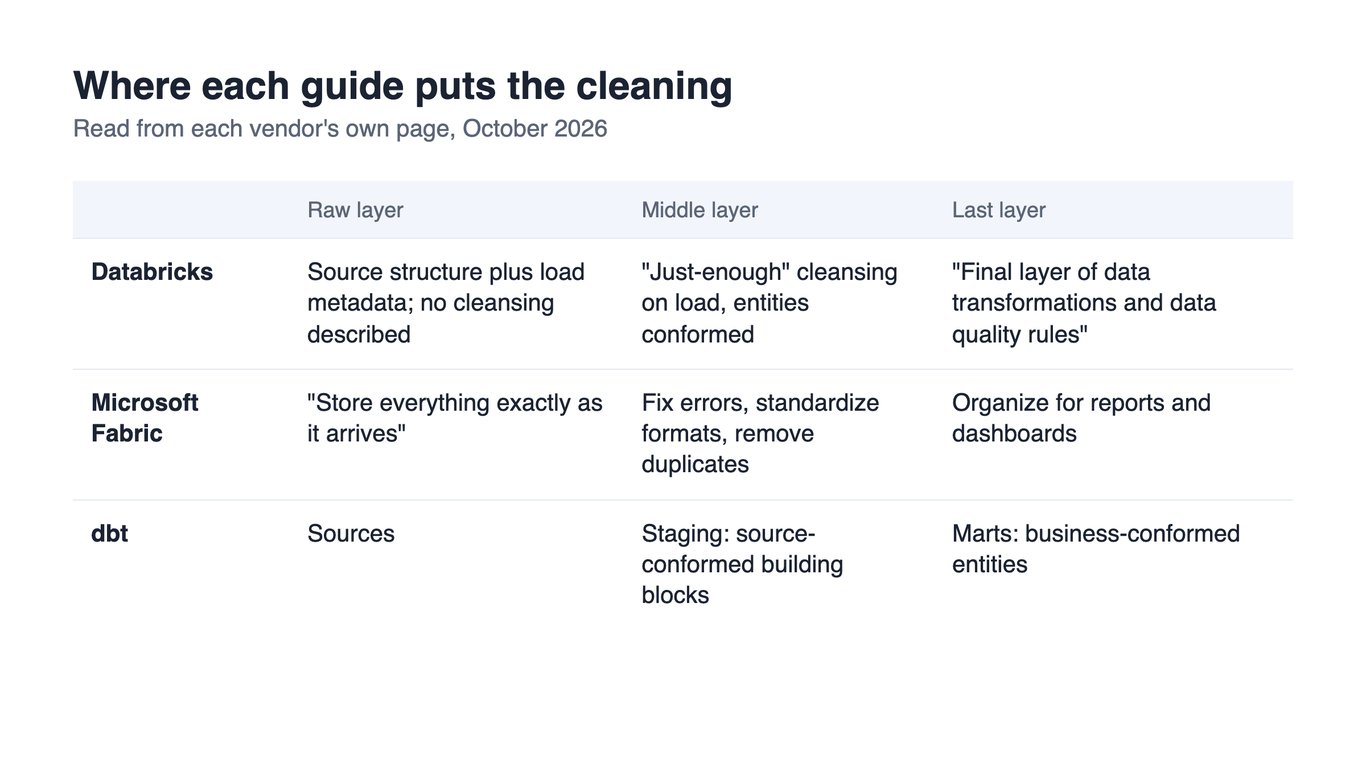
- Databricks puts raw data in Bronze with load metadata and describes no cleansing there, applies “just-enough” cleansing in Silver, and says the final transformations and data quality rules are applied in Gold.
- Microsoft Fabric says Bronze stores everything exactly as it arrives, with no changes allowed, and puts the fixing of errors, standard formats and duplicate removal in Silver. It also lets Bronze be a shortcut to data that already sits in a lake rather than a copy.
- dbt names three layers,
staging,intermediateandmarts, and describes the move as from source-conformed to business-conformed. Its worked example, the Jaffle Shop project, has astagingfolder and amartsfolder and nointermediateone.
So the poster question, “should data quality rules live only in Bronze?”, has an easy answer from every guide: no. Bronze keeps what arrived. Past that, the three sources split on whether the checking belongs in the middle layer or the last one, and none of them tells you how many layers you need. That part is yours.
One defect, three places to fix it
One defect, three places to fix it
To see where a quality rule belongs, you need a defect that is real. We used thelook_ecommerce, the public sample shop that Google publishes in BigQuery. It has an orders table with 124,732 rows and an order_items table with 180,996. It is synthetic data, and the clock gap below is probably an artifact of how it was generated, not of a real shop. That does not weaken the point, because a real source has defects of the same shape for real reasons, and this one is public, so you can run every query yourself. All numbers below are from 26 October 2026.
The question is the one a shipping report asks: how many days from creation to shipping? Both tables have a created_at and a shipped_at, so there are two ways to answer.
SELECT COUNT(*) AS shipped_items,
  ROUND(AVG(TIMESTAMP_DIFF(i.shipped_at, i.created_at, HOUR)) / 24, 2) AS days_item_clock,
  ROUND(AVG(TIMESTAMP_DIFF(o.shipped_at, o.created_at, HOUR)) / 24, 2) AS days_order_clock,
  COUNTIF(i.shipped_at < i.created_at) AS negative_items,
  ROUND(MIN(TIMESTAMP_DIFF(i.shipped_at, i.created_at, HOUR)) / 24, 1) AS earliest_gap_days
FROM `bigquery-public-data.thelook_ecommerce.order_items` AS i
JOIN `bigquery-public-data.thelook_ecommerce.orders` AS o USING (order_id)
WHERE i.shipped_at IS NOT NULL
It returns 118,240 shipped items, an average of 0.53 days on the item’s own clock and 1.47 days on its order’s clock, and 35,912 items, 30% of the shipped ones, whose shipped_at is earlier than their own created_at, by as much as four days. The ship time itself is not in doubt: the two tables agree on it for every item. What differs is the start. The item’s created_at differs from its order’s in 118,237 of the 118,240 shipped items, by about a day on average, and 51,465 of them are stamped after the order.
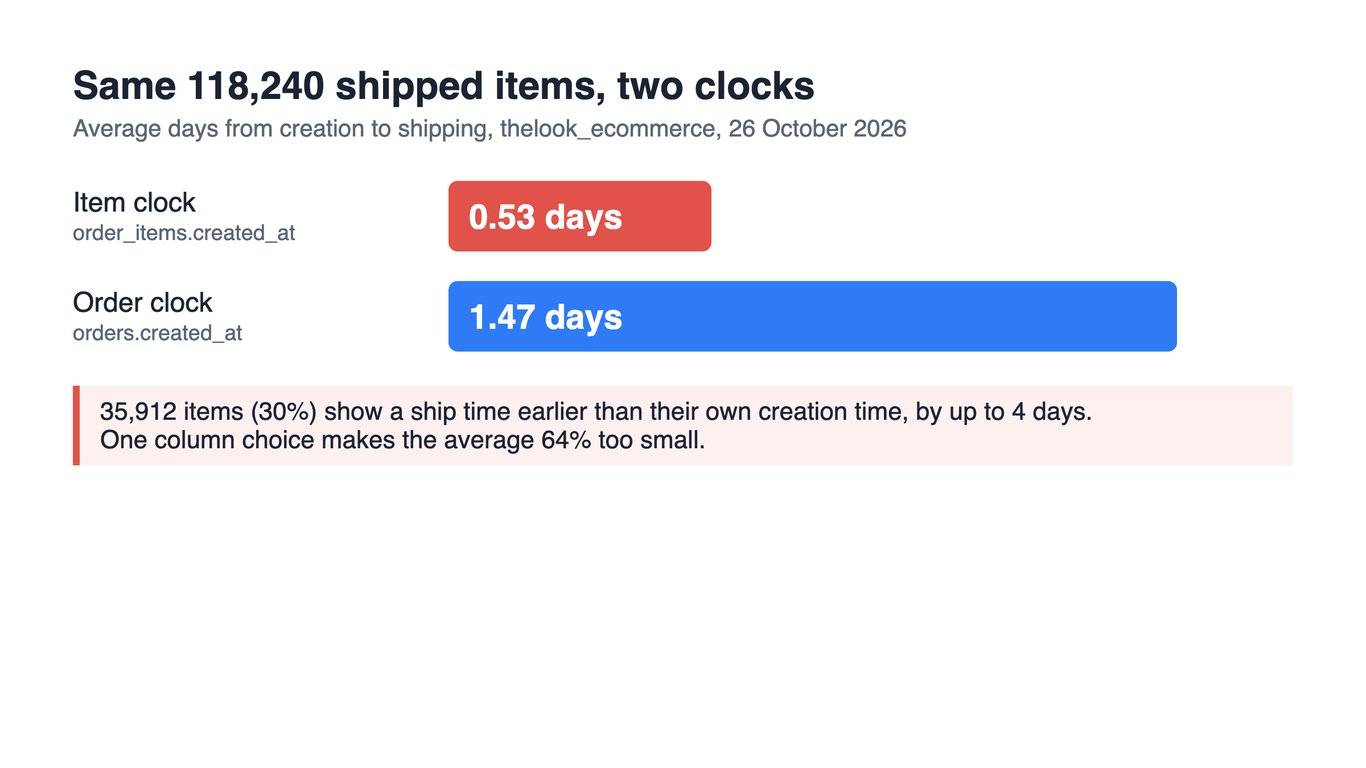
A pipeline that takes the nearest column gives you a shipping time that is 64% too small and 30% of rows that ship before they exist. Nothing errors. The query runs, the dashboard renders, and the number is wrong in a way that looks plausible.
Now ask where the fix goes.
- Bronze should not touch it. Both guides say Bronze keeps what arrived, and this is why: the item timestamps are what the source sent, and the day someone learns what they mean you will want them back.
- If the rule lives only at the end, every report carries it. A Gold table that applies “ship time must not precede creation” will catch the 35,912 rows. It will not tell the next report to use the order’s clock, and the items whose start differs from the order’s but still precedes shipping pass the check. Each consumer has to rediscover the choice.
- The middle layer is where the choice is made once. “The start of the clock is the order’s
created_at” is not a check. It is a decision about which column is true, and it applies to every metric that reads shipping time. That is what a Silver layer is for.
Here is that decision written once, as the middle layer’s whole job in this example. It runs as written and returns the same 118,240 items, 1.47 days and no negative items, and every report that reads shipping time now starts from it:
WITH silver_items AS (
  -- the decision, made once: an item starts when its order starts
  SELECT i.id AS item_id, i.order_id, o.created_at AS created_at, i.shipped_at, i.status
  FROM `bigquery-public-data.thelook_ecommerce.order_items` AS i
  JOIN `bigquery-public-data.thelook_ecommerce.orders` AS o USING (order_id)
)
SELECT COUNT(*) AS shipped_items,
  ROUND(AVG(TIMESTAMP_DIFF(shipped_at, created_at, HOUR)) / 24, 2) AS days_to_ship,
  COUNTIF(shipped_at < created_at) AS negative_items
FROM silver_items
WHERE shipped_at IS NOT NULL
One more thing we checked, because it is what a last-layer reconciliation usually looks like. We counted, for every order, the items it has against its own num_of_item, looked for orders whose items carry mixed statuses, orders whose status no item shares, and orders with no items at all. All four checks returned zero across the 124,732 orders. A reconciliation at the end of the pipeline would have passed, and the shipping time would still have been wrong. Totals that agree tell you the rows are all there. They do not tell you which clock each row runs on.
That decision is the whole case for the layer. It also sets the test for the rest of the article: if you cannot list the decisions a layer makes, you are paying to store its inputs twice.
OWOX Data Marts
See your first report built in real time. 15 minutes.
- Connect your data warehouse
- Pick your metrics
- Get a live Google Sheets report
In the time it takes to write a ticket. Then imagine never writing that ticket again.
Book a DemoWe'll use your actual use case
When each layer pays for itself
When each layer pays for itself
What follows is our judgement, based on the three guides and the run above. The guides do not state it.
| Layer | Worth having when | Skip or shrink it when |
|---|---|---|
| Raw (Bronze) | The source cannot be re-read: an API that overwrites, a retention window, an audit requirement. | The source is already a table you can query and it keeps history. Fabric’s own guide lets this layer be a shortcut, not a copy. |
| Middle (Silver) | At least one decision about what is true: which timestamp, which duplicate wins, which type a text date becomes. | You can list no decision. Then it is a copy with a rename. |
| Last (Gold) | Two or more consumers compute the same metric and must agree. | One report reads it and nobody else will; a view over the middle layer does the job. |
A layer is a set of objects with an owner, a refresh schedule and a check that says it is done. Each one you add is another place for a number to be stale. Our own demo warehouse is a small example: seven connector tables become one modelled table, which becomes a report of seven rows, and the lakehouse article traces that on real tables.
On the second r/databricks question, “how far do you all go with normalization in silver?”, the answer from the same logic is: as far as the decisions need and no further. Databricks suggests Silver models closer to third normal form, and a write-friendly shape such as Data Vault, but it presents these as options for a layer, not as requirements.
Where data quality rules live
Rules are not all the same kind. The three guides we read do not separate them, though some practitioner write-ups, such as DataKitchen’s, do test each layer differently, and separating them settles most of the argument about layers.
| Kind of rule | Example | Layer |
|---|---|---|
| Arrival | Did the load run, is the latest date today, did the column set change? | Raw. Check it, never change the data. |
| Conformance | Are keys unique, types valid, values possible, and which column is the clock? | The middle layer, with bad rows set aside, not deleted. |
| Business | Does revenue by channel add up to total revenue? | The last layer, because only it knows the definition. |
The shipping defect is a conformance rule, so the middle layer owns it. A reconciliation, such as “report totals equal the middle layer’s totals for the same filter”, belongs to the last. Six checks for the usual ways a total breaks covers the queries and common data quality issues the causes.
What practitioners keep asking, and where it is answered here
What practitioners keep asking, and where it is answered here
We read the threads this article came from: five askers on r/databricks between late August and October 2026, all circling the same worry. Their own words, and the section that answers each:
| What they wrote | Answered in |
|---|---|
| “Am I missing a strong reason to repeat rules across layers?” (28 August) | Where data quality rules live: a rule has a kind, and each kind has one home. |
| “How to balance this at scale?” (8 October) | When each layer pays for itself: balance by counting decisions, not by size. |
| “How far do you all go with normalization in silver?” (21 October) | When each layer pays for itself: as far as the decisions need. |
| “What is generally best practice?” (28 August) | What the three guides say: they agree on the shape and disagree on where the cleaning happens. |
Repeating a rule in every layer is the mistake behind the first question. Written once at the layer that owns the decision, a rule is a definition. Copied into three layers it is three things to keep in step, and the day they drift apart you are back to two numbers for one question.
The smallest version that works
The smallest version that works
If you recognize your pipeline in “everything is one query on the raw table”, two layers is a fair start: one that reads the sources and settles what is true, and one that defines what reports read. That is the shape of dbt’s example project, a staging and a marts folder, and nothing in the three guides says it is wrong. Our judgement: add the raw layer when you lose a source’s history for the first time, and split the middle layer when two teams argue over a decision that sits in the same model.
For the last layer, the model is the thing worth writing down: the entities, how they join, and the definitions every report reads. In OWOX Data Marts, an analyst writes that as SQL, a Data Mart, in your own data storage, and the Data Marts are the report-ready stage described above. They do not replace the earlier layers. For the step before it, dimensional data modeling explains how to shape the entities themselves, and mistakes in data modeling lists what usually goes wrong.
What to take from this
Do not ask whether you should use Bronze, Silver and Gold. List the decisions your pipeline makes about what is true, and give each one a home. Where there are none, the layer is overhead. Where one report reads the result, a view is enough. Where two reports must agree, you have found a Gold table.
Turn your data into decisions.
Governed data marts give you the clean foundation ML needs to actually work.
- No AI hallucinations
- Analyst-governed definitions
- Every number traces to SQL
Frequently Asked Questions
Is medallion architecture still relevant?
It is a pattern, not a standard, and the vendors say so: Databricks calls it a data design pattern, and dbt's guide calls its own layering just a starting point. It stays relevant where each layer makes a decision you can name, such as which timestamp is the true start of an order. Where a layer only copies the one before it, it is overhead.
When should you not use medallion architecture?
When you cannot name a decision a layer makes. A single report reading one table does not need a Gold table, a source that you can already query with its history does not need a raw copy, and a pipeline with no conformance decisions does not need a Silver layer. Count the decisions first and add a layer only where there is one.
How many layers do I need in a medallion architecture?
As many as you have kinds of decisions, and two is a fair start: one layer that reads the sources and settles what is true, and one that defines what reports read. dbt's example Jaffle Shop project has a `staging` folder and a `marts` folder and no intermediate one. Add a raw layer when you first lose a source's history.
Where should data quality rules live in a medallion architecture?
By kind. Arrival checks (did the load run, is the data fresh, did the columns change) belong to the raw layer, which should check and not change the data. Conformance rules (unique keys, valid types, impossible values, which column is the clock) belong to the middle layer, with bad rows set aside. Business reconciliations belong to the last layer. The vendors differ: Databricks puts data quality rules in Gold, and Microsoft puts error fixing in Silver.
Does the Bronze layer have to be a copy of the source data?
No. Microsoft's Fabric guide says that when the source data is in OneLake, ADLS Gen2, Amazon S3 or Google storage, you can create a shortcut in the bronze layer instead of copying the data. Keep a real copy when the source overwrites its history, expires data or must be auditable.
Does medallion architecture only work on Databricks?
No. Databricks describes the pattern, and Microsoft implements it in Fabric, but a layer is a set of tables with an owner, a refresh and a check, so you can build it as datasets or schemas in any warehouse. The test in this article ran on BigQuery's public sample data, and dbt's `staging` and `marts` layering works the same way in a project.