How to build a marketing attribution model in BigQuery
To build a marketing attribution model in BigQuery, you need three things in one place: GA4 event data (from Google’s free BigQuery export), ad cost data from every platform you pay, and an SQL query that groups events into sessions and decides how much credit each touchpoint gets. The first comes from Google, the second from connectors that load ad platforms into your warehouse, and the third is your own SQL, so the rules stay transparent and match your business instead of a black box.
This guide covers what attribution modeling is, how to load ad data into BigQuery with OWOX Data Marts connectors, the core logic every model needs (touchpoints, lookback windows, conversion events), and example SQL for first-touch, last-touch and linear models.
What is attribution modeling, and why does it matter?
What is attribution modeling, and why does it matter?
Attribution modeling is a method used to assign credit to different marketing channels and touchpoints that influence a customer’s decision to convert. Rather than focusing only on the final click, it considers the entire customer journey, from the first ad view to the final purchase, so you can see which efforts truly contribute to success.
This helps marketers make informed decisions and improve campaign effectiveness across every stage of the funnel.
Here are the key benefits of using attribution modeling:
- Helps you find and fix weak points in the buyer’s journey to improve your overall conversion rates.
- Reveals how much return on investment (ROI) each channel or campaign brings to your business.
- Allows you to invest more in the touchpoints that are actually driving results across different marketing platforms.
- Helps personalize future campaigns based on how your unique audience interacts with your content and ads.
- Gives clear insight into which marketing actions are most effective for converting visitors into loyal customers.
Keep in mind that GA4’s built-in model comparison tool doesn’t support rule-based options like first-click or linear. By writing the attribution logic yourself in BigQuery, you gain full flexibility and documented rules that can be reused across dashboards and teams.
Once that SQL is published as a Data Mart in OWOX Data Marts, every report reads the same logic, which helps eliminate conflicting numbers across tools.
Why load ad data with OWOX Data Marts connectors
Why load ad data with OWOX Data Marts connectors
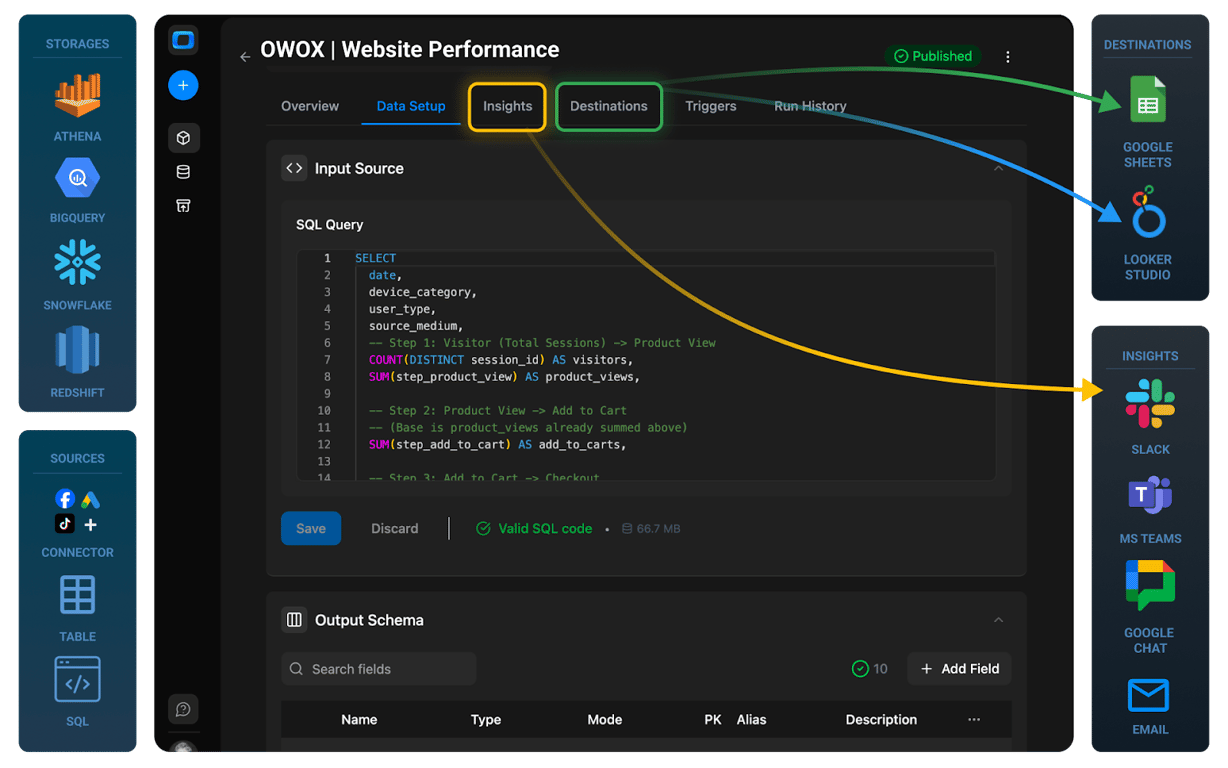
To build effective attribution models, you need to bring marketing data from different platforms into one place. While data from Google Ads & Google Analytics (GA4) can be easily synced with Google BigQuery, importing ad data from other non-Google ad platforms is often challenging.
Paid tools and custom scripts often add delays, costs, and complexity. OWOX Data Marts offers open-source that load ad data from platforms like Facebook, LinkedIn, and TikTok straight into BigQuery, without code.
Once the data is in BigQuery, the attribution model itself is SQL you write: the connectors load the data, and your query decides how credit is split across touchpoints.
Here’s why connectors help with attribution modeling in BigQuery:
- Skip manual coding by using prebuilt, open-source connectors that send data directly to BigQuery on your schedule.
- Maintain flexibility with transparent SQL that is easy to change for different attribution rules.
- Own your stack by keeping the data and the logic in your own BigQuery project.
OWOX Data Marts
See your first report built in real time. 15 minutes.
- Connect your data warehouse
- Pick your metrics
- Get a live Google Sheets report
In the time it takes to write a ticket. Then imagine never writing that ticket again.
Book a DemoWe'll use your actual use case
How connectors bring ad data next to GA4 data in BigQuery
How connectors bring ad data next to GA4 data in BigQuery
OWOX Connectors move ad spend data into BigQuery. In this section, we’ll cover how to set up the connection, combine the data using SQL, and automate updates.
Ensure that your GA4 data is in BigQuery
Check if your GA4 property is already exporting data into BigQuery. If it isn’t connected, you’ll need to set up the export first.
For a detailed walkthrough on how to import GA4 data into BigQuery, please refer to our step-by-step guide.
Note: We don’t want to charge you for what is already available under the native Google infrastructure.
Import ad data to BigQuery using OWOX Data Marts
With OWOX, you can set up Data Marts that pull ad data from platforms like Facebook, TikTok, Reddit, Criteo, LinkedIn, and Microsoft directly into BigQuery on your schedule. The process is simple:
- Sign in to OWOX Data Marts
You can get started free here. - Add a data storage:
In OWOX Data Marts, add a new storage and select Google BigQuery. Enter your project ID, region, and service account JSON key to connect.
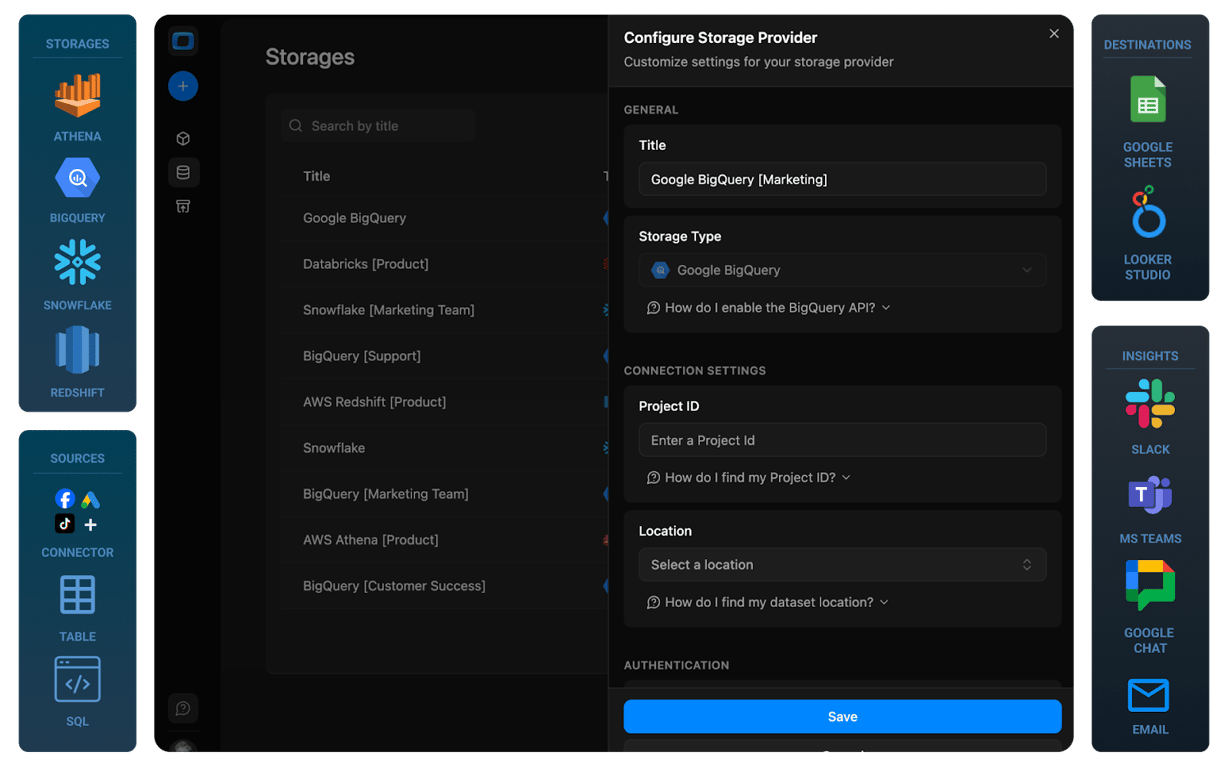
- Create a Data Mart:
Click ‘New Data Mart’, give it a name, and link it to your BigQuery storage. Specify the dataset and table where your ad data will be stored.
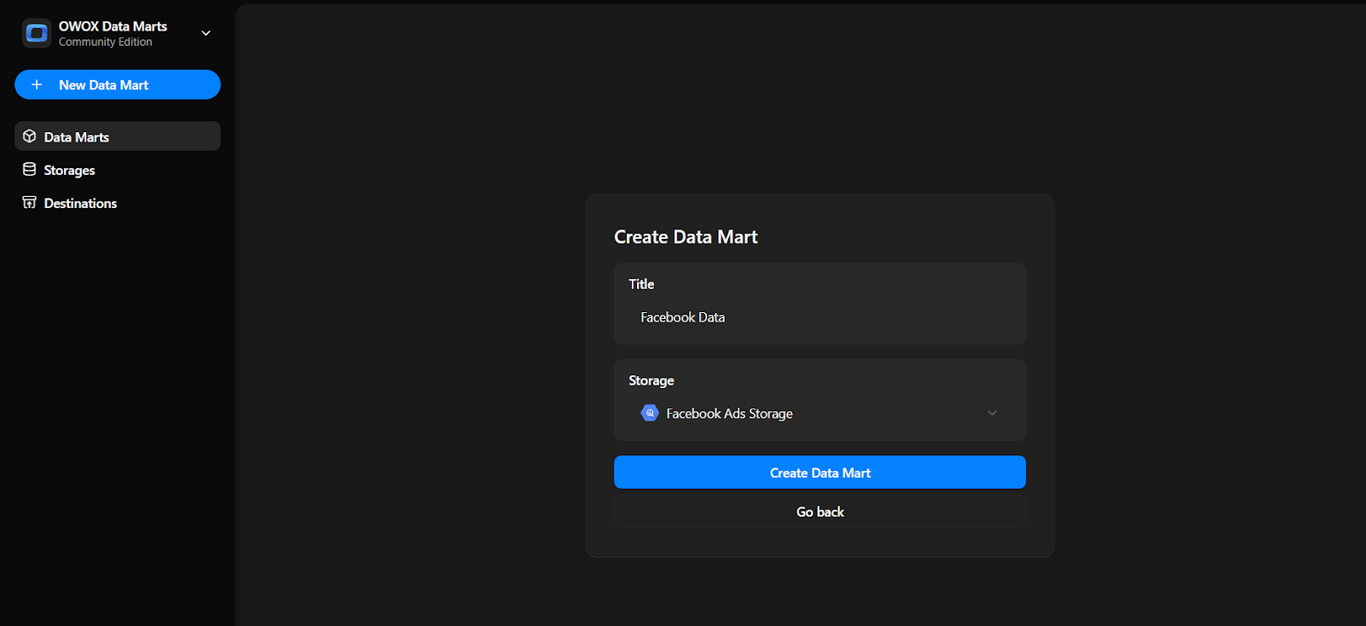
- Set up your Data Mart:
In the Data Setup tab, choose ‘Connector’ as the definition type.- Choose the ad account from one of the options given.
- Enter your ad account details and authorize the connector.
- Pick the data points from the platform API.
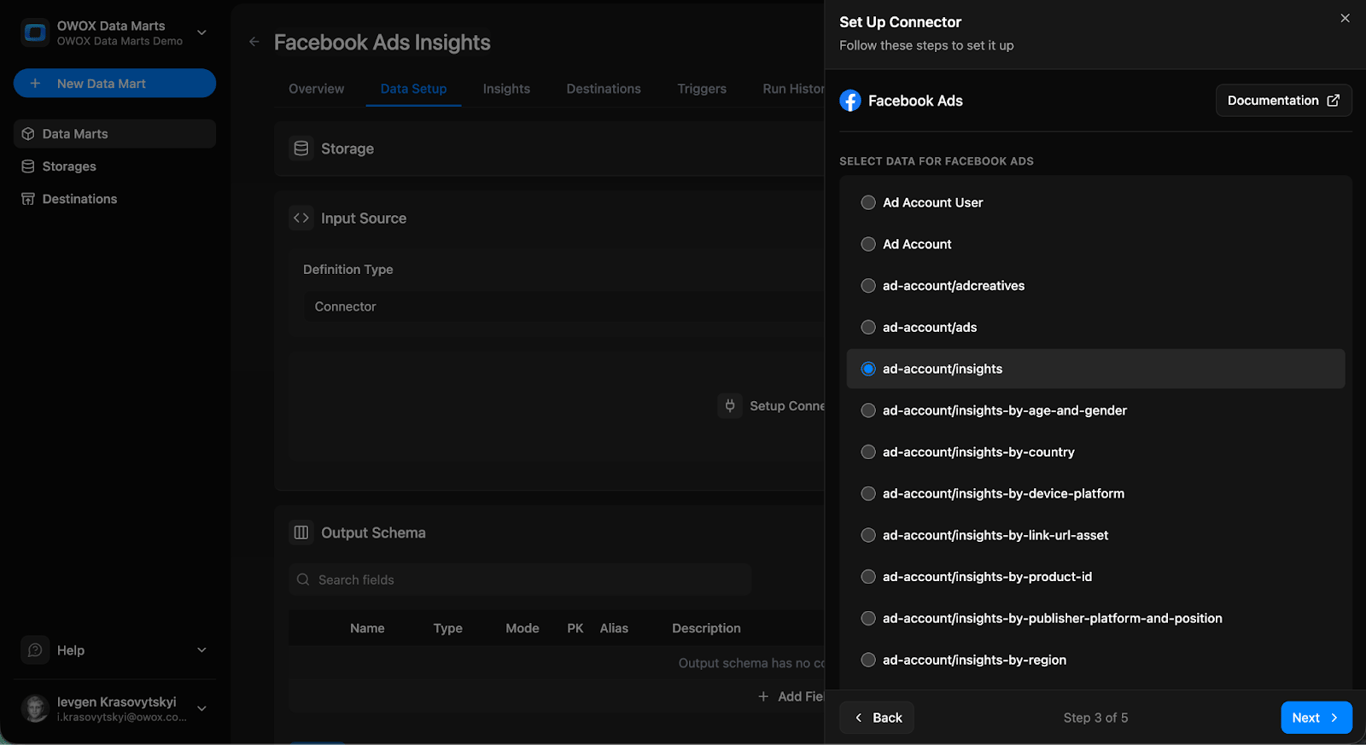
- Then, select any fields you need.
- Specify the BigQuery dataset and table.
- Save it.
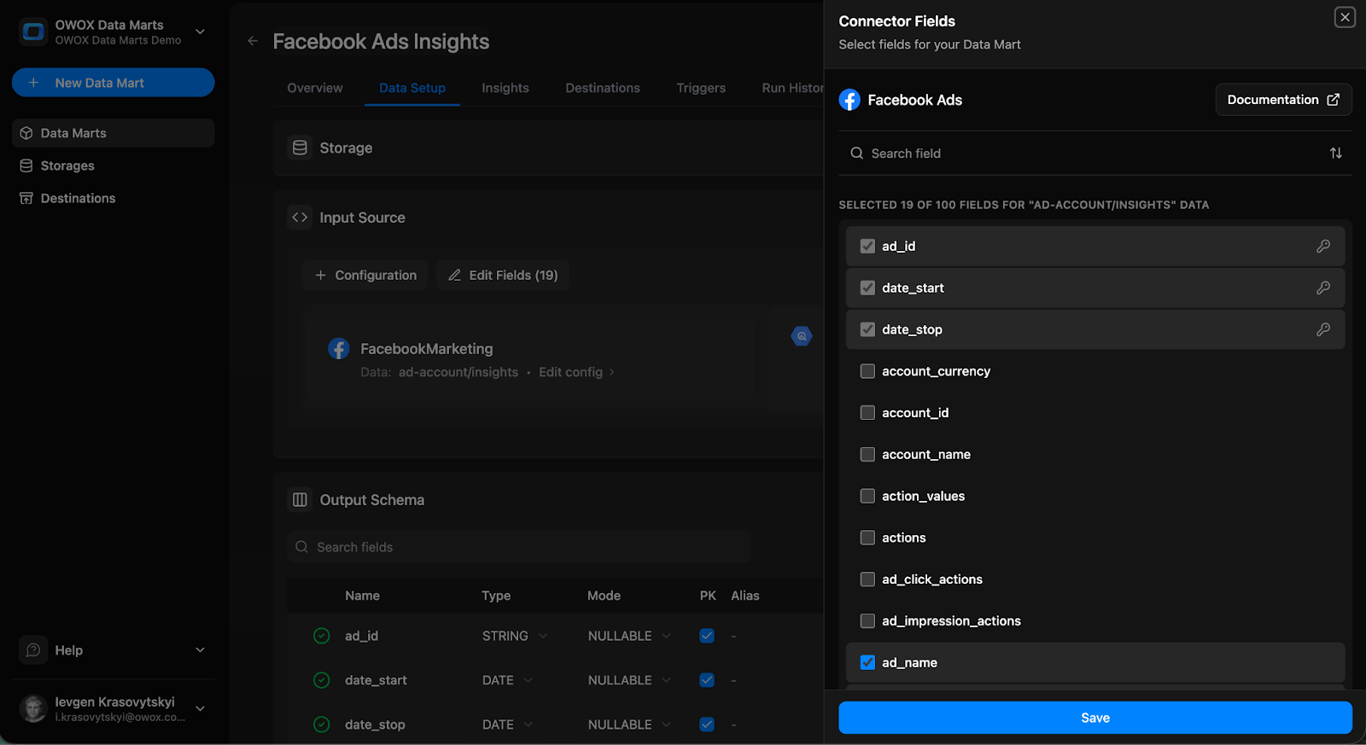
- Publish the Data Mart:
Once you have saved your configuration, publish the Data Mart, and run it manually once to validate that data is flowing correctly into the BigQuery dataset and table.
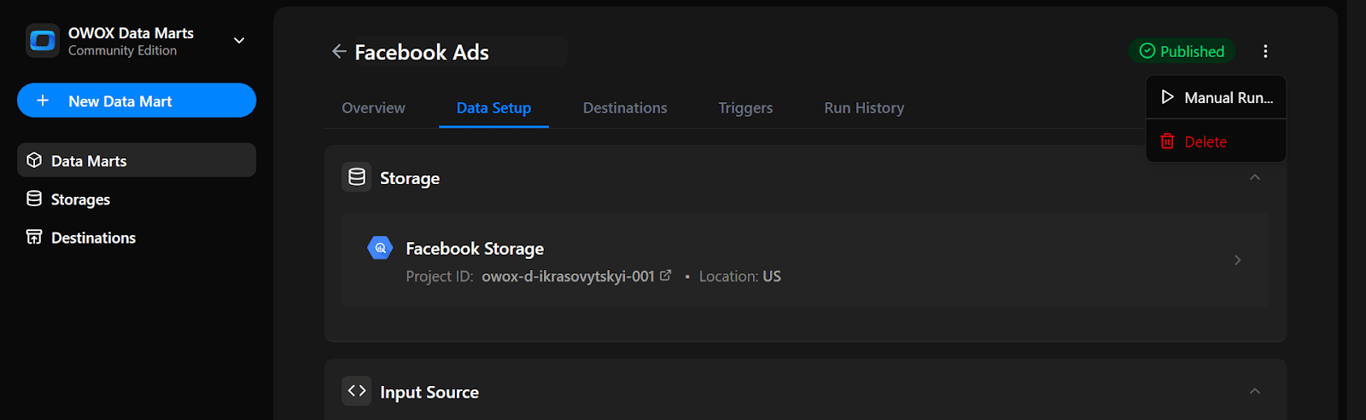
- Set up triggers:
Automate updates by adding a trigger. Choose Connector Run to refresh ingestion to update reports, and set the schedule (daily, weekly, monthly, or intervals).
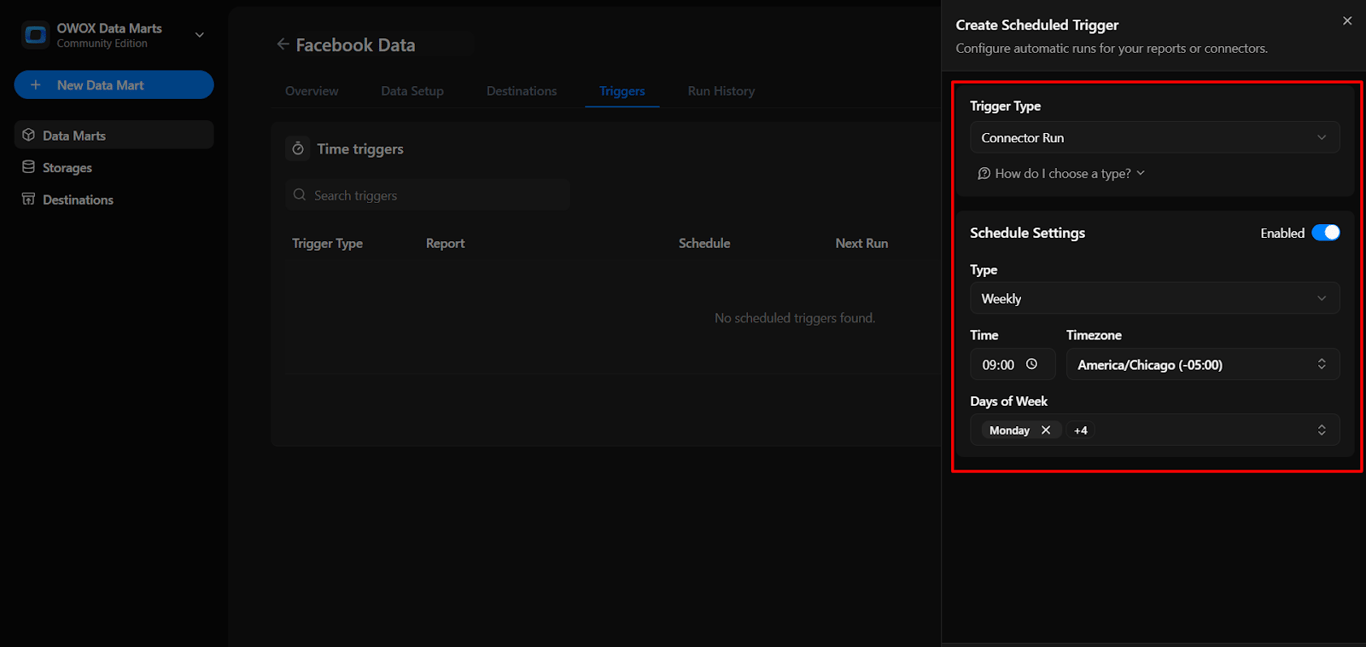
This workflow gives you scheduled ingestion of ad platform data into BigQuery, ready for your own attribution SQL.
Building attribution models with combined data in BigQuery
After bringing both GA4 event data and ad spend data into BigQuery, you can start building attribution models that reflect the full customer journey. This combined data allows you to see which channels and touchpoints influenced user actions, rather than just the last interaction before a conversion.
You write the attribution query yourself, then publish it as an SQL-based Data Mart in OWOX Data Marts, so the logic is versioned, traceable, and reusable across multiple destinations.
Using SQL, you can create rule-based models like first-click, last-click, linear, data-driven, or even custom logic tailored to your marketing goals. These models help you understand which channels drive real results and provide the insights needed to optimize your campaign strategy.
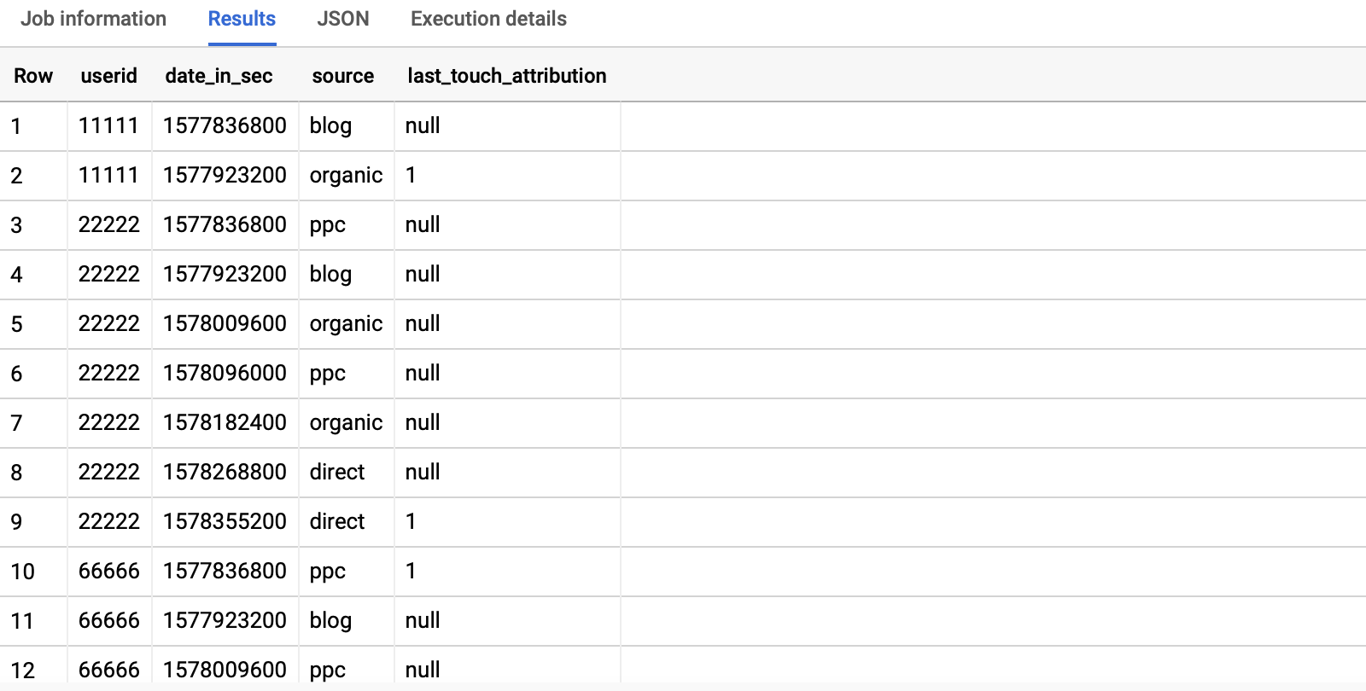
Using BigQuery to analyze cross-channel marketing performance
Using BigQuery to analyze cross-channel marketing performance
When you combine data from Google Ads, Meta Ads, and GA4 in BigQuery, you get a complete view of how users interact with your brand across multiple platforms. Instead of looking at each channel in isolation, you can analyze the full customer journey, from the first impression to the final conversion.
SQL allows you to build attribution models that measure the impact of every touchpoint along the way. You can identify which platforms perform best, compare campaign effectiveness, and understand how different channels work together to drive results. This insight helps you make smarter marketing decisions backed by real data.
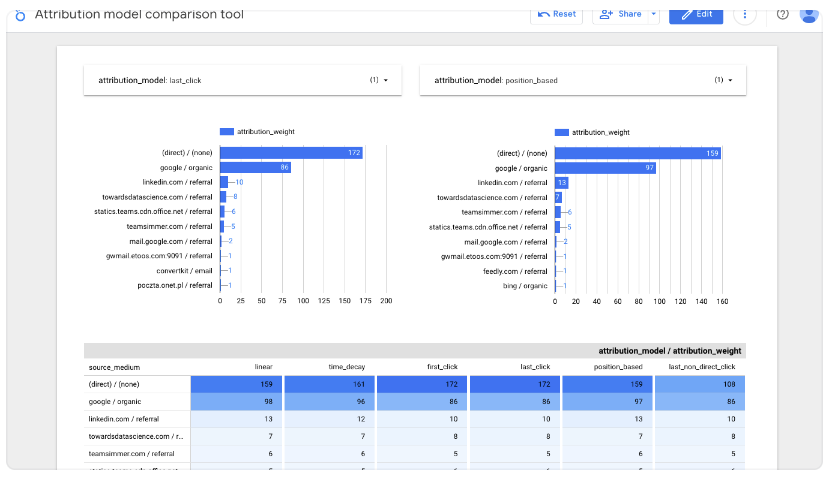
Once your attribution query is published as a Data Mart, you can send its output to Google Sheets or Data Studio, with no need to duplicate logic or rewrite queries.
Understanding the core logic of attribution modeling
Understanding the core logic of attribution modeling
To build effective attribution models, it’s important to understand how user interactions are tracked and credited. This section explains key concepts like touchpoint tracking, lookback windows, and defining conversion events that drive meaningful marketing insights.
Touchpoint tracking in attribution models

Touchpoint tracking is about recording every interaction a user has with your marketing before they convert. These could include clicking on an ad, opening an email, or visiting your website from a referral. It helps you understand the path a customer takes before completing an action.
By tracking touchpoints like first-click, last-click, or multi-click, marketers can see which channels actually influence decisions. This insight allows better evaluation of campaign performance and smarter budget allocation across touchpoints.
Lookback windows in attribution modeling
A lookback window sets the time frame in which a user’s interactions can be considered for attribution. For example, if the window is 30 days, only touchpoints within those 30 days before a conversion will be eligible for credit.
This helps marketers understand how long it takes for marketing actions to influence users. It also ensures older interactions aren’t unfairly credited, giving a more accurate view of what really impacts user behavior within a meaningful time range.
Defining conversion events in attribution models

Conversion events are the actions you want users to take – like making a purchase, signing up, or requesting a demo. These are the key outcomes that attribution models focus on when assigning credit to marketing touchpoints.
Attribution models then evaluate which touchpoints deserve credit for driving that conversion. If only one touchpoint occurred in the lookback window, it gets full credit. If multiple exist, the model decides how to split the credit, depending on the logic used (e.g., last-click, time-decay, etc.).
Step-by-step guide to writing SQL for attribution models
Step-by-step guide to writing SQL for attribution models
In this section, we’ll walk through the SQL you write to turn GA4 events and ad costs into attribution results.
Step 1: Group GA4 events into sessions
Before you can assign attribution credit, your GA4 event-level data needs to be grouped into sessions. Write a query over the GA4 export that extracts traffic source details, calculates a session_start timestamp, and groups events by user_pseudo_id. The result is a session-level table ready for attribution modeling.
Step 2: Join ad costs to sessions
Importing ad spend alone isn’t enough; you also need to connect it to user sessions. Match the ad data loaded by your connectors to sessions on gclid or UTM parameters, so each session carries the campaign and cost it came from.
Step 3: Building attribution models with SQL (with examples)
Once your data is unified, you can apply rule-based attribution in SQL. The query below computes three models at once from a session-level table (one row per session, with user_pseudo_id, session_start, traffic_source and, on the converting session, the conversion and its revenue). It runs as written in Google BigQuery; the sessions CTE stands in for your table, with one user who converts once after three sessions.
WITH sessions AS (
  -- one row per session, from your
  -- GA4 export after sessionization
  SELECT 'u1' AS user_pseudo_id,
         TIMESTAMP '2026-09-01 10:00:00'
           AS session_start,
         'google / cpc' AS traffic_source,
         CAST(NULL AS STRING) AS conversion_id,
         0.0 AS revenue
  UNION ALL SELECT 'u1',
    TIMESTAMP '2026-09-03 18:30:00',
    'facebook / paid', NULL, 0.0
  UNION ALL SELECT 'u1',
    TIMESTAMP '2026-09-05 09:15:00',
    'email', 'T-100', 120.0
),
conversions AS (
  SELECT user_pseudo_id, revenue
  FROM sessions
  WHERE conversion_id IS NOT NULL
),
journeys AS (
  -- position of each session in the
  -- journey, and the journey length
  SELECT s.traffic_source, c.revenue,
    ROW_NUMBER() OVER (
      PARTITION BY s.user_pseudo_id
      ORDER BY s.session_start) AS pos,
    COUNT(*) OVER (
      PARTITION BY s.user_pseudo_id)
      AS touches
  FROM sessions AS s
  JOIN conversions AS c
    USING (user_pseudo_id)
)
SELECT traffic_source,
  SUM(IF(pos = 1, revenue, 0))
    AS first_click,
  SUM(IF(pos = touches, revenue, 0))
    AS last_click,
  ROUND(SUM(revenue / touches), 2)
    AS linear
FROM journeys
GROUP BY traffic_source
ORDER BY linear DESC| traffic_source | first_click | last_click | linear |
|---|---|---|---|
| google / cpc | 120.0 | 0.0 | 40.0 |
| facebook / paid | 0.0 | 0.0 | 40.0 |
| 0.0 | 120.0 | 40.0 |
The same $120 order is credited entirely to paid search, entirely to email, or split three ways, depending on the rule. Two details matter in the SQL. Credit goes by position in the journey (pos = 1, pos = touches), not by matching the source name to the first or last source: a user who arrives from paid search twice would otherwise have both sessions credited as the first click. And this example has one conversion per user; with several, partition the journey by conversion and keep only the sessions inside the lookback window before each one.
What the choice of model does on a real-size store
We ran the same three rules on the demo shop behind the public [Demo] E-commerce project in OWOX Data Marts (synthetic data): every completed order from July to September 2026, with the customer’s sessions in the 30 days before it as the journey and the session the order was placed in as the last touch. Revenue is the order lines’; spend is each platform’s spend for the quarter.
| Source / medium | ROAS, first click | ROAS, last click | ROAS, linear | Last vs first |
|---|---|---|---|---|
| tiktok / cpc | 11.86 | 4.78 | 9.11 | −60% |
| facebook / cpc | 8.52 | 4.31 | 6.68 | −49% |
| reddit / cpc | 12.67 | 4.75 | 8.70 | −63% |
| bing / cpc | 5.37 | 4.73 | 4.92 | −12% |
| google / cpc | 4.78 | 4.70 | 4.74 | −2% |
| linkedin / cpc | 1.83 | 0.50 | 1.30 | −73% |
| twitter / cpc (X Ads) | 9.24 | 0.41 | 5.64 | −96% |
The query behind the table, as run on the demo dataset:
WITH conv AS (
  SELECT o.order_id, o.customer_id, o.order_date,
    o.session_id AS order_session,
    SUM(p.line_net_revenue) AS revenue
  FROM `owox-demo.ecommerce.orders` AS o
  JOIN `owox-demo.ecommerce.purchases` AS p
    USING (order_id)
  WHERE o.status = 'Completed'
    AND o.order_date
      BETWEEN '2026-07-01' AND '2026-09-30'
  GROUP BY 1, 2, 3, 4
),
earlier AS (
  -- the customer's sessions in the 30 days before
  SELECT c.order_id, c.revenue, s.date,
    s.session_id,
    CONCAT(s.source, ' / ', s.medium) AS ch,
    FALSE AS is_last
  FROM conv AS c
  JOIN `owox-demo.ecommerce.sessions` AS s
    ON s.customer_id = c.customer_id
   AND s.date BETWEEN
       DATE_SUB(c.order_date, INTERVAL 30 DAY)
       AND DATE_SUB(c.order_date, INTERVAL 1 DAY)
),
last_touch AS (
  -- the session the order was placed in
  SELECT c.order_id, c.revenue, s.date,
    s.session_id,
    CONCAT(s.source, ' / ', s.medium),
    TRUE
  FROM conv AS c
  JOIN `owox-demo.ecommerce.sessions` AS s
    ON s.session_id = c.order_session
),
pos AS (
  SELECT *,
    ROW_NUMBER() OVER (PARTITION BY order_id
      ORDER BY is_last, date, session_id) AS rn,
    COUNT(*) OVER (PARTITION BY order_id) AS n
  FROM (SELECT * FROM earlier
        UNION ALL SELECT * FROM last_touch)
),
ad_spend AS (
  SELECT CONCAT(source, ' / ', medium) AS ch,
    SUM(spend) AS amount
  FROM `owox-demo.ecommerce.ad_performance`
  WHERE date BETWEEN '2026-07-01' AND '2026-09-30'
  GROUP BY ch
)
SELECT ch,
  ROUND(SUM(IF(rn = 1, revenue, 0))
    / ANY_VALUE(amount), 2) AS roas_first,
  ROUND(SUM(IF(is_last, revenue, 0))
    / ANY_VALUE(amount), 2) AS roas_last,
  ROUND(SUM(revenue / n)
    / ANY_VALUE(amount), 2) AS roas_linear
FROM pos JOIN ad_spend USING (ch)
GROUP BY ch
ORDER BY roas_linear DESC
Two patterns stand out. Paid social opens journeys and search closes them: TikTok, Facebook and Reddit lose half or more of their credit under last click, while Google Ads barely moves, so a last-click report quietly tells you to shift budget from social to search. And a channel’s verdict can flip on the rule alone: LinkedIn clears a 1.5 ROAS target on first click (1.83), misses it on linear (1.30) and fails badly on last click (0.50). Direct and email, which close journeys, gain under last click. That is the reason to compute all three side by side before anyone moves budget.
Publish the query as a Data Mart that you can reuse in Sheets or Data Studio.
Step 4: Validate attribution output
Before using your attribution data in reports, it’s important to verify its accuracy. Check for sessions missing conversions, costs that matched no session, and rows with missing or zero values in AdCost, Impressions, or Clicks, so you fix errors before results reach dashboards or stakeholders.
Step 5: Automate data updates
You can automate refreshes with:
This ensures your attribution model stays up-to-date without manual exports.
Where OWOX Data Marts fits
OWOX Data Marts loads ad platform data into your warehouse with no-code connectors and lets an analyst publish SQL over the company’s own warehouse as Data Marts. Your attribution query becomes one of them, and reports and AI questions read from it through the model.
Turn your data into decisions.
Governed data marts give you the clean foundation ML needs to actually work.
- No AI hallucinations
- Analyst-governed definitions
- Every number traces to SQL
Frequently Asked Questions
Where can I access the OWOX Data Marts Community Edition?
OWOX Data Marts is open source, and the self-managed Community edition is on GitHub (github.com/OWOX/owox-data-marts). It includes the connectors that load ad platform data into your warehouse, such as Google BigQuery, and the setup guides. The attribution logic itself is SQL you write; you can then publish it as a Data Mart so reports read the same model.
How do I write SQL to build attribution models in BigQuery?
Start from a session-level table built from your GA4 export, with one row per session and its traffic source. First-click and last-click credit come from FIRST_VALUE and LAST_VALUE over each user's sessions ordered by time, with an explicit full window frame; linear credit divides each conversion's revenue by the number of sessions in the journey. The article includes one runnable query that computes all three side by side. Add time decay or position-based rules by changing the weights.
Can I use GA4 event data and ad spend data in BigQuery for attribution modeling?
Yes. Join GA4 event data with ad spend in BigQuery on campaign, source, medium and date. The joined table lets you apply first-click, last-click or linear attribution in SQL and compare each channel's credited revenue with its cost. The SQL is yours; once it is right, publishing it as a Data Mart keeps everyone on the same model.
How do free connectors help in building attribution models in BigQuery?
Connectors load ad costs from platforms such as Google Ads, Meta and LinkedIn into your warehouse on a schedule, so you do not export them by hand. With costs next to your GA4 data, the attribution model is one SQL query over both. The connectors in OWOX Data Marts are free in the self-managed Community edition.
What is an attribution model, and why is it important?
An attribution model is a rule or set of rules that assigns credit to marketing touchpoints for driving conversions. It’s important because it helps marketers understand which channels and campaigns contribute most to customer actions, improving budget allocation and strategy.