What is cohort analysis: how to build and read a cohort report
Cohort analysis groups customers by when they started and follows each group over time. How to read the table, and how to build it in Google Analytics 4, Google Sheets or your warehouse.

Cohort analysis groups customers by when they started, usually the month of their first purchase or sign-up, and tracks each group separately over the following weeks or months. Instead of one retention rate for everybody, you see whether January’s customers came back more often than March’s, and in which month each group stopped buying.
That difference is the point. A business can grow revenue every quarter while every new group of customers is worth less than the one before; the total hides it, the cohort table shows it. This guide explains how to read a cohort table, the choices that change what it says, and how to build one in Google Analytics 4, in Google Sheets and in your warehouse.
Originally published in 2020. Fully updated in October 2026 for the current Google Analytics 4 cohort exploration and a warehouse-based method.
What a cohort is
A cohort is a group of people who did the same thing in the same period: everyone who first bought in September, everyone who signed up in the first week of November, everyone who installed the app from one campaign.
There are two kinds:
- Acquisition cohorts group people by when they started: first visit, sign-up or first order. This is what most cohort reports mean, and what this guide uses.
- Behavioural cohorts group people by something they did: used a feature, bought a category, saw a new checkout. They are how you test whether that action changes what people do afterwards.
How to read a cohort table
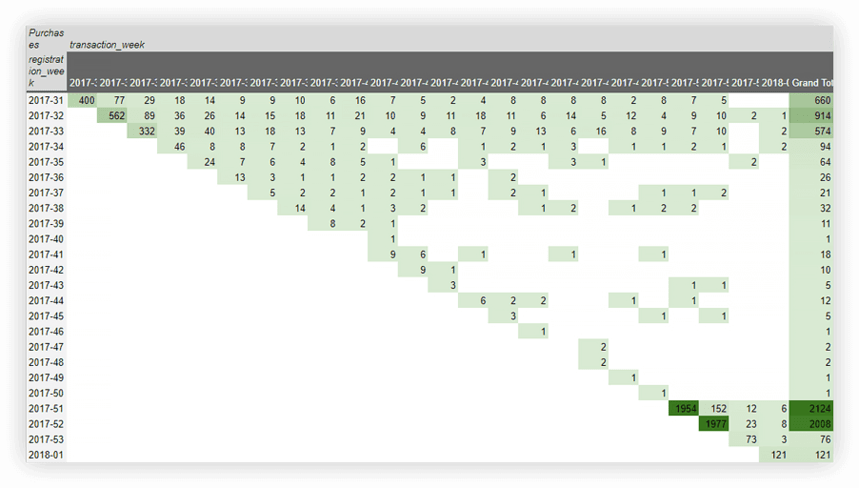
A cohort table has one row per cohort and one column per period since the cohort started. Each cell answers: of the people who started in this period, how many did the thing again N periods later?
Read it three ways:
- Along a row: how one cohort decays. A steep drop after the first period is normal; what matters is where the curve flattens, because those are your loyal customers.
- Down a column: whether newer cohorts do better or worse at the same age. If month-3 retention falls from cohort to cohort, something about how you acquire customers changed.
- Along a diagonal: cells on the same diagonal happened in the same calendar period. A dark or pale diagonal is a seasonal event or a promotion, not a property of the cohorts.
The table also tells you when to act. If most cohorts stop buying after the second month, a reminder or offer in month two reaches people before they are gone.
OWOX Data Marts
See your first report built in real time. 15 minutes.
- Connect your data warehouse
- Pick your metrics
- Get a live Google Sheets report
In the time it takes to write a ticket. Then imagine never writing that ticket again.
Book a DemoWe'll use your actual use case
Choices that change the number
Choices that change the number
The same orders produce different cohort tables depending on four decisions, and whoever asked for the report rarely knows they were made:
| Choice | Options | Effect |
|---|---|---|
| Which orders count | every placed order, or completed only | cancelled and returned orders inflate retention |
| Period | calendar months, or rolling 30-day windows | calendar months make a first-week customer and a last-week customer look different |
| Return condition | ordered in that exact period, or in that period or later | “or later” makes retention look higher and never fall |
| Unfinished periods | blank, or 0% | 0% makes the newest cohort look like a failure |
Cohort retention analysis in SQL runs each of these choices on real data, on the Google Merchandise Store sample and on the demo shop behind [Demo] E-commerce, and prints the results: month-one retention of 3.8% on calendar months against 2.8% on rolling 30-day windows, 6.9% when “that month or later” counts, and 9.0% with every placed order against 7.6% with completed orders only. Write the four choices under any cohort table you share.
A fifth choice is how long you wait before you judge. On the demo shop behind the public [Demo] E-commerce project (synthetic data), we grouped customers whose first completed order came in January–June 2025 by the channel of that order, and measured the share who ordered again:
| First order from | Customers | Again within 30 days | Within 90 days | Within 365 days |
|---|---|---|---|---|
| Direct | 312 | 9.6% | 26.0% | 73.7% |
| Paid ads | 234 | 6.4% | 18.8% | 69.2% |
| Organic search | 185 | 9.2% | 28.1% | 72.4% |
| 67 | 6.0% | 20.9% | 77.6% |
At 90 days, customers from paid ads look a third less loyal than customers from organic search. At a year, the gap is three points, and email, the weakest at 30 days, comes out on top, though with 67 customers that lead is within noise. A cohort table read too early does not just give a smaller number; it can rank the channels in the wrong order.
Cohort analysis in Google Analytics 4
Cohort analysis in Google Analytics 4
Google Analytics 4 has a built-in cohort report in Explorations. Use it for behaviour on your site or app: how many users who first arrived in a given week came back.
- Open Explore, then the Template gallery, and choose Cohort exploration.
- Set the four core settings (Google Analytics Help, Cohort exploration, checked October 2026):
- Cohort inclusion: the condition that puts a user in a cohort, for example first touch.
- Return criteria: what counts as coming back, for example any event or a purchase.
- Cohort granularity: daily, weekly or monthly.
- Calculation: standard counts users who returned in that period only; rolling counts users who returned in that period and every period before it; cumulative counts users who returned in any period up to it.
- Optionally add a breakdown dimension, such as first user source, and choose the value (metric) to show.
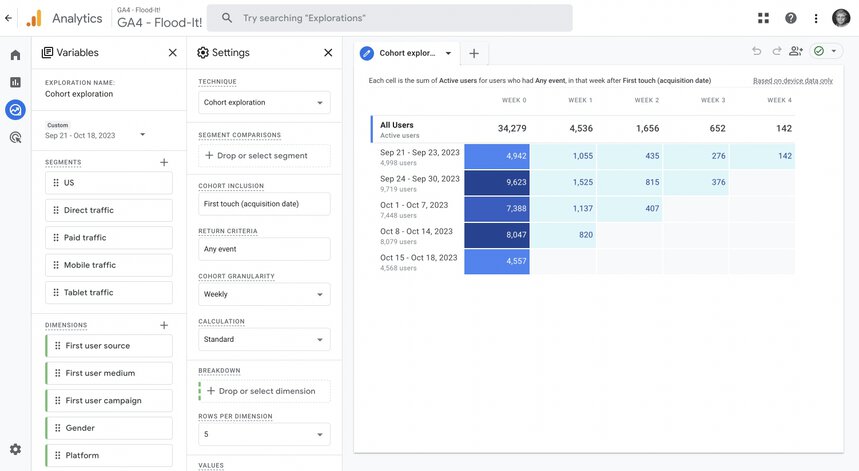
Google lists three limits: a cohort exploration shows at most 60 cohorts, a breakdown shows the top 15 values of its dimension, and demographic dimensions are subject to thresholding.
The larger limit is what GA4 knows. It sees sessions and events, not your order statuses, refunds or margin, so its cohort table measures coming back, not buying again. The two are far apart. On the demo shop behind the public [Demo] E-commerce project (synthetic data), we took the customers whose first completed order fell in January–June 2025 and counted, for each 30-day month after it, who returned to the site and who ordered again:
WITH firsts AS (
  SELECT customer_id, MIN(order_date) AS first_order
  FROM `owox-demo.ecommerce.orders`
  WHERE status = 'Completed'
  GROUP BY customer_id
  HAVING MIN(order_date)
    BETWEEN '2025-01-01' AND '2025-06-30'
),
activity AS (
  -- a return visit, and a repeat order,
  -- each tagged with the 30-day month it fell in
  SELECT f.customer_id, 'visit' AS kind,
    DIV(DATE_DIFF(s.date, f.first_order, DAY)
        - 1, 30) + 1 AS m
  FROM firsts AS f
  JOIN `owox-demo.ecommerce.sessions` AS s
    ON s.customer_id = f.customer_id
   AND s.date > f.first_order
  UNION ALL
  SELECT f.customer_id, 'order',
    DIV(DATE_DIFF(o.order_date, f.first_order,
        DAY) - 1, 30) + 1
  FROM firsts AS f
  JOIN `owox-demo.ecommerce.orders` AS o
    ON o.customer_id = f.customer_id
   AND o.status = 'Completed'
   AND o.order_date > f.first_order
)
SELECT m AS month,
  ROUND(100 * COUNT(DISTINCT IF(kind = 'visit',
    customer_id, NULL))
    / ANY_VALUE(n), 1) AS returned_to_site_pct,
  ROUND(100 * COUNT(DISTINCT IF(kind = 'order',
    customer_id, NULL))
    / ANY_VALUE(n), 1) AS ordered_again_pct
FROM activity
CROSS JOIN (SELECT COUNT(*) AS n FROM firsts)
WHERE m BETWEEN 1 AND 6
GROUP BY m
ORDER BY m| Month after first order | Returned to the site | Ordered again |
|---|---|---|
| 1 | 43.2% | 8.3% |
| 2 | 47.0% | 8.0% |
| 3 | 42.2% | 9.1% |
| 4 | 48.0% | 8.9% |
| 5 | 49.2% | 9.5% |
| 6 | 50.4% | 9.5% |
A visit cohort says roughly half your customers are retained every month; an order cohort says one in eleven. The exact levels, and the slight rise in visits over time, come from a synthetic dataset; the gap between the two kinds of cohort is the point. Both are true, of the same people. If the question is revenue, retention or lifetime value, build the cohorts from orders; use GA4’s cohort exploration for engagement, and label which one a table shows.
Cohort analysis in Google Sheets
Cohort analysis in Google Sheets
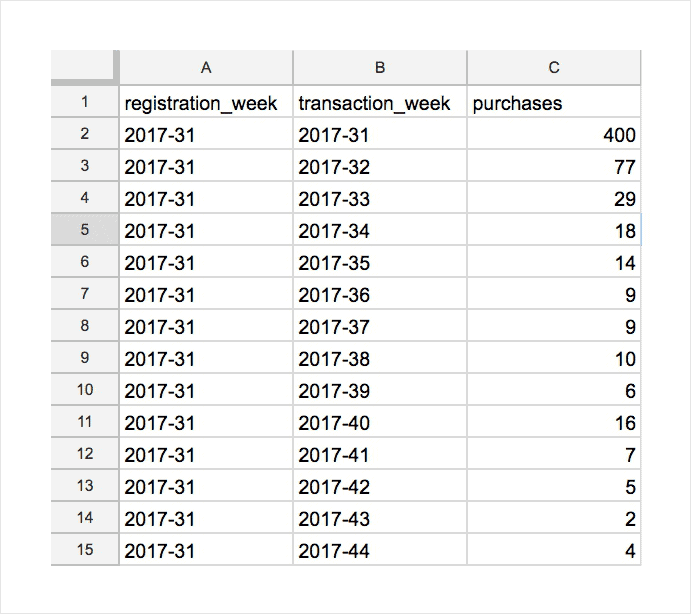
A spreadsheet is enough for a few thousand rows. Start from a table with three columns: the cohort period (week or month of first purchase), the activity period (week or month of the order) and the metric (orders, customers or revenue).
Then build the table one of two ways.
With a pivot table. Select the data, choose Insert → Pivot table, put the cohort period in Rows, the activity period in Columns and the metric in Values (summarised by SUM). Add conditional formatting to colour the cells.
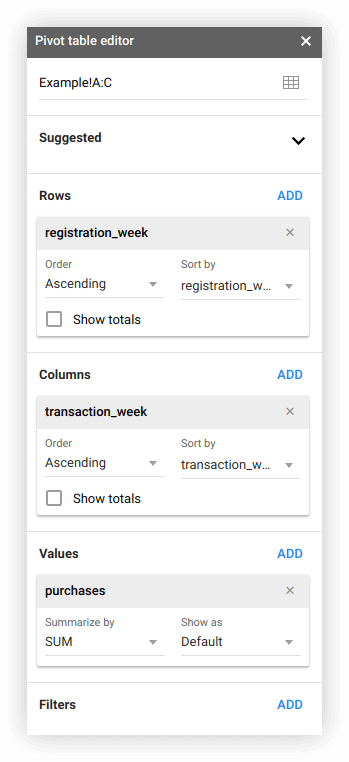
With formulas, if you want the layout under your control. On a new sheet, with the source data on a sheet named Data:
- Cohort periods down column A, in cell A3:
=UNIQUE(Data!A2:A) - Activity periods across row 2, in cell B2:
=TRANSPOSE(UNIQUE(Data!B2:B)) - The metric for each cell, in B3 and filled across and down:
=SUMIFS(Data!$C:$C,
  Data!$A:$A, $A3,
  Data!$B:$B, B$2)
To show retention as a percentage, divide each cell by the cohort’s first-period value. To filter by source or campaign, add those columns to Data and add a matching criteria pair to SUMIFS.
Where the source data comes from matters more than the formula. A file exported by hand is out of date the day after. If your orders already sit in your warehouse, the can be fed from a scheduled report instead of an export.
Cohort analysis in your warehouse
Cohort analysis in your warehouse
Once orders live in a warehouse, the cohort table is one SQL query: find each customer’s first-order month, count which later months they ordered in, and divide by the cohort size. It has no row limit, it reads order status and revenue directly, and it is the same query every time it runs. The full query, with each of the four choices above as a visible line, is in cohort retention analysis in SQL.
The question that query answers can also be asked in a sentence, once orders are published as a Data Mart in a model such as the E-commerce model:
“Group customers by the month of their first completed order and show the share who placed another completed order in each of the following six months.”
| Asked of raw tables | Asked of the Data Model | |
|---|---|---|
| What the assistant sees | every orders table and its copies | the published Orders Data Mart |
| “Completed order” | whatever it guesses from the column names | the status filter the analyst wrote |
| What you get | a cohort table | the cohort table, and the SQL behind it |
![The prompt above asked in the AI Assistant of an Insight on the Orders Data Mart, in the [Demo] E-commerce project of OWOX Data Marts: the assistant writes and applies the SQL and returns each first-order month with its cohort size and the share who ordered again in each later month – the cohort table from a sentence, on the analyst’s definition of a completed order.](https://cdn.owox.com/www/content-marketing-article/what-is-cohort-analysis/screens/1.png/public)
The answer is only as right as the Data Marts behind it. But the four choices are made once, by the analyst, and the next person who asks gets the same table.
What to do with cohort analysis
What to do with cohort analysis
- Time your retention offers. Send the reminder in the period just before most cohorts drop off.
- Compare acquisition channels. Break cohorts down by first source. A channel with cheap first orders and no second order is more expensive than it looks; customer lifetime value by channel puts a number on it.
- Test changes over the long run. A standard A/B test measures the first conversion. A behavioural cohort of people who saw the new version, compared with those who did not, shows whether the effect lasts.
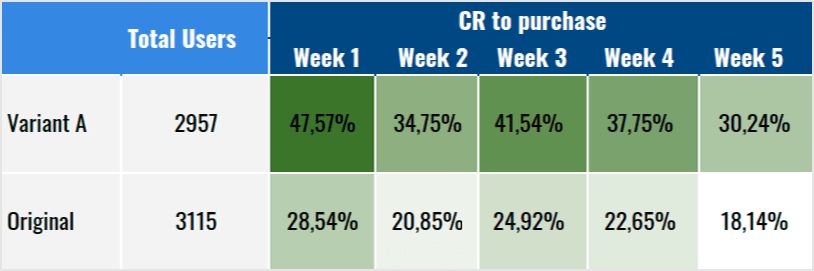
- Find your best customers. Combine cohorts with RFM analysis to see which cohorts produced the customers who still buy often and spend the most.
Turn your data into decisions.
Governed data marts give you the clean foundation ML needs to actually work.
- No AI hallucinations
- Analyst-governed definitions
- Every number traces to SQL
Frequently Asked Questions
What is cohort analysis?
Cohort analysis is a behavioral analytics method that groups users who share a common characteristic and then tracks their performance over a period of time. This helps businesses gain insights into customer retention, engagement, and product usage.
What are some metrics used in cohort analysis?
Common metrics used in cohort analysis include retention rate, lifetime value, churn rate, and conversion rate. These metrics can help businesses understand customer behavior and track the success of marketing campaigns.
Why is cohort analysis important?
Cohort analysis helps businesses understand how different groups of customers behave over time. It can help identify trends, track customer retention, and uncover insights that can improve marketing strategies, product development, and customer experience.