Google Ads enhanced conversions: how to set them up in 2026
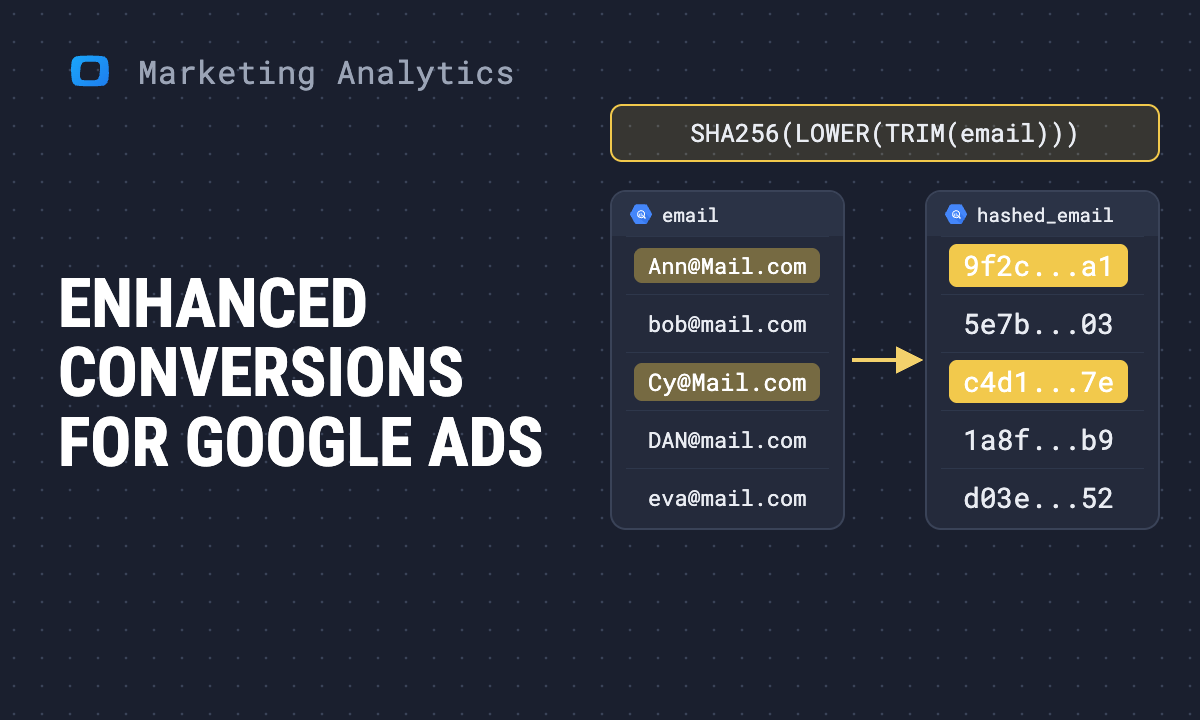
Enhanced conversions let Google Ads match a conversion to an ad click using first-party data the customer typed into your site, such as an email address or phone number. The data is hashed with SHA-256 in the browser or on your server before Google receives it. You turn the feature on in Google Ads, then tell your tag where to find the data: automatically, through CSS selectors, or with a code snippet.
This guide covers both kinds, enhanced conversions for web and enhanced conversions for leads, with the Google tag and with Google Tag Manager. It also covers what Google changed in 2026 and how to check, against your own orders, whether the numbers Google reports now match what actually happened.
What enhanced conversions are
Google describes the feature as a way to “improve the accuracy of your conversion measurement” by sending hashed first-party conversion data alongside the conversions you already track (Google Ads Help, About enhanced conversions, checked October 2026).
The problem it solves is a lost link between a click and a sale. A shopper clicks your ad on a work laptop, comes back three days later on a phone and buys. Without a cookie that survived the trip, Google sees a click with no conversion and a conversion with no click. With enhanced conversions, the hashed email from the order is matched to the same hashed email on a signed-in Google account, and the conversion is credited to the ad.
There are two kinds:
| Enhanced conversions for web | Enhanced conversions for leads | |
|---|---|---|
| Conversion happens | on your website | offline, after a form fill |
| Data sent | hashed email, phone, name, address at checkout | hashed lead data at form submit, then again with the offline sale |
| Typical user | online stores, sign-ups | B2B, clinics, anything closed by sales |
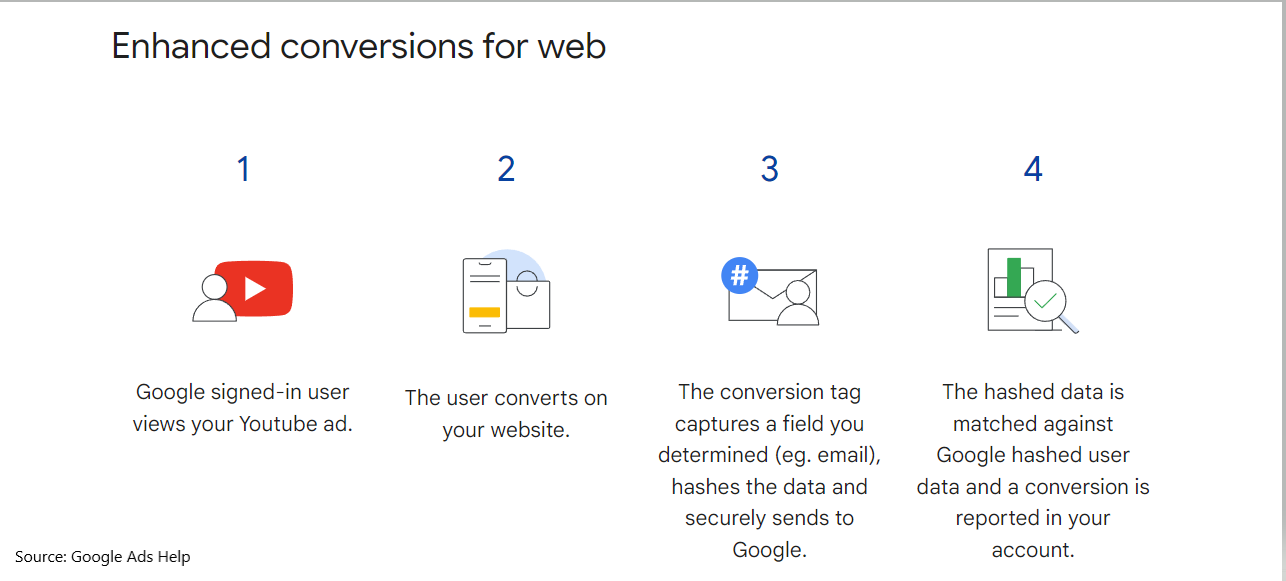
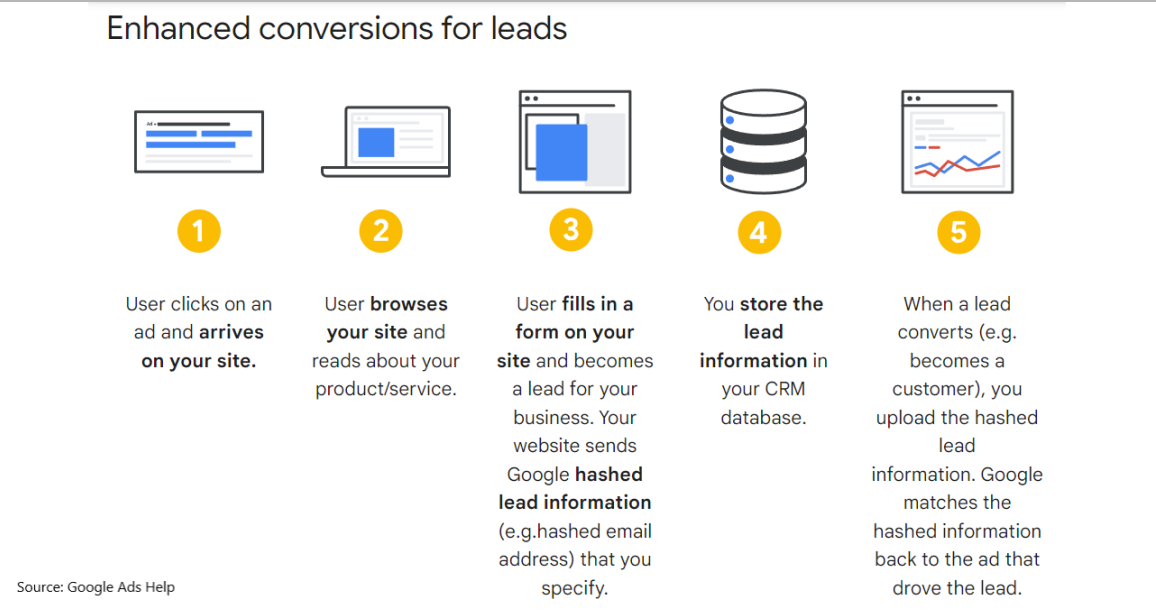
The identifiers Google accepts are email address, phone number, name and home address. Email matches best. Before hashing, values are normalised: leading and trailing spaces removed, text lowercased.
What changed in 2026
Three changes on Google’s side matter if you set this up in the past and are checking it now (Updates to your enhanced conversions settings, checked October 2026):
- One switch instead of two. Enhanced conversions for web and for leads are being “combined into a single on/off setting”, starting in June 2026. Accounts that had already agreed to the customer data terms are moved to the new unified status automatically. You can still opt out per conversion action.
- Offline uploads move to the Data Manager API. From 15 June 2026, offline conversion imports and enhanced conversions for leads uploads go through the Data Manager API and are blocked in the Google Ads API. If a script or a vendor uploads your offline sales through the old API, check it.
- Several sources at once. Since April 2026 Google Ads accepts user-provided data from more than one source for the same conversion.
Interface labels move with these changes. Google’s own help pages currently describe the settings both as “Settings within the Goals icon” and as “Conversion settings under the Conversions drop-down”. If a menu below looks different, the setting is the same: the Enhanced conversions panel on the account’s conversion settings page.
OWOX Data Marts
See your first report built in real time. 15 minutes.
- Connect your data warehouse
- Pick your metrics
- Get a live Google Sheets report
In the time it takes to write a ticket. Then imagine never writing that ticket again.
Book a DemoWe'll use your actual use case
Before you start
Check four things first. Most failed setups skip one of them.
- A working conversion tag. Enhanced conversions add data to a conversion you already measure. If the base tag does not fire on the purchase or thank-you page, nothing below will fix it.
- The data exists on the page. The email or phone must be on the page, or in the data layer, at the moment the conversion tag fires. A thank-you page that does not show the email needs the code method.
- Customer data terms. Google asks you to “review and agree to customer data terms” when you turn the feature on. Someone with the right access must click Agree.
- Consent. Data sent without the user’s consent is not yours to send. Your consent banner and Consent Mode settings decide whether the tag may collect it.
For leads, add a fifth: auto-tagging is on in Google Ads, so the GCLID is collected with each form fill.
Set up enhanced conversions for web with the Google tag
Set up enhanced conversions for web with the Google tag
Use this path if the Google tag (gtag.js) is installed directly on your site (Set up enhanced conversions for web using the Google tag, checked October 2026).
- In Google Ads, open Goals and go to the conversion Settings.
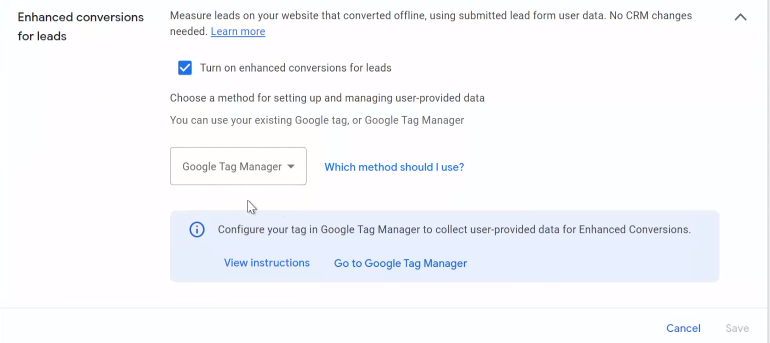
- Expand Enhanced conversions and check Turn on enhanced conversions.
- Choose Google tag as the method.
- If you are not sure which method your site uses, click Which method should I use?, enter your domain and click Check URL.
- Agree to the customer data terms.
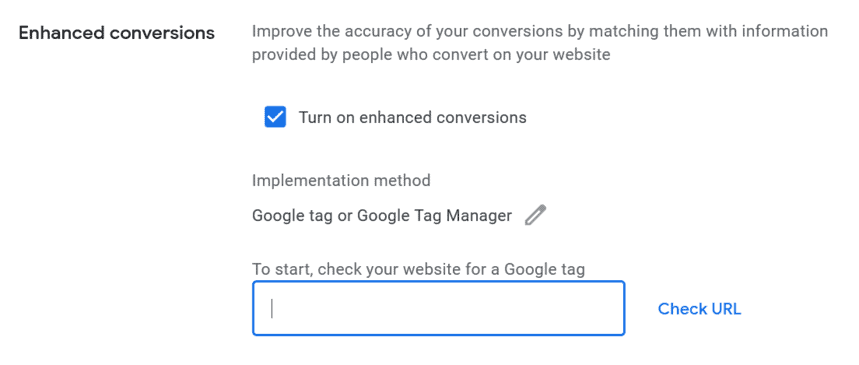
If Google reports that your tag will collect user-provided data from your website, save and you are done. Otherwise open Tag details and pick how the tag finds the data:
| Option | What it does | Use it when |
|---|---|---|
| Automatically detect user-provided data | the tag inspects the page for strings that look like an email or phone | the email is visible on the conversion page |
| Specify CSS selectors or JavaScript variables | you point the tag at the exact fields | the page has several emails, or detection misses |
| Add a code snippet to your website | your code sends the (hashed) data directly | the data is not on the page, or you want full control |
You can combine methods. Google notes that “code snippet data is always prioritized” over the other two.
Set up enhanced conversions for web with Google Tag Manager
Set up enhanced conversions for web with Google Tag Manager
Use this path if Google Ads conversion tracking runs through Tag Manager (Set up enhanced conversions for web using Google Tag Manager, checked October 2026).
In Google Ads, turn on enhanced conversions as above and choose Google Tag Manager as the method. Google then tells you to finish the setup in Tag Manager.
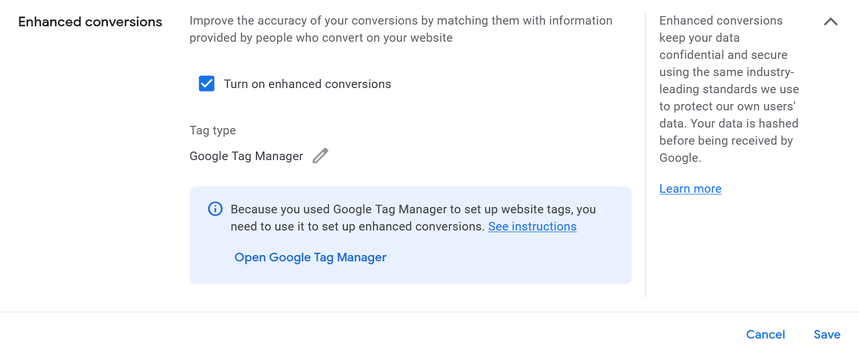
In Tag Manager:
- Open the Google Ads Conversion Tracking tag that fires on your conversion.
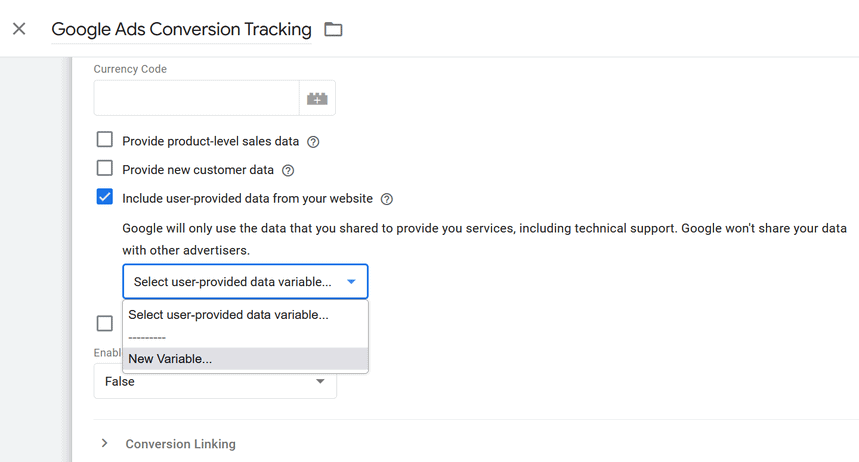
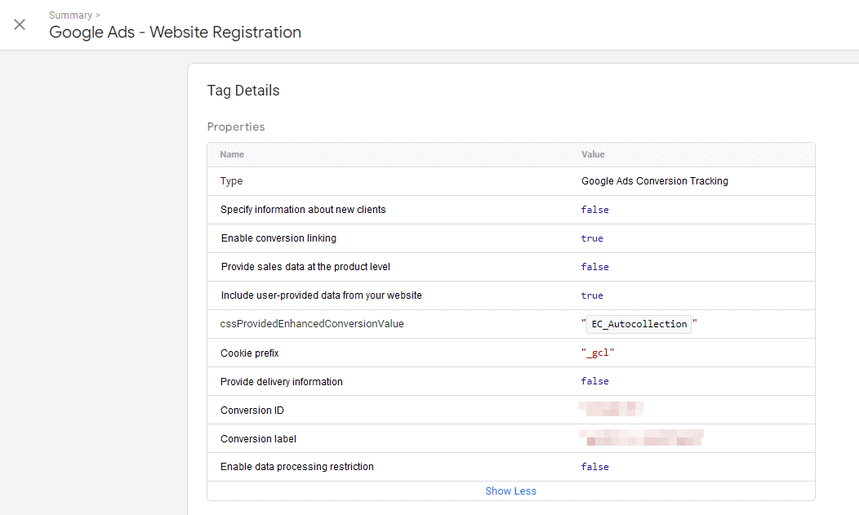
- Check Include user-provided data from your website. In containers that use the Google tag, the same switch is Allow user provided data capabilities, under the tag’s Manage settings.
- In the variable drop-down, choose New Variable and create a User-Provided Data variable.
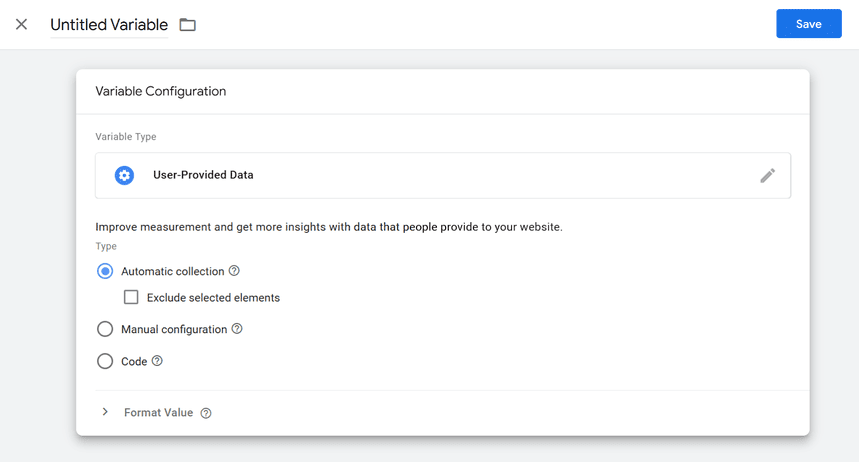
- Choose the variable type:
- Automatic collection if the email is visible on the conversion page.
- Manual configuration to map each field (email, phone, name, address) to a variable.
- Code if your developers push the data to the data layer.
Manual configuration with a CSS selector
Manual configuration is the usual fix when automatic collection picks up the wrong field. For each identifier you map, create a DOM Element variable that reads the form field.
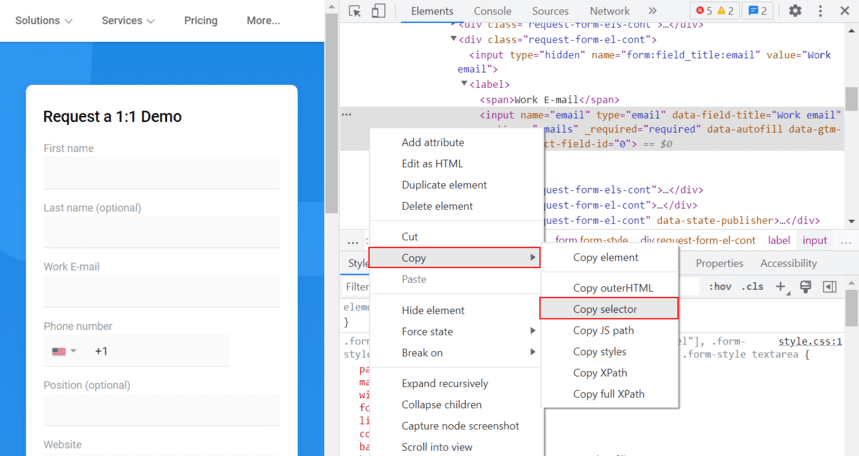
- On your site, right-click the email field, choose Inspect, then in DevTools right-click the highlighted element and choose Copy → Copy selector.
- In the User-Provided Data variable, choose Manual configuration, open the Email drop-down and choose New Variable.
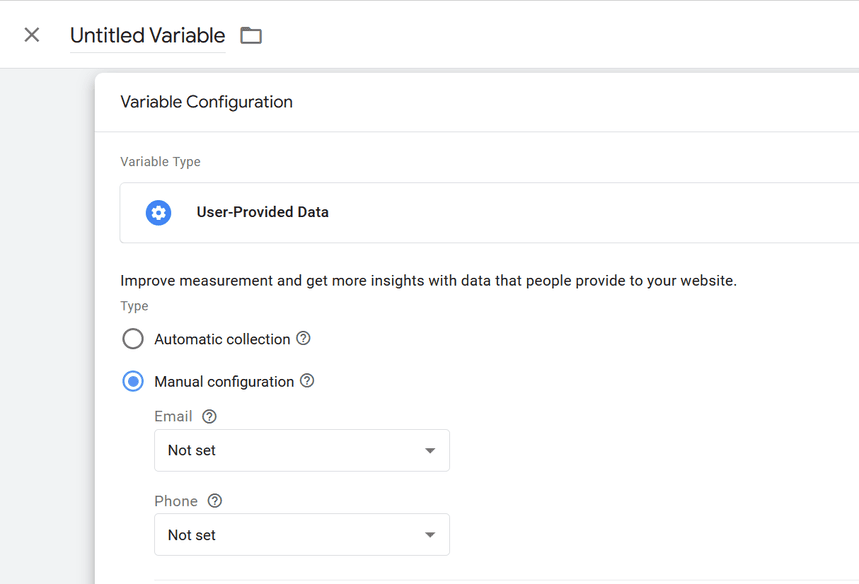
- Choose DOM Element, set the selection method to CSS Selector and paste the selector.
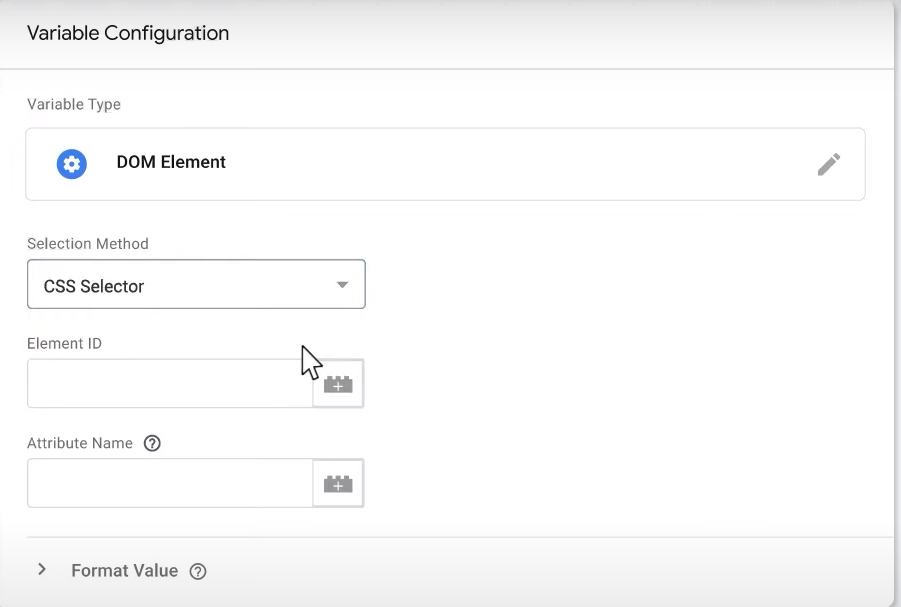
- Name the variable, save, and repeat for phone if you collect it.
A selector copied from DevTools breaks when the page layout changes. If your developers can add a stable id to the field, select by that instead.
Set up enhanced conversions for leads
Set up enhanced conversions for leads
Enhanced conversions for leads is, in Google’s words, “an upgraded version of offline conversion import that uses user-provided data, such as email addresses” (About enhanced conversions for leads, checked October 2026). It has two halves: the tag captures hashed lead data when the form is submitted, and later you upload the sale with the same hashed data.
Capture the lead with Tag Manager (Configure Google Tag Manager for enhanced conversions for leads, checked October 2026):
- Add a Conversion Linker tag that fires on all pages, if you do not have one.
- Create a Google Ads User-Provided Data Event tag with your Google Ads customer ID as the Conversion ID.
- Set its variable to Automatic, Manual or Code, as for web.
- Trigger it on an event “that happens after the form has been filled out”, such as a form submission.
- Preview, then publish the container.
If you push the data yourself, the data layer keys are email, phone_number and address (with first_name, last_name, street, city, region, country, postal_code). Pre-hashed values use keys that start with sha256_, such as sha256_email_address.
Upload the sale. When the lead becomes a customer, upload the conversion with the same hashed email or phone. Google supports this in Google Ads Data Manager and, from June 2026, the Data Manager API. Keep sending the GCLID too: Google asks you to “include GCLIDs with your uploaded events whenever possible”, and it is required if no tag collects user-provided data.
Prepare the upload in your warehouse
Most failed lead uploads fail on formatting, not on the tag. Google’s rules for user-provided data are short: remove leading and trailing spaces, lowercase the text, remove the dots before the domain in gmail.com and googlemail.com addresses, write phone numbers in E.164 (a plus sign, country code and number), and hash each value with hex SHA-256 (Google Ads Help, checked October 2026). If your CRM data already sits in a warehouse, the whole step is one query. This one runs as written in Google BigQuery; the leads CTE stands in for your CRM export.
WITH leads AS (
  -- stands in for your CRM export
  SELECT 'L-1' AS lead_id,
         ' Anna.Kovalenko@Gmail.com ' AS email,
         '+1 (415) 555-0132' AS phone
  UNION ALL SELECT 'L-2',
    'j.smith@acme-industries.com', '0044 20 7946 0958'
  UNION ALL SELECT 'L-3',
    'marta.b@outlook.com', NULL
  UNION ALL SELECT 'L-4',
    'procurement@acme-industries.com',
    '+44 20 7946 0000'
),
normalized AS (
  SELECT lead_id,
    LOWER(TRIM(email)) AS email_clean,
    -- E.164: keep digits, turn a 00 prefix into +
    CONCAT('+', REGEXP_REPLACE(
      REGEXP_REPLACE(phone, r'^\s*00', ''),
      r'[^0-9]', '')) AS phone_e164
  FROM leads
),
gmail_fixed AS (
  SELECT *,
    IF(REGEXP_CONTAINS(email_clean,
         r'@(gmail|googlemail)\.com$'),
       CONCAT(REPLACE(SPLIT(email_clean, '@')[OFFSET(0)],
                      '.', ''),
              '@', SPLIT(email_clean, '@')[OFFSET(1)]),
       email_clean) AS email_norm
  FROM normalized
)
SELECT lead_id, email_norm,
  TO_HEX(SHA256(email_norm)) AS hashed_email,
  TO_HEX(SHA256(phone_e164)) AS hashed_phone,
  NOT REGEXP_CONTAINS(email_norm,
    r'@(gmail|googlemail|outlook|hotmail|yahoo|icloud)\.')
    AS work_email
FROM gmail_fixed
ORDER BY lead_id| lead_id | email_norm | work_email |
|---|---|---|
| L-1 | annakovalenko@gmail.com | false |
| L-2 | j.smith@acme-industries.com | true |
| L-3 | marta.b@outlook.com | false |
| L-4 | procurement@acme-industries.com | true |
The hashes come out as 64-character hex strings; L-3 has no phone, so its hashed_phone is empty rather than the hash of an empty string, which would never match. A phone stored without a country code cannot be fixed by a regular expression; add the country from the lead’s own country field first.
The last column is a forecast of your match rate before you upload anything. Google can only match an address that belongs to a Google account, and company addresses on a company domain mostly do not, unless the company runs Google Workspace. Count the share of work_email = true in your leads: if it is three quarters, a low match rate after setup is the expected result, not a broken tag, and the phone number becomes the identifier worth collecting.
If you run lead form ads, the form is hosted by Google and already holds the user’s data, so no tag change is needed. Turn on enhanced conversions for leads, set up an offline conversion action and upload the outcomes.
Check that enhanced conversions work
Check that enhanced conversions work
Do these in order. The first two take minutes; the last two take days.
- Preview the container. In Tag Manager’s Preview mode, submit a test conversion and open the conversion tag. User-provided data should show as included.
- Look at the request. In Chrome DevTools, open the Network tab, convert, and find the request to
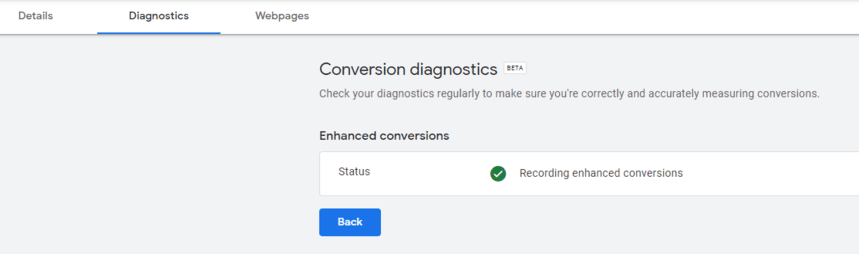
googleadservices.com/pagead/conversion/orgoogle.com/pagead/1p-conversion/. Google says to look for a parameteremwhose value starts withtv.1~emfollowed by a long hashed string. - Read the diagnostics. Two to three days after setup, open the conversion action in Google Ads and go to Diagnostics.
- Read the impact. After about 30 days Google shows how much enhanced conversions changed your reported conversions.
A warning in diagnostics is not always a broken setup.
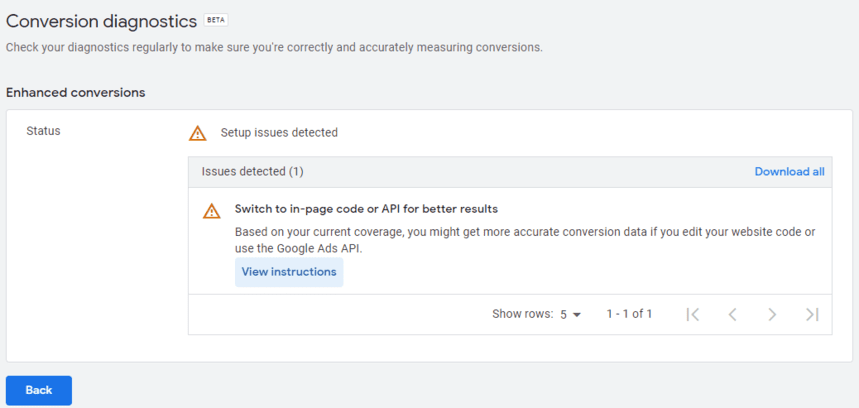
A low match rate with a correct tag usually means the emails have nothing to match: if most are company addresses not tied to a Google account, there is no signed-in user on Google’s side to pair them with, and the fix is not in the tag. The work-email share from the upload query above tells you in advance whether to expect this. If your buyers sign up with work emails, expect a lower match rate and judge the feature on the lift in diagnostics, not on the rate itself.
Check Google’s count against your own orders
Check Google’s count against your own orders
Google’s diagnostics tell you how many conversions it matched. They do not tell you whether the conversions Google Ads now reports agree with the orders your store or CRM recorded. That is the number you will be asked about when cost per acquisition moves after the switch, and the one that is awkward to defend if you have only Google’s side of it.
Put the two side by side, week by week, from a few weeks before you turned the feature on. Bring your Google Ads data into your warehouse with a (OWOX Data Marts has a free Google Ads connector), keep your orders next to it, and compare. The query below runs as written in Google BigQuery: the two CTEs stand in for your Google Ads table and your orders table.
![A Google Ads Data Mart in the [Demo] E-commerce project of OWOX Data Marts: the Google Ads connector writes ad group stats, including conversions and conversion value, to a table in the company’s own BigQuery – the Google Ads side of the comparison.](https://cdn.owox.com/www/content-marketing-article/google-ads-enhanced-conversions/screens/1.png/public)
WITH google_ads AS (
  -- one row per day
  SELECT DATE '2026-08-31' AS day,
         2.0 AS conversions,
         190.0 AS conv_value
  UNION ALL SELECT '2026-09-02', 1.0, 95.0
  UNION ALL SELECT '2026-09-08', 2.0, 200.0
  UNION ALL SELECT '2026-09-10', 2.0, 190.0
),
orders AS (
  -- one row per paid-search order
  SELECT 'A-101' AS order_id,
         DATE '2026-09-01' AS order_date,
         95.0 AS revenue
  UNION ALL SELECT 'A-102', '2026-09-02', 110.0
  UNION ALL SELECT 'A-103', '2026-09-03', 80.0
  UNION ALL SELECT 'A-104', '2026-09-04', 120.0
  UNION ALL SELECT 'A-105', '2026-09-08', 90.0
  UNION ALL SELECT 'A-106', '2026-09-09', 105.0
  UNION ALL SELECT 'A-107', '2026-09-10', 100.0
  UNION ALL SELECT 'A-108', '2026-09-11', 85.0
),
ads_weekly AS (
  SELECT DATE_TRUNC(day, WEEK(MONDAY))
           AS week,
         SUM(conversions) AS ads_conv,
         SUM(conv_value) AS ads_value
  FROM google_ads
  GROUP BY week
),
store_weekly AS (
  SELECT DATE_TRUNC(order_date,
           WEEK(MONDAY)) AS week,
         COUNT(DISTINCT order_id)
           AS orders,
         SUM(revenue) AS revenue
  FROM orders
  GROUP BY week
)
SELECT week,
       ads_conv,
       orders,
       ROUND(ads_conv / orders, 2)
         AS reported_per_order,
       ads_value,
       revenue
FROM ads_weekly
FULL JOIN store_weekly USING (week)
ORDER BY week
In this example Google reported 3 conversions for 4 orders in the week before the switch (0.75) and 4 for 4 the week after (1.0): the gap closed. In real data, watch the ratio rather than either number. For scale: in the demo shop behind the public [Demo] E-commerce project (synthetic data), Google Ads claimed 1.5 conversions per completed order for July–September 2026, the joint lowest of the paid platforms with Microsoft Ads; the platform-by-platform comparison is in how to measure online advertising. A ratio like that is not an error by itself, since Google also credits view-through and cross-device paths your store data cannot see, but it is the baseline to compare with after the switch. A ratio that rises well above 1 means Google is now crediting conversions your store attributes elsewhere, and the cost per acquisition in Google Ads will fall while your blended cost does not.
The same question can be asked in one line once the join is published as a Data Mart in a model. In the E-commerce model that is Ad Spend vs Store Orders, which sets each platform’s claimed conversions against the orders the store completed for the same source and campaign:
“Compare the conversions Google Ads claims with the completed orders the store recorded for Google paid traffic, by week, over the last eight weeks, rounded to one decimal.”
Run before and after the switch, the same sentence shows whether the gap closed.
What makes the one-line version safe to hand to someone outside the analytics team is where the answer comes from:
| Asked of raw tables | Asked of the Data Model | |
|---|---|---|
| What the assistant sees | every table in the warehouse | the published Data Marts |
| How it joins ads to orders | guesses a key | uses the relationship the analyst defined |
| What you get | a plausible number | the number, and the SQL behind it |
![The prompt above asked in the AI Assistant of an Insight on the Ad Spend vs Store Orders Data Mart, in the [Demo] E-commerce project of OWOX Data Marts: eight weeks with Google Ads claiming more conversions than the store completed orders in every one of them – the gap to watch before and after switching on enhanced conversions.](https://cdn.owox.com/www/content-marketing-article/google-ads-enhanced-conversions/screens/2.png/public)
It lowers the risk of a wrong figure rather than removing it: the answer is only as right as the Data Marts and the join the analyst published. But when a client asks why Google says one thing and the store another, you have both numbers and the query that produced them.
Common problems
- No data in diagnostics after a week. On setups made before Google’s 2026 settings change, the method chosen in Google Ads must match the one on the site: if Google Ads says Google tag and your conversions fire from Tag Manager, the data is not processed. Check the method first, then whether the email or phone is actually present when the tag fires.
- Low match rate. Work emails, or the email is collected on a different page from the conversion. Move the capture to the conversion page or use the code method.
- Leads that never convert in Google Ads. The upload does not carry the same hashed identifier as the tag, or the GCLID is missing.
- Data sent before consent. Check the tag’s consent settings. Fixing this is not optional.
For the wider question of which clicks deserve credit once conversions are matched, see how marketing attribution models work. For the ratio itself over time, Google Ads conversion rate and modeled conversions are the two terms you will meet in the reports.
Turn your data into decisions.
Governed data marts give you the clean foundation ML needs to actually work.
- No AI hallucinations
- Analyst-governed definitions
- Every number traces to SQL
Frequently Asked Questions
What are enhanced conversions in Google Ads?
Enhanced conversions send hashed first-party data the customer typed into your site, such as an email address or phone number, alongside the conversions you already track. Google matches the hashed values to signed-in Google accounts, so a conversion can be credited to an ad click even when the cookie that linked them was lost.
What is the difference between enhanced conversions for web and for leads?
Enhanced conversions for web cover conversions that happen on your website, such as a purchase. Enhanced conversions for leads cover sales closed offline after a form fill: the tag captures hashed lead data when the form is submitted, and later you upload the sale with the same hashed data.
What changed in enhanced conversions in 2026?
Google is combining the web and leads settings into a single on/off switch starting in June 2026, and from 15 June 2026 offline conversion imports and lead uploads go through the Data Manager API instead of the Google Ads API. Accounts that had accepted the customer data terms are moved to the new setting automatically.
Why is my enhanced conversions match rate low?
If the tag is correct, the usual reason is that the emails have nothing to match: company addresses that are not tied to a Google account cannot be paired with a signed-in user. Count the share of work emails in your leads before setup; a high share means a lower match rate is expected, and collecting phone numbers helps.