Custom Connectors
Missing a connector? Let your AI assistant write it.
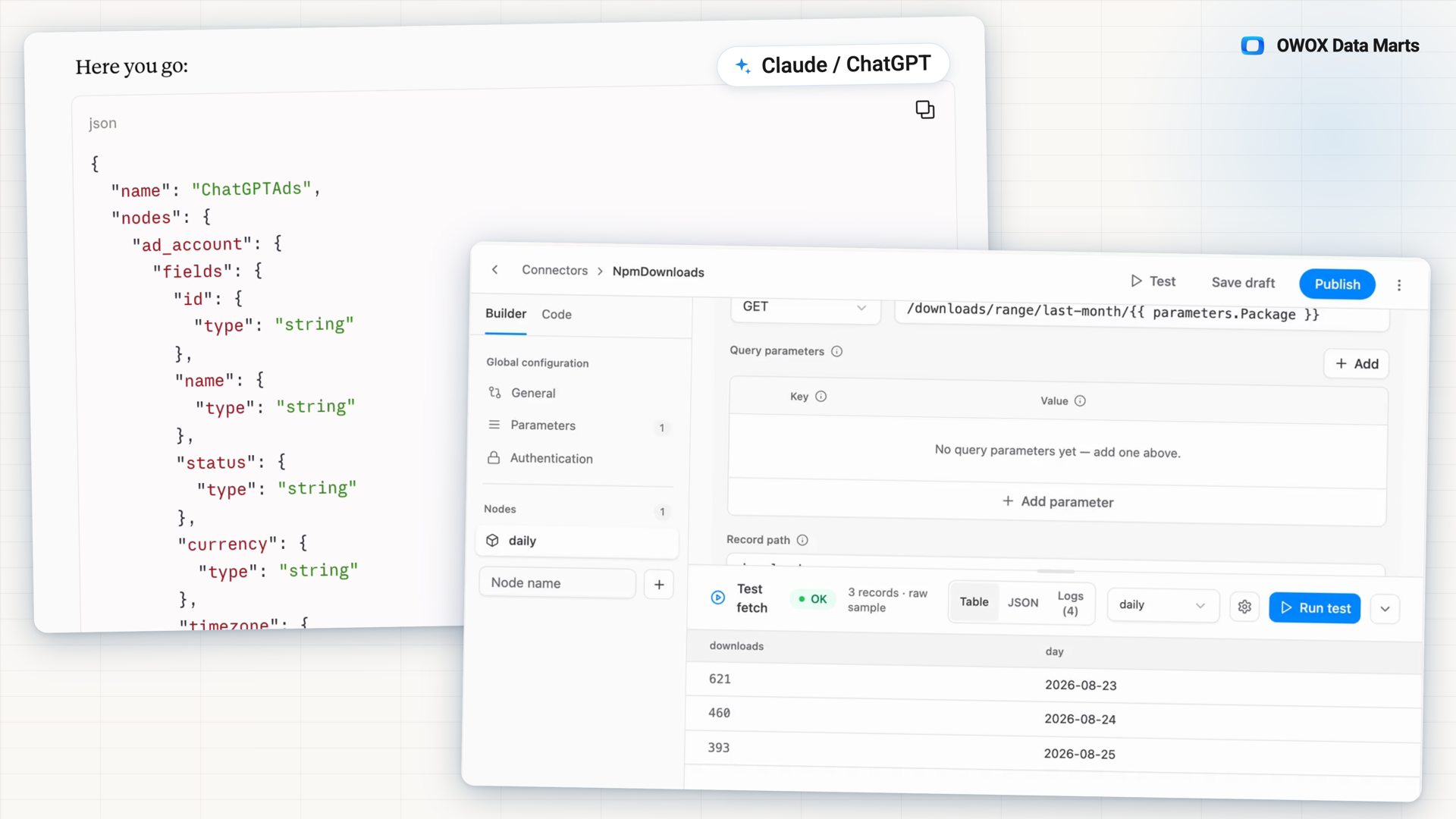
Give your AI assistant OWOX's connector guide and the API's docs, then import the JSON it returns. Test it against the live endpoint, publish it, and the data loads into your own warehouse as a scheduled Data Mart.
Get started freeRead the docs →
Why OWOX
When a report needs a source OWOX has no connector for, the usual answers are a vendor roadmap, a script only its author can fix, or a CSV exported by hand every month. With Custom Connectors, your AI assistant writes that connector from the API's docs.
- Give the assistant OWOX's manifest guide and the API's documentation, then import the JSON it returns.
- Test it against the live API before anything depends on it; every publish is a version you can roll back.
- The data loads into your own warehouse as a scheduled Data Mart, and keys stay in OWOX, never with the assistant.
The source your report is missing becomes a connector you own
OWOX keeps its own connector catalog small on purpose. For the API you need, your AI assistant drafts the connector from two links, and you test it on live data and publish it as a version. From then on it feeds a Data Mart like any built-in source.
THE ANALYST
Two links in, a connector out
Give your AI assistant OWOX's manifest guide and the API's documentation. Import the JSON it returns, run Test against the live API, fix anything the draft missed from the logs, then publish.
The assistant drafts. You test and publish.
THE BUSINESS USER
The missing source shows up in the report you already use
Once a Data Mart is built on the connector, its data refreshes on schedule next to every other source. The cost line that came from a monthly CSV export now comes from the warehouse.
No hand-exported CSV for one channel.
Not a script only its author can fix — A custom connector has what a one-off script never gets: versions you can roll back, test runs with logs, and a Data Mart with fields, a destination table and a schedule.
For Data Teams
Your assistant reads the docs, you check the result
The assistant turns an API reference into a connector manifest. You review it on live data before anything depends on it.
Two links, one JSON
OWOX's manifest guide for AI assistants and the API's own docs are what the assistant works from. Paste the JSON it returns into the Code tab or use Import JSON.
The whole API, not just the first page
The manifest covers offset, page or cursor pagination, incremental date windows with backfills, a request per parent record, several accounts per run and async report jobs.
Your keys and data never reach the assistant
The assistant writes the connector, nothing more. Keys and tokens are Secret parameters entered in OWOX, and the data loads straight into your warehouse.
For Business Teams
The channel with no cost line gets one
A source outside every connector catalog can sit next to the others in the same report.
Paid traffic with its cost next to it
When an affiliate network or a niche ad platform sends sessions and orders but has no connector, its spend can load into the same warehouse as the traffic it drove.
AI and SaaS spend beside every other cost
Usage bills from AI and SaaS vendors that have an API can land next to the cost lines finance already reads.
Refreshed on schedule, not exported by hand
The source that used to arrive as a monthly CSV loads on the Data Mart's schedule, like every built-in source.
How a custom connector comes together
Step 1: Give your assistant two links
OWOX's manifest guide for AI assistants and the documentation of the API you need.
Step 2: Import the JSON
Paste the manifest it returns into the Code tab, or use Import JSON.
Step 3: Test on the live API
Run Test, read the rows and the logs, and fix what the draft missed. Discover fields proposes fields and types.
Step 4: Publish and build the Data Mart
Publishing creates a version and lists the connector under Custom Connectors in Data Mart setup.
Available in all editions
Everything business needs
Tested before anything depends on it
Run the imported connector against the live API, with results as a table, as JSON or as logs, and fix what the draft missed.
Versioned, with rollback
Every publish creates a version. Save draft leaves the running one untouched, and an earlier version can be made active again.
Secrets stay out of the connector
Keys and tokens are Secret parameters, entered on the Data Mart page and never stored in the connector.
Lands in your own warehouse
The data loads into your data storage as a Data Mart with fields, a destination table and a schedule.
Frequently asked questions
Which APIs can a custom connector read?
APIs served over HTTPS that answer in JSON, CSV or JSONL. An API that answers in XML, or signs every request with a computed signature, still needs a JavaScript connector.
How does my AI assistant write the connector?
Give it OWOX's manifest guide for AI assistants and the API's documentation. It returns a JSON manifest: paste it into the Code tab or use Import JSON, then test and publish.
Is the first draft always right?
Not always. A draft can miss a parameter, so test it against the live API and fix it from the logs before you publish. When the source API changes later, the connector is yours to update.
Where are API keys and tokens kept?
In OWOX, never with the assistant. Keys and tokens are Secret parameters: their values are entered on the Data Mart page, masked, stored apart from the Data Mart's definition and never kept in the connector.
What happens when I change a published connector?
Publishing a change creates a new version. A Data Mart follows the active version on its next run or stays pinned to an earlier one, and an earlier version can be made active again to roll back. Save draft leaves the running version untouched.
Who can build and publish custom connectors?
Project Admins and Data Owners create, edit, publish and delete connectors. Anyone who sets up a connector-based Data Mart can use a published one. Export JSON and Import JSON move a connector between projects.
Every claim has a receipt.
Real things real customers said — each quote pinned to a specific claim, straight from the quotes database.
 Nodari RizunFounder & CEO, Pürblack®
“AI, by the nature of the models, will hallucinate. And because of that, you need something which will create guardrails to ensure that there are no hallucinations, that you can trust your data.”
 Mark SimmonsCMO, Pürblack®
“We had six or seven different channels and no single source of truth — it was almost impossible, a lot of guesswork.”
Nodari RizunFounder & CEO, Pürblack®“We regained time. And time is the one resource that never comes back.”
Missing a source? Hand your assistant the docs.
Import the connector it writes, test it on live data and publish. The data loads into your own warehouse as a Data Mart.
- Internal OWOX data as of 2026-10-02
- G2 reviews of OWOX
- npm installs stat
You are booked. The invitation is on its way to , with the calendar invite and the meeting link.