QuickBooks to BigQuery: Load the Books and Reconcile Them to the P&L
Getting QuickBooks Online into BigQuery is the easy half. The hard half is showing that the tables agree with what finance sees in QuickBooks. This guide covers which entities to load and which date to report on, when to use change data capture and when a LastUpdatedTime query, how to store and flatten QuickBooks reports, the invoice-to-payment join, and the reconciliation we ran on one company's books: the A/R aging matched QuickBooks in every bucket, and invoices and bills explained 94% and 71% of the P&L.
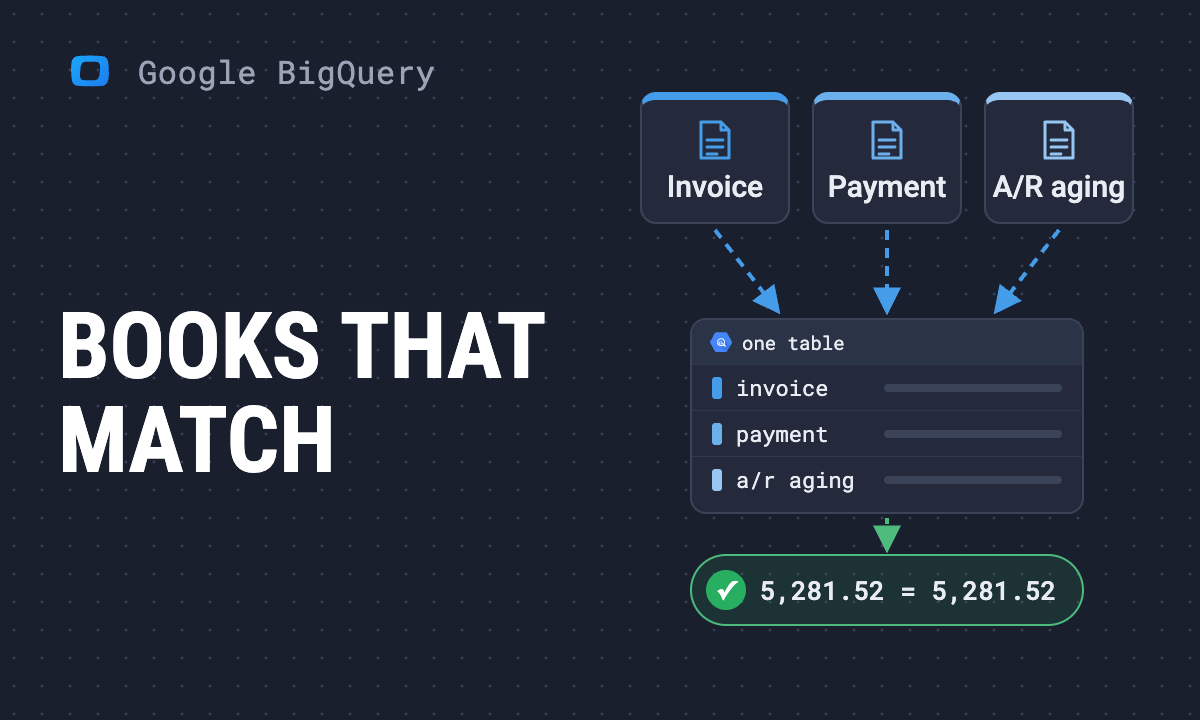
Finance answers revenue and receivables questions from QuickBooks. Your dashboard answers them from BigQuery. When the two numbers differ, nobody can say which one is right, and the one without an accounting standard behind it is yours.
The short answer: QuickBooks Online has an Accounting API. You land its entities (invoices, payments, bills, accounts) and its reports as tables in your data warehouse, keep them fresh with a MetaData.LastUpdatedTime query plus change data capture (CDC) for deletes, and then check the tables against QuickBooks’ own reports. This guide covers QuickBooks Online; a QuickBooks Desktop company file is a different route.
Most pages on this topic stop once the data has moved. We loaded one small company’s books with OWOX Data Marts and rebuilt QuickBooks’ own reports in SQL. The A/R aging matched to the cent, in every bucket. Invoices explained 94% of P&L income and bills 71% of P&L expenses, and the gaps have names. Every query below ran against the BigQuery dataset quickbooks.
Four ways to get QuickBooks Online into BigQuery
Four ways to get QuickBooks Online into BigQuery
The routes differ in three things that matter later: whether deletes reach the data warehouse, whether reports come along, and who owns the schema. The general menu is in how to load data into BigQuery.
| Route | Deletes reach the data warehouse | Reports (P&L, aging) | Who owns the schema |
|---|---|---|---|
| CSV export, uploaded by hand | Only if you replace the whole table each time | Yes, exported by hand | You, every time |
| Your own API script | If you build CDC handling | If you build it | You |
| An ELT tool | Depends on the tool (below) | Depends on the tool | The vendor defines it |
| OWOX Data Marts with the QuickBooks custom connector | A CDC node surfaces deletes | Eight report nodes | You: the tables sit in your dataset |
What the vendor pages said when we read them on 2026-11-05: Fivetran documents its tables but no report endpoints. Airbyte reads incrementally on LastUpdatedTime and does not propagate hard deletes. Coupler.io lists entities and dashboard templates, without schema or SQL. Weld ships a P&L-by-month SQL model and tells you to reconcile it, without publishing a result. Google Cloud Integration Connectors is built for operations on records, not reporting history.
Whichever route you pick (and the ETL vs ELT question behind it), the rest of this guide is about what you do once the tables exist.
Which QuickBooks tables you need (and which date field)
Which QuickBooks tables you need (and which date field)
For revenue, receivables and spend you need these entities, each keyed on realm_id (the company) plus id:
- Account, the chart of accounts every other table joins to; Customer, Vendor and Item.
- Invoice and Payment: money owed to you and money received. Bill and BillPayment: the same for what you owe.
- SalesReceipt, RefundReceipt, CreditMemo, Purchase and JournalEntry: income and spend that never passes through an invoice or a bill. The reconciliation below shows why you want them.
The joins between all 26 tables are drawn once in the QuickBooks data model: company_info is the anchor on realm_id, and customers, vendors and accounts are the hubs the transaction tables hang off. It is on the model canvas and as a bundle on GitHub.
Two dates, two jobs. txn_date is the accounting date: report on it, as QuickBooks’ own reports do. last_updated_time (MetaData.LastUpdatedTime) is when the record last changed: load on it. An invoice dated in March and edited in October is picked up in October and counted in March.
Line[] is where the money is
The header gives you total_amt and balance. What was sold, at what price and with what discount sits in the line array, kept as JSON. Each element’s DetailType decides which *LineDetail object exists, so filter on it when you UNNEST the array:
SELECT
  i.id AS invoice_id,
  i.txn_date,
  JSON_VALUE(l, '$.DetailType') AS detail_type,
  JSON_VALUE(l,
    '$.SalesItemLineDetail.ItemRef.name') AS item_name,
  CAST(JSON_VALUE(l,
    '$.SalesItemLineDetail.Qty') AS FLOAT64) AS qty,
  CAST(JSON_VALUE(l, '$.Amount') AS NUMERIC) AS amount
FROM `quickbooks.quickbooks_invoice` i,
  UNNEST(JSON_QUERY_ARRAY(i.line)) l
WHERE JSON_VALUE(l, '$.DetailType')
  IN ('SalesItemLineDetail', 'DiscountLineDetail')
Skip that WHERE and revenue roughly doubles. Each of our 31 invoices carries a SubTotalLineDetail line that repeats the sum of the lines above it. total_amt is no shortcut either: it includes sales tax. More on the functions in BigQuery JSON functions and JSON arrays and objects.
OWOX Data Marts
See your first report built in real time. 15 minutes.
- Connect your data warehouse
- Pick your metrics
- Get a live Google Sheets report
In the time it takes to write a ticket. Then imagine never writing that ticket again.
Book a DemoWe'll use your actual use case
Incremental loads, deletes and CDC: the decision rule
Incremental loads, deletes and CDC: the decision rule
QuickBooks gives you two ways to ask what changed, and they answer different questions:
Use CDC for daily deltas and deletes; use a LastUpdatedTime query for the first backfill and for any gap longer than CDC can see; store reports as dated snapshots, because they have neither.
The reasoning:
- A
LastUpdatedTimequery never returns a deleted record. A record that no longer exists has no timestamp to filter on. Delete an invoice in QuickBooks, and a table loaded this way keeps it, open balance and all. - CDC is the one place a hard delete shows up. Per Intuit’s change data capture documentation, a CDC request returns every object of the named entities changed since a point in time, deleted ones with
status = Deleted, looking back at most 30 days and returning at most 1,000 objects. - So CDC cannot backfill. A first load, or anything older than 30 days, goes through the query endpoint. If CDC runs stop for more than 30 days, reload the gap on
LastUpdatedTimeand compare the ids in your table with the ids QuickBooks still returns to find what was deleted.
Applying a delete is then a MERGE on realm_id and id, after you keep one CDC row per id (the latest last_updated_time): the CDC table holds one row per change, and BigQuery refuses a MERGE whose source matches a target row more than once. If finance needs to see an invoice as it was before a change, keep the CDC rows as history, as you would a slowly changing dimension.
What the CDC table looks like
Our connector’s cdc_invoice node writes quickbooks_cdc_invoice with id, realm_id, entity, status, last_updated_time, sync_token, txn_date, total_amt and payload, the full object as JSON. Its unique key is realm_id, id and last_updated_time, so each change to an invoice is a new row, not an overwrite. A deleted invoice arrives with status = Deleted. For deletes of another entity, the node is cloned with that entity’s name.
We have not landed this table on our books yet, so this article has no delete trace: the shape above is the node’s definition and Intuit’s documented behaviour, not a run we observed.
Reports: snapshot them, flatten them, call them by the right name
Reports: snapshot them, flatten them, call them by the right name
The P&L, the aging reports and the general ledger are computed on request, so they have no Id and no LastUpdatedTime, and nothing tells you last month’s P&L changed after a late journal entry. Store one row per report run, with the period it covers (start_period, end_period) and when it ran (report_time), and decide at query time which run you trust.
That decision is not optional. Our P&L node backfilled in 30-day windows (January 1–31, then February 1 to March 3, and so on), so a month arrives split across two runs. The next morning’s run then pulled October 1 to November 6 as one window. A plain SUM over the table would have counted October’s income twice: 8,854.60 instead of 4,427.30. Our rule: for any span of dates, keep the column from the latest run that covers it whole.
Then flatten. report_rows nests sections as deep as your chart of accounts, each with a Header, child Rows and a Summary. The totals sit on the Summary of the top-level sections, tagged by group (Income, COGS, Expenses, OtherExpenses, NetIncome), and the reconciliation query below reads exactly those.
The endpoint is not the report’s name
The report you open in QuickBooks and the endpoint you call rarely share a name:
| In QuickBooks | Endpoint |
|---|---|
| A/R Aging Summary | AgedReceivables |
| A/P Aging Summary | AgedPayables |
| General Ledger | GeneralLedgerDetail (the name our connector calls; this node has not run yet, so check Intuit’s reference before relying on it) |
| Sales by Customer Summary | CustomerSales |
| Expenses by Vendor | VendorExpenses |
| Profit and Loss, Balance Sheet, Statement of Cash Flows | ProfitAndLoss, BalanceSheet, CashFlow |
Those are our eight report nodes, running on API minorversion 75; check the names against Intuit’s Accounting API reference for the minor version you call. All but the two aging reports take accounting_method, Accrual or Cash.
The joins that matter: invoice to payment through LinkedTxn
The joins that matter: invoice to payment through LinkedTxn
A payment’s header carries no invoice id. The link lives in its line array: each line has a LinkedTxn list of TxnId and TxnType pairs, and one payment line can settle several invoices while one invoice can be paid by several payments. So the join goes through two UNNESTs:
WITH payment_links AS (
  SELECT
    p.id AS payment_id,
    p.txn_date AS paid_on,
    CAST(JSON_VALUE(l, '$.Amount') AS NUMERIC) AS amount,
    JSON_VALUE(t, '$.TxnId') AS invoice_id
  FROM `quickbooks.quickbooks_payment` p,
    UNNEST(JSON_QUERY_ARRAY(p.line)) l,
    UNNEST(JSON_QUERY_ARRAY(l, '$.LinkedTxn')) t
  WHERE JSON_VALUE(t, '$.TxnType') = 'Invoice'
)
SELECT
  i.doc_number,
  i.txn_date AS invoiced_on,
  pl.paid_on,
  pl.amount,
  DATE_DIFF(pl.paid_on, i.txn_date, DAY) AS days_to_pay,
  DATE_DIFF(pl.paid_on, i.due_date, DAY) AS days_late
FROM payment_links pl
JOIN `quickbooks.quickbooks_invoice` i
  ON i.id = pl.invoice_id
ORDER BY pl.paid_on
Keep the TxnType filter. Our 16 payments carry 17 links: 16 to invoices, one to a credit memo, which the filter keeps out of the invoice join. Two invoices were paid in two instalments, which is why days-to-pay belongs on the payment line, not the invoice. Bill payments link to bills the same way.
Does it match the books? Our reconciliation
Does it match the books? Our reconciliation
Most guides tell you to run this check; none we found publish the result. We ran it on one small company’s QuickBooks Online books: 31 invoices dated June 25 to October 10, 2026, 16 payments and 15 bills. Read it as a method shown working, not a benchmark.
| Check | QuickBooks report | Rebuilt from tables | Result |
|---|---|---|---|
| A/R aging, report of 5 Nov 2026 | 5,281.52 | 5,281.52 from invoice balances | Equal in all five buckets |
| P&L income, Jul–Oct 2026 | 9,809.52 | 9,220.05 from invoices | 94% |
| P&L expenses, Jul–Oct 2026 | 8,224.31 | 5,842.17 from bills | 71% |
The A/R aging is a full match. Open invoice balances, bucketed by days past due on the report date, gave 3,756.02 not yet due, 1,128.50 at 1–30 days, 241.00 at 31–60 and 156.00 at 61–90: QuickBooks’ report, bucket for bucket. The query that compares them:
WITH snap AS (
  SELECT end_period AS as_of,
    JSON_QUERY_ARRAY((
      SELECT r FROM UNNEST(
        JSON_QUERY_ARRAY(report_rows, '$.Row')) r
      WHERE JSON_VALUE(r, '$.group') = 'GrandTotal'
    ), '$.Summary.ColData') AS cells
  FROM `quickbooks.quickbooks_report_aged_receivables`
  QUALIFY ROW_NUMBER()
    OVER (ORDER BY report_time DESC) = 1
),
rebuilt AS (
  SELECT
    CASE
      WHEN DATE_DIFF(s.as_of, i.due_date, DAY) <= 0 THEN 1
      WHEN DATE_DIFF(s.as_of, i.due_date, DAY) <= 30 THEN 2
      WHEN DATE_DIFF(s.as_of, i.due_date, DAY) <= 60 THEN 3
      WHEN DATE_DIFF(s.as_of, i.due_date, DAY) <= 90 THEN 4
      ELSE 5
    END AS col,
    SUM(i.balance) AS from_invoices
  FROM `quickbooks.quickbooks_invoice` i
  CROSS JOIN snap s
  WHERE i.balance > 0
  GROUP BY col
)
SELECT
  ['Current', '1-30', '31-60', '61-90', '91+',
   'Total'][OFFSET(off - 1)] AS bucket,
  CAST(JSON_VALUE(c, '$.value') AS NUMERIC) AS report,
  ROUND(IF(off = 6,
    (SELECT SUM(from_invoices) FROM rebuilt),
    (SELECT from_invoices FROM rebuilt
     WHERE col = off)), 2) AS from_invoices
FROM snap, UNNEST(cells) c WITH OFFSET off
WHERE off BETWEEN 1 AND 6
ORDER BY off
If your books carry open credit memos or unapplied payments, check whether the report nets them in before you call a difference an error. The match also depends on timing: the report snapshot and the invoice balances were taken on the same day, so compare a report with balances as of its own date.
The P&L is coverage, not a match. Invoice sales lines minus discounts, by invoice date, equalled the P&L’s income line in July and August, then reached 97% in September and 89% in October. Bill totals covered 71% of expenses over the four months (bills are compared on total_amt, tax included, which is one more reason to read this as coverage). The query applies the latest-run rule and sets the report beside the rebuilt figures:
WITH cells AS (
  SELECT
    p.report_time,
    JSON_VALUE(s, '$.group') AS grp,
    (SELECT JSON_VALUE(m, '$.Value')
     FROM UNNEST(JSON_QUERY_ARRAY(c, '$.MetaData')) m
     WHERE JSON_VALUE(m, '$.Name') = 'StartDate') AS col_start,
    (SELECT JSON_VALUE(m, '$.Value')
     FROM UNNEST(JSON_QUERY_ARRAY(c, '$.MetaData')) m
     WHERE JSON_VALUE(m, '$.Name') = 'EndDate') AS col_end,
    SAFE_CAST(JSON_VALUE(JSON_QUERY_ARRAY(s,
      '$.Summary.ColData')[SAFE_OFFSET(i)], '$.value')
      AS NUMERIC) AS amount
  FROM `quickbooks.quickbooks_report_profit_and_loss` p,
    UNNEST(JSON_QUERY_ARRAY(p.report_rows, '$.Row')) s,
    UNNEST(JSON_QUERY_ARRAY(p.report_columns, '$.Column'))
      c WITH OFFSET i
  WHERE JSON_VALUE(s, '$.group')
    IN ('Income', 'COGS', 'Expenses', 'OtherExpenses')
),
latest AS (  -- a later run covering the same dates wins
  SELECT a.* FROM cells a
  LEFT JOIN cells b
    ON b.grp = a.grp
   AND b.report_time > a.report_time
   AND b.col_start <= a.col_start
   AND b.col_end >= a.col_end
  WHERE a.col_start IS NOT NULL AND b.grp IS NULL
),
pl AS (
  SELECT DATE_TRUNC(DATE(col_start), MONTH) AS month,
    SUM(IF(grp = 'Income', amount, 0)) AS pl_income,
    SUM(IF(grp != 'Income', amount, 0)) AS pl_expenses
  FROM latest GROUP BY month
),
inv AS (
  SELECT DATE_TRUNC(i.txn_date, MONTH) AS month,
    SUM(CASE JSON_VALUE(l, '$.DetailType')
      WHEN 'SalesItemLineDetail'
        THEN CAST(JSON_VALUE(l, '$.Amount') AS NUMERIC)
      WHEN 'DiscountLineDetail'
        THEN -CAST(JSON_VALUE(l, '$.Amount') AS NUMERIC)
    END) AS from_invoices
  FROM `quickbooks.quickbooks_invoice` i,
    UNNEST(JSON_QUERY_ARRAY(i.line)) l
  GROUP BY month
),
bil AS (
  SELECT DATE_TRUNC(txn_date, MONTH) AS month,
    SUM(CAST(total_amt AS NUMERIC)) AS from_bills
  FROM `quickbooks.quickbooks_bill`
  GROUP BY month
)
SELECT month, pl_income, from_invoices,
  pl_expenses, from_bills
FROM pl
LEFT JOIN inv USING (month)
LEFT JOIN bil USING (month)
WHERE month BETWEEN '2026-07-01' AND '2026-10-01'
ORDER BY month
Where the rest sits, by what each entity is for: income without an invoice is a SalesReceipt (paid on the spot) or a RefundReceipt; spend paid by card, check or cash with no bill is a Purchase; manual adjustments are JournalEntry lines. We have not loaded those entities yet, so this is where the remainder has to be, not a split we measured. Closing the gap means adding their Data Marts, not tuning the SQL. If your VP asks today, the honest line is: receivables match QuickBooks exactly; the P&L is 94% explained, and the rest is named.
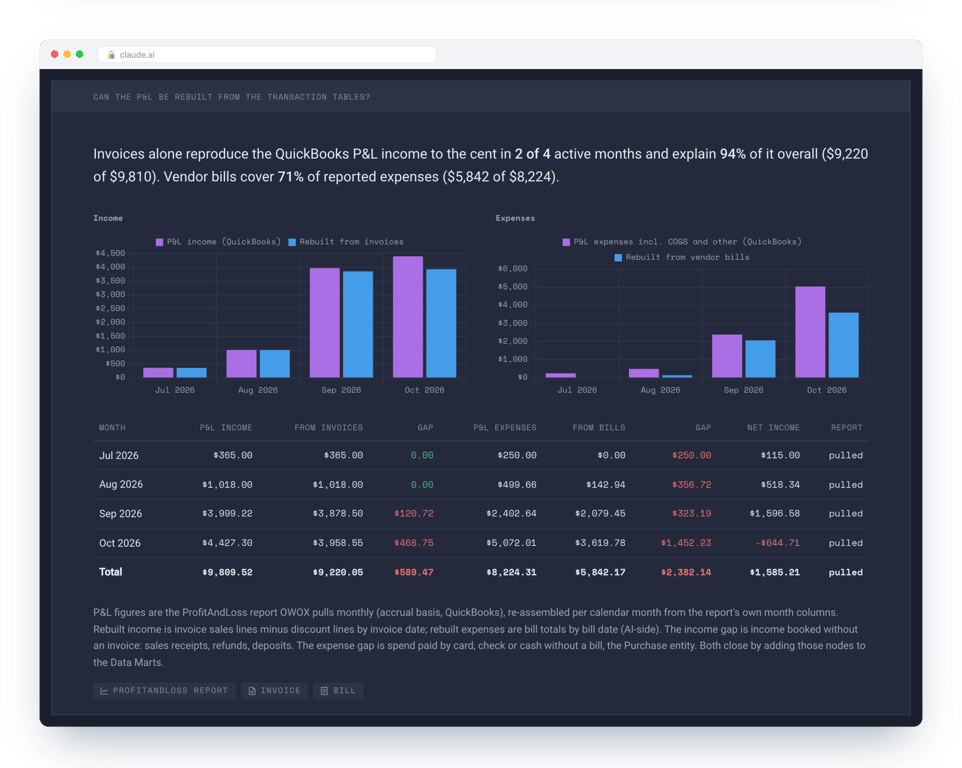
What a full P&L rebuild needs
To rebuild the P&L rather than cover it, sum by month: Invoice and SalesReceipt lines minus CreditMemo and RefundReceipt lines for income; Bill and Purchase lines for expenses, by the account each line posts to; JournalEntry lines on both sides. Then rule out the usual drift:
- Accounting method. Ask finance which basis their P&L uses and run the report on it. Ours is accrual; a cash-basis P&L counts payments, not invoices.
- Non-posting transactions. Estimates and purchase orders never reach the P&L. Leave them out.
- Edited history. A late edit changes the report; refresh that period’s snapshot before you compare.
A rebuild that matches once can drift next month, so the comparison belongs on a schedule, like any data quality check on a Data Mart. For what holds up when a board asks, see board pack numbers you can defend.
Setting it up in OWOX Data Marts
Setting it up in OWOX Data Marts
QuickBooks Online is not one of the native connectors in OWOX Data Marts. It is a custom connector, made in the connector builder (the GitHub connector is an example of the native kind): you choose it under Connectors rather than write it. It has 26 nodes, 17 entity tables, one CDC node and eight report snapshots, and the QuickBooks connector page lists every table. Why we build connectors this way: why we built free data connectors for analysts.
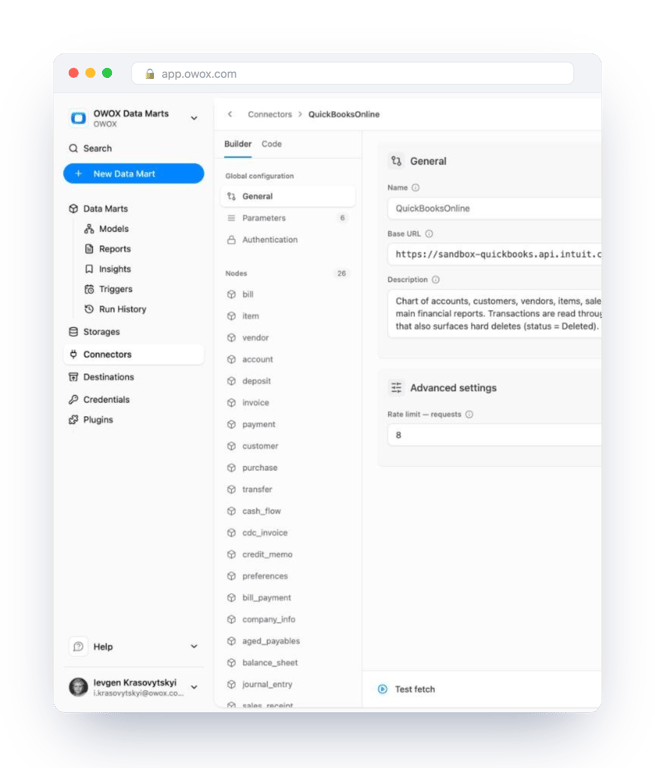
What the connector handles for you:
- Authentication. OAuth 2.0: you enter your Intuit app’s Client ID and Client secret, a refresh token and the company’s realm id once. Intuit rotates the refresh token (every 24 hours, per the connector’s parameter notes) and expires one left unused for 100 days; the platform stores each new token Intuit sends back, so renewing it is not your job.
- Throttling. At most 8 requests per second, and a retry with a back-off when QuickBooks answers 429, using the
Retry-Afterheader when Intuit sends one. - Watermarks. Transaction nodes read records changed after a date you set, at most 1,000 per run. For a first backfill on a busy company, move that date forward in steps until each run returns fewer than 1,000.
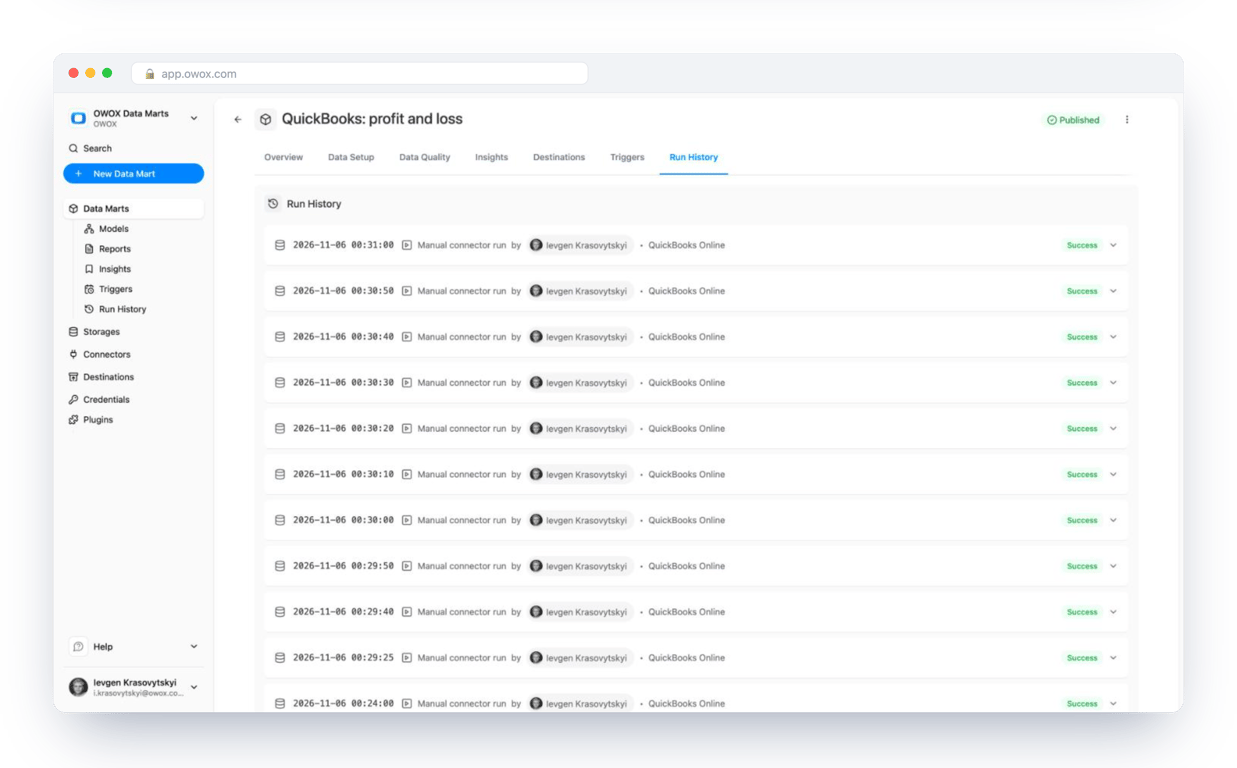
Each node becomes a Data Mart writing one table into the dataset quickbooks, and a trigger runs them daily. We published eight: accounts, customers, items, invoices, payments, bills, the P&L and the A/R aging.
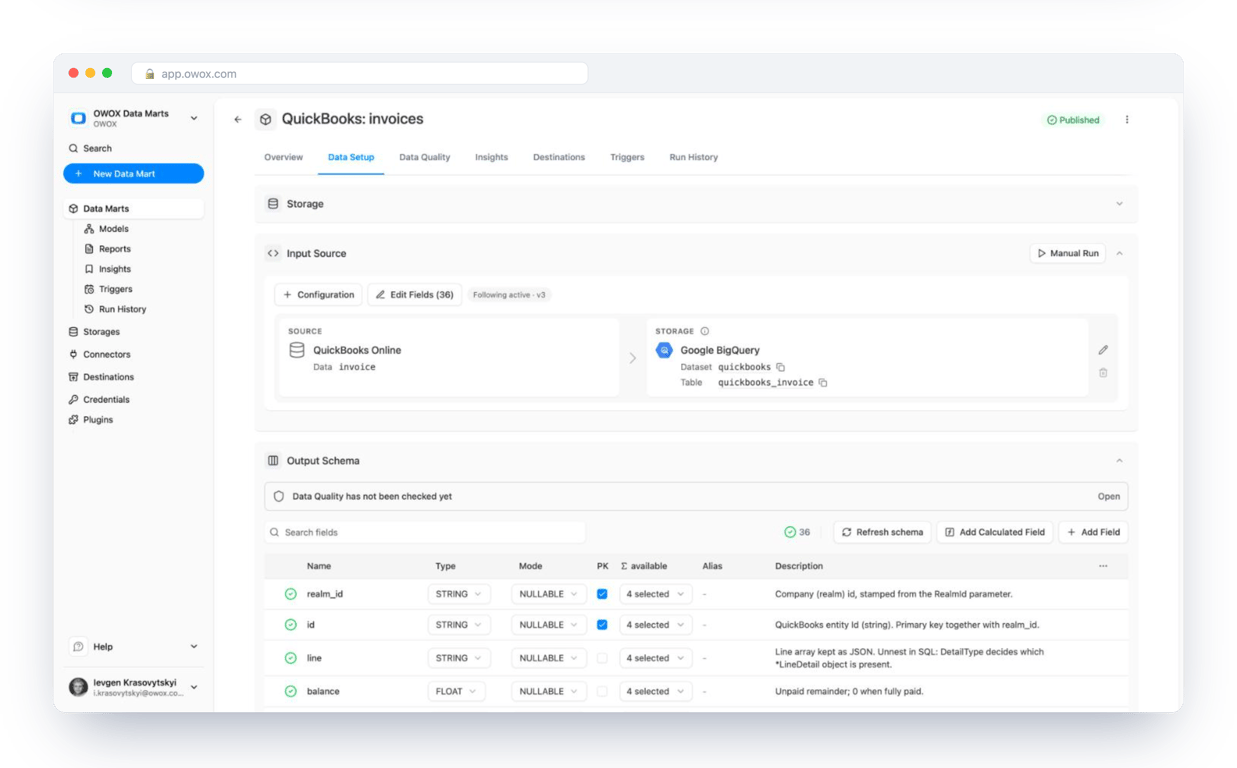
OWOX Data Marts works with Google BigQuery, Snowflake, AWS Redshift, AWS Athena and Databricks. This build used BigQuery, so the JSON functions above need translating elsewhere. Either way the Data Marts land the tables and the reconciliation SQL stays yours.
From tables to a dashboard the CEO reads
From tables to a dashboard the CEO reads
On the same tables we built a QuickBooks accounting dashboard: cash on hand, A/R aging, payables, product margin, vendor expenses, days to pay and the P&L reconciliation, each block naming the Data Marts it reads.
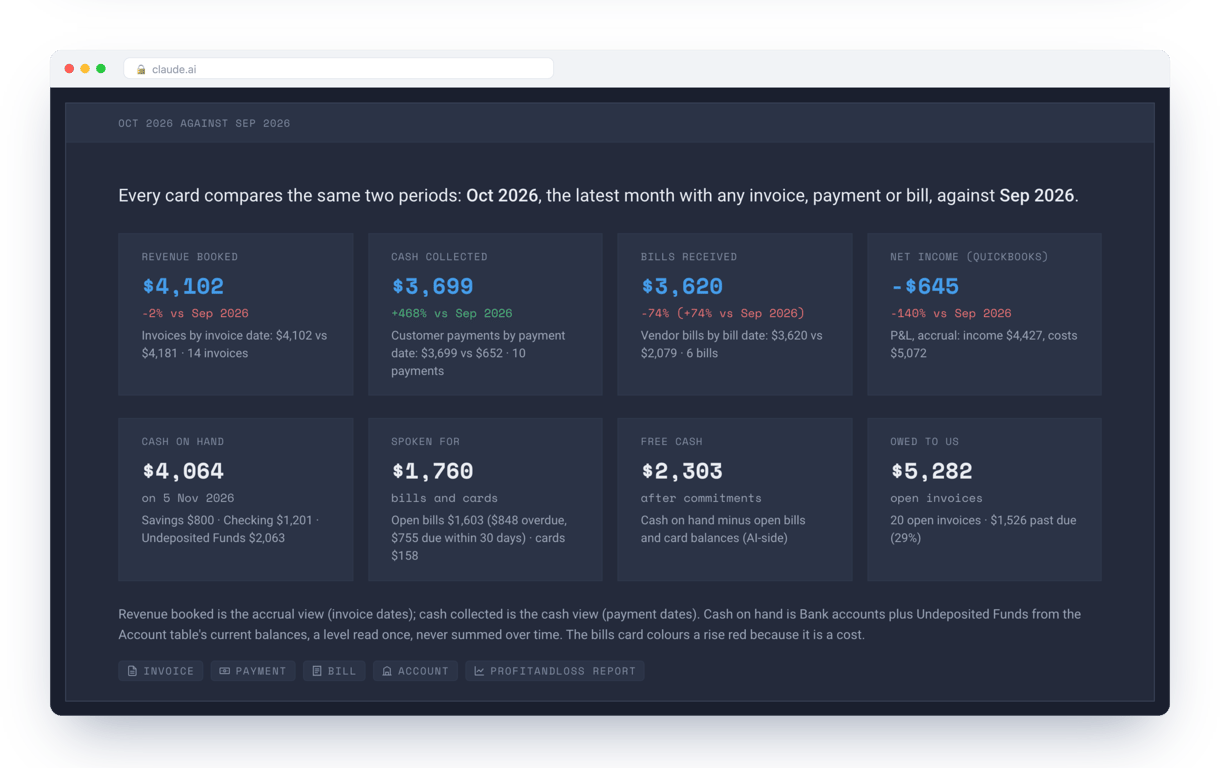
The same Data Marts can feed Data Studio or Google Sheets if finance prefers to stay there (more on ). Either way, finance’s number and your dashboard’s number come from the same rows, and you can show the query behind both.
To run this on your own books, set up OWOX Data Marts, connect QuickBooks Online and start with the A/R aging. It is the check that should match exactly, so it tells you fastest whether the load is right.
Turn your data into decisions.
Governed data marts give you the clean foundation ML needs to actually work.
- No AI hallucinations
- Analyst-governed definitions
- Every number traces to SQL
Frequently Asked Questions
Why doesn't my SQL P&L match QuickBooks?
Usually one of five reasons. The report runs on accrual and your SQL counts payments, or the reverse. You summed every invoice line, including SubTotalLineDetail, and doubled revenue. Income or spend never passed through an invoice or bill: sales receipts, refunds, card and cash purchases, journal entries. Report snapshots overlap and a plain SUM counts a month twice. Or a late edit changed history after your snapshot.
What are the QuickBooks API rate limits?
Intuit throttles the Accounting API and answers HTTP 429 when a client sends too much; check Intuit's developer documentation for the current figures. Any loader therefore needs throttling and a retry. Our QuickBooks connector sends at most 8 requests per second and, on a 429, waits for the time QuickBooks gives in the Retry-After header before trying again. Each query also returns at most 1,000 records, so large backfills run in date steps.
Can I load QuickBooks Desktop into BigQuery the same way?
Not with this setup. Everything here reads the QuickBooks Online Accounting API, and the OWOX Data Marts QuickBooks connector is for QuickBooks Online companies. A QuickBooks Desktop company file needs another route to reach a data warehouse, such as exporting reports and lists by hand. If your company has moved to QuickBooks Online, the same tables, refresh rules and reconciliation queries apply.
Does Google integrate with QuickBooks?
Yes, in one sense: Google Cloud Integration Connectors has a QuickBooks Online connector. It is built for operations on QuickBooks records from an integration flow, such as reading or creating an invoice, not for keeping reporting history in a data warehouse. To analyse your books in BigQuery you need a load that keeps history and catches deletes: an ELT tool, your own API script, or OWOX Data Marts with the QuickBooks custom connector.
How long does a QuickBooks refresh token last?
Intuit rotates the refresh token, about every 24 hours according to our connector's notes, and expires one that goes unused for 100 days. A token kept in a script therefore goes stale unless the script stores each new token Intuit returns. In OWOX Data Marts the platform exchanges the refresh token for an access token on every run and persists the replacement for a stored credential, so a daily schedule keeps it alive.
Does the same setup work for Snowflake, Redshift, Athena or Databricks?
Yes for the load: the QuickBooks connector lands its tables in your own data warehouse, whether that is Google BigQuery, Snowflake, AWS Redshift, AWS Athena or Databricks. The SQL in the article is written for BigQuery, so its JSON functions (JSON_VALUE, JSON_QUERY_ARRAY, UNNEST) need their equivalents on the other platforms. The logic of the A/R aging and P&L checks stays the same.