GA4 cost data import: how to bring non-Google ad costs into Google Analytics 4

Cost data import lets Google Analytics 4 show the cost, clicks and impressions of campaigns you run outside Google next to the sessions and revenue GA4 already measures. Google now calls it campaign data import. You upload one row per campaign per day, GA4 joins it to your sessions by source, medium and date, and the Non-Google cost metrics appear in reports.
The feature has grown since most guides were written. Besides CSV and SFTP, GA4 can now read from Google Sheets, BigQuery and other warehouses, and it has direct connections to five ad platforms. This guide covers the fields, the sources, the setup, the limits, and the point where the join belongs in your warehouse instead.
What non-Google cost data is
GA4 knows what Google Ads campaigns cost, because the accounts are linked. For every other platform it knows the sessions and nothing about the money. Non-Google cost data is that missing part: what you paid Meta, Microsoft Advertising, LinkedIn, TikTok or an affiliate network, per campaign and per day.
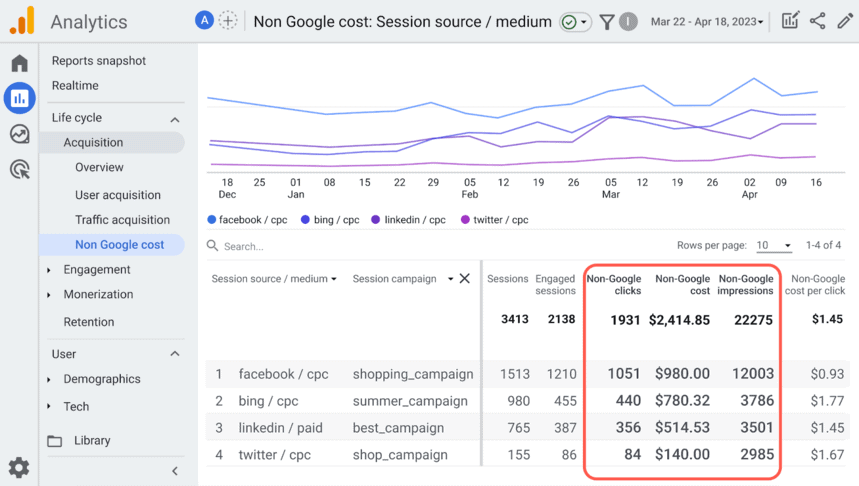
With it imported, GA4 can calculate non-Google cost per click and return on non-Google ad spend for each campaign, source and medium. Google’s page states where the result shows up: Reports, Acquisition, Non Google campaign, and the Advertising workspace under Planning, All channels (Import campaign data, checked October 2026).
What the import needs: fields and UTM tags
What the import needs: fields and UTM tags
The import is a table with these columns:
| Field | Requirement |
|---|---|
Campaign source (utm_source) |
Required |
Campaign medium (utm_medium) |
Required |
| Date (YYYY-MM-DD) | Required |
Campaign ID (utm_id) |
Optional, highly recommended |
Campaign name (utm_campaign) |
Optional, highly recommended |
| Currency (ISO 4217 code) | Required if cost is included |
| Cost, clicks, impressions (daily values) | At least one of the three |
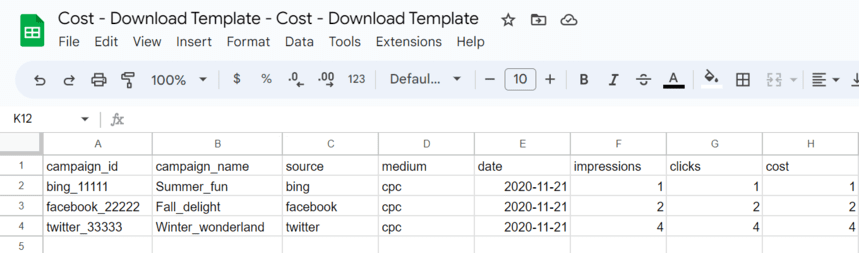
The join is exact. Google’s wording: the values for utm_source, utm_medium, utm_campaign and date in the file “must exactly match the values your users have logged”, and “Facebook” and “facebook” are not a match. So the import only works as well as your link tagging. Three rules from Google’s UTM guide:
- One source value per platform.
fb / cpcfor Facebook everywhere, notfb,Metaandfacebookin different campaigns. - Consistent campaign names.
SpringSaleandSpring_Saleare two campaigns to GA4. - Dynamic values where the platform offers them, such as
utm_campaign={{campaign.name}}, so the name in the URL is the name in the ad platform.
Add utm_id to your links if you can. It lets GA4 match on the campaign ID instead of on a name somebody may rename. Tagging is covered in the guide to UTM tags and in what utm_id is.
OWOX Data Marts
See your first report built in real time. 15 minutes.
- Connect your data warehouse
- Pick your metrics
- Get a live Google Sheets report
In the time it takes to write a ticket. Then imagine never writing that ticket again.
Book a DemoWe'll use your actual use case
Where GA4 can import cost data from
Where GA4 can import cost data from
Google lists two kinds of sources.
Direct connections to ad platforms. GA4 pulls the data itself, daily, and attempts to load 24 months of history. In the GA4 interface they are under Admin, Product links, as Meta links, Pinterest links, Reddit links, Snap links and TikTok links:
- Meta
- Snap
- TikTok
The condition is strict: all paid traffic from the platform has to carry a single utm_source value and a single utm_medium value. If it does not, Google’s advice is to use another import source.
Import sources where you already store the data. You prepare the table; GA4 reads it:
| Type | Sources |
|---|---|
| Files | CSV, SFTP, HTTPS, Google Cloud Storage, Amazon S3 |
| Spreadsheet | Google Sheets |
| Warehouses and databases | BigQuery, Snowflake, Amazon Redshift, MySQL, PostgreSQL |
Microsoft Advertising, LinkedIn Ads, X Ads, Criteo and every other platform not on the direct list go through the second kind.
How to import cost data with a CSV file
How to import cost data with a CSV file
The manual route is the same for every platform, and it is the one to use for a first test.
- Export a report from the ad platform with campaign, date, cost, clicks and impressions, one row per campaign per day.
- Add the source, medium and campaign ID columns with exactly the values used in the campaign’s UTM tags.
- In GA4, open Admin, then Data collection and modification, then Data import, and click Create data source.
- Choose campaign data as the type and Manual CSV upload as the source, then upload the file.
- Map each column of the file to the Analytics field, set the currency, and click Import.
Mappings cannot be edited after the source is created. If the columns change, delete the source and create a new one.
For later uploads, click Import now on the existing source. A new file with the same keys overwrites the earlier values, which is what you want: ad platforms adjust costs after the fact, so Google recommends uploading new data for the same campaign IDs daily.
How to check that the import worked
How to check that the import worked
Open the data source and look at the import history. Two numbers matter:
- % imported: rows imported divided by rows in the file. Below 100% means rows were dropped because of an error.
- Match rate: the share of imported rows that were joined with Analytics data on source, medium and date.

A low match rate almost always means the source or medium in the file is spelled differently from the UTM tags. GA4 also has a validation report under Reports, Data import, Campaign data import validation, which lists the paid sources and mediums your property actually received. Compare your file against that list.
Allow up to 24 hours for imported data to appear in reports.
The limits of cost data import
The limits of cost data import
| Limit | Value |
|---|---|
| Size of one import source | 1 GB |
| Uploads per property per day | 120 |
| Storage for campaign data | 1 GB across all import sources |
| Granularity | Daily totals per campaign |
| Join | At report time, on source, medium and date |
The last row has consequences that are easy to miss:
- Imported cost is not in the BigQuery export. Google states that query-time data such as cost is joined at reporting time. The export contains events, so the spend you imported is not there.
- It cannot be used in audiences or in exploration segments.
- There is no cost below the campaign. Ad set, ad, keyword and creative are not part of the schema.
- Deleting the source removes the data from reports, because nothing was written into the processed events.
When to join costs in the warehouse instead
When to join costs in the warehouse instead
Cost data import answers one question well: what did each campaign cost, next to the sessions GA4 recorded for it. Marketing teams usually need more than that:
- spend by ad set and creative, not only by campaign
- several currencies converted on the day’s rate
- orders from the shop system or deals from the CRM, not only GA4 key events
- one definition of spend that the , the finance sheet and the weekly report share
None of those fit a daily campaign table inside GA4. They fit a warehouse, where the GA4 export, the ad platform data and the orders are tables that can be joined in SQL.
OWOX Data Marts covers the ad platform side of that. It loads data from Facebook Ads, TikTok Ads, Microsoft Ads, LinkedIn Ads, X Ads, Reddit Ads and Criteo into your warehouse: Google BigQuery, Snowflake, AWS Redshift, AWS Athena or Databricks. An analyst then writes the SQL that unifies the platforms into one spend table and publishes it as a Data Mart, and reports on it are delivered to Google Sheets or Data Studio (the former Looker Studio).
To be exact about what it does not do: OWOX Data Marts does not send cost data into GA4. The spend lands in your warehouse. From there you have two options. Google’s list of import sources includes BigQuery, Snowflake and Amazon Redshift, so a table with the columns from the section above can feed GA4’s own import. Or you leave GA4’s reports as they are and do the join in the warehouse, which is the route described step by step in blending GA4 conversions with ad spend.
The unifying SQL is the analyst’s work in both cases. OWOX Data Marts loads the sources, runs the query on a schedule and publishes the result.
Platform guides
The steps differ slightly per platform, mostly in how the export is made and how the links are tagged:
Turn your data into decisions.
Governed data marts give you the clean foundation ML needs to actually work.
- No AI hallucinations
- Analyst-governed definitions
- Every number traces to SQL
Frequently Asked Questions
What is cost data import in GA4?
It is the GA4 feature, now called campaign data import, that adds cost, clicks and impressions of non-Google campaigns to Analytics. GA4 joins the imported rows to sessions by source, medium and date, and shows them in the Non Google campaign report.
Which fields does GA4 cost data import require?
Campaign source, campaign medium and date are required; campaign ID and campaign name are optional but recommended; at least one of cost, clicks or impressions; and a currency code when cost is included. The values must exactly match those in your UTM tags.
Which platforms can GA4 import cost data from directly?
Google lists direct connections for Meta, Pinterest, Reddit, Snap and TikTok. Other platforms, such as Microsoft Advertising, LinkedIn Ads or X Ads, are imported from a CSV file, SFTP, Google Sheets or a warehouse table such as BigQuery, Snowflake or Amazon Redshift.
Is imported cost data included in the GA4 BigQuery export?
No. Google states that cost data is joined at reporting time. The BigQuery export contains events, so spend has to be joined with them in the warehouse separately.