How to track X (Twitter) traffic and X Ads in Google Analytics 4
Traffic from X, formerly Twitter, reaches Google Analytics 4 with t.co as its source, because X shortens every link. This guide shows where to find it, how to tag X Ads with UTM parameters so paid and organic visits are separate, how to import X Ads cost data, and where the join belongs when GA4 is not enough.

Traffic from X (formerly Twitter) appears in Google Analytics 4 with the source t.co, because X wraps every link in its own shortener. Posts, replies, profile links and ads all arrive the same way. To tell X Ads from organic X traffic, the ad URLs need UTM parameters. To see what the ads cost, GA4 needs a cost import.
This guide covers where X traffic is in GA4, how to tag X Ads, how to bring in spend, and what to do when you need more than campaign totals.
Where X traffic appears in GA4
Where X traffic appears in GA4
Open Reports, Acquisition, Traffic acquisition. The first column is Session default channel group. Use the drop-down above it to switch to Session source / medium, then type t.co or twitter into the search box.
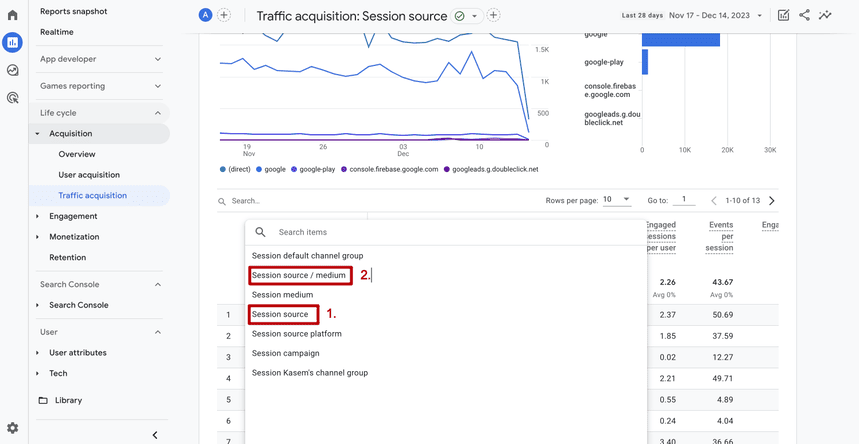
You will usually find these rows:
| Session source / medium | What it is |
|---|---|
t.co / referral |
Clicks on links in posts, replies and profiles, through X’s shortener |
twitter.com / referral, x.com / referral |
Clicks where the browser reported the site itself |
| Your own UTM values | Links you tagged, in ads or in posts |
Clicks from the X mobile app can also arrive without a referrer and be counted as direct. That is one more reason to tag every link you publish yourself. How untagged links end up there is covered in the guide to direct traffic in GA4.
How to tell X Ads from organic X traffic
How to tell X Ads from organic X traffic
An ad click and a click on an ordinary post both arrive through t.co. GA4 cannot separate them unless the URL does.
Add UTM parameters to the website URL of every ad:
https://www.example.com/landing
  ?utm_source=twitter&utm_medium=paid_social
  &utm_campaign=spring_sale
&utm_id=abc123| Parameter | Recommendation | Why |
|---|---|---|
utm_source |
twitter or x, one of them everywhere |
The cost import matches on this value exactly |
utm_medium |
paid_social, paid or cpc |
All match GA4’s pattern for paid mediums |
utm_campaign |
The campaign name as it is in X Ads | So both tools use the same name |
utm_id |
The campaign ID | Survives a renamed campaign |
For posts from your own account, use the same source with utm_medium=social. GA4 assigns social to Organic Social and paid mediums to the paid channels. A source GA4 does not have on its list of social sites, combined with a paid medium, lands in Paid Other. The rules are in the guide to the GA4 default channel group, and tagging conventions in the guide to UTM tags.
After a day of traffic, the tagged campaigns appear in Traffic acquisition as their own rows, with Session campaign as a second dimension.
OWOX Data Marts
See your first report built in real time. 15 minutes.
- Connect your data warehouse
- Pick your metrics
- Get a live Google Sheets report
In the time it takes to write a ticket. Then imagine never writing that ticket again.
Book a DemoWe'll use your actual use case
How to import X Ads cost data into GA4
How to import X Ads cost data into GA4
GA4 has direct import connections for Meta, Pinterest, Reddit, Snap and TikTok. X Ads is not among them (Import campaign data, checked October 2026). Its spend comes in through a CSV file, Google Sheets or a warehouse table:
- Export campaign spend, clicks and impressions from X Ads, one row per campaign per day.
- Add columns for source and medium with exactly the values from your UTM tags, and the campaign ID if you use
utm_id. - In GA4, open Admin, Data collection and modification, Data import, create a data source for campaign data, upload the file and map the columns.
GA4 joins the rows to sessions on source, medium and date. The match is exact, so Twitter in the file and twitter in the URL do not meet. The fields, limits and the match rate are explained in the guide to GA4 cost data import.
Once it is processed, the Non Google campaign report shows X Ads cost next to sessions and key events.
What GA4 does not show about X
What GA4 does not show about X
- Nothing that happens on X. Impressions, likes, reposts and follows stay in X’s own analytics. GA4 starts when someone lands on your site.
- No cost below the campaign. The import has no ad group or ad level.
- Imported cost is not in the GA4 BigQuery export.
- The file needs refreshing for as long as campaigns run.
X Ads spend next to GA4 data in your warehouse
X Ads spend next to GA4 data in your warehouse
For a team that reports on several ad platforms, uploading one file per platform per week is the part that breaks. The alternative is to keep spend out of GA4 and join it with GA4 data where both can be queried.
OWOX Data Marts has X Ads as a data source. It loads the ad stats into your warehouse: Google BigQuery, Snowflake, AWS Redshift, AWS Athena or Databricks. GA4 exports its events to BigQuery natively. An analyst writes the SQL that joins spend to sessions by campaign and date, publishes it as a Data Mart, and reports on it go to Google Sheets or Data Studio (the former Looker Studio) on a schedule.
OWOX Data Marts does not send cost data into GA4, and it does not write the join for you: the SQL is the analyst’s. What the marketer gets is one table with X Ads next to the other platforms, refreshed without a manual upload. The steps are in loading X Ads into BigQuery and blending GA4 conversions with ad spend.
Turn your data into decisions.
Governed data marts give you the clean foundation ML needs to actually work.
- No AI hallucinations
- Analyst-governed definitions
- Every number traces to SQL
Frequently Asked Questions
How do I see X Ads cost in Google Analytics 4?
Import it with GA4 campaign data import. X Ads has no direct connection in GA4, so export spend per campaign per day and upload it as a CSV file, through Google Sheets or from a warehouse table. The source and medium in the file have to match your UTM tags exactly.
Why does X traffic appear as t.co in Google Analytics?
X wraps every link in its t.co shortener, so the browser reports t.co as the referring site. Posts, replies, profile links and ads all arrive that way unless the link carries UTM parameters.
Can Google Analytics 4 track traffic from X (Twitter)?
Yes. GA4 records visits that arrive from X and shows them in the Traffic acquisition report, usually with the source t.co, because X shortens every link. It does not record what happens on X itself, such as impressions, likes or follows.
What can GA4 not tell me about X?
Anything that happens before the click: impressions, engagement and follower growth are only in X's own analytics. GA4 also has no ad group or ad level cost, because imported cost stops at the campaign.
Can I track several X accounts in one GA4 property?
Yes. Use a different utm_campaign or utm_content value for the links each account publishes. GA4 then reports them as separate rows under the same source.
How do I separate X Ads from organic X traffic in GA4?
Add UTM parameters to the website URL of every ad, with one source value such as twitter and a paid medium such as paid_social or cpc. Tagged ad clicks then appear as their own source and medium, apart from t.co / referral.