What is direct traffic in Google Analytics 4, and how to reduce it
Direct traffic in Google Analytics 4 is the channel for sessions whose source is (direct) and whose medium is (none) or (not set). In practice that is every visit that arrived with no referrer and no campaign parameters. This guide explains the definition, the eight common causes, how to find the affected landing pages, how to fix each cause, and how to check the raw sessions in BigQuery.
Direct traffic in Google Analytics 4 is every session that arrived with no referrer and no campaign parameters. GA4 labels the source (direct) and the medium (none). Some of those visitors typed your address or used a bookmark. Many did not: they clicked a link in an email, a chat, a PDF or an app, and the information about where they came from was lost on the way.
So a large Direct channel is rarely a sign of brand strength. It is mostly a measure of how much of your traffic you failed to label. This guide covers the definition, the causes, where to look in GA4, and what to fix.
What is direct traffic in Google Analytics 4
What is direct traffic in Google Analytics 4
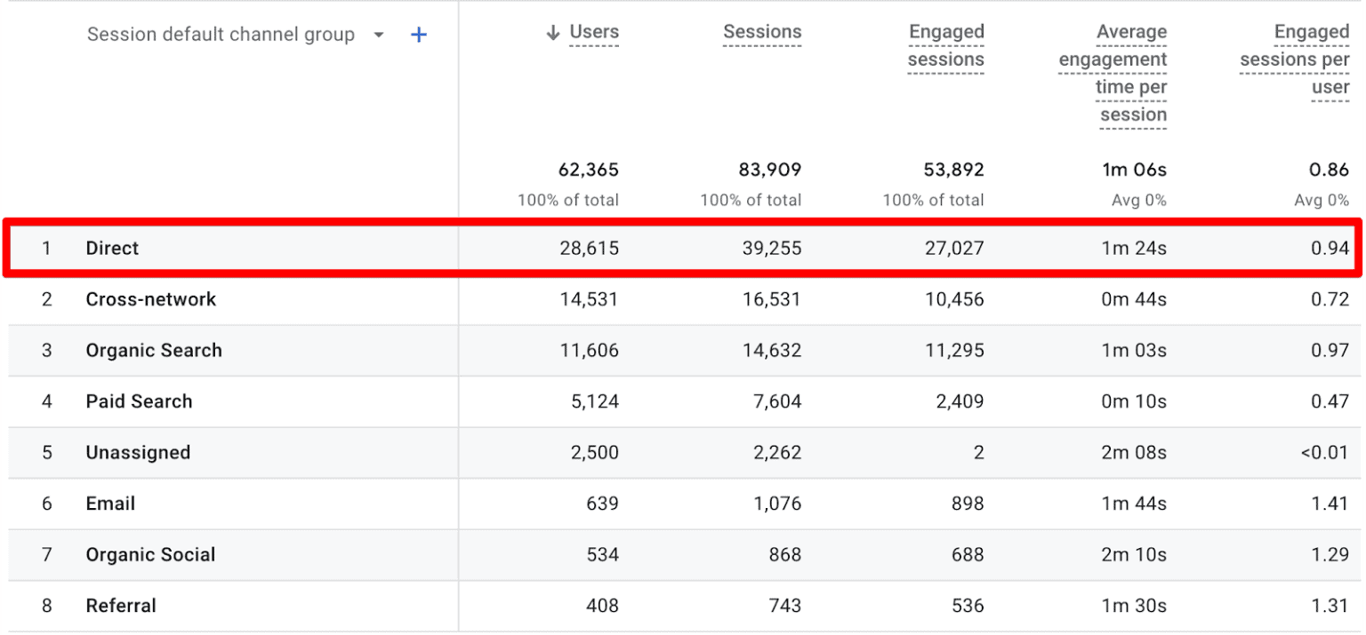
Google’s definition of the channel: “Direct is the channel by which users arrive at your site/app via a saved link or by entering your URL.” The rule behind it is mechanical. A session goes to Direct when its source exactly matches (direct) and its medium is (none) or (not set) (default channel group, checked October 2026).
GA4 writes (direct) when it has nothing else. It looks for campaign parameters in the URL, such as UTM tags or a Google Ads click ID, and for a referrer sent by the browser. When both are missing, the session is direct, whatever the visitor actually did.
One detail softens the number in some reports. For session-scoped dimensions Google states that “sessions initiated by direct entrance are attributed to the UTM values for that user”: a returning visitor who comes back directly can be credited to their earlier campaign. Direct is the answer of last resort.
Where to find direct traffic in GA4
Where to find direct traffic in GA4
Open Reports, then Acquisition, then Traffic acquisition. The default dimension is Session default channel group, or Session primary channel group if your property has set a custom channel group as primary. Direct is one of its rows. Add Session source / medium as a second dimension to see (direct) / (none).
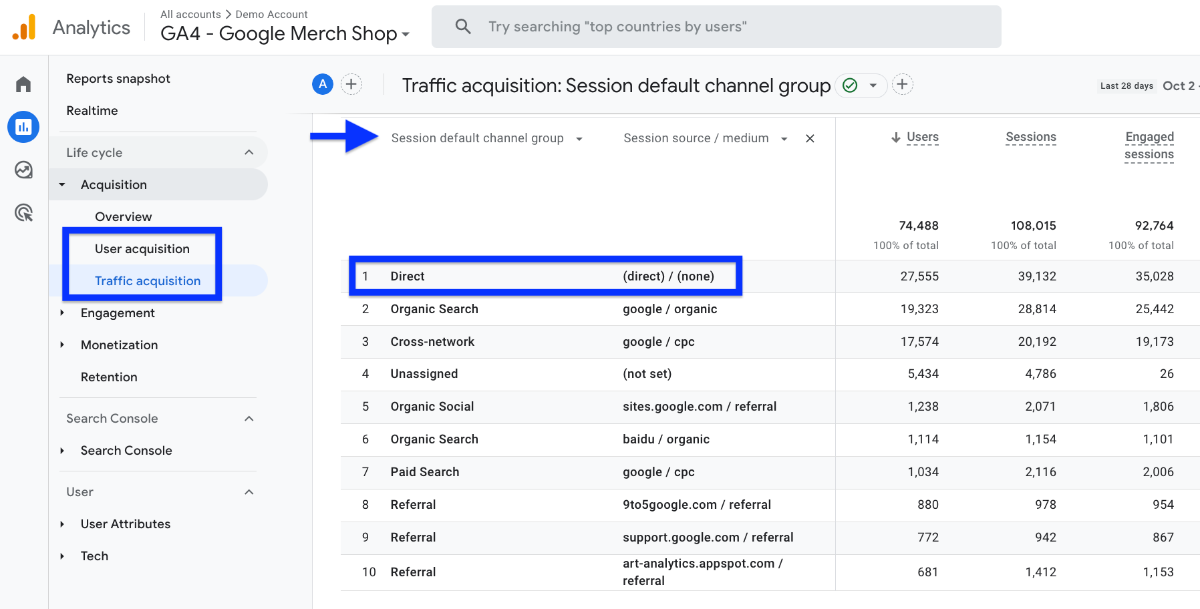
The User acquisition report shows the same for the first visit of each user, under First user default channel group.
OWOX Data Marts
See your first report built in real time. 15 minutes.
- Connect your data warehouse
- Pick your metrics
- Get a live Google Sheets report
In the time it takes to write a ticket. Then imagine never writing that ticket again.
Book a DemoWe'll use your actual use case
Which pages receive direct traffic
Which pages receive direct traffic
The landing page tells you whether a direct session can be real. People type a home page address. Nobody types the URL of a filtered category or a blog post with a long slug.
- In the Traffic acquisition report, type
directinto the search box above the table. - Click the plus sign next to the dimension and add Landing page + query string.
- Sort by sessions.
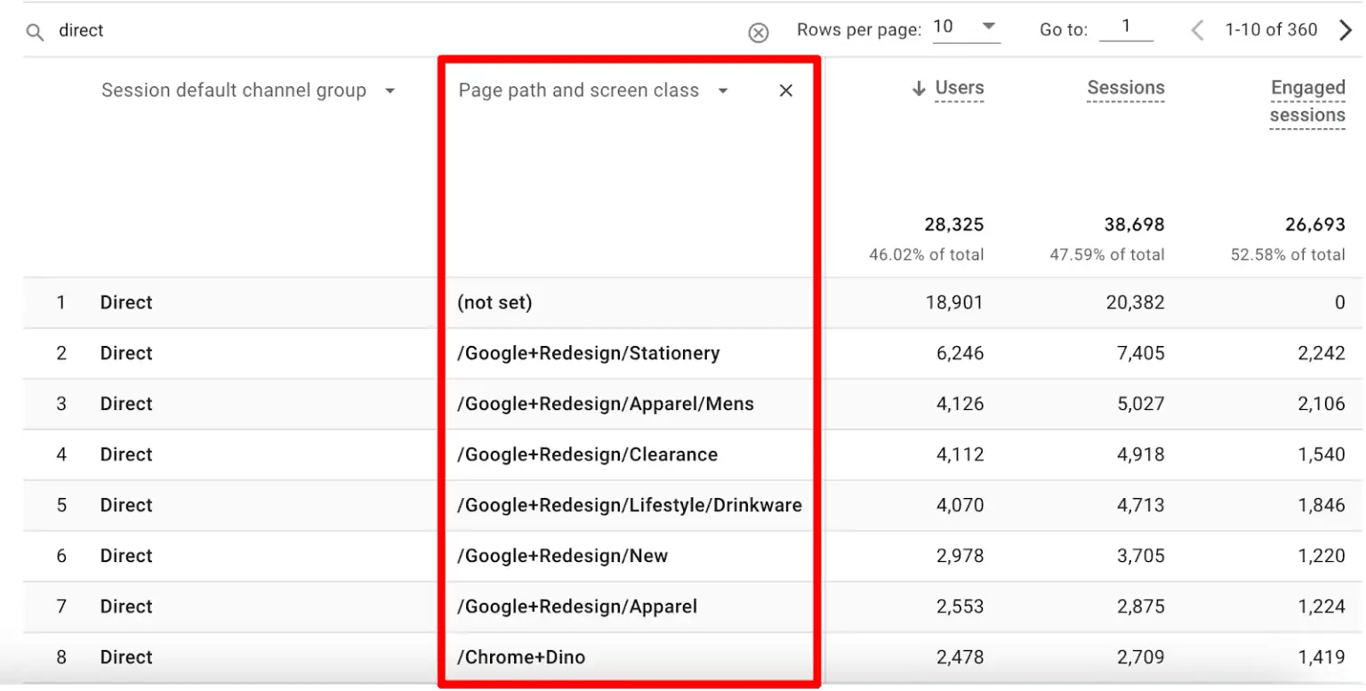
Direct sessions that land on deep pages are mislabelled traffic. That list is your work list. Rows where the landing page is (not set) are a separate problem, covered in what (not set) means in GA4.
What causes direct traffic
| Cause | Why the source is lost |
|---|---|
| Typed URL, bookmark, browser autofill | There is no referring page. This is real direct traffic |
| Links in email without UTM tags | Mail apps and many webmail clients send no referrer |
| Links in messengers and mobile apps | Apps open links without a referrer. Often called dark social |
| Links in documents | A PDF, a slide deck or a spreadsheet is not a web page and has no referrer |
| A link from an HTTPS page to an HTTP page | Browsers do not send the referrer when the connection is downgraded |
| Redirects that drop parameters | The redirect sends the visitor on without the UTM tags from the original URL |
| Pages without the GA4 tag | The landing page records nothing; the session starts on the next page, with your own site as referrer |
| Offline sources | QR codes, print and TV lead to a URL that carries no information unless you add it |
Only the first row is traffic you cannot label. Every other row can be reduced.
How to reduce direct traffic
1. Tag every link you control. Email campaigns, newsletter footers, social posts, QR codes, links in PDFs, partner placements. A UTM-tagged URL carries its source in the address, so it does not depend on the referrer. Agree on one naming scheme first; the rules are in the guide to UTM tags.
2. Use short, tagged URLs for offline media. A QR code or a printed address should redirect to a URL with UTM parameters. Check that the redirect passes them through.
3. Test your redirects. Open a tagged URL that redirects and look at the address bar after the page loads. If the UTM parameters are gone, the redirect rule drops the query string. This is a server setting to fix once.
4. Serve every page over HTTPS. If any landing page still answers on HTTP, links from secure sites arrive without a referrer.
5. Put the GA4 tag on every page. Landing pages built in a separate tool, checkout subdomains and old sections of a site are where the tag is usually missing. The setup is described in GA4 tags in Google Tag Manager.
6. Exclude your own team. Employees open the site from bookmarks all day. Define internal traffic under Admin, Data streams, Configure tag settings, and activate the data filter.
Check the effect a few weeks later in the landing page view above. A fix shows up as fewer direct sessions on deep pages, not as a smaller Direct total overnight.
Where GA4 stops
Three limits remain after the fixes:
- GA4 reports the label, not the evidence. You see that a session is direct. You do not see whether it had a referrer GA4 ignored, whether it started without a page view, or what the same visitor did the week before.
- The channel rules are Google’s. You can build a custom channel group, but the logic that turns missing data into
(direct)is not yours to change. - Past sessions stay as they were recorded. Tagging from today does not relabel last quarter.
For a marketer this matters at budget time. If a third of sessions sit in Direct, every paid channel looks less effective than it is, and the difference cannot be reassigned inside the interface.
Check the raw sessions in BigQuery
Check the raw sessions in BigQuery
GA4’s native BigQuery export contains every event with its page URL, its referrer and its campaign parameters. That is enough to count, per landing page, the sessions that arrived with no referrer and no campaign source. The query runs as written on Google’s public GA4 sample:
WITH sessions AS (
  SELECT
    user_pseudo_id,
    (SELECT value.int_value
     FROM UNNEST(event_params)
     WHERE key = 'ga_session_id') AS session_id,
    ARRAY_AGG(
      (SELECT value.string_value
       FROM UNNEST(event_params)
       WHERE key = 'page_location')
      IGNORE NULLS
      ORDER BY event_timestamp
      LIMIT 1)[SAFE_OFFSET(0)] AS landing_page,
    LOGICAL_OR((
      SELECT value.string_value
      FROM UNNEST(event_params)
      WHERE key = 'page_referrer') IS NOT NULL)
      AS has_referrer,
    LOGICAL_OR((
      SELECT value.string_value
      FROM UNNEST(event_params)
      WHERE key = 'source') IS NOT NULL)
      AS has_campaign_source
  FROM
    `bigquery-public-data.ga4_obfuscated_sample_ecommerce.events_*`
  WHERE _TABLE_SUFFIX BETWEEN '20210101' AND '20210131'
  GROUP BY user_pseudo_id, session_id
)
SELECT
  REGEXP_EXTRACT(
    landing_page, r'^https?://[^/]+(/[^?#]*)'
  ) AS landing_path,
  COUNT(*) AS sessions,
  COUNTIF(NOT has_referrer
          AND NOT has_campaign_source)
    AS no_origin_sessions
FROM sessions
GROUP BY landing_path
HAVING sessions >= 500
ORDER BY no_origin_sessions DESC
The first rows on the sample:
| landing_path | sessions | no_origin_sessions | share |
|---|---|---|---|
/ |
50,702 | 13,402 | 26% |
/Google+Redesign/Apparel |
17,723 | 11,011 | 62% |
/store.html |
5,752 | 3,556 | 62% |
/Google+Redesign/Lifestyle/Drinkware |
1,878 | 1,277 | 68% |
A quarter of home page sessions arriving with no origin is plausible. Six in ten sessions on an apparel category page arriving with no origin is not people typing URLs. Something links to that page without tags, and now you know which page to investigate.
This is a diagnostic, not a copy of GA4’s channel logic, so the totals will not equal the Direct row in the interface. Linking a property to BigQuery is covered in connecting GA4 to BigQuery.
Make the check part of the weekly report
Make the check part of the weekly report
The query answers the question once. The marketer’s real need is to see it every week next to spend: which landing pages lose their source, and whether last week’s tagging fix worked.
OWOX Data Marts is built for that step. An analyst saves the query as a Data Mart on the warehouse that holds the GA4 export, describes what “no origin” means in it, and publishes it. A report on the Data Mart is delivered to Google Sheets or Data Studio (the former Looker Studio) on a schedule. The marketer opens a sheet, not a SQL console.
OWOX Data Marts does not collect GA4 data and does not reassign direct sessions to channels. It publishes the analyst’s SQL on the tables the export already wrote. If the same warehouse also holds ad spend, the two can be joined there, as shown in blending GA4 conversions with ad spend.
Turn your data into decisions.
Governed data marts give you the clean foundation ML needs to actually work.
- No AI hallucinations
- Analyst-governed definitions
- Every number traces to SQL
Frequently Asked Questions
Can direct traffic be reassigned to the right channel after the fact?
Not inside GA4. Past sessions keep the source they were recorded with. You can investigate them in the BigQuery export, where each event has its page URL, referrer and campaign parameters, but fixes such as UTM tagging only affect sessions from the day they are applied.
How do I see which pages get direct traffic in GA4?
Open Reports, Acquisition, Traffic acquisition, type direct into the search box above the table, and add Landing page + query string as a second dimension. Direct sessions that land on deep pages, which nobody types by hand, are mislabelled traffic.
Why is direct traffic in GA4 often higher than expected?
Because GA4 uses (direct) whenever it has no other information. Links in email clients, mobile apps and documents send no referrer, redirects can drop UTM parameters, and pages without the GA4 tag lose the original source. All of those sessions end up in Direct.
What role do UTM parameters play in reducing direct traffic?
A UTM-tagged URL carries the source, medium and campaign in the address itself, so GA4 can attribute the session even when the browser sends no referrer. That is why tagging email, social and offline links moves sessions out of Direct.
How can I reduce direct traffic in GA4?
Tag every link you control with UTM parameters, use tagged short URLs for QR codes and print, check that redirects keep the query string, serve all pages over HTTPS, make sure the GA4 tag is on every landing page, and filter out internal traffic.
What is direct traffic in Google Analytics 4?
Direct traffic is the channel GA4 assigns to sessions whose source is (direct) and whose medium is (none) or (not set). In practice it is every visit that arrived with no referrer and no campaign parameters: typed URLs and bookmarks, but also untagged links in email, messengers, apps and documents.