E-commerce tracking in Google Analytics 4 with Google Tag Manager
E-commerce tracking in Google Analytics 4 is a set of recommended events, from view_item to purchase, each sent with an items array. This guide covers what changed from Enhanced Ecommerce in Universal Analytics, the events to implement, the data layer push, the Google Tag Manager tag and trigger, testing, the common errors, and how to get exact funnel and product numbers from the BigQuery export.
E-commerce tracking in Google Analytics 4 is a set of recommended events, such as view_item, add_to_cart and purchase, each sent with an items array that describes the products. There is no “Enhanced Ecommerce” switch to turn on, as there was in Universal Analytics. If your site pushes the events to the data layer in Google’s format, one tag in Google Tag Manager forwards them, and the e-commerce reports fill in.
This guide covers the events, the data layer code, the GTM setup, testing, the errors that cause most wrong numbers, and what to do when the GA4 reports are not exact enough to reconcile with your shop system.
Enhanced Ecommerce in GA4: what changed
Enhanced Ecommerce in GA4: what changed
If you are looking for Enhanced Ecommerce in GA4, this is it under a different name. Three things changed from Universal Analytics:
| Universal Analytics | Google Analytics 4 | |
|---|---|---|
| Activation | Enable Ecommerce and Enhanced Ecommerce in the view settings | Nothing to enable. Reports fill when the events arrive |
| Data model | Hits with an ecommerce object per action type |
Events with parameters and an items array |
| Naming | productClick, addToCart, checkout, purchase |
select_item, add_to_cart, begin_checkout, purchase |
An old Universal Analytics data layer does not work as it is. The event names and the structure of the product array are different, so the site code has to change, not only the tags.
Which e-commerce events to track
Which e-commerce events to track
Google’s developer guide groups the recommended events by step (Measure ecommerce, checked October 2026):
| Step | Events |
|---|---|
| Product lists | view_item_list, select_item |
| Product page | view_item |
| Cart | add_to_cart, remove_from_cart, view_cart, add_to_wishlist |
| Checkout | begin_checkout, add_shipping_info, add_payment_info |
| Order | purchase, refund |
| Promotions | view_promotion, select_promotion |
Start with four: view_item, add_to_cart, begin_checkout, purchase. They give you the funnel and the revenue. Add the list, promotion and shipping events when someone has a question that needs them. Every extra event is code to maintain.
OWOX Data Marts
See your first report built in real time. 15 minutes.
- Connect your data warehouse
- Pick your metrics
- Get a live Google Sheets report
In the time it takes to write a ticket. Then imagine never writing that ticket again.
Book a DemoWe'll use your actual use case
Step 1. Push the events to the data layer
Step 1. Push the events to the data layer
This is developer work on the site. Each action pushes an object with an event name and an ecommerce object. Google’s example for a purchase, shortened to one item:
dataLayer.push({ ecommerce: null });
dataLayer.push({
  event: "purchase",
  ecommerce: {
    transaction_id: "T_12345",
    value: 72.05,
    tax: 3.60,
    shipping: 5.99,
    currency: "USD",
    coupon: "SUMMER_SALE",
    items: [
      {
        item_id: "SKU_12345",
        item_name: "Stan and Friends Tee",
        item_brand: "Google",
        item_category: "Apparel",
        item_variant: "green",
        price: 10.01,
        quantity: 3
      }
    ]
  }
});
Four rules that prevent most problems:
- Clear the object first. The line
dataLayer.push({ ecommerce: null })removes the previousecommerceobject. Without it, items from an earlier event can leak into the next one. transaction_idmust be unique and never empty. GA4 uses it to deduplicate purchases. The details are in duplicate transactions in GA4.valueis the sum of price times quantity of the items, as Google’s example notes, andcurrencyis required with it.- Use the same
item_ideverywhere, from the list view to the purchase, or product reports will split one product into several.
Step 2. Create the tag in Google Tag Manager
Step 2. Create the tag in Google Tag Manager
You need the Google tag already on the site. If it is not, start with how to install Google Tag Manager and GA4 tags in GTM.
One tag can serve all e-commerce events.
- Create a tag of the type Google Analytics: GA4 Event and enter your measurement ID.
- In Event Name, choose the built-in variable
{{Event}}. The tag then sends whatever event name the data layer pushed. - Open More Settings, then Ecommerce, tick Send Ecommerce data, and choose Data Layer as the data source.
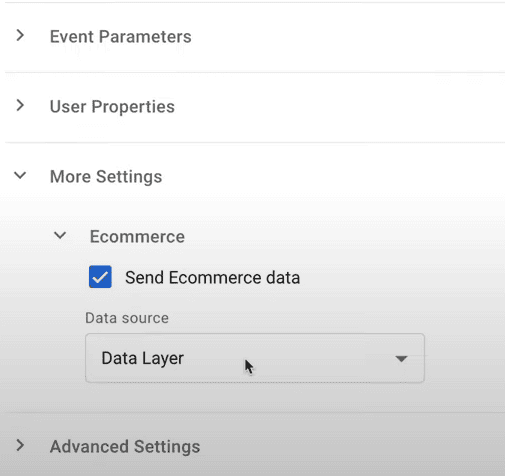
Google’s guide describes this option as an alternative to mapping each parameter by hand with data layer variables. Use the manual mapping only if your data layer differs from Google’s structure.
- Add a trigger of the type Custom Event. Tick Use regex matching and list the events you implemented:
view_item|add_to_cart|begin_checkout|purchase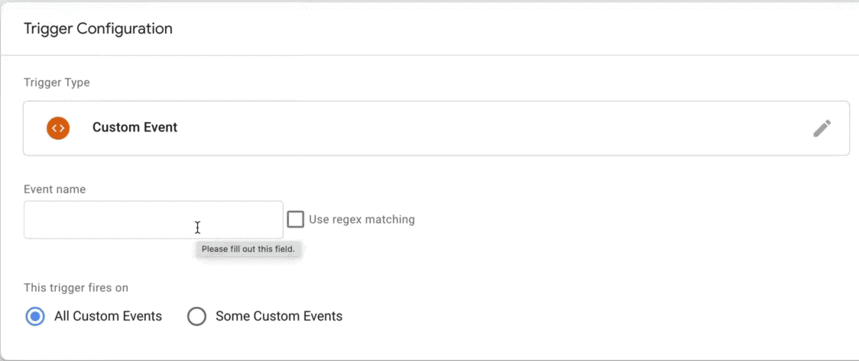
- Save the tag. Do not publish yet.
Step 3. Test before you publish
Step 3. Test before you publish
- Click Preview in GTM and open your site in the debug window.
- View a product, add it to the cart, start the checkout and complete a test order.
- In the GTM debug panel, check that the tag fired once for each action and that the
itemsarray is filled. - In GA4, open Admin, then DebugView, and check that the same events arrive with their parameters.
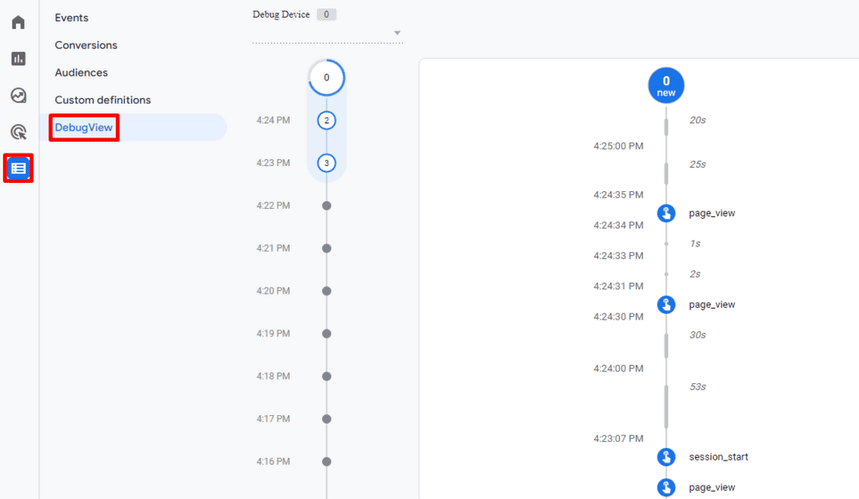
Then publish the container. The e-commerce reports under Reports, Monetization fill within a day or two. GA4 treats purchase as a key event by default; the other events can be marked as key events under Admin, Events.
Common problems and their causes
Common problems and their causes
| Symptom | Usual cause |
|---|---|
| No data in the Monetization reports | The tag never fires: event name in the trigger does not match the data layer exactly |
| Revenue is zero or missing | value or currency is absent, or value is sent as text with a currency symbol |
| Items show as (not set) | The items array is empty, or item_id and item_name are both missing |
| Purchases are counted twice | The confirmation page was reloaded and transaction_id is missing or not unique |
| Purchases are missing | The tag fires after the page redirects, or consent was not granted |
| Wrong items in an event | The ecommerce object was not cleared before the push |
| One product appears as several | item_id differs between events, or the name changes with the variant |
How (not set) arises is covered in what (not set) means in GA4.
Refunds
Send a refund event with the transaction_id of the original order. For a partial refund, include the refunded items and quantities. Most shops process refunds in a back office, not in the browser, so this event is usually sent from the server with the GA4 Measurement Protocol.
Be realistic about it. Refund tracking in GA4 is rarely complete, and GA4 is not the system of record for money.
Where GA4 e-commerce reports stop
Where GA4 e-commerce reports stop
The setup above gives a marketing team what it needs for day-to-day work: funnel steps, product views, revenue by channel. An analyst who has to reconcile it with the shop system meets the limits quickly:
- GA4 revenue is what the browser reported. Blocked scripts, declined consent and closed tabs remove purchases. Orders by phone or marketplace never appear.
- Reports can be sampled or thresholded, and distinct counts are estimates, as described in data sampling in GA4.
- Product cost, margin and stock are not in GA4. Revenue by product is there. Profit by product is not.
- Returns arrive late or not at all.
- Explorations keep event-level data for 14 months at most on a standard property.
None of this is a reason to skip the setup. It is the reason the GA4 number and the finance number differ, and why nobody should try to make them equal inside GA4.
Exact funnel and product numbers from BigQuery
Exact funnel and product numbers from BigQuery
GA4’s native BigQuery export contains every e-commerce event with its items array. The funnel is then a query, counted from all events. This one runs as written on Google’s public GA4 sample:
SELECT
  event_name,
  COUNT(*) AS events,
  COUNT(DISTINCT user_pseudo_id) AS users
FROM
  `bigquery-public-data.ga4_obfuscated_sample_ecommerce.events_*`
WHERE _TABLE_SUFFIX BETWEEN '20210101' AND '20210131'
  AND event_name IN (
    'view_item', 'add_to_cart', 'begin_checkout',
    'add_shipping_info', 'add_payment_info',
    'purchase')
GROUP BY event_name
ORDER BY users DESC| event_name | events | users |
|---|---|---|
| view_item | 86,971 | 19,629 |
| add_to_cart | 15,522 | 3,832 |
| begin_checkout | 11,034 | 1,924 |
| add_shipping_info | 3,952 | 1,924 |
| add_payment_info | 2,841 | 1,395 |
| purchase | 1,204 | 1,069 |
Product revenue comes from unnesting the items of the purchase events:
SELECT
  item.item_name,
  SUM(item.quantity) AS units,
  ROUND(SUM(item.item_revenue), 2)
    AS item_revenue
FROM
  `bigquery-public-data.ga4_obfuscated_sample_ecommerce.events_*`,
  UNNEST(items) AS item
WHERE _TABLE_SUFFIX BETWEEN '20210101' AND '20210131'
  AND event_name = 'purchase'
GROUP BY item.item_name
ORDER BY item_revenue DESC
The first row on the sample is Google Crewneck Sweatshirt Green, 78 units and 3,542 in revenue. Linking a property is covered in connecting GA4 to BigQuery, and the query patterns in how to query GA4 event data in BigQuery.
The larger gain is what you can join. In the warehouse the GA4 events sit next to the orders from the shop system, with their real totals, refunds and costs, and next to ad spend. GA4 tells you which session and source led to an order; the shop system tells you what the order was worth.
From tracking to a model the business can use
From tracking to a model the business can use
Those joins are where an e-commerce team’s recurring questions live: revenue and margin by channel, repeat purchase by first product, what a customer from each paid channel costs and brings back. Answering them once is a query. Answering them every week, the same way, for people who do not write SQL, is a different job.
OWOX Data Marts is built for that job. An analyst defines the entities, such as orders, purchases, customers, sessions and traffic sources, as Data Marts on the warehouse, with SQL they wrote and descriptions the business can read. Reports on them are delivered to Google Sheets or Data Studio (the former Looker Studio) on a schedule. The E-commerce Data Model is a ready structure of such Data Marts to start from.
The honest boundaries: OWOX Data Marts does not track anything on your site and has no GA4 connector. The GA4 events reach your warehouse through Google’s own export, orders can be loaded from Shopify, and ad spend from the ad platforms. The SQL that turns events into sessions and orders into revenue is the analyst’s. The product publishes it, runs it on a schedule and keeps one definition in use.
Turn your data into decisions.
Governed data marts give you the clean foundation ML needs to actually work.
- No AI hallucinations
- Analyst-governed definitions
- Every number traces to SQL
Frequently Asked Questions
Why is GA4 e-commerce revenue missing or wrong?
The usual causes are a missing value or currency parameter, a value sent as text, an empty items array, a purchase tag that fires twice or not at all, and an ecommerce object that was not cleared before the push. Check the event in GTM preview mode and in GA4 DebugView.
How do I set up e-commerce tracking in Google Analytics 4?
Have the site push Google's recommended e-commerce events, such as view_item, add_to_cart, begin_checkout and purchase, to the data layer with an items array. In Google Tag Manager, create one GA4 Event tag with the event name {{Event}} and Send Ecommerce data set to Data Layer, triggered by a Custom Event trigger that lists those events. Test in preview mode and DebugView, then publish.
Does enhanced measurement in GA4 track e-commerce?
No. Enhanced measurement collects page views, scrolls, outbound clicks, site search, video engagement, file downloads and form interactions. E-commerce events are not part of it and have to be implemented on the site.
Why does GA4 revenue differ from my shop system?
GA4 records what the browser reported. Blocked scripts, declined consent and closed tabs remove purchases, phone and marketplace orders never arrive, and refunds are often incomplete. The shop system is the record for money; GA4 connects orders to sessions and traffic sources.
Which e-commerce events should I track in GA4?
Start with view_item, add_to_cart, begin_checkout and purchase, which give the funnel and the revenue. Add view_item_list, select_item, add_shipping_info, add_payment_info, refund and the promotion events when a question needs them.
What is the difference between Enhanced Ecommerce in Universal Analytics and e-commerce in GA4?
Universal Analytics used hits with an ecommerce object per action type and names such as productClick and addToCart. GA4 uses events with parameters and an items array, with names such as select_item and add_to_cart. A Universal Analytics data layer has to be rewritten for GA4.
How do I enable Enhanced Ecommerce in Google Analytics 4?
There is nothing to enable. GA4 has no Enhanced Ecommerce setting; its e-commerce reports fill in when the recommended events arrive with an items array.