Best marketing analytics tools in 2026: free and open-source first
A free-first guide to marketing analytics tools in 2026: what each tool is for, what is free, where it stops, and how to combine them into one stack that your team can trust.
Note: Originally published in September 2025. Fully updated in October 2026: the list grew from five tools to seven, every vendor claim was re-checked against the vendor’s own page, and the product screenshots were retaken.
Marketing teams rarely lack data. They lack a way to bring ad spend, website behaviour, orders and CRM records into one place where the numbers can be trusted. The paid platforms sell that convenience by the seat and by the connector, and the bill grows with every new channel. Most of the job can be done with free tools if you know which tool does which job.
This guide covers the marketing analytics tools worth your time in 2026, free and open-source ones first. For each one: what it is for, what is free, where it stops, and who it fits. Then how the free tools fit together into one stack, and a checklist for choosing when the free tier is no longer enough.
Why start with free marketing analytics tools
Why start with free marketing analytics tools
Free is not the point. Control is. The free tools in this list share three properties that paid marketing analytics suites usually do not.
Your data stays where you put it. Self-hosted and warehouse-native tools keep the raw data in your own warehouse or database. When you switch a tool, the history does not leave with the vendor. That is the warehouse-first argument in one line.
The logic is readable. Open-source tools and SQL-defined reports can be audited. A number that someone questions can be traced to the query that produced it, which is the difference between a dashboard and a defensible answer.
You can start today. No procurement, no seat count, no annual contract. A team can run the whole stack below for a month on real campaign data before deciding what, if anything, to pay for.
The honest limit: free tools need an owner. Someone has to host Matomo, keep Airbyte running, write the SQL behind the Data Marts. If nobody on the team can own that, the cost moves from the licence line to the payroll line, and a paid tool may be the cheaper option.
What a marketing analytics tool has to do
What a marketing analytics tool has to do
“Marketing analytics tool” covers four different jobs, and no free tool does all four. Knowing which job you are hiring for is most of the decision.
- Collect. Pull spend, clicks and conversions from every ad platform, plus website behaviour and orders, on a schedule.
- Store. Land it in a warehouse you control, with history, so that a changed API or a dropped vendor does not erase last year.
- Govern. Define once what “cost”, “conversion” and “campaign” mean, so that every report reads the same joins and the same filters.
- Deliver. Put the result where people work: a spreadsheet, a dashboard, a Slack channel, an AI assistant.
The tools below are grouped by the job they do best. The last section shows how they connect.
OWOX Data Marts
See your first report built in real time. 15 minutes.
- Connect your data warehouse
- Pick your metrics
- Get a live Google Sheets report
In the time it takes to write a ticket. Then imagine never writing that ticket again.
Book a DemoWe'll use your actual use case
The best marketing analytics tools in 2026
The best marketing analytics tools in 2026
Seven tools, free first. Where a vendor’s own page was the source, the month it was checked is noted.
1. Google Analytics 4 – web and app behaviour

GA4 tracks how people move through a website or app with an event-based model, reports engagement, conversions and funnels, and links natively to Google Ads. For marketing analytics its most valuable feature is the one most teams never switch on: the free export of raw event data to BigQuery. Standard properties can export daily, with a limit of one million events per day on the daily export, and streaming export is available at BigQuery’s own rates (Google Analytics Help, checked October 2026).
What is free: the full GA4 interface and the BigQuery daily export for standard properties.
Where it stops: the reports in the interface can be sampled on large date ranges, the model takes time to learn, and GA4 knows nothing about ad spend outside Google. The raw export is the way out of all three; the GA4 export data model explains how to shape it.
Fits: any team with a website or app. If GA4 is not an option for compliance reasons, see the Google Analytics alternatives.
2. Matomo on-premise – web analytics you host

Matomo On-Premise is the open-source web analytics platform you install on your own server. Matomo’s position is plain: “you own your data, no one else”, “No data sampling”, and On-Premise “is, and forever will remain free to download” (matomo.org, checked October 2026). Goals, funnels, e-commerce tracking and campaign reports are all in the free product.
What is free: the whole On-Premise product. Matomo 6 needs PHP 8.1 or newer and MySQL 8 or MariaDB 10.6 or newer, on any web server you run.
Where it stops: you host, patch and scale it, and some features are paid plugins. Matomo answers “what happened on the site”; it does not join that to ad spend or CRM data on its own.
Fits: teams in regulated markets or with strict data-residency rules, and anyone who wants a GA4 alternative without sampling.
3. Airbyte open source – moving data into your warehouse

Airbyte describes itself as “open-source data movement for ELT pipelines and AI agents”, with a catalogue of several hundred connectors covering ad platforms, databases, files and SaaS tools (Airbyte on GitHub, checked October 2026). It is built to run on Kubernetes, with abctl and single-VM installs documented for smaller setups.
What is free: the self-managed platform and the connector catalogue, under a dual ELv2 and MIT licence.
Where it stops: you run it. Connector quality varies across the catalogue, and Airbyte lands raw tables; it does not define what the numbers mean. That is the job of the next tool.
Fits: teams with a data engineer, or an analyst who is comfortable with Docker and Kubernetes, who want one pipeline tool for marketing and non-marketing sources alike. The ETL tools guide compares it with the paid options.
4. OWOX Data Marts – governed Data Marts on SQL the analyst owns

OWOX Data Marts is the governance layer in this list. An analyst defines a Data Mart as SQL, a table or a view in Google BigQuery, Snowflake, AWS Redshift, AWS Athena or Databricks, documents what it means, and publishes it. Business users then pull that Data Mart into Google Sheets, Data Studio, Slack, email or an AI assistant without touching the warehouse credentials. OWOX does not transform the data; it publishes and schedules the SQL the analyst wrote, and every run is logged.
The connectors are part of the free product: ad platforms such as Facebook, Google, LinkedIn, TikTok, Microsoft, Reddit and X, plus Shopify, Google Sheets, GitHub and a few reference sources, all landing in the warehouse you already have. The connector catalogue lists the current set.
What is free: the Community edition, self-managed, “forever free” on the pricing page. Connectors are MIT-licensed and the platform core is ELv2 (OWOX Data Marts on GitHub, checked October 2026). Install is npm install -g owox and owox serve.
Where it stops: it expects a warehouse and an analyst who writes SQL. The hosted cloud editions, with AI assistants and managed setup, are paid.
Fits: a data analyst who is tired of being the reporting bottleneck, and a team that wants numbers it can defend. The OWOX vs Supermetrics vs Airbyte comparison draws the lines between the three.
5. Metabase OSS – dashboards on the warehouse

Metabase calls itself “the easy-to-use open source Business Intelligence and Embedded Analytics tool that lets everyone work with data” (Metabase on GitHub, checked October 2026). The Open Source plan is free, self-hosted, with unlimited users, questions and dashboards, a point-and-click query builder and a SQL editor (metabase.com/pricing, checked October 2026).
What is free: the AGPL open-source edition, run as a JAR or a Docker container.
Where it stops: row-level permissions, SSO and official support are in the paid plans, and a dashboard is only as good as the tables behind it. Point Metabase at governed Data Marts rather than raw connector tables and the numbers stay consistent across dashboards.
Fits: teams that want shared dashboards on BigQuery, Postgres or MySQL without a per-seat BI licence. For a broader view of the category, see the data analysis tools list.
6. Data Studio (formerly Looker Studio) – free reporting on Google data
Data Studio is Google’s free reporting tool. It connects natively to GA4, Google Ads, BigQuery and Google Sheets, and it is where most marketing dashboards in Google-centric teams end up. The native BigQuery connector means a governed Data Mart can feed a dashboard directly.
What is free: the product. Data Studio Pro, with team workspaces and support, is paid.
Where it stops: it has no data layer of its own. Blending sources inside Data Studio is where dashboards drift apart from each other; keep the joins in the warehouse. The Looker vs Data Studio guide covers where the paid Looker starts, and BigQuery reports in Data Studio shows the Data Mart-to-dashboard path.
Fits: anyone reporting on Google data who needs shareable dashboards this week.
7. Google Sheets with the OWOX extension – reporting where the team works
Most marketing reporting ends in a , whatever BI tool the company bought. The OWOX Data Marts extension for Google Sheets turns that from a liability into the delivery layer: a business user opens the sidebar, browses the published Data Marts, picks columns and filters, and hits Run. No SQL, no warehouse credentials, and the source is the governed Data Mart, not a pasted CSV.
What is free: Google Sheets, and the extension works with the Community edition.
Where it stops: a spreadsheet is still a spreadsheet. Large datasets belong in the warehouse with the sheet reading an aggregated Data Mart, not the raw rows. The unified ad report in Google Sheets walkthrough shows the pattern end to end.
Fits: the marketers and managers who will never open a BI tool but live in Sheets.
Paid tools you will be compared against
Two paid products come up in every evaluation, and it is worth knowing what they are for.
Supermetrics positions itself as a way to “connect, manage, analyze, and activate” marketing data into spreadsheets, BI tools and warehouses, with a free trial (supermetrics.com, checked October 2026). It is the quickest route from an ad platform to a Google Sheet; the trade-off is that the data lands in a personal spreadsheet with no governance once it is there.
Funnel calls itself “the leading marketing intelligence platform”, a hub to “centralize your marketing data once” with cross-channel normalisation built in and no free tier shown on its site (funnel.io, checked October 2026). It is strong at standardising channels inside its own platform; the data is governed there, and ungoverned again once exported.
Both are legitimate choices for teams that would rather pay than host. The free stack below covers the same ground with the data staying in your warehouse. If you are weighing them up, the OWOX vs Supermetrics vs Airbyte comparison and the analytics tools topic go deeper.
The seven at a glance
- Google Analytics 4. Collects web and app behaviour. The free edition stops at sampled interface reports and one million events a day on the daily export.
- Matomo On-Premise. Collects web behaviour on your own server. Stops where you have to host and maintain it; some plugins are paid.
- Airbyte Open Source. Collects from any source into the warehouse. Stops at raw tables with no business logic, and you run it.
- OWOX Data Marts. Governs and delivers SQL-defined Data Marts. The Community edition is self-managed; hosted editions and AI assistants are paid.
- Metabase OSS. Dashboards on the warehouse. Row-level permissions, SSO and support are paid.
- Data Studio. Dashboards on Google data. No data layer of its own; Pro workspaces are paid.
- Google Sheets with the OWOX extension. Reporting where the team works. Aggregate in the warehouse, not in the sheet.
How the free tools fit together
How the free tools fit together
Read as a stack, the seven tools map onto the four jobs. Collection is GA4 or Matomo for behaviour and Airbyte or the OWOX connectors for ad spend and orders. Storage is your warehouse. Governance is the Data Mart layer. Delivery is Sheets, Data Studio, Metabase, Slack or an AI assistant, all reading the same Data Marts.
The piece most teams skip is governance, and it is the one that decides whether the numbers agree. Here is what it looks like on a real Data Mart.
The analyst writes the SQL once
In the demo project below, seven ad-platform connectors each land their own table. One Data Mart, Unified Ad Spend, joins them into a single daily grain with a common source, medium and campaign naming. The whole definition is SQL inside the Data Mart, one commented block per platform, and the Facebook block starts like this:
SELECT
  CAST(date_start AS DATE)
    AS date,
  'facebook' AS source,
  'cpc' AS medium,
  REGEXP_REPLACE(
    LOWER(
      TRIM(campaign_name)
    ),
    r'\s+', ' '
  ) AS campaign,
  ...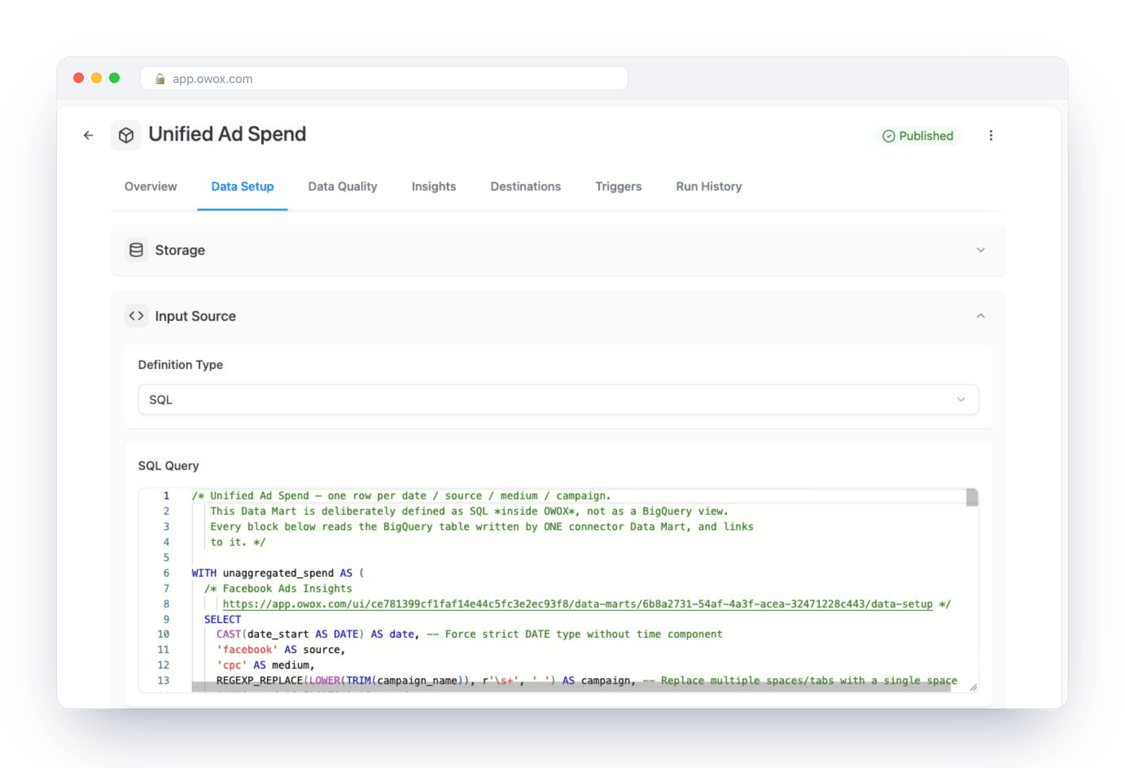
Every report, dashboard and AI answer about ad spend now reads this one definition. Change the campaign-naming rule here and every downstream number changes together.
The same Data Mart is delivered everywhere
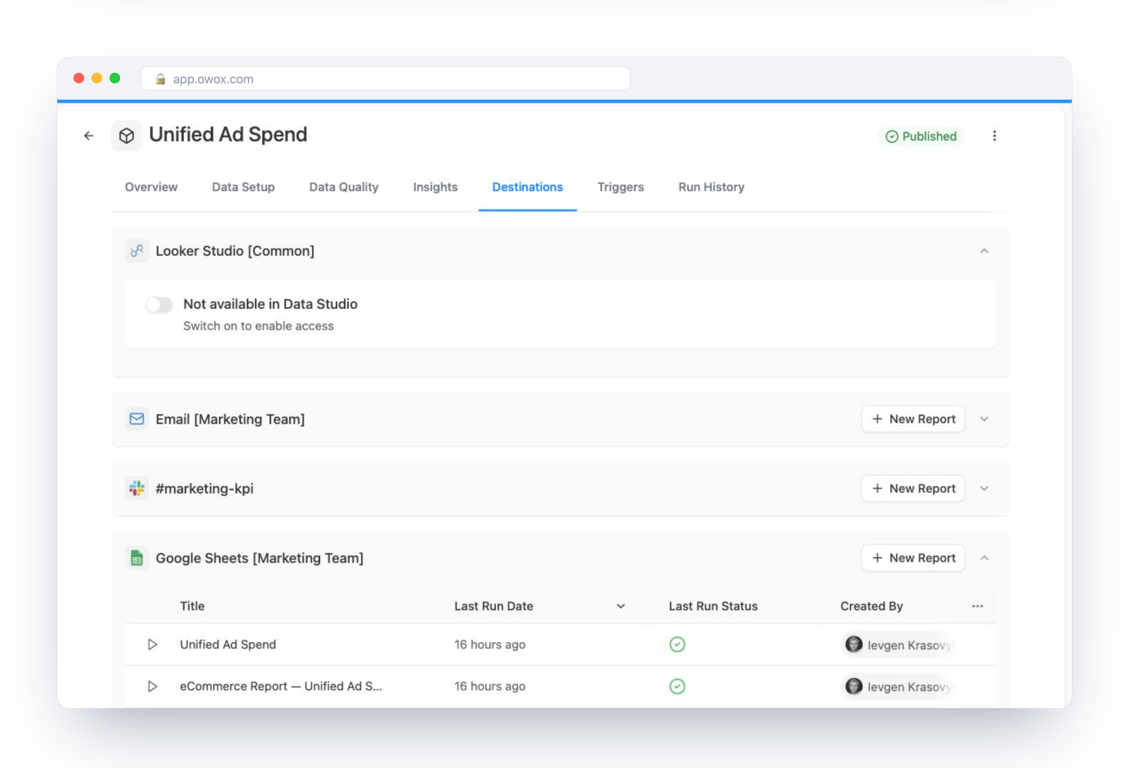
The Data Mart’s Destinations tab lists where it goes: a Google Sheets report for the marketing team, a Slack channel, an email digest and Data Studio, each on its own schedule. Nobody downstream needs warehouse credentials.
Every number is auditable
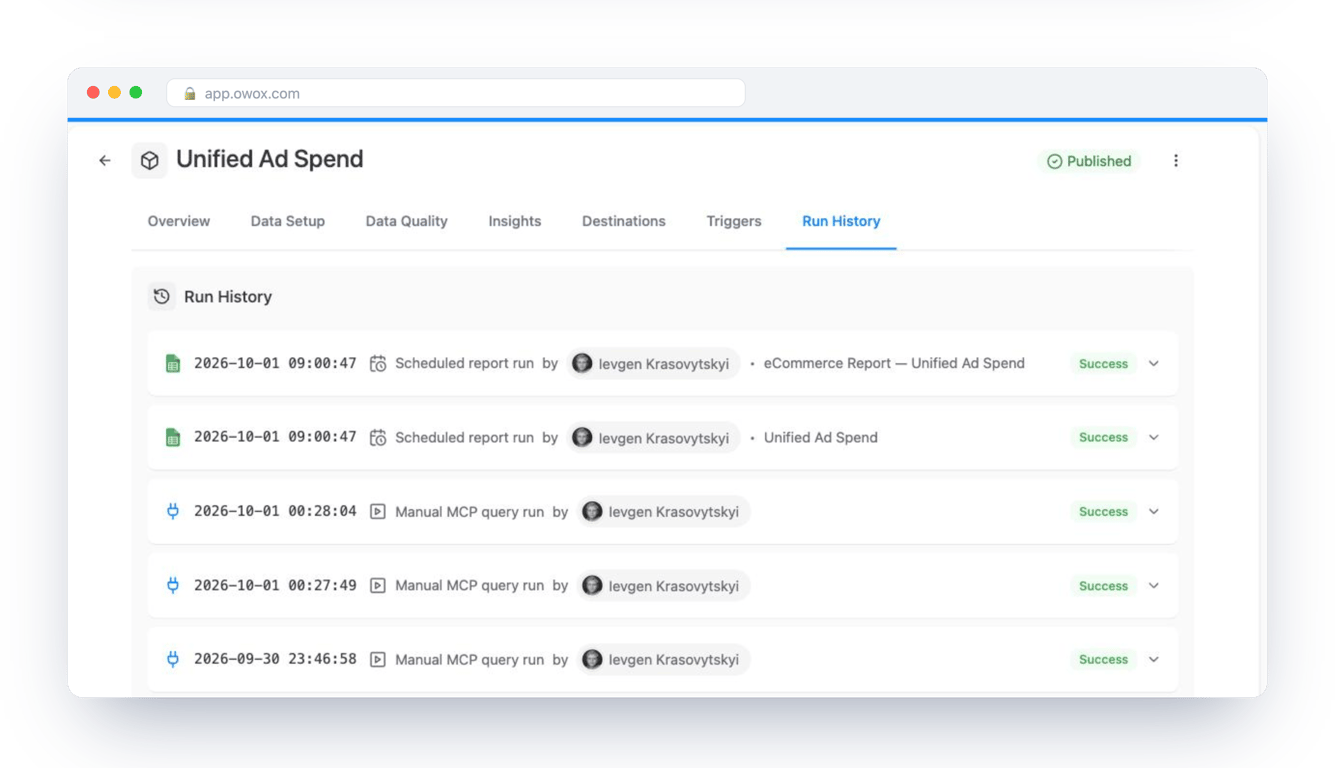
The question a free stack has to answer is not “can it produce a chart” but “can we defend the chart in the meeting”. Run History logs every scheduled report run and every query an AI assistant made over MCP, with who asked and whether it succeeded.
Ask the question in plain language
With the Data Mart published, a business user can ask an AI assistant connected over MCP: “What is our blended cost per order by ad platform for the last 30 days?” The difference between a plausible answer and a defensible one is what the assistant is allowed to read.
An assistant on raw warehouse tables sees seven connector tables with seven schemas, invents the join and the naming rule, and returns a plausible number that is confidently wrong.
An assistant on the governed Data Mart sees the published Unified Ad Spend Data Mart, reads the analyst’s join, and returns the number together with the query behind it in Run History.
That is why governance sits in the middle of the stack. Governed MCP analytics walks through the same pattern in more depth, and the data models catalogue shows ready-made Data Marts for e-commerce, SaaS and lead generation.
How to choose: a checklist before you commit
How to choose: a checklist before you commit
Free tools fail for the same reasons paid ones do: nobody wrote down what they were supposed to answer. Run this before the trial, not after.
Name the five questions first
Write down the questions the team asks every week: ROAS by channel, cost per lead by campaign, conversion rate by landing page. A tool that cannot answer those five is the wrong tool whatever its feature list says. The marketing metrics overview helps if the list is not obvious.
Audit the sources you actually have
List every platform that holds marketing data today: ad accounts, web analytics, the shop, the CRM, the spreadsheets people keep. Check that each one has a connector in the tool you are testing, native or open-source, and whether it keeps history or only the last few months.
Decide where the data will live
If the answer is “inside the tool”, you are renting your own history. Prefer tools that land data in a warehouse you own, even on a free sandbox tier, so that the next tool change costs a connector, not a migration.
Test two tools in parallel for 30 days
Point both at the same real campaign data and compare the numbers they produce for the same question. Where they disagree, find out why; that is usually where one tool has silently applied a rule you did not write.
Know the upgrade path before you need it
Every free tier has an edge: events per day, rows per sync, users per workspace, features behind a plan. Find the edge before the finance team asks why the free tool suddenly has an invoice.
Where OWOX Data Marts fits, and where it does not
Where OWOX Data Marts fits, and where it does not
This is an OWOX article, so the position should be stated plainly rather than implied.
What OWOX Data Marts does: collects from ad platforms and a few other sources into your warehouse, lets an analyst define and document Data Marts in SQL, governs who can read which Data Mart, and delivers them to Google Sheets, Data Studio, Slack, email and AI assistants over MCP. Every run is logged. The Community edition is open-source and self-managed; the cloud editions add hosted infrastructure, AI assistants and OWOX’s own data experts, and they are paid.
What it does not do: it does not replace GA4 or Matomo for behavioural tracking, it does not transform data on your behalf, and it does not try to be the dashboard. The SQL is yours; the joins are yours; OWOX publishes them.
When not to use it: if nobody on the team writes SQL and nobody will, the governed Data Mart model has no one to govern it. Start with GA4 and Data Studio, and come back when the first “which number is right” argument happens.
If you want to see the three screenshots above with your own data, the product page and the comparison page show how the pieces fit, and why we built free connectors for analysts explains the reasoning behind the open-source core.
Try the stack in an afternoon
- Turn on the GA4 BigQuery export, or install Matomo if you are not on GA4.
- Run
npm install -g owoxandowox serve, connect your warehouse, and add one ad-platform connector from the GitHub repository. - Define one Data Mart: last 30 days of spend by campaign. Document the two fields people will argue about.
- Install the Google Sheets extension and pull the Data Mart into the sheet the team already uses.
- Add Metabase or Data Studio on the same Data Mart when a dashboard is needed.
That is a working marketing analytics stack, free, with the data in your warehouse and every number traceable to a query. The paid tools in the list are still there when the team outgrows it; the difference is that the history comes with you.
Turn your data into decisions.
Governed data marts give you the clean foundation ML needs to actually work.
- No AI hallucinations
- Analyst-governed definitions
- Every number traces to SQL
Frequently Asked Questions
Which free tools help track ad spend across platforms?
Collect spend from each platform with the free OWOX connectors or Airbyte Open Source into your warehouse, then define one Data Mart that normalises source, medium and campaign across Google, Facebook, TikTok, LinkedIn, Microsoft, Reddit and X. Data Studio, Metabase or Google Sheets read that one Data Mart, so every channel is compared on the same definition of cost and conversion.
Are there open-source tools for automating marketing reports?
Yes. Airbyte Open Source schedules the data collection, OWOX Data Marts schedules the governed Data Marts and their delivery to Google Sheets, Slack, email and Data Studio, and Metabase OSS refreshes dashboards on the same warehouse tables. Together they automate the report without a commercial platform in the middle.
Is OWOX Data Marts free and open-source?
The Community edition is self-managed and free: the connectors are MIT-licensed and the platform core is under the Elastic License v2, with the source on GitHub. Install is `npm install -g owox` and `owox serve`. The hosted cloud editions, which add managed infrastructure, AI assistants and setup by OWOX data experts, are paid.
Can I build multi-channel marketing reports without paying for a tool?
Yes. Land ad-platform data in a warehouse with Airbyte Open Source or the OWOX connectors, define one governed Data Mart that unifies spend by date, source, medium and campaign, and deliver it to Google Sheets, Data Studio or Metabase. The whole chain runs on free editions; the warehouse is the only thing you pay for, and a BigQuery sandbox is free to start.
What are the best marketing analytics tools in 2026?
Free and open-source first: Google Analytics 4 and Matomo On-Premise for web and app behaviour, Airbyte Open Source and OWOX Data Marts for collecting ad spend and orders into your warehouse, OWOX Data Marts for governed SQL-defined Data Marts, and Metabase OSS, Data Studio and Google Sheets with the OWOX extension for delivery. Supermetrics and Funnel are the paid tools most teams compare them against.