Month-End Without Exports: A/R Aging, Cash and the P&L Beside the Orders
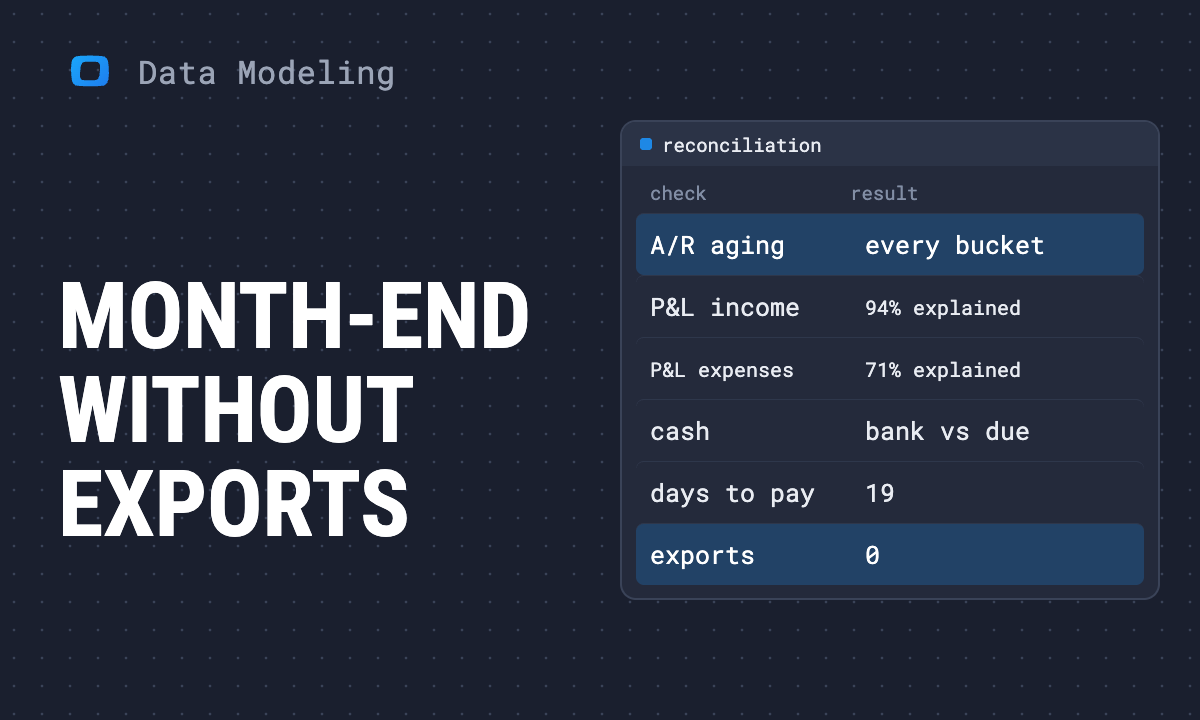
Most closes start with exports: the aging, the P&L, the bank, and a spreadsheet that ties them to what marketing reported. This article is the month-end outcome of putting QuickBooks Online in the data warehouse beside the orders, told from one company's books: which tables and report snapshots arrive every day, whether they matched the books (the A/R aging did, in every bucket; invoices and bills explained 94% and 71% of the P&L, and the rest is named), which spreadsheets stop, what finance keeps control of, and how finance and marketing end up reading one revenue number.
A close that starts with exports looks the same every month. Export the A/R aging. Export the P&L. Export the bank register. Open last month’s spreadsheet, paste, fix the formulas that broke, and tie the result to the revenue marketing reported, which never agrees.
This is what the loaded data replaces, read from one company’s QuickBooks Online in its data warehouse beside the orders. The numbers below are that company’s, read through one business data model. The books are small, which makes every figure easy to check.
What arrives every day
Eight QuickBooks Data Marts load on a daily schedule: six tables (the chart of accounts, customers, items, invoices, payments and bills) and two reports (the profit and loss and the A/R aging) kept as dated snapshots of what QuickBooks itself produced. They sit next to the tables the rest of the company already reports from: orders, order lines, products, sessions and ad spend.
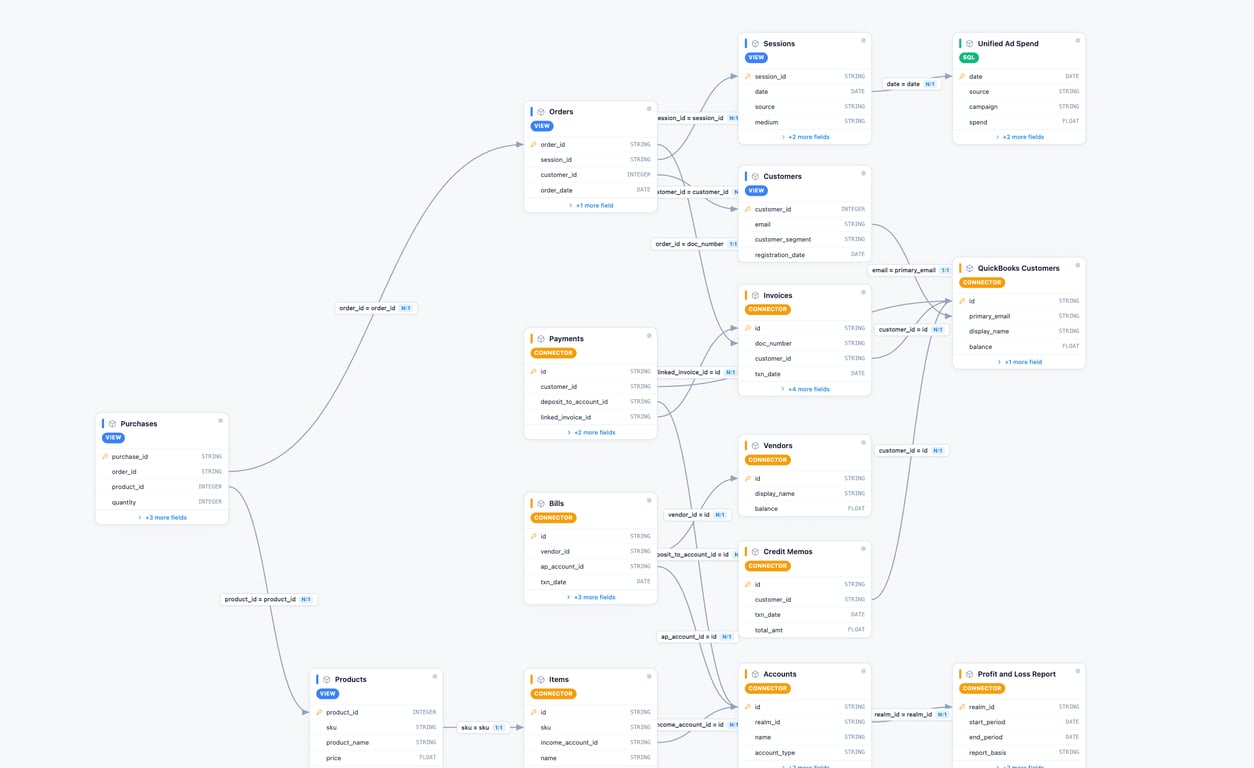
Two things about that picture matter here. The connector reads; nothing in the model posts to the books. And every report snapshot carries the time it was taken, so the aging of 5 November is on record as it stood on 5 November; schedule a run at each close and a later run for the same period lands as a newer dated row beside it rather than over it.
Did it match the books?
The first test of a copy is whether it agrees with the original. We rebuilt two of QuickBooks’ reports from the tables and set them against the snapshots.
| Check | QuickBooks report | Rebuilt from the tables | Result |
|---|---|---|---|
| A/R aging, 5 November 2026 | 5,281.52 | 5,281.52 | Equal in every bucket |
| P&L income, July to October 2026 | 9,809.52 | 9,220.05 from invoices | 94% explained |
| P&L expenses, July to October 2026 | 8,224.31 | 5,842.17 from bills | 71% explained |
The aging is a full match. Open invoice balances, bucketed by days past due on the report date, gave 3,756.02 not yet due, 1,128.50 at 1 to 30 days, 241.00 at 31 to 60 and 156.00 at 61 to 90, nothing over 90: QuickBooks’ report, bucket for bucket. The match depends on comparing the report with balances taken the same day; the invoice table holds today’s balance, so the check reruns each time a snapshot lands.
The P&L is coverage, not a match. Invoices explained all of July’s and August’s income, 97% of September’s and 89% of October’s; bills covered 71% of expenses. In amounts, 589.47 of income and 2,382.14 of expense are not in the loaded tables, so the rebuilt net (3,377.88) does not tie to QuickBooks’ (1,585.21). The remainder sits in entities not yet loaded: sales paid on the spot, credit memos and refunds, card and cash purchases, and manual journal entries. Loading them is the next step, and until they are in, the net is QuickBooks’ number, not the model’s. The analyst guide carries the full method and every query.
Receivables match QuickBooks exactly; income and expenses are 94% and 71% explained by the documents loaded so far, with the gap stated in amounts; the net waits for five more entities.
OWOX Data Marts
See your first report built in real time. 15 minutes.
- Connect your data warehouse
- Pick your metrics
- Get a live Google Sheets report
In the time it takes to write a ticket. Then imagine never writing that ticket again.
Book a DemoWe'll use your actual use case
Which spreadsheets stop
Once the tables and snapshots arrive on their own, four recurring sheets have a replacement:
- The aging export. Open balance by customer, in the report’s buckets, is a view of the invoices table, refreshed daily. On 5 November: 5,281.52 open across 17 customers, 1,525.50 of it on 10 overdue invoices.
- The days-to-pay sheet. Payments link to the invoices they settle, so the average is a column: 19 days, 2 of 16 payments after the due date, 12 of 16 in a different month from their invoice.
- The cash sheet. Book balances from the chart of accounts beside what is owed and what is due, as one view (below). The bank reconciliation itself stays in QuickBooks.
- The marketing tie-out. Revenue as the books carry it, net of discounts and with sales tax kept out, sits in the same model as the orders and the ad spend, so the difference between marketing’s number and finance’s is a column, not a reconciliation.
| Cash position, as loaded on 5 November 2026 | Amount | Of which |
|---|---|---|
| Bank accounts (book balance) | 2,001.00 | |
| Receivable, 17 customers | 5,281.52 | 1,525.50 overdue on 10 invoices |
| Payable, 5 vendors | 1,602.67 | 847.67 overdue; 755.00 due within 30 days |
What stays in QuickBooks is the close itself: accruals, adjustments, the bank reconciliation, the review and the lock. The data warehouse reads the result; it does not produce it. Treat the open month as unreviewed until finance closes it.
What finance keeps
Nothing about the books moves. The chart of accounts, the accounting method (this company’s P&L is accrual, and the copy follows whatever basis finance runs) and the close dates stay in QuickBooks and stay finance’s. With a report run scheduled at each close, a closed month is a dated snapshot in the data warehouse, and a late edit to that period shows up as a newer snapshot next to the one taken at the close, so history is added to, not rewritten. Who can see the copy is decided by the data warehouse’s own permissions, and finance can decide who holds access.
What finance gives up is the export. In return it gets the same numbers every morning, where the rest of the company already looks, and a copy it can check against the original whenever it wants.
One number for finance and marketing
One number for finance and marketing
The model is where the two sides meet. Where the store posts one invoice per order, the order number travels onto the invoice as its document number and an order meets its invoice. Where it posts a daily summary or sales receipts, the day is the key and the receivables side is small; the hard part is the payout line, where gross sales, fees, refunds and tax arrive together, and the model’s job is to keep that split. Marketing’s dashboard and the books stop being two systems and become two views of one set of joined tables.
This changes who reads whose number. Marketing reads revenue as finance books it: on the accounting date, net of discounts and credits, tax separated, with the cost of goods from the books rather than a margin assumption. Finance reads marketing’s orders and ad spend next to its own invoices and payments, and can say which part of a gap is timing, which is refunds and which is tax. The QuickBooks accounting dashboard shows that view; the companion piece for the CEO, why your dashboard and your accountant disagree on revenue, walks the rest of the room through it.
What to ask for
Finance sets the conditions and checks the result. Three things to send to whoever owns the data warehouse, in-house or at your agency, or to the analyst you would hire:
- The QuickBooks data source page: every table the connector loads, its keys and how it joins.
- The analyst guide: loading the books and reconciling them to the P&L and the aging.
- The dashboard page: what the shared view looks like.
And one condition worth setting before anything is loaded: the first deliverable is the reconciliation table above, run on your books, not a dashboard. If the aging does not match in every bucket, the dashboard waits.
Turn your data into decisions.
Governed data marts give you the clean foundation ML needs to actually work.
- No AI hallucinations
- Analyst-governed definitions
- Every number traces to SQL
Frequently Asked Questions
What does finance get when QuickBooks sits in the data warehouse?
The QuickBooks tables (chart of accounts, customers, items, invoices, payments, bills) and dated snapshots of its reports (profit and loss, A/R aging), refreshed on a daily schedule, next to the orders, sessions and ad spend the rest of the company reports from. The aging export, the days-to-pay sheet, the cash sheet and the marketing tie-out stop; the close, the accruals, the bank reconciliation and the lock stay in QuickBooks.
Does an A/R aging rebuilt from the invoices table match QuickBooks' own report?
On one company's books it did, in every bucket: 3,756.02 not yet due, 1,128.50 at 1 to 30 days, 241.00 at 31 to 60, 156.00 at 61 to 90, 5,281.52 in total, the same as the A/R Aging Summary report of the same date. The match depends on comparing the report with invoice balances as of its own date, so keep the report as a dated snapshot and compare like with like.
Why does a P&L rebuilt from invoices and bills not tie to QuickBooks?
Because invoices and bills are not the only documents that post to the P&L. Sales paid on the spot, credit memos and refunds, card and cash purchases and manual journal entries post too. On one company's books, invoices explained 94% of income and bills 71% of expenses over four months; the remaining 589.47 of income and 2,382.14 of expense sit in those other entities, so the rebuilt net does not tie until they are loaded. Until then the net is QuickBooks' number.
Does loading QuickBooks into a data warehouse change the chart of accounts or the close?
No. The chart of accounts, the accounting method and the close dates stay in QuickBooks and stay finance's. The connector reads; nothing in the data warehouse posts back. Report snapshots carry the time they were taken, so with a report run scheduled at each close, a month closed in QuickBooks stays on record as it was closed, and a later edit appears as a newer dated snapshot beside it.