BigQuery string functions: syntax and tested examples
A reference to the BigQuery string functions people look up most, each with an example and its real result: splitting, substrings, concatenation, length, search, replace, trim, padding and regular expressions. It also notes where each one behaves differently from what you would expect.
This page covers the BigQuery string functions that get looked up most, with an example each. Every result shown was produced by running the query in BigQuery on 6 October 2026.
| To do this | Use | Example | Result |
|---|---|---|---|
| Split by a delimiter | SPLIT |
SPLIT('a,b,c', ',') |
[a, b, c] |
| Take part of a string | SUBSTR |
SUBSTR('BigQuery', 1, 3) |
Big |
| Join strings | CONCAT, || |
'a' || 'b' |
ab |
| Count characters | LENGTH |
LENGTH('héllo') |
5 |
| Find text | STRPOS |
STRPOS('BigQuery', 'Query') |
4 |
| Test for text | CONTAINS_SUBSTR |
CONTAINS_SUBSTR('BigQuery', 'query') |
true |
| Test the start | STARTS_WITH |
STARTS_WITH('BigQuery', 'Big') |
true |
| Replace text | REPLACE |
REPLACE('2026-10-06', '-', '/') |
2026/10/06 |
| Remove spaces | TRIM |
TRIM(' hi ') |
hi |
| Unify Unicode forms | NORMALIZE |
NORMALIZE('cafe\u0301') = 'caf\u00e9' |
true |
| Pad to a width | LPAD |
LPAD('7', 3, '0') |
007 |
| Match a pattern | REGEXP_EXTRACT |
REGEXP_EXTRACT('order-123', r'(\d+)') |
123 |
The complete list is Google’s string functions reference.
Note: Originally published in January 2024. Fully updated in October 2026 with every example re-run.
SPLIT
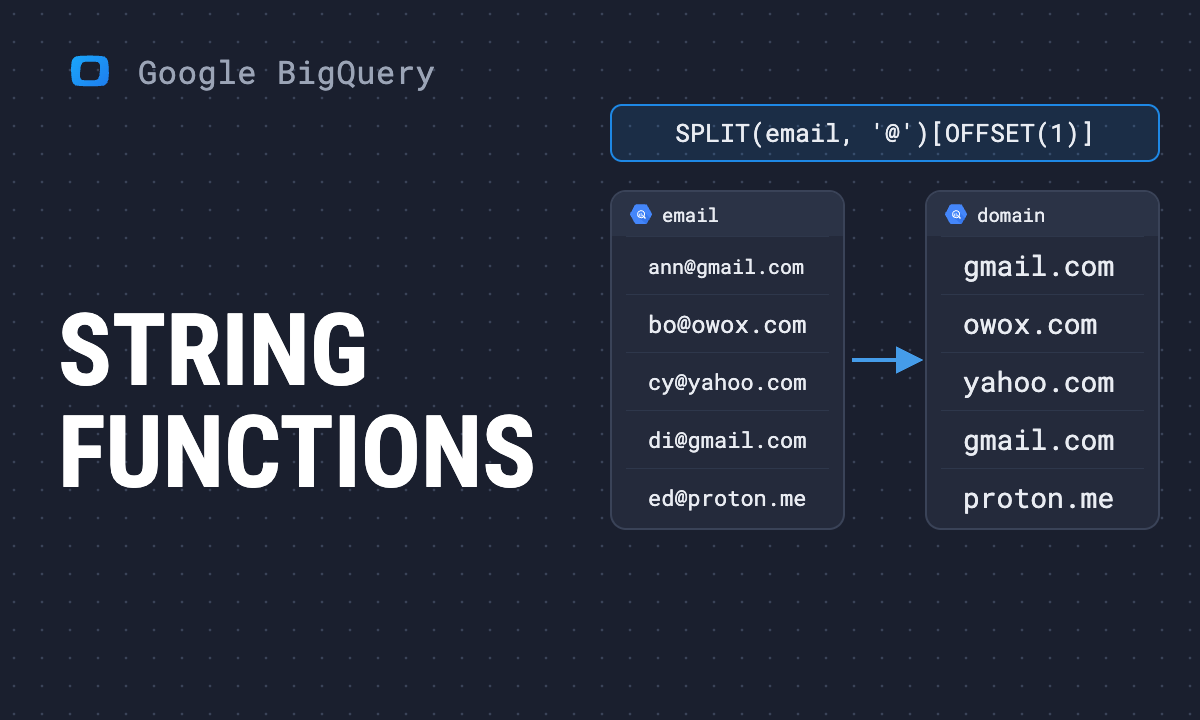
SPLIT(value, delimiter) returns an array, not a string. That is the reason most first attempts fail: you cannot compare or concatenate the result directly.
SELECT
  SPLIT('a,b,,c', ','),
  -- [a, b, , c]
  SPLIT('a,b,c', ',')[OFFSET(1)],
  -- b
  SPLIT('a,b,c', ',')[SAFE_OFFSET(9)],
  -- NULL
  ARRAY_LENGTH(SPLIT('', ','));
-- 1OFFSETcounts from 0,ORDINALfrom 1.- Use
SAFE_OFFSETon real data.OFFSET(9)on a three-element array stops the query;SAFE_OFFSET(9)returnsNULL. - Two delimiters in a row produce an empty string, not a skipped element.
- Splitting an empty string returns an array with one empty element, so its length is 1, not 0.
To turn the pieces into rows, use UNNEST:
SELECT part
FROM UNNEST(SPLIT('utm_source=google&utm_medium=cpc', '&'))
  AS part;
-- utm_source=google
-- utm_medium=cpc
More on working with the result in array functions.
SUBSTR, LEFT and RIGHT
SUBSTR(value, position, length) counts positions from 1. A negative position counts from the end.
SELECT
  SUBSTR('BigQuery', 4),      -- Query
  SUBSTR('BigQuery', 1, 3),   -- Big
  SUBSTR('BigQuery', -5),     -- Query
  LEFT('BigQuery', 3),        -- Big
  RIGHT('BigQuery', 5);       -- Query
SUBSTRING is an alias for SUBSTR.
OWOX Data Marts
See your first report built in real time. 15 minutes.
- Connect your data warehouse
- Pick your metrics
- Get a live Google Sheets report
In the time it takes to write a ticket. Then imagine never writing that ticket again.
Book a DemoWe'll use your actual use case
CONCAT and the || operator
SELECT
  CONCAT('order-', CAST(42 AS STRING)), -- order-42
  'a' || 'b',                           -- ab
  CONCAT('a', 'b', NULL);               -- NULL
One NULL argument makes the whole result NULL. This is the most common string bug in reports: a full name disappears because the middle name is missing. Wrap nullable parts in IFNULL(x, '') or COALESCE.
CONCAT needs strings, so cast numbers first. To join the values of an array, ARRAY_TO_STRING skips NULL elements by default:
SELECT
  ARRAY_TO_STRING(['a', NULL, 'c'], '-'),      -- a-c
  ARRAY_TO_STRING(['a', NULL, 'c'], '-', '?'); -- a-?-c
To join values across rows, use the aggregate STRING_AGG:
SELECT STRING_AGG(x, ', ' ORDER BY x)
FROM UNNEST(['b', 'a', 'c']) AS x;
-- a, b, c
LENGTH
SELECT
  LENGTH('héllo'),      -- 5
  BYTE_LENGTH('héllo'); -- 6
LENGTH counts characters. BYTE_LENGTH counts bytes, and an accented letter takes two. Use BYTE_LENGTH only when a size limit is in bytes.
Finding text: STRPOS, STARTS_WITH, CONTAINS_SUBSTR, LIKE
Finding text: STRPOS, STARTS_WITH, CONTAINS_SUBSTR, LIKE
SELECT
  STRPOS('BigQuery', 'Query'),           -- 4
  STRPOS('BigQuery', 'x'),               -- 0
  INSTR('a-b-c', '-', 1, 2),             -- 4
  STARTS_WITH('BigQuery', 'Big'),        -- true
  ENDS_WITH('BigQuery', 'ry'),           -- true
  CONTAINS_SUBSTR('BigQuery', 'query'),  -- true
  'BigQuery' LIKE '%query%',             -- false
'BigQuery' LIKE '%Query%'; -- trueSTRPOSreturns 0 when the text is not found, notNULLand not -1.INSTRfinds the n-th occurrence: above, the second hyphen.CONTAINS_SUBSTRignores letter case.LIKE,STARTS_WITHandSTRPOSdo not. That one difference explains most “the filter returns nothing” problems. To make the others case-insensitive, compareLOWER(x).
REPLACE
SELECT REPLACE('2026-10-06', '-', '/');
-- 2026/10/06
REPLACE swaps every occurrence of an exact piece of text. It does not understand patterns; for those, use REGEXP_REPLACE below.
TRIM, LTRIM and RTRIM
SELECT
  TRIM('  hi  '),       -- hi
  TRIM('--hi--', '-'),  -- hi
  LTRIM('xxhi', 'x'),   -- hi
  RTRIM('hi!!', '!');   -- hi
Without a second argument, the functions remove whitespace. With one, they remove any of the listed characters from the ends. TRIM before every join on a text key that came from a spreadsheet or a form: a trailing space is invisible and breaks the match.
UPPER, LOWER and INITCAP
SELECT
  UPPER('hi'),               -- HI
  LOWER('Hi'),               -- hi
  INITCAP('hello world');    -- Hello World
NORMALIZE: Make two spellings of the same character equal
NORMALIZE: Make two spellings of the same character equal
NORMALIZE(value [, normalization_mode]) converts a string to one standard Unicode form, so text that looks identical on screen is also identical to BigQuery. It is the fix for a join or a WHERE that fails on names, cities or product titles with accents, when one system stored “é” as a single character and another stored it as “e” followed by a combining accent.
SELECT
  'caf\u00e9' = 'cafe\u0301',                         -- false
  NORMALIZE('caf\u00e9') = NORMALIZE('cafe\u0301'),   -- true
  LENGTH('cafe\u0301'),                               -- 5
  LENGTH(NORMALIZE('cafe\u0301')),                    -- 4
  NORMALIZE('\uff21\uff22\uff23-\uff11\uff12\uff13', NFKC),          -- ABC-123
  NORMALIZE('\ufb01nance', NFKC);                     -- finance
These results were run in BigQuery on 2 November 2026. The mode is one of four keywords, written without quotes: NORMALIZE(x, 'NFKC') fails with “Argument is not a valid NORMALIZE mode”.
NFC, the default, composes: “e” plus a combining accent becomes one “é”. Use it when the only problem is accents typed two ways.NFKCalso folds compatibility characters into their plain form: full-width letters and digits (ABC-123, common in text copied from Japanese or Chinese systems) becomeABC-123, and the ligaturefibecomesfi. Use it on IDs and codes, where only the characters matter.NFCleaves both unchanged.NFDandNFKDdecompose instead, soNORMALIZE('caf\u00e9', NFD)is five characters long. They are rarely what a report wants.
NORMALIZE does not change case: NORMALIZE('CAF\u00c9') = NORMALIZE('caf\u00e9') is still false. When case should not matter either, use the function below.
NORMALIZE_AND_CASEFOLD: Compare text without case or Unicode surprises
NORMALIZE_AND_CASEFOLD: Compare text without case or Unicode surprises
NORMALIZE_AND_CASEFOLD(value [, normalization_mode]) returns a string prepared for a caseless comparison. Google’s reference explains the two halves: normalization makes two strings equal when they render the same but have different Unicode code points, and case folding is for comparing strings without regard to case. The default mode is NFC, and NFKC, NFD and NFKD are also accepted. LOWER only changes case, so it misses both problems:
SELECT
  'CAF\u00c9' = 'cafe\u0301',
  -- false
  LOWER('CAF\u00c9') = LOWER('cafe\u0301'),
  -- false
  NORMALIZE_AND_CASEFOLD('CAF\u00c9') = NORMALIZE_AND_CASEFOLD('cafe\u0301'),
  -- true
  LOWER('Stra\u00dfe') = LOWER('STRASSE'),
  -- false
  NORMALIZE_AND_CASEFOLD('Stra\u00dfe') = NORMALIZE_AND_CASEFOLD('STRASSE');
  -- true
\u00c9 is a capital E with an acute accent, \u0301 is a combining acute accent that follows a plain e, and \u00df is the German sharp s. Written as one character or as two, the accented word is the same word on screen but a different string, and only NORMALIZE_AND_CASEFOLD makes them match. Use it on both sides of a join or a WHERE on names or emails that come from different systems, and keep the original value for display.
LPAD and RPAD
SELECT
  LPAD('7', 3, '0'),      -- 007
  RPAD('ab', 5, '.'),     -- ab...
  LPAD('12345', 3, '0');  -- 123
The last line is worth noticing: when the value is longer than the target width, LPAD cuts it. A five-digit ID padded to three characters loses two digits without an error.
Regular expressions
BigQuery uses the RE2 syntax. Write patterns as raw strings, r'...', so backslashes do not need doubling.
SELECT
  REGEXP_CONTAINS('order-123', r'\d+'),
  -- true
  REGEXP_EXTRACT('order-123-us', r'(\d+)'),
  -- 123
  REGEXP_EXTRACT_ALL('a1b22c333', r'\d+'),
  -- [1, 22, 333]
  REGEXP_REPLACE('a  b   c', r'\s+', ' ');
  -- a b c
A practical one, the host from a URL:
SELECT REGEXP_EXTRACT(
  'https://www.owox.com/blog/articles/x?utm=1',
  r'^https?://([^/]+)');
-- www.owox.com
REGEXP_EXTRACT returns the first capture group, or the whole match if the pattern has none. It returns NULL when nothing matches. Regular expressions cost more to evaluate than plain functions, so where STARTS_WITH or REPLACE does the job, prefer it.
FORMAT, REVERSE and REPEAT
SELECT
  FORMAT('%s has %d orders', 'ana', 3),
  -- ana has 3 orders
  REVERSE('abc'),    -- cba
  REPEAT('ab', 3);   -- ababab
FORMAT builds a string from a pattern with placeholders and is easier to read than a long CONCAT.
Strings to other types
A string that holds a number or a date has to be converted before you can calculate with it. Use SAFE_CAST for numbers and SAFE.PARSE_DATE for dates; both return NULL for values that do not convert. See CAST and SAFE_CAST and date functions.
The behaviours that cause wrong results
The behaviours that cause wrong results
Collected from the sections above, because each one fails silently:
CONCATwith aNULLreturnsNULL.LIKEis case-sensitive;CONTAINS_SUBSTRis not.SPLITreturns an array, andOFFSETpast the end is an error.STRPOSreturns 0 for “not found”.LPADtruncates a value longer than the width.- A trailing space makes two keys different.
- An accented character can be stored two ways, and the two are not equal until you
NORMALIZEthem.
Cleaning text once
String functions are mostly used for one job: turning text that arrived messy into keys and labels a report can group by. Campaign names get lower-cased, IDs padded, URLs cut down to a host. Each of those is a small decision, and the reports only agree with each other if every query makes it the same way.
That is the case for doing the cleaning in one query that the others read. In OWOX Data Marts that query is a Data Mart: your SQL with the TRIM, LOWER and REGEXP_EXTRACT you chose, saved with a description and an owner, and run in your warehouse. OWOX does not clean the text for you. It keeps the rules you wrote in one place, so a campaign is spelled the same in every report built on it.
Turn your data into decisions.
Governed data marts give you the clean foundation ML needs to actually work.
- No AI hallucinations
- Analyst-governed definitions
- Every number traces to SQL
Frequently Asked Questions
How do I get the length of a string in BigQuery?
LENGTH(value) returns the number of characters. BYTE_LENGTH(value) returns the number of bytes, which is larger for accented and non-Latin characters: LENGTH('héllo') is 5 and BYTE_LENGTH('héllo') is 6.
What is the difference between ARRAY_AGG and STRING_AGG?
ARRAY_AGG collects values into an array and keeps their type. STRING_AGG joins string values into one string with a delimiter. Use ARRAY_AGG when you will process the values further, STRING_AGG when you need text to display.
How do I concatenate strings in BigQuery?
CONCAT(a, b) or the || operator. If any argument is NULL the result is NULL, so wrap nullable values in IFNULL(x, ''). Numbers must be cast to STRING first.
Why does LPAD cut my value in BigQuery?
LPAD(value, length, pad) returns exactly length characters. If the value is already longer, it is truncated: LPAD('12345', 3, '0') returns '123'. Check the maximum length of the column before choosing the width.
How do I check whether a string contains text in BigQuery?
CONTAINS_SUBSTR(value, 'text') returns true or false and ignores letter case. LIKE '%text%' and STRPOS are case-sensitive; STRPOS returns the position, or 0 when the text is not found.
How do I use STRING_AGG in BigQuery?
STRING_AGG(expression, delimiter ORDER BY expression) joins values across rows into one string, usually with GROUP BY. It returns a STRING and skips NULL values.
How do I split a string in BigQuery?
SPLIT(value, delimiter) returns an array. Take one element with SPLIT(x, ',')[SAFE_OFFSET(0)], which returns NULL instead of an error when the element does not exist, or turn the elements into rows with UNNEST(SPLIT(x, ',')).
How do I extract part of a string in BigQuery?
SUBSTR(value, position, length) for a fixed position, counting from 1; a negative position counts from the end. LEFT and RIGHT take characters from either end. For a pattern, use REGEXP_EXTRACT, which returns the first capture group.