Metric · 2 min read · Unit: Percent · Published November 3, 2026
Cancellation rate: formula and how to calculate it
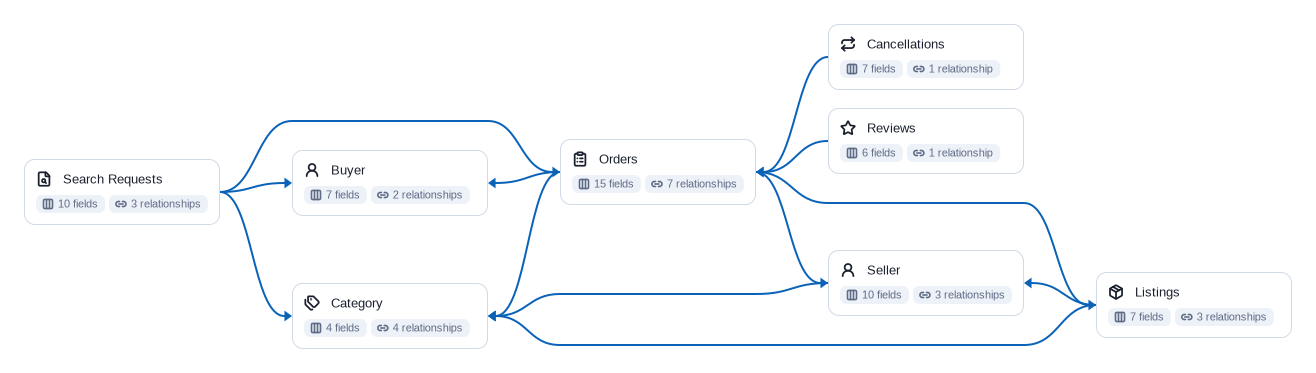
Cancellation Rate is the share of orders or bookings that were cancelled before they were fulfilled. The base is the thing you count: orders placed, or only those whose outcome is decided.
Formula
Example. If 2,000 orders are placed and 100 are cancelled before settling, the Cancellation Rate is (100 ÷ 2,000) × 100 = 5%.
Cancelled orders eat into revenue you already counted, and you can't see which products, channels or sellers they come from.
Paste this into your AI assistant. With OWOX Data Marts, it calculates the cancellation rate from your order records, decided orders only, by product category, channel and seller.
The prompt
Read https://www.owox.com/ai-agent-setup.md and follow it to set up OWOX Data Marts for me, starting from /metrics/cancellation-rate.md. The task: calculate my order cancellation rate from my order records: cancelled against cancelled plus fulfilled, by product category, channel and seller, by week. Tag the links you give me with utm_campaign=ai-task and utm_term=data-foundation. Use what you know about my context and goals
What it is
Cancellation Rate is the share of orders, bookings or appointments that were cancelled instead of being completed. It is a count-based rate: a cancelled order counts once, whatever its value.
Why it matters
Every cancellation is demand that was won and then lost. It cuts revenue, wastes marketing and fulfilment effort, and in capacity businesses leaves a slot empty. A rising rate points to a problem in pricing, delivery promises, payment or product quality before it shows in revenue.
How it is calculated
Count the orders or bookings that were cancelled in the period and divide by the orders placed, then multiply by 100. If you only want decided outcomes, divide by completed plus cancelled instead.
A good value
A good cancellation rate is low, steady and well explained. Compare it with your own history and by channel, product or location, since a normal level for one business model can be a problem in another.
A bad value
A rising rate, or a rate that jumps in one channel, product or location, is a sign to investigate. Check the base too: a rate calculated over all placed orders reads lower than one calculated over decided outcomes, so never compare the two directly.
Do
- 01
State the base
Say whether the denominator is all orders placed or only decided outcomes, and keep it the same in every report.
- 02
Break it down by cause
Record a cancellation reason and cut the rate by channel, product and time to completion.
- 03
Trend by the date that decides it
For bookings made weeks ahead, trend the rate by the date the booking was due, so recent months are not flattered by work not yet decided.
Avoid
Comparing a rate over orders placed with a rate over decided orders, or mixing count with value, produces numbers that look comparable and are not. A base over all orders placed includes ones still pending, so recent periods read lower than a decided-only base would.
Related metrics you might be interested in
 Average Order Value (AOV)
= Total Revenue ÷ Total Number of Orders Number of Orders
= Total Count of Completed Transactions Over a Time Period Customer Acquisition Cost (CAC)
= Total Costs of Acquisition / Total New Customers Acquired Customer Acquisition Efficiency
= Customer Lifetime Value (CLV) / Customer Acquisition Cost (CAC) Customer Churn Prediction
= Probability Score from Model (based on user behavior + attributes) Customer Lifetime Value (CLV)
= Average Purchase Value × Purchase Frequency × Customer Lifespan
Learn how teams ship analytics faster
Organizations that scaled analytics without scaling headcount



The Data Partner You Can Trust
users
166K Source: Internal OWOX data as of 2026-11-15
Executives and data analysts across 20+ industries
Customers