How to Let Each Client Ask an AI Assistant About Only Their Own Data
If each client can ask Claude or ChatGPT about their data, the only safe place to keep client A away from client B's rows is where the data lives, keyed to the person asking. A prompt cannot do it and neither can a shared service account. This guide covers three ways to separate clients, the identity chain from the chat to the warehouse, where Snowflake's managed MCP, BigQuery and Databricks stand, and a row access policy we tested through an MCP connection.
"Could Snowflake's managed MCP make this reasonably simple and affordable?"
-- a thread on r/snowflake, October 2026
The asker wanted each client to query only their own data, from their own ChatGPT or Claude, without building servers. Yes, partly, and the part a managed server does not do for you is the part that leaks. The rule for any client-facing AI chat is short: the isolation lives where the data lives, keyed to the person asking. Not in the prompt, not in the assistant’s instructions, not in a dashboard filter. The assistant writes whatever SQL it decides to write, so the only thing standing between client A and client B’s rows is what the warehouse will return to the identity that sent the query.
So there are two jobs. Separate the clients’ data in a way the warehouse enforces. Then make sure the identity that reaches the warehouse is the client’s, not yours. Most designs that fail get the first one right and the second one wrong.
Why the prompt cannot be the boundary
Why the prompt cannot be the boundary
“Only answer about Acme’s data” is an instruction to a model, and a model can be talked out of an instruction. Claude’s help page for custom connectors warns about prompt injection, as of November 2026. More to the point, the assistant does not need to be tricked. Asked “how do we compare with your other clients?”, a helpful model writes the query that answers it.
Snowflake says the same thing about its own server. Its managed MCP documentation recommends exposing a Cortex Agent as the only client-facing tool, because exposing SYSTEM_EXECUTE_SQL on the same server “allows the MCP client to bypass the agent’s semantic views” (Snowflake docs, checked November 2026). A curated view is a convenience. A raw SQL tool next to it is a way around it.
That leaves the warehouse. A row access policy, a separate schema, a separate account: each is enforced after the SQL is written, whoever or whatever wrote it.
Three ways to separate clients
Three ways to separate clients
Snowflake’s own design guide for multi-tenant applications names the three patterns: a multi-tenant table, an object per tenant, or an account per tenant. The same three exist on every warehouse.
| Pattern | What separates the clients | Strength | What it costs you |
|---|---|---|---|
| Account or project per client | Nothing is shared: separate account, project or workspace | Strongest. A wrong grant cannot reach another client | Onboarding a client is an infrastructure job; cross-client reporting for your own team needs a second copy |
| Schema or dataset per client | Grants on objects: each client’s role reads only its schema | Strong, if every new table lands with the right grants | Schema drift across clients; every change ships N times |
| Shared tables with row-level security | A policy filters rows by who is asking | As strong as the policy and the identity behind it | One mistake in the mapping table exposes everyone; policies cost some query speed |
Google’s BigQuery documentation ranks the options the same way: separate tables are “recommended for security”, while authorized views are “recommended for flexibility” and are open to crafted-query and side-channel attacks (checked November 2026).
Agencies usually land on the third pattern for the same reason they need it: one set of tables, one pipeline, many clients. It is the right choice as long as you treat the mapping from person to client as security data, not as configuration.
OWOX Data Marts
See your first report built in real time. 15 minutes.
- Connect your data warehouse
- Pick your metrics
- Get a live Google Sheets report
In the time it takes to write a ticket. Then imagine never writing that ticket again.
Book a DemoWe'll use your actual use case
The identity has to reach the warehouse
The identity has to reach the warehouse
Row-level security filters by who is asking. So the question that decides whether any of this works is: who does the warehouse think is asking?
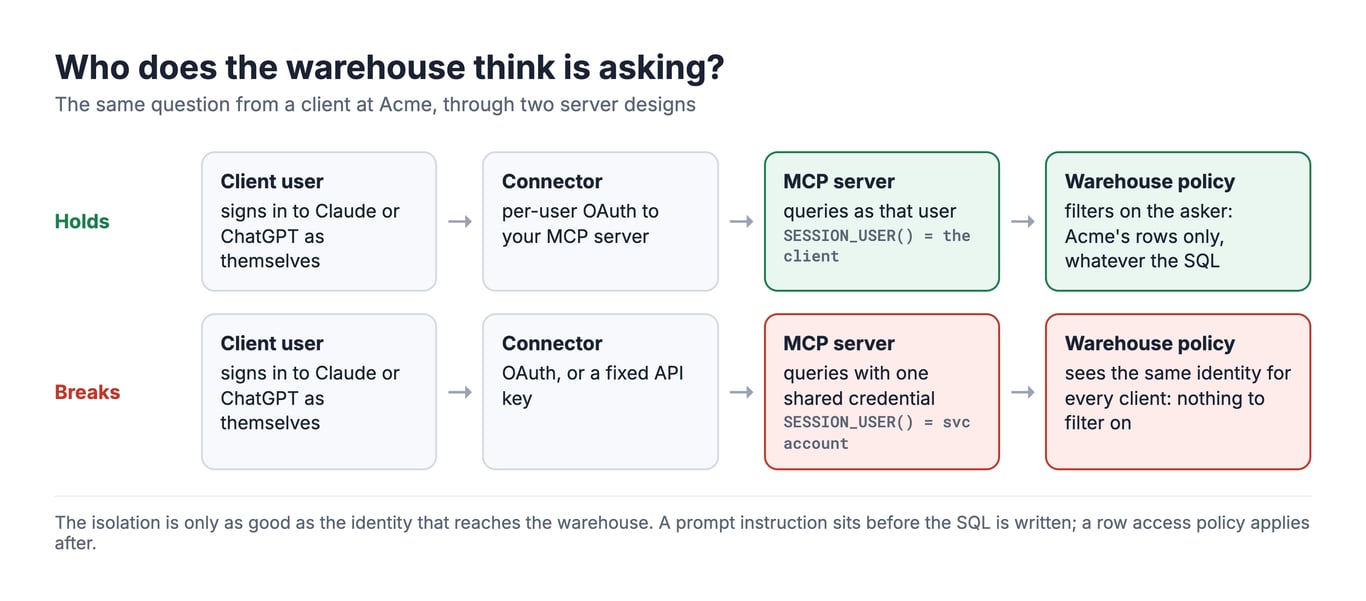
The chain has four links: the client signs in to Claude or ChatGPT; the connector authorizes against your MCP server; the server queries the warehouse; the warehouse applies its policy to the identity on the query. It breaks in one predictable place. If the server holds one shared credential, a service account or a fixed API key, every client’s question arrives at the warehouse as the same identity, and a policy keyed to the asker has nothing to key on. Claude’s documentation for custom connectors says it plainly: a fixed API key in the request headers gives everyone who uses the connector the same credential’s access (checked November 2026).
Both assistants support the alternative. Claude’s custom connectors let each member of a Team or Enterprise workspace connect individually, typically through OAuth. OpenAI’s Apps SDK expects remote servers to implement an OAuth 2.1 flow and does not support machine-to-machine grants. Per-user OAuth on the client side is available. Whether the identity survives the server is your design. That is also where client-facing differs from internal use: for your own team, a separate service account for the assistant is sound advice, because everyone behind it may see the same data. For clients, it is the one design that cannot work with a policy keyed to the asker.
What we tested
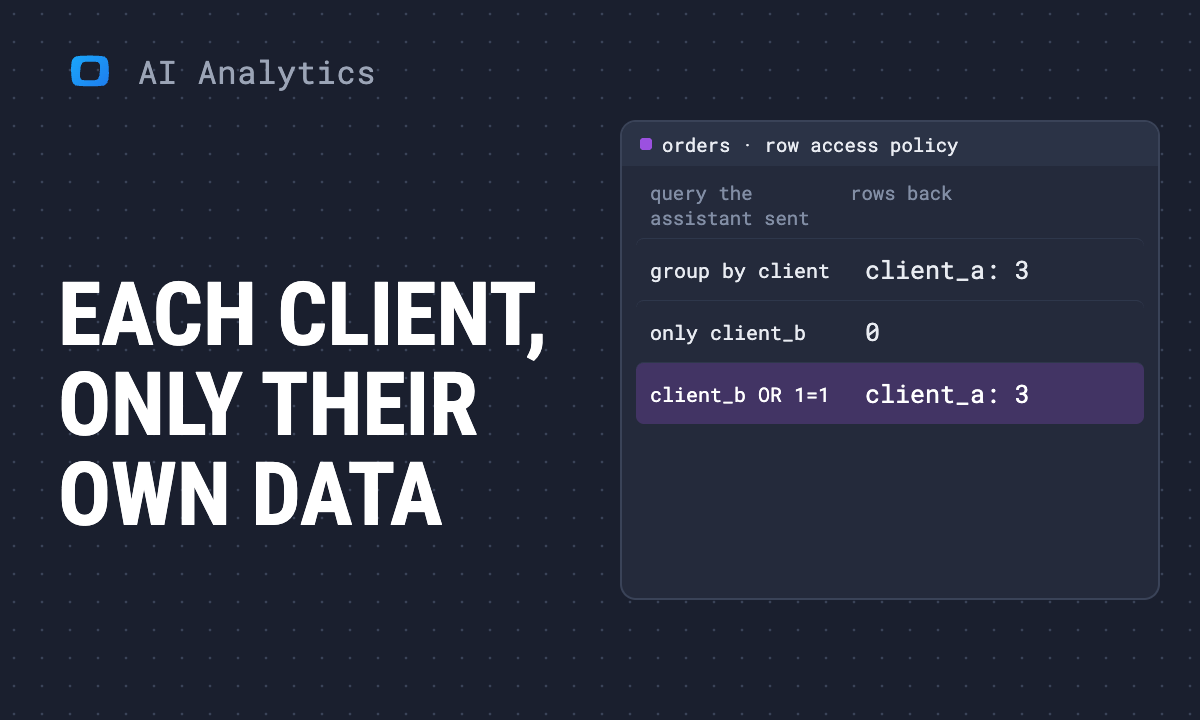
We ran the pattern end to end through Google’s remote BigQuery MCP server, the one Claude and ChatGPT can connect to, on 2 November 2026, in a scratch dataset in an OWOX development project. The table held five synthetic orders: three for client_a, two for client_b. A mapping table assigned the signed-in user to client_a, and one row access policy filtered on it:
CREATE ROW ACCESS POLICY client_scope
ON `project.scratch.orders`
GRANT TO ('domain:example.com')
FILTER USING (client_id IN (
  SELECT client_id FROM `project.scratch.client_users`
  WHERE user_email = SESSION_USER()));
First, the identity: SELECT SESSION_USER() through the MCP connection returned the signed-in person’s email, not a service account. That is the link that makes the rest work. Then three questions an assistant could plausibly send:
| Query sent through MCP | Rows the warehouse returned |
|---|---|
Orders and revenue grouped by client_id |
client_a only: 3 orders, 245.5 revenue |
WHERE client_id = 'client_b' |
0 orders |
WHERE client_id = 'client_b' OR 1 = 1 |
3 orders, all client_a |
With the policy dropped, the first query returned both clients, 3 and 2 orders. The SQL did not matter; the identity did. Two limits on this run: it used one identity, so it shows the policy holding for the user it maps, not a second client’s view, and it ran on BigQuery only. The dataset was deleted afterwards.
Snowflake’s managed MCP and the default-role trap
Snowflake’s managed MCP and the default-role trap
Snowflake-managed MCP servers became generally available on 4 November 2025. As of November 2026, the documentation recommends OAuth, Snowflake’s own or an external provider such as Okta or Entra, and the session runs under a Snowflake role. That is the good news for the r/snowflake question: queries run as the connecting user’s role, so row access policies and secure views keyed to that role apply. The MCP page does not state that sentence about row access policies directly; it follows from the session running under the user’s role, and Snowflake’s quickstart promises “the same trusted governance policies, from role-based access to masking” for the server.
The trap is which role. The session uses the user’s DEFAULT_ROLE unless a session:role:<name> scope picks another, and the docs note that Claude requests the session:role:all scope and the session still uses the user’s DEFAULT_ROLE. So isolation depends on how you set up the users, not on the connector:
- One Snowflake user per client person, each with a default role scoped to that client.
- A row access policy that checks the role with
IS_ROLE_IN_SESSION, or a mapping table from role to client. Snowflake notes a mapping table “may result in decreased performance”. - Snowflake recommends leaving
OAUTH_USE_SECONDARY_ROLESatNONE, so a user’s other roles do not widen the session. - Grant the MCP server and its tools separately: “Access to the MCP Server does not give access to the tools.”
- Expose the Cortex Agent, not
SYSTEM_EXECUTE_SQL, on the server clients connect to.
Snowflake documents a second route, for an app you build yourself: Cortex Agents multi-tenancy. The caller passes tenant values in the variables of an agent:run call, marks them is_immutable_session_attribute, and a row access policy reads them with SYS_CONTEXT('SNOWFLAKE$SESSION_ATTRIBUTES', …); the page says such an attribute “cannot be modified by generated SQL, code execution, or tool invocation during the session”. That fits a portal where your server calls the agent for each client. The multi-tenancy page does not mention the managed MCP server, Claude or ChatGPT, so as of November 2026 there is no documented way for a client’s own Claude to set those attributes. For that path, the role is the boundary.
What it does not do is make onboarding simple. Every client person becomes a Snowflake user with a role, and the mapping lives in your account. That is the honest answer to “reasonably simple and affordable”: simple to connect, as much work to govern as the users you create.
BigQuery and Databricks: Same rule, different gaps
BigQuery and Databricks: Same rule, different gaps
BigQuery. Row-level access policies use CREATE ROW ACCESS POLICY … GRANT TO … FILTER USING, and SESSION_USER() restricts rows to the user running the query. The remote MCP server supports “all Google Cloud identities”, and our test above shows the signed-in user’s identity reaching the query. A table with a policy cannot be read with legacy SQL or through a wildcard table, and its preview is blocked. The MCP page itself says nothing about row-level security, so test it on your own tables the way we did.
Databricks. Unity Catalog row filters “restrict which rows a user can see in a table”, and the docs advise simple CASE expressions over mapping tables for speed. The managed MCP endpoint for Databricks SQL runs with “the caller’s Unity Catalog and warehouse permissions”, but as of November 2026 the documentation does not say whether calls from claude.ai or ChatGPT run on behalf of the user or as a service principal, and most workspace endpoints are in Public Preview. Treat that as the question to answer before the first client logs in.
Where OWOX Data Marts fits, and where it stops
Where OWOX Data Marts fits, and where it stops
OWOX Data Marts takes a different route to the same rule. A client does not get raw SQL on your warehouse. They get the Data Marts your analyst has defined and shared with them, through OWOX MCP for Claude and ChatGPT. Here is what the product documents, as of November 2026:
- Each person connects with OAuth as themselves, and the token is bound to one project: a per-project address works only “if the signed-in user is an active member of that project”. One connection never reaches two projects.
- The assistant sees only published Data Marts the member’s role permits. Drafts cannot be inspected or queried, and filters “never expand your existing Data Mart access”.
- Contexts limit what a member sees. A member set to “Selected contexts only” sees only the Data Marts tagged with their Contexts, plus anything they own: ownership overrides the Context filter, so a client’s people should own nothing. On OWOX Data Marts Cloud, the Scale plan gives “a separate context for each team”.
- Storages can separate clients outright. The docs say: “You can add several Storages to isolate clients or teams. Each Data Mart links to exactly one Storage.”
- Every MCP query lands in Run History, with the query definition and the executed SQL, never row values.
So the client-facing setup is: a client’s people are members of your project, scoped to that client’s Context, and the Data Marts in that Context either sit on the client’s own Storage or are defined by your analyst to return that client’s rows only. For agencies that need a harder wall, a project per client is the same pattern as an account per client above.
Where it stops matters just as much. The warehouse query runs with the Storage’s credential, which belongs to the project, not with the identity of the person asking. A row access policy keyed to the client’s own warehouse login therefore does not apply to a question asked through OWOX. And a row filter an assistant passes when it queries a shared Data Mart is a filter, not access control. Inside OWOX, the boundary is which Data Marts a person can see, not which rows of one Data Mart. Define the per-client Data Mart; do not share one all-clients Data Mart and hope the question narrows it.
Before the first client logs in
Before the first client logs in
Run these as a client, not as yourself. Your own grants are wider than any client’s, and in OWOX a Project Admin bypasses sharing and Contexts altogether.
- Ask for another client by name. “Show me Acme’s revenue” from a user mapped to a different client should return nothing, not an error message that confirms Acme exists.
- Ask a cross-client question. “How do we compare with your other clients?” is the question a helpful assistant answers by widening the query.
- Check the identity, on the route you chose. On a warehouse-native connector, run
SELECT SESSION_USER()on BigQuery orSELECT CURRENT_USER(), CURRENT_ROLE()on Snowflake through the same connector the client uses: it must return the client’s identity. If it returns a service account, stop: the policy is keyed to nothing. Through OWOX it will return the Storage’s credential, by design, so check the member instead: set to “Selected contexts only”, assigned only that client’s Context, owning nothing, and not a Project Admin. - Check the tools. List what the MCP server exposes to that user. A raw SQL tool next to a curated one is a way around the curated one.
- Read the log. Every query a client sent should be in the warehouse’s query history or Run History, with the identity that sent it.
If all five pass, the answer to the r/analytics question, “Has anyone shipped something like this to real customers?”, can be yes, and you can say why it is safe in one sentence: the boundary is enforced below the assistant, for the person asking, whatever the question.
To go deeper on what a connected assistant should be allowed to do, governed MCP analytics walks through the chain of control, and AI analytics on Snowflake compares raw SQL, Cortex Analyst and Data Marts on one warehouse.
Turn your data into decisions.
Governed data marts give you the clean foundation ML needs to actually work.
- No AI hallucinations
- Analyst-governed definitions
- Every number traces to SQL