Governed AI analytics on Snowflake: who writes the SQL when finance asks
Finance can ask Snowflake about revenue in an AI chat without writing SQL. Connecting the chat is the quick part; agreeing what revenue means is the long one. This guide compares Snowflake's own option with two others, shows what one revenue question returned from a Snowflake table when nobody had defined revenue, and ends with a short reply the analyst can send back to finance.
“We want real-time revenue KPIs without writing SQL. Which AI platforms connect to Snowflake and give us governed metrics?” That is how the question arrives, from finance, to whoever looks after the data.
If you are the person who asked, the last section is the reply your analyst can send you, in plain words. The rest is working detail for the analyst.
OWOX wrote this article. We make OWOX Data Marts, one of the three options compared below. For some teams Snowflake’s own option is the better pick; the article says which.
The short answer
Yes, finance can ask Snowflake questions in an AI chat without writing SQL. Connecting a chat is the quick part. The long part is agreeing what “revenue” means and writing it down, and no tool shortens that.
“Governed” means two things here: the AI answers only from written, approved definitions, and every question leaves a record of the calculation that ran.
Which option fits. If everything you report on is in Snowflake and the figures must stay under Snowflake’s controls, use Snowflake’s own assistant, Cortex Analyst, and ask inside Snowflake, in the Snowflake CoWork app. If people will ask in Claude or ChatGPT, or the same number must also land in a spreadsheet, or your data sits in more than one database, use published definitions, which is what our product does. If only the analyst will ask, letting the AI write its own queries is enough.
For the close, no option makes a chat answer something you can book. A chat speeds up the questions between closes. Any figure that goes into the close still gets its calculation opened and reconciled against the ledger.
“Real-time” means as current as the last load into Snowflake. In our run below, the connector could not tell the assistant when the table was last updated, and the three revenue answers said so; Run History showed the last load was 22 June 2026. Check the load time before you trust “current”.
Settle first where the figures may go. Asked from Claude or ChatGPT, what the assistant reads goes to Anthropic or OpenAI.
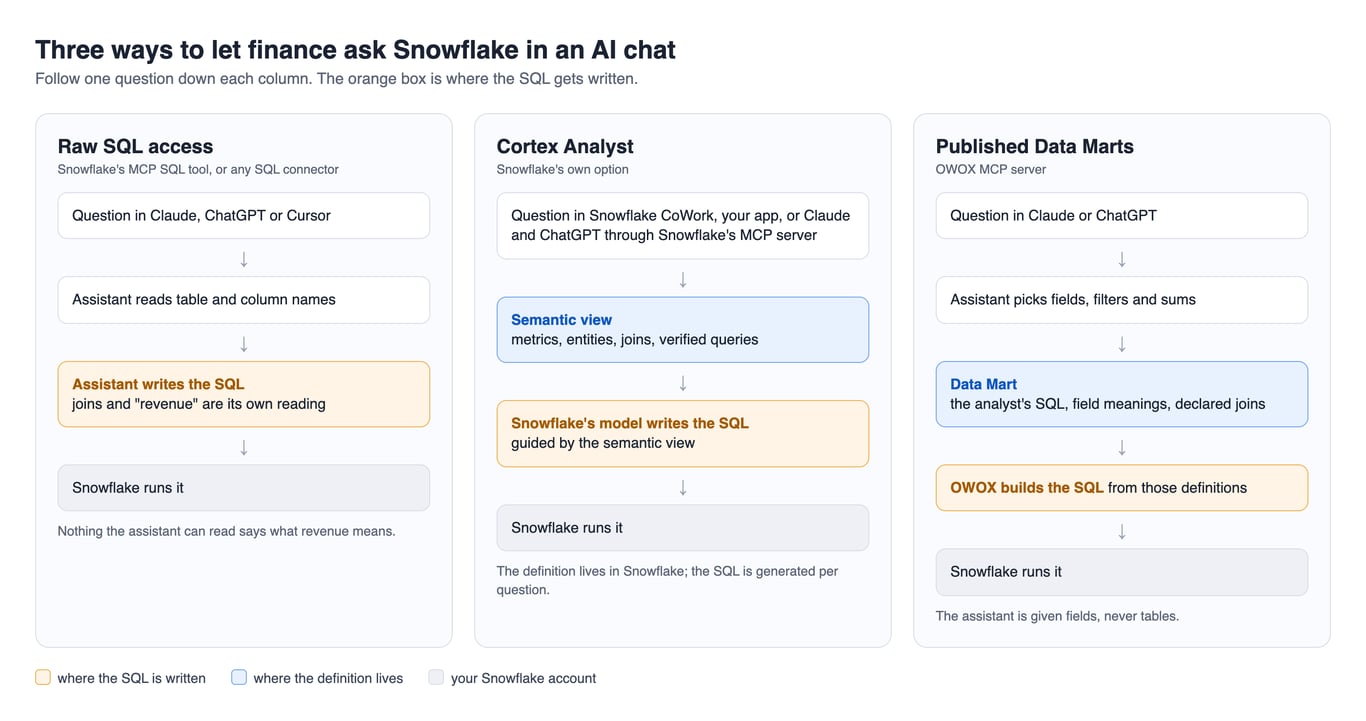
Three ways to let finance ask Snowflake in a chat
Three ways to let finance ask Snowflake in a chat
The three setups differ in where the SQL gets written. A semantic view is a Snowflake object that holds your metrics and joins; Cortex Analyst reads it and writes the SQL. A Data Mart, in OWOX Data Marts, is a dataset an analyst defines on a table, a view or a SQL query.
| Raw SQL access | Cortex Analyst on a semantic view | Published Data Marts | |
|---|---|---|---|
| Who writes the SQL | The assistant | Snowflake’s model, from the semantic view | OWOX, from the analyst’s definitions |
| What the assistant can see | Whatever its role can read | The semantic view, under Snowflake roles | Published Data Marts your OWOX role allows |
| Where “revenue” is defined | Nowhere, unless a column name says it | In the semantic view | In the Data Mart, if somebody wrote it there |
| Where finance asks | Claude, ChatGPT, Cursor | Snowflake CoWork (formerly Snowflake Intelligence), your own app, or Claude and ChatGPT through Snowflake’s MCP server | Claude or ChatGPT |
| What is logged | Snowflake query history | Cortex Analyst’s request log and query history | Run History and Snowflake query history |
| Where rows go | To the AI provider | Under Snowflake’s controls when asked there, on the models and regions your account allows; to the AI provider when asked from Claude or ChatGPT | To the AI provider |
Raw SQL access. MCP (Model Context Protocol) is the standard way an AI assistant connects to an outside system. Snowflake’s managed MCP server can expose a SQL execution tool (Snowflake’s documentation, read 11 October 2026), so the assistant reads your schema and writes its own query. The meaning of “revenue” then comes from your column names.
Cortex Analyst on a semantic view. Snowflake’s own answer; it calls semantic views “the recommended approach for new implementations” (Cortex Analyst, read 11 October 2026). Finance can ask in Snowflake CoWork, Snowflake’s chat for business users (“formerly Snowflake Intelligence”, per its product page), in an application you build, or in Claude and ChatGPT through Snowflake’s MCP server. Each request is logged with the user, the question and the generated SQL (monitoring).
Published Data Marts. The analyst publishes Data Marts on top of Snowflake, and the OWOX MCP server exposes those, and only those, to assistants such as Claude or ChatGPT. The assistant picks fields, filters and aggregations; it “cannot run arbitrary SQL” (OWOX documentation, read 10 October 2026). OWOX’s MCP server is part of OWOX Data Marts Cloud. The queries still run in your own Snowflake account, as the user of the storage you connected.
What OWOX builds this way is a data model, not a semantic layer: the Data Marts and how they relate are described once, before anyone asks.
OWOX Data Marts
See your first report built in real time. 15 minutes.
- Connect your data warehouse
- Pick your metrics
- Get a live Google Sheets report
In the time it takes to write a ticket. Then imagine never writing that ticket again.
Book a DemoWe'll use your actual use case
When Snowflake’s own option is the better pick
When Snowflake’s own option is the better pick
Pick Snowflake’s option if most of these are true:
- Everything finance reports on is in Snowflake.
- The figures must stay under Snowflake’s controls. Read this one closely. Snowflake’s sentence that “no data, including metadata or prompts, leaves Snowflake’s governance boundary” is about Cortex Analyst’s default models, Snowflake-hosted ones from Mistral and Meta (Cortex Analyst). The same page lists Anthropic and OpenAI models among those Cortex Analyst can use, says you cannot choose the model directly, and describes cross-region inference. Snowflake CoWork runs on Cortex Agents, whose model list includes Claude, OpenAI and Gemini models. So before you tell compliance that nothing leaves, ask your Snowflake admin: which models may our account use, and is cross-region inference on? With OWOX Data Marts the result rows go to the AI provider.
- Access must follow each person’s Snowflake role. Cortex Analyst’s page says the SQL it generates adheres to your access controls. A user needs access to the semantic view only, not its tables (querying semantic views).
- Someone will write and keep semantic views. In a team of one, that is you.
Two limits. First, the boundary advantage belongs to asking inside Snowflake. When Claude or ChatGPT calls Cortex Analyst through Snowflake’s MCP server, the tool’s response goes back to that client, so we read the result as reaching Anthropic or OpenAI. That is our reading of Snowflake’s MCP page; we have not traced it. Second, the Cortex Agents page says the accuracy of responses is not guaranteed, and CoWork’s documentation says the Cortex Agent API is what powers CoWork.
Snowflake’s option is not enough on its own when finance also reads the same numbers outside the chat. A Data Mart can deliver to Google Sheets, Microsoft Excel, Data Studio, email, Slack, Microsoft Teams and Google Chat (destinations, read 11 October 2026). Excel is an add-in refreshed by hand; our Excel page says scheduled refresh is not available. Tableau and Power BI are not destinations today. If finance lives in Tableau, pick Snowflake’s option.
What Snowflake itself lets you lock down
What Snowflake itself lets you lock down
First, a dedicated user and role. Never connect the assistant as yourself. With published Data Marts the assistant holds no Snowflake credentials: queries run as the user you connected to OWOX, ideally a dedicated service user. Without this step the check below cannot work: if the assistant runs as you, its queries and yours are one list.
Second, a schema of views, and nothing else. Grant that role read access to views you would defend, not to raw tables (a reusable reporting layer on Snowflake). For Cortex Analyst, access to the semantic view is enough.
Later, a warehouse of its own, so its usage is visible and cappable (Snowflake pricing explained).
Find every query the assistant ran
The plain example does not do this. INFORMATION_SCHEMA.QUERY_HISTORY() with no arguments returns up to the last 100 queries run by the current user, which is you, plus other users’ queries on any warehouse where you hold MONITOR (query history reference, read 11 October 2026). It does not single out the assistant. Ask for the assistant’s user by name:
SELECT start_time, role_name, warehouse_name, query_text
FROM TABLE(INFORMATION_SCHEMA.QUERY_HISTORY_BY_USER(
  USER_NAME => 'ASSISTANT_SERVICE_USER',
  RESULT_LIMIT => 1000))
ORDER BY start_time DESC;
Use the name the assistant, or OWOX, connects as. Two conditions from the same page:
- Privilege. To see another user’s queries you need MONITOR or OPERATE on the warehouse they ran on. Without it, an empty list looks like “the assistant ran nothing”.
- Window. The function covers the last seven days. The
SNOWFLAKE.ACCOUNT_USAGE.QUERY_HISTORYview keeps a year, but can lag by up to 45 minutes.
We wrote this query from Snowflake’s documented syntax and have not run it: we had no login to the Snowflake account behind our demo.
Add the definition before you let people ask
Add the definition before you let people ask
A published Data Mart only holds the definition you put in it. So the first job is yours and finance’s, and it is small. Three decisions cover most of it:
- What counts. Product revenue, or order totals with tax and shipping? Before or after refunds?
- Which date. The order’s created date or its processed date?
- Which time zone a month ends in.
Finance signs the definition; the analyst maintains it. Take the query behind the number finance asks for most, save it as a view with those three decisions made, describe each field, and publish that one thing, as a semantic view or a Data Mart. If the definition already lives in a dbt model, publish what that model builds; two copies of the logic drift. OWOX Data Marts does not write that SQL for you; it publishes the decision, and the same Data Mart then feeds the destinations listed above. Data Marts run on Google BigQuery, Snowflake, AWS Redshift, AWS Athena and Databricks (how it works).
What happens when the definition is missing
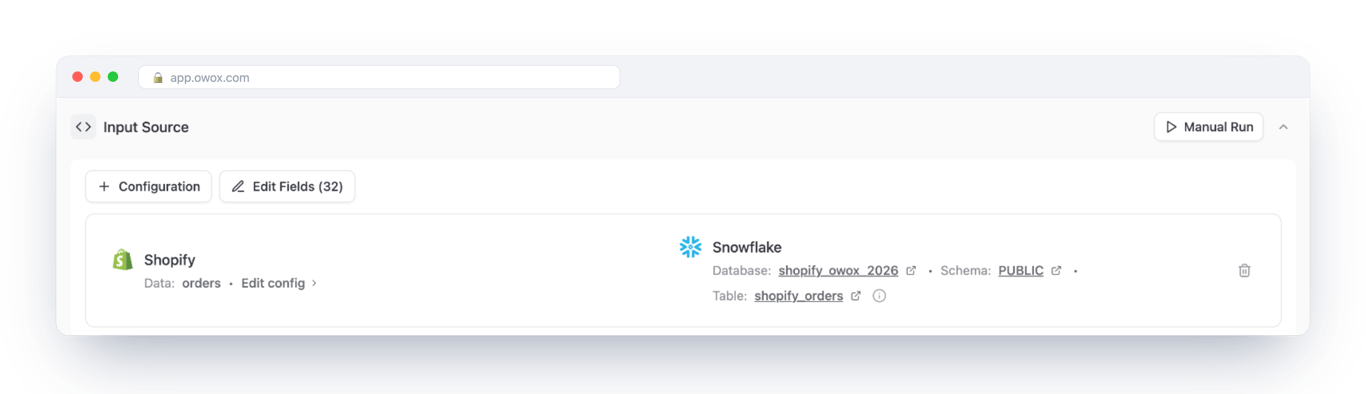
On 11 October 2026 we asked one revenue question three ways through the OWOX MCP server. The Data Mart is a published demo one on a Snowflake storage, confirmed in its Data Setup, and it carries no revenue definition: 32 fields with Shopify’s one-line descriptions, such as “The total price of the order.”, and no calculated revenue field.
| Asked | Led with | What that figure is | April, as reported |
|---|---|---|---|
| “What was our revenue in Q2 2026?” | $118,790.85 | totalPrice: tax and shipping in, refunds ignored |
395 orders, $41,557.81 |
| “How much did we earn in Q2 2026?” | $118,790.85, then $116,582.26 after refunds | The same, then its own subtraction, labelled | 399 orders, $42,027.03 |
| “What was the top line for Q2 2026?” | $118,790.85 | The same | 395 orders, $41,557.81 |
| “How many employees did we have at the end of Q2 2026?” | No figure | Declined; ran no query | n/a |
The assistant was open about what it counted, and it still had to choose. All three answers led with $118,790.85, the sum of totalPrice. That includes $2,257.24 of tax and $3,894.21 of shipping and ignores $2,208.59 of refunds; product revenue on the same orders is $112,675.58. Each answer said what its figure included. The choice was the assistant’s, not finance’s, so three matching answers do not show that a definition exists.
Month ends need a time zone. April came back as 395 orders in two answers and 399 in one, $469.22 apart. The two requests that returned 395 asked for month buckets in UTC. The one that returned 399 named no time zone. That is the likely cause, not a proven one: no run isolated it.
It did not invent an answer. Asked for headcount, it gave no number.
Where a definition is written in, the picture is calmer: on BigQuery our demo Data Mart has net revenue defined, and the figures held across three phrasings. One habit is still worth keeping: check the label of the first figure. Asked for the “top line”, the assistant led with gross, labelled as gross. The trace is in our BigQuery walkthrough.
What a definition does not fix. The assistant can still pick the wrong Data Mart or get its own arithmetic wrong, and a chat can answer from memory, so the log is the proof that a number came from Snowflake. Before anything is connected, take it to compliance; the questions to bring are in can you trust what AI tells you about your business numbers.
How we tested
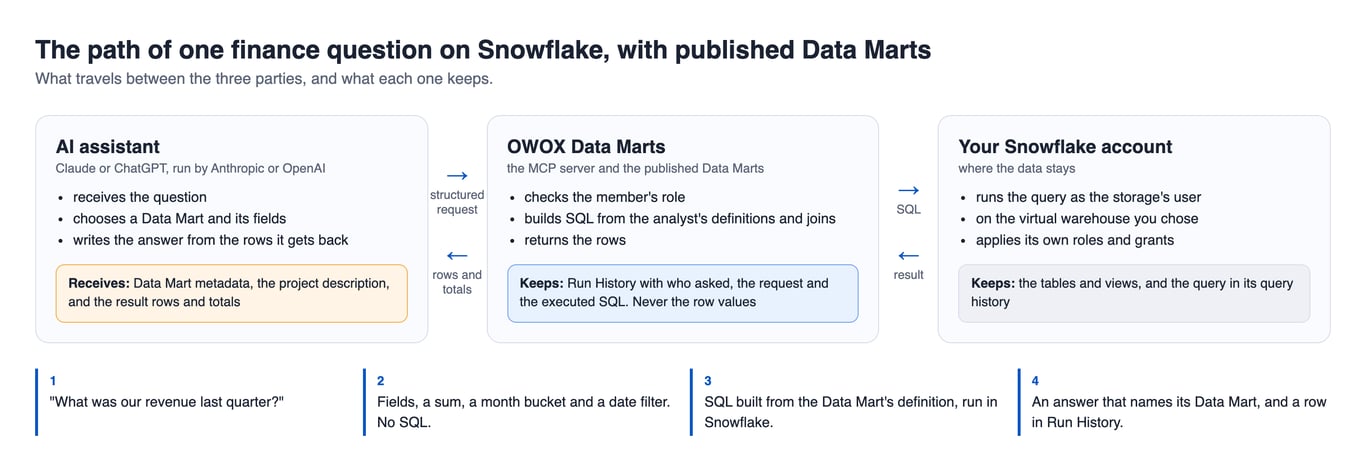
Each question ran in its own Claude Opus session. The assistant sends a structured request and no SQL. This is the one behind the “top line” answer, shortened:
{
  "fields": ["processedAt", "totalPrice", "subtotalPrice", "totalRefunded"],
  "aggregations": [{"field": "totalPrice", "function": "SUM"}],
  "date_buckets": [{"field": "processedAt", "unit": "MONTH", "time_zone": "UTC"}],
  "filters": [
    {"field": "processedAt", "operator": "gte", "value": "2026-04-01T00:00:00Z"},
    {"field": "processedAt", "operator": "lt", "value": "2026-07-01T00:00:00Z"}
  ]
}
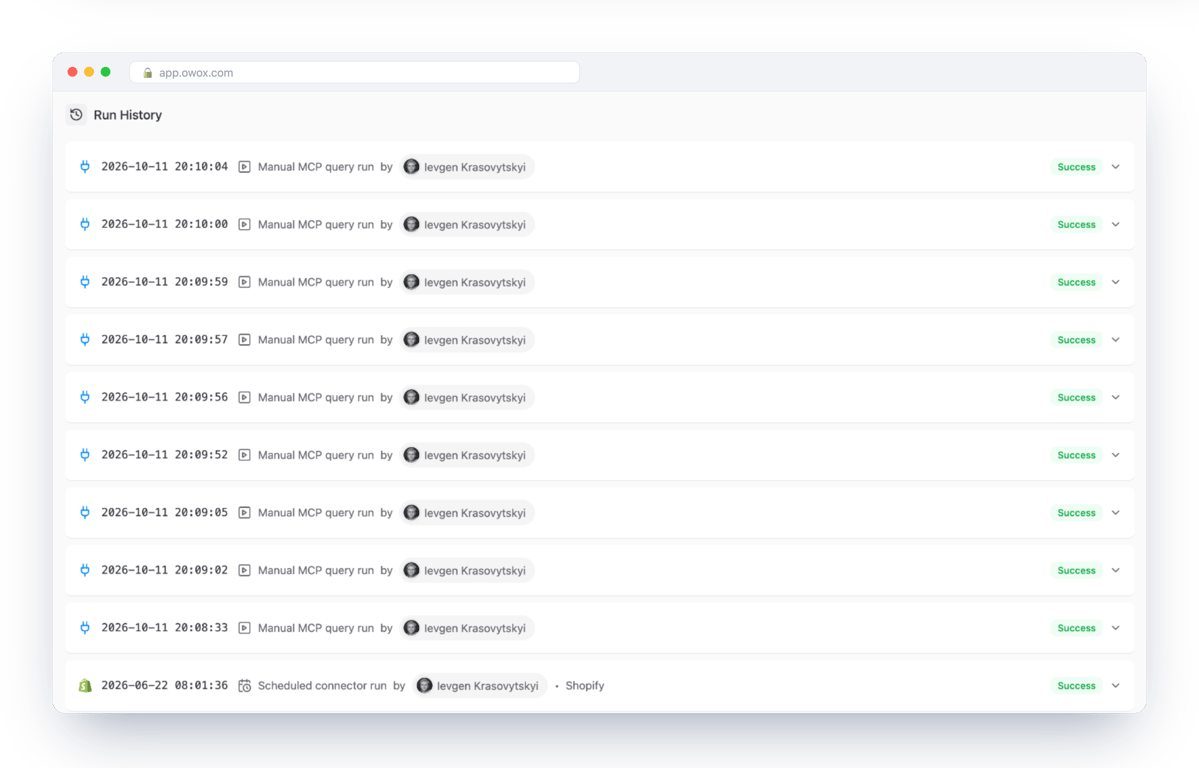
OWOX builds the SQL and runs it in Snowflake. Run History, OWOX’s log for each Data Mart, keeps the request and the SQL, never the row values. It listed nine MCP runs for that evening: six from the sessions and three checks of our own. We opened one of ours: all orders by month, no time zone in the request. The SQL that ran:
SELECT
  DATE_TRUNC('MONTH', "createdAt") AS "createdAt",
  COUNT(DISTINCT "id") AS "id | COUNTUNIQUE",
  SUM("totalPrice") AS "totalPrice | SUM",
  SUM("subtotalPrice") AS "subtotalPrice | SUM",
  SUM("totalRefunded") AS "totalRefunded | SUM",
  SUM("totalTax") AS "totalTax | SUM",
  SUM("totalShippingPrice") AS "totalShippingPrice | SUM",
  SUM("totalDiscounts") AS "totalDiscounts | SUM"
FROM shopify_owox_2026."PUBLIC"."shopify_orders"
GROUP BY DATE_TRUNC('MONTH', "createdAt")
ORDER BY "createdAt" ASC
LIMIT 101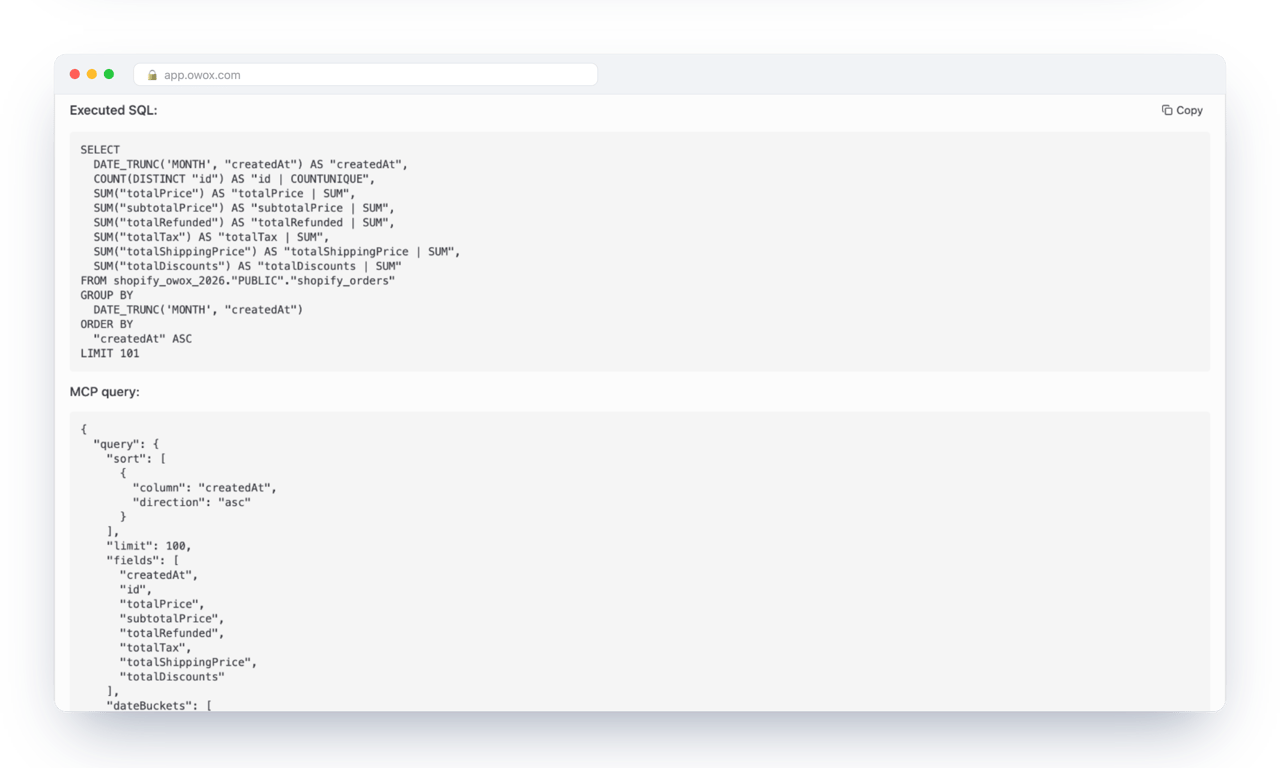
With no time zone in the request, the month is cut on the stored timestamp as it is, which fits the April difference.
Limits. One run per phrasing, one model, demo data last loaded on 22 June 2026. The sessions were Claude Code sub-agents, not a chat app: told which Data Mart to use, with no chat memory, and their requests are as they reported them. We read the executed SQL for one of the nine entries, and did not check Snowflake’s own query history.
A test to run, and what to send back to finance
A test to run, and what to send back to finance
Ten minutes once an assistant is connected. Getting there (the user, the access, the definition) is the part to plan for.
- Pick the number finance argues about.
- Ask for it three ways in three new chats (why new chats): “revenue last quarter”, “how much did we earn last quarter”, “last quarter’s top line”.
- Write down the three numbers and what each answer says it counted. If the numbers differ, a definition is missing. If they match, read what was counted anyway.
- Ask one chat for the same number by month, and compare one month with your own report.
- Find the SQL behind each answer in the log. No entry means the answer came from the chat’s memory.
- Run
QUERY_HISTORY_BY_USERfor the assistant’s user and confirm that every statement belongs to one of your questions.
What to send back to the person who asked
Fill in the two brackets before you send it.
- Yes, we can ask our Snowflake data in an AI chat. Connecting is the quick part.
- My recommendation for us: [Snowflake’s own assistant, if everything is in Snowflake and we read it in Tableau / published definitions, if we ask in Claude or ChatGPT or want the same number in a spreadsheet].
- The risk is not invented numbers. It is the AI deciding what “revenue” means because nobody wrote it down. In a demo test it led with the same figure three times, tax and shipping in, refunds not deducted; one answer added the after-refunds figure.
- The fix: we write down what each number means, once: what counts, which date, which time zone a month ends in. You sign it off, I keep it up to date, starting with the number we argue about most.
- After that, I can show you the exact calculation behind any answer. Answers will be as current as our last data load, which runs [how often].
- A chat can also answer from memory without looking at our data. If there is no logged calculation for an answer, it did not look.
- This speeds up your questions between closes, not the close: anything that goes into it still gets its calculation opened and reconciled against the ledger.
- Before we switch it on, compliance sees which data the AI may read and which AI company gets it. If our numbers must stay inside Snowflake, we first check which AI models and regions our account allows.
Turn your data into decisions.
Governed data marts give you the clean foundation ML needs to actually work.
- No AI hallucinations
- Analyst-governed definitions
- Every number traces to SQL
Frequently Asked Questions
Does Snowflake have a built-in AI analyst?
Yes. Cortex Analyst turns a business question into SQL over a semantic view, and Snowflake CoWork is Snowflake's ready-made chat for business users. Both write SQL with a model, guided by the semantic view and any verified queries you add.
Can Claude or ChatGPT query Snowflake directly?
Yes. Snowflake's managed MCP server can give Claude, ChatGPT or Cursor a SQL execution tool, Cortex Analyst or a Cortex Agent, with OAuth and Snowflake roles. With the SQL tool the assistant writes its own queries; with OWOX Data Marts it can only ask for fields from published Data Marts, and the SQL is built from the analyst's definitions.
What is a Snowflake semantic view, and how is it different from a Data Mart?
A semantic view is a Snowflake object that holds metrics, entities and their relationships; Cortex Analyst reads it and generates SQL for each question. A Data Mart in OWOX Data Marts is the analyst's own SQL, table or view with described fields and declared joins; the assistant chooses fields and filters, and the SQL comes from that definition. Both are descriptions someone has to keep current.
Does my data leave Snowflake when an AI assistant answers?
It depends where the question is asked. By default Cortex Analyst runs on Snowflake-hosted models, and Snowflake states that no data, metadata or prompts leave its governance boundary. That statement covers the default models, so ask your Snowflake admin which models your account may use and whether cross-region inference is on. When Claude or ChatGPT answers, through any connector, what the assistant reads goes to Anthropic or OpenAI. With OWOX Data Marts, the documentation says the result rows and totals are sent to that provider.
Can a finance team get revenue KPIs from Snowflake without writing SQL?
Yes, once an analyst has written down what revenue means and published it, as a semantic view or as a Data Mart. Finance then asks in plain language and each answer is a fresh query on Snowflake, as current as the last data load. Without a written definition, the assistant chooses what revenue means. In our test on a Data Mart with no revenue definition it led with order totals, tax and shipping included, in all three phrasings.
How do I see which queries an AI assistant ran in Snowflake?
Filter Snowflake's query history by the user the assistant connects as: the QUERY_HISTORY_BY_USER table function covers the last seven days, and the ACCOUNT_USAGE.QUERY_HISTORY view keeps a year. Cortex Analyst also logs each request with the generated SQL. With OWOX Data Marts, Run History records each question's request and executed SQL.