Photo Sizes for Facebook: A Guide to All Facebook Image Sizes in 2026
Every Facebook image size Meta publishes today, for profile pictures, covers, link previews, Stories, Shops and ads, each linked to Meta's own page.
Facebook offers users and businesses many ways to showcase their products and services. On the one hand, this is helpful, as you can choose methods of promotion that bring the most benefit for your company and best fit your marketing and advertising needs.
This page lists the Facebook image sizes Meta publishes today, for profile pictures, covers, link previews, Stories, Shops and ads, each with a link to Meta’s own page. It was checked against those pages in October 2026.
Facebook image sizes at a glance
Facebook image sizes at a glance
Every size below comes from Meta’s own Help Center, Ads Guide or developer documentation, checked in October 2026. Where Meta does not publish a size, this page says so rather than guessing.
| Image | Size | Aspect ratio |
|---|---|---|
| Page profile picture | 320 × 320 px; shown as a circle | 1:1 |
| Page cover photo | 851 × 315 px; at least 400 × 150 px | 16:9 on a computer, 2.4:1 on a phone |
| Personal profile cover photo | at least 720 px wide | not published |
| Group cover photo | 1,640 × 856 px | 1.91:1 |
| Link preview image | 1,200 × 630 px; at least 600 × 315 px | 1.91:1 |
| Event cover photo | not published | not published |
| Feed image ad | 1,440 × 1,800 px; at least 600 px wide | 4:5 |
| Stories image ad | 1,440 × 2,560 px; at least 500 px wide | 9:16 |
| Carousel ad card | at least 1,080 × 1,080 px | 1:1 |
| Marketplace image ad | at least 1,080 × 1,080 px | 1:1 |
| Shop and catalog product image | 1,024 × 1,024 px; at least 500 × 500 px | 1:1 |
Facebook profile picture size
According to Meta’s Help Center, a Facebook Page profile picture:
- should be 320 × 320 pixels for the best quality;
- displays at 176 × 176 pixels on a computer, 196 × 196 pixels on a smartphone and 36 × 36 pixels on most feature phones;
- is cropped to a circle, so keep the logo or face away from the corners.
Meta publishes these figures for Pages; it gives none for personal profiles. For a logo or an image with text, Meta suggests a PNG file for a sharper result.
OWOX Data Marts
See your first report built in real time. 15 minutes.
- Connect your data warehouse
- Pick your metrics
- Get a live Google Sheets report
In the time it takes to write a ticket. Then imagine never writing that ticket again.
Book a DemoWe'll use your actual use case
Facebook cover photo size
Page cover photo
From the same Help Center page:
- At least 400 × 150 pixels.
- Loads fastest as an sRGB JPG file of 851 × 315 pixels, under 100 kilobytes.
- On a computer the cover is shown at a 16:9 ratio; on a phone at 2.4:1. The left side is partly covered by the profile picture, which overlaps the cover by about 40 pixels on mobile.
Because the two screens crop differently, keep text and faces in the middle of the image.
Personal profile cover photo
For a personal profile, Meta’s only stated requirement is that the cover image is at least 720 pixels wide. After uploading you can drag the image up or down to choose what shows.
Group cover photo
Meta recommends 1,640 × 856 pixels, a 1.91:1 ratio, for a group cover photo. It also warns that people on a phone may not see the whole image, so important details should stay away from the edges.
Facebook post image size
Meta does not publish a size for a photo shared in an ordinary post. What it does publish are the aspect ratios that fit the feed: 1.91:1 and 16:9 for horizontal images, 1:1 for square and 4:5 for vertical, with 9:16 for full-screen formats (Meta Business Help Center).
For feed ads, Meta recommends the vertical 4:5.
Tips for shared images:
- Use high-quality images that are clear and visually appealing.
- Use descriptive captions to give the image context.
- Tag people or Pages in the image to widen its reach.
- Track how each image performs using Facebook Insights or other analytics tools.
Facebook link preview image size
Facebook link preview image size
When you share a link, Facebook shows the image set in that page’s og:image tag. Meta’s developer documentation gives these rules:
- Use at least 1,200 × 630 pixels for the best display on high-resolution screens.
- Use at least 600 × 315 pixels for the large link preview. A smaller image still appears, but much smaller.
- The minimum is 200 × 200 pixels.
- Keep the ratio close to 1.91:1 so the image is not cropped in the feed.
- The file must not exceed 8 MB.
Facebook event cover photo size
Facebook event cover photo size
Meta’s Help Center article on event cover photos gives no dimensions. It does warn that you can’t edit the size of a cover photo after it has been added to an event, so check how it is cropped in the preview before you save.
Facebook Stories image size
Meta publishes Stories dimensions for ads. For a Stories image ad:
- Ratio 9:16, resolution 1,440 × 2,560 pixels, JPG or PNG.
- At least 500 pixels wide, up to 30 MB.
- Leave about 14% at the top, 35% at the bottom and 6% on each side free of text and logos, so the profile name and the call-to-action button do not cover them.
The same 9:16 frame and safe zones are a sensible guide for organic Stories.
Facebook Shop and catalog image size
Facebook Shop and catalog image size
For product images in a catalog, Meta’s requirements are:
- JPEG or PNG, 8 MB at most, at least one image per product.
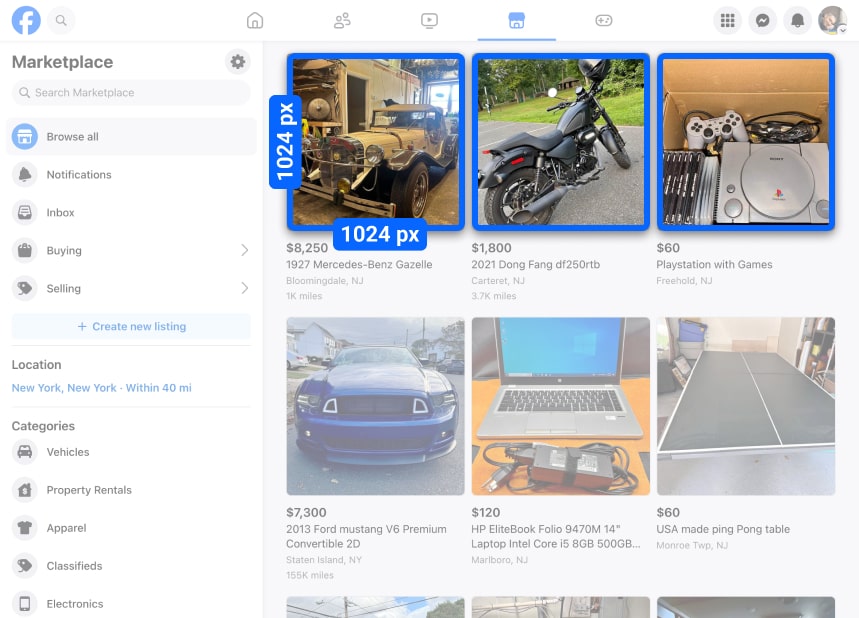
- On Facebook and Instagram Shops, images are shown square (1:1). They must be at least 500 × 500 pixels; 1,024 × 1,024 pixels is recommended.
- The image must show the actual product for sale.
Facebook ad image sizes
Meta’s Ads Guide lists the image specs per placement. For the most common ones:
| Placement | Ratio | Resolution | Minimum |
|---|---|---|---|
| Feed | 4:5 | 1,440 × 1,800 px | 600 px wide |
| Stories | 9:16 | 1,440 × 2,560 px | 500 px wide |
| Carousel | 1:1 | at least 1,080 × 1,080 px | 2 to 10 cards |
| Marketplace | 1:1 | at least 1,080 × 1,080 px | – |
All four take JPG or PNG files up to 30 MB. In the feed both 1:1 and 4:5 are supported; Meta recommends 4:5 for single-image feed ads.
Tips for ad images:
- Keep product images clear and uncluttered, with the item against a clean background.
- Check the preview for each placement before publishing, since each placement uses a different ratio.
What is no longer on this list
What is no longer on this list
Earlier versions of this page gave sizes for Facebook Notes covers, the “Our Story” section, highlighted images, multi-photo post layouts and Messenger ads. Meta’s current Help Center and Ads Guide do not document any of them, so they have been removed rather than repeated from memory.
Key takeaways
The sizes that matter most: 320 × 320 for a Page profile picture, 851 × 315 for a Page cover, 1,640 × 856 for a group cover, 1,200 × 630 for a link preview and 1,440 × 1,800 (4:5) for a feed ad. Meta changes these from time to time, so each figure above links to the page it came from.
What to check once the image is live
What to check once the image is live
The right dimensions get an image shown without cropping. Whether the image did its job is a different question, and the answer sits in numbers Facebook reports per post and per ad.
- Organic posts: Facebook engagement rate compares reactions, comments, shares and clicks with reach. It is the quickest way to tell whether a new image format changed anything.
- Ads: Facebook ROAS compares the revenue an ad brought with what it cost. Read it per creative, so two images of the same size can be compared.
- Site traffic: How to track Facebook Ads in Google Analytics 4 shows how to see what visitors from an ad did after the click.
- Numbers that disagree: Ads Manager and Google Analytics 4 rarely report the same conversions. Facebook Ads vs. GA4 conversions explains why.
Reporting on Facebook Ads
If you run ads every week, you will want these numbers in one place instead of rebuilding them by hand. Two starting points: the Facebook Ads report templates and the Facebook Ads dashboard template.
To put ad spend next to revenue, the data has to leave Facebook. With OWOX Data Marts you can collect Facebook Ads data into your warehouse and report on it in Google Sheets or Looker Studio, next to the data from your other ad platforms.
Turn your data into decisions.
Governed data marts give you the clean foundation ML needs to actually work.
- No AI hallucinations
- Analyst-governed definitions
- Every number traces to SQL
Frequently Asked Questions
What is the size of the Facebook cover photo and its safe area?
For a Facebook Page, Meta says the cover loads fastest as an sRGB JPG of 851 x 315 pixels, under 100 KB, and must be at least 400 x 150 pixels. It is shown at 16:9 on a computer and 2.4:1 on a phone, and the profile picture overlaps it by about 40 pixels on mobile, so keep text and faces near the middle.
What is the best image size for Facebook?
It depends on where the image goes. Meta's published sizes are 320 x 320 pixels for a Page profile picture, 851 x 315 for a Page cover, 1,640 x 856 for a group cover, 1,200 x 630 for a link preview and 1,440 x 1,800 (4:5) for a feed image ad.
What size is a Facebook profile picture?
Meta recommends 320 x 320 pixels for a Facebook Page profile picture. It displays at 176 x 176 pixels on a computer and 196 x 196 pixels on a smartphone, and it is cropped to a circle.
What size should Facebook shared link images be?
Meta recommends at least 1,200 x 630 pixels at a ratio close to 1.91:1. Images of at least 600 x 315 pixels get the large link preview; the minimum is 200 x 200 pixels.
What is the maximum file size for a Facebook image?
Meta lists 8 MB for a link preview image and for a catalog product image, and 30 MB for an image ad in the feed, Stories, carousel or Marketplace.
What size should a Facebook event cover photo be?
Meta does not publish a size for event cover photos. It does say the size cannot be edited after the photo is added to the event, so check the crop in the preview before saving.