Data masking explained: Secure your sensitive data
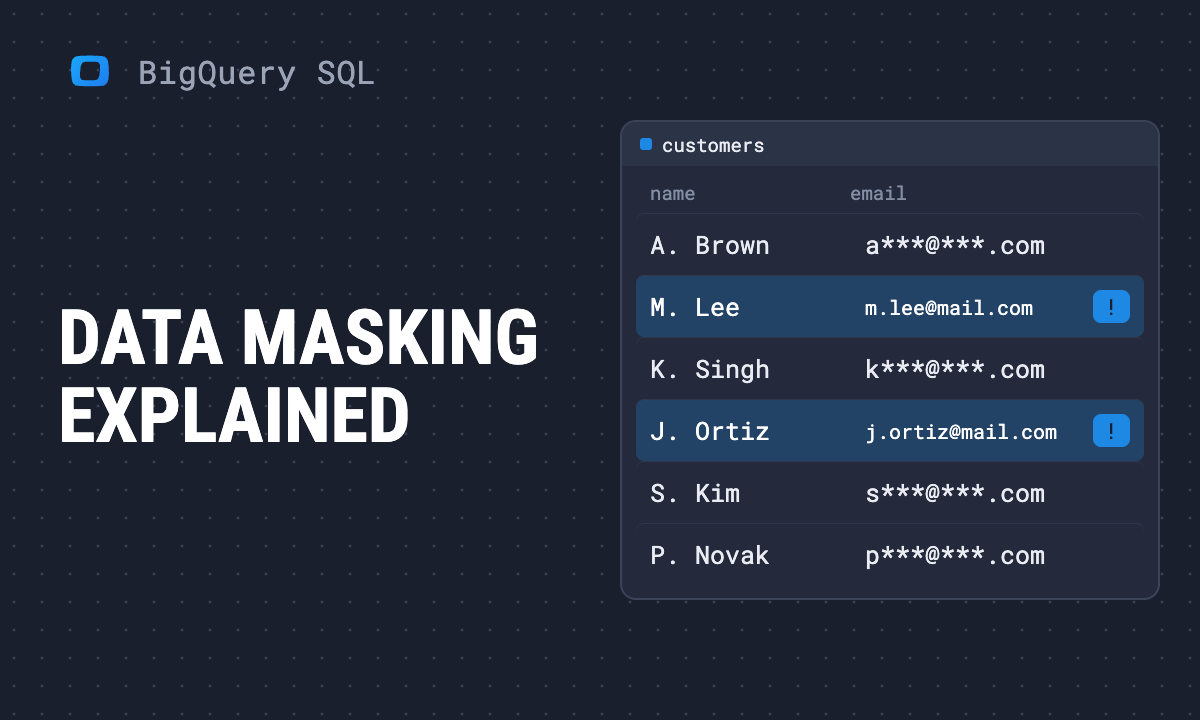
Data masking replaces sensitive values with altered ones, so people can work with a dataset without seeing the real names, card numbers or salaries in it. The question that decides most masking designs is not “which technique”, it is “what must still work afterwards”: a join, a test suite, a report, a filter by year.
Masking applies to tables, logs and test databases alike. This guide covers what masking is and is not, its types and techniques, where organizations use it, and how dynamic data masking works in BigQuery, including which masking rules still let you join tables and which can be reversed.
Reading to get this done?
What data masking means
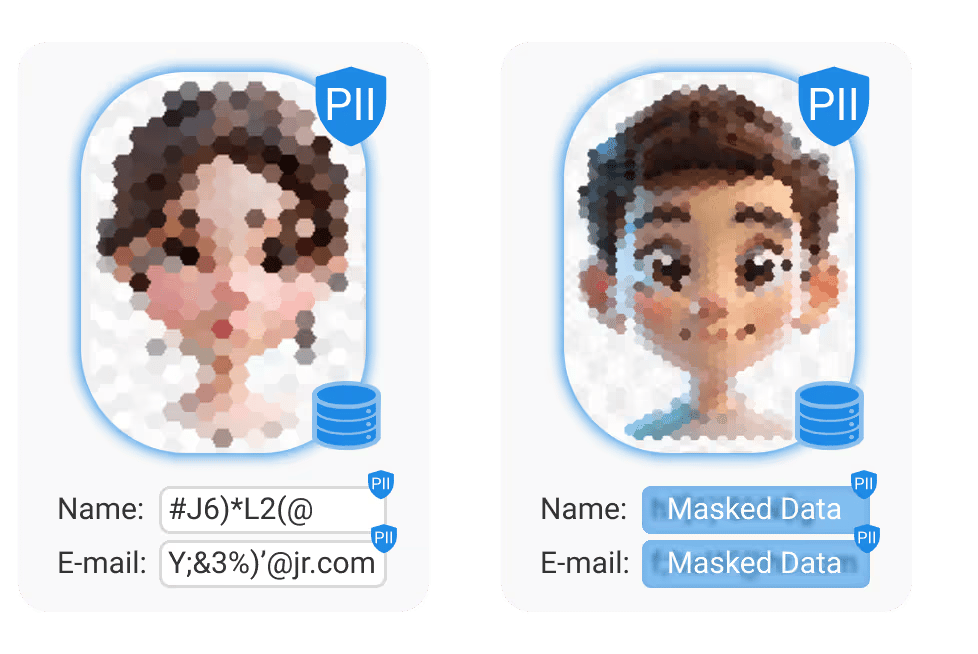
Data masking, also called data obfuscation, protects sensitive data by replacing original values with fictitious but realistic ones. It is an umbrella term: pseudonymization, redaction, scrubbing and de-identification are all forms of it. The masked data keeps its shape, so testing, analytics and reporting still run on it.
Three neighbouring terms are worth keeping apart, because regulations treat them differently:
| Term | What happens to the value | Can it be reversed? |
|---|---|---|
| Masking | replaced or partly hidden, format usually kept | depends on the technique: nullifying cannot, a plain hash of a short value can |
| Encryption | turned into ciphertext | yes, with the key |
| Anonymization | changed so no person can be identified, even with other data | no, by definition |
The difference matters under GDPR. Recital 26 of the regulation says that data which has been pseudonymized but could be linked back to a person with additional information is still personal data; only truly anonymous data falls outside it. Most masking is pseudonymization in that sense, so a masked table usually stays in scope of GDPR – masking reduces the risk, it does not remove the obligation.
Why data masking is important
Masking earns its place in four situations: when data has to be seen by more people than should see the raw values, when it leaves the system it was made in, when a regulator asks how it is protected, and when old systems are retired.
It narrows who can see raw values
Masked columns let a support agent, a tester or an analyst do their job without access to the original records. That cuts the damage an insider, a phished account or a leaked credential can do, because the account sees only masked values.
It supports compliance
GDPR, HIPAA and PCI DSS all require technical measures that protect personal or payment data. Masking is one of the measures they name or accept: GDPR Article 32 lists pseudonymization by name, and PCI DSS requires card numbers to be masked when displayed. Each is covered in more detail in the regulations section below.
It protects data outside production
Copies are where data leaks. Test databases, analytics sandboxes, vendor exports and cloud migrations all move data into places with weaker controls. Masking the copy before it moves means a breach of that environment exposes nothing real, whether it runs on-premises, in the cloud or in between.
It helps sanitize data on old systems
Deleting a file can leave recoverable traces. Overwriting sensitive values with masked ones before a system is decommissioned or a dataset is handed on is a safer way to sanitize it.
Most people shouldn't see names, emails or salaries, but the masked columns still have to join and filter.
Paste this into your AI assistant. It finds the sensitive columns in your data warehouse tables and proposes a masking rule for each that keeps your joins and reports working.
The prompt
Read https://www.owox.com/ai-agent-setup.md and follow it to set up OWOX Data Marts for me, starting from /blog/articles/data-masking-explained.md. The task: list the sensitive columns in my data warehouse tables and propose a masking rule for each: who sees raw values, which rule keeps joins working, and which ones can be reversed. Tag the links you give me with utm_campaign=ai-task and utm_term=data-foundation. Use what you know about my context and goals
Different types of data masking
Different types of data masking
The types differ in when masking happens and whether the stored data changes. Pick by asking where the data is going and who reads it.
Static data masking
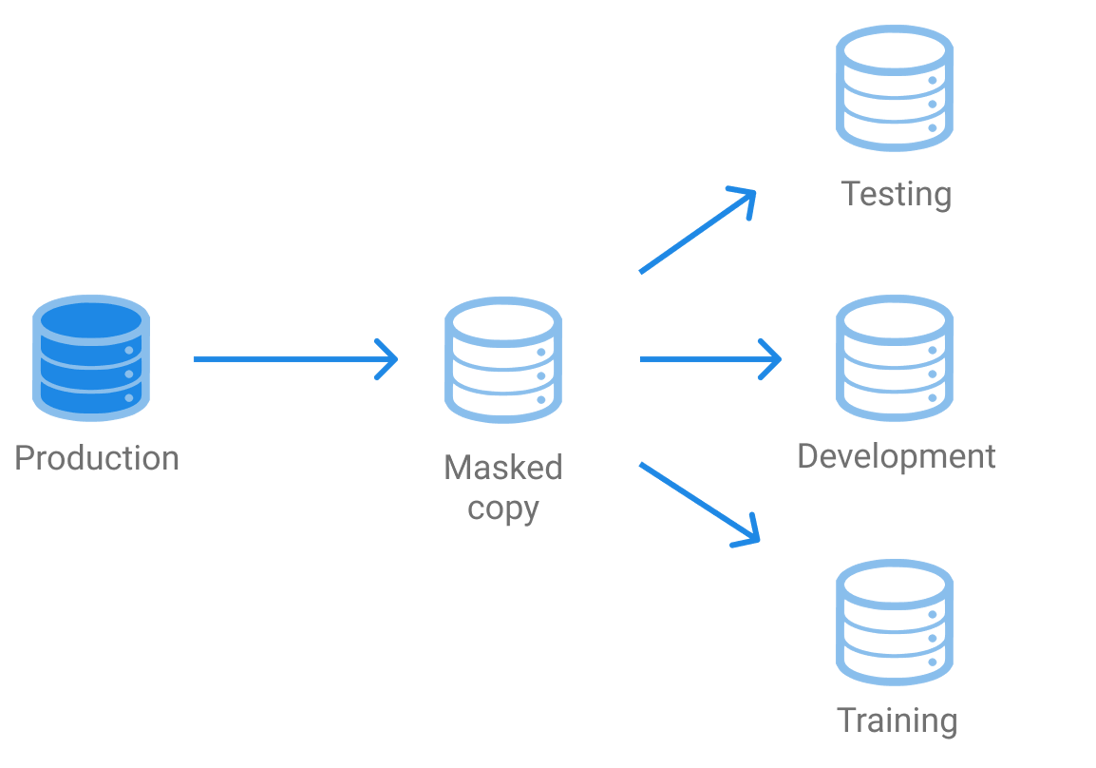
Static masking applies a fixed set of rules to a copy of the data, and the copy is stored masked. It suits data that does not change often and environments that never need the real values: development, training, data shared with a partner. The same rules give the same result in every copy.
Dynamic data masking
Dynamic masking leaves the stored data unchanged and masks it at query time, based on who is asking. An authorized user sees the real value; everyone else sees the masked one. Customer support, medical records and financial applications use it, and it is what BigQuery’s column-level masking does (see the BigQuery section below).
Deterministic data masking
Deterministic masking always replaces the same input with the same output. That keeps relationships intact: a customer masked in the orders table matches the same customer masked in the payments table, so joins still work. The price is that anyone who can guess candidate inputs can match them, which the SHA-256 example below shows.
On-the-fly data masking
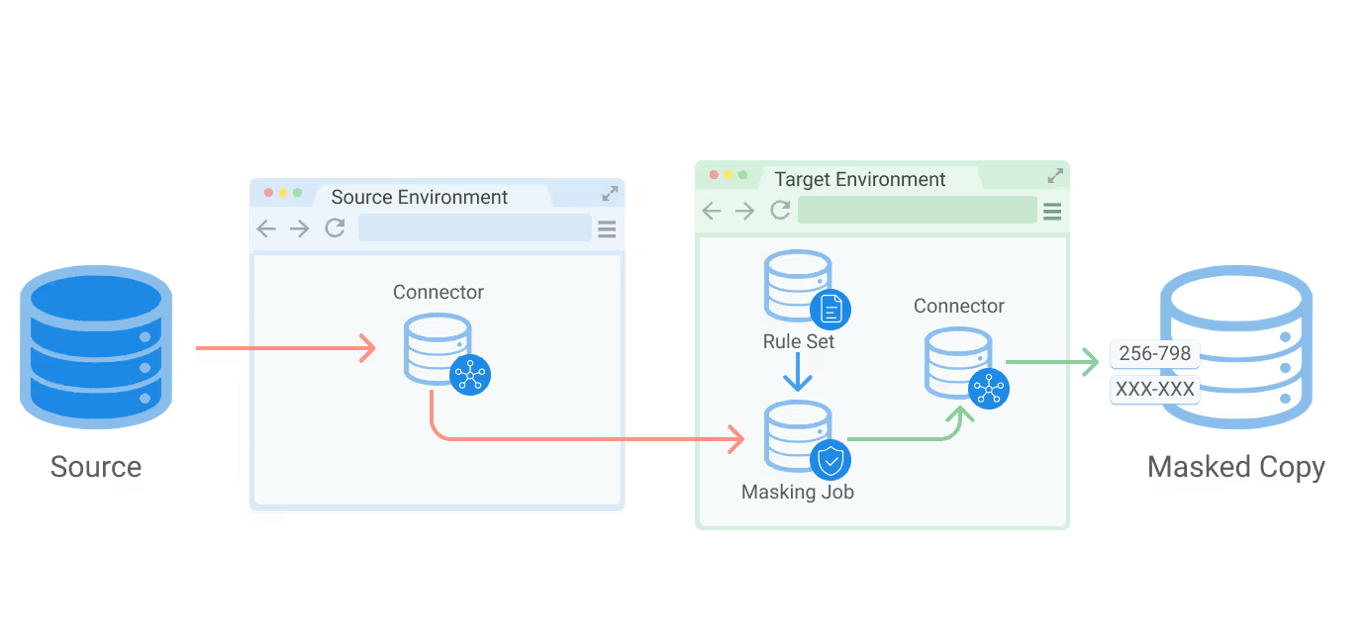
On-the-fly masking masks data in transit, as it moves from production to another environment, without writing an unmasked copy first. It fits continuous deployment pipelines that refresh test environments often.
Statistical obfuscation
Statistical obfuscation changes individual values while keeping the distribution, patterns and correlations of the dataset, using mathematical transformations or random perturbation. Aggregates stay meaningful; individual rows stop being true.
Key techniques for data masking
Key techniques for data masking
Each technique trades some usability for some protection. The ones below run from the most usable to the most protective.
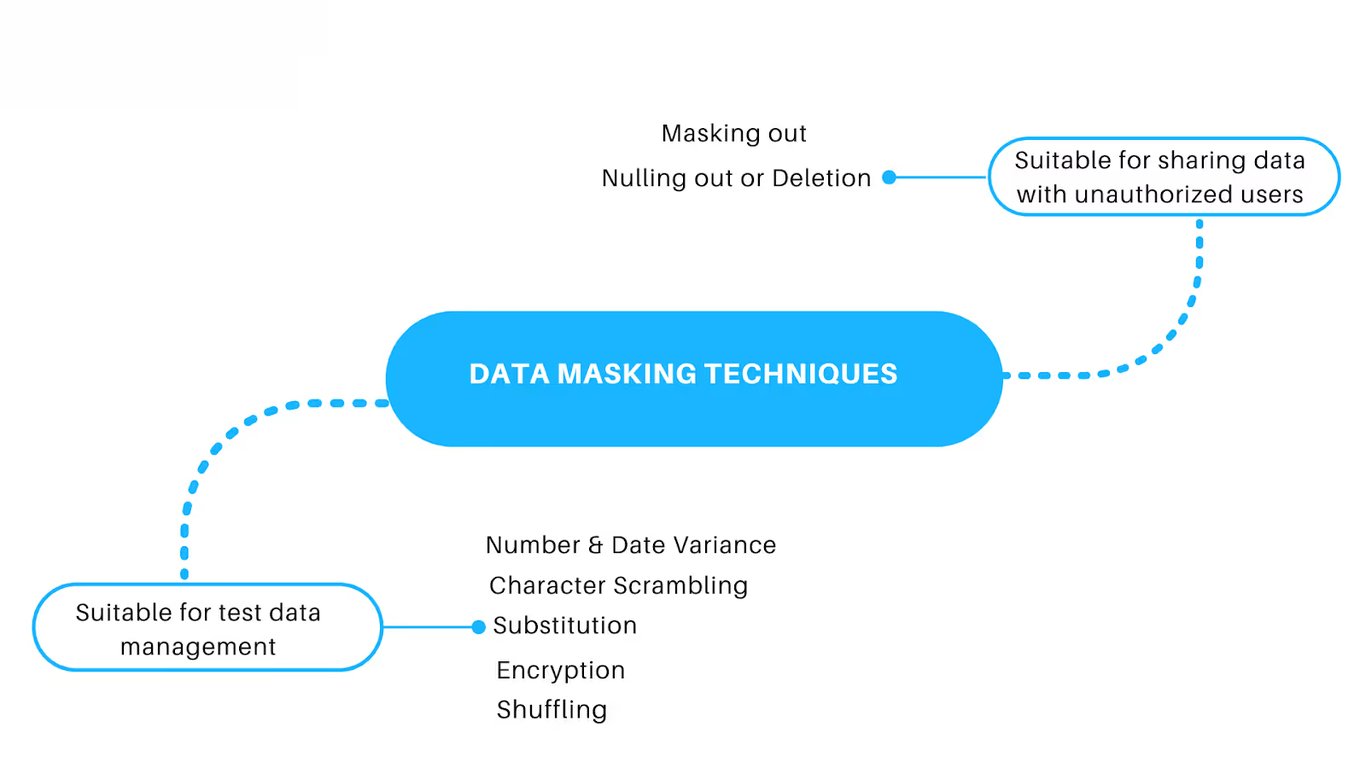
Scrambling
Scrambling rearranges characters while keeping the format: customer ID 3429871 might become 8840162. It is easy to implement and the weakest of the techniques here, so keep it for values that are only mildly sensitive.
Substitution
Substitution replaces a value with a realistic one from a lookup table, such as a valid-looking but fake card number or a name from a list. The format holds and the result is harder to reverse than scrambling.
Shuffling
Shuffling reorders the values within a column: last names stay real, but no longer belong to the right row. Column statistics are preserved. The shuffle needs a secure algorithm, or the original order can be reconstructed.
Date aging
Date aging shifts dates by a set or random range, for example moving patient birthdates by a few months. Intervals between events stay usable for timeline analysis while the real dates disappear.
Variance
Variance changes numbers or dates slightly, such as salaries by ±5%, so overall trends survive and exact figures do not. It suits financial and transactional data.
Nullifying
Nullifying replaces the value with NULL. Nothing leaks, but nothing is left to analyze either, so use it where the column is not needed at all.
Tokenization
Tokenization swaps a value for a meaningless token and keeps the mapping in a separate, secured vault. Without the vault the tokens are useless, which is why it is common for card numbers and other PII.
Data redaction
Redaction hides part of a value, as in XXXX-XXXX-XXXX-1234 for a card number, or removes confidential passages from a report. Automated redaction prevents accidental exposure in exports and extracts.
Encryption
Encryption turns plaintext into ciphertext that only a key holder can read. It protects data at rest and in transit, but it is reversible by design, so it protects against outsiders rather than against anyone who holds the key.
How to implement dynamic data masking in BigQuery
How to implement dynamic data masking in BigQuery
BigQuery masks data at the column level, at query runtime, based on the role of the user running the query. The stored data never changes. Masking is built on column-level access control, so the same policy tags decide who sees raw values, who sees masked ones, and who gets an access-denied error. Google notes that the feature depends on the BigQuery edition of the reservation that runs the query, so check your edition first.
The steps below follow Google’s own documentation, Introduction to data masking and Mask column data, read November 2026.
Step 1: Set up a taxonomy and policy tags
Create a taxonomy and one or more policy tags that classify columns by sensitivity, for example Confidential with a child tag Financial. The account that creates the taxonomy needs the Data Catalog Policy Tag Admin role, and the Data Catalog and BigQuery Data Policy APIs must be enabled.
Step 2: Create data policies for each policy tag
A data policy maps one masking rule and one or more principals (users or groups) to a policy tag. A policy tag can carry up to nine data policies, one of which is reserved for column-level access control, so up to eight masking policies per tag. You can create them in the Google Cloud console or with the BigQuery Data Policy API. Google also lets you set a data policy directly on a column, without policy tags.
Step 3: Choose the masking rule
The rule decides what a masked reader sees. BigQuery’s rules differ in two ways that matter in practice: whether the masked column can still be joined, and how easily the original can be recovered.
| Rule | What the masked reader sees | Joinable | Strength, per Google |
|---|---|---|---|
| Nullify | NULL |
no | highest |
| Default masking value | a type default: "", 0, 1970-01-01 |
no | highest |
| Date year mask | the year only: 2030-07-17 becomes 2030-01-01 |
no | moderate |
| Email mask | XXXXX@gmail.com; the domain stays visible |
no | moderate |
| First or last four characters | four characters, the rest XXXXX |
no | low to moderate |
| Hash (SHA-256) | the same hash for the same value, every query | yes | moderate |
| Random hash | a hash salted per query; set on columns only | within one query | high |
| Custom masking routine | whatever your UDF returns; salted hash or AEAD encryption are the common choices | yes | high, if the salt or key stays secret |
Two details in Google’s comparison change designs. The email mask leaves the domain readable, which can identify a person in a small company. And first or last four characters, on a value of four characters or fewer, falls back to SHA-256, which Google rates “very low” for short strings.
Step 4: Assign policy tags to columns
Attach the policy tags to columns in your BigQuery tables. From then on, every query that reads the column is masked or not according to the data policies on the tag. Existing queries need no change: unlike plain column-level access control, users do not have to exclude columns they cannot read.
Step 5: Grant Masked Reader and Fine-Grained Reader
Users who should see masked values get the BigQuery Masked Reader role; users who should see raw values get Data Catalog Fine-Grained Reader on the policy tag. Google recommends granting Masked Reader at the data policy level, because granting it at the project level gives the user every data policy in the project.
How the roles combine:
- Fine-Grained Reader only: raw values.
- Masked Reader only: masked values.
- Neither: permission denied. A user with neither role on a masked column cannot run
SELECT *on the table, and has to name the allowed columns or useSELECT * EXCEPT (...). - Both: BigQuery walks up the policy tag hierarchy from the column’s tag and uses the first role it finds. A Masked Reader grant on the child tag beats a Fine-Grained Reader grant on the parent.
When a user is in several groups whose policies mask the same column differently, BigQuery applies the rule highest in this order: custom routine, random hash, SHA-256, email mask, last four, first four, date year, default value, nullify. A user in both an “employees” group (nullify) and an “accounting” group (SHA-256) therefore sees the hash.
What a deterministic hash does not protect
SHA-256 is the rule people reach for because masked columns stay joinable. It is also reversible whenever the set of possible values is small: hash every candidate and look the masked value up. We ran this on 9 November 2026 in BigQuery, with no table involved: all 10,000 four-digit values, hashed the way the masking rule hashes them (TO_BASE64(SHA256(...)), which reproduces the example in Google’s documentation exactly), then joined to two masked values.
WITH candidates AS (
  SELECT FORMAT('%04d', n) AS pin, TO_BASE64(SHA256(FORMAT('%04d', n))) AS hashed
  FROM UNNEST(GENERATE_ARRAY(0, 9999)) AS n
),
masked_rows AS (
  SELECT TO_BASE64(SHA256('4821')) AS masked_value UNION ALL
  SELECT TO_BASE64(SHA256('0007'))
)
SELECT m.masked_value, c.pin AS recovered_value
FROM masked_rows AS m
JOIN candidates AS c ON c.hashed = m.masked_value
Both values came back – 4821 and 0007 – and the query processed 0 bytes. The same works for anything with a guessable range: PINs, ZIP codes, birthdates, phone numbers, employee IDs. If a column is short or enumerable, use random hash (when joins are only needed inside one query), a custom routine with a secret salt, or a rule that is not a hash at all.
Choosing a rule: two questions
Google’s table rates each rule on its own. In practice, the choice comes down to two questions about the column: does a masked reader need to join on it, and how many values can it hold? Our reading of Google’s rules gives this:
| Masked reader must join on it… | Few possible values (PINs, ZIP codes, birthdates, small IDs) | Many possible values (emails, long IDs, free text) |
|---|---|---|
| never | nullify or default value | nullify, default value; email mask if the domain is safe to show |
| within one query only | random hash | random hash |
| across queries and tables | custom routine with a secret salt or AEAD encryption; plain SHA-256 is reversible, as shown above | SHA-256 is acceptable if guessing candidates is impractical; a salted routine is safer |
Two cases fall outside the grid. A date column analysts need by year takes the date year mask. A support screen that shows the end of a card or account number takes last four characters, as long as no value is four characters or shorter, or it falls back to the reversible hash.
Data masking use cases
Most masking projects start from one of a few jobs: sharing data, testing software, working with vendors, or analyzing customers. The data underneath decides the technique.
Sharing data with partners and researchers
Masking lets an organization share a dataset that keeps its structure with external partners, researchers or another department, without exposing PII or confidential records. Static masking is the usual choice, because the copy leaves for good. Where the recipient needs to join their data to yours, a salted, deterministic rule keeps the join without handing over the raw key.
Creating secure testing environments
Developers and testers need realistic data to reproduce real bugs and run performance tests, and production data in a test environment is one of the most common sources of leaks. Masked copies keep formats, volumes and edge cases while removing the people. On-the-fly masking keeps them fresh in a deployment pipeline.
Working with third-party vendors and support teams
Outsourced support, agencies and integration partners often need records, not raw identities. Dynamic masking lets a support agent confirm the last four digits of an account without seeing the rest, and lets a vendor work on a table without reading the columns that matter. This also limits the damage of a data breach on the vendor’s side.
Analytics on customer data
Analysts can measure behaviour, cohorts and revenue on masked identifiers, as long as the identifier stays joinable across tables. That is the case for a deterministic rule, and the reason to check the reversibility of the one you choose. Data analytics on masked data answers “how many” and “which segment” while hiding “who”.
Data by system
The same jobs look different depending on which system holds the data:
| Data | Where it lives | What gets masked | Typical techniques |
|---|---|---|---|
| Customers and leads | CRM | names, emails, phone numbers of active and inactive leads | shuffling, pseudonymization, date aging |
| Employees | HCM and payroll systems | addresses, salaries, health insurance details | pseudonymization, shuffling, variance |
| Financial accounts | portfolio and banking systems | account numbers, balances, transactions, Social Security Numbers | substitution, tokenization, anonymization |
| Website and network activity | log files | IP addresses | redaction, encrypted lookup substitution, shuffling |
| Patients | EHR systems | names, addresses, medical histories | shuffling, date aging |
Industry examples
- Healthcare: patient records, test results and billing data, shared between hospitals, insurers and researchers.
- Financial services: transactions, card numbers and investment records, masked for fraud analysis and audits. In the US, the Gramm-Leach-Bliley Act (GLBA) adds its own duty to protect customer financial data.
- Retail: purchase histories, payment details and loyalty data, masked for behaviour analysis.
- Telecommunications: call records, identities and billing details, masked for customer service and regulatory reporting.
- Government: citizen records, tax data and social security numbers, masked for exchange between departments.
Regulations where masking plays a role
Regulations where masking plays a role
Masking is not a compliance program on its own, but three regulations come up in almost every masking project.
GDPR (General Data Protection Regulation)
GDPR requires appropriate technical and organizational measures for personal data, and Article 32 names pseudonymization and encryption among them. As Recital 26 makes clear, pseudonymized data is still personal data; only data that can no longer be linked to a person is out of scope.
HIPAA (Health Insurance Portability and Accountability Act)
HIPAA requires healthcare organizations to protect the confidentiality of patient information. Its Privacy Rule defines two routes to de-identified data: removing a list of 18 identifiers (Safe Harbor), or a qualified expert’s determination that the risk of identification is very small. Masking is one way to get there for research and analytics copies.
PCI DSS (Payment Card Industry Data Security Standard)
PCI DSS requires the primary account number (PAN) to be masked when displayed, so that only people with a business need see more than the BIN and the last four digits. Masking, tokenization and truncation are the standard ways to keep card data out of systems that do not need it, which also shrinks what falls under the standard’s compliance scope.
Overcoming challenges in data masking
Overcoming challenges in data masking
Masking projects fail in predictable places: the masked data stops being useful, stops being valid, or stops being maintained.
Preserving data integrity while masking
Altering key attributes can distort patterns and break joins, and then the masked data has lost the analytical value it was kept for. Use techniques that preserve relationships, such as deterministic or salted hashing for keys and variance for measures, and decide upfront which columns must stay joinable.
Ensuring semantic consistency in masked data
A masked ID that fails a checksum, or a date that no longer parses, breaks every system that reads it. Define masking rules that keep the format and structure of the original, and validate the output against the same rules production data must pass.
Fitting masking into existing workflows
A masking tool that does not fit current systems creates manual steps and workarounds, and workarounds are where unmasked copies appear. Prefer masking built into the platform that already holds the data, like BigQuery’s column-level masking, over a separate copy-and-mask process, and train the people who manage the policies.
Best practices for secure data sharing with masking
Best practices for secure data sharing with masking
A masking setup is only as good as the inventory behind it. These four practices keep it honest.
Discover and catalog sensitive data
Find every sensitive column first. Security and business teams should build the inventory together and classify each column’s sensitivity; a policy tag taxonomy in BigQuery is one way to record it.
Analyze how the data is used
For each sensitive column, record who reads it, where it is copied and what must still work: joins, filters, aggregations. That list chooses the technique, not the other way round.
Use different techniques for different data
One rule for everything is either too weak or too destructive. Apply tailored techniques by sensitivity and use: nullify what nobody needs, hash with a salt what must join, age dates that feed timelines.
Test and validate masking regularly
Masking is not set-and-forget. Quality assurance should check that masked data keeps its formats and relationships, and someone should try to reverse it, as in the SHA-256 example above.
Where OWOX Data Marts fits
OWOX Data Marts runs its SQL in your own warehouse and never stores a copy of your data. In BigQuery, masking is applied to whoever runs the query, so reports built on a Data Mart return values exactly as BigQuery’s policies allow the connected account to see them: masked for a Masked Reader, raw only where Fine-Grained Reader is granted. Masking stays where you configured it, and nothing outside the warehouse needs its own copy of the policy.
Most people shouldn't see names, emails or salaries, but the masked columns still have to join and filter.
Paste this into your AI assistant. It finds the sensitive columns in your data warehouse tables and proposes a masking rule for each that keeps your joins and reports working.
The prompt
Read https://www.owox.com/ai-agent-setup.md and follow it to set up OWOX Data Marts for me, starting from /blog/articles/data-masking-explained.md. The task: list the sensitive columns in my data warehouse tables and propose a masking rule for each: who sees raw values, which rule keeps joins working, and which ones can be reversed. Tag the links you give me with utm_campaign=ai-task and utm_term=data-foundation. Use what you know about my context and goals
Prefer to start on your own? Get started free
Frequently Asked Questions
Is data masking compliant with data protection regulations?
Yes, data masking supports compliance with GDPR, HIPAA, PCI DSS, and other regulations by securing personally identifiable information (PII) and financial data while maintaining usability for business operations.
Can data masking be reversed?
No, data masking is irreversible by design. Unlike encryption, which allows decryption with a key, masked data cannot be restored to its original form, ensuring permanent protection.
Who uses data masking and why?
Data analysts, security teams, compliance officers, and developers use data masking to protect sensitive records, meet privacy regulations, and enable safe data access for testing, analytics, and reporting.
How does data masking differ from encryption?
Data masking permanently alters data to make it unreadable, while encryption converts data into ciphertext that can be decrypted with a key. Masked data cannot be restored to its original state.
What are the benefits of data masking?
Data masking protects sensitive information, prevents data breaches, ensures regulatory compliance, and enables secure data sharing. It maintains data usability for analysis and development without exposing actual sensitive values.
How does data masking work?
Data masking replaces sensitive data with anonymized values, preserving format but preventing unauthorized access. It ensures security while allowing data usability for testing, analytics, and compliance purposes.