Top 10 free database diagram design tools
Ten free database diagram tools, each described from its own documentation as of October 2026. They fall into four groups: diagrams written as code, visual canvases, tools that read an existing database, and tools whose output is a portable model and not only a picture. A comparison table comes first, then one section per tool and a short way to choose.
A database diagram tool turns tables, columns and keys into a picture people can read: an entity-relationship diagram (ERD). There are many free ones, and they differ less in how the diagram looks than in how you make it and what you get back.
This list covers ten. Every statement about a tool comes from that tool’s own site or documentation, checked in October 2026, and is linked. Plans and limits change, so prices are left out and each “free” below is the vendor’s own word.
The ten tools at a glance
| Tool | How you draw | Reads an existing database or SQL | What you get back |
|---|---|---|---|
| dbdiagram.io | Code (DBML) | Not stated on the pages checked | Diagram from text |
| DrawSQL | Visual canvas | Paste CREATE TABLE statements |
DDL, Laravel migrations, JSON |
| QuickDBD | Typing | Not stated | SQL, images, PDF/RTF |
| ERDPlus | Visual canvas | No | SQL scripts, PNG |
| draw.io | Visual canvas | Insert from SQL code | Diagram file, stored where you choose |
| Lucidchart | Visual canvas | Database import | SQL for four databases |
| Mermaid | Code (Markdown) | No | Diagram rendered from text |
| DbSchema | Visual, connected | Reverse engineering, live sync | HTML5 or PDF documentation |
| DBeaver | Generated from the database | Yes, it is a database client | PNG, GIF, BMP, GraphML |
| OWOX Model Canvas | Visual canvas, AI-drafted | Imports OKF | OKF bundle, share link |
What to look for in a database diagram tool
What to look for in a database diagram tool
Four questions separate these tools better than a feature checklist does.
- Do you think in code or on a canvas? Text-based tools are fast and diff well in git. Canvas tools are easier to walk a colleague through.
- Is the database already there? For an existing database you want reverse engineering. Drawing 80 tables by hand is how diagrams end up wrong.
- What comes out? A PNG is the end of the road. SQL, a text format or an open model file can be reviewed, versioned and reused.
- Who else has to read it? A diagram for engineers can show every column. One for the business has to show what the tables mean.
OWOX Data Marts
See your first report built in real time. 15 minutes.
- Connect your data warehouse
- Pick your metrics
- Get a live Google Sheets report
In the time it takes to write a ticket. Then imagine never writing that ticket again.
Book a DemoWe'll use your actual use case
Diagrams written as code
1. dbdiagram.io
dbdiagram.io describes itself as “a free, simple tool to draw database diagrams (ERDs) by typing DSL code”. The language is DBML, the Database Markup Language (dbdiagram docs). You write tables and references as text, and the diagram updates beside it:
Table orders {
  id int [pk]
  customer_id int
  status varchar
}

Ref: orders.customer_id
  > customers.id
Best for: engineers who would rather type a schema than drag boxes, and who want the definition in a file.
2. QuickDBD
QuickDBD’s headline is “Draw database diagrams by typing”. Its site lists SQL export, image export and PDF/RTF export, real-time collaboration and public sharing, and says “It’s free and registration is not required” (quickdatabasediagrams.com).
Best for: sketching a schema during a call, when speed matters more than polish.
3. Mermaid
Mermaid renders ER diagrams from text inside Markdown, using crow’s foot notation. Attributes can carry types and PK, FK or UK keys (Mermaid docs).
erDiagram
  CUSTOMER ||--o{ ORDER : places
  ORDER ||--|{ ORDER_LINE : contains
  PRODUCT ||--o{ ORDER_LINE : in
Best for: documentation that lives next to code. The diagram is reviewed in the same pull request as the change it describes. There is no visual editor.
Visual canvases
4. DrawSQL
DrawSQL calls itself “the database schema diagram tool where teams design, review, and evolve together”. You can paste CREATE TABLE statements to generate a diagram, edit with others in real time, and export DDL, Laravel migrations or JSON. The site also offers more than 200 real-world schemas to start from (drawsql.app).
Best for: a team that reviews schema changes together and wants a diagram good enough to share outside engineering.
5. ERDPlus
ERDPlus creates “Entity Relationship Diagrams, Relational Schemas, and Star Schemas”, converts an ER diagram into a relational schema in one click, generates SQL scripts and exports PNG. Its site says “No paid features - everything is completely free” (erdplus.com).
Best for: students and anyone learning database design. It is the only tool on this list whose site names star schemas as a diagram type.
6. draw.io
draw.io is a general diagramming tool: “Free forever • No sign-up required • No lock-in”, with Apache 2.0 licensed source code. You choose where files are stored (drawio.com). For databases it has an Entity Relation shape library and can create entity tables from SQL code. You draw the connectors between them yourself (draw.io blog).
Best for: teams that already draw everything else in draw.io and need an ERD beside the architecture diagram.
7. Lucidchart
Lucidchart’s ERD tool can import database tables and schemas onto the canvas and “automatically generates the SQL commands you need to match your ERD to your DBMS”, with export for MySQL, PostgreSQL, SQL Server or Oracle. Several people can edit one diagram at once, and a free account is available (lucid.co).
Best for: companies already using Lucidchart, where the ERD has to sit with process maps and org charts.
Tools that read an existing database
Tools that read an existing database
8. DbSchema
DbSchema connects to a database and turns it into an ER diagram, lets you compare the design with the live database and choose which side to update, and publishes schemas as interactive HTML5 or PDF documentation. Its Community Edition is described as “free for non-commercial use” (dbschema.com).
Best for: documenting and maintaining a database that already exists. Check the licence terms before using the free edition at work.
9. DBeaver
DBeaver Community is “a free, open-source database management tool”. Its ER diagrams are generated from the database: you open one for a table, a view or a whole schema, and can combine tables from different connections on one canvas. Diagrams export as PNG, GIF, BMP or GraphML (DBeaver docs).
Best for: analysts and engineers who already use DBeaver to query. The diagram is always the real schema, because it is read from it.
A tool that gives back a model, not only a picture
A tool that gives back a model, not only a picture
10. OWOX Model Canvas
OWOX Model Canvas is a free canvas for models that works without signing in. Its source is on GitHub under the Apache 2.0 licence (OWOX/models). It is ours, so read this entry with that in mind.
It differs from the nine above in what a box on the canvas is. A node is a Data Mart (a table, a view or SQL), and an edge is a join between two of them on named keys. A field-level view shows columns, primary keys and join keys.
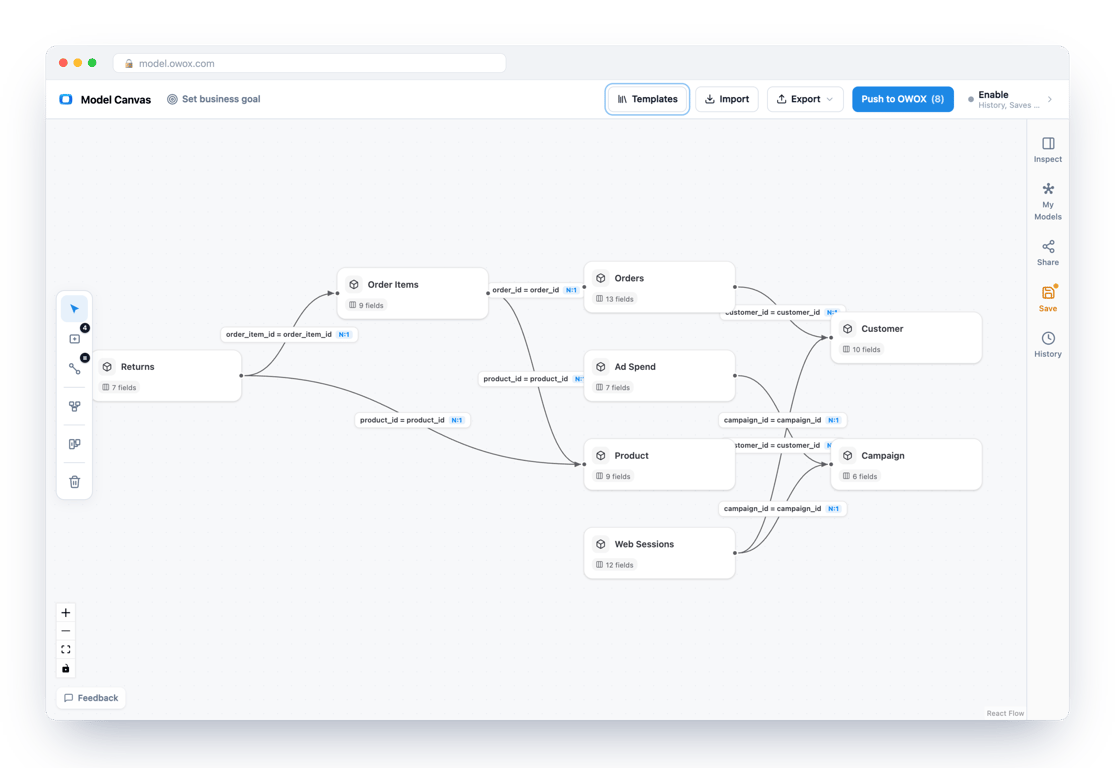
What you get back is an OKF bundle. Open Knowledge Format is an open specification published by Google: a folder of Markdown files, one per table, with a schema table and a joins section. It can be kept in git, reviewed in a pull request and re-imported. The canvas also has:
- templates for e-commerce, SaaS, marketplace, lead generation, mobile games, finance and healthcare, and two public datasets, Bitcoin and Stack Overflow,
- a way to draft a model with an AI assistant: copy a brief into Claude, ChatGPT or Gemini and import the result,
- share links that carry the whole model in the URL,
- a push that creates draft Data Marts and their relationships in OWOX Data Marts. This is the only step that needs an account.
What it does not offer: its site lists no database connection for reverse engineering and no SQL DDL export. For those jobs use DBeaver, DbSchema or one of the SQL-exporting tools above.
Best for: analysts designing a reporting model who want the result to be more than a diagram. More on the format in what is OKF, and a shorter list focused on ERDs in best free ERD tools.
How to choose
- You want a schema as text in git: dbdiagram.io, or Mermaid if it should render inside your docs.
- You need a sketch in a minute: QuickDBD.
- You are learning database design: ERDPlus.
- Your team reviews schemas together: DrawSQL or Lucidchart.
- You already diagram in a general tool: draw.io.
- The database exists and needs documenting: DBeaver or DbSchema.
- You are designing a reporting model and want to keep it as an open file: OWOX Model Canvas.
Two tools on earlier versions of this list are gone from it. Vertabelo is now Redgate Data Modeler, and erwin Data Modeler’s product page could not be read when this was checked, so neither is described here.
After the diagram
A diagram records a design at one moment. The database keeps changing, and the picture does not. Three habits keep the two together:
- Keep the source, not the image. Store the DBML, Mermaid, SQL or OKF file in the repository. Regenerate the picture from it.
- Change the model in the same pull request as the schema. A reviewer then sees both.
- Write down what the lines mean. A foreign key says two tables join. It does not say that revenue counts completed orders only. That rule belongs in a description next to the table.
For reporting, the third habit matters most. In OWOX Data Marts, each Data Mart carries its SQL, a description and its relationships to other Data Marts, and reports read those definitions. The model people drew is then the one their reports run on. Background on the design choices themselves is in types of data models and star schema.
Turn your data into decisions.
Governed data marts give you the clean foundation ML needs to actually work.
- No AI hallucinations
- Analyst-governed definitions
- Every number traces to SQL
Frequently Asked Questions
Is OWOX Model Canvas free?
Yes. The canvas is free and works without signing in, and its source is published on GitHub under the Apache 2.0 licence. An OWOX API key is needed only for the optional step of pushing a model into OWOX Data Marts as draft Data Marts.
Which database diagram tools work with git?
The text-based ones. Mermaid diagrams render from Markdown in a repository, dbdiagram.io diagrams are written in DBML, and OWOX Model Canvas exports an OKF bundle, a folder of Markdown files. Each can be changed and reviewed in the same pull request as the schema.
What is the difference between a database diagram and a data model?
A diagram is a picture of tables and their keys. A data model also says what the tables mean and how they join, in a form that can be reused: SQL, DBML, or an open format such as OKF. A picture cannot be reviewed line by line or re-imported; a model file can.
Can I generate SQL from a database diagram?
Several tools say so on their own sites: QuickDBD and ERDPlus export SQL, DrawSQL exports DDL and Laravel migrations, and Lucidchart generates SQL for MySQL, PostgreSQL, SQL Server or Oracle. Check each tool's current documentation, because export options differ by plan.
Which free tools can create a diagram from an existing database?
DBeaver generates ER diagrams directly from the tables, views or schemas of a connected database. DbSchema reverse-engineers a database into a diagram and can compare the design with the live database. Lucidchart imports database tables onto its canvas, and DrawSQL and draw.io build tables from pasted SQL.
What is the best free database diagram tool?
It depends on how you work. For a schema written as text, dbdiagram.io or Mermaid. For a quick sketch, QuickDBD. For learning, ERDPlus. For an existing database, DBeaver or DbSchema. For team review, DrawSQL or Lucidchart. For a reporting model you want to keep as an open file, OWOX Model Canvas.