Understanding star schema: definition, diagram and a SQL example
A star schema is a way to lay out reporting data: one fact table of measurable events in the middle, joined directly to dimension tables that describe them. This guide covers the definition, the diagram, a SQL example on a real dataset, the comparison with a snowflake schema, and the five design decisions that decide whether the totals come out right.
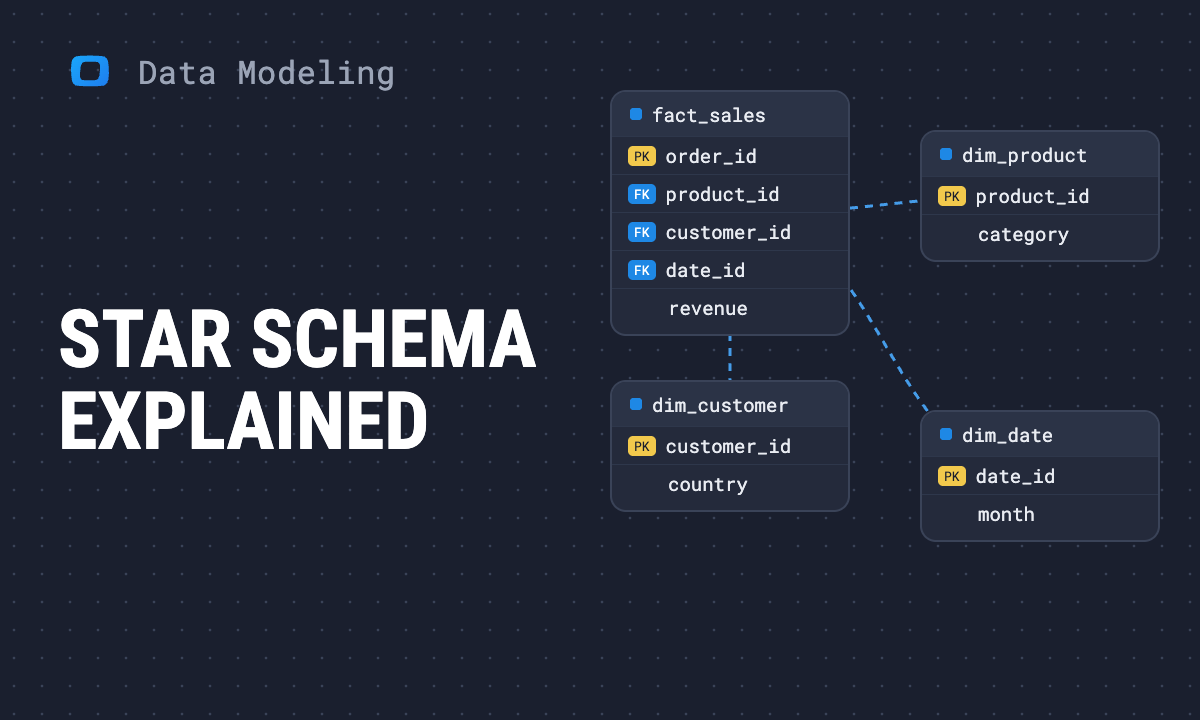
A star schema is a way to lay out data for reporting: one fact table in the middle that records events you can count or sum, joined directly to dimension tables that describe those events. Drawn as a diagram, the fact table is the centre and the dimensions are the points of the star.
It is the default shape for a data warehouse because every question has the same form: sum something from the fact table, grouped or filtered by something from a dimension. One join per dimension, and no join between dimensions.
Reading to get this done?
What a star schema is
A star schema has two kinds of table and one rule.
- Fact table: one row per event, such as an order line, a payment or a page view. It holds the numbers (quantity, revenue) and a key to each dimension.
- Dimension tables: one row per thing that describes an event, such as a product, a customer, a date or a store. They hold the text people group and filter by.
- The rule: every dimension joins to the fact table directly. A dimension does not join to another dimension.
The shape belongs to dimensional modeling, the approach Ralph Kimball set out in The Data Warehouse Toolkit (1996). For the wider method, including conformed dimensions and the bus matrix, see dimensional data modeling.
Star schema diagram
The diagram below is a sales star. Sales_Fact sits in the middle, and four dimensions surround it: product, customer, store and time.
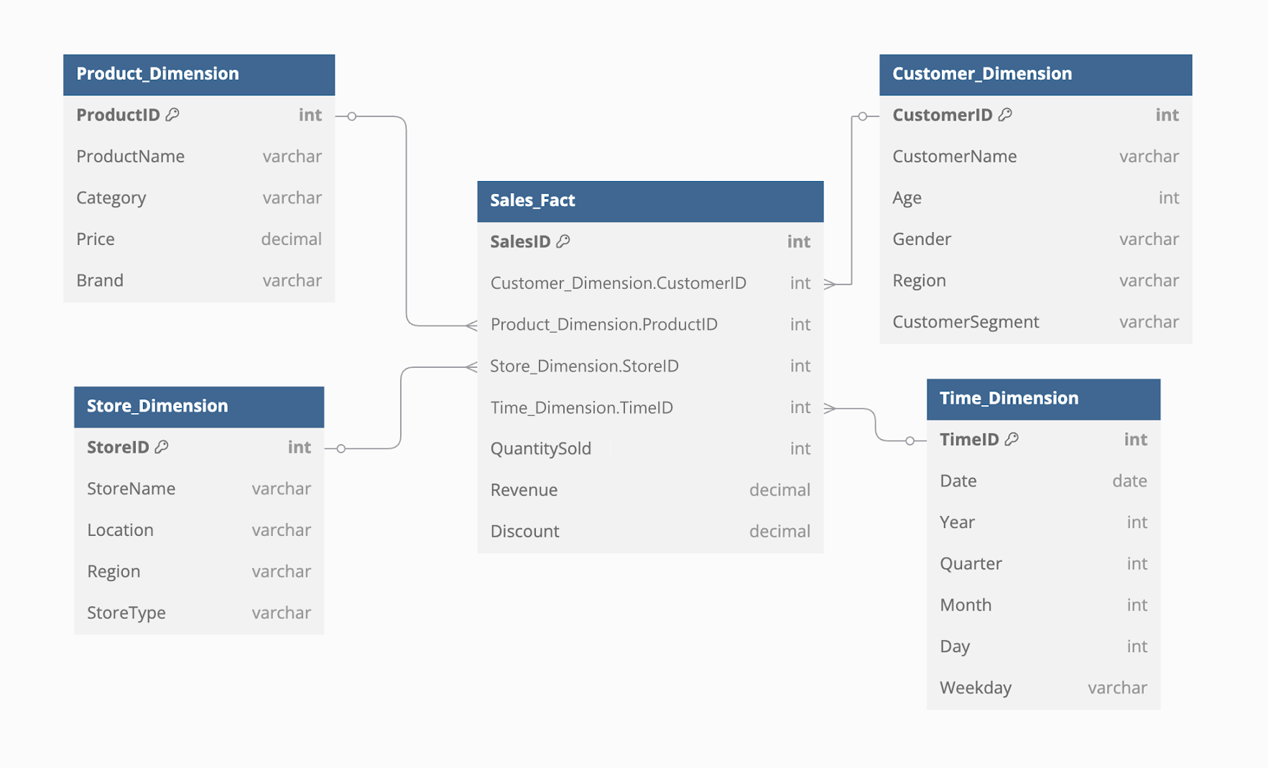
To read any star schema diagram, check three things:
- The fact table has one key per dimension and nothing descriptive. Here: customer, product, store and time keys, then quantity, revenue and discount.
- Each dimension has one primary key and many descriptive columns.
CategoryandBrandlive on the product row, not in tables of their own. - Every line runs from a dimension to the fact table. If a line connects two dimensions, the diagram shows a snowflake schema, not a star.
Your joins look right, but revenue doubles the moment you add a second dimension to the report.
Paste this into your AI assistant. It lays out a star schema on your own sources in your data warehouse: one fact table with its grain stated, and the dimension tables it joins to.
The prompt
Read https://www.owox.com/ai-agent-setup.md and follow it to set up OWOX Data Marts for me, starting from /blog/articles/star-schema-explained.md. The task: design a star schema for my reporting: the fact table and its grain, the dimension tables, and the keys that join them, from the sources I actually have. Tag the links you give me with utm_campaign=ai-task and utm_term=m1. Use what you know about my context and goals
Fact tables and dimension tables
Fact tables and dimension tables
The two table types behave differently, and most star schema mistakes come from treating one like the other.
The fact table and its grain
The grain is what one row of the fact table stands for: one order, one order line, one day of ad spend per campaign. State it in a sentence before choosing any column. Every measure in the table must be true at that grain, and every dimension must have exactly one value at it.
Grain decides what can be asked. A fact table at order grain cannot answer “revenue by product”, because an order holds several products. A table at order-line grain can answer both. The three common kinds, transaction, periodic snapshot and accumulating snapshot, are covered in types of fact tables.
Dimension tables
A dimension is wide and short: tens of columns, far fewer rows than the fact table. It is denormalized on purpose. The product row repeats the category name on every product in that category, so a report can group by category without another join.
Two practices keep dimensions stable:
- Surrogate keys. Give each dimension row a key the warehouse owns, instead of the source system’s id. Source ids get reused and reformatted.
- A rule for change. Decide what happens when a customer moves country: overwrite the row (type 1) or add a new row with dates (type 2). Type 2 keeps old orders in the old country.
A star schema example in SQL
This example uses the OWOX demo e-commerce dataset in Google BigQuery. Its source tables are normalized the way an application stores them: purchases (order lines), orders, products and product_category.
To build a star, flatten category into the product dimension and put the order’s date and customer onto each order line.
The product dimension:
SELECT
  pr.product_id,
  pr.product_name,
  pr.sub_category,
  c.category_name,
  c.category_group
FROM
  `owox-demo.ecommerce.products` pr
JOIN
  `owox-demo.ecommerce.product_category` c
  ON c.category_id = pr.category_id
The fact table, at the grain of one row per order line on a completed order:
SELECT
  p.purchase_id,
  p.product_id,
  o.customer_id,
  o.order_date,
  p.quantity,
  p.line_net_revenue,
  p.line_net_profit
FROM
  `owox-demo.ecommerce.purchases` p
JOIN
  `owox-demo.ecommerce.orders` o
  ON o.order_id = p.order_id
WHERE o.status = 'Completed'
With the two saved as dim_product and fact_sales, a report is one join and one GROUP BY:
SELECT
  d.category_name,
  EXTRACT(YEAR FROM f.order_date)
    AS year,
  SUM(f.quantity) AS units,
  ROUND(SUM(f.line_net_revenue))
    AS revenue
FROM fact_sales f
JOIN dim_product d
  ON d.product_id = f.product_id
GROUP BY 1, 2
ORDER BY year DESC, revenue DESC
Run on 7 October 2026 with the two definitions inlined as WITH clauses, the top rows were:
| Category | Year | Units | Revenue |
|---|---|---|---|
| Electronics | 2026 | 3,613 | 1,516,438 |
| Apparel | 2026 | 3,403 | 381,502 |
| Home & Kitchen | 2026 | 1,828 | 204,592 |
| Sports | 2026 | 1,685 | 189,486 |
The CREATE TABLE statements are left out because they were not run. The three SELECT statements were.
Note where the business rule sits. “Completed orders only” is in the fact table’s definition, so every report built on fact_sales inherits it. On this dataset, leaving that filter out raises revenue from 7,497,509 to 8,835,903. A star schema does not make the number right by itself. It gives the rule one place to live.
Star schema vs snowflake schema
Star schema vs snowflake schema
A snowflake schema starts as a star and then normalizes the dimensions: category moves out of the product table into its own table, and product keeps only a category key.
| Star schema | Snowflake schema | |
|---|---|---|
| Dimensions | Denormalized, one table each | Normalized into sub-tables |
| Joins per query | One per dimension | One per level of each dimension |
| Repeated text | Yes, in dimensions | No |
| Changing a category name | Update many product rows | Update one row |
| Easiest for | Reporting and BI tools | Maintaining large, shared hierarchies |
The source tables in the example above are a small snowflake: purchases to products to product_category. The first query turns that branch into one star dimension.
On a columnar warehouse the storage saved by snowflaking is small, because repeated values compress well. So the usual advice is to start with a star and snowflake a dimension only when its hierarchy is maintained elsewhere and has to stay in step. More detail: snowflake schema in data modeling and star schema vs snowflake schema.
When to use a star schema, and when not to
When to use a star schema, and when not to
A star schema fits when the same events are reported in many ways and by many people.
Use it when:
- several reports slice the same facts by different dimensions,
- business users build their own pivots and need table and column names they recognise,
- more than one fact table shares dimensions, for example orders and ad spend both by date and campaign.
Think again when:
- There is one report and one question. A single wide table is less work and just as fast.
- The data is not events. Deeply nested or graph-shaped data fights the fact and dimension split.
- The source changes shape weekly. Model it after it settles, or the star is rebuilt every sprint.
Five design decisions that decide whether totals are right
Five design decisions that decide whether totals are right
Performance is rarely what goes wrong in a star schema. Wrong totals are. These five decisions prevent most of them.
- Write the grain down. One sentence, at the top of the fact table’s definition. If two people describe it differently, stop there.
- Keep measures additive. Store quantity and revenue, which can be summed. Calculate ratios such as margin or conversion rate in the query, from the sums.
- Watch for fan-out. Joining a fact table to anything with several rows per key duplicates the fact rows, and
SUMthen overstates. A dimension must have one row per key, and two fact tables are never joined to each other row by row. - Share dimensions between fact tables. One date dimension and one product dimension, used by every fact table, are what let orders and ad spend appear in the same report.
- Test with a number someone already trusts. Reconcile one month of revenue against finance before anyone builds on the model.
For more failure cases, see mistakes in data modeling.
From a star schema to reports people can trust
From a star schema to reports people can trust
A well-built star still leaves two jobs: getting it in front of the people who need it, and making sure they join it the way it was designed. A business user with direct access to fact_sales and a raw orders table can still pick the wrong one.
In OWOX Data Marts each fact and dimension table becomes a Data Mart: the analyst’s SQL, table or view, with a description, an owner and described output fields. The joins in the diagram become relationships between Data Marts, declared once on their keys. The star is then something the product knows about, not only a picture in a wiki.
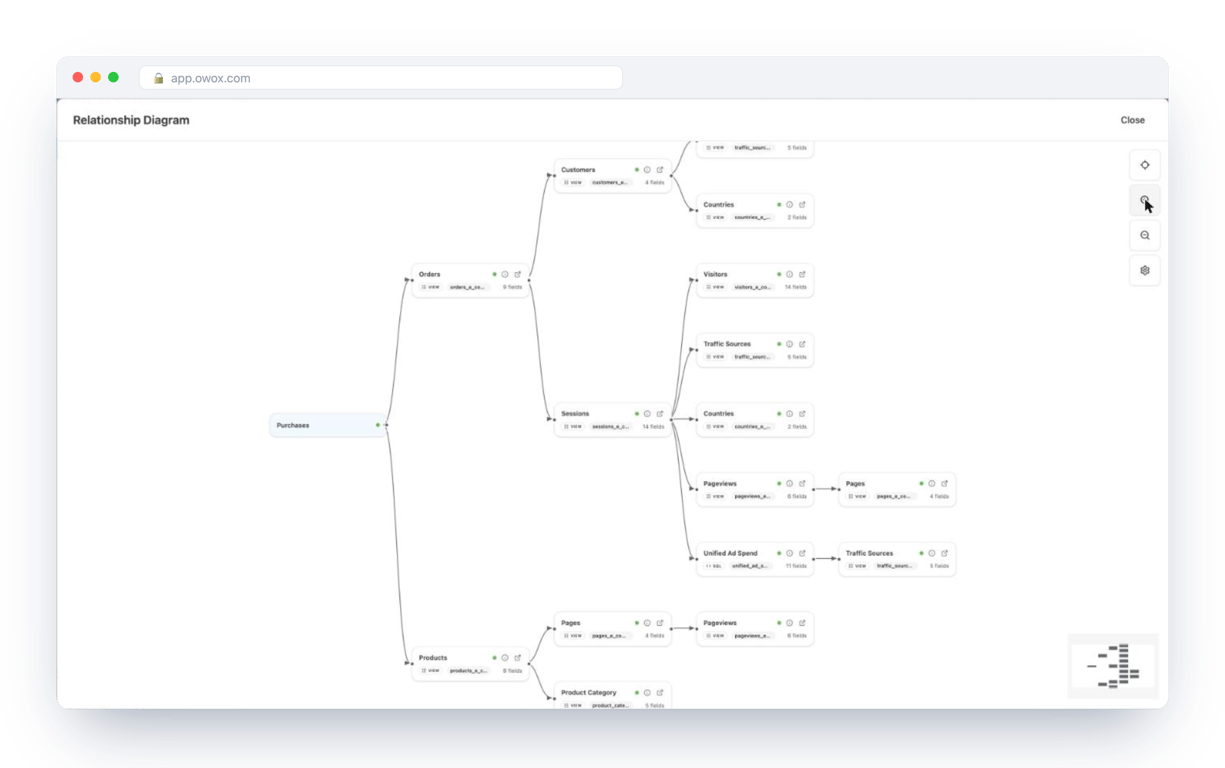
What that changes in practice:
- A report in Google Sheets or Looker Studio picks columns from the fact and its dimensions, and the join uses the declared key.
- The rule in the fact table’s SQL, such as “completed orders only”, reaches every report, because nothing reads the raw tables.
- The SQL behind a number stays the analyst’s own and can be read by whoever asks.
OWOX Data Marts does not design the schema or write these queries. The analyst does, and the product publishes, schedules and governs the result on the where the data already is: Google BigQuery, Snowflake, AWS Redshift, AWS Athena or Databricks. See Joinable Data Marts for how relationships are declared, or start from the ready-made data model, walked through in e-commerce data model. The other industry data models are worked examples, and modeling in OWOX Data Marts explains how a star like this is defined and published.
Your joins look right, but revenue doubles the moment you add a second dimension to the report.
Paste this into your AI assistant. It lays out a star schema on your own sources in your data warehouse: one fact table with its grain stated, and the dimension tables it joins to.
The prompt
Read https://www.owox.com/ai-agent-setup.md and follow it to set up OWOX Data Marts for me, starting from /blog/articles/star-schema-explained.md. The task: design a star schema for my reporting: the fact table and its grain, the dimension tables, and the keys that join them, from the sources I actually have. Tag the links you give me with utm_campaign=ai-task and utm_term=m1. Use what you know about my context and goals
Prefer to start on your own? Get started free
Frequently Asked Questions
Why does a star schema return inflated totals?
Usually fan-out: the fact table was joined to a table with several rows per key, which duplicates fact rows before the SUM. Check that each dimension has one row per key and that two fact tables are aggregated separately before being combined.
What is the grain of a fact table?
The grain is what one row stands for, such as one order line or one day of ad spend per campaign. Write it as a sentence before choosing columns. Every measure must be true at that grain, and every dimension must have exactly one value at it.
When should I choose a star schema over a snowflake schema?
Start with a star schema for reporting: it needs fewer joins and business users can read it. Snowflake a single dimension only when its hierarchy is maintained in another system and has to stay in step. On a columnar warehouse the storage saved by normalizing is small.
What is the difference between a fact table and a dimension table?
A fact table has one row per event and holds numbers that can be summed plus a key to each dimension. A dimension table has one row per product, customer, date or other descriptive thing and holds the text columns reports group and filter by.
How does a star schema differ from a snowflake schema?
In a star schema each dimension is one denormalized table, so a query needs one join per dimension. A snowflake schema normalizes dimensions into sub-tables, for example product and category, which removes repeated text but adds a join for every level.
What is a star schema?
A star schema is a layout for reporting data with one fact table in the centre, holding measurable events such as order lines, joined directly to dimension tables that describe them, such as product, customer and date. Every dimension joins to the fact table and never to another dimension.