Stop delegating tasks with data screenshots that are wrong by morning
Every founder knows the itch. Something’s off. Products XYZ aren’t moving the way they should. A cohort of customers went quiet. You can feel it before you can prove it.
So you dig in, and the hunch checks out – the numbers really are bad. Now comes the part that always breaks: you have to hand it to someone. And how do you actually assign that? “Go check, something’s off” isn’t a task. So you screenshot the Shopify admin or the Facebook cabinet, paste it into Slack, and type “can you look into these?”
That screenshot is stale by morning. It reconciles with nothing. And your employee is left interpreting a picture instead of working a list. This is the delegation loop that keeps founders doing their own analysis at 11pm: the hand-off artifact is worse than the hunch.
In this article, you’ll learn how a hands-on founder turns a hunch into a task – one plain-English prompt pulls the exact data into a Google Sheet, and that fresh, model-connected Sheet is the assignment.
Why the screenshot hand-off keeps failing
Why the screenshot hand-off keeps failing
Delegation only sticks when the person you hand it to gets something concrete, current, and trustworthy to act on. A screenshot is none of those, and the usual workarounds are worse.
A screenshot dies overnight
The moment you capture it, a cabinet screenshot starts rotting. Tomorrow’s numbers are different, the screenshot isn’t, and now your employee is chasing a snapshot of a problem that has already moved. Nobody can act with confidence on a picture they can’t refresh.
Twenty spreadsheet tabs that argue with each other
The other classic is the pile of hand-assembled tabs – built once, never updated, each with a slightly different definition of “conversion” or “revenue.” Hand someone that and you’ve delegated an argument, not a task. They’ll spend the first day reconciling before they do any actual work.
A verbal task with no data attached
“Something’s off with these products, go figure it out” hands over the investigation, not the finding. The employee may define the problem differently than you did, chase the wrong cut, and come back a week later with an answer to a question you didn’t ask. You stayed the bottleneck the whole time.
Turn the hunch into an artifact, in one prompt
Turn the hunch into an artifact, in one prompt
The fix isn’t a new dashboard for your team to go learn. It’s to make the hand-off itself concrete and fresh – to turn “something’s off” into a Google Sheet that holds the exact rows to act on, created the moment you ask.
Ask your business, then ask for the sheet
You investigate the hunch the way you’d ask anyone – in your own AI chat, in plain English, over your governed data (the same ask-and-decide surface the CEO uses). When the finding is confirmed, one more prompt turns it into the assignment: “put those products into a Google Sheet I can hand to my merchandiser.” You never write SQL – you write the sentence, and the server builds the query behind it.
The sheet creates itself
There’s no document to make and no sharing dance. The Sheet is created in a Drive folder your analyst set up once, and you get back a ready-to-open link. That link, connected to the model and refreshable, is the task. This is the piece the “export an AI answer to Google Sheets” tools miss: it’s not a one-time dump, it’s a live report.
It stays true tomorrow
Because it’s a report over your data marts, you can ask the AI to keep it fresh: “schedule it to refresh weekly, Monday 10am.” Now the artifact updates on its own instead of dying overnight – a Google Sheet with an automatic, scheduled refresh from your warehouse, no action needed from you or your employee.
OWOX Data Marts
See your first report built in real time. 15 minutes.
- Connect your data warehouse
- Pick your metrics
- Get a live Google Sheets report
In the time it takes to write a ticket. Then imagine never writing that ticket again.
Book a DemoWe'll use your actual use case
What the whole loop looks like
What the whole loop looks like
Here’s the real path, start to finish, run in an AI chat with the OWOX MCP connector on a demo store. Four prompts, four frames – a hunch goes in, a live hand-off Sheet comes out.
1. “Which products are getting lots of views but aren’t converting into purchases?”
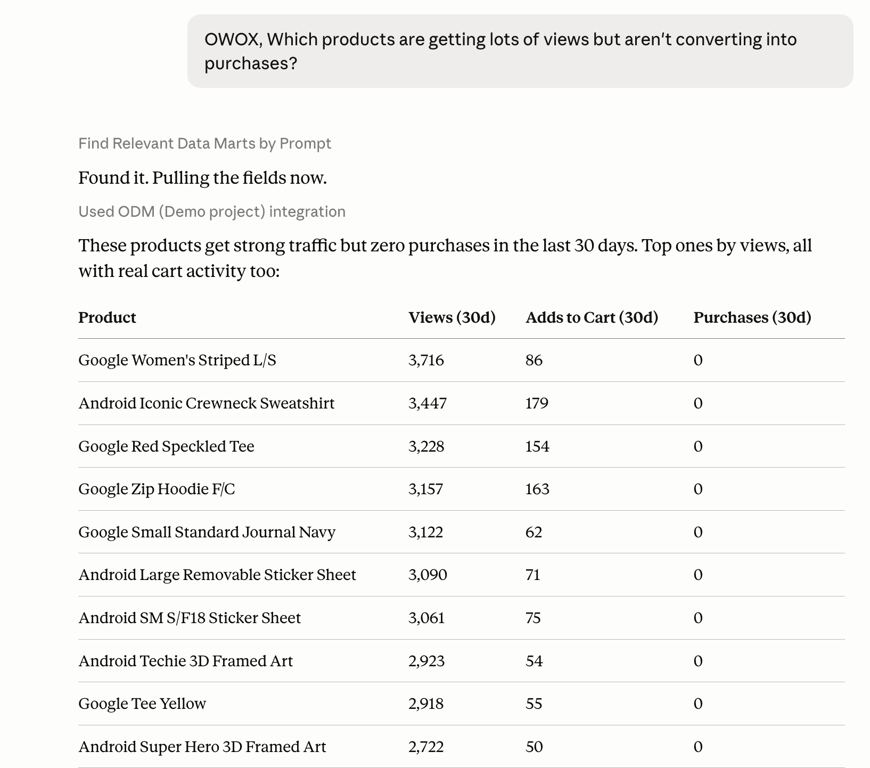
The investigation: products with strong traffic and real cart activity but zero purchases in the last 30 days – the drop-off is visible per product, straight from the model, not a cabinet export.
The itch, confirmed.
Google Women’s Striped L/S: 3,716 views, 86 add-to-carts, 0 purchases.
Row after row of the same story. That’s not a hunch anymore; it’s a list.
2. “Put those products into a Google sheet I can hand to my merchandiser.”
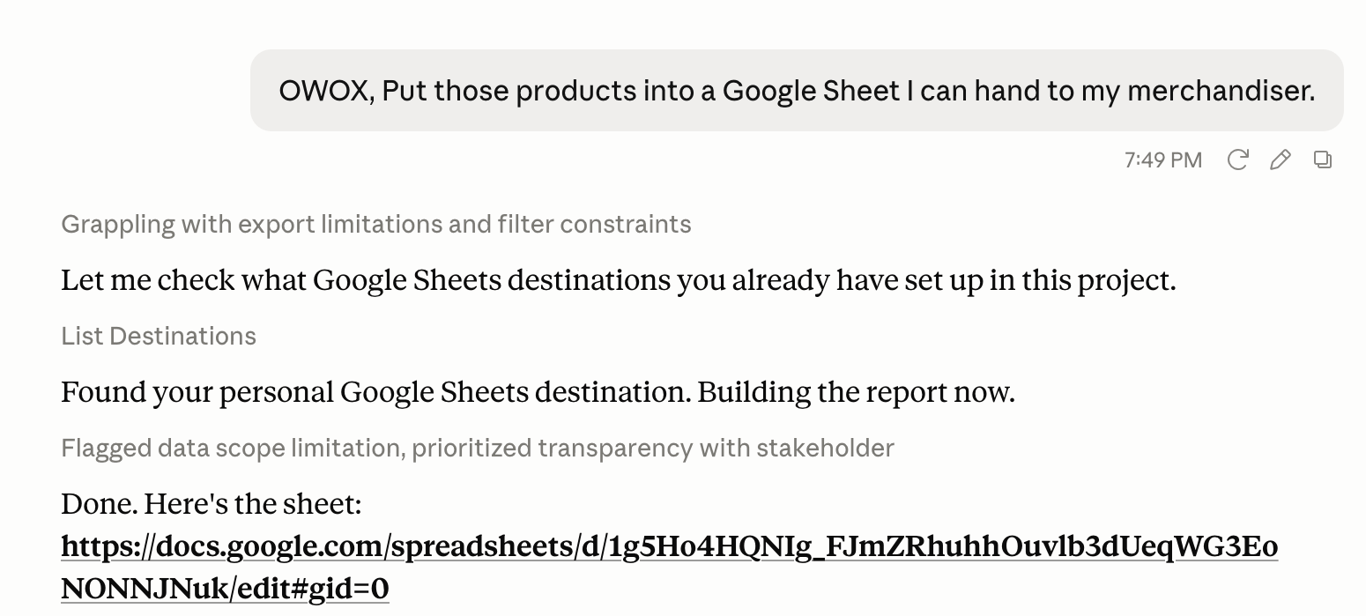
One prompt, one artifact: the MCP finds the Sheets destination the analyst pre-configured, builds the report, and returns a link. No document creation, no sharing setup.
This is the whole move. There’s no “export, download, re-upload, share” – the Sheet lands in the right folder and comes back as a link you can paste into a message with one line of instruction.
3. “Schedule it to refresh weekly, Monday 10am New York time.”
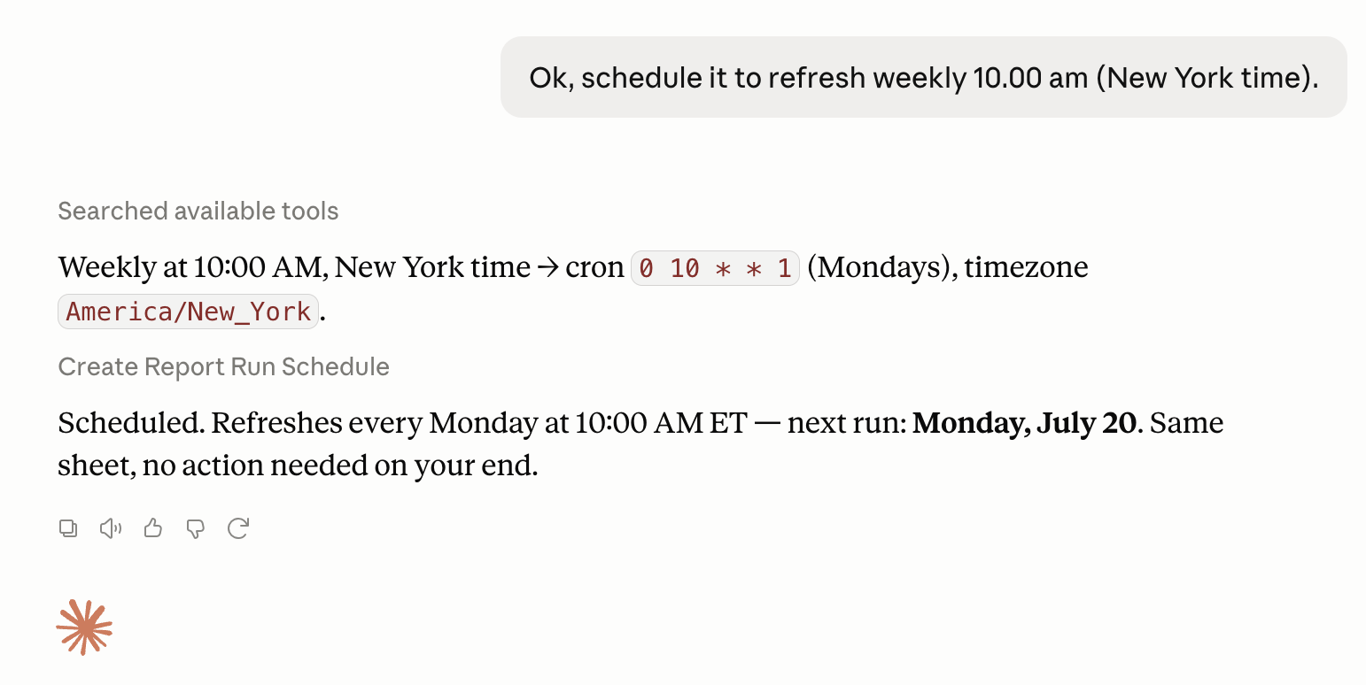
Fresh, not fossilized: a weekly Monday-morning refresh, same sheet, no action needed on anyone’s end. The opposite of a screenshot.
This is the line that separates a hand-off artifact from a screenshot. The employee opens the same link on any given Monday and the numbers are current, because the report re-runs against the model on a schedule.
4. The sheet your employee actually receives
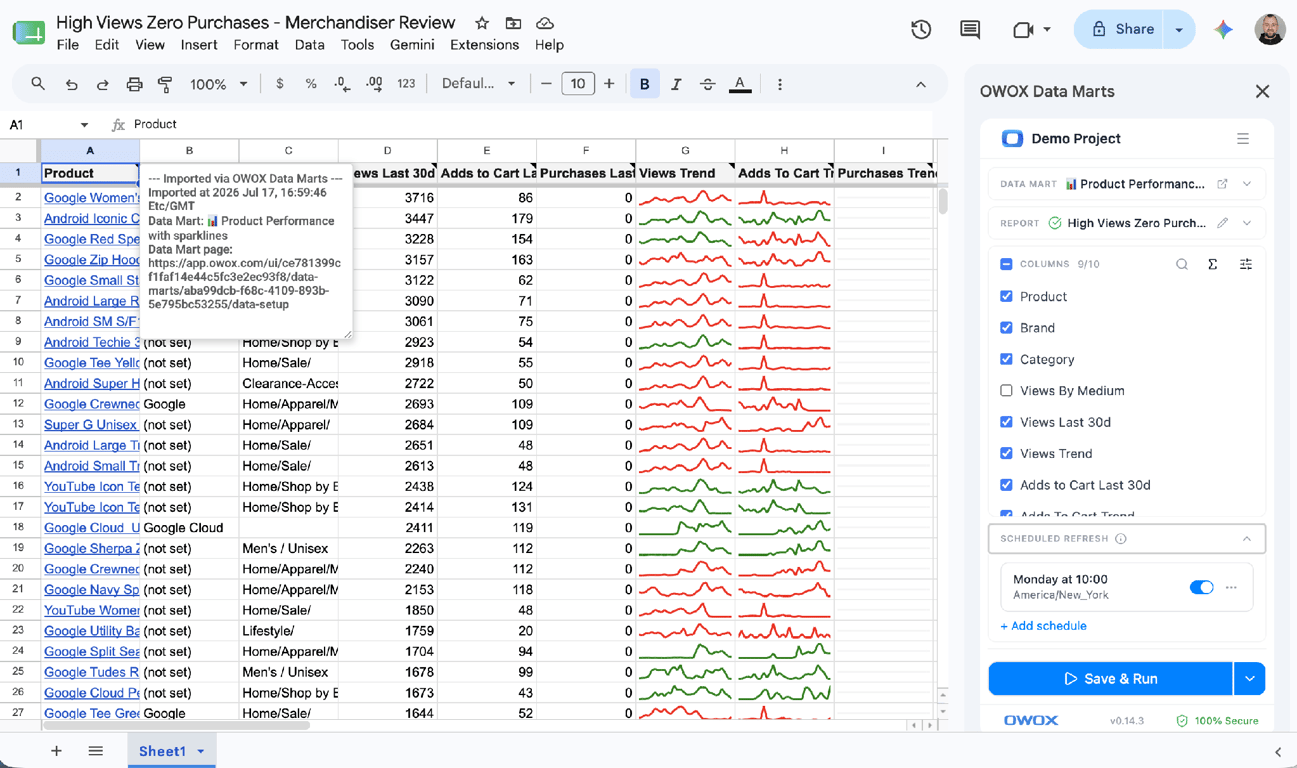
The hand-off, in the tool your team already lives in: product rows with view→cart→purchase columns and sparkline trends, plus the OWOX Data Marts panel showing the connected mart, the scheduled refresh, and the columns the employee can add themselves.
Notice what your merchandiser can do here without coming back to you: filter, sort, annotate, and even add a column from the side panel. It’s not a dashboard they look at – it’s a working surface they work in.
The same move works for any hunch
The same move works for any hunch
Products that won’t convert is just one itch. The pattern – confirm the hunch, hand over a fresh Sheet – is the same whatever’s bugging you, and it’s worth seeing it generalize before you assume it’s a one-trick demo.
Products with traffic but no sales
The walkthrough above is the merchandising version: you saw the view-to-purchase drop-off, and your merchandiser got a live list of exactly which products to fix, with the trend on each so they can tell “always been dead” from “just fell off a cliff.” That distinction is invisible in a static screenshot and obvious in a Sheet with sparklines.
Customers who’ve gone quiet
Swap the question and you’ve armed a different team. “Which customers haven’t ordered in the last 60 days?” → “put them in a Sheet for my retention lead.” Now the re-activation task is a concrete, refreshable list of accounts, not a vague “we should win some people back.” Same one-prompt move, same fresh artifact, a re-activation campaign instead of a merchandising fix. Verify the exact window against your customer data before you pin it, and the list stays honest as accounts move in and out of it week to week.
Why a sheet beats a screenshot (and a dashboard)
Why a sheet beats a screenshot (and a dashboard)
The hand-off Sheet wins on the two things delegation actually needs – trust and freshness – and it wins by meeting your team where they already are.
The numbers trace back to the model
A cabinet screenshot reconciles with nothing; you’re trusting a picture. The Sheet is a report over your governed data marts, so every figure traces to one definition of the metric – the same reason a single source of truth matters at all. Your employee isn’t arguing with the number; they’re acting on it.
The spreadsheet is a working surface, not a wall
Hand someone a dashboard and you’ve given them something to look at. Hand them a Sheet and you’ve given them something to use – filter to their segment, add a note, drop in a column, build their plan right there. That durability is the point: the work happens in the artifact, not in a separate tool. And because the data behind it lives in your own warehouse, the Sheet is a view onto an asset you own, not a copy trapped in a vendor’s cloud.
A few honest limits
I’d rather be precise than let this oversell, because the value is that the hand-off is trustworthy.
“Fresh” means on schedule, not live
The Sheet refreshes on its report schedule, not in real time. “Still true tomorrow” means it re-runs on the cadence you set – daily, weekly – not that it’s a live stream. That’s the honest, and sufficient, promise.
You ask in chat; the answer lands in Sheets
The is the output surface. You ask your questions in the AI chat, and the result is delivered to Sheets – you don’t ask questions inside the Sheet. Keep that model straight and the whole thing stays simple.
Your employee works in the sheet, not the model
The merchandiser can filter, annotate, and add columns, but they aren’t editing the data marts, metric definitions, or joins. The governance your analyst set up stays intact – self-service on the surface, control underneath.
One-time setup by your analyst
Someone sets up the data marts and picks the Google Sheets destination folder once, per project. After that there’s no document handling for anyone – but it isn’t magic, and it isn’t zero-setup on day one.
The questions worth asking before you delegate this way
The questions worth asking before you delegate this way
Whether you use OWOX or not, this is the checklist that separates a real hand-off artifact from a screenshot in a Slack message.
Is the artifact still true next week?
If it can’t refresh on its own, it’s a snapshot, and snapshots rot. Ask whether the thing you hand over updates on a schedule from the source.
Does every number trace to one definition?
If two tabs can disagree about “conversion,” you’ve delegated a reconciliation exercise. A report over governed data marts has one definition to argue with – or rather, none.
Can my employee work in it without coming back to me?
The test of a good hand-off is that it doesn’t bounce back. Can they filter, annotate, and extend it themselves, in a tool they already know?
Where does the underlying data live?
If the Sheet is fed by a vendor’s capped copy, you’ve inherited their retention and their lock-in. If it’s fed from your own warehouse, the artifact is yours as deep as your data goes.
From a hunch to a task your team can run
From a hunch to a task your team can run
The gap between “something’s off” and “someone’s on it” is usually a bad artifact – a stale screenshot, a contradicting tab, a vague instruction. Close that gap and delegation finally sticks: you spot the problem, you hand over a fresh, model-connected Sheet, and your team runs with it while you go back to running the company.
You shouldn’t have to redo the analysis to delegate the analysis. Ask once, hand over the Sheet, and let it stay true on its own.
→ See how OWOX works for CEOs and founders
_Want to try the loop on your own data?_
Start free and hand your team a Sheet that refreshes itself.
Turn your data into decisions.
Governed data marts give you the clean foundation ML needs to actually work.
- No AI hallucinations
- Analyst-governed definitions
- Every number traces to SQL
Frequently Asked Questions
What setup is required before I can hand off Google Sheets this way?
A one-time setup by your analyst or admin: the data marts, and a Google Sheets destination folder (pick and share a Drive folder), done once per project. After that there's no document handling for anyone; the Sheet creates itself and you just share the link.
Do I need to know SQL to create the report?
No. You write the request in plain English and the OWOX server builds the SQL behind it, running only over the data marts your analyst governs. You describe the data subset you want; you never write a query.
Is the data in the hand-off Sheet real-time?
No. The Sheet refreshes on the report schedule you set (daily, weekly), not as a live stream. Still true tomorrow means it re-runs on that cadence from your model. That's the honest, and for delegation the sufficient, promise.
Can my employee work in the Sheet without changing the data model?
Yes. The person you hand it to can filter, sort, annotate, and even add a column from the OWOX side panel, all in the spreadsheet they already know. They are not editing the data marts, metric definitions, or joins; the governance your analyst set up stays intact. Self-service on the surface, control underneath.
Why is a hand-off Sheet better than sending a screenshot?
A cabinet screenshot goes stale overnight and reconciles with nothing, so your teammate acts on a picture of a problem that has already moved. The Sheet is connected to your model, so every figure traces to one metric definition and it refreshes on a schedule. It's also a working surface: your teammate can filter, annotate, and add columns instead of just looking.
Can a Google Sheet refresh automatically from my data warehouse?
Yes. Because the Sheet is a report over your governed data marts, you can ask the AI to schedule it, e.g. refresh weekly, Monday 10am. The same sheet updates on that cadence with no manual action, so the hand-off stays current instead of going stale overnight. Fresh means on schedule, not a live real-time stream.
How do I turn an AI chat answer into a Google Sheet?
Ask your business a question in your AI chat, then add one more prompt: 'put those products into a Google Sheet I can hand to my merchandiser.' With OWOX MCP the report is created in a pre-configured Drive folder and you get back a ready-to-open link. It isn't a one-time export; it's a live report over your data marts that can refresh on a schedule.