Duplicate transactions in GA4: how to find and remove them
Google Analytics 4 deduplicates purchase events with the same transaction ID, but only on web streams and only when the ID is filled in. This guide shows how to find duplicate transactions in an exploration, how to stop them in Google Tag Manager, and a tested BigQuery query that counts what the raw export still contains.
Google Analytics 4 deduplicates purchase events that carry the same transaction ID, so a reloaded confirmation page is not counted twice. That protection has three gaps: it works for web streams only, it needs a unique ID on every purchase, and it does not apply to the raw events in the BigQuery export.
This guide shows how to check whether your property has duplicate transactions, where they come from, how to stop them at the source, and how to count them in the export, where revenue is summed from every event that arrived.
Why transactions get duplicated
Why transactions get duplicated
In most shops the purchase event fires when the confirmation page loads. Every additional load of that page sends the event again:
- The customer refreshes the confirmation page.
- They return to it from the order email or a bookmark.
- They use the back button, or the browser restores a closed session.
Two setup problems produce the same effect without any action from the customer: the purchase tag fires twice on one page load, or the purchase is sent from both the browser and the server.
What GA4 deduplicates by itself
What GA4 deduplicates by itself
Google’s documentation is short and specific: “Google Analytics deduplicates purchase events with the same transaction ID” (Google Analytics Help, checked October 2026). The conditions matter as much as the rule:
| Condition | What Google states |
|---|---|
| Stream type | Deduplication “only works for data collected through web streams, not app streams” |
| Scope | Purchases “from the same user”. The same ID should not be used across different users |
| Empty ID | Do not send an empty string. GA4 “will deduplicate all purchase events that have transaction_id=""” |
| Static ID | If the tag sends the same ID for different orders, “you could significantly undercount” |
So there are two opposite failures. Without a transaction ID, reloads are counted as new orders. With an empty or constant ID, real orders are thrown away. Both come from the same field.
OWOX Data Marts
See your first report built in real time. 15 minutes.
- Connect your data warehouse
- Pick your metrics
- Get a live Google Sheets report
In the time it takes to write a ticket. Then imagine never writing that ticket again.
Book a DemoWe'll use your actual use case
How to find duplicate transactions in GA4
How to find duplicate transactions in GA4
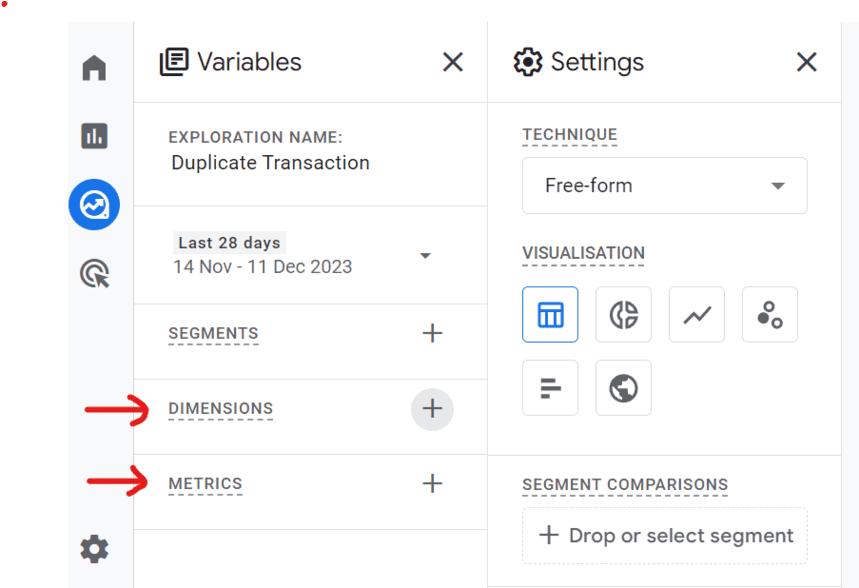
Build a free-form exploration with the transaction ID next to the number of purchases:
- Open Explore and start a Blank exploration.
- Under Dimensions, add Transaction ID. Under Metrics, add Purchases.
- Put Transaction ID into rows and Purchases into values.
- Sort by Purchases, descending.
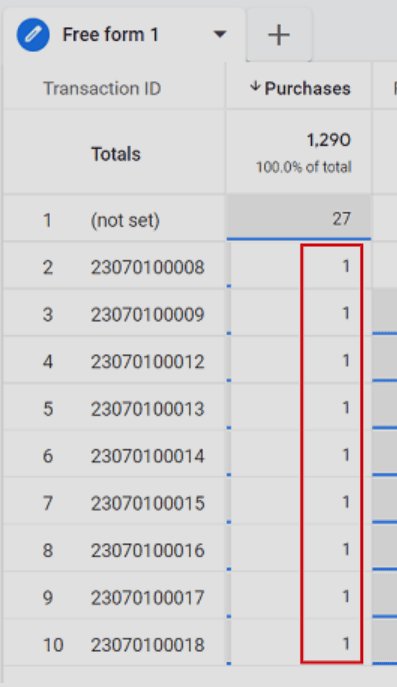
Read the table from the top. Any ID with more than one purchase is a duplicate that got through. A (not set) row means purchases arrived with no transaction ID at all, and those cannot be deduplicated by anyone.
Why a dimension turns into (not set) is covered in what (not set) means in GA4.
Fix the cause, in this order
1. Send a unique transaction ID with every purchase. Use the order number from your shop system. Google’s requirements: unique per order, no customer-identifying information, never empty. This one change lets GA4’s own deduplication work.
2. Check that the purchase tag fires once. In Google Tag Manager’s preview mode, complete a test order and count the purchase events on the confirmation page. Two tags with the same measurement ID, or a tag on both a page view trigger and a custom event trigger, send the event twice. The tag setup is described in the guide to GA4 tags in Google Tag Manager.
3. Stop repeat loads in the browser. If you cannot change the site so that the confirmation page redirects on reload, Google Tag Manager can block the repeat:
- When the confirmation page loads, read the transaction ID into a variable.
- Compare it with the IDs stored in a first-party cookie.
- If the ID is already there, do not fire the purchase tag.
- If it is not, fire the tag and add the ID to the cookie.
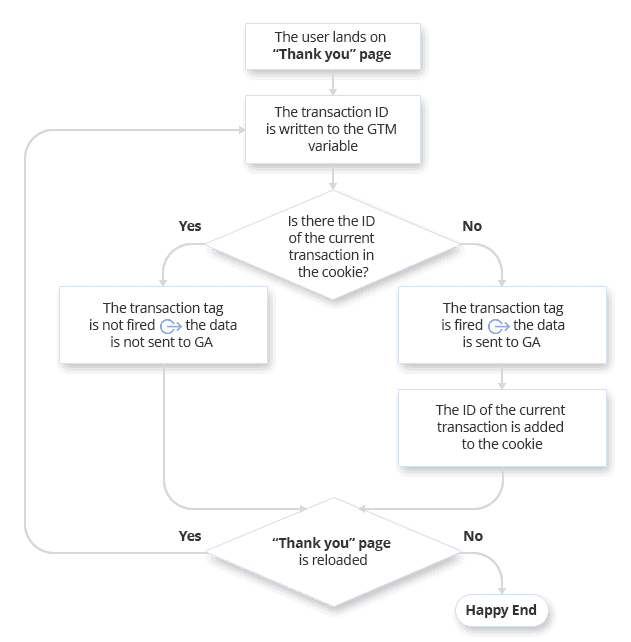
This does not catch everything. A customer who clears cookies or opens the order email on another device sends the event again. It reduces duplicates before they are sent, and the transaction ID handles the rest inside GA4.
The purchase event itself, with its required parameters, is covered in the guide to e-commerce tracking in GA4.
What the GA4 interface does not show you
What the GA4 interface does not show you
The exploration tells you that duplicates exist. It does not tell you how much revenue they added, whether the copies came seconds or days apart, or which page sent them. And GA4 does not rewrite history: purchases that were double counted last quarter stay double counted in last quarter’s reports.
There is a second place where the problem returns. The BigQuery export contains raw events. A revenue report built on the export with SUM(ecommerce.purchase_revenue) adds up every purchase event that arrived, including the repeats that the GA4 interface collapses. This is one of the reasons a warehouse report and a GA4 report disagree.
Count duplicate purchases in BigQuery
Count duplicate purchases in BigQuery
This query runs as written on Google’s public GA4 sample. It groups purchase events by transaction ID and separates IDs that are filled in from those that are empty:
WITH purchases AS (
  SELECT
    ecommerce.transaction_id AS transaction_id,
    COUNT(*) AS purchase_events,
    SUM(ecommerce.purchase_revenue)
      AS revenue_all_events,
    MAX(ecommerce.purchase_revenue)
      AS revenue_once
  FROM
    `bigquery-public-data.ga4_obfuscated_sample_ecommerce.events_*`
  WHERE _TABLE_SUFFIX BETWEEN '20201101' AND '20210131'
    AND event_name = 'purchase'
  GROUP BY transaction_id
)
SELECT
  IF(transaction_id IS NULL
     OR transaction_id IN ('', '(not set)'),
     'empty id', 'has id') AS id_state,
  COUNT(*) AS transaction_ids,
  SUM(purchase_events) AS purchase_events,
  COUNTIF(purchase_events > 1)
    AS ids_sent_more_than_once,
  ROUND(SUM(revenue_all_events))
    AS revenue_all_events,
  ROUND(SUM(revenue_once)) AS revenue_one_per_id
FROM purchases
GROUP BY id_state
Result on the sample, November 2020 to January 2021:
| id_state | transaction_ids | purchase_events | ids_sent_more_than_once | revenue_all_events | revenue_one_per_id |
|---|---|---|---|---|---|
| has id | 4,451 | 4,786 | 326 | 330,348 | 308,200 |
| empty id | 2 | 906 | 2 | 31,817 | 1,160 |
Two findings, both invisible in a standard report:
- 326 order IDs were sent more than once. Summing every event gives 330,348 in revenue; counting each order once gives 308,200. The repeats add about 7%.
- 906 purchase events have no usable ID. Their 31,817 in revenue cannot be deduplicated, because there is nothing to tell a repeat from a real order. The
revenue_one_per_idfigure in that row is meaningless for the same reason.
Replace the table name with your own export to run it on your data. If your property is not linked yet, start with connecting GA4 to BigQuery.
One definition of an order for every report
One definition of an order for every report
The fix in the warehouse is one line of logic: count an order once per transaction ID. The hard part is that the line has to be in every query that touches revenue. One analyst deduplicates, another sums the raw events, and the two dashboards differ by 7%.
OWOX Data Marts is built for that. The analyst writes the deduplicated orders query once, saves it as a Data Mart on the warehouse that holds the export, and describes the rule in it. Reports for Google Sheets and Data Studio (the former Looker Studio) are built on that Data Mart, so they inherit the rule instead of repeating it.
OWOX Data Marts does not deduplicate anything for you and does not collect GA4 data. The rule is the analyst’s SQL; the product publishes it, schedules the reports and keeps the definition in one place. If the orders also exist in your shop system, that table is the better source of truth for revenue, and the GA4 events are what connect each order to a session and a traffic source. The E-commerce Data Model shows how orders, sessions and traffic sources relate.
Turn your data into decisions.
Governed data marts give you the clean foundation ML needs to actually work.
- No AI hallucinations
- Analyst-governed definitions
- Every number traces to SQL
Frequently Asked Questions
What is a duplicate transaction in Google Analytics 4?
A duplicate transaction is one order recorded more than once: the purchase event was sent again for the same order, usually because the confirmation page was loaded again. It inflates purchases and revenue.
What causes duplicate transactions in GA4?
A reloaded or revisited confirmation page, a purchase tag that fires twice on one page load, or a purchase sent from both the browser and the server. Purchases without a transaction ID make it worse, because GA4 has no way to recognise the repeat.
Does GA4 remove duplicate transactions automatically?
Partly. GA4 deduplicates purchase events from the same user that carry the same transaction ID, on web streams only. It does not work for app streams, it needs a unique non-empty ID on every purchase, and it does not change the raw events in the BigQuery export.
How can I identify duplicate transactions in GA4?
Create a free-form exploration with Transaction ID as the dimension and Purchases as the metric, then sort by Purchases. Any ID with more than one purchase is a duplicate, and a (not set) row shows purchases sent without an ID. In the BigQuery export, group purchase events by ecommerce.transaction_id and count them.