Logical vs physical data models: the main differences explained
A logical data model says what the data is: entities, attributes, keys and relationships, independent of any database. A physical data model says how that design is stored on one specific database: tables, data types, indexes, partitions. This guide shows the same design at both levels, the differences in a table, and the steps from one to the other.
The difference between a logical and a physical model is the question each one answers.
- A logical data model answers what is the data? It lists entities, their attributes, the keys and the relationships. It does not depend on any database product.
- A physical data model answers how is it stored here? It is the same design written for one database: tables, column types, constraints, indexes, partitions.
One logical model can produce several physical models. The logical model changes when the business changes. The physical model also changes when the platform, the data volume or the query pattern changes.
Logical vs physical data model at a glance
Logical vs physical data model at a glance
| Logical data model | Physical data model | |
|---|---|---|
| Describes | Entities, attributes, keys, relationships | Tables, columns, types, constraints, indexes |
| Depends on a database | No | Yes, written for one |
| Names | Business names: Order, Customer | Object names: orders, customer_id |
| Data types | Generic: text, number, date | Exact: varchar(20), numeric(12,2), DATE |
| Normalization | Normalized, usually to third normal form | Adjusted for performance where needed |
| Performance | Not considered | Indexes, partitions, clustering |
| Written by | Analysts, data architects | Data engineers, database administrators |
| Read by | Business and technical people | Technical people |
| Changes when | The business or its rules change | The platform, volume or queries change |
| Output | A diagram and definitions | DDL that creates the database |
What a logical data model is
A logical data model is the full design of the data without any technology in it. It takes the entities agreed in the conceptual model and adds everything needed to make the structure exact:
- every attribute of every entity,
- a primary key for each entity and the foreign keys that connect them,
- cardinality for each relationship: one to many, many to many,
- normalization, so each fact is stored once.
Example of a logical data model
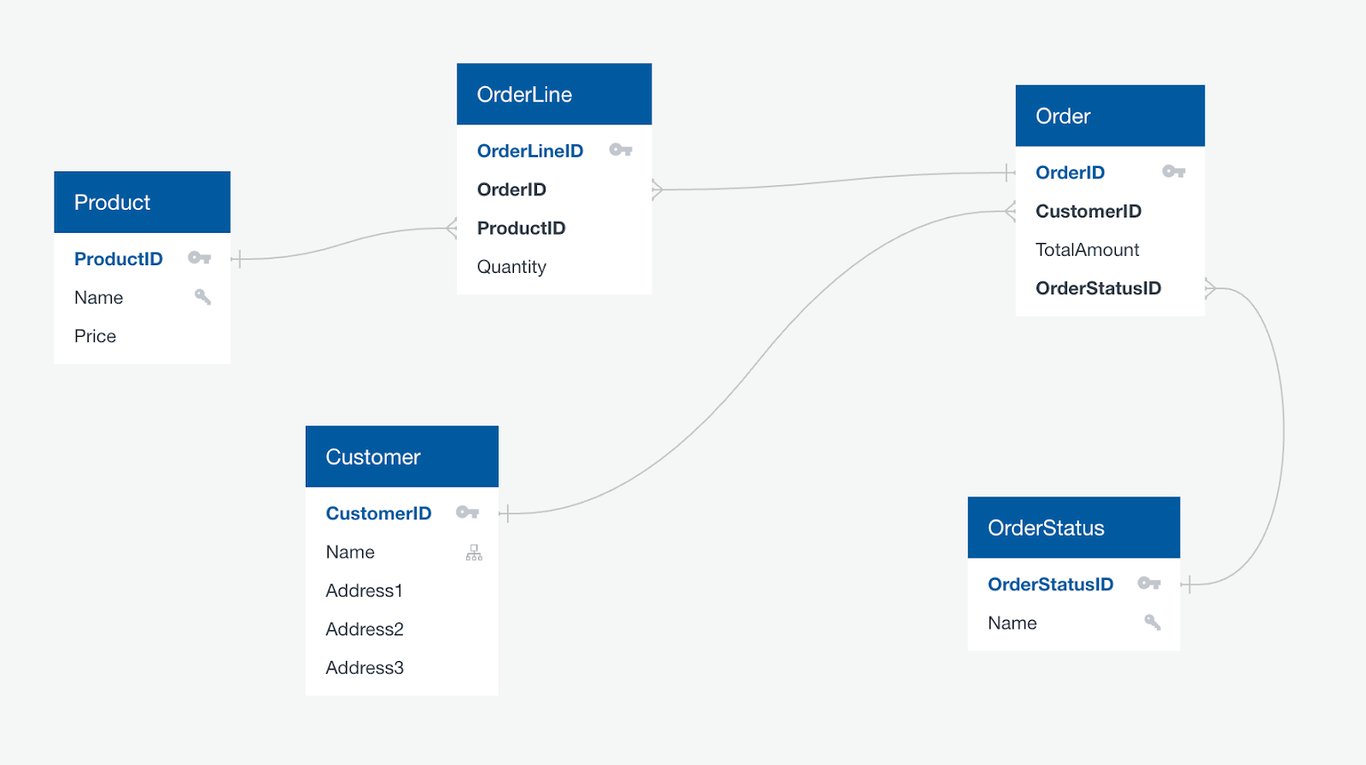
In words: a Customer places many Orders. An Order has many Order lines and one Order status. An Order line refers to one Product and carries a quantity.
Nothing in this diagram says whether the data will live in PostgreSQL or Google BigQuery, how long a name can be, or which columns are indexed. That is deliberate. The logical model is where the rules are decided: what one row of Order line means, and that an order has exactly one status at a time.
OWOX Data Marts
See your first report built in real time. 15 minutes.
- Connect your data warehouse
- Pick your metrics
- Get a live Google Sheets report
In the time it takes to write a ticket. Then imagine never writing that ticket again.
Book a DemoWe'll use your actual use case
What a physical data model is
A physical data model is the logical model made real on one database. It names each table and column, gives each column an exact type, and adds what the platform needs to store and query the data efficiently.
Example of a physical data model
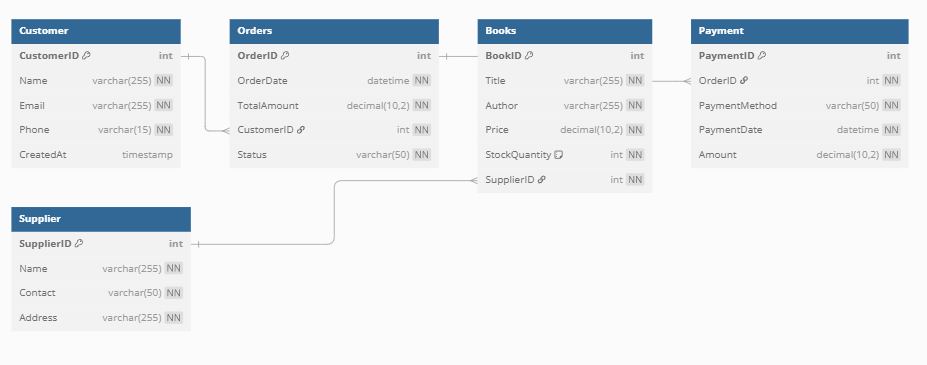
Every column now has a type and a nullability rule, and every relationship is a foreign key between named columns. A physical model also decides things the logical model never mentions: indexes, partitioning and where the platform lets you bend normalization for speed.
One logical model, two physical models
One logical model, two physical models
The clearest way to see the difference is to build the same logical entity twice. Take Customer and Order from the logical example.
On PostgreSQL, a transactional database, the physical model enforces keys and indexes the lookup column:
CREATE TABLE customers (
  customer_id bigint PRIMARY KEY,
  name varchar(255) NOT NULL
);

CREATE TABLE orders (
  order_id bigint PRIMARY KEY,
  customer_id bigint NOT NULL
    REFERENCES customers
      (customer_id),
  order_date date NOT NULL,
  status varchar(20) NOT NULL,
  total_amount numeric(12,2)
);

CREATE INDEX orders_customer_idx
  ON orders (customer_id);
These statements were run on PostgreSQL 16 on 7 October 2026 and created both tables and the index.
On Google BigQuery, a columnar warehouse, the same entity is declared differently. There are no indexes to create. The table is partitioned by date and clustered by customer, and keys are declared but not enforced:
CREATE TABLE shop.orders (
  order_id INT64 NOT NULL,
  customer_id INT64 NOT NULL,
  order_date DATE NOT NULL,
  status STRING NOT NULL,
  total_amount NUMERIC,
  PRIMARY KEY (order_id)
    NOT ENFORCED
)
PARTITION BY order_date
CLUSTER BY customer_id;
This one follows the BigQuery DDL reference and was not executed for this article.
The logical model did not change between the two. An order still has one customer, a date, a status and an amount. Everything that differs is physical: type names, how keys behave, and how each platform is told to find rows quickly.
How to go from a logical to a physical model
How to go from a logical to a physical model
The translation is mechanical once the logical model is complete. Six steps:
- Entities become tables. Choose a naming convention and apply it everywhere.
- Attributes become columns with exact types. Pick the smallest type that fits and decide nullability for each.
- Keys become constraints. Declare primary and foreign keys. On a warehouse that does not enforce them, add tests that do.
- Resolve many-to-many relationships. Each becomes a bridge table with two foreign keys.
- Add performance structures. Indexes on a transactional database. Partitions and clustering on a warehouse.
- Denormalize on purpose. For reporting, flatten where it removes joins, and write down what was flattened and why. This is where a normalized logical model becomes a star schema.
Where conceptual models fit
The conceptual model comes first and is the least detailed. It shows the entities and relationships and nothing else, so that business and data people can agree on scope.
| Conceptual | Logical | Physical | |
|---|---|---|---|
| Entities and relationships | Yes | Yes | As tables and foreign keys |
| Attributes and keys | No | Yes | As columns and constraints |
| Types, indexes, partitions | No | No | Yes |
All three levels are covered in types of data models.
When each one is used
Use the logical model when the question is about meaning or structure: scoping a new source, agreeing what a metric is built from, checking whether a new requirement fits the current design, or moving to a different database. The logical model is what survives a migration.
Use the physical model when the question is about a running system: creating or altering tables, working out why a query is slow or expensive, planning storage, or reviewing access to specific tables.
A team that has only a physical model can run its database and cannot explain it. A team that has only a logical model can explain a database that does not exist.
The gap neither model closes
Both models describe tables. Neither says how a number is calculated from them. That is the job of a semantic data model. “An order has a status” is in the logical model. “Revenue counts completed orders only” is not in either one. It lives in the SQL of whoever builds the report, and two reports can disagree while both models are correct.
For reporting, that rule needs a home as well. In OWOX Data Marts it is the Data Mart: an analyst’s SQL, table or view on top of the physical tables, with a description, an owner and described output fields. Relationships between Data Marts are declared on join keys, much like the lines of a logical model, and reports in Google Sheets or Looker Studio read the Data Marts instead of the raw tables.
The analyst still designs the model and writes the SQL, on the warehouse where the data already is. What the Data Mart adds is one place where the calculation is written down and can be read by whoever asks about a number. See Joinable Data Marts, or the industry data models for worked examples.
Turn your data into decisions.
Governed data marts give you the clean foundation ML needs to actually work.
- No AI hallucinations
- Analyst-governed definitions
- Every number traces to SQL
Frequently Asked Questions
Do logical and physical data models define how metrics are calculated?
No. Both describe tables. A rule such as 'revenue counts completed orders only' is in neither model. It lives in the SQL behind a report, so it needs its own home, for example a published Data Mart that every report reads.
Can one logical data model have several physical data models?
Yes. The same logical design is written differently for each platform. On PostgreSQL an orders table has enforced keys and indexes. On Google BigQuery the same table is partitioned and clustered, and its keys are declared but not enforced.
Can a logical data model exist without a physical data model?
Yes. A logical model can be used on its own to agree structure and rules before anything is built. The reverse is common too and riskier: a database with only a physical model can be run but is hard to explain or migrate.
When should I use a physical data model instead of a logical one?
Use the physical model for anything about a running database: creating or altering tables, diagnosing a slow or expensive query, planning storage or reviewing access. Use the logical model for questions of meaning and structure, such as scoping a new source or planning a migration.
What is an example of a logical data model?
An order system with five entities: Customer, Order, Order line, Product and Order status. A customer places many orders, an order has many lines and one status, and each line refers to one product. Attributes and keys are listed, but no data types or database are named.
What is the main difference between a logical and a physical data model?
A logical data model describes what the data is: entities, attributes, keys and relationships, independent of any database. A physical data model describes how that design is stored on one database: tables, exact column types, constraints, indexes and partitions.