8 mistakes in data modeling and how to avoid them
Your reports disagree, and you suspect the model but cannot tell which mistake is behind it. A wrong model does not throw an error. It returns a number, and the number looks plausible.
So this guide does not describe the eight mistakes in the abstract. For each one it shows the broken model, the wrong number it produces and the fix, measured on one dataset you can query yourself.
The dataset and how we measured
The dataset and how we measured
All numbers come from thelook_ecommerce, a synthetic online shop that Google publishes as a public BigQuery dataset: seven tables, 75 columns, 180,996 order lines and 124,732 orders when we ran it on 26 October 2026. Every query ran read-only, and every figure below is copied from a result. The shop keeps adding rows, so your counts will differ slightly; the gaps between right and wrong will not.
None of the tables is partitioned or clustered. That matters in mistake 7.
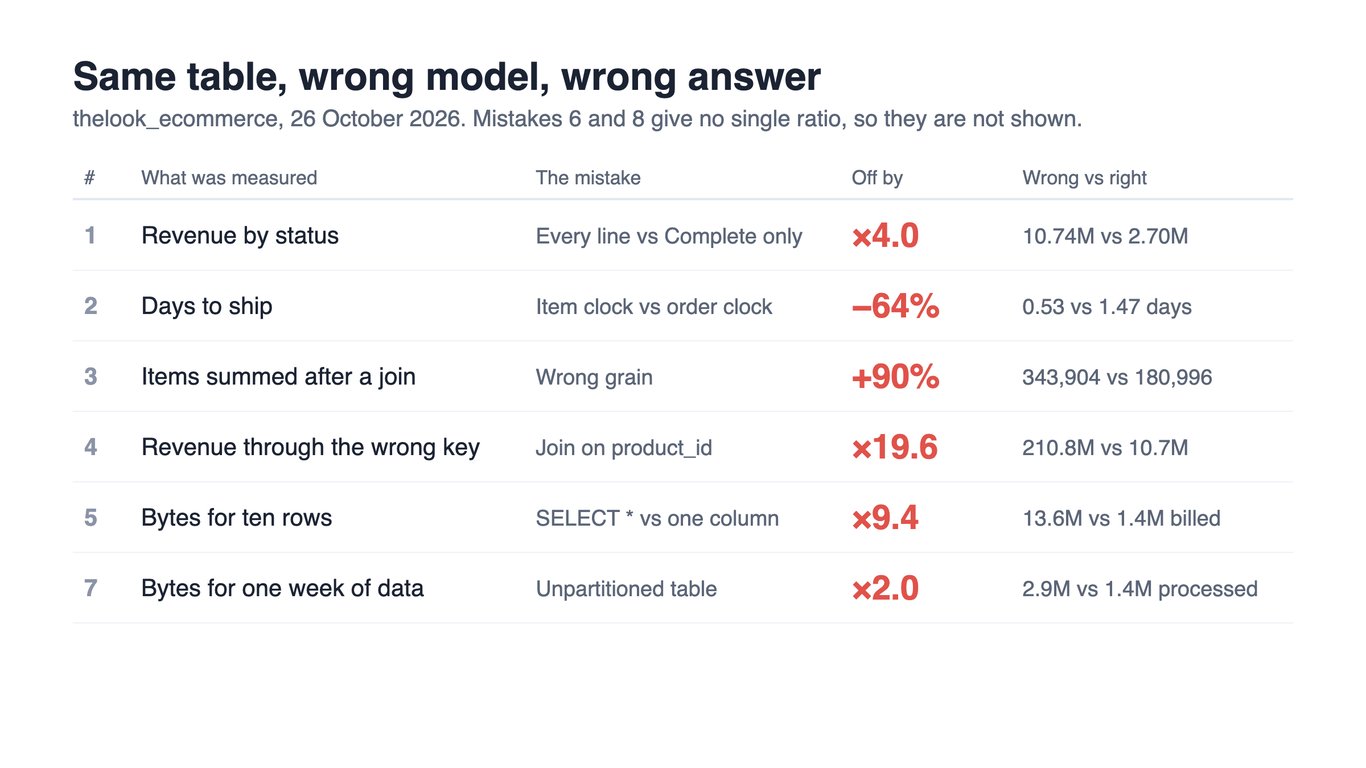
The table shows the size of the error for the six mistakes that produce a single ratio. The sections below show the model behind each number.
1. Nobody agreed what “revenue” means
1. Nobody agreed what “revenue” means
The broken model. Finance, sales and operations each query order_items, and each means something different by revenue. Nothing in the model says which one is the revenue.
The wrong number. Over the same table:
| Definition | Revenue |
|---|---|
| Every order line | 10,739,087.41 |
| Every line except Cancelled and Returned orders | 8,090,389.03 |
| Only lines with status Complete | 2,695,089.87 |
The first and the last differ by a factor of four. The status counts explain why: 26,811 lines are Cancelled, 18,158 Returned, 45,238 Complete, 54,844 Shipped and 35,945 still Processing. “Complete only” quietly drops everything in flight, and nobody chose that on purpose.
The fix. Get the people who read the reports into one room before you model, and write down each definition under its own name: gross revenue, net revenue, completed revenue. Name the stakeholders who rely on a number, not only the ones who pay for it. A metric that is named is a metric that can be argued about once.
OWOX Data Marts
See your first report built in real time. 15 minutes.
- Connect your data warehouse
- Pick your metrics
- Get a live Google Sheets report
In the time it takes to write a ticket. Then imagine never writing that ticket again.
Book a DemoWe'll use your actual use case
2. The same name means two things
2. The same name means two things
The broken model. created_at exists in orders and in order_items, and in other tables as well. In order_items it differs from the order’s created_at in 118,237 of the 118,240 shipped lines, by about a day on average.
The wrong number. Average days from creation to shipping, over the same 118,240 shipped lines:
SELECT COUNT(*) AS shipped_items,
  ROUND(AVG(TIMESTAMP_DIFF(i.shipped_at, i.created_at, HOUR)) / 24, 2) AS days_item_clock,
  ROUND(AVG(TIMESTAMP_DIFF(o.shipped_at, o.created_at, HOUR)) / 24, 2) AS days_order_clock,
  COUNTIF(i.shipped_at < i.created_at) AS negative_items
FROM `bigquery-public-data.thelook_ecommerce.order_items` AS i
JOIN `bigquery-public-data.thelook_ecommerce.orders` AS o USING (order_id)
WHERE i.shipped_at IS NOT NULL
It returns 0.53 days on the line’s own clock and 1.47 days on the order’s clock, and 35,912 lines, 30%, that ship before they were created. Same word, two columns, a shipping time 64% too small.
The fix. Put the owner in the name (order_created_at, item_created_at) and keep a data dictionary that says what each one means, not only what type it is. The inverse mistake is as common: renaming a column that business users already know, so a report that used to say “Total Sales” now says something else. Keep the business name where there is one and document the system name beside it.
3. Joining at the wrong grain
The broken model. orders has one row per order and a field, num_of_item, that is a property of the order. order_items has one row per line. A report joins the two to show items per order and sums the order-level field.
The wrong number.
SELECT SUM(o.num_of_item) AS items_summed_after_join
FROM `bigquery-public-data.thelook_ecommerce.orders` AS o
JOIN `bigquery-public-data.thelook_ecommerce.order_items` AS i USING (order_id)
It returns 343,904. The real number of items is 180,996, which SUM(num_of_item) over orders alone returns exactly. After the join each order’s figure is repeated once per line, so an order of three items counts three times three. The report is 90% too high and the query runs without complaint.
The fix. Decide the grain of every table (one row per what?), and sum a column only at its own grain. Aggregate to one row per order before you join, or sum the line-level column. A model that states its grain in the table description makes this mistake visible before anyone writes the join.
4. A relationship on the wrong key, and arrays that hide the join
4. A relationship on the wrong key, and arrays that hide the join
The broken model. order_items carries both product_id and inventory_item_id. A report that wants the cost of each sold unit joins inventory_items. Joining on product_id looks natural, because products also has it, and it is wrong: many inventory rows share one product.
The wrong number. Total revenue, through the right and the wrong key:
| Join | Revenue |
|---|---|
inventory_items.id = order_items.inventory_item_id |
10,739,087.41 |
inventory_items.product_id = order_items.product_id |
210,823,916.56 |
The wrong key makes revenue 19.6 times too big. Nothing in the query is an error.
The array variant of the same mistake: store each order’s prices and product ids as two arrays and unnest both. The two lists multiply, not zip, and revenue reads 20,428,046 against the true 10,739,087, from 343,904 rows instead of 180,996.
The fix. Declare the relationship once, with its keys and its cardinality (one product, many inventory items; one order, many lines), and let every report use that declaration. Use an array only for data you will never filter or group by; if a field will appear in a GROUP BY, it is a table. In OWOX Data Marts relationships between Data Marts are declared in one place for the same reason.
5. A model built for storage and not for the way it is read
5. A model built for storage and not for the way it is read
The broken model. A dashboard tool, or an analyst in a hurry, reads the whole table to look at ten rows.
The wrong number. Here the cost is bytes, not revenue. SELECT * ... LIMIT 10 on order_items processed 13,587,945 bytes and was billed 13,631,488. Asking for the one column that matters, SUM(sale_price), processed 1,447,968. The LIMIT saved nothing, because BigQuery reads the columns before it counts rows, and the wide read processed 9.4 times more bytes.
The fix. Ask how the model will be read before you shape it: which columns a report needs, which filters it applies, how often it refreshes. Expose narrow, report-ready tables for the common questions and keep the wide ones for exploration. A model designed only for loading data is correct on day one and slow on day two hundred.
6. Overcomplicating the model
The broken model. More tables and more ways to get from one fact to another than any report needs. In thelook_ecommerce there are two routes from a user to their order lines: order_items.user_id, or orders.user_id and then order_items.order_id.
The wrong number. We checked whether the two routes disagree, per user. They do not: 79,807 users and 180,996 lines both ways, and zero users whose counts differ. This model is clean. The cost of the second route is not a wrong number today but a choice that every analyst makes again for every report, and a duplicated fact that only stays consistent while the source does.
The fix. Model what you report on, and give each question one declared route. Seven tables are easy to hold in your head; a model with hundreds is not, and the first of the mistakes above that you commit will be hard to find in it.
7. Ignoring growth in the physical model
7. Ignoring growth in the physical model
The broken model. One large table with no partitioning, no clustering and no summary table, read by every report.
The wrong number. A revenue figure for one week of orders processed 2,895,936 bytes. The all-time revenue figure processed 1,447,968. The filtered query scanned twice as much, because it had to read the created_at column as well, and a table that is not partitioned cannot use that filter to skip data. Both were billed 10,485,760 bytes, the minimum, so at this size the bill hides the difference. On a table a thousand times larger it would not.
The shop covers 2,821 distinct days. A daily summary of revenue is 2,821 rows, against 180,996 lines.
The fix. Partition large tables by the date reports filter on, cluster by the columns they group by, and keep a summary table at the grain reports actually use. BigQuery partitioned tables explains how partitions cut the bytes scanned. Do it before the table is big, because moving a large table is the expensive part.
8. Validating only what the model can already see
8. Validating only what the model can already see
The broken model. A model passes its checks: it runs, the row counts match, nothing is orphaned. Then it ships.
The wrong number. We ran four reconciliations on thelook_ecommerce: each order’s num_of_item against its line count, orders whose lines carry mixed statuses, orders whose status no line shares, and orders with no lines. All four returned zero across 124,732 orders.
Two defects passed straight through them. 35,912 of the 118,240 shipped lines ship before they were created (mistake 2). And 1,419 lines, worth 83,728.85, are dated after the day we ran the queries. The latest of those dates is 30 October, so a report of “this month’s revenue” includes them.
The fix. Reconciliation tells you the rows are all there. It cannot tell you the values are possible. Add checks for what cannot be true: a ship date before a creation date, a date in the future, a negative quantity. Run them on a schedule, and have someone told when one fails. Six checks for the usual ways a total breaks lists the queries.
What would have caught each one
What would have caught each one
| Mistake | The check that catches it | The number to watch |
|---|---|---|
| 1. Undefined revenue | Each metric has a named definition and an owner | Two reports with one name and different totals |
| 2. One name, two meanings | A data dictionary entry per column | Negative durations |
| 3. Wrong grain | Grain stated per table; sums only at that grain | A total that exceeds the source’s row count |
| 4. Wrong key or arrays | Declared keys and cardinality | A total many times the source total |
| 5. Built for storage | A list of report queries and the columns they read | Bytes processed per query |
| 6. Too complex | One declared route per question | Two routes giving different counts |
| 7. No growth plan | Partitioning and a summary table | Bytes processed for a one-week filter |
| 8. Validation by counts | Plausibility checks for impossible values | Dates in the future |
Most of these share one cause: a rule that lived in somebody’s query and nowhere else. In OWOX Data Marts an analyst writes a definition once as a Data Mart, a dataset defined with SQL in your own data storage, with a description, described fields and declared relationships to other Data Marts, and every report reads it. The analyst still designs the model and writes the SQL; the point is that the rule exists in one place. What data modeling is and dimensional data modeling cover how to design the entities themselves.
Turn your data into decisions.
Governed data marts give you the clean foundation ML needs to actually work.
- No AI hallucinations
- Analyst-governed definitions
- Every number traces to SQL
Frequently Asked Questions
How can I validate my data model to ensure accuracy?
Reconciling counts and totals against the source is necessary and not enough: on a public shop dataset, four reconciliations all returned zero while 30% of shipped lines still shipped before they were created. Also check what cannot be true (a ship date before a creation date, a date in the future, a negative quantity), run the checks on a schedule, and have someone told when one fails.
How can I ensure my data model scales for future growth?
Partition large tables by the date reports filter on, cluster by the columns they group by, and keep a summary table at the grain reports actually use. On an unpartitioned table a date filter does not reduce the data read: in our test a one-week revenue query processed twice the bytes of the all-time query, because it also had to read the date column.
Why is standardizing naming conventions important in data modeling?
Standardized naming ensures consistency, improves collaboration, and makes data easier to understand. It reduces confusion, enhances self-service analytics, and simplifies referencing across reports, applications, and business processes.
How does poor stakeholder involvement affect data modeling?
Excluding key stakeholders leads to misaligned data structures, inconsistent metric definitions, and unusable reports. Without business input, models may fail to meet operational needs, causing inefficiencies and resistance to adoption.
What are the most common mistakes in data modeling?
Common mistakes include incorrect granularity, misdefined relationships, lack of standardized naming conventions, poor stakeholder involvement, neglecting scalability, overusing array fields, and failing to validate results against source data.
Why do my totals come out too big after a join?
Usually because of grain. A column that has one value per order is repeated once per order line after the join, and a sum then counts it once per line. In our test, summing an order-level item count after joining orders to lines gave 343,904 against a true 180,996, 90% too high. Sum each column only at its own grain, or aggregate to one row per order before the join.